Yes! You can use AI to fill out Provider Add Request
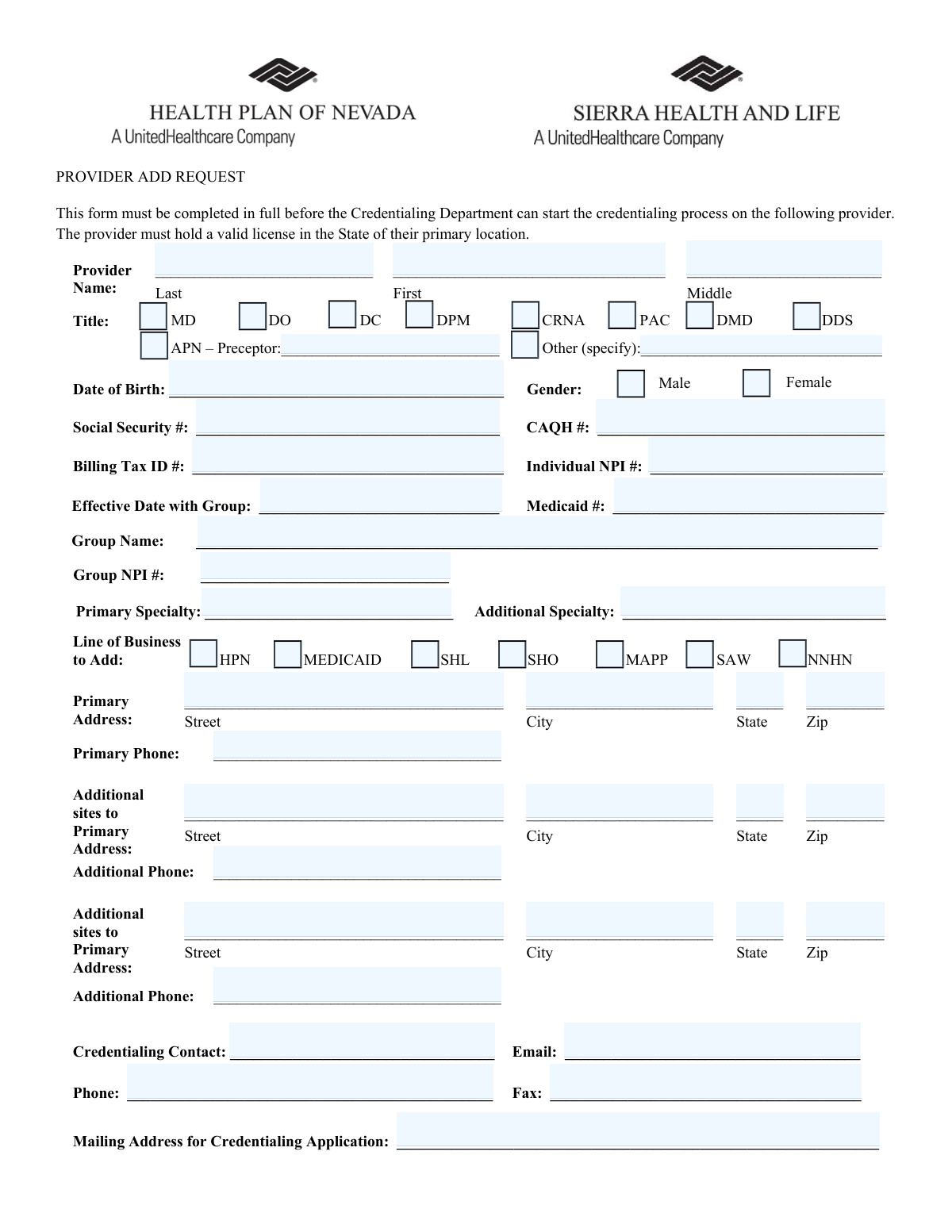
This form is a crucial first step for healthcare organizations to gather essential data about a new provider before starting the formal credentialing process. It captures everything from personal identifiers like SSN and NPI to professional details, practice locations, and lines of business. Today, this form can be filled out quickly and accurately using AI-powered services like Instafill.ai, which can also convert non-fillable PDF versions into interactive fillable forms.
Our AI automatically handles information lookup, data retrieval, formatting, and form filling.
It takes less than a minute to fill out Provider Add Request using our AI form filling.
Securely upload your data. Information is encrypted in transit and deleted immediately after the form is filled out.
Form specifications
| Form name: | Provider Add Request |
| Number of fields: | 55 |
| Number of pages: | 1 |
| Language: | English |
Instafill Demo: How to fill out PDF forms in seconds with AI
How to Fill Out Provider Add Request Online for Free in 2026
Are you looking to fill out a PROVIDER ADD REQUEST form online quickly and accurately? Instafill.ai offers the #1 AI-powered PDF filling software of 2026, allowing you to complete your PROVIDER ADD REQUEST form in just 37 seconds or less.
Follow these steps to fill out your PROVIDER ADD REQUEST form online using Instafill.ai:
- 1 Navigate to Instafill.ai and upload or select the Provider Add Request form.
- 2 Provide the provider's personal information, including their full name, date of birth, Social Security Number, CAQH number, and individual NPI number.
- 3 Select the provider's professional title (e.g., MD, DO, APN) and specify their primary and any additional specialties.
- 4 Indicate the group affiliation details, such as the group name, group NPI, and the provider's effective date with the group.
- 5 Check the boxes for the specific lines of business to be added, such as HPN, MEDICAID, or SHL.
- 6 Enter the primary practice address and phone number, as well as information for any additional practice sites.
- 7 Input the details for the credentialing contact and the mailing address for the application, then review all auto-filled information for accuracy before finalizing.
Our AI-powered system ensures each field is filled out correctly, reducing errors and saving you time.
Why Choose Instafill.ai for Your Fillable Provider Add Request Form?
Speed
Complete your Provider Add Request in as little as 37 seconds.
Up-to-Date
Always use the latest 2026 Provider Add Request form version.
Cost-effective
No need to hire expensive lawyers.
Accuracy
Our AI performs 10 compliance checks to ensure your form is error-free.
Security
Your personal information is protected with bank-level encryption.
Frequently Asked Questions About Form Provider Add Request
This form is used to initiate the credentialing process for a new healthcare provider joining a group or practice. It gathers the essential information needed by the Credentialing Department to begin their review.
Typically, the provider's group, practice manager, or a designated credentialing contact completes this form on behalf of the provider. The form must be completed in full before the credentialing process can start.
You will need the provider's personal details (DOB, SSN), professional identifiers (NPI, CAQH #), practice addresses, and group affiliation details. A valid license in the state of the provider's primary location is mandatory.
A CAQH (Council for Affordable Quality Healthcare) number is a unique ID for providers who use the CAQH ProView platform to store their credentialing data. Providing this number allows credentialing departments to access the provider's information efficiently.
The Individual NPI is a unique identifier for the individual healthcare provider. The Group NPI is a separate identifier for the practice or organization the provider is affiliated with, and both are required for billing and credentialing.
These checkboxes represent the different health plans or networks you want the provider to be credentialed and enrolled with. You must select all the specific lines of business the provider will be participating in through your group.
If the provider's title is not one of the options provided, check the 'Other (specify)' box. Then, write the provider's full and correct professional title in the space next to it.
The form has space for a primary address and two additional sites. If the provider has more locations, you should attach a separate sheet with the full address and phone number for each extra site or contact the Credentialing Department for guidance.
The Credentialing Contact is the person in your office who will handle communications and answer questions about the provider's application. This is often a practice manager, office administrator, or credentialing specialist.
After submission, the Credentialing Department will review the form for completeness. If everything is in order, they will begin the formal credentialing process, which may involve sending a full application to the mailing address you provided.
Yes, services like Instafill.ai use AI to accurately auto-fill form fields from your saved provider data, which can save significant time and reduce errors. This is especially helpful for repetitive information like names, addresses, and NPI numbers.
Simply upload the form to the Instafill.ai platform. The AI will identify the fields, and you can then use your saved profile data to instantly populate the provider's information, review for accuracy, and download the completed form.
You can use a service like Instafill.ai, which can convert flat, non-fillable PDFs into interactive, fillable forms. Once converted, you can easily type in your information or use the AI-powered autofill feature to complete it.
Compliance Provider Add Request
Validation Checks by Instafill.ai
1
Provider Name Completeness
This check ensures that both the 'First Name' and 'Last Name' fields for the provider are filled. These fields are the primary identifiers for the provider record and are essential for all subsequent credentialing, billing, and communication processes. If either field is empty, the form submission will be rejected with an error message prompting the user to provide the full name.
2
Title Selection Requirement
Validates that at least one provider title checkbox (e.g., MD, DO, APN) has been selected. The provider's title is a critical piece of information that defines their qualifications and scope of practice. Failure to select a title would result in an incomplete provider profile, so the form will display an error if no selection is made.
3
Conditional 'Other Title' Entry
This validation check is triggered if the 'Other (specify)' checkbox under 'Title' is selected. It ensures that the corresponding text field for specifying the other title is not empty. This prevents submissions where a user indicates a non-standard title but fails to provide the necessary details, which would halt the credentialing process.
4
Conditional 'APN Preceptor' Entry
If the 'APN – Preceptor' checkbox is selected, this rule verifies that the associated 'Preceptor' name field has been filled out. This maintains logical consistency and ensures that the required supervisory information for an APN is captured. If the checkbox is selected but the name is missing, an error will prompt the user to provide the preceptor's name.
5
Date of Birth Format and Plausibility
This check validates that the 'Date of Birth' is entered in a valid date format (e.g., MM/DD/YYYY) and represents a plausible age for a licensed medical provider (e.g., over 21 years old and not in the future). This prevents data entry errors and ensures the DOB is accurate for identity verification and eligibility checks. An invalid or implausible date will trigger an error.
6
Social Security Number Format
Ensures the 'Social Security #' is a 9-digit number, allowing for optional hyphens (XXX-XX-XXXX). The SSN is a critical and sensitive identifier used for background checks and identity verification with external agencies. An incorrectly formatted number will be rejected to ensure data integrity and prevent processing failures downstream.
7
Individual NPI Number Validity
This validation confirms that the 'Individual NPI #' consists of exactly 10 digits and contains no letters or symbols. The NPI is a standard, unique identifier for health care providers, and an incorrect number will cause claim rejections and credentialing failures. The system should reject any entry that does not meet the 10-digit numeric format.
8
Billing Tax ID Format
Validates that the 'Billing Tax ID #' is a 9-digit number, typically formatted as an EIN (XX-XXXXXXX). This ID is crucial for financial and billing setup. This check prevents the entry of incorrectly formatted or incomplete tax identifiers, which would lead to significant billing and payment issues.
9
Line of Business Selection Requirement
This check ensures that at least one checkbox under 'Line of Business to Add' has been selected. The purpose of the form is to add a provider to specific business lines, so this information is mandatory. If no selection is made, the form cannot be processed, and an error will instruct the user to choose at least one option.
10
Primary Address Completeness
Verifies that the 'Street', 'City', 'State', and 'Zip' fields for the 'Primary Address' are all filled in. The primary practice location is fundamental for network directories, state licensing verification, and official correspondence. Incomplete addresses will cause the form submission to fail until all required address components are provided.
11
State Abbreviation Format
This rule checks that all 'State' fields (for primary and additional addresses) contain a valid, 2-letter postal abbreviation. Using a standardized format is essential for address validation systems, mail delivery, and maintaining a clean database. The system should provide an error and may offer a dropdown list of valid state codes to prevent invalid entries.
12
ZIP Code Format
Ensures all 'Zip' code fields are entered in a valid 5-digit or 9-digit (ZIP+4) format. Correct ZIP codes are essential for accurate mail delivery and geographic analysis for network adequacy. The validation will reject entries with an incorrect number of digits or non-numeric characters.
13
Credentialing Contact Email Format
Validates that the 'Email' address for the 'Credentialing Contact' follows the standard format (e.g., [email protected]). This is the primary method of communication for follow-up questions and application status updates. An invalid email address would prevent communication, so the form will reject malformed entries.
14
Effective Date with Group Validity
This check ensures the 'Effective Date with Group' is a valid date and is not unreasonably far in the past or future. This date is critical for determining when the provider's contract and billing privileges begin. An invalid format or illogical date will trigger an error to prompt correction.
15
Primary Specialty Requirement
Verifies that the 'Primary Specialty' field is not left blank. A provider's specialty is a core piece of data used for patient referrals, network directories, and determining reimbursement rates. The form submission will be blocked if this mandatory field is empty, as it is essential for the credentialing process.
Common Mistakes in Completing Provider Add Request
Users often confuse the provider's individual NPI (Type 1) with the practice's group NPI (Type 2) and enter them in the wrong fields or use the same number for both. This critical error leads to immediate data validation failures, claim rejections, and significant delays in the credentialing process. To avoid this, carefully verify and enter the unique 10-digit Individual NPI for the provider and the separate Group NPI for the practice.
Applicants frequently enter a nickname, an abbreviated name, or fail to include a middle initial, which does not exactly match the provider's legal name on their professional license and other official documents. This discrepancy causes validation failures and requires manual verification, delaying the entire credentialing timeline. Always use the full, legal name as it appears on the provider's license to ensure a smooth process.
Fields like Social Security #, CAQH #, and Billing Tax ID # are highly susceptible to typos, such as transposed digits or incorrect lengths. A single incorrect digit can make it impossible to verify the provider's identity or link them to the correct records, halting the application. It is crucial to double-check these numbers for accuracy before submission. AI-powered form filling tools like Instafill.ai can help prevent these errors by validating number formats and lengths automatically.
The 'Line of Business to Add' section is one of the most important parts of the form, yet it is often overlooked and left blank. Failing to check any of the boxes (HPN, MEDICAID, SHL, etc.) means the request cannot be processed, as the system doesn't know which networks to add the provider to. This results in the form being returned and the process starting over. Always ensure at least one applicable line of business is selected.
When selecting a title that requires additional information, such as 'APN' or 'Other', users often forget to fill in the corresponding text field ('Preceptor' name or specifying the 'Other' title). This leaves the form incomplete and requires follow-up from the credentialing department, causing delays. If you check a box that has a corresponding fill-in-the-blank field, ensure you provide the required information.
Applicants often omit crucial details like suite numbers, apartment numbers, or use P.O. Boxes for a primary practice address where a physical location is required. This can lead to returned mail, failed site verifications, and incorrect directory listings. Ensure every address is complete, includes any suite or unit numbers, and uses the physical street address for all practice locations.
Users may enter dates like 'Date of Birth' or 'Effective Date with Group' in an inconsistent format (e.g., MM-DD-YY instead of MM/DD/YYYY) or accidentally swap the month and day. This can cause data entry errors on the back-end or lead to misinterpretation of the date, potentially affecting eligibility or start dates. Always use a clear and consistent format like MM/DD/YYYY to avoid confusion.
The form asks for both a 'Credentialing Contact' (with email/phone) and a 'Mailing Address for Credentialing Application'. People sometimes enter the contact person's information in the application mailing address field, or vice-versa. This can result in sensitive application materials being sent to the wrong person or location. Carefully distinguish between the person to contact with questions and the official address for receiving the application packet.
Despite the instruction that the form 'must be completed in full,' a common mistake is leaving fields like 'Medicaid #', 'Primary Specialty', or 'Group Name' blank, assuming they are optional if not immediately known. Any missing required information will cause the form to be rejected and returned, restarting the clock on the credentialing process. If the form is a non-fillable PDF, tools like Instafill.ai can convert it into an interactive version, making it easier to see and complete all required fields before submission.
The 'Group Name' entered on the form must be the legal entity name associated with the provided 'Billing Tax ID #'. Often, a 'Doing Business As' (DBA) name is entered instead, which does not match the IRS record for the Tax ID. This mismatch causes validation to fail during the verification process, requiring correction and resubmission. Always use the official legal business name tied to the Tax ID to prevent this issue.
Saved over 80 hours a year
“I was never sure if my IRS forms like W-9 were filled correctly. Now, I can complete the forms accurately without any external help.”
Kevin Martin Green
Your data stays secure with advanced protection from Instafill and our subprocessors

Robust compliance program
Transparent business model
You’re not the product. You always know where your data is and what it is processed for.
ISO 27001, HIPAA, and GDPR
Our subprocesses adhere to multiple compliance standards, including but not limited to ISO 27001, HIPAA, and GDPR.
Security & privacy by design
We consider security and privacy from the initial design phase of any new service or functionality. It’s not an afterthought, it’s built-in, including support for two-factor authentication (2FA) to further protect your account.
Fill out Provider Add Request with Instafill.ai
Worried about filling PDFs wrong? Instafill securely fills provider-add-request forms, ensuring each field is accurate.