Yes! You can use AI to fill out Provider Group/Facility Application Form (RA-02)

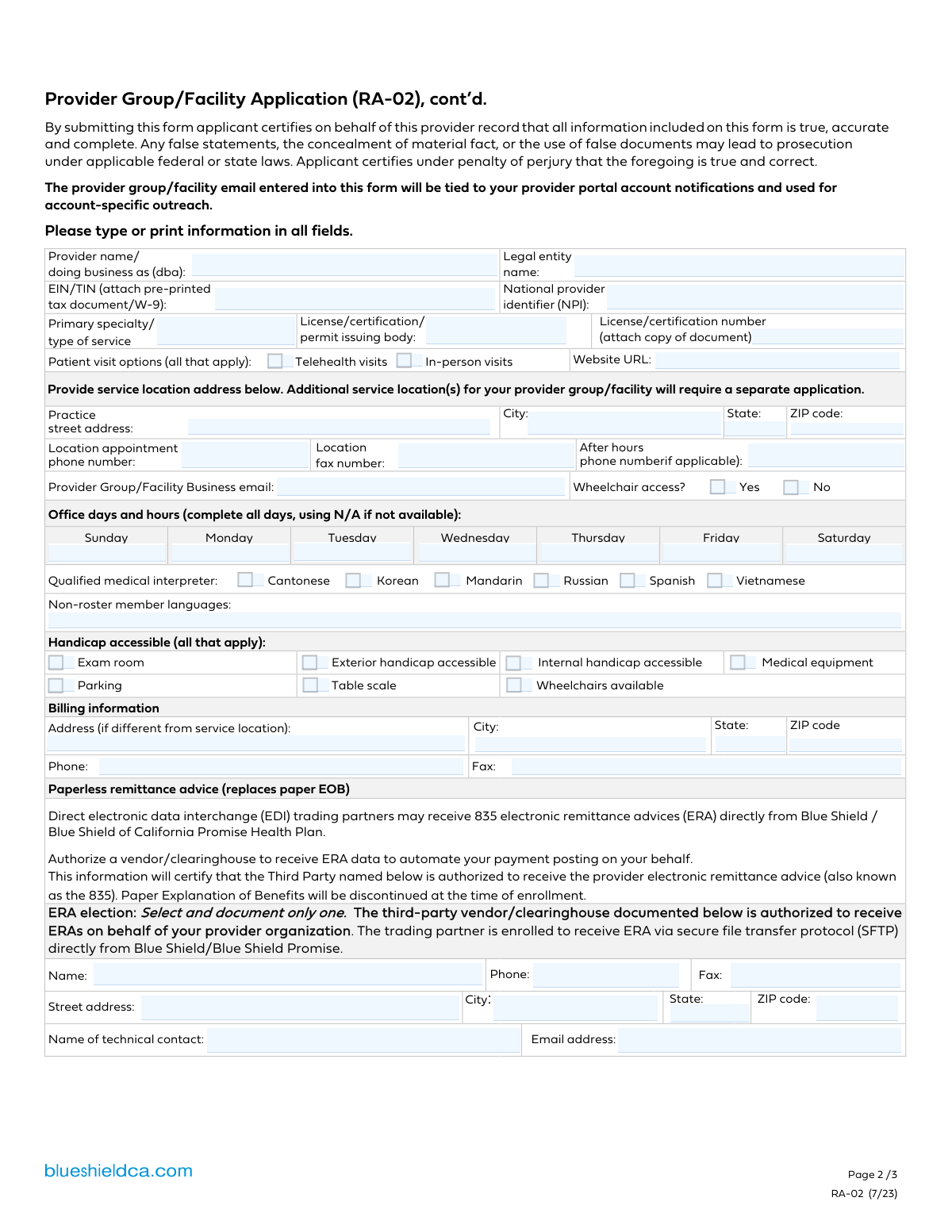
Form RA-02, the Provider Group/Facility Application, is submitted to Blue Shield of California and Blue Shield of California Promise Health Plan to create a new record for a healthcare group or facility. This record is crucial for enabling claims processing and requires detailed information about the entity, its location, billing setup, and individual practitioners. Today, this form can be filled out quickly and accurately using AI-powered services like Instafill.ai, which can also convert non-fillable PDF versions into interactive fillable forms.
Our AI automatically handles information lookup, data retrieval, formatting, and form filling.
It takes less than a minute to fill out RA-02 using our AI form filling.
Securely upload your data. Information is encrypted in transit and deleted immediately after the form is filled out.

Form specifications

Form name: Provider Group/Facility Application Form (RA-02)
Number of fields: 132
Number of pages: 3
Language: English
main-image

Instafill Demo: How to fill out PDF forms in seconds with AI

How to Fill Out RA-02 Online for Free in 2026

Are you looking to fill out a RA-02 form online quickly and accurately? Instafill.ai offers the #1 AI-powered PDF filling software of 2026, allowing you to complete your RA-02 form in just 37 seconds or less.
Follow these steps to fill out your RA-02 form online using Instafill.ai:
  1. 1 Navigate to Instafill.ai and upload or select the Provider Group/Facility Application Form (RA-02).
  2. 2 Use the AI to automatically populate provider group information, including legal name, EIN/TIN, and National Provider Identifier (NPI).
  3. 3 Enter the service location address, contact details, office hours, and accessibility information.
  4. 4 Provide billing information, including details for electronic remittance advice (ERA) if applicable.
  5. 5 Complete the practitioner roster by adding details for each professional, such as their name, license number, NPI, and patient acceptance status.
  6. 6 Securely attach all required supporting documents, such as a W-9, state licenses, and articles of incorporation.
  7. 7 Review all entered and auto-filled information for accuracy before downloading the completed application for submission.

Our AI-powered system ensures each field is filled out correctly, reducing errors and saving you time.

Why Choose Instafill.ai for Your Fillable RA-02 Form?

Speed

Complete your RA-02 in as little as 37 seconds.

Up-to-Date

Always use the latest 2026 RA-02 form version.

Cost-effective

No need to hire expensive lawyers.

Accuracy

Our AI performs 10 compliance checks to ensure your form is error-free.

Security

Your personal information is protected with bank-level encryption.

Frequently Asked Questions About Form RA-02

This form is used to create a new record for a provider group or facility within the Blue Shield of California system. This record is necessary to support claims processing.

No, this form is not an agreement to participate in the Blue Shield provider network. For information on joining the network, you must contact the Provider Information and Enrollment Department separately.

You must include a copy of your license/certification, a signed W-9 or IRS tax document for your EIN, and proof of your legal or 'doing business as' (dba) name, such as Articles of Incorporation or a Fictitious Name Statement.

Yes, a separate application form is required for each individual service location.

If you have more practitioners at one location than the form allows, you can use page three as a template to create and attach additional pages with the required information for each practitioner.

This form (RA-02) is only for creating a new provider group or facility record. To update information for an existing group or facility, you must use the Provider Group/Facility Information Change Form (ICF-02).

You should email the completed form and all required documentation to Blue Shield at [email protected]. The form can be completed electronically.

Yes, Primary Care Physicians (PCPs) are limited to seven in-person service locations, and Physician Specialists are limited to eleven in-person service locations across the entire network. These limits do not apply to locations where only telehealth services are provided.

This section allows you to authorize a third-party vendor or clearinghouse to receive your electronic remittance advices (ERAs or 835 files). Enrolling in this will discontinue paper Explanations of Benefits (EOBs).

Blue Shield will review your application and documentation to establish a record for claims processing. Once the process is complete, they will use the contact information provided to confirm your eligibility for claims submission.

Your application will not be initiated if any of the required documentation is missing. Ensure you have attached all licenses, a W-9, and proof of your legal/dba name as outlined in the instructions.

Yes, services like Instafill.ai use AI to auto-fill form fields accurately and save time, which can be particularly helpful for detailed forms like this one.

You can use a service like Instafill.ai to upload the PDF form. The platform allows you to fill out all the fields online, making the process faster and more convenient.

If you have a non-fillable or 'flat' PDF, you can use a tool like Instafill.ai. It can convert the non-fillable PDF into an interactive, fillable form that you can complete on your computer.

Compliance RA-02
Validation Checks by Instafill.ai

1
Validates EIN/TIN Format
This check ensures that the Employer Identification Number (EIN) or Taxpayer Identification Number (TIN) is a valid 9-digit numeric value. This is critical for correct tax reporting to the IRS and for linking claims payments to the correct legal entity. A failure in this validation would prevent the group from being set up for billing and could lead to claim rejections.
2
Validates NPI Structure
This check verifies that the National Provider Identifier (NPI) for both the group and each individual practitioner is a 10-digit numeric value. The NPI is a standard, unique identifier required for all HIPAA-covered healthcare providers and is essential for claims processing and routing. An invalid NPI would make it impossible to process claims or identify the provider in the system.
3
Ensures Patient Visit Option is Selected
This validation confirms that at least one of the 'Patient visit options' ('Telehealth visits' or 'In-person visits') is checked. It is essential to know how the provider will be delivering services to patients. If neither is selected, the application is incomplete as the mode of service delivery is unknown, preventing proper directory listing and patient scheduling.
4
Conditional Requirement for In-Person Service Address
This check ensures that if 'In-person visits' is selected, the full practice street address, city, state, and ZIP code are all provided. This information is vital for patients to locate the facility and for inclusion in provider directories. Failure to provide a complete address for an in-person location would render the listing useless and misleading.
5
Logical Consistency of Patient Age Range
This validation verifies that for each practitioner, the value entered for 'Lowest age' is less than or equal to the value entered for 'Highest age'. This is a critical logical check to ensure the data is sensible and prevents impossible patient age criteria (e.g., accepting patients from age 40 to 20). Incorrect age ranges can lead to improper patient referrals and directory inaccuracies.
6
Supervisor NPI Dependency Check
This check ensures that the 'Supervisor's NPI' field is only populated if the 'Supervising physician's name' field is also filled out. It prevents the submission of an orphaned NPI without an associated name, which would be meaningless data. This rule enforces data integrity by ensuring that if a supervisor is identified, all their required information is present.
7
Hospital Affiliation Degree Dependency
This validation enforces the rule that the 'Hospital affiliation name(s)' field can only be completed if the practitioner's degree is listed as 'MD' or 'DO'. This aligns with the form's instructions and ensures data relevance, as hospital affiliations are typically tracked for physicians. Submitting this information for other practitioner types could lead to data clutter and processing errors.
8
Mutually Exclusive Patient Acceptance Status
This check confirms that for each practitioner, only one of the two 'Patient acceptance' options ('Current patients only' or 'New and existing patients') is selected. These options are mutually exclusive and selecting both would create a contradiction. This validation is crucial for accurately representing a practitioner's availability to take on new patients in provider directories.
9
Standard Phone Number Formatting
This validation ensures that all phone number fields (appointment, after-hours, billing, etc.) conform to a standard US format, such as a 10-digit number. Correctly formatted phone numbers are essential for Blue Shield staff, other providers, and patients to be able to contact the facility. An improperly formatted number could prevent critical communication.
10
Valid Email Address Syntax
This check verifies that the 'Provider Group/Facility Business email' and 'Technical Contact Email' fields contain a string that follows the standard email format (e.g., '[email protected]'). This is critical as these email addresses are used for provider portal account notifications, account-specific outreach, and ERA setup. An invalid email address would result in the provider missing important communications.
11
Office Hours Field Completeness
This validation ensures that for each day of the week (Sunday through Saturday), the office hours field is not empty. Each field must contain either a valid time range (e.g., '9:00 AM - 5:00 PM') or the text 'N/A'. This prevents incomplete or ambiguous scheduling information from being entered into the system, which is vital for accurate provider directory listings.
12
Mutually Exclusive Gender Limitation Selection
This check ensures that for each practitioner, only one of the gender limitation options ('N/A', 'Male only', 'Female only') is selected. These choices are mutually exclusive, and selecting more than one would result in conflicting data. This validation is necessary to accurately define the patient population a practitioner serves.
13
Billing Address Completeness Check
This validation checks that if any part of the 'Billing information' address (Address, City, State, ZIP) is filled out, then all parts of the billing address must be complete. This rule prevents the submission of a partial, unusable billing address. A complete and accurate billing address is mandatory for sending paper correspondence and resolving billing issues.
14
Completeness of Practitioner Roster Entry
This check ensures that if a practitioner's name is entered in a roster slot, other critical fields like 'Practitioner's NPI' and 'License number' are also completed for that same practitioner. This prevents the submission of partial records that cannot be processed or verified. A complete record is required to add a practitioner to the group's service location.

Common Mistakes in Completing RA-02

Incomplete Submission Without Required Documentation

The form instructions explicitly state that the application will not be initiated until all required documentation (e.g., W-9, license copies, DBA filings) is received. Applicants often submit the form by itself, assuming they can send documents later. This results in the application being held or rejected outright, causing significant delays. To avoid this, create a checklist based on page one and gather all necessary documents before submission.

Confusing Legal Entity Name with DBA Name

Practices often enter their public-facing 'Doing Business As' (DBA) name in the 'Legal entity name' field, or vice-versa. The legal name must exactly match the name registered with the IRS and appearing on the W-9 form to ensure proper claims processing and tax reporting. Mismatched names are a primary cause of claim payment delays and rejections. Always cross-reference with your official tax documents to ensure accuracy.

Mismatching Group (Type 2) and Individual (Type 1) NPIs

The form requires the group/facility's Type 2 NPI on page two and the individual practitioners' Type 1 NPIs on the page three roster. A frequent error is entering an individual's NPI in the group field or repeating the group NPI for every practitioner on the roster. This error prevents proper linking between the facility and its providers in the system, leading to claim denials and credentialing failures.

Using the Application for Incorrect Purposes

This RA-02 form is strictly for creating a new provider group record for a single service location. Applicants mistakenly use it to update information for an existing group (which requires Form ICF-02) or to list multiple service locations on one application. Both mistakes lead to automatic rejection, as the processing workflow is entirely different. A separate application must be submitted for each new service location.

Inconsistent or Incomplete Office Hours

The form requires office hours for all seven days of the week, with 'N/A' specified for days the office is closed. Applicants often leave fields for closed days blank, which can be misinterpreted as missing information. They also use inconsistent time formats (e.g., '9-5', '9:00 AM - 5:00 PM', 'Closed'). This leads to inaccurate data in provider directories, causing patient confusion and frustration.

Incomplete Practitioner Roster Information

Page three is a template for listing practitioners at the service location, and it must be copied for groups with more than four providers. It is common for applicants to provide incomplete details for each practitioner, such as missing a license number, NPI, or patient acceptance status. An incomplete roster means those practitioners cannot be properly credentialed or linked to the group, preventing them from being eligible for claims submission.

Missing Supervising Physician Information

When a roster includes mid-level practitioners like a Physician Assistant (PA) or Nurse Practitioner (NP), the form requires the supervising physician's name and NPI. This information is frequently omitted, either because the applicant is unaware of the requirement or forgets to include it. Without this data, the credentialing process for the mid-level provider cannot be completed, halting the application.

Errors in Electronic Remittance Advice (ERA) Authorization

The ERA section authorizes a third-party clearinghouse to receive payment data and discontinues paper explanations of benefits. Applicants often fill this section with incomplete vendor details or do not fully understand the consequences, leading to disruptions in the revenue cycle. An error here can cause payment information to be lost or delayed, impacting the practice's ability to post payments and manage cash flow.

Using Informal Instead of Official Practitioner Names

The practitioner roster on page three requires the full legal name as it appears on the professional license for verification purposes. A common mistake is to use a nickname (e.g., 'Mike' instead of 'Michael') or a name that doesn't precisely match the license. This discrepancy causes a failure during the credentialing verification process, halting the application until the name is corrected to match the official documentation.

Submitting a Non-Fillable PDF with Manual Errors

This form is often distributed as a non-fillable PDF, forcing applicants to print it and fill it out by hand. This leads to illegible handwriting, missed fields, and data entry errors that cause processing rejections. To avoid this, AI-powered tools like Instafill.ai can convert the flat PDF into a smart, fillable form. These tools can also help prevent other mistakes by auto-filling information from a secure profile and validating data formats to ensure accuracy before submission.
Saved over 80 hours a year

“I was never sure if my IRS forms like W-9 were filled correctly. Now, I can complete the forms accurately without any external help.”

Kevin Martin Green

Your data stays secure with advanced protection from Instafill and our subprocessors

Robust compliance program

Transparent business model

You’re not the product. You always know where your data is and what it is processed for.

ISO 27001, HIPAA, and GDPR

Our subprocesses adhere to multiple compliance standards, including but not limited to ISO 27001, HIPAA, and GDPR.

Security & privacy by design

We consider security and privacy from the initial design phase of any new service or functionality. It’s not an afterthought, it’s built-in, including support for two-factor authentication (2FA) to further protect your account.

Fill out RA-02 with Instafill.ai

Worried about filling PDFs wrong? Instafill securely fills provider-groupfacility-application-form-ra-02 forms, ensuring each field is accurate.