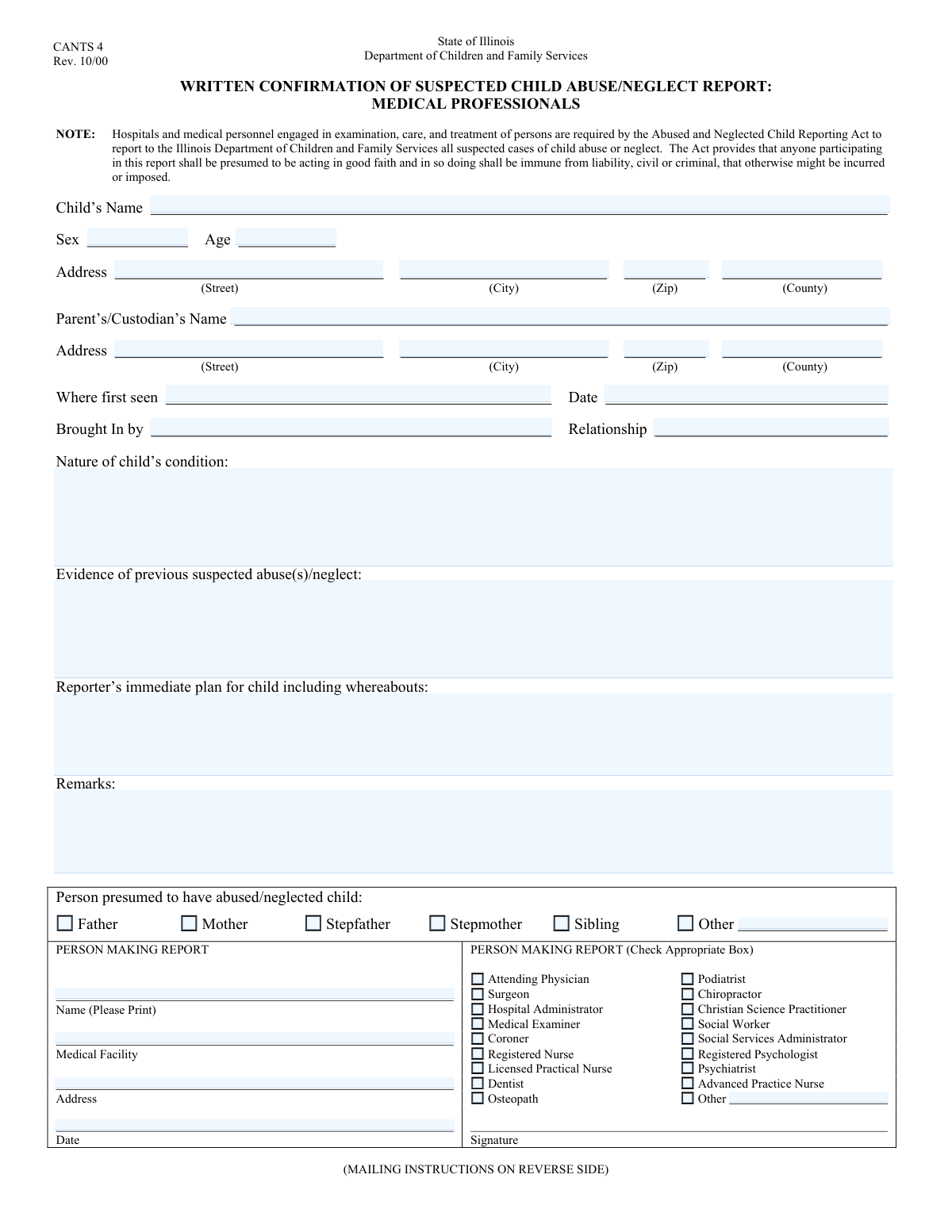
Yes! You can use AI to fill out Report of Suspected Child Abuse/Neglect

A Report of Suspected Child Abuse/Neglect is a formal legal document that mandated reporters, such as healthcare providers and social workers, are required to submit when they have reasonable cause to believe a child is being abused or neglected. This form is crucial for initiating an investigation by child protective services, ensuring the child's safety, and providing a detailed record of the initial observations and concerns. Today, this sensitive report can be filled out quickly and accurately using AI-powered services like Instafill.ai, which can also convert non-fillable PDF versions into interactive fillable forms for easier completion.
Our AI automatically handles information lookup, data retrieval, formatting, and form filling.
It takes less than a minute to fill out Child Abuse Report Form using our AI form filling.
Securely upload your data. Information is encrypted in transit and deleted immediately after the form is filled out.

Form specifications

Form name: Report of Suspected Child Abuse/Neglect
Number of fields: 50
Number of pages: 2
Filled form examples: Form Child Abuse Report Form Examples
Language: English
main-image

Instafill Demo: How to fill out PDF forms in seconds with AI

How to Fill Out Child Abuse Report Form Online for Free in 2026

Are you looking to fill out a CHILD ABUSE REPORT FORM form online quickly and accurately? Instafill.ai offers the #1 AI-powered PDF filling software of 2026, allowing you to complete your CHILD ABUSE REPORT FORM form in just 37 seconds or less.
Follow these steps to fill out your CHILD ABUSE REPORT FORM form online using Instafill.ai:
  1. 1 Navigate to Instafill.ai and upload your Report of Suspected Child Abuse/Neglect form or select it from their template library.
  2. 2 Use the AI assistant to accurately enter the child's personal details, including their name, age, sex, and current address.
  3. 3 Complete the section for the parent or custodian's information, including their name and address.
  4. 4 Carefully document the nature of the child's condition, the circumstances of the initial observation, and any evidence of previous abuse or neglect.
  5. 5 Indicate the relationship of the person presumed to have abused or neglected the child, providing specifics if necessary.
  6. 6 Provide your professional information as the reporter, including your name, facility, address, and professional role.
  7. 7 Review all the entered information for accuracy and completeness before securely saving or printing the report for submission to the appropriate child protective agency.

Our AI-powered system ensures each field is filled out correctly, reducing errors and saving you time.

Why Choose Instafill.ai for Your Fillable Child Abuse Report Form Form?

Speed

Complete your Child Abuse Report Form in as little as 37 seconds.

Up-to-Date

Always use the latest 2026 Child Abuse Report Form form version.

Cost-effective

No need to hire expensive lawyers.

Accuracy

Our AI performs 10 compliance checks to ensure your form is error-free.

Security

Your personal information is protected with bank-level encryption.

Frequently Asked Questions About Form Child Abuse Report Form

This form is used by mandated reporters, such as medical professionals and social workers, to officially document and report suspected cases of child abuse or neglect to the appropriate authorities.

This form is designed for mandated reporters, including physicians, nurses, social workers, and other professionals listed in the reporter section, who suspect a child has been abused or neglected.

You will need the child's and parent's personal and address details, information about when and where the child was first seen, a description of the child's condition, and your own professional information.

If the addresses are identical, you should still fill out the address information in both the 'Child's Address' and 'Parent's/Custodian's Information' sections to ensure the form is complete.

Provide a clear, objective, and factual description of your observations. Include any visible injuries, symptoms, the child's emotional state, and any direct quotes from the child if applicable.

You are required to report suspected abuse based on your professional judgment and observations, even without definitive physical proof. Fill out the form with all the information you do have.

If you have no information regarding previous incidents of abuse or neglect, you can write 'None known' or 'N/A' in this section.

Check the 'Other (Presumed Abuser Relationship)' box. Then, specify the person's exact relationship to the child in the 'Alleged Abuser Other Relationship' field.

If your professional role is not among the provided checkboxes, select the 'Other (Reporter Role)' box and write your specific profession in the 'Other Profession' field.

After submission, this report is typically sent to child protective services or law enforcement. They will review the information and determine the necessary steps to ensure the child's safety.

Yes, AI-powered services like Instafill.ai can help you fill out this form accurately and efficiently. These tools use AI to autofill fields, which can save you significant time and reduce errors.

Simply upload the form to the Instafill.ai platform. The AI will identify the fields, allowing you to type your information once and have it automatically populate all relevant sections.

You can use a service like Instafill.ai, which can instantly convert flat, non-fillable PDFs into interactive, fillable forms. This allows you to easily type your information directly into the document online without printing.

Compliance Child Abuse Report Form
Validation Checks by Instafill.ai

1
Child's Age Range Validation
This check ensures the 'Child's Age' field contains a valid integer between 0 and 17. It is crucial for correctly assessing the child's developmental stage, vulnerability, and the type of services required. An invalid age, such as a negative number or an age outside the typical range for a child, could lead to miscategorization of the case or rejection of the report.
2
Temporal Logic Check for Dates
This validation confirms that the 'Date First Seen' is not later than the 'Report Date'. This is a critical logical check to ensure the timeline of events is coherent and plausible. A report where the child was seen in the future is nonsensical and would be rejected, as it indicates a significant data entry error.
3
Future Date Prohibition
This check ensures that both the 'Date First Seen' and 'Report Date' fields do not contain a date in the future. This prevents common data entry errors and maintains the integrity of the report's timeline. Submitting a report with future dates would invalidate the record and require correction before it can be processed.
4
Conditional Requirement for 'Other' Abuser Relationship
This validation enforces that the 'Alleged Abuser Other Relationship' text field is filled out if and only if the 'Other' checkbox is selected in the presumed abuser section. This is essential for capturing complete information when the relationship is not standard. Failure to provide this detail when 'Other' is checked would leave a critical information gap in the report.
5
Conditional Requirement for 'Other' Reporter Profession
This check ensures that the 'Other Profession' text field is completed when the 'Other' checkbox is selected for the reporter's role. This provides necessary context about the reporter's qualifications and perspective, which is vital for evaluating the report. An empty field here would mean incomplete information about the source of the report, potentially affecting its credibility.
6
ZIP Code Format Validation
This check verifies that all zip code fields ('Child's Zip Code', 'Parent's/Custodian's Zip Code') adhere to the standard 5-digit or 9-digit (ZIP+4) format. Correctly formatted zip codes are essential for address validation, mail delivery, and geographic data analysis. An invalid format would prevent proper location services and could delay an emergency response.
7
Address Component Consistency Check
This validation cross-references the entered City, County, and Zip Code against a geographic database to ensure they form a valid combination. This is important for verifying the child's location accurately, which is critical for dispatching services. A mismatch could indicate a data entry error and lead responders to the wrong location, wasting valuable time.
8
Child's Core Information Completeness
This check ensures that the 'Child's Name', 'Child's Age', and 'Child's Sex' fields are not empty. These fields represent the minimum required information to identify the child and initiate a case file. Missing any of this core data would render the report incomplete and likely un-actionable by the receiving agency.
9
Report Substance and Action Plan Completeness
This validation confirms that the 'Nature of Child's Condition' and 'Reporter's Immediate Plan for Child' text areas are not left blank. These fields contain the most critical information regarding the child's welfare and the immediate steps being taken for their safety. An empty submission for these fields would defeat the purpose of the report and result in its rejection.
10
Reporter Role Selection Mandate
This check mandates that at least one professional role checkbox is selected by the person filing the report. The reporter's professional capacity is a legal and procedural requirement for mandated reporters, adding credibility and context to the report. Failure to select a role would question the validity and source of the report, potentially leading to processing delays.
11
Alleged Abuser Relationship Mandate
This validation requires that at least one relationship checkbox is selected in the 'Presumed Abuser Relationship' section. Identifying the alleged perpetrator's relationship to the child is fundamental to the investigation and safety planning. A report without this information is significantly incomplete and hinders the ability to take protective action.
12
Exclusive 'Other' Field Usage
This check ensures that text fields like 'Alleged Abuser Other Relationship' and 'Other Profession' are only populated when their corresponding 'Other' checkbox is selected. This prevents extraneous or confusing data from being entered when a standard option has been chosen. If validation fails, it indicates a logical inconsistency that must be corrected to ensure data cleanliness.
13
Mandatory Reporter Identification
This check ensures that the reporter's full name, their affiliated medical facility, and the report date are all provided. This information is legally required for mandated reporting, establishing the report's origin, credibility, and timestamp. A failure to provide this information could invalidate the report from a legal standpoint or prevent follow-up communication.
14
Full Name Structure Validation
This validation checks that fields designated for a 'full name' (e.g., 'Child's Name', 'Parent's/Custodian's Name') contain at least two distinct parts, suggesting a first and last name. While not foolproof, it helps prevent single-name or incomplete entries that can complicate identification in official records. A failure would prompt the user to provide a more complete name.

Common Mistakes in Completing Child Abuse Report Form

Vague Descriptions in Narrative Fields

Reporters often use subjective or brief language in critical fields like 'Nature of Child's Condition' instead of objective, detailed observations. This happens due to time constraints or uncertainty about what information is relevant, leading to reports like 'child seems unwell'. Vague reports can hinder an accurate assessment and delay appropriate intervention. To avoid this, describe specific, observable facts, such as 'child has a 2-inch circular bruise on their left forearm and is reluctant to make eye contact'.

Incomplete or Inaccurate Address Information

Users frequently omit crucial details like apartment numbers, or enter incorrect zip codes or counties for the child, parent, or medical facility. This error can severely delay the response from child protective services, as they may be unable to locate the individuals involved. Always double-check addresses for completeness and accuracy before submission. AI-powered tools like Instafill.ai can help by auto-completing and validating address components, and if the form is a non-fillable PDF, it can convert it into an interactive, fillable version.

Confusing 'Date First Seen' with 'Report Date'

A common mistake is entering the same date in both the 'Date First Seen' and 'Report Date' fields, even when the events occurred on different days. This confusion creates an inaccurate timeline of events, which is critical for any investigation. The 'Date First Seen' refers to the initial observation of the child's condition, while the 'Report Date' is the day the form is actually being filled out. Carefully distinguish between these two dates to provide a clear and accurate record.

Omitting Details for 'Other' Selections

When a specific option is not available in a checklist, users often check the 'Other' box but forget to fill in the corresponding text field, such as for the 'Alleged Abuser Other Relationship' or 'Other Profession'. This leaves a critical information gap, making the selection useless and requiring follow-up to clarify the reporter's role or the alleged abuser's relationship. Always provide the specific details in the text field whenever you select an 'Other' option.

Using Partial Names or Nicknames

Providing incomplete names or nicknames for the child, parent, or reporter (e.g., 'Jimmy' instead of 'James Smith') is a frequent error. This can cause significant problems with official record-keeping, database searches, and legal proceedings, potentially leading to an inability to identify the correct individuals. Always use the full, legal name as known to ensure accuracy and prevent identification issues.

Insufficient Detail in 'Reporter's Immediate Plan'

The field 'Reporter's Immediate Plan for Child' is often filled with vague statements like 'monitoring the situation' or 'sent home.' This lack of specificity can leave responding agencies unsure of the child's immediate safety and location. A clear plan, such as 'Child admitted to the pediatric unit, room 301, under the care of Dr. Evans' or 'Child released to mother, who was advised to follow up with their pediatrician,' is essential for continuity of care and safety assessment.

Failing to Differentiate Addresses

When the child and parent/custodian do not live at the same address, reporters sometimes mistakenly enter the same address for both due to haste or assumption. Incorrect address information can lead investigators to the wrong location, wasting valuable time in a potentially urgent situation. Carefully verify and enter the correct, distinct addresses for both the child and the parent/custodian if they reside separately.

Leaving Critical Narrative Fields Blank

Reporters may leave important free-text fields like 'Evidence of Previous Abuse/Neglect' or 'Remarks' empty, assuming they have no information or that it's not relevant. However, even noting 'no known history of prior abuse' is valuable information that provides context. Omitting details can result in an incomplete picture for investigators, so always fill in every field, even if it is to state that information is unknown or not applicable.

Inconsistent Date Formatting

The form requires dates in multiple fields, but users may enter them in inconsistent formats (e.g., 05-10-2024, 10/May/24, May 10, 2024). This can lead to data entry errors and confusion when the information is entered into a central system. To prevent this, use a consistent and clear format like MM/DD/YYYY for all date fields. AI form-filling tools like Instafill.ai can automatically standardize date formats, preventing such errors.

Vague 'Brought In By' Relationship

In the 'Brought In By Relationship' field, users might enter a vague term like 'friend' or 'relative.' This lacks the specific detail needed for investigators to understand the child's social network and the context of the situation. It is more helpful to be specific, such as 'maternal aunt,' 'neighbor from Apt 2B,' or 'caseworker.' Providing a precise relationship helps authorities follow up more effectively.
Saved over 80 hours a year

“I was never sure if my IRS forms like W-9 were filled correctly. Now, I can complete the forms accurately without any external help.”

Kevin Martin Green

Your data stays secure with advanced protection from Instafill and our subprocessors

Robust compliance program

Transparent business model

You’re not the product. You always know where your data is and what it is processed for.

ISO 27001, HIPAA, and GDPR

Our subprocesses adhere to multiple compliance standards, including but not limited to ISO 27001, HIPAA, and GDPR.

Security & privacy by design

We consider security and privacy from the initial design phase of any new service or functionality. It’s not an afterthought, it’s built-in, including support for two-factor authentication (2FA) to further protect your account.

Fill out Child Abuse Report Form with Instafill.ai

Worried about filling PDFs wrong? Instafill securely fills report-of-suspected-child-abuseneglect forms, ensuring each field is accurate.