Yes! You can use AI to fill out REQUEST FOR SERVICES - PROVIDER, Community Pediatric Audiology Program
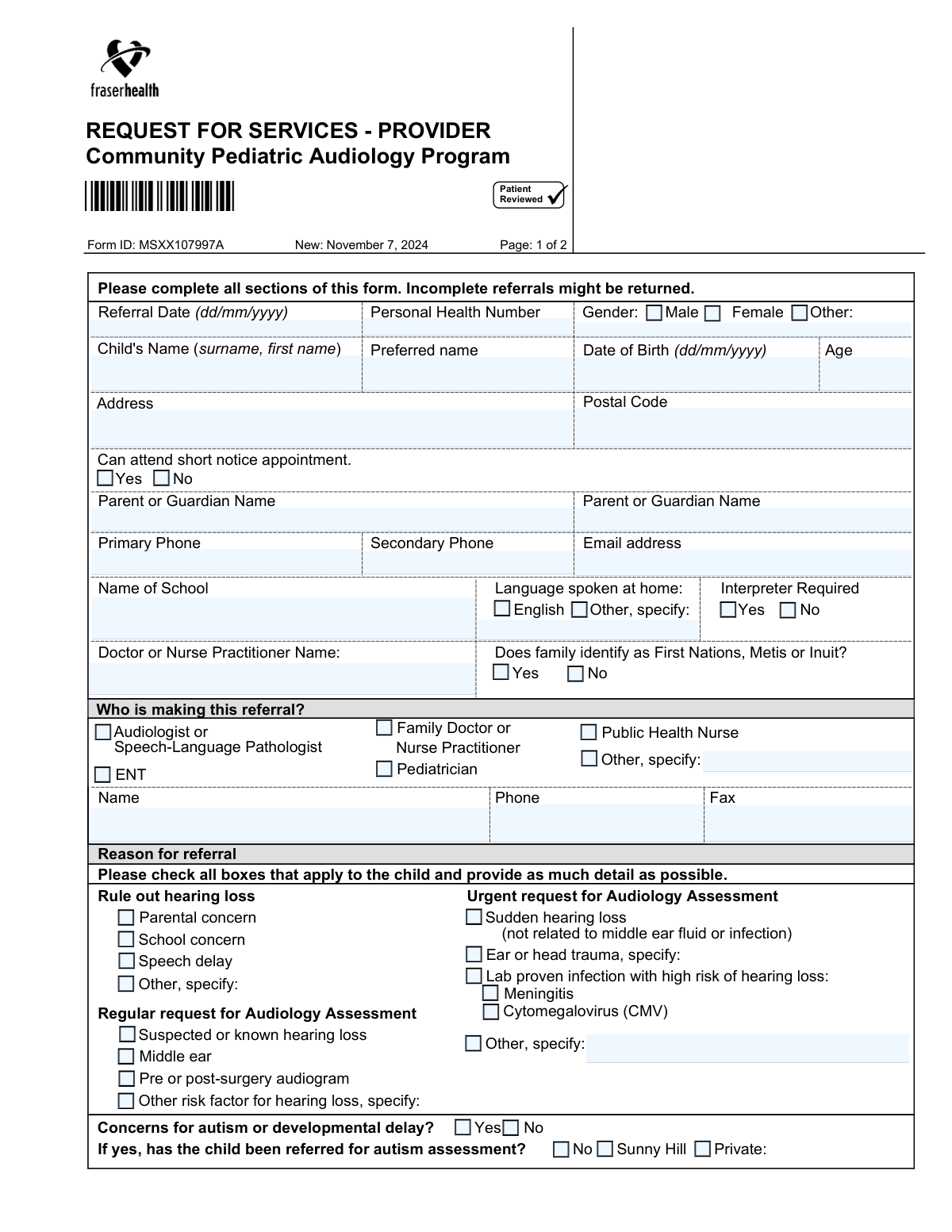
This form is a medical referral document used by healthcare providers such as pediatricians, family doctors, and audiologists to request a hearing assessment for a child. It captures crucial information about the patient, their family, the reason for the referral, and the referring provider's details to ensure the child is directed to the appropriate audiology services. Today, this form can be filled out quickly and accurately using AI-powered services like Instafill.ai, which can also convert non-fillable PDF versions into interactive fillable forms.
Our AI automatically handles information lookup, data retrieval, formatting, and form filling.
It takes less than a minute to fill out MSXX107997A using our AI form filling.
Securely upload your data. Information is encrypted in transit and deleted immediately after the form is filled out.
Form specifications
| Form name: | REQUEST FOR SERVICES - PROVIDER, Community Pediatric Audiology Program |
| Number of fields: | 66 |
| Number of pages: | 2 |
| Filled form examples: | Form MSXX107997A Examples |
| Language: | English |
Instafill Demo: How to fill out PDF forms in seconds with AI
How to Fill Out MSXX107997A Online for Free in 2026
Are you looking to fill out a MSXX107997A form online quickly and accurately? Instafill.ai offers the #1 AI-powered PDF filling software of 2026, allowing you to complete your MSXX107997A form in just 37 seconds or less.
Follow these steps to fill out your MSXX107997A form online using Instafill.ai:
- 1 Navigate to Instafill.ai and upload or select the 'Request for Services - Provider' form for the Community Pediatric Audiology Program.
- 2 Use the AI to automatically populate the child's personal details, including their name, date of birth, and Personal Health Number.
- 3 Enter the contact information for the parent(s) or guardian(s), including names, phone numbers, and email address.
- 4 Indicate the reason for the referral by checking the appropriate boxes for urgent or regular assessments, detailing concerns like speech delay or suspected hearing loss.
- 5 Provide the referring provider's information, including their name, contact details, and professional role.
- 6 Select the specific audiology clinic location where the referral should be sent.
- 7 Review all entered information for accuracy before downloading the completed form to be faxed to the selected clinic.
Our AI-powered system ensures each field is filled out correctly, reducing errors and saving you time.
Why Choose Instafill.ai for Your Fillable MSXX107997A Form?
Speed
Complete your MSXX107997A in as little as 37 seconds.
Up-to-Date
Always use the latest 2026 MSXX107997A form version.
Cost-effective
No need to hire expensive lawyers.
Accuracy
Our AI performs 10 compliance checks to ensure your form is error-free.
Security
Your personal information is protected with bank-level encryption.
Frequently Asked Questions About Form MSXX107997A
This form is used by healthcare providers to refer a child for an audiology assessment due to concerns about their hearing. It helps gather the necessary information to schedule and prepare for the child's appointment.
This form must be completed and submitted by a healthcare provider, such as a Family Doctor, Pediatrician, Nurse Practitioner, Audiologist, or Public Health Nurse. Referrals directly from parents are not accepted through this form.
The form states that incomplete referrals might be returned to the sender. This will delay the process, so it is crucial to fill out all sections completely before submission.
You must fax the completed form to the audiology service location the family wishes to attend. Remember to check the box on the form that corresponds to the clinic you are faxing it to.
An 'Urgent request' is for time-sensitive conditions like sudden hearing loss or recent head trauma. A 'Regular request' is for non-emergency concerns such as routine speech delay evaluations or pre-surgery audiograms.
You must check the 'Yes' box next to 'Interpreter Required' and specify the language needed. This ensures the clinic can arrange for appropriate language services for the appointment.
This indicates the family is flexible and can accept an appointment on short notice, such as in the event of a cancellation. This may help the child be seen more quickly.
Yes, the Personal Health Number (PHN) is a mandatory field. Providing the correct PHN is essential for patient identification and processing the referral.
If you check 'Yes' for concerns about autism or developmental delay, you must also indicate whether the child has already been referred for an autism assessment, and if so, where (Sunny Hill or Private).
Yes, services like Instafill.ai use AI to accurately auto-fill form fields from your existing patient records, which can save significant time and help prevent data entry errors.
You can use a service like Instafill.ai, which can convert any flat, non-fillable PDF into an interactive form. Simply upload the document, and the platform will make the fields fillable for you.
Upload the form to Instafill.ai, and its AI will automatically identify the fields. You can then easily type in the required information, save your progress, and manage the document digitally.
You should select and fax the referral to the clinic location that is most convenient for the child and their family. The form provides a list of clinics with their addresses and fax numbers.
Compliance MSXX107997A
Validation Checks by Instafill.ai
1
Verifies Child's Age Corresponds with Date of Birth
This check calculates the child's age based on the 'Date of Birth' provided and compares it to the value entered in the 'Age' field. This is crucial for ensuring data accuracy for clinical assessments, as age is a key factor in pediatric audiology. If the calculated age and entered age do not match, the system should flag the discrepancy and require the user to correct either the Date of Birth or the Age before submission.
2
Ensures Referral Date is Valid and Not in the Future
This validation confirms that the 'Referral Date' is entered in the correct 'dd/mm/yyyy' format and represents a real calendar date. It also checks that the date is not in the future, as a referral cannot be made for a future date. This ensures accurate record-keeping and proper timeline tracking for patient care, and a failed validation would prevent submission and prompt the user to enter a valid, non-future date.
3
Requires Specification When 'Other' is Selected
This check ensures that if a user selects an 'Other' checkbox (e.g., for Referral Source, Reason for Referral, Language Spoken at Home), the corresponding 'specify' text field is not left empty. This is vital for capturing complete and actionable information that is not covered by the standard options. If 'Other' is checked but the specification is missing, the form submission should be blocked until the necessary details are provided.
4
Requires At Least One Complete Parent or Guardian Contact
This validation verifies that at least one 'Parent or Guardian Name' field is filled out, along with a corresponding 'Primary Phone' number. It is critical to have a reliable point of contact to schedule appointments, discuss findings, and manage the child's care. Without this information, the clinic cannot proceed with the referral, so the form should not be submittable without at least one parent name and primary phone number.
5
Ensures At Least One Reason for Referral is Selected
This check confirms that at least one checkbox under the 'Reason for referral' section has been selected. This information is fundamental for the audiology team to understand the clinical urgency and context of the request, allowing them to triage and prepare for the assessment appropriately. If no reason is selected, the referral lacks essential clinical context, and the submission should be blocked with a message prompting the user to select a reason.
6
Validates Selection of a Single Audiology Clinic
This validation ensures that the user has selected exactly one clinic location from the provided list. Selecting zero clinics would leave the referral destination ambiguous, while selecting multiple could cause confusion and duplicate processing. This check guarantees the referral is routed to a single, correct destination, and the form should prompt the user to select one and only one clinic if the rule is violated.
7
Validates Canadian Postal Code Format
This check verifies that the 'Postal Code' field follows the standard Canadian format of 'A1A 1A1' (letter-number-letter space number-letter-number). Correct postal codes are essential for mail correspondence, demographic analysis, and verifying service area eligibility. An invalid format could lead to returned mail or incorrect patient records, so the system should reject incorrectly formatted postal codes.
8
Enforces Conditional Requirement for Autism Assessment Details
This check ensures that the questions about where the child was referred for an autism assessment ('Sunny Hill', 'Private', 'No') are only enabled and required if the user first answers 'Yes' to 'Concerns for autism or developmental delay?'. This prevents irrelevant questions from being presented and ensures logical data flow. If 'No' is selected for the initial concern, the follow-up questions should be hidden or disabled to avoid confusion and incorrect data entry.
9
Cross-Validates Interpreter Need with Home Language
This check provides a soft validation or warning if 'Language spoken at home' is 'English' but 'Interpreter Required' is 'Yes'. While there can be valid exceptions, it is an unusual combination that warrants a confirmation prompt. This helps prevent errors in arranging interpretation services, which can be costly and cause appointment delays. The system could ask 'Interpreter is requested, but home language is English. Is this correct?' before allowing submission.
10
Validates Personal Health Number (PHN) Format
This check verifies that the 'Personal Health Number' field contains a number that matches the specific format required by the health authority (e.g., a specific number of digits). A valid PHN is crucial for patient identification, billing, and accessing health records. An incorrect PHN can lead to record mismatches or inability to process the referral, so the system should reject submissions with an improperly formatted PHN.
11
Validates Completeness of Referral Source Information
This check ensures that if a referral source role is selected (e.g., 'Family Doctor'), the corresponding 'Name' and 'Phone' fields for the referral source are also filled out. This information is vital for the audiology clinic to communicate with the referring provider for clarifications or to send back reports. An incomplete referral source section can create communication barriers, and the submission should be blocked until the referrer's name and phone number are provided.
12
Requires Exclusive Selection for Mutually Exclusive Options
This validation applies to radio button groups like 'Can attend short notice appointment' (Yes/No) and 'Interpreter Required' (Yes/No). It ensures that for each group, one and only one option is selected before submission. This prevents ambiguity and ensures complete data for processing the referral. If neither or both options in a set are somehow selected, the form submission should fail.
13
Validates Phone Number Format
This validation ensures that the 'Primary Phone' and 'Secondary Phone' fields contain a valid 10-digit phone number, potentially allowing for common formats like (xxx) xxx-xxxx or xxx-xxx-xxxx. This is critical for ensuring the clinic can successfully contact the family to schedule appointments. An invalid number would prevent communication, delaying care, so the system should enforce a standard format or strip characters to validate the 10-digit number.
14
Ensures Child's Full Name is Provided
This validation confirms that the 'Child's Name (surname, first name)' field is not empty. The child's name is the primary identifier for the patient and is absolutely essential for creating a new record or locating an existing one. A referral without a patient name is unusable, so the form should be impossible to submit without this fundamental piece of information.
Common Mistakes in Completing MSXX107997A
The form explicitly requires dates in DD/MM/YYYY format for both 'Referral Date' and 'Date of Birth'. Many people, particularly those accustomed to the MM/DD/YYYY format, enter it incorrectly out of habit. This can lead to significant errors in patient records, such as an incorrect age calculation or referral timeline, potentially delaying the appointment. Always double-check the date format instructions next to the field to ensure accuracy.
The form specifies that the 'Child's Name' and 'Parent or Guardian Name' should be entered as 'surname, first name'. A frequent error is to write the name in the 'first name surname' order. This mistake can cause data entry problems when creating or updating the patient's file, leading to misidentification and administrative delays. To prevent this, carefully follow the formatting example provided on the form.
The second page of the form lists multiple audiology clinics and requires the sender to check a box indicating where the faxed referral should be sent. Forgetting to select a clinic is a critical error, as the central intake or the receiving fax machine may not know where to direct the request. This results in the referral not being processed and the family never being contacted. Always select one clinic from the list before faxing the document.
Several sections, such as 'Reason for referral' or 'Language spoken at home', have an 'Other, specify' option. A common mistake is to check the 'Other' box but fail to provide the necessary details in the corresponding text field. This leaves the clinical team with incomplete information, requiring them to make follow-up calls that delay the triage and booking process. If you check 'Other', always provide a clear and concise explanation.
As this is a provider referral form, information about who is making the referral is mandatory. People sometimes forget to fill in the referring provider's name, role, phone, and fax number. Without this information, the audiology clinic cannot verify the referral's legitimacy or contact the provider with questions, which will cause the referral to be returned or rejected.
Users may indicate that a language other than English is spoken at home but then select 'No' for 'Interpreter Required'. While some families may not need an interpreter, this creates ambiguity for the clinic staff scheduling the appointment. This can lead to communication barriers during the appointment if an interpreter was actually needed. It is crucial to accurately represent the family's language and interpretation needs to ensure a smooth clinical visit.
The Personal Health Number is the primary identifier for the patient within the healthcare system. Entering it incorrectly, or omitting it entirely, is a serious error that prevents staff from locating the correct patient file. This can lead to the creation of duplicate records or a complete inability to process the referral, causing significant delays. The PHN should be copied exactly from the patient's health card.
Under 'Reason for referral', options like 'Ear or head trauma' and 'Other risk factor' require specification. A mistake is to check the box without providing any context or detail in the space provided. This missing information is critical for the audiologist to understand the urgency and nature of the case, and its absence may lead to an incomplete initial assessment or delays while the clinic seeks clarification.
The form asks if there are 'Concerns for autism or developmental delay?' with a 'Yes/No' choice. The subsequent question, 'has the child been referred for autism assessment?', should only be answered if the answer to the first question is 'Yes'. People sometimes answer the second question regardless, creating confusing and contradictory data. Pay close attention to instructions that link questions to ensure the form is filled out logically.
This form is often distributed as a flat, non-fillable PDF, requiring it to be printed and filled by hand, which can lead to illegible handwriting and data entry errors. Trying to type onto it without the right software results in misaligned text. To avoid this, the form should be made fillable first. AI-powered tools like Instafill.ai can convert such PDFs into interactive, fillable forms, ensuring all entries are clear, correctly formatted, and validated before submission.
Saved over 80 hours a year
“I was never sure if my IRS forms like W-9 were filled correctly. Now, I can complete the forms accurately without any external help.”
Kevin Martin Green
Your data stays secure with advanced protection from Instafill and our subprocessors

Robust compliance program
Transparent business model
You’re not the product. You always know where your data is and what it is processed for.
ISO 27001, HIPAA, and GDPR
Our subprocesses adhere to multiple compliance standards, including but not limited to ISO 27001, HIPAA, and GDPR.
Security & privacy by design
We consider security and privacy from the initial design phase of any new service or functionality. It’s not an afterthought, it’s built-in, including support for two-factor authentication (2FA) to further protect your account.
Fill out MSXX107997A with Instafill.ai
Worried about filling PDFs wrong? Instafill securely fills request-for-services-provider-community-pediatric-audiology-program forms, ensuring each field is accurate.



