Yes! You can use AI to fill out Residential Broker Price Opinion

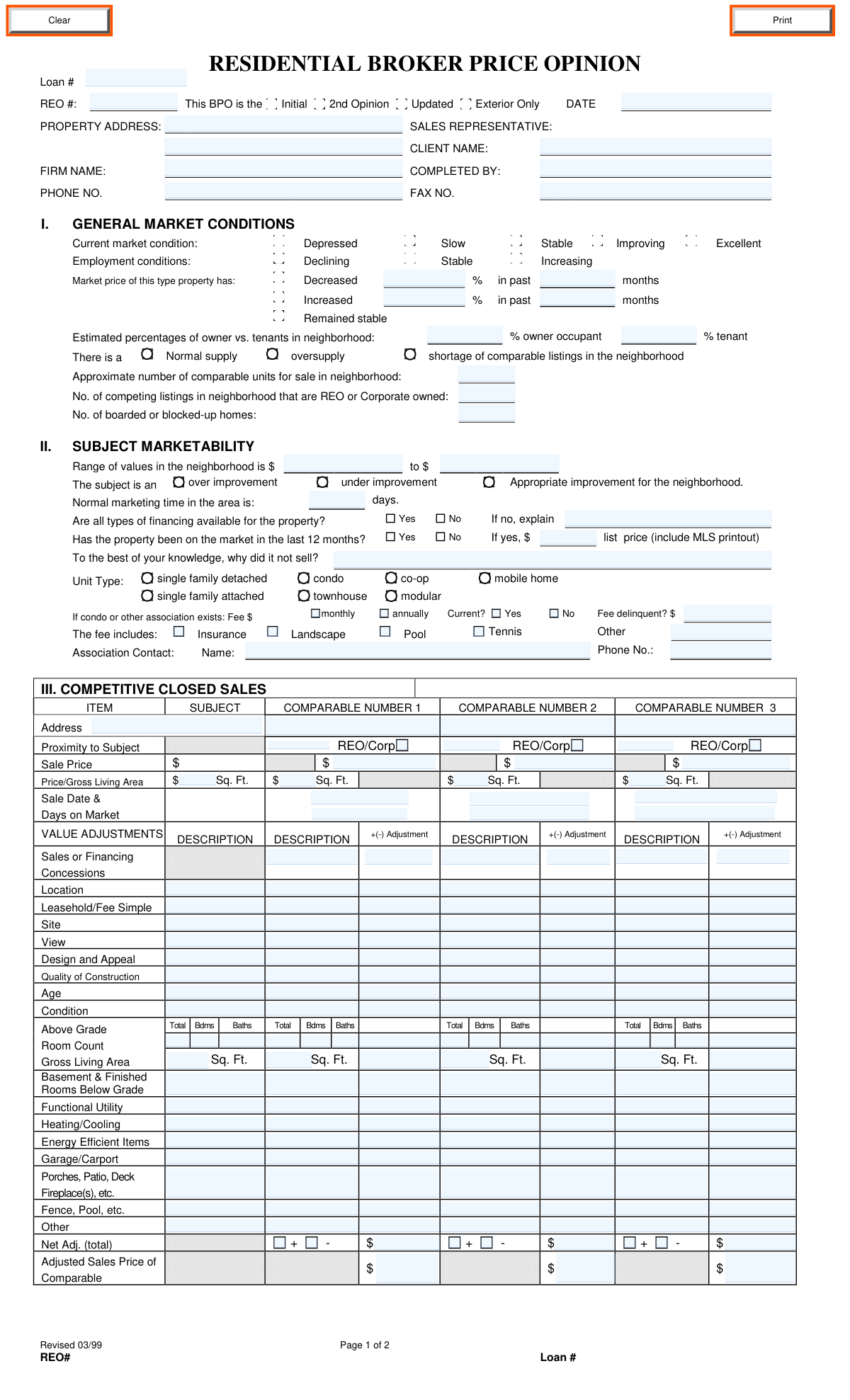
A Residential Broker Price Opinion (BPO) is a document prepared by a qualified real estate broker or agent to provide an estimated value of a property. It is often used by lenders, financial institutions, and asset managers for situations like foreclosures (REO), short sales, or loan modifications, as a quicker and less expensive alternative to a full appraisal. The form requires a detailed analysis of the subject property, local market conditions, and comparisons to similar sold and listed properties. Today, this form can be filled out quickly and accurately using AI-powered services like Instafill.ai, which can also convert non-fillable PDF versions into interactive fillable forms.
Residential BPO has a complex Form Complexity Index of 74/100 — 414 fillable fields across 2 pages. Instafill’s AI completes it accurately in under a minute.

Form specifications

Form name: Residential Broker Price Opinion
Number of fields: 455
Number of pages: 2
FCI: Complex (74/100)
Language: English
Our AI automatically handles information lookup, data retrieval, formatting, and form filling.
It takes less than a minute to fill out Residential BPO using our AI form filling.
Securely upload your data. Information is encrypted in transit and deleted immediately after the form is filled out.
Preview of Residential Broker Price Opinion

Instafill Demo: How to fill out PDF forms in seconds with AI

How to Fill Out Residential BPO Online for Free in 2026

Are you looking to fill out a RESIDENTIAL BPO form online quickly and accurately? Instafill.ai offers the #1 AI-powered PDF filling software of 2026, allowing you to complete your RESIDENTIAL BPO form in just 37 seconds or less.
Follow these steps to fill out your RESIDENTIAL BPO form online using Instafill.ai:
  1. 1 Navigate to Instafill.ai and upload or select the Residential Broker Price Opinion form.
  2. 2 Use the AI to pre-fill header information such as the property address, client name, your firm's details, and the date.
  3. 3 Complete the 'General Market Conditions' and 'Subject Marketability' sections by checking the appropriate boxes and entering data about neighborhood values and trends.
  4. 4 Input detailed information for at least three 'Competitive Closed Sales,' including property features, sale prices, and value adjustments.
  5. 5 Enter data for at least three 'Competitive Listings' to provide a current market snapshot, making necessary adjustments.
  6. 6 Itemize all recommended repairs and their estimated costs in the 'Repairs' section to determine the property's 'as-is' versus 'repaired' value.
  7. 7 Conclude by entering the suggested list prices and market values for different scenarios (As-Is, Repaired, Quick Sale), add final comments, and digitally sign the form before submission.

Our AI-powered system ensures each field is filled out correctly, reducing errors and saving you time.

Why Choose Instafill.ai for Your Fillable Residential BPO Form?

Speed

Complete your Residential BPO in as little as 37 seconds.

Up-to-Date

Always use the latest 2026 Residential BPO form version.

Cost-effective

No need to hire expensive lawyers.

Accuracy

Our AI performs 10 compliance checks to ensure your form is error-free.

Security

Your personal information is protected with bank-level encryption.

Frequently Asked Questions About Residential BPO

Residential BPO has a Form Complexity Index of 74 out of 100, placing it in the complex complexity tier. This score is calculated deterministically from the form’s own structure using Instafill’s published Form Complexity Index methodology, so it can be reproduced and independently verified — it is not a subjective estimate.

For Residential BPO specifically, the score reflects 414 fillable fields across 2 pages, grouped into 77 sections, and 25 conditional fields that only apply depending on earlier answers, 1 table or repeating lists. The number of fields is the largest factor in the base score (weighted 36%), followed by how difficult those fields are to complete based on their type, where free-text and signature fields count for more than simple checkboxes (26%). The number of pages that actually contain fields (15%), the amount of conditional “fill-only-if” logic (16%), and how many sections the form is divided into (7%) account for the rest of the base. On top of that base, the index adds points for tables and repeating lists, bundled instruction pages, and dense page layouts — capturing difficulty the base alone can miss.

In practical terms, a complex score means the form is demanding, with many fields, multiple pages and branching rules that are easy to get wrong. Instafill removes that effort entirely: our AI reads your information, maps each value to the correct field — including the conditional ones — and completes Residential BPO accurately in under a minute, with every field available for you to review before you download. See exactly how the Form Complexity Index is calculated.

This form is used by a real estate professional to provide an estimated value of a residential property. It is often requested by lenders, banks, or asset management companies for situations involving REO (Real Estate Owned) properties, foreclosures, or loan evaluations.

A licensed real estate sales representative or broker with knowledge of the local market completes this form. The person completing it provides their professional opinion on the property's value based on market data and analysis.

Section III, 'Competitive Closed Sales,' analyzes properties that have already sold to establish a baseline value. Section VI, 'Competitive Listings,' analyzes properties currently for sale to understand the present competition and market positioning.

The 'As-Is' value is the property's worth in its current state. The 'Repaired' value is its potential worth after making necessary repairs. The '30-Day Quick Sale' value is a lower, more aggressive price estimated to sell the property within one month.

You will need property details, data on at least three recent closed sales, information on three current comparable listings, and cost estimates for any necessary repairs. If the property was listed in the last year, you must also provide an MLS printout.

You should only itemize the costs for repairs needed to bring the property to an average, marketable condition for the neighborhood. Do not include costs for a full rehab unless that is the standard for all comparable properties in the area.

If comparable properties are scarce, you may need to expand your search criteria, such as distance or sale date, and make appropriate value adjustments. It is crucial to explain the lack of comparables and your reasoning in the 'Comments' section.

REO (Real Estate Owned) or corporate-owned properties often sell under different circumstances, sometimes at a discount, compared to traditional sales. Identifying them allows for a more accurate and fair comparison to the subject property if it is also an REO.

'Market Value' is your professional estimate of what the property is worth in the current market. 'Suggested List Price' is the strategic price you recommend to the client for listing the property, which may be slightly different to attract buyers.

Yes, services like Instafill.ai use AI to help you complete forms like this more efficiently. They can auto-fill fields with known data, reducing manual entry and saving you significant time.

If you have a non-fillable or 'flat' PDF, you can use a tool like Instafill.ai to convert it into an interactive, fillable form. This allows you to easily type your information into the fields and complete the report digitally.

Simply upload the BPO form to the Instafill.ai platform. The service will make the document interactive, and you can then use its AI-powered features to help auto-fill the required information before downloading or printing the completed form.

Use the 'Comments' section to provide context for your valuation that isn't captured elsewhere. This includes noting any encroachments, easements, flood zones, environmental concerns, or specific positive or negative property attributes.

Compliance Residential BPO
Validation Checks by Instafill.ai

1
Ensures Owner and Tenant Percentages Sum to 100%
This check verifies that the 'owner occupant' and 'tenant' percentage fields in the General Market Conditions section sum to exactly 100%. This is crucial for an accurate representation of the neighborhood's occupancy composition. If the sum is not 100%, the data is logically inconsistent and could lead to incorrect market analysis, so the form should prompt the user to correct the values.
2
Validates Market Price Trend Data Entry
This validation ensures that if the user selects that the market price has 'Increased' or 'Decreased', the corresponding percentage and month fields are filled out. Conversely, if 'Remained stable' is selected, these fields should be empty or disabled. This prevents incomplete data submission and ensures the trend information is quantifiable and useful for analysis.
3
Requires Explanation for Limited Financing Availability
This check enforces that if the user selects 'No' for 'Are all types of financing available for the property?', the 'If no, explain' text field must be completed. This context is critical for understanding potential hurdles in selling the property and accurately assessing its marketability. Failure to provide an explanation would leave a significant gap in the property's profile.
4
Requires Details for Prior Market Listing
This validation ensures that if 'Yes' is selected for 'Has the property been on the market in the last 12 months?', both the 'list price' and 'why did it not sell?' fields must be filled. This information is vital for understanding the property's recent history and potential pricing or condition issues. An incomplete entry would fail to provide the full context needed for the current valuation.
5
Validates Neighborhood Value Range Logic
This check verifies that the 'Range of values in the neighborhood' is logical, meaning the 'from' value must be less than or equal to the 'to' value. An inverted range is a clear data entry error that would make the field meaningless. This ensures the provided value range is coherent and usable for contextualizing the subject property's value.
6
Verifies Grand Total of Repair Costs
This validation calculates the sum of all individual repair cost fields in Section V and ensures it matches the value entered in the 'GRAND TOTAL FOR ALL REPAIRS' field. This is a critical cross-check to prevent mathematical errors and ensure the total repair estimate is accurate. A mismatch would indicate a calculation error and could lead to incorrect financial decisions based on the BPO.
7
Validates Adjusted Sales Price Calculation for Closed Sales
For each of the three 'Competitive Closed Sales', this check confirms that the 'Adjusted Sales Price of Comparable' is correctly calculated by verifying that 'Sale Price' plus or minus the 'Net Adj. (total)' equals the final adjusted price. This ensures the mathematical integrity of the comparable analysis, which is the foundation of the entire valuation. If the calculation is incorrect, the form should flag the error to the user.
8
Ensures Market Value Falls Within Adjusted Comparable Range
This validation checks that the final 'Market Value' in Section VI falls within the range of the 'Adjusted Sales Price of Comparable' values from Section III, as explicitly required by the form. This rule prevents the broker from providing a value that is not supported by the comparable sales data presented in the report. A value outside this range would trigger a warning, requiring justification.
9
Validates Report and Sale Date Formats
This check ensures that all date fields, such as the main 'DATE' and the 'Sale Date' for each comparable, are entered in a valid format (e.g., MM/DD/YYYY) and represent a plausible, non-future date. This maintains data consistency and prevents errors in time-sensitive calculations like Days on Market. An invalid date would corrupt the record and hinder analysis.
10
Verifies Price per Gross Living Area Calculation
For the subject and each comparable property, this check validates that the 'Price/Gross Living Area' is correctly calculated by dividing the 'Sale Price' (or 'List Price') by the 'Gross Living Area'. This ensures the per-unit metrics used for comparison are accurate, which is a key factor in comparing properties of different sizes. An incorrect value would require recalculation before submission.
11
Requires Association Details if Applicable
This validation ensures that if the 'Unit Type' is 'condo', 'co-op', or 'townhouse', the associated fee details (Fee amount, frequency, current status, contact info) are provided. These costs directly impact the property's affordability and value. Missing this information for an association-bound property would result in an incomplete and potentially misleading BPO.
12
Ensures Completeness of Header Information
This validation confirms that essential header fields like 'PROPERTY ADDRESS', 'CLIENT NAME', 'COMPLETED BY', and 'DATE' are not left blank. This information is fundamental for identifying the report, the subject property, and the responsible parties. A submission without this data would be unidentifiable and unusable, and should be blocked.
13
Validates Room Count Logic
This check ensures that for the subject and each comparable, the sum of 'Bdms' (bedrooms) and 'Baths' (bathrooms) is not greater than the 'Total' room count in the 'Above Grade Room Count' section. This provides a basic logical check on the property's physical characteristics. An illogical count would suggest a data entry error and require correction.
14
Cross-references REO/Corporate-owned Listings
This check validates consistency between the number of REO listings reported in Section I and the properties marked as REO/Corp in Sections III and VI. The 'No. of competing listings in neighborhood that are REO or Corporate owned' should align with the number of comparables checked as 'REO/Corp'. This ensures internal consistency in the report's market data.

Common Mistakes in Completing Residential BPO

Incorrect Calculation of Net Adjustments

This occurs when the sum of the individual positive and negative dollar adjustments in the comparable sales grid does not equal the 'Net Adj. (total)' amount. This is often a manual calculation error made under tight deadlines. An incorrect net adjustment leads to a flawed 'Adjusted Sales Price,' undermining the entire valuation and causing the BPO to be rejected. To avoid this, meticulously sum all adjustments and double-check the math; AI-powered tools like Instafill.ai can prevent this by performing these calculations automatically and ensuring accuracy.

Final Market Value Outside Comparable Range

The form explicitly states that the final 'Market Value' must fall within the indicated value of the Competitive Closed Sales. Agents sometimes provide a value based on a gut feeling that isn't supported by their own analysis, listing a value higher or lower than the adjusted sales prices of their comps. This is a major red flag for reviewers and can lead to immediate rejection of the report. Always ensure your final value is bracketed by the adjusted prices of your selected comparables.

Mismatched Repair Cost Grand Total

In Section V, the 'GRAND TOTAL FOR ALL REPAIRS' often does not match the sum of the itemized repair costs listed. This simple arithmetic mistake happens when costs are added, removed, or changed without updating the total. It signals a lack of attention to detail and can cause delays as the client must seek clarification on the true estimated cost of repairs. To prevent this, always recalculate the total after any changes to the itemized list, or use a tool that automatically sums the column.

Incomplete Conditional Information

Users frequently check a box but fail to provide the required follow-up information. For example, checking 'Yes' for 'Has the property been on the market in the last 12 months?' but leaving the 'list price' and 'why did it not sell?' fields blank. This leaves critical questions unanswered and forces the client to follow up, delaying the process. Ensure that for every 'Yes' or 'No' that triggers a subsequent field, that field is completed with the necessary details.

Illogical Valuation Progression

In Section VII, the values provided for 'AS IS', 'REPAIRED', and '30 DAY QUICK SALE' are sometimes illogical. For instance, the 'REPAIRED' value might be entered as less than the 'AS IS' value, or the '30 DAY QUICK SALE VALUE' might be higher than the standard 90-120 day market value. This indicates a data entry error or a fundamental misunderstanding of valuation principles. The 'Repaired' value should be higher than 'As-Is' (if repairs add value), and the 'Quick Sale' value should typically be lower to attract a faster sale.

Missing Justification for Adjustments

In the comparable sales grids (Sections III and VI), agents enter numerical dollar adjustments without providing any text in the corresponding 'DESCRIPTION' fields (e.g., for Location, Condition, Design). Without this qualitative justification, the adjustments appear arbitrary and unsubstantiated, making the BPO difficult to defend. Always provide a brief but clear description for every adjustment made to explain why it was necessary. AI form fillers like Instafill.ai can prompt users to fill these required descriptive fields.

Omitting Critical Loan or REO Identifiers

The 'Loan #' and 'REO #' at the top of both pages are the primary tracking numbers for the file. Leaving these blank is a common oversight, especially when rushing. Without these numbers, the BPO can be misfiled or delayed as the client's processing department struggles to match the report to the correct property file. Always double-check that these key identifiers are present and correct on both pages of the form.

Inconsistent Owner vs. Tenant Percentages

In Section I, the 'Estimated percentages of owner vs. tenants in neighborhood' fields must add up to 100%. It is a frequent mistake to enter numbers that do not, such as '70% owner' and '20% tenant'. This simple error raises questions about the accuracy of the agent's market analysis. Before submitting, verify that these two percentages sum correctly to 100%.

Ignoring Explicit Instructions on Repair Costs

The instructions for Section V clearly state, 'Do not include normal start up costs (trash-out, initial lawn maintenance, etc)'. However, agents often include these exact items in their repair list. This shows they have not read the instructions carefully and can lead to the BPO being returned for correction, as these costs are typically handled under a different budget. Focus only on repairs needed to bring the property to an average marketable condition.

Using Inconsistent Subject Property Data

An agent might list the subject property's Gross Living Area (GLA) as one number in the 'Competitive Closed Sales' grid (Section III) and a different number in the 'Competitive Listings' grid (Section VI). This inconsistency can happen from copying and pasting data from different sources or simple typos. It creates confusion and casts doubt on the reliability of all data in the report. Ensure all data points for the subject property, like GLA and room counts, are consistent throughout the entire form. Since this form is a non-fillable PDF, a tool like Instafill.ai can convert it to a smart, fillable version that can help maintain data consistency across sections.
Saved over 80 hours a year

“I was never sure if my IRS forms like W-9 were filled correctly. Now, I can complete the forms accurately without any external help.”

Kevin Martin Green

Your data stays secure with advanced protection from Instafill and our subprocessors

Robust compliance program

Transparent business model

You’re not the product. You always know where your data is and what it is processed for.

ISO 27001, HIPAA, and GDPR

Our subprocesses adhere to multiple compliance standards, including but not limited to ISO 27001, HIPAA, and GDPR.

Security & privacy by design

We consider security and privacy from the initial design phase of any new service or functionality. It’s not an afterthought, it’s built-in, including support for two-factor authentication (2FA) to further protect your account.

Fill out Residential BPO with Instafill.ai

Worried about filling PDFs wrong? Instafill securely fills residential-broker-price-opinion forms, ensuring each field is accurate.