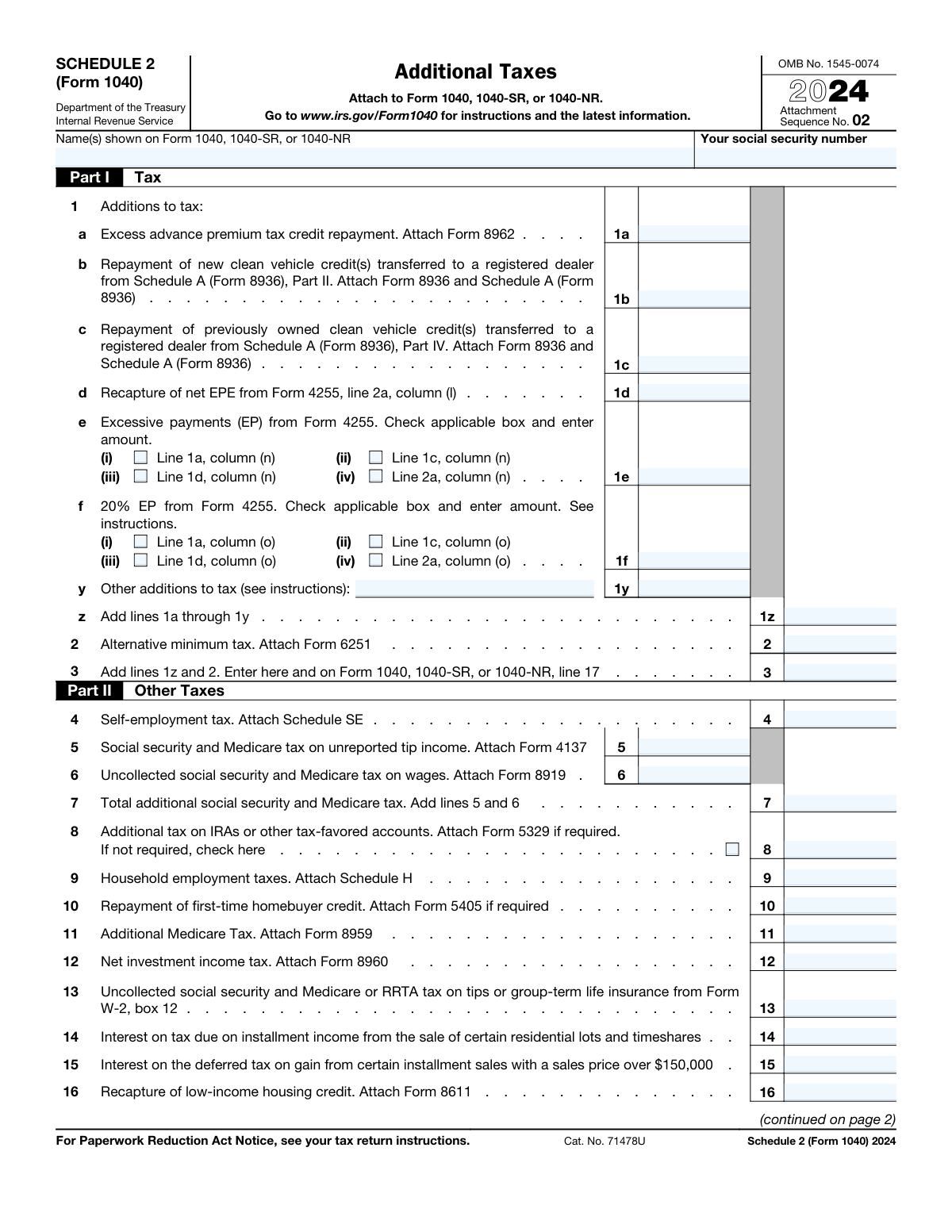
Yes! You can use AI to fill out Schedule 2 (Form 1040), Additional Taxes

IRS Schedule 2 (Form 1040) is a tax form used to report additional taxes that are not included in the standard calculation on Form 1040. This includes taxes such as the alternative minimum tax (AMT), self-employment tax, and repayments of certain tax credits. It ensures that all tax liabilities are accurately calculated and reported to the IRS. Today, this form can be filled out quickly and accurately using AI-powered services like Instafill.ai, which can also convert non-fillable PDF versions into interactive fillable forms.
Schedule 2 (Form 1040) has a moderate Form Complexity Index of 55/100 — 60 fillable fields across 2 pages. Instafill’s AI completes it accurately in under a minute.

Form specifications

Form name: Schedule 2 (Form 1040), Additional Taxes
Number of fields: 60
Number of pages: 2
FCI: Moderate (55/100)
Language: English
Our AI automatically handles information lookup, data retrieval, formatting, and form filling.
It takes less than a minute to fill out Schedule 2 (Form 1040) using our AI form filling.
Securely upload your data. Information is encrypted in transit and deleted immediately after the form is filled out.
Preview of Schedule 2 (Form 1040), Additional Taxes

Instafill Demo: How to fill out PDF forms in seconds with AI

How to Fill Out Schedule 2 (Form 1040) Online for Free in 2026

Are you looking to fill out a SCHEDULE 2 (FORM 1040) form online quickly and accurately? Instafill.ai offers the #1 AI-powered PDF filling software of 2026, allowing you to complete your SCHEDULE 2 (FORM 1040) form in just 37 seconds or less.
Follow these steps to fill out your SCHEDULE 2 (FORM 1040) form online using Instafill.ai:
  1. 1 Navigate to Instafill.ai and upload or select the Schedule 2 (Form 1040) from their form library.
  2. 2 Provide your personal information, including your name and Social Security Number, exactly as it appears on your Form 1040, 1040-SR, or 1040-NR.
  3. 3 In Part I, enter any applicable additions to tax, such as the alternative minimum tax from Form 6251 or excess advance premium tax credit repayment from Form 8962.
  4. 4 Complete Part II by reporting other taxes you owe, including self-employment tax from Schedule SE, household employment taxes from Schedule H, and net investment income tax from Form 8960.
  5. 5 Address any other specific taxes in Part II, such as recapture of credits or additional taxes on IRAs, referencing the required supporting forms.
  6. 6 Allow the AI to automatically calculate the totals for Part I and Part II, and then review the final combined total for accuracy.
  7. 7 Download the completed Schedule 2 and attach it to your main tax return (Form 1040, 1040-SR, or 1040-NR) before filing.

Our AI-powered system ensures each field is filled out correctly, reducing errors and saving you time.

Why Choose Instafill.ai for Your Fillable Schedule 2 (Form 1040) Form?

Speed

Complete your Schedule 2 (Form 1040) in as little as 37 seconds.

Up-to-Date

Always use the latest 2026 Schedule 2 (Form 1040) form version.

Cost-effective

No need to hire expensive lawyers.

Accuracy

Our AI performs 10 compliance checks to ensure your form is error-free.

Security

Your personal information is protected with bank-level encryption.

Frequently Asked Questions About Schedule 2 (Form 1040)

Schedule 2 (Form 1040) has a Form Complexity Index of 55 out of 100, placing it in the moderate complexity tier. This score is calculated deterministically from the form’s own structure using Instafill’s published Form Complexity Index methodology, so it can be reproduced and independently verified — it is not a subjective estimate.

For Schedule 2 (Form 1040) specifically, the score reflects 60 fillable fields across 2 pages, grouped into 45 sections, and 8 conditional fields that only apply depending on earlier answers. The number of fields is the largest factor in the base score (weighted 36%), followed by how difficult those fields are to complete based on their type, where free-text and signature fields count for more than simple checkboxes (26%). The number of pages that actually contain fields (15%), the amount of conditional “fill-only-if” logic (16%), and how many sections the form is divided into (7%) account for the rest of the base. On top of that base, the index adds points for tables and repeating lists, bundled instruction pages, and dense page layouts — capturing difficulty the base alone can miss.

In practical terms, a moderate score means the form takes real effort: there are enough fields, pages and rules that errors are easy to make by hand. Instafill removes that effort entirely: our AI reads your information, maps each value to the correct field — including the conditional ones — and completes Schedule 2 (Form 1040) accurately in under a minute, with every field available for you to review before you download. See exactly how the Form Complexity Index is calculated.

Schedule 2 is used to report additional taxes that are not calculated on the main Form 1040. This includes the Alternative Minimum Tax (AMT), self-employment tax, and repayments for certain tax credits.

You must file Schedule 2 if you owe specific taxes listed on the form, such as self-employment tax, additional tax on an IRA, or household employment taxes. If none of the situations on the form apply to you, you do not need to file it.

Part I is used to report the Alternative Minimum Tax (AMT) and certain tax credit repayments. Part II is used for a broader category of 'Other Taxes,' such as self-employment tax, Additional Medicare Tax, and household employment taxes.

You first calculate your self-employment tax on Schedule SE. The total amount from Schedule SE is then entered on Schedule 2, Part II, line 4.

The AMT is a separate tax calculation to ensure certain taxpayers with high economic income pay a minimum amount of tax. If you are subject to AMT, you must calculate it using Form 6251 and enter the result on line 2.

You must repay the credit if you received more advance payments for your Health Insurance Marketplace plan than you were eligible for based on your final yearly income. This repayment amount is calculated on Form 8962 and entered on line 1a.

Yes, if you paid a household employee and owe employment taxes, you must file Schedule H. The total tax from Schedule H is then reported on line 9 of Schedule 2.

This is typically a penalty for taking an early withdrawal from your IRA or other tax-favored account before age 59½. You may need to file Form 5329 to calculate this tax and report it on line 8.

The total from Part I (line 3) is entered on Form 1040, line 17. The total from Part II (line 21) is entered on Form 1040, line 23.

No, you only need to attach the specific forms that correspond to the taxes you are reporting. For example, if you report AMT on line 2, you must attach Form 6251.

This is a 3.8% tax on investment income for individuals, estates, and trusts with income above certain thresholds. You must attach Form 8960 if you are subject to this tax.

Yes, services like Instafill.ai use AI to auto-fill form fields accurately and save time. This is especially useful for Schedule 2, as it pulls data from many other tax forms.

Simply upload the Schedule 2 PDF to the Instafill.ai platform. The AI will make the form fillable online, and you can use its features to auto-fill information from your other tax documents quickly.

You can use a service like Instafill.ai to solve this problem. Upload the flat PDF, and the platform will automatically convert it into an interactive, fillable form that you can complete and sign electronically.

Compliance Schedule 2 (Form 1040)
Validation Checks by Instafill.ai

1
Validates Social Security Number Format and Presence
This check ensures that the 'Your social security number' field is not empty and that the value provided is in a valid Social Security Number (SSN) format, such as XXX-XX-XXXX or XXXXXXXXX. This is critical for correctly associating the schedule with the taxpayer's main Form 1040 and their IRS record. A missing or malformed SSN will cause the form to be rejected or delayed during processing.
2
Verifies Calculation of Total Additions to Tax (Line 1z)
This validation confirms that the amount on Line 1z is the correct mathematical sum of all preceding lines in Part I (lines 1a through 1y). Accurate calculation is essential for determining the correct subtotal of additional taxes before including the Alternative Minimum Tax. An error here will lead to an incorrect total tax liability on Line 3 and the main tax return.
3
Verifies Calculation of Total Tax for Part I (Line 3)
This check ensures the value on Line 3 is the correct sum of Line 1z (Total Additions to Tax) and Line 2 (Alternative Minimum Tax). This total is a key figure that must be transferred to the main Form 1040, 1040-SR, or 1040-NR. An incorrect sum will result in an inaccurate tax liability calculation on the primary tax form.
4
Verifies Calculation of Total Other Taxes (Line 21)
This validation confirms that the amount on Line 21 is the correct sum of lines 4, 7 through 16, 18, and 19. This represents the final total of 'Other Taxes' calculated on this schedule, which is then carried over to the main Form 1040. A miscalculation will cause a discrepancy on the main return and an incorrect final tax assessment.
5
Ensures Attachment of Form 8962 for Line 1a
This check verifies that if a monetary value greater than zero is entered on Line 1a for 'Excess advance premium tax credit repayment,' the corresponding Form 8962 is attached to the submission. The IRS requires the supporting form to validate the calculated repayment amount. Failure to attach the required form will result in processing delays and correspondence from the IRS requesting the missing documentation.
6
Ensures Attachment of Form 6251 for Line 2
This validation confirms that if an amount is entered on Line 2 for 'Alternative minimum tax,' the required Form 6251 is included with the tax filing. The AMT calculation is complex and must be detailed on its specific form. Submitting an amount on Line 2 without the supporting Form 6251 will lead to an incomplete return and require follow-up action from the taxpayer.
7
Ensures Attachment of Schedule SE for Line 4
This check ensures that if a value is present on Line 4 for 'Self-employment tax,' the corresponding Schedule SE is attached. Schedule SE is used to calculate the self-employment tax due, and its presence is mandatory to substantiate the amount claimed. Missing this schedule will result in an incomplete filing and likely an adjustment to the tax due.
8
Validates Logical Consistency of Line 8
This check enforces the rule for Line 8, 'Additional tax on IRAs.' If a monetary amount is entered, the 'If not required, check here' box must be unchecked, and Form 5329 should be attached. Conversely, if the box is checked, the monetary amount on Line 8 must be zero or blank. This prevents contradictory information and ensures the filing is logical and processed correctly.
9
Validates Exclusive Checkbox Selection for Line 1e
This check ensures that if an amount is entered on Line 1e for 'Excessive payments (EP) from Form 4255,' then exactly one of the four associated checkboxes (i, ii, iii, or iv) is selected. This selection is necessary to specify the source of the amount from Form 4255. Failure to select one and only one box makes the entry ambiguous and will halt processing.
10
Validates Exclusive Checkbox Selection for Line 1f
This validation confirms that if a value is entered on Line 1f for the '20% EP from Form 4255,' then one and only one of the corresponding checkboxes (i, ii, iii, or iv) is marked. This indicates the specific line and column from Form 4255 where the surcharge originates. An entry without a single, clear selection is incomplete and will require clarification.
11
Ensures Completeness of Line 17a (Recapture of Other Credits)
This check verifies that if a monetary amount is entered on Line 17a, the accompanying text fields for 'type' and 'form number' are also filled in. This descriptive information is required for the IRS to understand the nature of the recaptured credit. An amount without a description is insufficient and will likely trigger a notice requesting more information.
12
Ensures Completeness of Line 17z (Any Other Taxes)
This validation ensures that if an amount is entered on Line 17z, the corresponding 'List type and amount' text field is also completed. This catch-all line requires a specific description of the tax being reported for it to be valid. Submitting an amount without this explanation will result in an incomplete form and require taxpayer clarification.
13
Cross-Form Consistency Check for Line 3
This validation verifies that the total tax amount calculated on Schedule 2, Line 3, exactly matches the amount entered on the corresponding line of the main tax form (Line 17 of Form 1040, 1040-SR, or 1040-NR). This ensures the integrity of the entire tax return by confirming that subtotals are transferred correctly between forms. A mismatch indicates a calculation or transcription error that must be corrected for the return to be accurate.
14
Cross-Form Consistency Check for Line 21
This check confirms that the total 'Other Taxes' amount from Schedule 2, Line 21, is correctly transferred to the main tax form (Line 23 of Form 1040/1040-SR or Line 23b of Form 1040-NR). This is a critical final check to ensure the tax liability from this schedule is properly included in the taxpayer's overall tax calculation. Any discrepancy will lead to an incorrect total tax and potential penalties.

Common Mistakes in Completing Schedule 2 (Form 1040)

Failure to Attach Supporting Forms

Many lines on Schedule 2, such as those for Alternative Minimum Tax (Line 2) or Self-Employment Tax (Line 4), require an accompanying form (e.g., Form 6251, Schedule SE). Taxpayers often enter the tax amount but forget to include the detailed supporting schedule with their return. This omission will trigger an IRS notice requesting the missing form, delaying tax processing and any potential refund. To avoid this, carefully review each line's instructions and ensure every required form is attached to your main 1040 filing.

Data Transcription Error from Supporting Forms

Schedule 2 is primarily a summary form, with most amounts calculated on other schedules like Form 8962 (Premium Tax Credit) or Form 6251 (AMT). A common mistake is incorrectly transcribing the final calculated amount from the supporting form to the corresponding line on Schedule 2. This simple typo can lead to an incorrect tax assessment, resulting in an overpayment or an underpayment notice from the IRS. If working with a non-fillable PDF, tools like Instafill.ai can convert it to a fillable version to reduce manual entry and help catch transcription errors.

Arithmetic Errors on Total Lines

Simple addition mistakes are common on summary lines like Line 3 (Total Additions to Tax) and Line 21 (Total Other Taxes). Line 21 is particularly prone to error as it requires adding specific, non-sequential lines from Part II. These calculation errors result in an incorrect total tax liability on Form 1040, causing processing delays and requiring amendments. Using tax software or an AI-powered tool like Instafill.ai, which performs calculations automatically, can eliminate these manual errors.

Missing Penalty on Early Retirement Withdrawals

Taxpayers who take an early distribution from an IRA or other tax-favored account often forget to account for the 10% additional tax penalty. They may fail to complete Form 5329 or neglect to carry the penalty amount over to Schedule 2, Line 8. This error leads to an underpayment of tax and an inevitable correction notice from the IRS. Always verify if distributions are subject to this penalty and report it correctly on Form 5329.

Overlooking Household Employment Taxes

Many people who pay individuals for household work (like nannies, senior care, or cleaning services) don't realize they are considered household employers. They consequently fail to file Schedule H and report the associated employment taxes on Schedule 2, Line 9. This non-compliance can lead to back taxes, penalties, and interest. If you paid a household employee over the annual threshold, you must file Schedule H.

Ignoring Uncollected Tax on Form W-2

Form W-2, Box 12 can contain codes (specifically 'A' for uncollected Social Security tax on tips or 'M' for uncollected tax on group-term life insurance) that require action. Taxpayers frequently overlook these codes and fail to report the owed tax on Schedule 2, Line 13. The IRS computer systems will automatically flag this discrepancy, leading to a notice for underreported tax. Always scrutinize every box on your W-2 for items that need to be transferred to your tax return.

Failing to Report Net Investment Income Tax (NIIT)

Taxpayers with higher incomes and significant investment income (like interest, dividends, or capital gains) may not be aware of the 3.8% Net Investment Income Tax. They subsequently fail to complete Form 8960 and report the tax on Schedule 2, Line 12. This is a major compliance issue that can result in a substantial tax bill, plus penalties and interest, upon IRS review. Be sure to assess your NIIT liability if your modified adjusted gross income exceeds the applicable threshold.

Incorrectly Reporting Self-Employment Tax

Individuals with freelance, gig, or small business income often misunderstand their tax obligations, leading them to either miscalculate their self-employment tax on Schedule SE or forget to report it entirely on Line 4. This can result in significant underpayment of taxes, penalties, and interest. To prevent this, ensure you accurately calculate your net earnings from self-employment and use Schedule SE to determine the correct tax amount.

Misunderstanding Alternative Minimum Tax (AMT)

Certain high-income taxpayers may not realize that various deductions or income types can trigger the Alternative Minimum Tax (AMT). This leads to a failure to complete the complex Form 6251 and report the resulting tax on Schedule 2, Line 2. The IRS will recalculate the tax owed, which can result in a large, unexpected tax bill and penalties. It is crucial to understand the AMT triggers and perform the calculation if your income is near the threshold.

Inconsistent Name or SSN with Form 1040

A seemingly minor but critical error is entering a name or Social Security Number on the top of Schedule 2 that does not exactly match the information on the primary Form 1040. This can happen with typos, using nicknames, or in cases of a recent name change. This mismatch causes the IRS processing system to reject the schedule, delaying the entire tax return and any associated refund. Always ensure identifying information is identical across all filed forms and schedules.
Saved over 80 hours a year

“I was never sure if my IRS forms like W-9 were filled correctly. Now, I can complete the forms accurately without any external help.”

Kevin Martin Green

Your data stays secure with advanced protection from Instafill and our subprocessors

Robust compliance program

Transparent business model

You’re not the product. You always know where your data is and what it is processed for.

ISO 27001, HIPAA, and GDPR

Our subprocesses adhere to multiple compliance standards, including but not limited to ISO 27001, HIPAA, and GDPR.

Security & privacy by design

We consider security and privacy from the initial design phase of any new service or functionality. It’s not an afterthought, it’s built-in, including support for two-factor authentication (2FA) to further protect your account.

Fill out Schedule 2 (Form 1040) with Instafill.ai

Worried about filling PDFs wrong? Instafill securely fills schedule-2-form-1040-additional-taxes forms, ensuring each field is accurate.