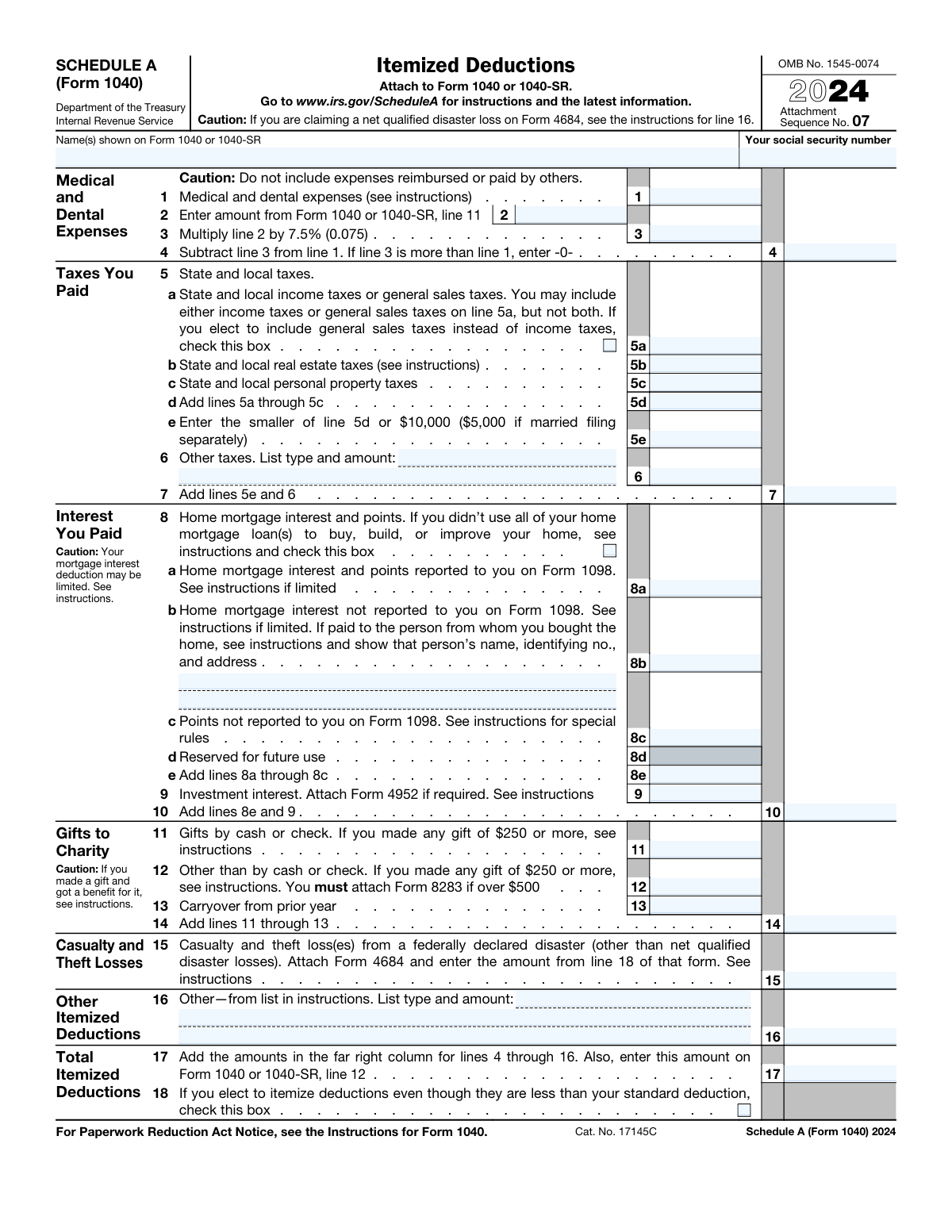
Yes! You can use AI to fill out Schedule A (Form 1040), Itemized Deductions

Schedule A (Form 1040) is an Internal Revenue Service (IRS) form attached to Form 1040 that allows U.S. taxpayers to claim itemized deductions instead of the standard deduction. Taxpayers list expenses such as medical costs, state and local taxes, home mortgage interest, and charitable gifts to potentially lower their overall tax liability. It is beneficial to itemize if the total of these deductions is greater than the standard deduction amount for your filing status. Today, this form can be filled out quickly and accurately using AI-powered services like Instafill.ai, which can also convert non-fillable PDF versions into interactive fillable forms.

Form specifications

Form name: Schedule A (Form 1040), Itemized Deductions
Number of fields: 39
Number of pages: 1
Language: English
Our AI automatically handles information lookup, data retrieval, formatting, and form filling.
It takes less than a minute to fill out Schedule A (Form 1040) using our AI form filling.
Securely upload your data. Information is encrypted in transit and deleted immediately after the form is filled out.
Preview of Schedule A (Form 1040), Itemized Deductions

Instafill Demo: How to fill out PDF forms in seconds with AI

How to Fill Out Schedule A (Form 1040) Online for Free in 2026

Are you looking to fill out a SCHEDULE A (FORM 1040) form online quickly and accurately? Instafill.ai offers the #1 AI-powered PDF filling software of 2026, allowing you to complete your SCHEDULE A (FORM 1040) form in just 37 seconds or less.
Follow these steps to fill out your SCHEDULE A (FORM 1040) form online using Instafill.ai:
  1. 1 Navigate to Instafill.ai and upload your Schedule A (Form 1040) or select it from the template library.
  2. 2 Provide your personal identification details, such as your name and Social Security Number, which the AI can use to populate the header section.
  3. 3 Follow the AI-guided prompts to enter your expenses for each deduction category, including medical and dental expenses, taxes you paid, home mortgage interest, and gifts to charity.
  4. 4 Upload any necessary supporting documents, such as Form 1098 for mortgage interest or receipts for charitable donations, allowing the AI to help extract relevant figures.
  5. 5 Allow the AI to perform all necessary calculations, such as the AGI limitation for medical expenses and the cap on state and local taxes, ensuring accuracy.
  6. 6 Review the auto-filled Schedule A for correctness, verify all calculated totals, and make any final adjustments before completion.
  7. 7 Download the completed Schedule A, ready to be attached to your Form 1040 or 1040-SR for filing with the IRS.

Our AI-powered system ensures each field is filled out correctly, reducing errors and saving you time.

Why Choose Instafill.ai for Your Fillable Schedule A (Form 1040) Form?

Speed

Complete your Schedule A (Form 1040) in as little as 37 seconds.

Up-to-Date

Always use the latest 2026 Schedule A (Form 1040) form version.

Cost-effective

No need to hire expensive lawyers.

Accuracy

Our AI performs 10 compliance checks to ensure your form is error-free.

Security

Your personal information is protected with bank-level encryption.

Frequently Asked Questions About Schedule A (Form 1040)

Schedule A is used to report your itemized deductions, such as medical expenses, certain taxes, home mortgage interest, and charitable gifts. Filing this form may allow you to lower your taxable income more than the standard deduction would.

You should file Schedule A if your total itemized deductions are greater than the standard deduction for your filing status. Calculating both is the best way to determine which option provides a greater tax benefit.

The deduction for all state and local taxes (SALT), including property, income, and sales taxes combined, is capped at $10,000 per household per year. If you are married filing separately, the limit is $5,000.

No, you must choose to deduct either your state and local income taxes or your state and local general sales taxes on line 5a. You cannot deduct both, so you should calculate which one gives you a larger deduction.

You can only deduct the amount of your medical and dental expenses that exceeds 7.5% of your Adjusted Gross Income (AGI), which is found on line 11 of your Form 1040. You cannot deduct expenses that were reimbursed by insurance or others.

You will need records for all expenses you intend to deduct, such as Form 1098 for mortgage interest, receipts for medical bills and charitable donations, and property tax statements. Keeping organized records throughout the year is essential.

Mortgage interest reported to you by your lender on Form 1098 goes on line 8a. If you paid mortgage interest that was not reported on a Form 1098, such as in a seller-financed deal, you would report it on line 8b.

For any single cash or non-cash gift of $250 or more, you need a written acknowledgment from the charity. If your total non-cash contributions exceed $500, you must also attach Form 8283.

This is an uncommon choice, but some taxpayers may be required to itemize or may find it beneficial for their state tax return. Checking this box indicates you are intentionally choosing to itemize even though it results in a smaller deduction on your federal return.

The total amount of your itemized deductions, calculated on line 17 of Schedule A, is entered on line 12 of your Form 1040 or 1040-SR.

Yes, services like Instafill.ai use AI to accurately auto-fill form fields from your documents, which can save time and reduce errors. This is useful for pulling numbers from your Form 1098, tax receipts, and other financial records.

You can use a service like Instafill.ai to fill out your Schedule A online. Simply upload the PDF, and the platform's AI will help you populate the fields quickly and accurately before you download or print it.

If you have a non-fillable or 'flat' PDF, you can use a tool like Instafill.ai. It can convert the static PDF into an interactive, fillable form that you can complete easily on your computer.

Compliance Schedule A (Form 1040)
Validation Checks by Instafill.ai

1
Validates Social Security Number Format
This check ensures that the 'Your social security number' field contains a 9-digit number, correctly formatted as XXX-XX-XXXX or XXXXXXXXX. It prevents data entry errors and ensures the number is structurally valid for processing. A failure would lead to rejection of the form, as the taxpayer cannot be correctly identified by the IRS.
2
Verifies Medical Expense Deduction Calculation (Line 4)
This validation confirms that the amount on Line 4 is correctly calculated by subtracting Line 3 (AGI threshold) from Line 1 (medical expenses). It also enforces the rule that if Line 3 is greater than Line 1, the result must be zero, not a negative number. Incorrect calculation could lead to an improper deduction amount, resulting in tax miscalculation and potential penalties.
3
Confirms AGI Threshold Calculation (Line 3)
This check verifies that the value on Line 3 is exactly 7.5% (0.075) of the amount on Line 2 (Adjusted Gross Income). This calculation is a critical step in determining the deductible portion of medical expenses. An error here would cascade to Line 4, causing the final medical deduction to be incorrect.
4
Verifies Total State and Local Taxes Sum (Line 5d)
This validation ensures that the amount on Line 5d is the precise sum of the amounts entered on lines 5a, 5b, and 5c. This is a basic arithmetic check to prevent simple addition errors that would affect subsequent calculations. Failure to correctly sum these values would lead to an incorrect tax deduction limit on line 5e.
5
Enforces State and Local Tax Deduction Limit (Line 5e)
This check confirms that the value on Line 5e is the smaller of Line 5d or the statutory limit, which is $10,000 ($5,000 for married filing separately). This is a crucial rule-based validation to prevent taxpayers from claiming more than the law allows for state and local taxes. Claiming an amount over this limit would result in an overstatement of deductions and an incorrect tax liability.
6
Verifies Total Taxes Paid Calculation (Line 7)
This check ensures that the amount on Line 7 is the correct sum of Line 5e (the limited state and local tax deduction) and Line 6 (other taxes). This calculation provides the total tax deduction amount. An incorrect sum would misrepresent the total tax deduction and affect the final itemized deduction total on Line 17.
7
Confirms Total Mortgage Interest Calculation (Line 8e)
This validation verifies that the amount on Line 8e is the sum of lines 8a, 8b, and 8c, which represent different categories of home mortgage interest. This ensures all components of the mortgage interest deduction are correctly totaled before being included in the next calculation. An error here would lead to an incorrect total interest deduction on Line 10.
8
Verifies Total Gifts to Charity Calculation (Line 14)
This check ensures that the amount on Line 14 is the correct sum of lines 11 (cash gifts), 12 (non-cash gifts), and 13 (carryover from prior year). This provides the total charitable contribution for the year. An arithmetic error would lead to an incorrect charitable deduction and an inaccurate total itemized deduction.
9
Flags Requirement for Form 8283 Attachment
This validation checks if the amount on Line 12 (non-cash gifts) is greater than $500. If it is, the system flags that Form 8283, Noncash Charitable Contributions, must be attached to the return. This is important because the IRS requires this specific form to substantiate large non-cash donations, and its absence can lead to the disallowance of the deduction.
10
Flags Requirement for Form 4684 Attachment
This check verifies if a positive value is entered on Line 15 for casualty and theft losses. If an amount is present, the system flags that Form 4684, Casualties and Thefts, must be attached. This is a mandatory documentation requirement, and failing to attach the required form will result in the denial of the claimed loss deduction.
11
Verifies Grand Total Itemized Deduction Calculation (Line 17)
This is a critical final check that validates the amount on Line 17 is the sum of the amounts from lines 4, 7, 10, 14, 15, and 16. This represents the taxpayer's total itemized deductions, which is a key figure transferred to the main Form 1040. An error in this final summation would directly cause an incorrect tax liability calculation.
12
Ensures Completeness of 'Other' Deduction Fields (Lines 6 & 16)
This validation checks that if a monetary amount is entered on Line 6 or Line 16, a corresponding text description of the tax or deduction type is also provided. This ensures the form is complete and provides the necessary context for the claimed deduction. A missing description can trigger IRS inquiries or delays in processing the return.
13
Cross-Form AGI Consistency Check (Line 2)
This validation ensures the Adjusted Gross Income (AGI) entered on Schedule A, Line 2, exactly matches the AGI reported on Form 1040, Line 11. This is a critical consistency check, as the AGI is the basis for calculating the medical expense deduction threshold. A mismatch indicates a data transfer error or inconsistency that would invalidate the medical deduction calculation.
14
Validates Itemization Election Logic (Line 18)
This check compares the total itemized deductions on Line 17 with the taxpayer's applicable standard deduction amount (based on filing status). If the itemized total is less than the standard deduction, the system verifies that the checkbox on Line 18 is checked to confirm the taxpayer's intent to itemize. This prevents an unintentional reduction in the taxpayer's overall deduction and ensures their choice is explicitly recorded.
15
Cross-Form Name and SSN Consistency
This validation confirms that the taxpayer name and Social Security Number on Schedule A match the information on the associated Form 1040 or 1040-SR. This is a fundamental check to ensure the schedule is correctly associated with the primary tax return. A mismatch would cause the form to be rejected or processed incorrectly, potentially delaying a refund or creating other filing issues.

Common Mistakes in Completing Schedule A (Form 1040)

Miscalculating the Medical Expense Deduction

Taxpayers often make errors calculating the 7.5% Adjusted Gross Income (AGI) threshold on line 3 or incorrectly subtracting it from their total medical expenses on line 4. This happens due to manual math mistakes or misunderstanding how the AGI limit works, leading to an incorrect deduction amount and potential IRS notices. To avoid this, double-check your AGI from Form 1040, line 11, and use a calculator for the percentage. AI-powered tools like Instafill.ai can perform these calculations automatically, ensuring accuracy and preventing common arithmetic errors.

Including Reimbursed Medical Expenses

The instructions for line 1 clearly state not to include medical expenses that were reimbursed by insurance, an employer, or others. However, people often forget to subtract these reimbursements from their total out-of-pocket costs, leading to an inflated and incorrect deduction. This overstatement can be easily caught by the IRS and will result in a reduced deduction and potential underpayment penalties. Always track both your total expenses and any reimbursements received during the year.

Exceeding the State and Local Tax (SALT) Deduction Limit

A frequent error is entering the total state and local taxes from line 5d directly into the final calculation without applying the cap on line 5e. The law limits the total state and local tax (SALT) deduction to $10,000 per household ($5,000 if married filing separately). Claiming more than the allowed limit will result in an incorrect total deduction, which the IRS will correct, potentially leading to a balance due with interest. Always enter the smaller of your total taxes or the $10,000/$5,000 limit on line 5e.

Improperly Deducting Both Sales and Income Taxes

On line 5a, taxpayers must choose to deduct either their state and local income taxes or their state and local general sales taxes, but not both. People sometimes mistakenly add them together or forget to check the box if electing sales tax, which can overstate their deduction and trigger an IRS review. You should calculate both amounts and choose the larger of the two to maximize your deduction, ensuring you only enter one of them on line 5a.

Incorrectly Deducting Home Mortgage Interest

Taxpayers can only deduct interest on home acquisition debt, which is a mortgage used to buy, build, or substantially improve a qualified home. A common mistake is deducting interest from a home equity loan or cash-out refinance that was used for other purposes, like paying off credit cards or buying a car. This can lead to a disallowed deduction and penalties during an audit. Carefully review how loan proceeds were used and check the box on line 8 if necessary.

Forgetting to Attach Required Supporting Forms

Schedule A often requires other forms to be attached to substantiate certain deductions, such as Form 8283 for non-cash charitable gifts over $500 or Form 4684 for casualty losses. Forgetting to include these mandatory attachments is a major red flag that can cause processing delays or the automatic disallowance of the related deduction. Always read the line instructions carefully to see if another form is required.

Claiming Charitable Gifts Without Proper Documentation

The IRS has strict documentation rules for charitable contributions, especially for single cash or non-cash gifts of $250 or more. A common error is claiming these deductions without obtaining a contemporaneous written acknowledgment from the charity, which is required. Without this proof, the deduction can be disallowed entirely in an audit. Always secure and file receipts for all donations, especially those over the $250 threshold.

Claiming Ineligible Casualty and Theft Losses

A significant point of confusion is the casualty and theft loss deduction on line 15, which is now limited almost exclusively to losses occurring in a federally declared disaster area. Many people mistakenly try to claim losses from personal events like a minor car accident or local storm damage that do not qualify. This will lead to the deduction being denied. Ensure your loss is attributable to a federally declared disaster before claiming it on Form 4684 and Schedule A.

Mismatching Name or SSN with the Main Form 1040

A simple but disruptive error is entering a name or Social Security Number on Schedule A that does not exactly match the information on the attached Form 1040 or 1040-SR. This can happen due to typos or if one spouse's information is entered when filing jointly under the other's name first. Such a mismatch can cause automated processing rejections, delaying your refund and requiring correspondence with the IRS to resolve. Using a form-filling tool like Instafill.ai can prevent this by populating consistent information across all related tax forms.

Arithmetic Errors When Totaling Deductions

Manually adding up the various deduction amounts on line 17 is a common source of error. A simple miscalculation can lead to an incorrect total itemized deduction, which then carries over to the main Form 1040 and affects your final tax liability. This can result in either overpaying your taxes or underpaying and facing a notice from the IRS. If the form is a non-fillable PDF, a tool like Instafill.ai can convert it to a fillable version with automated calculations to ensure accuracy.
Saved over 80 hours a year

“I was never sure if my IRS forms like W-9 were filled correctly. Now, I can complete the forms accurately without any external help.”

Kevin Martin Green

Your data stays secure with advanced protection from Instafill and our subprocessors

Robust compliance program

Transparent business model

You’re not the product. You always know where your data is and what it is processed for.

ISO 27001, HIPAA, and GDPR

Our subprocesses adhere to multiple compliance standards, including but not limited to ISO 27001, HIPAA, and GDPR.

Security & privacy by design

We consider security and privacy from the initial design phase of any new service or functionality. It’s not an afterthought, it’s built-in, including support for two-factor authentication (2FA) to further protect your account.

Fill out Schedule A (Form 1040) with Instafill.ai

Worried about filling PDFs wrong? Instafill securely fills schedule-a-form-1040-itemized-deductions forms, ensuring each field is accurate.