
Instafill.ai
7 days free
AI form filling · 106 fields · 2 pages · done in seconds

Yes! You can use AI to fill out Schedule C (Form 1040), Profit or Loss From Business

Don't type 106 fields by hand. Tell our AI about yourself, or upload your W-2 or last year's return, and it fills every field in seconds. You check it, then download, print or sign.
7 days free, then $19.99/month · Cancel anytime
AI fills it, no typingEncrypted, never used to train AICancel in two clicks
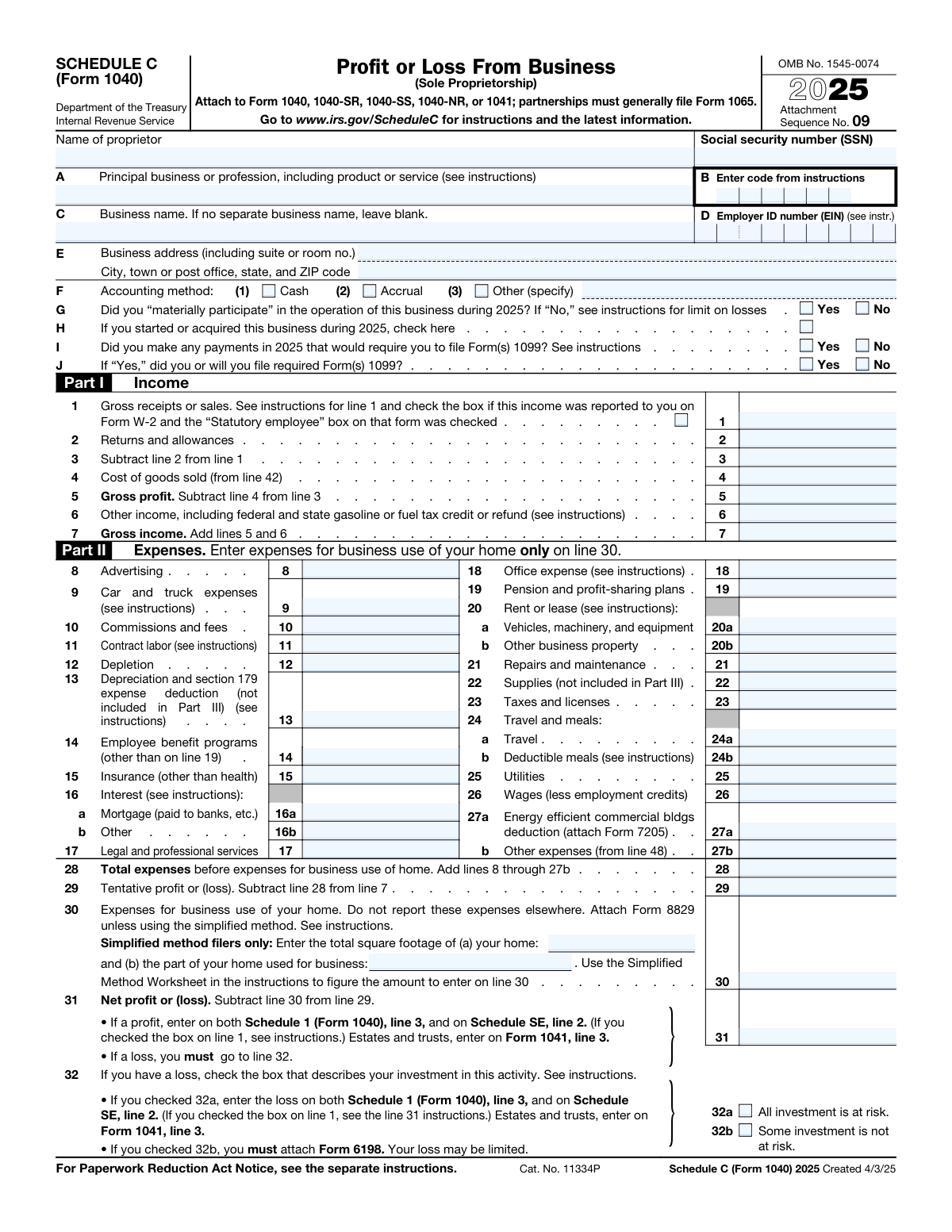
Schedule C (Form 1040), Profit or Loss From Business, page 1
Complex · 68/100Form Complexity Index

The AI does the filling. You just check it.

No typing into boxes, nothing to install.

Tell the AI about youAnswer a few questions in plain words, or upload your W-2 or last year's return. That is all the typing there is.
AI fills every field in secondsIt puts each answer in the right box on every page, tables and checkboxes included.
Check it and downloadReview every field, change anything, then download, print or sign the PDF.

What this form asks for

The AI fills all of it, from your answers or your documents.

Schedule C (Form 1040) is an Internal Revenue Service (IRS) tax form used by sole proprietors to report the income and expenses of their business. It is a critical part of a business owner's tax return, as the calculated net profit or loss is used to determine self-employment tax and is reported on their personal Form 1040. Today, this form can be filled out quickly and accurately using AI-powered services like Instafill.ai, which can also convert non-fillable PDF versions into interactive fillable forms.
Fillable fields106
Pages2
Sections35
Tables and lists1
Questions that depend on earlier answers19
Form Complexity IndexComplex, 68/100

The AI checks your answers before you download

14 checks built for this form, so a wrong date or a missing answer is caught before anyone else sees it.

Validates Social Security Number (SSN) Format

This check ensures the 'Social security number (SSN)' field is entered in the correct nine-digit format (XXX-XX-XXXX or XXXXXXXXX). The SSN is a critical identifier for the IRS to link the business activity to the correct individual taxpayer. An invalid format will cause the form to be rejected by the IRS processing systems, preventing the return from being filed.

Validates Employer Identification Number (EIN) Format

This check verifies that if an 'Employer ID number (EIN)' is provided, it follows the standard nine-digit format (XX-XXXXXXX). While optional for many sole proprietors, if an EIN is used for business banking or hiring employees, it must be correct. An incorrectly formatted EIN can lead to processing delays and mismatches with other tax filings, such as payroll tax forms.

Conditional Logic for Form 1099 Questions

This validation ensures that question J ('did you or will you file required Form(s) 1099?') is answered only if the answer to question I ('Did you make any payments... that would require you to file Form(s) 1099?') is 'Yes'. This maintains the logical flow of the form and prevents contradictory information. Answering question J when it's not applicable can create confusion and may trigger unnecessary IRS scrutiny.

Verifies Gross Income Calculation (Line 7)

This check confirms that the value on Line 7 ('Gross income') is the correct sum of Line 5 ('Gross profit') and Line 6 ('Other income'). This is a fundamental calculation for determining the business's total income before expenses. An error here will lead to incorrect calculations for tentative profit, net profit, and ultimately, the taxpayer's total taxable income.

Verifies Total Expenses Calculation (Line 28)

This validation ensures that the amount on Line 28 ('Total expenses before expenses for business use of home') correctly equals the sum of all individual expense lines from 8 through 27b. Accurate expense totaling is crucial for calculating the correct net profit or loss. A miscalculation can result in overpayment or underpayment of taxes, potentially leading to penalties and interest.

Verifies Net Profit or Loss Calculation (Line 31)

This check confirms that the value on Line 31 ('Net profit or (loss)') is the result of subtracting Line 30 ('Expenses for business use of your home') from Line 29 ('Tentative profit or (loss)'). This final profit/loss figure is a key amount that transfers to other parts of the tax return (Schedule 1 and Schedule SE). An incorrect value will directly impact the taxpayer's adjusted gross income (AGI) and self-employment tax liability.

And 8 more checks
  • Conditional Requirement for At-Risk Determination (Line 32)
  • Cross-references Cost of Goods Sold (Line 4 and Line 42)
  • Verifies Cost of Goods Sold Calculation (Line 42)
  • Conditional Requirement for Vehicle Information (Part IV)
  • Cross-references Other Expenses (Line 27b and Line 48)
  • Ensures Returns and Allowances Do Not Exceed Gross Receipts
  • Validates Business Use of Home Square Footage
  • Ensures Accounting Method Selection is Mutually Exclusive

Let AI fill out your Schedule C (Form 1040)

No typing. Every field filled in seconds, checked, ready to sign.

7 days free, then $19.99/month · Cancel anytime

How to Fill Out Schedule C (Form 1040) Online for Free in 2026

What the AI walks you through.

  1. Navigate to Instafill.ai and upload or select the Schedule C (Form 1040).
  2. Provide your personal and business identification details, such as name, SSN, business name, and address, letting the AI pre-fill information from your profile.
  3. Enter your business income in Part I, including gross receipts, sales, and other income sources.
  4. Detail all your business expenses in Part II, such as advertising, supplies, and travel, allowing the AI to help categorize and calculate totals.
  5. Complete the additional sections as needed, such as Part III for Cost of Goods Sold and Part IV for vehicle information.
  6. Review the automatically calculated net profit or loss. The AI ensures all calculations are accurate and flow correctly through the form.
  7. Securely download, print, or e-file the completed Schedule C to attach to your Form 1040 tax return.

Common Mistakes in Completing Schedule C (Form 1040)

The ones the AI is built to catch.

Using an Incorrect or Vague Business Activity Code
Filers often guess or choose a generic code for their principal business activity on Line B. The IRS uses this code to compare a business's income and expenses against industry averages, and an incorrect code can make a return an outlier, increasing the likelihood of an audit. To avoid this, carefully review the official IRS instructions to find the six-digit code that most accurately describes your primary business. AI-powered form-filling tools can also help suggest appropriate codes based on your business description, reducing the chance of error.
Incorrectly Answering Form 1099 Filing Questions
Many business owners mistakenly check "No" on Line I, forgetting they are required to file Form 1099-NEC for any independent contractor paid $600 or more during the year. This is a significant compliance error that the IRS can easily cross-reference, leading to penalties for failure to file. Always review your payments to contractors and ensure you answer Lines I and J accurately. Using accounting software or AI-powered tools like Instafill.ai can help track contractor payments and flag potential 1099 filing requirements, preventing this oversight.
Misclassifying Employees as Contract Labor
A common error is to report payments to employees on Line 11 (Contract Labor) instead of Line 26 (Wages) to avoid payroll taxes. This misclassification has severe consequences, including liability for back employment taxes, interest, and substantial penalties. It's crucial to understand the difference between an employee and an independent contractor based on IRS guidelines regarding behavioral and financial control.
Double-Dipping on Vehicle Expense Deductions
Filers often get confused between the standard mileage rate and the actual expense method for vehicle deductions on Line 9. A frequent mistake is claiming the standard mileage rate while also deducting actual costs like gas, insurance, or repairs, which is not permitted. You must choose one method and keep meticulous records, especially a contemporaneous mileage log. AI-powered tools like Instafill.ai can help by calculating deductions based on your chosen method and validating mileage entries to prevent common calculation errors.
Reporting Net Income on the Gross Receipts Line
On Line 1, filers must report their total gross receipts or sales before any expenses or cost of goods sold are subtracted. Some proprietors mistakenly enter their net income (profit), which significantly understates their business's total activity and is incorrect. This can lead to processing delays and IRS inquiries. Always report the full amount of income received from all business operations on this line.
Deducting Personal Expenses as Business Costs
A major red flag for the IRS is the deduction of personal, living, or family expenses that are not directly related to the business. For example, claiming 100% of a utility or cell phone bill that is also used for personal purposes is improper without prorating the expense. Commingling funds and failing to keep separate records makes this mistake more likely and can lead to disallowed deductions and accuracy-related penalties.
Errors in the Business Use of Home Deduction
The home office deduction on Line 30 is complex and prone to errors, such as miscalculating the square footage of the exclusive business area or claiming expenses for a space that is also used for personal activities. If not using the simplified method, you must complete and attach Form 8829, and failure to do so will result in the deduction being denied. If the form is a non-fillable PDF, tools like Instafill.ai can convert it into an interactive version with built-in calculators for deductions like the simplified home office method, reducing mathematical errors.
Mismatching Beginning and Prior Year's Ending Inventory
A critical but common error is when the 'Inventory at beginning of year' on Line 35 does not exactly match the 'Inventory at end of year' from the previous year's Schedule C. This discrepancy immediately signals poor record-keeping or potential income manipulation to the IRS, almost guaranteeing further review. AI-powered form-filling tools like Instafill.ai can help prevent this by carrying over data from prior-year returns or flagging inconsistencies between the beginning inventory value and previously entered data.
Misinterpreting 'Material Participation'
The question on Line G, 'Did you “materially participate”...', is a legal test with specific criteria, not just a simple question about being involved. Incorrectly checking 'Yes' when your involvement doesn't meet one of the seven IRS tests can lead to improperly deducting business losses against other income. This can result in the loss being disallowed and a higher tax bill upon review. If you are unsure, consult the IRS instructions to see if your hours and type of involvement qualify.
Including Owner's Pay in Cost of Labor
Sole proprietors often mistakenly include their own 'salary' or draws in the 'Cost of labor' on Line 37. However, a sole proprietor's compensation is the net profit of the business, not a deductible wage or labor cost. Including owner's pay on this line artificially inflates the Cost of Goods Sold, understates gross profit, and is explicitly disallowed by the IRS, which can lead to adjustments and penalties.

Frequently Asked Questions About Schedule C (Form 1040)


Is it really free for 7 days?
Yes. You pay $0 today. Cancel before Nov 1 and you are never charged. Keep it, and it is $19.99 a month for 5 fills of your Schedule C (Form 1040).
Can I fill other forms too?
This plan is for your Schedule C (Form 1040): your own AI agent fills it as often as 5 times a month. To fill other forms and upload your own, choose a Professional plan from your account.
How do I cancel?
From your account, in two clicks, any time. No email, no call.
How does the AI fill out Schedule C (Form 1040)?
You answer a few questions in plain words, or upload your W-2 or last year's return. The AI reads what you give it and puts each answer into the right field of Schedule C (Form 1040), on every page, in seconds. It checks the answers against the form's own rules, and you review and change anything before you download, print or sign.
What happens to my information?
It is encrypted in transit and at rest, and it is never used to train AI.
How complex is Schedule C (Form 1040) to fill out?
Schedule C (Form 1040) has a Form Complexity Index of 68 out of 100, in the complex tier: 106 fillable fields across 2 pages. Instafill.ai's AI fills it in under a minute, with every field there for you to review before you download.
What is Schedule C (Form 1040) and who needs to file it?
Schedule C is an IRS form used to report income or loss from a business you operated as a sole proprietor. You must file it if you are self-employed, an independent contractor, a freelancer, or a single-member LLC that has not elected to be treated as a corporation.
Do I need an Employer ID Number (EIN) or can I use my Social Security Number (SSN)?
You can use your SSN if you are the sole owner and have no employees. You generally need an EIN if you hire employees, have a Keogh plan, or are required to file employment, excise, or alcohol, tobacco, and firearms tax returns.
What is the difference between 'Gross receipts or sales' and 'Gross income'?
Gross receipts or sales (Line 1) is the total income your business received before any deductions. Gross income (Line 7) is your gross profit (receipts minus cost of goods sold) plus any other business income.
What does it mean to 'materially participate' in my business?
Material participation means you were involved in the business's operations on a regular, continuous, and substantial basis during the year. This is important because your ability to deduct a business loss may be limited if you did not materially participate.
When do I need to fill out Part III, Cost of Goods Sold?
You must complete Part III if your business involves producing or selling merchandise. This section is for businesses that maintain inventory to calculate the direct costs of the goods they sold during the year.
How do I report expenses for using my car for business?
You report car and truck expenses on Line 9 and provide details in Part IV if required. You can use either the standard mileage rate or your actual expenses, but you must keep detailed records of your business mileage and costs.
What should I do if my business has a loss for the year?
If your expenses exceed your income, you have a net loss which you report on Line 31. You must then complete Line 32 to indicate whether your investment is 'at risk,' which may affect how much of the loss you can deduct.
Do I need to file Form(s) 1099 for people I paid?
You must check 'Yes' on Line I if you paid an individual who is not your employee, such as an independent contractor, $600 or more for services during the year. If you answer 'Yes,' you are also required to file the necessary Form(s) 1099 with the IRS and provide copies to the recipients.
What documents do I need to fill out Schedule C?
You will need detailed records of all your business income, including bank statements and Forms 1099-NEC or 1099-K you received. You also need receipts and records for all your deductible expenses, such as advertising, supplies, and vehicle costs.
How do I claim the home office deduction?
You report expenses for business use of your home on Line 30. You can use either the simplified method, which is a standard deduction based on square footage, or the regular method, which requires tracking actual expenses and filing Form 8829.
How is Schedule C submitted?
Schedule C is not filed by itself; it is a schedule that must be attached to your main tax return, such as Form 1040, 1040-SR, or 1040-NR. The net profit or loss from Schedule C is then carried over to your main tax form.
Can AI tools help me fill out my Schedule C?
Yes, services like Instafill.ai use AI to help you fill out your forms accurately and quickly. These tools can auto-fill fields based on your data, reducing manual entry and helping to prevent common errors.
How can I fill out this form online using Instafill.ai?
To fill out your Schedule C online, you can upload the PDF to a platform like Instafill.ai. The service will make the form interactive, allowing you to easily type your information into the correct fields, save your progress, and download the completed document.
The Schedule C PDF I have is not fillable. What can I do?
If you have a non-fillable or 'flat' PDF, you can use a tool like Instafill.ai to convert it into an interactive, fillable form. Simply upload the file, and the service's AI will identify the fields and make them editable for you.
Encrypted in transit and at restNever used to train AIDelete your forms any time

Get your Schedule C (Form 1040) filled out by AI

$0 today. Cancel before Nov 1 and you pay nothing.

7 days free, then $19.99/month · Cancel anytime