Yes! You can use AI to fill out Schedule D (Form 1040), Capital Gains and Losses (2024)

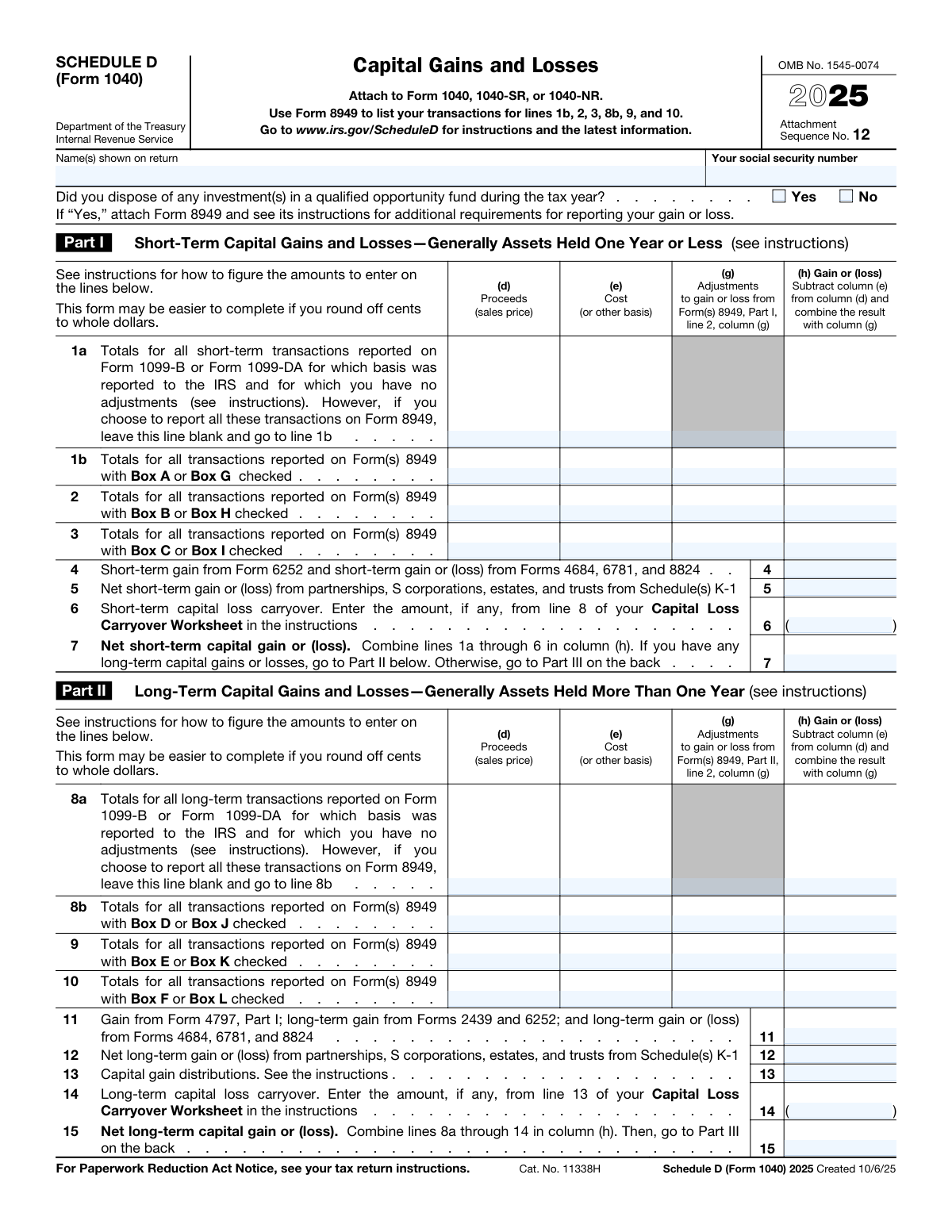
Schedule D (Form 1040) is an Internal Revenue Service (IRS) tax form used to report capital gains and losses resulting from the sale of assets like stocks, bonds, and real estate. It separates transactions into short-term (held one year or less) and long-term (held more than one year) to determine the correct tax rate. Today, this form can be filled out quickly and accurately using AI-powered services like Instafill.ai, which can also convert non-fillable PDF versions into interactive fillable forms.
Schedule D (Form 1040) has a moderate Form Complexity Index of 48/100 — 55 fillable fields across 2 pages. Instafill’s AI completes it accurately in under a minute.

Form specifications

Form name: Schedule D (Form 1040), Capital Gains and Losses (2024)
Number of fields: 55
Number of pages: 2
FCI: Moderate (48/100)
Language: English
Our AI automatically handles information lookup, data retrieval, formatting, and form filling.
It takes less than a minute to fill out Schedule D (Form 1040) using our AI form filling.
Securely upload your data. Information is encrypted in transit and deleted immediately after the form is filled out.
Preview of Schedule D (Form 1040), Capital Gains and Losses (2024)

Instafill Demo: How to fill out PDF forms in seconds with AI

How to Fill Out Schedule D (Form 1040) Online for Free in 2026

Are you looking to fill out a SCHEDULE D (FORM 1040) form online quickly and accurately? Instafill.ai offers the #1 AI-powered PDF filling software of 2026, allowing you to complete your SCHEDULE D (FORM 1040) form in just 37 seconds or less.
Follow these steps to fill out your SCHEDULE D (FORM 1040) form online using Instafill.ai:
  1. 1 Navigate to Instafill.ai and upload or select the Schedule D (Form 1040).
  2. 2 Provide your personal details, such as your name and Social Security Number, which the AI can often pre-fill from your profile.
  3. 3 Enter your short-term capital gains and losses in Part I. You can upload your Form 1099-B or Form 8949, and the AI will extract and populate the required data.
  4. 4 Input your long-term capital gains and losses in Part II, again allowing the AI to pull information from your supporting documents.
  5. 5 Proceed to Part III, where the AI will automatically calculate the summary of your net gains or losses based on the entries in the previous parts.
  6. 6 Review the entire form, checking the AI-populated fields and calculations for accuracy against your financial records.
  7. 7 Download, print, or e-file the completed Schedule D, which is now ready to be attached to your Form 1040, 1040-SR, or 1040-NR.

Our AI-powered system ensures each field is filled out correctly, reducing errors and saving you time.

Why Choose Instafill.ai for Your Fillable Schedule D (Form 1040) Form?

Speed

Complete your Schedule D (Form 1040) in as little as 37 seconds.

Up-to-Date

Always use the latest 2026 Schedule D (Form 1040) form version.

Cost-effective

No need to hire expensive lawyers.

Accuracy

Our AI performs 10 compliance checks to ensure your form is error-free.

Security

Your personal information is protected with bank-level encryption.

Frequently Asked Questions About Schedule D (Form 1040)

Schedule D (Form 1040) has a Form Complexity Index of 48 out of 100, placing it in the moderate complexity tier. This score is calculated deterministically from the form’s own structure using Instafill’s published Form Complexity Index methodology, so it can be reproduced and independently verified — it is not a subjective estimate.

For Schedule D (Form 1040) specifically, the score reflects 55 fillable fields across 2 pages, grouped into 20 sections, and 7 conditional fields that only apply depending on earlier answers. The number of fields is the largest factor in the base score (weighted 36%), followed by how difficult those fields are to complete based on their type, where free-text and signature fields count for more than simple checkboxes (26%). The number of pages that actually contain fields (15%), the amount of conditional “fill-only-if” logic (16%), and how many sections the form is divided into (7%) account for the rest of the base. On top of that base, the index adds points for tables and repeating lists, bundled instruction pages, and dense page layouts — capturing difficulty the base alone can miss.

In practical terms, a moderate score means the form takes real effort: there are enough fields, pages and rules that errors are easy to make by hand. Instafill removes that effort entirely: our AI reads your information, maps each value to the correct field — including the conditional ones — and completes Schedule D (Form 1040) accurately in under a minute, with every field available for you to review before you download. See exactly how the Form Complexity Index is calculated.

Schedule D is used to report gains and losses from the sale or exchange of capital assets, such as stocks, bonds, and real estate. It summarizes these transactions to calculate your net capital gain or loss for the tax year, which is then reported on your Form 1040.

You generally need to file Schedule D if you sold a capital asset, received a capital gain distribution, or have a capital loss carryover from a previous year. It must be attached to your Form 1040, 1040-SR, or 1040-NR.

Part I is for reporting gains or losses on assets you held for one year or less, which are considered short-term. Part II is for assets held for more than one year, which are long-term and may be taxed at a more favorable rate.

Yes, in most cases you must first report the details of each capital asset sale on Form 8949. You then transfer the summary totals from Form 8949 to the corresponding lines on Schedule D.

You will need records of your asset sales, including the purchase date, sale date, proceeds (sales price), and your cost basis. This information is often provided on Form 1099-B from your brokerage firm.

You can report summary totals on lines 1a (short-term) or 8a (long-term) if the transactions were reported on Form 1099-B with basis reported to the IRS and you have no adjustments. Otherwise, you must detail each transaction on Form 8949.

If your capital losses are greater than your capital gains, you can deduct the difference as a loss on your tax return. The annual deduction limit is $3,000, or $1,500 if you are married and filing separately.

If your net capital loss exceeds the annual deduction limit, you can carry the unused portion of the loss over to future tax years. This amount is entered on line 6 (short-term) or line 14 (long-term) of Schedule D.

This question asks if you sold an investment in a Qualified Opportunity Fund (QOF), a special vehicle for tax-advantaged investing. If you did, you must check 'Yes' and follow specific reporting requirements on Form 8949.

Capital gain distributions, typically reported to you on Form 1099-DIV, are entered on line 13 of Schedule D. These are treated as long-term capital gains regardless of how long you owned the mutual fund shares.

Yes, services like Instafill.ai use AI to auto-fill form fields accurately and save time. This is especially helpful for Schedule D, which can involve many individual transaction details.

You can use a service like Instafill.ai to complete your Schedule D online. Simply upload the form, and the AI-powered platform will help you populate the fields, perform calculations, and prepare it for filing.

If you have a non-fillable or 'flat' PDF, you can use a tool like Instafill.ai. It can convert the static document into an interactive, fillable form that you can complete and save on your computer.

Part III combines your net short-term gain/loss from line 7 and your net long-term gain/loss from line 15 to determine your overall capital gain or loss. It then directs you to the appropriate worksheet to calculate the tax on your net capital gain.

Compliance Schedule D (Form 1040)
Validation Checks by Instafill.ai

1
Validates Social Security Number Format
This check ensures that the 'Your social security number' field contains exactly nine digits and no other characters. An incorrect or incomplete SSN can lead to processing delays or rejection of the entire tax return by the IRS. If the format is invalid, the system should flag the field for correction before submission.
2
Ensures Taxpayer Name is Provided
This validation confirms that the 'Name(s) shown on return' field is not empty. The name is a primary identifier that must match the one on the associated Form 1040. Failure to provide a name will result in an incomplete and unprocessable form, requiring the user to enter the information before proceeding.
3
Verifies Short-Term Gain/Loss Calculation
This check validates the arithmetic for all short-term gain or loss lines in Part I (e.g., 1a, 1b, 2, 3). It confirms that the value in column (h) correctly equals the value in column (d) minus column (e), plus or minus the adjustment in column (g). Incorrect calculations can lead to an inaccurate tax liability and potential IRS notices, so this ensures mathematical integrity.
4
Verifies Long-Term Gain/Loss Calculation
This check validates the arithmetic for all long-term gain or loss lines in Part II (e.g., 8a, 8b, 9, 10). It confirms that the value in column (h) correctly equals the value in column (d) minus column (e), plus or minus the adjustment in column (g). This is critical for correctly calculating the net long-term gain or loss, which is often taxed at a different rate.
5
Validates Net Short-Term Capital Gain/Loss Summation (Line 7)
This check ensures that the value on Line 7 is the correct sum of all amounts in column (h) for lines 1a through 6. This total is a key figure that feeds into the final summary of capital gains and losses. A miscalculation here would make the entire form incorrect and could result in an improper tax assessment.
6
Validates Net Long-Term Capital Gain/Loss Summation (Line 15)
This check ensures that the value on Line 15 is the correct sum of all amounts in column (h) for lines 8a through 14. This total represents the taxpayer's overall long-term capital gain or loss position. An error on this line will directly impact the final summary on Line 16 and subsequent tax calculations.
7
Validates Final Summary Calculation (Line 16)
This validation confirms that the amount on Line 16 is the correct sum of Line 7 (Net short-term gain/loss) and Line 15 (Net long-term gain/loss). Line 16 is the primary summary figure on the form that determines the subsequent steps in Part III. An incorrect sum will lead to following the wrong logic path and an incorrect entry on Form 1040.
8
Enforces Mutually Exclusive Reporting for Short-Term Transactions
This check verifies that the user has not entered data into both Line 1a and Line 1b. The form instructions specify that taxpayers should either report summary totals on Line 1a or detail transactions on Form 8949 and report the totals on Line 1b, but not both. Allowing data in both fields would lead to double-counting transactions and an incorrect tax calculation.
9
Enforces Mutually Exclusive Reporting for Long-Term Transactions
This check verifies that the user has not entered data into both Line 8a and Line 8b. Similar to the short-term rule, taxpayers must choose to report either the summary totals from Form 1099-B on Line 8a or the totals from Form 8949 on Line 8b. If both are filled, it indicates a reporting error that must be corrected to prevent overstating gains or losses.
10
Validates Part III Logic Flow Based on Line 16
This check enforces the conditional logic outlined in Part III. If Line 16 is a loss, it ensures lines 17-20 are blank and Line 21 is filled. If Line 16 is a gain, it ensures Line 21 is blank. This prevents the user from filling out irrelevant or contradictory sections of the form, guiding them to the correct tax worksheet.
11
Validates Capital Loss Limitation on Line 21
This check ensures the amount on Line 21 is the smaller of the total loss on Line 16 or the statutory limit ($3,000 for most filers, $1,500 for married filing separately). The value must also be a negative number (or formatted as a loss). This is a critical tax rule, and claiming a larger loss than allowed will result in an incorrect tax return and likely be adjusted by the IRS.
12
Verifies Conditional Logic for Line 17
This check validates the 'Yes' or 'No' answer on Line 17. The answer must be 'Yes' only if both Line 15 (net long-term) and Line 16 (total net) show a gain. An incorrect answer here will lead the taxpayer to either skip required worksheets (Lines 18-20) or complete them unnecessarily, causing calculation errors.
13
Ensures Loss Carryover Fields are Negative or Zero
This validation confirms that the values entered for 'Short-term capital loss carryover' (Line 6) and 'Long-term capital loss carryover' (Line 14) are either zero or negative (represented by parentheses). Entering a positive number in a loss carryover field is illogical and would incorrectly increase the gain or reduce the loss. This check maintains the mathematical integrity of the form's calculations.
14
Completeness Check for Qualified Opportunity Fund Question
This check ensures that either the 'Yes' or 'No' box is checked for the question 'Did you dispose of any investment(s) in a qualified opportunity fund...'. This question is required for all filers of Schedule D. Answering 'Yes' has specific downstream reporting requirements (attaching Form 8949), so leaving it blank creates an incomplete form.

Common Mistakes in Completing Schedule D (Form 1040)

Misclassifying Short-Term vs. Long-Term Assets

Filers often confuse the holding period, reporting assets held for one year or less in Part II (Long-Term) or assets held for more than one year in Part I (Short-Term). This error is critical because long-term gains are typically taxed at a lower rate, and misclassification can lead to a significant overpayment or underpayment of tax. To avoid this, carefully verify the purchase and sale dates for each asset on your Form 1099-B before entering it.

Incorrectly Reporting Cost Basis

A frequent error is entering the wrong cost basis (column e), often by failing to account for reinvested dividends, commissions, or wash sale adjustments. This directly results in an inaccurate gain or loss calculation and an incorrect tax liability. Always use the adjusted cost basis, which is usually provided on Form 1099-B, and ensure it reflects all relevant adjustments to avoid overpaying taxes or inviting IRS scrutiny.

Failing to Use Form 8949 When Required

Many filers mistakenly try to list all individual transactions on Schedule D itself, ignoring the requirement to use Form 8949. Schedule D is a summary form, and most transactions (especially those with adjustments or where basis was not reported to the IRS) must be detailed on Form 8949 first. Skipping Form 8949 results in an incomplete return that will likely be flagged by the IRS, causing processing delays and requests for more information.

Forgetting to Include Capital Loss Carryovers

A very common and costly mistake is forgetting to enter a capital loss carryover from a prior year on line 6 (short-term) or line 14 (long-term). This valuable deduction is often overlooked, especially if filers switch tax preparation methods. Forgetting this carryover means you overstate your net capital gain or understate your loss, causing you to overpay your taxes. Always review your prior year's return for any available carryover amount.

Incorrectly Applying the Capital Loss Limitation on Line 21

When a taxpayer has a net capital loss exceeding the annual limit, they often make errors on line 21. Some incorrectly enter the full loss amount, while others forget to claim the deduction at all. The IRS limits your deductible capital loss against other income to $3,000 per year ($1,500 if married filing separately). To avoid errors, enter the smaller of your total net loss or the applicable annual limit on line 21.

Navigational Errors in Part III Summary

Part III contains complex conditional logic that directs the filer to different worksheets based on their specific gain/loss situation. People frequently get lost in the 'if-then' instructions, using the wrong tax worksheet or skipping required lines, which leads to an entirely incorrect tax calculation. To prevent this, read each step in Part III slowly and follow the instructions precisely based on the outcomes from lines 7, 15, and 16.

Omitting Gains/Losses from Schedules K-1 and Other Forms

Filers often focus only on transactions from Form 1099-B and forget to include capital gains and losses from other sources. Amounts from Schedules K-1 (from partnerships or S-corps), Form 4797 (sales of business property), or Form 6252 (installment sales) must be reported on lines 4, 5, 11, and 12. Omitting this information leads to underreporting income and an inaccurate return, which can result in penalties and interest.

Transposing Proceeds and Cost Basis Figures

A simple but impactful data entry error is swapping the numbers for Proceeds (column d) and Cost Basis (column e) when manually filling out the form. This mistake reverses the outcome of a transaction, turning a gain into a loss or vice-versa, which dramatically alters the final tax due. To avoid this, carefully double-check each entry against your source documents. AI-powered form filling tools like Instafill.ai can prevent these errors by automatically and accurately populating data.

Double-Counting Transactions on Summary and Detail Lines

Filers sometimes report the same transactions twice: once on the summary line (1a or 8a) and again on the lines that pull from Form 8949 (e.g., 1b or 8b). This happens from misunderstanding that lines 1a/8a are an alternative, not a supplement, for reporting certain transactions. This error creates a discrepancy with the data reported to the IRS, inviting scrutiny. If the form is a non-fillable PDF, a tool like Instafill.ai can convert it to a fillable version to make data entry clearer and reduce such mistakes.
Saved over 80 hours a year

“I was never sure if my IRS forms like W-9 were filled correctly. Now, I can complete the forms accurately without any external help.”

Kevin Martin Green

Your data stays secure with advanced protection from Instafill and our subprocessors

Robust compliance program

Transparent business model

You’re not the product. You always know where your data is and what it is processed for.

ISO 27001, HIPAA, and GDPR

Our subprocesses adhere to multiple compliance standards, including but not limited to ISO 27001, HIPAA, and GDPR.

Security & privacy by design

We consider security and privacy from the initial design phase of any new service or functionality. It’s not an afterthought, it’s built-in, including support for two-factor authentication (2FA) to further protect your account.

Fill out Schedule D (Form 1040) with Instafill.ai

Worried about filling PDFs wrong? Instafill securely fills schedule-d-form-1040-capital-gains-and-losses-2024 forms, ensuring each field is accurate.