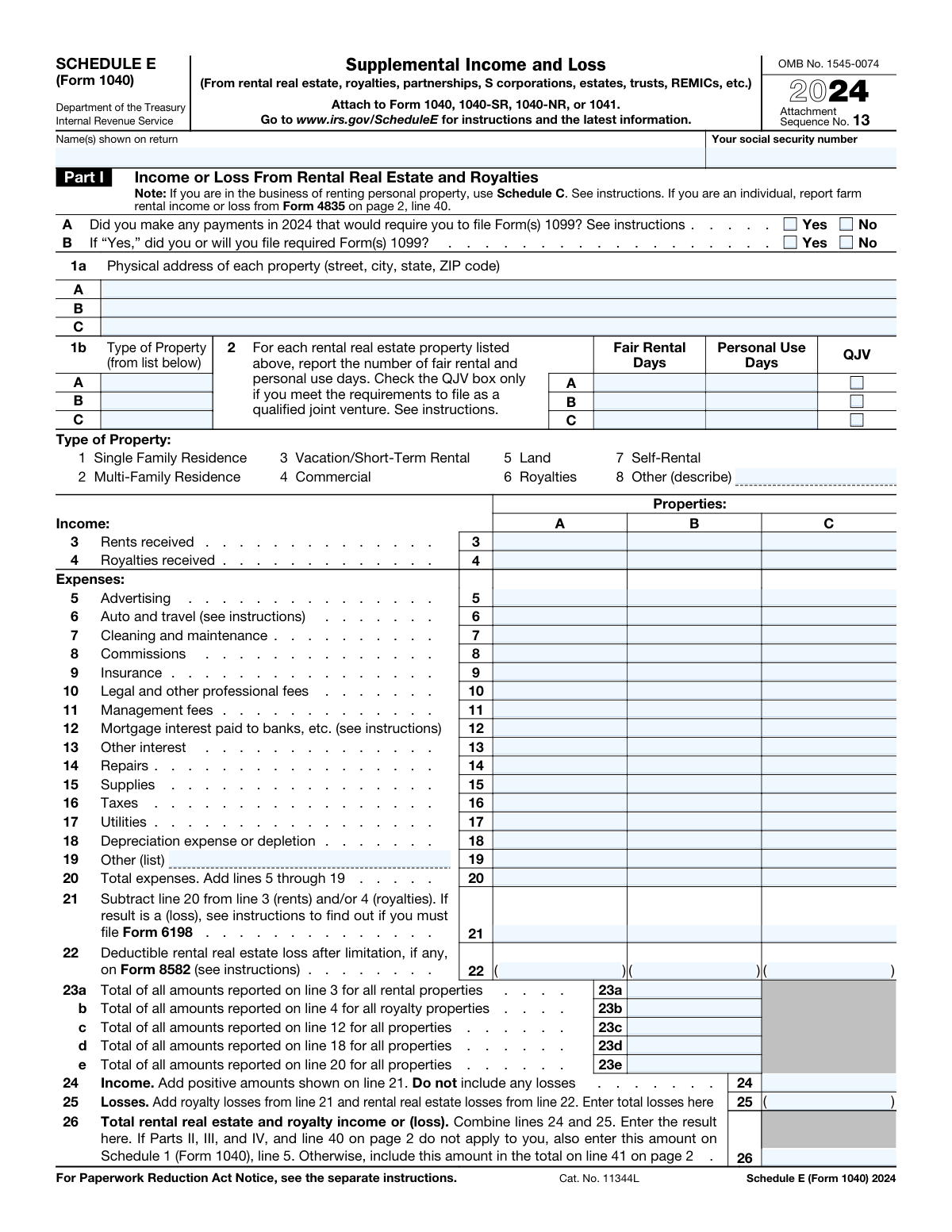
Yes! You can use AI to fill out Schedule E (Form 1040), Supplemental Income and Loss

IRS Schedule E (Form 1040) is a tax form used to report supplemental income and losses from various sources, including rental real estate, royalties, partnerships, S corporations, estates, trusts, and REMICs. It is a crucial component of an individual's tax return if they have income streams beyond standard wages, as it helps calculate the total taxable income. Today, this form can be filled out quickly and accurately using AI-powered services like Instafill.ai, which can also convert non-fillable PDF versions into interactive fillable forms.
Schedule E (Form 1040) has a complex Form Complexity Index of 75/100 — 185 fillable fields across 2 pages. Instafill’s AI completes it accurately in under a minute.

Form specifications

Form name: Schedule E (Form 1040), Supplemental Income and Loss
Number of fields: 185
Number of pages: 2
FCI: Complex (75/100)
Language: English
Our AI automatically handles information lookup, data retrieval, formatting, and form filling.
It takes less than a minute to fill out Schedule E (Form 1040) using our AI form filling.
Securely upload your data. Information is encrypted in transit and deleted immediately after the form is filled out.
main-image

Instafill Demo: How to fill out PDF forms in seconds with AI

How to Fill Out Schedule E (Form 1040) Online for Free in 2026

Are you looking to fill out a SCHEDULE E (FORM 1040) form online quickly and accurately? Instafill.ai offers the #1 AI-powered PDF filling software of 2026, allowing you to complete your SCHEDULE E (FORM 1040) form in just 37 seconds or less.
Follow these steps to fill out your SCHEDULE E (FORM 1040) form online using Instafill.ai:
  1. 1 Navigate to Instafill.ai and upload your Schedule E (Form 1040) or select it from their template library.
  2. 2 Provide your personal identification information, such as your name and Social Security Number, as shown on your main tax return.
  3. 3 Complete Part I by entering details for each rental real estate and royalty property, including income received and a breakdown of all related expenses.
  4. 4 Fill out Parts II, III, and IV for income or loss from partnerships, S corporations, estates, trusts, and REMICs, using information from your corresponding Schedules K-1 and Q.
  5. 5 Complete Part V, the summary section, where the AI tool will help you combine the totals from all previous parts of the form.
  6. 6 Allow the AI to perform all necessary calculations, such as totaling expenses and combining income and loss figures from all sources.
  7. 7 Review the auto-filled form for accuracy, then download, print, or e-file the completed Schedule E with your Form 1040, 1040-SR, or 1040-NR.

Our AI-powered system ensures each field is filled out correctly, reducing errors and saving you time.

Why Choose Instafill.ai for Your Fillable Schedule E (Form 1040) Form?

Speed

Complete your Schedule E (Form 1040) in as little as 37 seconds.

Up-to-Date

Always use the latest 2026 Schedule E (Form 1040) form version.

Cost-effective

No need to hire expensive lawyers.

Accuracy

Our AI performs 10 compliance checks to ensure your form is error-free.

Security

Your personal information is protected with bank-level encryption.

Frequently Asked Questions About Schedule E (Form 1040)

Schedule E (Form 1040) has a Form Complexity Index of 75 out of 100, placing it in the complex complexity tier. This score is calculated deterministically from the form’s own structure using Instafill’s published Form Complexity Index methodology, so it can be reproduced and independently verified — it is not a subjective estimate.

For Schedule E (Form 1040) specifically, the score reflects 185 fillable fields across 2 pages, grouped into 49 sections, and 3 conditional fields that only apply depending on earlier answers, 3 tables or repeating lists. The number of fields is the largest factor in the base score (weighted 36%), followed by how difficult those fields are to complete based on their type, where free-text and signature fields count for more than simple checkboxes (26%). The number of pages that actually contain fields (15%), the amount of conditional “fill-only-if” logic (16%), and how many sections the form is divided into (7%) account for the rest of the base. On top of that base, the index adds points for tables and repeating lists, bundled instruction pages, and dense page layouts — capturing difficulty the base alone can miss.

In practical terms, a complex score means the form is demanding, with many fields, multiple pages and branching rules that are easy to get wrong. Instafill removes that effort entirely: our AI reads your information, maps each value to the correct field — including the conditional ones — and completes Schedule E (Form 1040) accurately in under a minute, with every field available for you to review before you download. See exactly how the Form Complexity Index is calculated.

Schedule E is an IRS form used to report income or loss from supplemental sources, including rental real estate, royalties, partnerships, S corporations, estates, and trusts. It is filed as an attachment to your main tax return, such as Form 1040.

You must file Schedule E if you receive income or have a loss from rental properties, royalties, or as a beneficiary of an estate or trust, or as a partner in a partnership or shareholder in an S corporation. It is used to report these supplemental income sources for your tax return.

To complete Part I, you'll need records of rental income and all related expenses. For Parts II, III, and IV, you will need the Schedule K-1 or Schedule Q provided to you by the partnership, S corporation, estate, trust, or REMIC.

Part I of Schedule E only has space to list three properties. If you have more than three, you must complete and attach additional Schedule E forms to report all of your rental properties.

Repairs are routine maintenance expenses that keep your property in good condition and are fully deductible in the year they are paid. Improvements, which add value or prolong the life of the property, must be capitalized and deducted over several years through depreciation.

If you paid an independent contractor, such as a plumber or painter, $600 or more for services related to your rental activity, you are generally required to issue them a Form 1099-NEC. These questions confirm your compliance with this filing requirement.

You report this income in Part II of Schedule E using the information provided on the Schedule K-1 you received from the entity. You must report the income or loss as either passive or nonpassive, as indicated on the K-1.

A real estate professional is a special tax status for individuals who spend a significant amount of time in real property businesses. This status may allow you to deduct rental losses without the usual passive activity loss limitations.

Schedule E is not filed by itself; it must be attached to your main income tax return (Form 1040, 1040-SR, 1040-NR, or 1041). You submit it as part of your complete tax return package.

Yes, services like Instafill.ai use AI to help you accurately fill out complex forms like Schedule E. These tools can auto-fill fields, perform calculations, and guide you through the process to save time and reduce errors.

Simply upload your Schedule E PDF to the Instafill.ai platform. The AI will make the form fillable online, allowing you to easily enter your income, expenses, and other information to generate a completed, downloadable form.

If your PDF is not interactive, you can use a service like Instafill.ai to convert it into a fillable form. This allows you to type your information directly into the fields instead of printing and filling it out by hand.

Fair Rental Days are the days the property was rented at a fair market price, while Personal Use Days are days you or your family used it for personal purposes. The ratio between these days can affect the amount of expenses you are allowed to deduct.

The total income or loss calculated on line 41 of Schedule E is carried over to Schedule 1 (Form 1040), line 5. This amount is then combined with your other income to determine your adjusted gross income (AGI).

Compliance Schedule E (Form 1040)
Validation Checks by Instafill.ai

1
Validates Social Security Number Format
Checks that the 'Your social security number' field contains exactly nine digits and no other characters. This is critical for correctly identifying the taxpayer and linking the form to the main tax return. If the format is incorrect, the IRS will reject the filing, causing processing delays.
2
Validates Employer Identification Number Format
Verifies that all Employer Identification Number (EIN) fields (lines 28d, 33b, 38b) contain a valid nine-digit number. A valid EIN is essential for the IRS to identify the specific partnership, S corporation, estate, trust, or REMIC from which income or loss is being reported. An invalid EIN will lead to processing errors and potential notices from the IRS for mismatched information.
3
Ensures Form 1099 Follow-Up Question is Answered
This validation ensures that if the user answers 'Yes' to Question A ('Did you make any payments...that would require you to file Form(s) 1099?'), they must provide an answer to Question B ('...did you or will you file required Form(s) 1099?'). This is a required data point for the IRS to track 1099 filing compliance. Failure to answer Question B when required will result in an incomplete form and may trigger further scrutiny.
4
Requires Property Address if Income or Expenses are Reported
This check ensures that if any income (Line 3 or 4) or expense (Lines 5-19) is entered for a property column (A, B, or C), the corresponding physical address on Line 1a must be provided. The property address is essential for identifying the asset and is a required field for reporting rental activity. Submitting the form without a required address will result in an incomplete filing.
5
Validates Property Type Code on Line 1b
This check confirms that the value entered for 'Type of Property' on line 1b is a valid numeric code from the provided list (1-8). Using a valid code is crucial for the IRS to correctly categorize the rental activity and apply the appropriate tax rules. An invalid code would make the property type ambiguous and could lead to incorrect tax calculations or rejection of the schedule.
6
Requires Description for 'Other' Property Type
This validation enforces that if a user enters '8' (Other) for the 'Type of Property' on line 1b, the 'Other Property Type Description' field must be filled out. This provides necessary clarification for the IRS when a property doesn't fit into the standard categories. Without this description, the form is considered incomplete and lacks required information for processing.
7
Verifies Total Days in Use Does Not Exceed Days in Year
This check validates that the sum of 'Fair Rental Days' and 'Personal Use Days' on line 2 for any given property does not exceed 366 (for the 2024 leap year). This is a logical check to ensure the reported days are possible within a single year. Reporting more days than exist in a year is a data entry error that would invalidate the calculations for personal use limitations and must be corrected.
8
Verifies Total Expenses Calculation for Each Property (Line 20)
This validation confirms that the amount on Line 20 ('Total expenses') for each property column is the correct sum of the individual expense lines (lines 5 through 19). This is a critical calculation check to ensure the accuracy of the total expense figure before it is used to calculate net income or loss. An incorrect total will lead to an incorrect net income/loss on line 21 and an erroneous tax liability.
9
Verifies Net Income/Loss Calculation on Line 21
This check ensures the value on Line 21 is correctly calculated by subtracting 'Total expenses' (Line 20) from the sum of 'Rents received' (Line 3) and 'Royalties received' (Line 4). This is the primary calculation for determining the profitability of each property. An error here directly impacts the total income or loss reported on the tax return.
10
Validates Deductible Loss on Line 22
This check ensures that an amount is entered on Line 22 ('Deductible rental real estate loss') only if the corresponding Line 21 shows a loss (a negative value). It also verifies that the deductible loss on Line 22 is not greater than the absolute value of the total loss calculated on Line 21. This prevents claiming a loss that doesn't exist or is larger than the amount allowed before other limitations.
11
Verifies Total Rents Received Across All Properties (Line 23a)
This validation checks that the value on Line 23a is the sum of all 'Rents received' amounts from Line 3 across all properties (A, B, and C). This summary figure is used by the IRS for data analysis and cross-verification. An incorrect total on this line indicates a calculation error on the form and undermines the integrity of the summary section.
12
Validates Entity Type on Line 28b
This validation confirms that the entry in column (b) of line 28 is either 'P' for partnership or 'S' for S corporation. This single-letter code is essential for the IRS to correctly process the income/loss information and match it against the data reported by the entity on its own return. An incorrect or missing code will cause a data mismatch and likely trigger an IRS notice.
13
Verifies Final Total Income or Loss Calculation on Line 41
This validation ensures the amount on Line 41 ('Total income or (loss)') is the correct sum of the totals from all parts of the form (lines 26, 32, 37, 39, and 40). This is the final, critical figure that carries over to the main Form 1040, directly impacting the taxpayer's overall income and tax liability. An error on this line means the entire form's calculations are incorrect and will result in an inaccurate tax return.

Common Mistakes in Completing Schedule E (Form 1040)

Misclassifying Repairs vs. Capital Improvements

Filers often deduct the full cost of a major improvement (e.g., a new roof) as a current repair on line 14, instead of capitalizing and depreciating it. Repairs maintain a property's condition, while improvements add value or prolong its life. This error overstates current expenses, leading to an underpayment of tax and potential penalties. To avoid this, carefully distinguish between the two based on IRS guidelines and depreciate improvements over their useful life, typically calculated on Form 4562.

Incorrectly Reporting Personal Use Days

On line 2, filers often underestimate or misinterpret what constitutes 'personal use days,' which includes use by the owner, family members, or anyone paying less than fair market rent. Incorrectly reporting these days can lead to improperly deducting expenses, as deductions are limited when personal use exceeds certain thresholds. This can result in disallowed losses and an increased tax liability. Keep a detailed log of all days the property was used for personal reasons versus rented at a fair price to ensure accurate reporting.

Incorrectly Transferring Data from Schedule K-1

In Parts II and III, it is common to incorrectly transcribe numbers from a Schedule K-1 into the wrong columns on Schedule E, such as mixing up passive income (column h) with nonpassive income (column k). This directly impacts the calculation of total income or loss and can misrepresent your level of participation in the activity. To prevent this, meticulously match the box numbers and descriptions on your K-1 to the corresponding columns on Schedule E, paying close attention to the passive vs. nonpassive distinction.

Forgetting to Claim or Incorrectly Calculating Depreciation

Many filers either forget to claim depreciation on line 18 or use an incorrect basis or recovery period. The IRS requires you to depreciate rental buildings, and if you fail to do so, you cannot simply 'catch up' in a later year; upon sale, gain is calculated as if you had taken the correct depreciation. This mistake results in overpaying taxes now and potential complications later. Use Form 4562 to calculate depreciation correctly and ensure you are using the proper method.

Mishandling Mortgage Payments on Line 12

A frequent error is entering the total annual mortgage payment on line 12, which incorrectly includes principal, property taxes, and insurance. Only the mortgage interest portion, as reported on Form 1098 from your lender, is deductible on this line. This error inflates your interest deduction and miscategorizes other expenses, which should be on line 16 (Taxes) and line 9 (Insurance). Always refer to your Form 1098 for the exact amount of deductible mortgage interest.

Ignoring At-Risk and Basis Limitation Rules

When reporting a loss from a partnership or S corporation in Part II, filers often fail to check the required boxes in columns (e) or (f) and attach the necessary basis or at-risk computations. The IRS limits the amount of loss you can deduct to your investment basis and the amount you have 'at risk.' Ignoring these rules is a major red flag and can lead to the disallowance of losses and significant tax adjustments upon review.

Overlooking Form 1099 Filing Requirements

In questions A and B, landlords often incorrectly answer 'No' because they are unaware of their obligation to file Form 1099-NEC for payments of $600 or more to independent contractors like plumbers, electricians, or lawyers. Answering 'Yes' to question A but 'No' to question B indicates non-compliance and can result in significant penalties. To avoid this, track all payments to service providers and be prepared to file the required forms by the deadline.

Reporting Net Rent Instead of Gross Rent

Taxpayers sometimes report their net rental income on line 3 after subtracting expenses like management fees, instead of reporting the gross rents received. The form is designed for you to list gross rents on line 3 and then deduct all expenses on their respective lines (5-19). This mistake can lead to an inaccurate calculation of total income and may trigger IRS scrutiny if the reported income doesn't match information returns like Form 1099-MISC. Always report the full amount of rent collected before any deductions.

Mathematical Errors in Totals and Summaries

The form requires numerous calculations, such as summing expenses on line 20 and summarizing totals on lines 23, 26, and 41. Simple addition or subtraction errors are common and can invalidate the entire return, leading to an incorrect Adjusted Gross Income (AGI). To prevent this, meticulously double-check all calculations. AI-powered form filling tools like Instafill.ai can eliminate these errors by performing calculations automatically and ensuring all totals are correct.

Incomplete or Incorrect Property Address

A simple but frequent error is providing an incomplete address or using a P.O. Box for a property on line 1a. The IRS requires the full physical address, including street, city, state, and ZIP code, to verify the property's existence and location. Missing information can cause processing delays or trigger questions from the IRS. If the form is a non-fillable PDF, tools like Instafill.ai can convert it into a fillable version, making it easier to enter complete and properly formatted address information.
Saved over 80 hours a year

“I was never sure if my IRS forms like W-9 were filled correctly. Now, I can complete the forms accurately without any external help.”

Kevin Martin Green

Your data stays secure with advanced protection from Instafill and our subprocessors

Robust compliance program

Transparent business model

You’re not the product. You always know where your data is and what it is processed for.

ISO 27001, HIPAA, and GDPR

Our subprocesses adhere to multiple compliance standards, including but not limited to ISO 27001, HIPAA, and GDPR.

Security & privacy by design

We consider security and privacy from the initial design phase of any new service or functionality. It’s not an afterthought, it’s built-in, including support for two-factor authentication (2FA) to further protect your account.

Fill out Schedule E (Form 1040) with Instafill.ai

Worried about filling PDFs wrong? Instafill securely fills schedule-e-form-1040-supplemental-income-and-loss forms, ensuring each field is accurate.