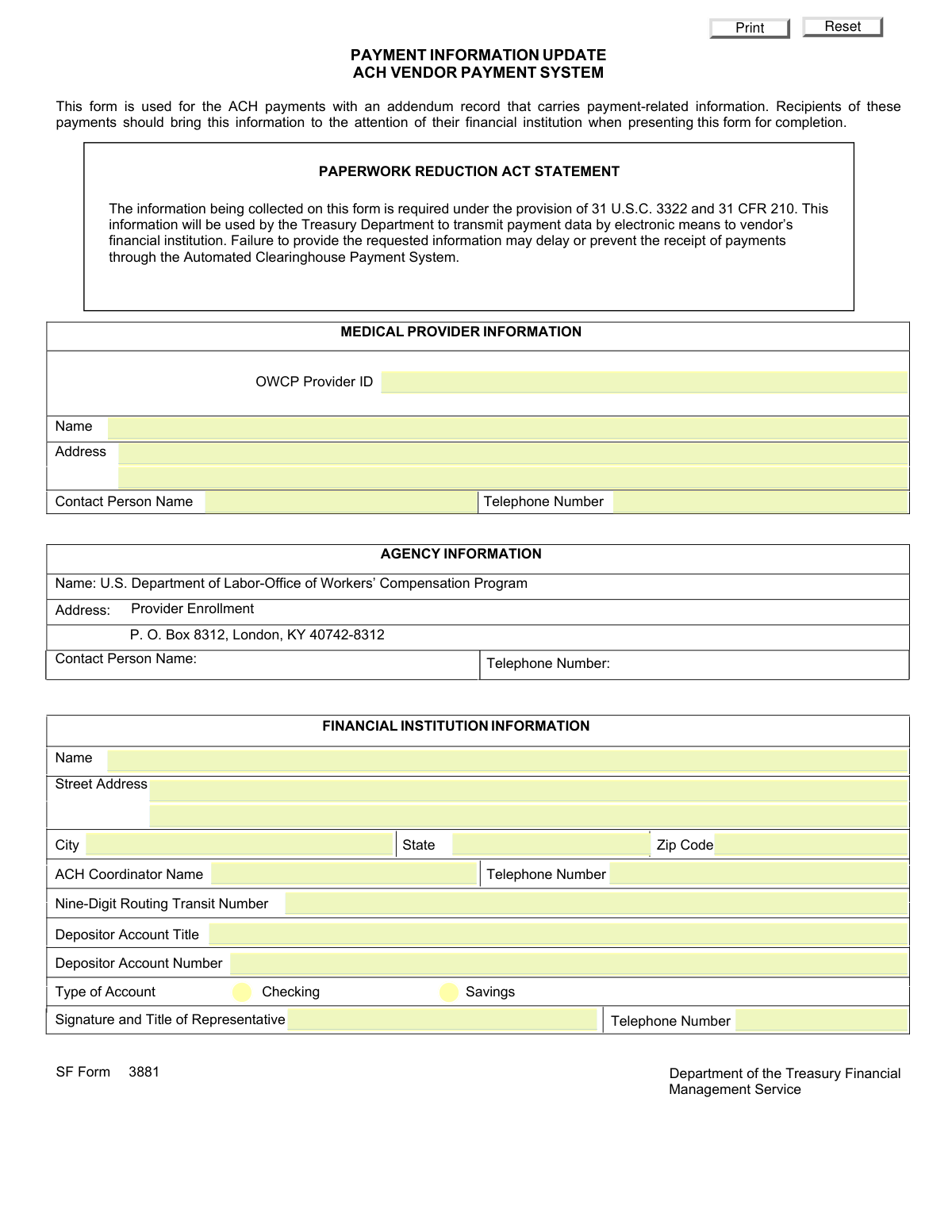
Yes! You can use AI to fill out SF Form 3881, Payment Information Update, ACH Vendor Payment System
Standard Form 3881 (SF 3881) is a Department of the Treasury form used to collect banking information for electronic payments via the Automated Clearinghouse (ACH) system. It enables government agencies to securely and efficiently transfer funds directly to a vendor's, contractor's, or medical provider's bank account, replacing traditional paper checks. Today, this form can be filled out quickly and accurately using AI-powered services like Instafill.ai, which can also convert non-fillable PDF versions into interactive fillable forms.
Our AI automatically handles information lookup, data retrieval, formatting, and form filling.
It takes less than a minute to fill out SF 3881 using our AI form filling.
Securely upload your data. Information is encrypted in transit and deleted immediately after the form is filled out.
Form specifications
| Form name: | SF Form 3881, Payment Information Update, ACH Vendor Payment System |
| Number of fields: | 23 |
| Number of pages: | 2 |
| Language: | English |
Instafill Demo: How to fill out PDF forms in seconds with AI
How to Fill Out SF 3881 Online for Free in 2026
Are you looking to fill out a SF 3881 form online quickly and accurately? Instafill.ai offers the #1 AI-powered PDF filling software of 2026, allowing you to complete your SF 3881 form in just 37 seconds or less.
Follow these steps to fill out your SF 3881 form online using Instafill.ai:
- 1 Navigate to Instafill.ai and upload or select the SF Form 3881.
- 2 Use the AI assistant to fill in the 'Medical Provider Information' section with your practice name, address, and contact details.
- 3 Verify that the 'Agency Information' section is correctly pre-populated for the U.S. Department of Labor.
- 4 Enter your 'Financial Institution Information,' including the bank's name, address, and ACH coordinator contact.
- 5 Accurately provide your bank account details, including the nine-digit routing number, account number, and account type (checking or savings).
- 6 Review all entered information for accuracy, then provide the signature, title, and telephone number of the authorized representative.
- 7 Securely download, print, or submit the completed SF 3881 as instructed by the agency.
Our AI-powered system ensures each field is filled out correctly, reducing errors and saving you time.
Why Choose Instafill.ai for Your Fillable SF 3881 Form?
Speed
Complete your SF 3881 in as little as 37 seconds.
Up-to-Date
Always use the latest 2026 SF 3881 form version.
Cost-effective
No need to hire expensive lawyers.
Accuracy
Our AI performs 10 compliance checks to ensure your form is error-free.
Security
Your personal information is protected with bank-level encryption.
Frequently Asked Questions About Form SF 3881
This form, also known as the ACH Vendor Payment System form, is used by medical providers to set up or update their information for receiving electronic payments from the U.S. Department of Labor's Office of Workers' Compensation Program (OWCP).
Medical providers who provide services under the Office of Workers' Compensation Program (OWCP) and wish to receive payments directly into their bank account via Automated Clearinghouse (ACH) must complete this form.
Yes, you can. The instructions state that if this is a new enrollment, an OWCP Provider ID is not required to submit the form.
You should fill this section out with your bank's details, including its name, address, routing number, and your account information. You may need to contact your bank to get the correct ACH Coordinator's name and phone number.
An authorized representative from either the provider's practice or the financial institution can sign the form. Typed or stamped signatures are not acceptable; a physical, handwritten signature is required.
You will need your practice's contact information, your OWCP Provider ID (if you have one), and your bank account details, including the routing number, account number, and account title.
You should mail the completed and signed form to the Provider Enrollment address listed on the form, which is P.O. Box 8312, London, KY 40742-8312.
Failure to provide the requested information may delay or prevent you from receiving payments through the Automated Clearinghouse (ACH) Payment System from the OWCP.
You must enter the exact name or title of the account holder as it appears on your bank's records. This ensures the payment is credited to the correct account without any issues.
No, the instructions indicate that the Federal agency information in this section is pre-populated. You can leave this section as is.
Yes, services like Instafill.ai use AI to accurately auto-fill form fields, which can save you time and help reduce errors.
Simply upload the SF 3881 PDF to the Instafill.ai platform. The AI will identify the fields, allowing you to quickly fill them in, save your progress, and download the completed form for printing and signing.
You can use a service like Instafill.ai, which can convert flat, non-fillable PDFs into interactive, fillable forms. This allows you to type your information directly onto the form before printing it.
Compliance SF 3881
Validation Checks by Instafill.ai
1
Validates Routing Transit Number Format and Checksum
Checks that the 'Nine-Digit Routing Transit Number' field contains exactly nine numeric digits. It should also perform a checksum calculation to verify it is a valid, active routing number assigned by the American Bankers Association. This is critical to ensure payments are sent to the correct financial institution, and failure will result in immediate payment rejection.
2
Ensures Exclusive Account Type Selection
This validation confirms that the user has selected exactly one account type, either 'Checking' or 'Savings'. It prevents submissions where no account type is chosen or where both are selected simultaneously. An incorrect selection will cause the ACH transaction to fail, as the payment system requires a specific account type designation.
3
Verifies Completeness of Medical Provider Information
This check ensures that the 'Medical Provider Name', 'Address', 'City', 'State', and 'Zip Code' fields are all filled out. A complete and accurate provider profile is necessary for record-keeping, correspondence, and identity verification. Incomplete information can delay enrollment and payment processing or lead to misdirected communications.
4
Checks for Presence of Depositor Account Number
This validation ensures that the 'Depositor Account Number' field is not empty and contains only valid characters (typically alphanumeric). This number is the final destination for the payment, making it one of the most critical pieces of information on the form. Failure to provide an account number will make it impossible to process any payments, and the form submission will be rejected.
5
Validates US State Abbreviation Format
This validation checks that the 'State' fields for both the Medical Provider and the Financial Institution contain a valid two-letter U.S. postal abbreviation. Using standardized abbreviations ensures data consistency and compatibility with automated address verification systems. An invalid entry could cause mail to be returned or processing errors.
6
Confirms Standard US ZIP Code Format
This check verifies that the 'Zip Code' fields for both the provider and the financial institution adhere to a standard 5-digit or 9-digit (ZIP+4) format. A valid ZIP code is essential for mail delivery and for geographically locating the provider and bank branch. An invalid format will cause address validation to fail and may halt the submission process.
7
Validates Standard 10-Digit Telephone Number Format
This rule inspects all telephone number fields ('Contact Telephone Number', 'ACH Coordinator Telephone Number', 'Telephone Number of Representative') to ensure they contain a valid 10-digit number. This is important so that agency or bank personnel can successfully contact the right person if issues arise with the payment setup. An invalid number prevents necessary communication and can delay problem resolution.
8
Validates Conditional OWCP Provider ID Format
This rule checks that if a value is entered into the 'OWCP Provider ID' field, it consists of exactly 9 digits, as specified in the form instructions. While the field is not required for new enrollments, an incorrectly formatted ID for an existing provider can cause record-matching failures. This ensures data integrity for established providers without blocking new ones.
9
Verifies Completeness of Financial Institution Address
This check ensures that the 'Financial Institution Name', 'Street Address', 'City', 'State', and 'Zip Code' fields are all populated. An accurate address for the financial institution is required for verification purposes and to ensure the routing number corresponds to the correct branch. Missing information can lead to rejection of the ACH enrollment.
10
Confirms Presence of Depositor Account Title
This validation confirms that the 'Depositor Account Title' field is not left blank. The account title must exactly match the name on the bank account to prevent ACH transaction rejections due to a name mismatch. Submitting the form without this information will result in failed payments and require resubmission.
11
Requires Representative Information and Authorization
This check ensures the 'Signature and Title of Representative' and 'Telephone Number of Representative' fields are completed, as they signify authorization for the payment change. For a digital form, this confirms the field representing the signature and the title text box are not empty. Lack of authorization invalidates the request and will cause the form to be rejected.
12
Ensures All Required Contact Persons are Provided
This check verifies that the 'Contact Person Name' for the medical provider and the 'ACH Coordinator Name' for the financial institution are both provided. These fields identify the specific individuals responsible for payment inquiries at each organization. Missing names would make it difficult to resolve any payment discrepancies, potentially delaying funds.
Common Mistakes in Completing SF 3881
Users often transpose digits or mistakenly use a routing number from a deposit slip, which can differ from the one required for ACH electronic transfers. An incorrect routing number is a primary cause of payment failure, leading to rejected transactions and significant delays. To avoid this, always confirm the correct ACH routing number from a check or by contacting the financial institution directly before filling out the form.
The 'Depositor Account Title' must be the exact legal name on the bank account, not a DBA ('doing business as') name, an abbreviation, or a variation. Banks use this field for strict name matching, and any discrepancy will cause the ACH payment to be rejected. This error often occurs when a practice's public name differs from the legal entity name on its bank records. Always verify the exact account title from a bank statement to ensure a perfect match.
The form instructions explicitly state that 'Typed or stamped signatures are not acceptable.' Applicants frequently type their name in the signature field on a digital PDF, which is invalid and will lead to the form's rejection. The form requires a physical, handwritten (wet) signature. To comply, you must print the completed form and sign it by hand, or use a verified digital signature service if explicitly permitted.
Many applicants do not know their bank's ACH Coordinator and may leave this section blank, guess, or enter a generic customer service number. This information is crucial for the paying agency to resolve payment issues. Incomplete or incorrect details can prevent troubleshooting if a payment fails, delaying resolution. Before completing the form, contact your financial institution’s business services or treasury department to obtain the correct ACH Coordinator's name and direct phone number.
Simple data entry errors, like swapping two numbers in the long Depositor Account Number field, are extremely common and guarantee payment failure. A single incorrect digit will cause the payment to be rejected or, in a worst-case scenario, sent to the wrong account. This mistake necessitates resubmitting the entire form, causing significant delays. Carefully double-check the account number against a check or bank statement. AI-powered tools like Instafill.ai can help prevent this by securely storing and accurately auto-filling this information.
It is a simple but frequent oversight to forget to check either the 'Checking' or 'Savings' box in the 'Type of Account' section. This missing information renders the form incomplete and will halt the payment setup process until a corrected form is submitted. This checkbox is a critical data point for the ACH system. Always perform a final review of the entire form to catch simple but costly omissions like this one.
The signature line requires both a signature and the official title of the representative (e.g., 'Office Manager,' 'Owner,' 'CFO'). Applicants often sign their name but forget to write their title. This omission can lead to the form being rejected, as the agency cannot verify that the signatory was authorized to approve financial changes for the practice. Always ensure the person signing includes their official title to confirm their authority.
The instructions state the OWCP Provider ID is not required for new enrollments, yet new applicants may enter another number (like a Tax ID), causing confusion. Conversely, existing providers updating their information might forget to include their required 9-digit ID, which is essential for linking the payment details to their file. It is critical to read the instructions carefully and only provide the ID if you are an existing provider.
Since this form is often distributed as a non-fillable PDF, many people print it and fill it out by hand. Illegible handwriting, especially in the critical account and routing number fields, can easily be misread by data entry personnel, leading to payment rejections. To avoid this, it is best to use a tool like Instafill.ai that can convert the flat PDF into a fillable format, allowing you to type information clearly before printing for signature.
Providers sometimes enter a shortened version of their practice name or a DBA instead of the full legal name registered with the Department of Labor. This discrepancy can cause delays while the agency attempts to match the form to the correct provider file. Always use the full, official name of the medical provider or healthcare facility as it appears on official documents to ensure seamless processing.
Saved over 80 hours a year
“I was never sure if my IRS forms like W-9 were filled correctly. Now, I can complete the forms accurately without any external help.”
Kevin Martin Green
Your data stays secure with advanced protection from Instafill and our subprocessors

Robust compliance program
Transparent business model
You’re not the product. You always know where your data is and what it is processed for.
ISO 27001, HIPAA, and GDPR
Our subprocesses adhere to multiple compliance standards, including but not limited to ISO 27001, HIPAA, and GDPR.
Security & privacy by design
We consider security and privacy from the initial design phase of any new service or functionality. It’s not an afterthought, it’s built-in, including support for two-factor authentication (2FA) to further protect your account.
Fill out SF 3881 with Instafill.ai
Worried about filling PDFs wrong? Instafill securely fills sf-form-3881-payment-information-update-ach-vendor-payment-system forms, ensuring each field is accurate.