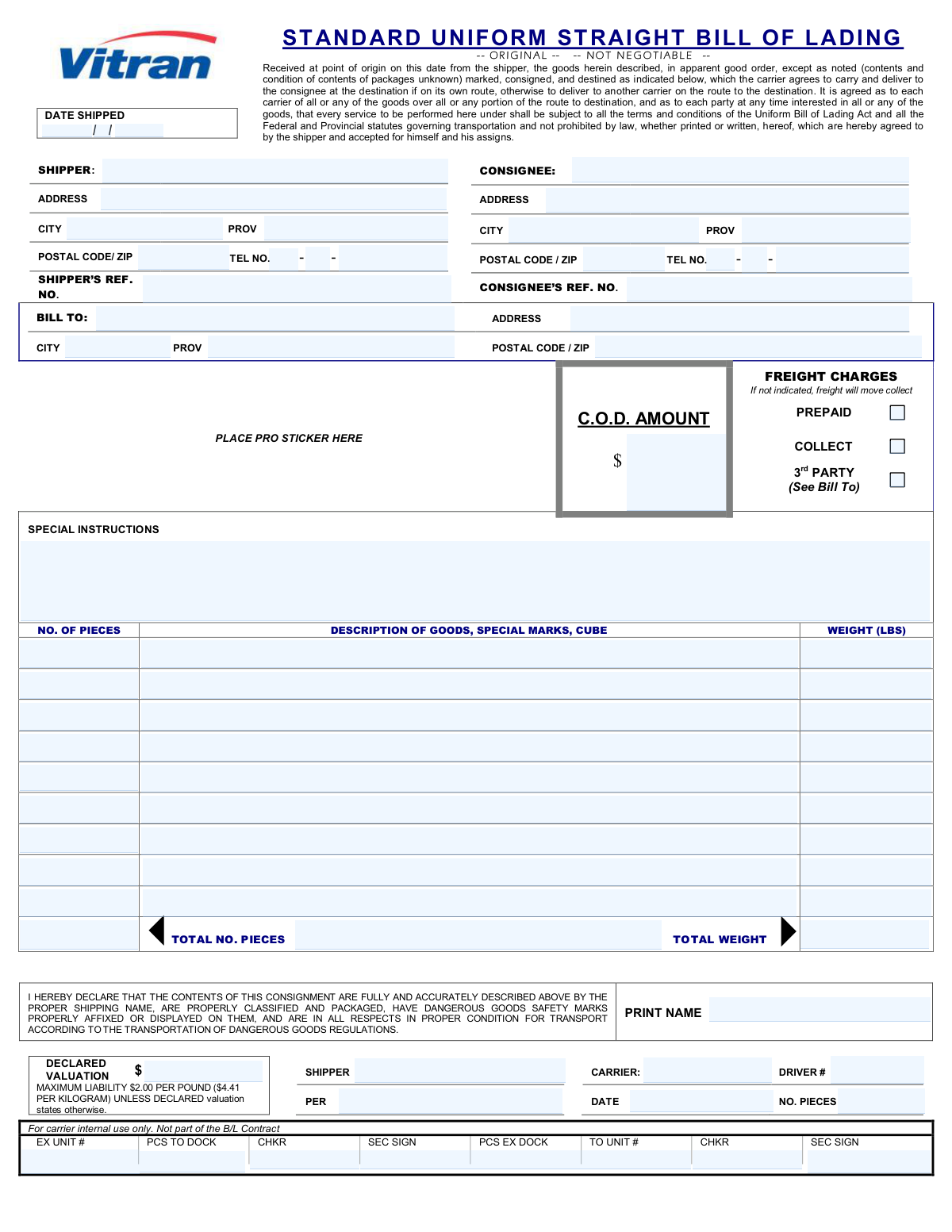
Yes! You can use AI to fill out Standard Uniform Straight Bill of Lading

A Standard Uniform Straight Bill of Lading is a non-negotiable legal document that acts as a receipt for goods and a contract for their transportation. It details the type, quantity, and destination of the goods being shipped, and outlines the terms and conditions of the transport agreement between the shipper and the carrier. This form is crucial for ensuring clear communication and legal protection for all parties involved in the shipping process. Today, this form can be filled out quickly and accurately using AI-powered services like Instafill.ai, which can also convert non-fillable PDF versions into interactive fillable forms.
Straight Bill of Lading has a complex Form Complexity Index of 64/100 — 77 fillable fields across 1 page. Instafill’s AI completes it accurately in under a minute.

Form specifications

Form name: Standard Uniform Straight Bill of Lading
Number of fields: 77
Number of pages: 1
FCI: Complex (64/100)
Field instructions: Straight Bill of Lading Instructions
Language: English
Our AI automatically handles information lookup, data retrieval, formatting, and form filling.
It takes less than a minute to fill out Straight Bill of Lading using our AI form filling.
Securely upload your data. Information is encrypted in transit and deleted immediately after the form is filled out.
Preview of Standard Uniform Straight Bill of Lading

Instafill Demo: How to fill out PDF forms in seconds with AI

How to Fill Out Straight Bill of Lading Online for Free in 2026

Are you looking to fill out a STRAIGHT BILL OF LADING form online quickly and accurately? Instafill.ai offers the #1 AI-powered PDF filling software of 2026, allowing you to complete your STRAIGHT BILL OF LADING form in just 37 seconds or less.
Follow these steps to fill out your STRAIGHT BILL OF LADING form online using Instafill.ai:
  1. 1 Navigate to Instafill.ai and upload or select the Standard Uniform Straight Bill of Lading form.
  2. 2 Use the AI assistant to automatically populate shipper and consignee information, including names, addresses, and contact details.
  3. 3 Specify the freight charge details by selecting prepaid, collect, or third-party billing, and provide the billing address if necessary.
  4. 4 Enter the details for each item being shipped, including the number of pieces, a clear description of the goods, and their weight.
  5. 5 Add any special instructions for handling or delivery, and state the declared valuation of the shipment.
  6. 6 Review all the information populated by the AI for accuracy, making any edits as needed.
  7. 7 Electronically sign and date the form to certify the information and finalize the shipping contract with the carrier.

Our AI-powered system ensures each field is filled out correctly, reducing errors and saving you time.

Why Choose Instafill.ai for Your Fillable Straight Bill of Lading Form?

Speed

Complete your Straight Bill of Lading in as little as 37 seconds.

Up-to-Date

Always use the latest 2026 Straight Bill of Lading form version.

Cost-effective

No need to hire expensive lawyers.

Accuracy

Our AI performs 10 compliance checks to ensure your form is error-free.

Security

Your personal information is protected with bank-level encryption.

Frequently Asked Questions About Straight Bill of Lading

Straight Bill of Lading has a Form Complexity Index of 64 out of 100, placing it in the complex complexity tier. This score is calculated deterministically from the form’s own structure using Instafill’s published Form Complexity Index methodology, so it can be reproduced and independently verified — it is not a subjective estimate.

For Straight Bill of Lading specifically, the score reflects 77 fillable fields across 1 page, grouped into 23 sections, and 5 conditional fields that only apply depending on earlier answers, 1 table or repeating lists. The number of fields is the largest factor in the base score (weighted 36%), followed by how difficult those fields are to complete based on their type, where free-text and signature fields count for more than simple checkboxes (26%). The number of pages that actually contain fields (15%), the amount of conditional “fill-only-if” logic (16%), and how many sections the form is divided into (7%) account for the rest of the base. On top of that base, the index adds points for tables and repeating lists, bundled instruction pages, and dense page layouts — capturing difficulty the base alone can miss.

In practical terms, a complex score means the form is demanding, with many fields, multiple pages and branching rules that are easy to get wrong. Instafill removes that effort entirely: our AI reads your information, maps each value to the correct field — including the conditional ones — and completes Straight Bill of Lading accurately in under a minute, with every field available for you to review before you download. See exactly how the Form Complexity Index is calculated.

This form is a legal contract between a shipper and a carrier for transporting goods. It serves as a receipt of shipment and details the type, quantity, and destination of the items being transported.

The shipper (the person or company sending the goods) is responsible for accurately completing the Bill of Lading before the carrier arrives for pickup. The carrier's driver then signs it to acknowledge receipt of the shipment.

The 'Shipper' is the sender, and the 'Consignee' is the receiver of the goods. The 'Bill To' section is only used if a separate third party, who is not the shipper or consignee, is responsible for paying the freight charges.

In the 'Freight Charges' box, check 'Prepaid' if the shipper is paying, 'Collect' if the consignee will pay upon delivery, or '3rd Party' if someone else is paying. If no box is checked, charges will default to 'Collect'.

A 'Not Negotiable' or 'Straight' Bill of Lading means the shipment can only be delivered to the specific consignee named on the form. The ownership of the goods cannot be transferred to another party while in transit.

If you leave the 'Declared Valuation' blank, the carrier's liability for loss or damage is limited to a maximum of $2.00 per pound ($4.41 per kilogram). You should declare a higher value for high-value goods to ensure adequate coverage.

You must accurately list the number of pieces, provide a clear description of the goods, note any special marks, and enter the weight in pounds for each line item. This information is critical for calculating freight charges and for liability.

You must check the declaration box at the bottom, confirming the contents are fully and accurately described, properly classified, packaged, and marked according to the Transportation of Dangerous Goods Regulations.

C.O.D. stands for 'Collect on Delivery.' If the consignee must pay for the goods themselves (not the shipping fee) upon arrival, you enter that amount here for the carrier to collect on your behalf.

You must give the completed original form to the carrier's driver when they pick up the shipment. Ensure the driver signs it and you keep a copy for your records.

Yes, services like Instafill.ai use AI to accurately auto-fill form fields, which saves time and helps prevent errors. This is particularly useful for businesses that frequently ship goods.

Simply upload the Bill of Lading PDF to the Instafill.ai platform. Its AI will make the document fillable online, allowing you to type in your information, save it, and download the completed form.

You can use a service like Instafill.ai, which can convert flat, non-fillable PDFs into interactive forms. This allows you to easily type your information into the correct fields instead of printing and filling it out by hand.

Compliance Straight Bill of Lading
Validation Checks by Instafill.ai

1
Valid and Complete 'Date Shipped'
This check ensures that the 'Shipment Day', 'Shipment Month', and 'Shipment Year' fields are all filled and together form a valid calendar date. It prevents impossible dates like February 30th. A valid date is crucial for tracking, billing cycles, and establishing the start of the transit period, and failure to provide one will block form submission.
2
Shipper Information Completeness
Validates that the Shipper's Name, Address, City, Province, and Postal Code/Zip are all provided. This information is mandatory for identifying the shipment's origin and the responsible party. Incomplete origin information can lead to legal disputes, billing errors, and an inability to process the shipment, so the form cannot be submitted without it.
3
Consignee Information Completeness
Ensures the Consignee's Name, Address, City, Province/State, and Postal/Zip Code are all filled out. The consignee information is essential for the carrier to successfully deliver the goods to the correct destination. If this information is missing or incomplete, the shipment will be undeliverable, resulting in delays, storage fees, and return costs.
4
Postal/ZIP Code Format Validation
This check verifies that the postal codes for the Shipper, Consignee, and Bill To parties match a valid Canadian (e.g., A1A 1A1) or US (e.g., 12345 or 12345-6789) format. Correctly formatted postal codes are critical for automated sorting, route planning, and accurate delivery. An invalid format will trigger an error and require correction before submission.
5
Mutually Exclusive Freight Charge Selection
Verifies that exactly one of the freight charge options ('Prepaid', 'Collect', or '3rd Party') is selected. These options determine who is responsible for payment and are mutually exclusive. Selecting none or more than one creates ambiguity, leading to billing errors and payment disputes, so the system will require a single, clear choice.
6
Conditional 'Bill To' Section Requirement
This validation ensures that if the '3rd Party' freight charge option is selected, then the 'Bill To' name and full address fields must be completed. This information is necessary to invoice the correct entity for the shipping costs. If '3rd Party' is checked but the billing details are missing, the submission will be rejected to prevent unbillable shipments.
7
Goods Line Item Integrity
For each row describing goods, this check ensures that if a 'Number of Pieces' or 'Weight' is entered, the corresponding 'Description of Goods' field is not empty. A quantity or weight without a description is meaningless and prevents proper handling and inventory. The validation will flag any incomplete line items to ensure all shipped goods are accounted for.
8
Total Pieces Calculation Consistency
This check automatically calculates the sum of all 'Number of Pieces' fields from the individual goods rows and compares it to the value entered in the 'Total Number of Pieces' field. This cross-reference ensures accuracy in the shipment count, which is vital for inventory control and loss prevention. A mismatch will trigger a warning, prompting the user to review and correct the quantities.
9
Total Weight Calculation Consistency
Validates that the 'Total Weight' field equals the sum of all individual 'Weight (LBS)' fields for each goods row. Accurate total weight is critical for carrier load planning, regulatory compliance (e.g., road weight limits), and calculating freight charges. If the manually entered total does not match the calculated sum, an error is raised to prevent logistical and billing inaccuracies.
10
C.O.D. Amount Format
Ensures that the 'C.O.D. Amount' field, if filled, contains a valid, non-negative numeric value. This amount must be collected from the consignee upon delivery, so it must be a clear and processable monetary figure. Entering non-numeric text or a negative number would cause collection failure, so the input is restricted to valid currency formats.
11
Declared Valuation Format
This check verifies that the 'Declared Valuation' field contains a valid, non-negative numeric value. This value determines the carrier's maximum liability in case of loss or damage and affects insurance costs. An invalid entry could lead to significant financial loss or legal disputes, so the field must contain a proper monetary value.
12
Carrier Accepted vs. Shipper Declared Pieces
Compares the 'Total Number of Pieces' declared by the shipper with the 'Accepted Pieces Quantity' entered by the carrier upon receipt. This is a critical hand-off verification step. If the numbers do not match, it indicates a discrepancy that must be resolved immediately to prevent disputes over lost or missing items, and the system should flag this for immediate review.
13
Full Phone Number Validation
This check ensures that if any part of a phone number (Area Code, Prefix, or Line Number) is entered for the Shipper or Consignee, all three parts are present and correctly formatted. It validates that the area code and prefix are 3 digits and the line number is 4 digits. A complete and valid phone number is essential for communication regarding delivery issues, so incomplete numbers will be flagged.
14
Dangerous Goods Declaration Signature
This validation checks if the 'Description of Goods' contains keywords associated with hazardous materials (e.g., 'flammable', 'corrosive', 'hazmat'). If such keywords are found, it then verifies that the 'Printed Name' field in the declaration section is filled out. This ensures that a responsible party has acknowledged the special handling requirements for dangerous goods as required by law.

Common Mistakes in Completing Straight Bill of Lading

Forgetting to Specify Freight Charge Terms

A frequent error is failing to check one of the 'Prepaid', 'Collect', or '3rd Party' boxes. The form states that if no option is selected, the shipment will default to 'Collect', billing the recipient. This can lead to refused shipments, payment disputes, and delivery delays if the consignee was not expecting to pay the freight charges.

Incomplete Third-Party Billing Information

Shippers often check the '3rd Party' box but then fail to provide the complete and accurate name and address in the 'Bill To' section. This makes it impossible for the carrier to issue an invoice, leading to significant billing delays and follow-up communications. It's crucial to treat the 'Bill To' section with the same level of detail as the shipper and consignee addresses.

Using Vague or Inaccurate Goods Descriptions

Describing items as 'General Merchandise' or 'Parts' is a common but critical mistake. Carriers and customs officials require specific descriptions to determine correct freight class, handling requirements, and duties. Vague descriptions can lead to incorrect billing, shipping delays, and complications with insurance claims if the goods are damaged.

Mismatching Itemized and Total Piece/Weight Counts

Manually adding the number of pieces and weights from each line often results in calculation errors. When the 'Total No. Pieces' or 'Total Weight' does not match the sum of the line items, it causes confusion and requires a manual recount by the carrier. This discrepancy can delay the shipment at the terminal and lead to billing adjustments.

Overlooking the Declared Valuation Field

Many shippers leave the 'Declared Valuation' field blank, unknowingly accepting the carrier's minimum liability, which is stated as $2.00 per pound. If a high-value shipment is lost or damaged, the shipper's compensation will be capped at this low default rate, potentially resulting in a significant financial loss. Shippers should always assess their shipment's value and declare it if it exceeds the default liability.

Mismanaging the C.O.D. Amount Field

The 'Collect on Delivery' (C.O.D.) field is intended for the value of the goods to be collected, not the freight charges. Common errors include leaving it blank when required, entering the freight cost, or writing an illegible amount. Such mistakes can cause the carrier to fail to collect payment for the goods, creating a major financial problem for the shipper.

Omitting Shipper or Consignee Reference Numbers

The 'Shipper's Ref. No.' and 'Consignee's Ref. No.' are vital for internal tracking and reconciliation, often corresponding to purchase orders or internal order numbers. Forgetting to include these numbers makes it difficult for the shipper and consignee to match the physical shipment to their paperwork. This can cause delays in receiving, inventory management, and payment processing.

Providing an Invalid or Incomplete Delivery Address

Entering a P.O. Box instead of a physical address or omitting a suite, unit, or building number is a frequent cause of delivery failure. Freight carriers require a complete physical address to complete a delivery. An incomplete address will result in failed delivery attempts, costly return-to-sender fees, and significant delays in getting the product to the consignee.

Missing Signature or Printed Name in Declaration

The declaration section, including the printed name and shipper signature, is a legally binding component of the Bill of Lading. Forgetting to sign the document or print the name of the authorized person can render the contract invalid. This may lead to the carrier refusing the shipment or create legal vulnerabilities in the event of a dispute or claim.

Incorrectly Calculating Total Weight and Cube

The form requires a description of goods, weight, and sometimes cube (volume). Shippers often estimate these values inaccurately or make errors in calculation, especially for non-uniform items. Incorrect weight or dimensions can lead to billing corrections, re-weigh fees from the carrier, and potential capacity issues on the truck.
Saved over 80 hours a year

“I was never sure if my IRS forms like W-9 were filled correctly. Now, I can complete the forms accurately without any external help.”

Kevin Martin Green

Your data stays secure with advanced protection from Instafill and our subprocessors

Robust compliance program

Transparent business model

You’re not the product. You always know where your data is and what it is processed for.

ISO 27001, HIPAA, and GDPR

Our subprocesses adhere to multiple compliance standards, including but not limited to ISO 27001, HIPAA, and GDPR.

Security & privacy by design

We consider security and privacy from the initial design phase of any new service or functionality. It’s not an afterthought, it’s built-in, including support for two-factor authentication (2FA) to further protect your account.

Fill out Straight Bill of Lading with Instafill.ai

Worried about filling PDFs wrong? Instafill securely fills standard-uniform-straight-bill-of-lading forms, ensuring each field is accurate.