
Yes! You can use AI to fill out State Bar of Wisconsin Form 3-2003, Quit Claim Deed
Don't type 35 fields by hand. Tell our AI about yourself, or upload a document you already have, and it fills every field in seconds. You check it, then download, print or sign.
The AI does the filling. You just check it.
No typing into boxes, nothing to install.
What this form asks for
The AI fills all of it, from your answers or your documents.
The AI checks your answers before you download
13 checks built for this form, so a wrong date or a missing answer is caught before anyone else sees it.
This check ensures that at least one Grantor name is provided in the 'Grantor Names' section. A quit claim deed is a legal transfer of property from a grantor, so the document is invalid without identifying who is giving up their interest. If this field is empty, the submission should be rejected as fundamentally incomplete.
This validation verifies that at least one Grantee name is entered in the 'Grantee Names' section. The property must be transferred to a specific individual or entity. An absence of a grantee means there is no recipient for the property interest, making the deed legally meaningless and unrecordable.
This check confirms that the Parcel Identification Number (PIN) field is not empty. The PIN is a unique identifier used by the county for tax and recording purposes, and it is critical for correctly identifying the property. A missing PIN will lead to the rejection of the document by the recording office.
This validation ensures the 'Legal Description' field contains text. The legal description is the official description of the property's boundaries and is the primary means of identifying the real estate being conveyed. A deed without a legal description is void because it fails to define the subject of the transfer.
This check verifies that the 'Execution Date' is a valid calendar date and is not set in the future. The execution date establishes the point in time the deed was signed by the Grantor. It serves as a reference for other dates on the form, such as the acknowledgment date, which cannot precede it.
This validation ensures that one of the two options, 'is' or 'is not', is selected for the 'Homestead Property Declaration'. This declaration has significant legal implications in Wisconsin regarding creditor claims and spousal rights. Failure to make this declaration leaves the property's status ambiguous and can cause the form to be rejected.
And 7 more checks
- Drafter Name Requirement
- Authentication or Acknowledgment Section Completeness
- Acknowledgment Date Consistency
- Notary Commission Expiration Date Validity
- Grantor Name and Signature Consistency
- Return Address Completeness
- Property County Validation
Let AI fill out your Form 3-2003
No typing. Every field filled in seconds, checked, ready to sign.
How to Fill Out Form 3-2003 Online for Free in 2026
What the AI walks you through.
- Navigate to Instafill.ai and upload or select the Wisconsin Quit Claim Deed (Form 3-2003).
- Provide the full legal names of the Grantor(s) and Grantee(s) as prompted by the AI assistant.
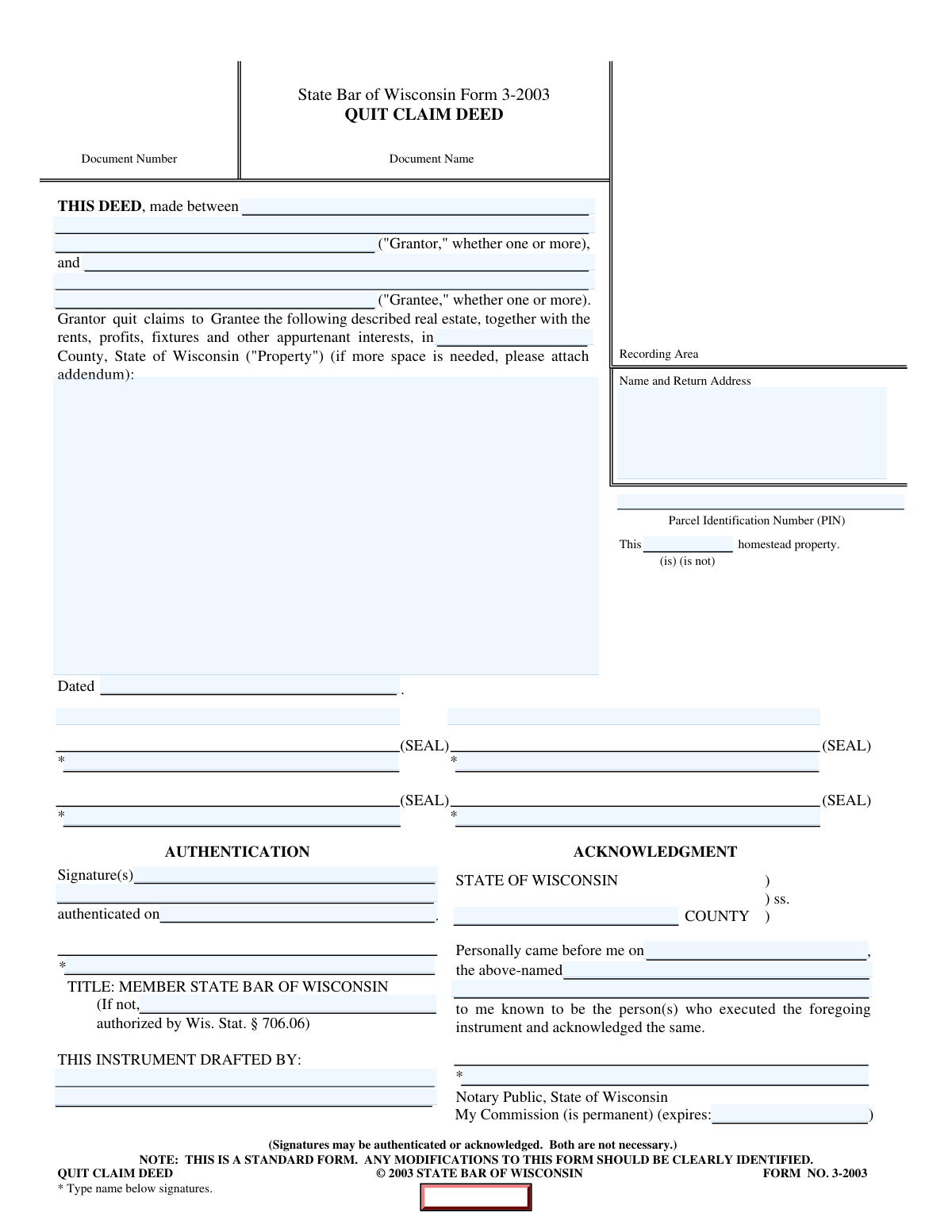
- Enter the property details, including the Parcel Identification Number (PIN), county, and the complete legal description.
- Indicate whether the property is or is not homestead property.
- Review all the information auto-filled by the AI across the form for accuracy, including the return address and drafter information.
- Download the completed deed. The Grantor(s) must then sign the document in the presence of a notary or have their signatures authenticated.
- File the original, executed deed with the Register of Deeds in the county where the property is located.
Common Mistakes in Completing Form 3-2003
The ones the AI is built to catch.
Providing an Incomplete or Incorrect Legal Description
Using Inconsistent or Incorrect Grantor and Grantee Names
Improperly Completing the Authentication or Acknowledgment Section
Omitting the Drafter's Information
Failing to Properly Declare Homestead Status
Incomplete Notarization in the Acknowledgment Section
Forgetting to Type Names Below Signatures
Entering an Incorrect Parcel Identification Number (PIN)
Providing an Inaccurate 'Name and Return Address'
Using Inconsistent or Future Dates
Frequently Asked Questions About Form 3-2003
Is it really free for 7 days?
Can I fill other forms too?
How do I cancel?
How does the AI fill out Form 3-2003?
What happens to my information?
How complex is Form 3-2003 to fill out?
What is the purpose of the Wisconsin Quit Claim Deed (Form 3-2003)?
Who needs to fill out and sign this form?
Where can I find the property's legal description?
What is a Parcel Identification Number (PIN) and where do I find it?
What does the 'homestead property' declaration mean?
Do I need to complete both the Authentication and Acknowledgment sections?
What do I do with the form after it's been signed and notarized?
Who is considered the 'Drafter' of this instrument?
Can I use an AI tool to help me fill out this Quit Claim Deed?
How can I fill out this form online using Instafill.ai?
The PDF I have is not fillable. What can I do?
What if there are more Grantors or Grantees than the spaces provided?
Why do I need to type my name below my signature?
Get your Form 3-2003 filled out by AI
$0 today. Cancel before Nov 4 and you pay nothing.
Other forms like this one
VA claim forms: Form OWCP-915, Claim for Medical Reimbursement, Form 8862, Information To Claim Certain Credits, Form CA-7, Claim for Compensation, Form CA-5, Claim for Compensation, Form SC-100, Plaintiff's Claim and ORDER to Go to Small Claims Court, Form 20-0995, Decision Review Request: Supplemental Claim, Form 104, List of Creditors 20 Largest Unsecured Claims, Form 941-X (Rev. April 2023), Adjusted Employer’s QUARTERLY Federal Tax Return or Claim for Refund, Judicial Council of California Form SC-104, Proof of Service (Small Claims), Immigration and Refugee Board of Canada (IRB) – Refugee Protection Division (RPD) Basis of Claim Form (for persons claiming refugee protection in Canada) (RPD.02.01), SC-108, Request to Correct or Cancel Judgment and Answer (Small Claims), Judicial Council of California Form SC-105, Request for Court Order and Answer (Small Claims), SC-120, Defendant’s Claim and ORDER to Go to Small Claims Court (Small Claims), Judicial Council of California Form SC-104, Proof of Service (Small Claims), Continental American Insurance Company (CAIC) / Aflac Group Critical Illness Claim Form (with Attending Physician’s Statement, HIPAA Authorization to Obtain Information, and Electronic Funds Transaction Authorization), Judicial Council of California Form SC-108, Request to Correct or Cancel Judgment and Answer (Small Claims), SC-105, Request for Court Order and Answer (Small Claims), Judicial Council of California Form SC-120, Defendant’s Claim and ORDER to Go to Small Claims Court (Small Claims), Small Claim and Notice of Small Claim (ORS 46.425) (OJD Official) (Jan 2026), VA Form 21-4138, Statement in Support of Claim
PA state forms: Form 1095-A, Health Insurance Marketplace Statement, Form W-2, Wage and Tax Statement, Form 593, Real Estate Withholding, Form 8938, Statement of Specified Foreign Financial Assets, Form CMS-2567, Statement of Deficiencies, Form 1098, Mortgage Interest Statement, Form 1098-T, Tuition Statement, Form 1099-S, Proceeds From Real Estate Transactions, Form 1098-E, Student Loan Interest Statement, Form DS-3053, Statement of Consent, Form DS-86, Statement of Non-Receipt of a U.S. Passport, Form DS-86, Statement of Non-Receipt of a U.S. Passport, Form 108, Statement of Intention, Form 107, Statement of Financial Affairs, Form 121, Statement About Your SSNs, Form 122A-1, Chapter 7 Statement of Current Monthly Income, Center for Infertility & Reproductive Surgery – New Patient Questionnaire and Patient/Guarantor Statement (Brigham and Women’s Hospital, Department of Obstetrics and Gynecology), Adult Travel Document Application for Stateless and Protected Persons in Canada (16 years of age or over) (PPTC 190), Form W-8IMY (Rev. October 2021), Certificate of Foreign Intermediary, Foreign Flow-Through Entity, or Certain U.S. Branches for United States Tax Withholding and Reporting, Form W-2, Wage and Tax Statement (2025)
NJ state forms: Form 1095-A, Health Insurance Marketplace Statement, Form W-2, Wage and Tax Statement, Form 593, Real Estate Withholding, Form 8938, Statement of Specified Foreign Financial Assets, Form CMS-2567, Statement of Deficiencies, Form 1098, Mortgage Interest Statement, Form 1098-T, Tuition Statement, Form 1099-S, Proceeds From Real Estate Transactions, Form 1098-E, Student Loan Interest Statement, Form DS-3053, Statement of Consent, Form DS-86, Statement of Non-Receipt of a U.S. Passport, Form DS-86, Statement of Non-Receipt of a U.S. Passport, Form 108, Statement of Intention, Form 107, Statement of Financial Affairs, Form 121, Statement About Your SSNs, Form 122A-1, Chapter 7 Statement of Current Monthly Income, Center for Infertility & Reproductive Surgery – New Patient Questionnaire and Patient/Guarantor Statement (Brigham and Women’s Hospital, Department of Obstetrics and Gynecology), Adult Travel Document Application for Stateless and Protected Persons in Canada (16 years of age or over) (PPTC 190), Form W-8IMY (Rev. October 2021), Certificate of Foreign Intermediary, Foreign Flow-Through Entity, or Certain U.S. Branches for United States Tax Withholding and Reporting, Form W-2, Wage and Tax Statement (2025)
state ID forms: Application for Renewal or Duplicate of Alabama Driver License or ID card, Form 1095-A, Health Insurance Marketplace Statement, Form W-2, Wage and Tax Statement, Form 593, Real Estate Withholding, Form 8938, Statement of Specified Foreign Financial Assets, Form CMS-2567, Statement of Deficiencies, Form 1098, Mortgage Interest Statement, Form 1098-T, Tuition Statement, Form 1099-S, Proceeds From Real Estate Transactions, Form 1098-E, Student Loan Interest Statement, Form DS-3053, Statement of Consent, Form DS-86, Statement of Non-Receipt of a U.S. Passport, Form 108, Statement of Intention, Form 107, Statement of Financial Affairs, Form 121, Statement About Your SSNs, Form 122A-1, Chapter 7 Statement of Current Monthly Income, Center for Infertility & Reproductive Surgery – New Patient Questionnaire and Patient/Guarantor Statement (Brigham and Women’s Hospital, Department of Obstetrics and Gynecology), Adult Travel Document Application for Stateless and Protected Persons in Canada (16 years of age or over) (PPTC 190), Form W-8IMY (Rev. October 2021), Certificate of Foreign Intermediary, Foreign Flow-Through Entity, or Certain U.S. Branches for United States Tax Withholding and Reporting, Form W-2, Wage and Tax Statement (2025)
Let AI fill out your Form 3-2003
Your trial starts once a card is added. You pay nothing before Nov 4.
Our AI already knows this form, all 35 fields of it. Skip the typing: tell it about yourself, or upload what you have, and it fills the whole form in seconds.
- AI fills every field on the form, tables and checkboxes included
- No typing into boxes: answer a few questions, or upload a document you already have, an old copy of this form, a photo of a document
- The AI checks the answers; you review and change anything before you download
- Download the finished PDF, print it, or sign it online
- Encrypted, and never used to train AI
Cancel before Nov 4 and you pay nothing.
A card is needed to start the trial. Cancel in two clicks from your account.
Terms · Privacy