Yes! You can use AI to fill out Suspected Child Abuse Report
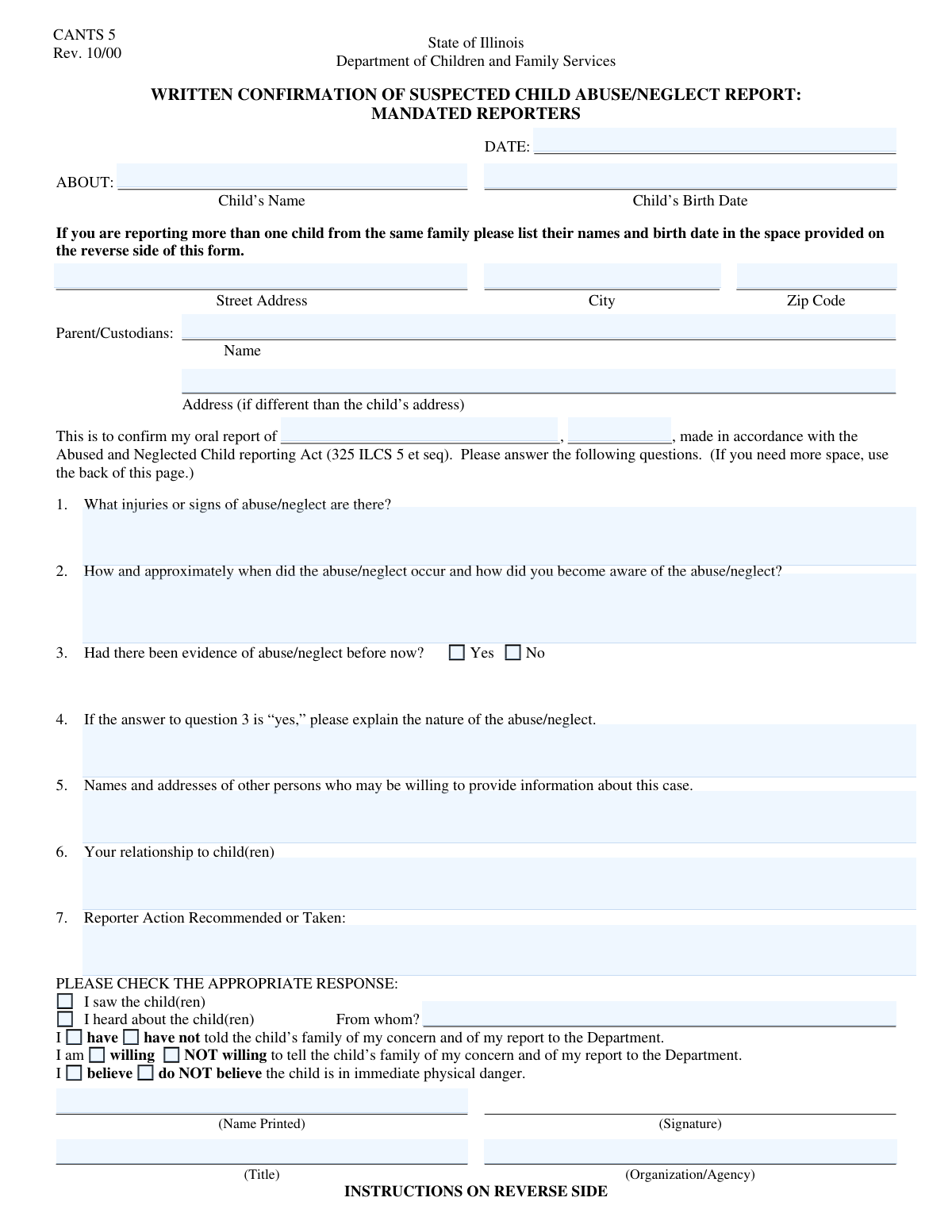
The Suspected Child Abuse Report is a critical legal document used to formally notify child protective services of potential child abuse or neglect. It provides authorities with the necessary information to initiate an investigation and ensure the safety of the child or children involved. Completing this form with accuracy and detail is paramount, and today this can be done quickly and accurately using AI-powered services like Instafill.ai, which can also convert non-fillable PDF versions into interactive fillable forms.
Our AI automatically handles information lookup, data retrieval, formatting, and form filling.
It takes less than a minute to fill out Child Abuse Report using our AI form filling.
Securely upload your data. Information is encrypted in transit and deleted immediately after the form is filled out.
Form specifications
| Form name: | Suspected Child Abuse Report |
| Number of fields: | 34 |
| Number of pages: | 2 |
| Filled form examples: | Form Child Abuse Report Examples |
| Language: | English |
Instafill Demo: How to fill out PDF forms in seconds with AI
How to Fill Out Child Abuse Report Online for Free in 2026
Are you looking to fill out a CHILD ABUSE REPORT form online quickly and accurately? Instafill.ai offers the #1 AI-powered PDF filling software of 2026, allowing you to complete your CHILD ABUSE REPORT form in just 37 seconds or less.
Follow these steps to fill out your CHILD ABUSE REPORT form online using Instafill.ai:
- 1 Navigate to Instafill.ai and upload or select the Suspected Child Abuse Report form to begin.
- 2 Use the AI assistant to accurately fill in the initial report details, including the date and time of the report and any prior oral reports.
- 3 Provide the child's personal information, such as name, birth date, and address, followed by the parent or custodian's details.
- 4 Carefully document the specifics of the suspected abuse or neglect, including descriptions of injuries, dates, and how you became aware of the situation.
- 5 Complete the sections regarding your relationship to the child, any actions you have already taken, and whether you have informed the family.
- 6 Enter your personal information as the reporter, including your name, title, and organization, to ensure the report is properly documented.
- 7 Thoroughly review all the information entered with the help of Instafill.ai's validation checks, then sign and submit the completed report to the appropriate child protective services agency.
Our AI-powered system ensures each field is filled out correctly, reducing errors and saving you time.
Why Choose Instafill.ai for Your Fillable Child Abuse Report Form?
Speed
Complete your Child Abuse Report in as little as 37 seconds.
Up-to-Date
Always use the latest 2026 Child Abuse Report form version.
Cost-effective
No need to hire expensive lawyers.
Accuracy
Our AI performs 10 compliance checks to ensure your form is error-free.
Security
Your personal information is protected with bank-level encryption.
Frequently Asked Questions About Form Child Abuse Report
This form is used to create a formal written report of suspected child abuse or neglect, often as a required follow-up to an initial oral report to child protective services.
This form is typically completed by mandated reporters like teachers, doctors, or social workers. However, anyone who suspects child abuse or neglect can use it to make a report.
The 'Oral Report Date' is when you first verbally reported the suspicion, for example, in a phone call. The 'Report Date' is the date you are completing this written document.
You should have the child's full name and birth date, parent/custodian details, information about your initial oral report, and a specific description of the injuries or signs of neglect you observed.
Be as objective and detailed as possible. Describe the type, size, location, and color of any injuries, or detail the specific signs of neglect you have witnessed.
In the 'Details of Abuse/Neglect Occurrence' section, provide the approximate date or timeframe to the best of your ability. You should also explain how you became aware of the situation.
The primary child's information goes on the first page. The form provides sections on Page 2 to add the names and birth dates of additional children involved in the same report.
Check the box for 'Heard About Child' and provide the name of the person who gave you the information in the 'Source of Information' field. This clarifies that your report is based on second-hand information.
You must check the box for 'Believe Child in Danger'. It is critical that you also communicate this urgency during your oral report to ensure an immediate response from the authorities.
The form asks if you have told the family or are willing to, but it is not a requirement for submission. Answer these questions based on your specific situation and comfort level.
No, the form specifies to enter the parent or custodian's address only if it is different from the child's address. If they live together, you can leave that field blank.
Yes, services like Instafill.ai use AI to help you accurately auto-fill form fields from your records. This can save significant time and help reduce errors.
Simply upload the form to the Instafill.ai platform. Its AI will make the document interactive, allowing you to fill it out online or use the auto-fill feature to populate information quickly.
You can use a service like Instafill.ai, which converts flat, non-fillable PDFs into interactive forms. This allows you to type your answers directly into the fields before printing or submitting electronically.
Compliance Child Abuse Report
Validation Checks by Instafill.ai
1
Report Date Chronological Validity
Checks that the 'Report Date' is a valid date format and is not set in the future. This is crucial for establishing an accurate timeline of events for legal and administrative purposes. If the date is invalid or in the future, the form submission will be rejected, and the user will be prompted to enter a date that is today or in the past.
2
Child's Birth Date Validity
Validates that the 'Child's Birth Date' is a valid date and is in the past, relative to the 'Report Date'. This check confirms the child's age, which is fundamental for determining jurisdiction and the applicability of child protection laws. An invalid or future date will trigger an error, requiring the user to correct the entry before proceeding.
3
Oral Report Date and Time Precedence
Ensures the 'Oral Report Date' and 'Oral Report Time' are chronologically on or before the main 'Report Date'. This maintains the logical sequence of events, as a written confirmation cannot precede the initial oral report it is confirming. A validation failure would indicate a data entry error and require the user to adjust the dates or times to reflect a correct timeline.
4
Mandatory Injury Description
Verifies that the 'Description of Injuries or Signs' field is not empty and contains a substantive description. This information is the primary evidence for the report and is critical for investigators to assess the urgency and nature of the situation. An empty or insufficient entry will block submission and prompt the user to provide the necessary details.
5
Mandatory Abuse Occurrence Details
Confirms that the 'Abuse/Neglect Occurrence Details' field has been filled out. This narrative explains the context of the alleged abuse, which is essential for any investigation to understand the circumstances and identify risks. The form cannot be submitted without this information, ensuring that all reports contain the core details needed for a preliminary assessment.
6
Conditional Explanation for Prior Abuse
This validation checks that if the 'Evidence of Previous Abuse/Neglect - Yes' box is checked, the corresponding 'Explanation of Prior Abuse/Neglect' text area is not empty. This ensures that claims of prior incidents are substantiated with details, providing a more complete history for investigators. If the box is checked but the explanation is missing, the user will be required to provide the explanation or uncheck the box.
7
Conditional Source for Indirect Information
Validates that if the 'Heard About Child' box is checked, the 'Source of Information' field is filled in. This is important for tracing the chain of information and assessing the reliability of secondhand reports. A failure to provide the source when required will prevent form submission and prompt the user to either provide the source's name or change their selection.
8
Exclusive Selection for Prior Abuse Evidence
Ensures that the user selects either 'Evidence of Previous Abuse/Neglect - Yes' or 'No', but not both. This prevents contradictory data entry and ensures a clear answer to a critical question about the child's history. If both or neither are selected, the form will display an error, forcing a clear choice.
9
Exclusive Selection for Immediate Danger
Verifies that only one of the two options, 'Believe Child in Danger' or 'Do NOT believe child is in immediate physical danger', is selected. This is a critical piece of information for triaging the report's urgency and determining the speed of the required response. An invalid selection would halt submission until a single, unambiguous choice is made.
10
Child's Full Address Requirement
This check ensures that the 'Street Address', 'City', and 'Zip Code' fields for the child are all completed. A complete and accurate address is vital for locating the child and initiating a welfare check or investigation. If any part of the address is missing, the form will be considered incomplete and cannot be submitted.
11
Zip Code Format Validation
Validates that the 'Zip Code' field contains a correctly formatted US ZIP code, such as 5 digits. This helps ensure address accuracy, which is critical for dispatching services and for data aggregation and reporting. An incorrectly formatted ZIP code will trigger an error message asking the user to correct the entry.
12
Mandatory Reporter Identification
Verifies that the 'Reporter Name' and 'Reporter Title' fields are not empty. Identifying the reporter is crucial for follow-up questions and for legal and accountability purposes, especially for mandated reporters. Submission will be blocked if this essential identifying information is missing, ensuring all reports have a clear point of contact.
13
Second Child Birth Date Dependency
This rule ensures that if a name is entered into the 'Second Child's Name' field, the 'Second Child's Birth Date' field must also be completed. This maintains data integrity by preventing records of children with incomplete vital information. If the name is present but the birth date is missing, the user will be prompted to provide it before the form can be submitted.
14
Exclusive Selection for Information Source
This validation ensures that the user selects either 'Saw Child(ren)' or 'Heard About Child', but not both. This clarifies whether the report is based on direct observation or indirect information, which is a key factor in assessing its evidentiary value. The form will show an error if both or neither option is checked, requiring the user to specify the source type.
15
Mandatory Parent/Custodian Name
This check verifies that the 'Parent/Custodian Name' field is filled out. Identifying the legal guardian is a fundamental requirement for any child protective services case, as they are a primary party in the investigation and any subsequent actions. The form submission will fail without this information, as it is impossible to proceed with a case without knowing the identity of the child's guardian.
Common Mistakes in Completing Child Abuse Report
Reporters often use emotional or subjective language (e.g., 'the child seemed sad') instead of objective, factual observations in the 'Description of Injuries' or 'Details of Abuse/Neglect Occurrence' fields. This happens due to the distressing nature of the situation. Vague reports are difficult for investigators to act upon and can weaken the case, potentially delaying intervention. To avoid this, describe only what you saw, heard, or know directly, using specific details like dates, times, locations, and direct quotes whenever possible.
This form contains conditional logic, such as 'Fill only if 'Evidence of Previous Abuse/Neglect - Yes' is 'Yes''. A common mistake is to check 'Yes' but then fail to provide the required explanation in the subsequent field. This omission creates an incomplete record and forces caseworkers to spend extra time following up for missing information, delaying the assessment process. Always review your selections and ensure you have completed all related fields that become mandatory based on your answers.
In fields like 'Child's Name' or 'Parent/Custodian Name', people sometimes enter a nickname or only a first name. This can lead to significant delays and confusion during identity verification and database searches, making it difficult to connect the report to existing records or locate the individuals. Always use the full, legal name as known to ensure authorities can quickly and accurately identify the child and family involved.
When filling out the 'Street Address' for the child or parent, reporters frequently forget to include essential details like apartment numbers, building numbers, or even the correct zip code. This seemingly small error can make it impossible for first responders or social workers to locate the child, especially in an emergency. Double-check every part of the address for completeness and accuracy before submitting the form to prevent critical delays in a welfare check.
The form requires multiple dates: 'Report Date', 'Child's Birth Date', and 'Oral Report Date'. Users often enter dates in the wrong format, transpose numbers, or confuse the 'Report Date' with the date the incident occurred. Incorrect dates can disrupt the timeline of events, affect the child's eligibility for services, and create legal complications. Carefully verify each date and its format; AI-powered tools like Instafill.ai can help by auto-formatting and validating dates to prevent such errors.
When a report involves a household with multiple children, the reporter might focus on the primary child mentioned and neglect to list siblings on Page 2. Other children in the home may also be victims or witnesses, and failing to include them means they may not be assessed for safety. If abuse or neglect is suspected in a home, it is crucial to list the full name and birth date of every child residing there.
Reporters may incorrectly check the 'Saw Child(ren)' box when their information is actually second-hand ('Heard About Child'). This distinction is vital for investigators to assess the source's reliability and the evidence's directness. Misrepresenting the source can undermine the report's credibility. Be precise about how you obtained the information and fill out the 'Source of Information' field if you did not personally witness the situation.
Under stress or when rushing, a person might accidentally check conflicting boxes, such as selecting both 'Believe Child in Danger' and 'Do NOT believe child is in immediate physical danger'. Such contradictions make the reporter's assessment unclear and may cause the form to be rejected or require immediate clarification, wasting valuable time. To avoid this, read each option carefully and review all your checkbox selections before finalizing the report.
The form asks for the parent's address 'if it is different from the child's address.' People often leave this field blank, which creates ambiguity: is the address the same, or was the information simply omitted? This forces caseworkers to assume or investigate further. To prevent this, if the address is the same, it's best practice to write 'Same as child's address' to remove any doubt.
Mandated reporters sometimes provide their name but leave the 'Reporter Title' and 'Reporter Organization/Agency' fields blank. This information is critical as it establishes the reporter's legal standing and relationship to the child (e.g., teacher, doctor), which can lend weight to the report. Incomplete professional details can hinder necessary follow-up communication between the agency and the reporter. If this form is a non-fillable PDF, a tool like Instafill.ai can convert it into a fillable version to ensure all fields are easily completed.
Saved over 80 hours a year
“I was never sure if my IRS forms like W-9 were filled correctly. Now, I can complete the forms accurately without any external help.”
Kevin Martin Green
Your data stays secure with advanced protection from Instafill and our subprocessors
Robust compliance program
Transparent business model
You’re not the product. You always know where your data is and what it is processed for.
ISO 27001, HIPAA, and GDPR
Our subprocesses adhere to multiple compliance standards, including but not limited to ISO 27001, HIPAA, and GDPR.
Security & privacy by design
We consider security and privacy from the initial design phase of any new service or functionality. It’s not an afterthought, it’s built-in, including support for two-factor authentication (2FA) to further protect your account.
Fill out Child Abuse Report with Instafill.ai
Worried about filling PDFs wrong? Instafill securely fills suspected-child-abuse-report forms, ensuring each field is accurate.