Yes! You can use AI to fill out UniCare Health Plan of West Virginia, Inc. Provider Application Form
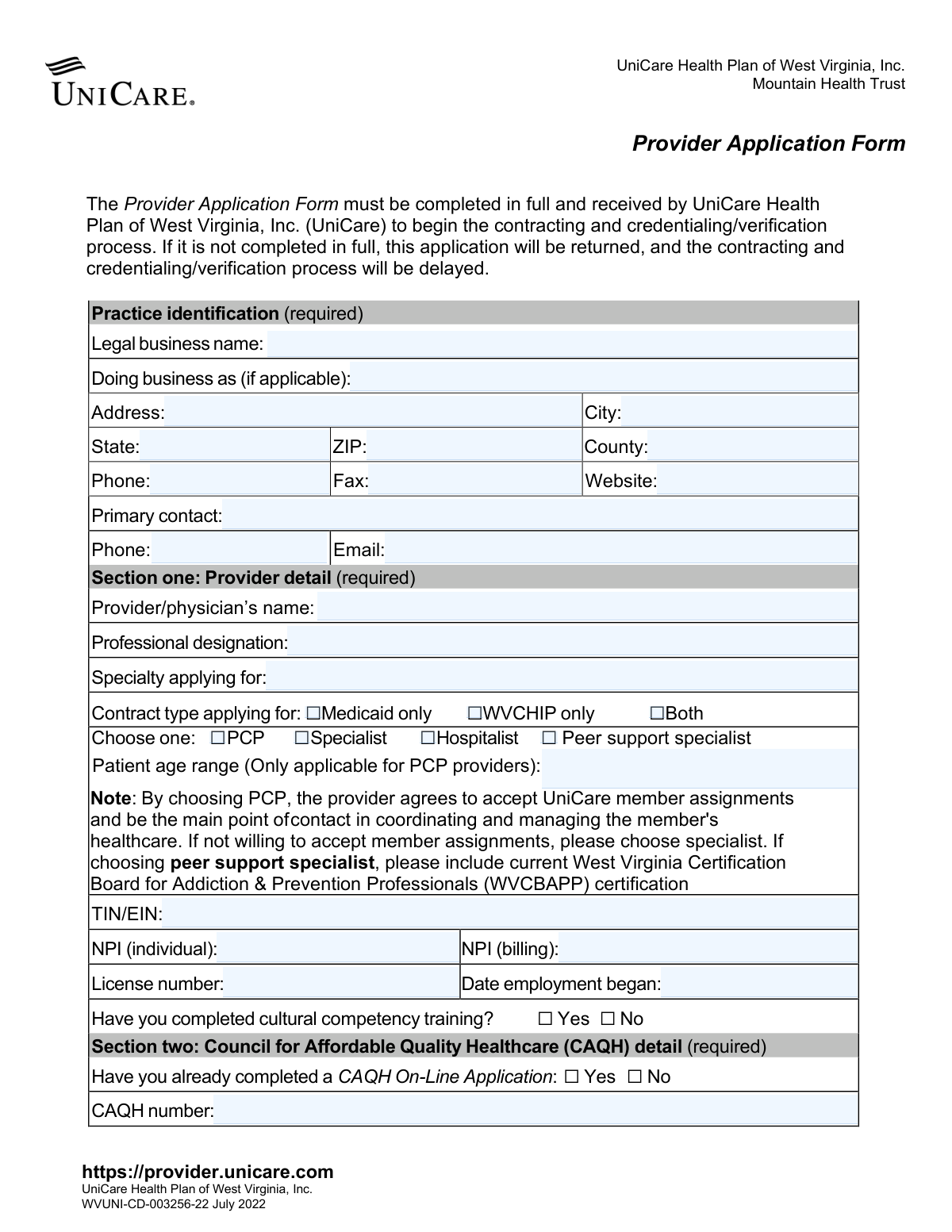
The UniCare Provider Application Form is a required document for healthcare professionals and practices wishing to join the UniCare network in West Virginia. Submitting this application initiates the contracting and credentialing process, which is necessary to provide services to UniCare members. Today, this form can be filled out quickly and accurately using AI-powered services like Instafill.ai, which can also convert non-fillable PDF versions into interactive fillable forms.
WVUNI-CD-003256-22 is part of the
CAR forms, health care forms, health forms and L.A. Care forms categories on Instafill.
Our AI automatically handles information lookup, data retrieval, formatting, and form filling.
It takes less than a minute to fill out WVUNI-CD-003256-22 using our AI form filling.
Securely upload your data. Information is encrypted in transit and deleted immediately after the form is filled out.
Form specifications
| Form name: | UniCare Health Plan of West Virginia, Inc. Provider Application Form |
| Number of pages: | 1 |
| Language: | English |
More forms in CAR forms
Instafill Demo: How to fill out PDF forms in seconds with AI
How to Fill Out WVUNI-CD-003256-22 Online for Free in 2026
Are you looking to fill out a WVUNI-CD-003256-22 form online quickly and accurately? Instafill.ai offers the #1 AI-powered PDF filling software of 2026, allowing you to complete your WVUNI-CD-003256-22 form in just 37 seconds or less.
Follow these steps to fill out your WVUNI-CD-003256-22 form online using Instafill.ai:
- 1 Navigate to Instafill.ai and upload or select the UniCare Provider Application Form.
- 2 Use the AI assistant to automatically fill in your practice identification details, including legal business name, address, and primary contact information.
- 3 Enter your individual provider details, such as professional designation, specialty, NPI, and license number, letting the AI guide you through each required field.
- 4 Provide your Council for Affordable Quality Healthcare (CAQH) number and attestation date, ensuring the information is current as required.
- 5 Confirm your West Virginia Medicaid enrollment status and input the correct provider remittance advice address.
- 6 List all physical practice locations, including addresses, office hours, and billing NPIs for each site.
- 7 Review all the information pre-filled by the AI for accuracy, make any necessary corrections, and then securely download or submit the completed application.
Our AI-powered system ensures each field is filled out correctly, reducing errors and saving you time.
Why Choose Instafill.ai for Your Fillable WVUNI-CD-003256-22 Form?
Speed
Complete your WVUNI-CD-003256-22 in as little as 37 seconds.
Up-to-Date
Always use the latest 2026 WVUNI-CD-003256-22 form version.
Cost-effective
No need to hire expensive lawyers.
Accuracy
Our AI performs 10 compliance checks to ensure your form is error-free.
Security
Your personal information is protected with bank-level encryption.
Frequently Asked Questions About Form WVUNI-CD-003256-22
This form is used by healthcare providers to initiate the contracting and credentialing process with UniCare Health Plan of West Virginia, Inc., which is required to join their provider network.
Any healthcare provider, including physicians (PCPs, Specialists, Hospitalists) and Peer Support Specialists, who wants to contract with UniCare to provide services to its members must complete this form.
If the form is not completed in full, it will be returned to you. This will cause a delay in the contracting and credentialing/verification process.
Yes, Section 3 explicitly states that you must be an enrolled West Virginia Medicaid provider before UniCare can begin the contracting and credentialing process.
CAQH (Council for Affordable Quality Healthcare) is a service that stores your professional information. You must have a complete and up-to-date CAQH profile for UniCare to access and verify your credentials.
You must log in to your CAQH online application, update your information, and re-attest to its accuracy before submitting this form. An expired attestation will delay the processing of your application.
By selecting PCP (Primary Care Provider), you agree to accept UniCare member assignments and manage their care. If you are not willing to accept member assignments, you should select 'Specialist'.
You must provide the full address, phone number, and office hours for each practice location, starting with your primary service location. You can list up to four locations per individual NPI.
Yes, if you are applying as a Peer Support Specialist, you must include your current West Virginia Certification Board for Addiction & Prevention Professionals (WVCBAPP) certification.
You will need to provide your practice's Tax ID/EIN, your individual and billing NPIs, your state license number, and your CAQH number.
Yes, services like Instafill.ai use AI to help you accurately auto-fill form fields. This can save you time and help prevent errors that might delay your application.
You can use a service like Instafill.ai to complete the form digitally. Simply upload the PDF to their platform to type your information directly into the fields and then download the completed document.
If you have a non-fillable or 'flat' PDF, you can use a tool like Instafill.ai. It can convert the document into an interactive, fillable form that you can easily complete on your computer.
Compliance WVUNI-CD-003256-22
Validation Checks by Instafill.ai
1
TIN/EIN Format Validation
This check verifies that the Taxpayer Identification Number (TIN/EIN) is a 9-digit numeric value. This is crucial for correct tax reporting and financial processing with the provider. An invalid format will prevent the system from correctly identifying the business entity for payment and regulatory purposes, leading to application rejection.
2
NPI Number Format and Existence
This validation ensures that both the individual and billing National Provider Identifier (NPI) fields contain a valid 10-digit number. The NPI is a standard, unique identifier for health care providers in administrative and financial transactions. Failure to provide a valid NPI will halt the credentialing process as it is impossible to verify the provider's identity within the national system.
3
WV Medicaid Enrollment Prerequisite
This check confirms that the applicant has selected 'Yes' for being enrolled with WV Medicaid. The form explicitly states this is a mandatory prerequisite to begin the UniCare contracting and credentialing process. If 'No' is selected, the application is considered ineligible and should be immediately flagged for rejection with instructions on how to enroll with WV Medicaid first.
4
CAQH Attestation Date Recency
This validation checks if the 'date of last attestation' for the CAQH application is within the last 120 days. Outdated information can lead to incorrect credentialing data, which poses a compliance risk. An expired attestation date will delay the application, as the provider must update their CAQH profile before UniCare can proceed.
5
Conditional Patient Age Range for PCPs
This check ensures that the 'Patient age range' field is completed if, and only if, the provider has selected 'PCP' as their role. This information is critical for assigning members to an appropriate Primary Care Provider. If a provider is a PCP and this field is blank, the application is incomplete and will be returned for correction.
6
Exclusive Provider Role Selection
This validation verifies that exactly one provider role (PCP, Specialist, Hospitalist, or Peer support specialist) has been selected. Selecting multiple or no roles creates ambiguity in how the provider should be contracted and listed in directories. The form must be returned if this rule is violated, as the provider's primary function is unclear.
7
Peer Support Specialist Certification Requirement
This check flags applications where 'Peer support specialist' is chosen to ensure the required West Virginia Certification Board for Addiction & Prevention Professionals (WVCBAPP) certification is included. While there isn't a dedicated field, this validation serves as a business rule to halt processing until manual verification of the certification is complete. Lack of certification makes the provider ineligible for this specific role.
8
Completeness of Primary Service Location
This validation ensures all fields within the 'Primary service location' section are filled out, including address, county, phone, and at least one entry for office hours. This location is the main point of service for members and is required for provider directories and network adequacy analysis. An incomplete primary location will cause the application to be rejected.
9
Employment Date Logical Check
This check validates that the 'Date employment began' is a properly formatted, valid date that is not in the future. An invalid or future date is a logical error that can cause issues with credentialing timelines and background verification. The system should reject illogical dates and require the user to input a past or current date.
10
Conditional CAQH Number Requirement
This validation ensures that if a provider answers 'Yes' to 'Have you already completed a CAQH On-Line Application', then the 'CAQH number' field must be populated. The CAQH number is essential for accessing the provider's detailed credentialing data. An application with a 'Yes' but no number is incomplete and cannot be processed.
11
Phone and Fax Number Formatting
This check verifies that all phone and fax number fields across the form adhere to a standard format, such as a 10-digit number. Consistent formatting is essential for data integrity and ensuring successful communication with the provider's practice. Incorrectly formatted numbers can lead to communication failures and will require correction.
12
ZIP Code and State Consistency
This validation ensures all ZIP code fields are a valid 5-digit format and correspond logically with the entered City and State. For example, a West Virginia address should have a ZIP code that exists within WV. This check prevents data entry errors that could lead to misdirected mail and incorrect location data in provider directories.
13
Required Section Completion
This is a high-level check to ensure all sections explicitly marked as '(required)' have been filled out. The form states that it will be returned if not completed in full. This validation acts as a gatekeeper to prevent partially completed forms from entering the processing queue, thereby reducing manual follow-up and delays.
14
Contract Type Selection Check
This validation ensures that at least one option under 'Contract type applying for' (Medicaid only, WVCHIP only, or Both) is selected. This choice defines the scope of the provider's participation and is fundamental to the contract. An application without this selection cannot proceed as the desired business relationship is undefined.
Common Mistakes in Completing WVUNI-CD-003256-22
Providers often enter their practice's common name or 'Doing Business As' (DBA) in the 'Legal business name' field. The legal name is the one registered with the state and IRS, which may differ from the public-facing name. This discrepancy causes validation failures against tax records, leading to application rejection and significant delays in the credentialing process. To avoid this, verify the exact legal name on your business registration or tax documents before filling out the form.
Applicants frequently confuse the individual provider's NPI (Type 1) with the group or billing NPI (Type 2) for the practice. The 'NPI (individual)' field is for the specific physician's number, while the 'NPI (billing)' is for the entity submitting claims. Entering these incorrectly will cause claim rejections and payment delays. Always verify the correct NPI type for each field to ensure smooth processing.
The form requires the CAQH attestation to be current within the last 120 days, a detail providers often overlook. Submitting an application with an expired attestation guarantees a processing delay, as UniCare cannot verify credentials until the CAQH profile is re-attested. Before submitting, log in to your CAQH ProView® profile, review all information, and complete the attestation process to prevent your application from being returned.
The application clearly states that being an enrolled West Virginia Medicaid provider is a prerequisite. Applicants sometimes miss this and submit the form anyway, hoping to complete the processes in parallel. This results in an automatic rejection, as UniCare cannot proceed without a valid WV Medicaid provider ID. Ensure you are fully enrolled and active with WV Medicaid before starting this application to avoid wasting time.
A provider might select 'PCP' without understanding the contractual obligation to accept member assignments and coordinate care, as noted on the form. This can lead to operational issues and potential contract breaches when the provider later refuses member assignments. If you are not prepared to be the main point of contact for assigned members, you must select 'Specialist' to align your practice's capabilities with your contractual duties.
Even if a provider's CAQH profile is up-to-date, they may forget to grant UniCare specific authorization to access their data. Without this permission, the credentialing team cannot pull the necessary information, bringing the application process to a halt. To prevent this, log in to your CAQH profile, navigate to the 'Authorizations' section, and ensure that UniCare is selected as a plan authorized to view your data.
In Section 5, providers often leave the office hours for their practice locations blank, viewing it as non-essential. However, this data is critical for creating accurate provider directories for members and for network adequacy analysis. Incomplete location details can delay the finalization of your profile and prevent members from finding your practice, so meticulously fill out the hours for each service location.
Data entry errors like transposing digits in the Tax Identification Number (TIN) or Employer Identification Number (EIN) are common. An incorrect TIN/EIN will cause a mismatch with IRS records, leading to application rejection and significant issues with future payment processing. Double-check the number against official tax documents before entry. AI-powered tools like Instafill.ai can help validate such numeric formats to reduce errors.
The form requires providers choosing 'peer support specialist' to include their current West Virginia Certification Board for Addiction & Prevention Professionals (WVCBAPP) certification. Applicants often select this role but forget to attach or note the required certification information. This omission will delay the application, as the credentialing team cannot verify this specialty without the specific certification. Always include all required documentation for specialized roles.
Since this form is a PDF, providers may print and handwrite it, leading to illegible entries for critical data like names, license numbers, and NPIs. Unclear handwriting is a primary source of data entry errors, causing significant processing delays or rejection. To avoid this, use a fillable PDF editor or a service like Instafill.ai, which can convert flat PDFs into fillable forms and ensure all entries are clear and typed.
Saved over 80 hours a year
“I was never sure if my IRS forms like W-9 were filled correctly. Now, I can complete the forms accurately without any external help.”
Kevin Martin Green
Your data stays secure with advanced protection from Instafill and our subprocessors




Robust compliance program
Transparent business model
You’re not the product. You always know where your data is and what it is processed for.
ISO 27001, HIPAA, and GDPR
Our subprocesses adhere to multiple compliance standards, including but not limited to ISO 27001, HIPAA, and GDPR.
Security & privacy by design
We consider security and privacy from the initial design phase of any new service or functionality. It’s not an afterthought, it’s built-in, including support for two-factor authentication (2FA) to further protect your account.
Fill out WVUNI-CD-003256-22 with Instafill.ai
Worried about filling PDFs wrong? Instafill securely fills unicare-health-plan-of-west-virginia-inc-provider-application-form forms, ensuring each field is accurate.
