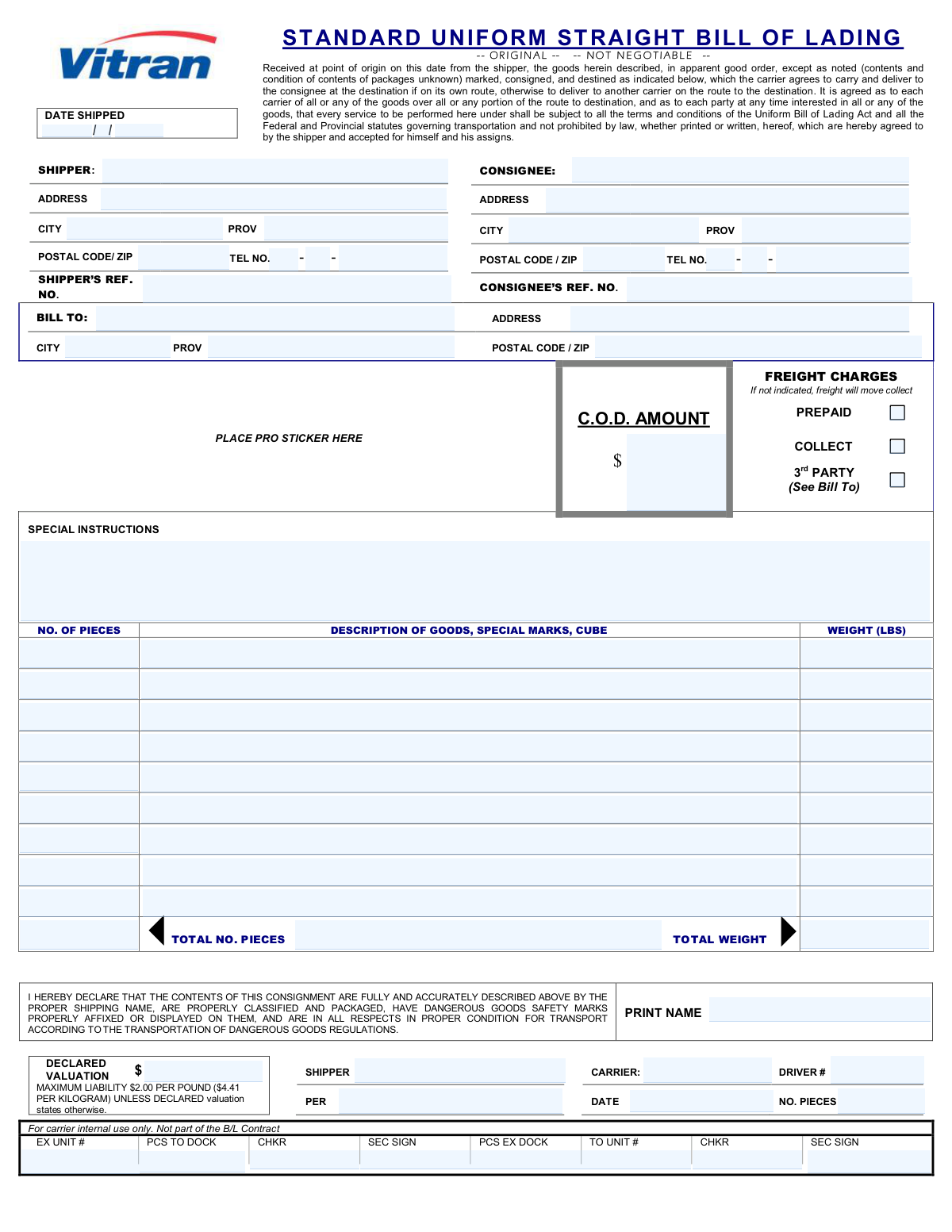
Yes! You can use AI to fill out Uniform Straight Bill of Lading

A Uniform Straight Bill of Lading (BOL) is a non-negotiable legal document that serves as a receipt for goods, a contract for their carriage, and a document of title. It outlines the shipper, consignee, the specific goods being shipped, their quantity, and their destination, and is essential for tracking and legal purposes in the logistics industry. Today, this form can be filled out quickly and accurately using AI-powered services like Instafill.ai, which can also convert non-fillable PDF versions into interactive fillable forms.
Our AI automatically handles information lookup, data retrieval, formatting, and form filling.
It takes less than a minute to fill out BOL using our AI form filling.
Securely upload your data. Information is encrypted in transit and deleted immediately after the form is filled out.

Form specifications

Form name: Uniform Straight Bill of Lading
Number of fields: 77
Number of pages: 1
Filled form examples: Form BOL Examples
Language: English
main-image

Instafill Demo: How to fill out PDF forms in seconds with AI

How to Fill Out BOL Online for Free in 2026

Are you looking to fill out a BOL form online quickly and accurately? Instafill.ai offers the #1 AI-powered PDF filling software of 2026, allowing you to complete your BOL form in just 37 seconds or less.
Follow these steps to fill out your BOL form online using Instafill.ai:
  1. 1 Navigate to Instafill.ai and upload your Uniform Straight Bill of Lading form, or select it from a template library.
  2. 2 Allow the AI to scan and identify all fields, such as Shipper Information, Consignee Details, and Goods Description.
  3. 3 Provide your information, and let the AI auto-fill recurring details like your company's shipper address and contact information.
  4. 4 Enter the specific shipment details, including the consignee's address, reference numbers, and a line-by-line description of the goods, including quantity and weight.
  5. 5 Specify the freight charge terms (Prepaid, Collect, or 3rd Party) and enter the declared valuation amount for the shipment.
  6. 6 Carefully review the entire document to ensure all information, from addresses to total piece count and weight, is accurate.
  7. 7 Electronically sign the form and download the completed Bill of Lading to provide to the carrier and keep for your records.

Our AI-powered system ensures each field is filled out correctly, reducing errors and saving you time.

Why Choose Instafill.ai for Your Fillable BOL Form?

Speed

Complete your BOL in as little as 37 seconds.

Up-to-Date

Always use the latest 2026 BOL form version.

Cost-effective

No need to hire expensive lawyers.

Accuracy

Our AI performs 10 compliance checks to ensure your form is error-free.

Security

Your personal information is protected with bank-level encryption.

Frequently Asked Questions About Form BOL

This form, a bill of lading, acts as a legal contract between the person shipping goods (shipper) and the transportation company (carrier). It details the contents, origin, destination, and payment terms of the shipment.

The 'Shipper' is the individual or company sending the shipment. The 'Consignee' is the individual or company who will be receiving the shipment.

You only need to complete the 'Bill To Information' section if a third party, who is neither the shipper nor the consignee, is responsible for paying the freight charges. You must also check the '3rd Party' box under 'Freight Charges'.

Selecting 'Prepaid' means the shipper is paying for the shipping costs in advance. Selecting 'Collect' means the consignee will pay for the shipping costs upon delivery of the goods.

The 'Declared Valuation' is the monetary value of your shipment that you declare for liability purposes. This amount is used to determine the carrier's maximum liability in case of loss or damage to your goods during transit.

These are optional internal tracking numbers, like a purchase order or invoice number, used by the shipper and consignee to identify the shipment in their own record-keeping systems.

Provide a detailed description of the items being shipped, including the type of goods, quantity, any special marks, and cubic dimensions if applicable. This helps the carrier handle your shipment correctly.

If you have more items than the rows provided, you can attach a separate detailed packing list. Make a note like 'See Attached Packing List' in the description field and ensure the total piece count and weight on this form are accurate.

No, these sections are reserved for the carrier's personnel. The driver and dock workers will complete these fields when they accept, handle, and process the shipment.

C.O.D. stands for 'Collect on Delivery.' This is the amount of money the carrier must collect from the consignee upon delivery, which is typically for the cost of the goods themselves, not the freight charges.

Yes, services like Instafill.ai use AI to accurately auto-fill form fields from your saved data. This can save significant time and reduce errors, especially for businesses that ship frequently.

Simply upload the form to the Instafill.ai platform, and its AI will make the document fillable. You can then type in your information, save it for future use, and download the completed PDF.

You can use a service like Instafill.ai, which is designed to convert flat, non-fillable PDFs into interactive forms. This allows you to easily type your information directly into the correct fields online.

Compliance BOL
Validation Checks by Instafill.ai

1
Mutually Exclusive Freight Charge Selection
This check ensures that only one of the freight charge options ('Prepaid', 'Collect', '3rd Party') is selected. It is critical for accurate billing and financial processing to have a single, unambiguous payment instruction. If more than one option is selected, the form submission should be rejected with an error message prompting the user to choose only one payment method.
2
Conditional 'Bill To' Section Requirement
This validation enforces the rule that the 'Bill To' information fields are required if and only if the '3rd Party' freight charge option is selected. This prevents incomplete billing information when a third party is responsible for payment and avoids unnecessary data entry otherwise. A failure would mean either missing billing details for a 3rd party payment or extraneous data when it's not needed.
3
Goods Total Pieces Calculation Consistency
This check verifies that the 'Total Number of Pieces (Goods Totals)' field correctly equals the sum of all 'Number of Pieces' fields from each individual goods row. This is a crucial cross-check to ensure the manifest is accurate and that no items are unaccounted for in the summary. A mismatch would flag a potential data entry error, preventing disputes about shipment quantity.
4
Goods Total Weight Calculation Consistency
This validation confirms that the 'Total Weight (Goods Totals)' field is the accurate sum of all 'Weight in LBS' fields from the individual goods rows. This is essential for calculating freight costs, ensuring compliance with vehicle weight limits, and proper handling. An incorrect total weight could lead to billing errors or logistical and safety issues during transit.
5
Valid Shipment Date Composition
This check combines the 'Shipment Year', 'Shipment Month', and 'Shipment Day' fields to ensure they form a valid, non-future calendar date. It prevents impossible dates like February 30th or dates in the future, which would be logically incorrect for a shipment that has been dispatched. An invalid date would cause significant issues in tracking, billing, and legal documentation.
6
Shipper and Consignee Distinction
This validation ensures that the Shipper and Consignee are not the same entity by comparing their respective name and address information. A shipment must have a distinct origin and destination party for logistical and legal clarity. If the information is identical, the form should prompt the user to correct the entry, as this likely indicates a data entry mistake.
7
Minimum Goods Requirement
This check ensures that at least one row of goods information (Number of Pieces, Description, and Weight) is completed. A bill of lading cannot be created for a shipment with no goods listed. This validation prevents the submission of empty or incomplete shipment forms, ensuring the core purpose of the document is met.
8
Phone Number Component Format
This validation verifies that the phone number components ('Area Code', 'Prefix', 'Line Number') for both the shipper and consignee are numeric and adhere to their expected lengths (e.g., 3, 3, and 4 digits respectively). This ensures the data is clean and that the phone numbers are correctly formatted and usable for communication. An invalid format would render the contact number useless.
9
Postal/Zip Code Format Validation
This check validates that the 'Shipper Postal Code/Zip', 'Consignee Postal/Zip Code', and 'Bill To Postal Code/Zip' fields match recognized postal code formats. Correct postal codes are critical for routing, delivery, and address verification systems. An invalid format can lead to delivery delays, returned shipments, or failed address lookups.
10
Carrier Acceptance Date Logic
This validation ensures the 'Acceptance Date' entered by the carrier is on or after the 'Shipment Date' provided by the shipper. A carrier cannot logically accept a shipment before it has been dispatched. This check maintains the chronological integrity of the shipment's timeline and prevents logical impossibilities in the record.
11
Numeric Fields Value Validation
This check ensures that fields representing quantities, weights, or monetary values (e.g., 'Weight in LBS', 'Number of Pieces', 'C.O.D. Amount') contain only positive numeric values. Negative or non-numeric entries in these fields are illogical and would corrupt calculations for billing and logistics. The validation prevents such data entry errors from being saved.
12
Completeness of Shipper Information
This validation verifies that all required fields for the shipper, including 'Shipper Name', 'Shipper Address', 'Shipper City', 'Shipper Province', and 'Shipper Postal Code/Zip', are filled out. Complete shipper information is legally required and essential for identifying the shipment's origin and for contact purposes. An incomplete shipper profile would render the bill of lading invalid.
13
Completeness of Consignee Information
This validation ensures that all mandatory fields for the consignee, such as 'Consignee Name', 'Consignee Address', 'Consignee City', and 'Consignee Postal/Zip Code', are provided. The consignee information is critical for determining the shipment's final destination and ensuring it can be successfully delivered. Missing information would make delivery impossible and require costly follow-up.
14
Shipper vs. Carrier Piece Count Agreement
This check compares the 'Total Number of Pieces (Goods Totals)' declared by the shipper with the 'Accepted Pieces Quantity' recorded by the carrier. While not a hard failure that stops submission, it should flag any discrepancy for immediate review. This is a critical control point to resolve quantity disputes at the point of origin rather than at the destination.

Common Mistakes in Completing BOL

Incorrectly Entering Segmented Phone Numbers

The form requires phone numbers to be split into separate fields for Area Code, Prefix, and Line Number. Users often try to enter the full 10-digit number in the first field or distribute the digits incorrectly. This leads to invalid contact information, making it impossible for the carrier to reach the shipper or consignee for delivery coordination, which can cause delays. To avoid this, carefully enter the correct digits into each corresponding box; AI-powered tools like Instafill.ai can automatically parse and place the correct parts of a phone number into their respective fields.

Calculation Errors in Totals for Pieces and Weight

The form requires users to list individual items and then enter totals in a separate section. It's very common for the sum of the individual line items to not match the 'Total Number of Pieces' or 'Total Weight' fields due to manual calculation errors. This discrepancy can trigger carrier audits, shipment re-weighs, and billing adjustments, delaying the shipment and incurring extra fees. To prevent this, use a calculator to sum the values before entering them, or use a tool like Instafill.ai which can perform these calculations automatically to ensure accuracy.

Selecting Contradictory Freight Payment Options

The form provides three mutually exclusive options for freight charges: 'Prepaid', 'Collect', and '3rd Party'. A common error is checking multiple boxes (e.g., both 'Prepaid' and 'Collect') or checking a box that contradicts the billing information provided. This creates ambiguity and almost always results in billing disputes, payment delays, and strained relationships with carriers. To prevent this, select only one payment option that accurately reflects the agreement for this specific shipment.

Failing to Complete Third-Party Billing Information

The 'Bill To' section is conditional and must be filled out if the '3rd Party' box is checked. People frequently check the '3rd Party' box but then forget to provide the corresponding name and address in the 'Bill To' section. This leaves the carrier with no information on who to invoice, causing significant delays in payment processing and potentially holding the shipper liable for the charges. Always double-check that if '3rd Party' is selected, the 'Bill To' section is fully and accurately completed.

Transposing Shipper and Consignee Details

In a rush, it is easy to accidentally enter the shipper's information in the consignee's fields or vice versa. This simple copy-paste error has severe consequences, as it can cause the shipment to be returned to its origin or sent to a completely incorrect address. This results in significant delays, added costs for re-shipment, and customer dissatisfaction. Carefully review each section to ensure the correct party's information is in the appropriate fields before submission.

Providing Vague Descriptions of Goods

The 'Description of Goods' field is often filled with generic terms like 'General Merchandise' or 'Parts.' This lack of specificity is a major red flag for carriers and customs officials, often leading to mandatory inspections, shipping delays, and potential fines. A proper description should be specific, including the nature of the items, material, and any identifying marks as requested. For example, instead of 'Electronics,' use '25 boxes of Dell Latitude 5420 Laptops.'

Misunderstanding the Declared Valuation Field

The 'Declared Valuation Amount' field determines the carrier's maximum liability in case of loss or damage. People often leave this blank, enter a nominal value like '$1,' or confuse it with the C.O.D. amount. Under-declaring the value means you may only be compensated for a fraction of your item's worth if something goes wrong. Always declare the true replacement value of the goods to ensure you are adequately covered.

Entering Weight in Kilograms (KG) Instead of Pounds (LBS)

The form explicitly asks for 'Weight in LBS'. Shippers, particularly those outside the US, may be more accustomed to the metric system and inadvertently enter the weight in kilograms without converting. Since 1 kg is approximately 2.2 lbs, this error leads to a significant under-reporting of weight, resulting in incorrect freight quotes, post-shipment billing adjustments, and potential penalties. Always convert weights to pounds (LBS) before filling out the form.

Incorrectly Entering Segmented Shipment Date

The shipment date is broken into three separate fields: 'Shipment Year', 'Shipment Month', and 'Shipment Day'. Users may mistakenly enter the full date (e.g., '2024-10-26') into a single field or mix up the month and day. This creates invalid data that can cause processing errors in the carrier's system or confusion about the actual shipping date. To prevent this, carefully enter only the required component (year, month, or day) into its designated field.

Omitting Critical Special Instructions

The 'Special Instructions' field is crucial for any non-standard delivery requirements, such as 'Liftgate required,' 'Delivery appointment needed,' or 'Use side entrance.' Forgetting to include this information can lead to failed delivery attempts, as the driver may not have the necessary equipment or information. This results in re-delivery fees and significant delays. Always consider the delivery location's specific needs and clearly state them in this section.

Illegible Handwriting on a Printed Form

If this form is only available as a non-fillable PDF, users are forced to print it and fill it out by hand. This often leads to illegible handwriting, which can cause data entry errors by the carrier, resulting in misdirected shipments, incorrect billing, and delays. To avoid this, tools like Instafill.ai can convert flat PDFs into interactive, fillable forms, ensuring all data is clear, legible, and validated before submission.
Saved over 80 hours a year

“I was never sure if my IRS forms like W-9 were filled correctly. Now, I can complete the forms accurately without any external help.”

Kevin Martin Green

Your data stays secure with advanced protection from Instafill and our subprocessors

Robust compliance program

Transparent business model

You’re not the product. You always know where your data is and what it is processed for.

ISO 27001, HIPAA, and GDPR

Our subprocesses adhere to multiple compliance standards, including but not limited to ISO 27001, HIPAA, and GDPR.

Security & privacy by design

We consider security and privacy from the initial design phase of any new service or functionality. It’s not an afterthought, it’s built-in, including support for two-factor authentication (2FA) to further protect your account.

Fill out BOL with Instafill.ai

Worried about filling PDFs wrong? Instafill securely fills uniform-straight-bill-of-lading-2 forms, ensuring each field is accurate.