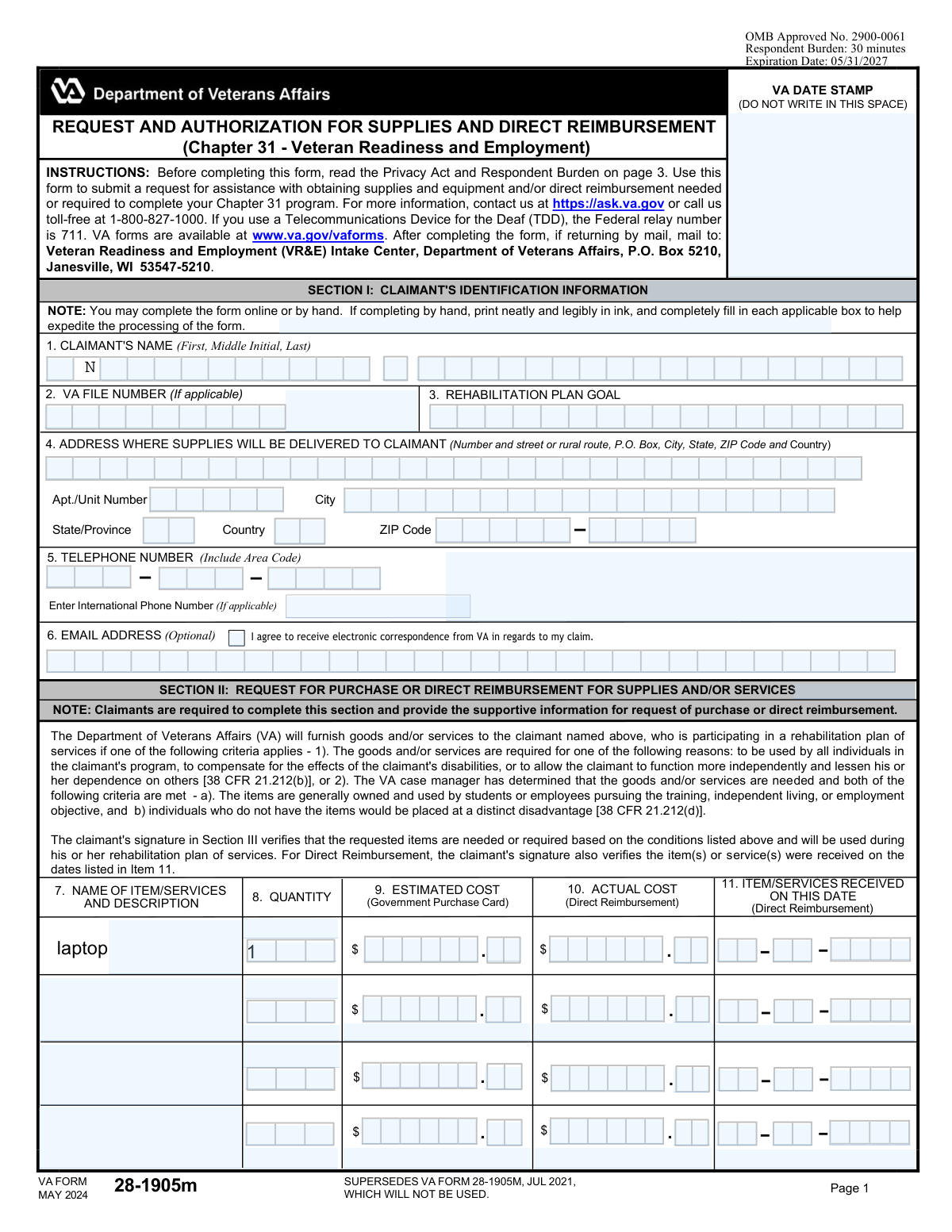
Yes! You can use AI to fill out VA Form 28-1905m, Request and Authorization for Supplies and Direct Reimbursement (Chapter 31 - Veteran Readiness and Employment)

This form, officially titled 'Request and Authorization for Supplies and Direct Reimbursement,' is a Department of Veterans Affairs document for participants in the Chapter 31 Veteran Readiness and Employment (VR&E) program. Veterans use it to formally request necessary supplies and equipment or to seek direct reimbursement for items required to complete their approved rehabilitation program. Today, this form can be filled out quickly and accurately using AI-powered services like Instafill.ai, which can also convert non-fillable PDF versions into interactive fillable forms.
VA Form 28-1905m has a complex Form Complexity Index of 65/100 — 227 fillable fields across 3 pages. Instafill’s AI completes it accurately in under a minute.

Form specifications

Form name: VA Form 28-1905m, Request and Authorization for Supplies and Direct Reimbursement (Chapter 31 - Veteran Readiness and Employment)
Number of fields: 227
Number of pages: 3
FCI: Complex (65/100)
Language: English
Our AI automatically handles information lookup, data retrieval, formatting, and form filling.
It takes less than a minute to fill out VA Form 28-1905m using our AI form filling.
Securely upload your data. Information is encrypted in transit and deleted immediately after the form is filled out.
Preview of VA Form 28-1905m, Request and Authorization for Supplies and Direct Reimbursement (Chapter 31 - Veteran Readiness and Employment)

Instafill Demo: How to fill out PDF forms in seconds with AI

How to Fill Out VA Form 28-1905m Online for Free in 2026

Are you looking to fill out a VA FORM 28-1905M form online quickly and accurately? Instafill.ai offers the #1 AI-powered PDF filling software of 2026, allowing you to complete your VA FORM 28-1905M form in just 37 seconds or less.
Follow these steps to fill out your VA FORM 28-1905M form online using Instafill.ai:
  1. 1 Navigate to Instafill.ai and upload or select VA Form 28-1905m.
  2. 2 Use the AI assistant to populate Section I with your claimant identification information, including your name, VA file number, and contact details.
  3. 3 In Section II, list the items or services you are requesting. Specify the description, quantity, and either the estimated cost for a government purchase or the actual cost for direct reimbursement.
  4. 4 Complete Section III by providing your digital signature and the date to certify that the requested items are necessary for your rehabilitation plan.
  5. 5 If applicable, have your training facility or employer complete and sign Section IV to verify that the requested items are required.
  6. 6 Submit the form to your VA Case Manager, who will review the request and complete the authorization sections (IV, V, and VI) as needed.
  7. 7 Review the entire form for accuracy before submitting it to the VA Readiness and Employment (VR&E) Intake Center via mail or as directed by your case manager.

Our AI-powered system ensures each field is filled out correctly, reducing errors and saving you time.

Why Choose Instafill.ai for Your Fillable VA Form 28-1905m Form?

Speed

Complete your VA Form 28-1905m in as little as 37 seconds.

Up-to-Date

Always use the latest 2026 VA Form 28-1905m form version.

Cost-effective

No need to hire expensive lawyers.

Accuracy

Our AI performs 10 compliance checks to ensure your form is error-free.

Security

Your personal information is protected with bank-level encryption.

Frequently Asked Questions About VA Form 28-1905m

VA Form 28-1905m has a Form Complexity Index of 65 out of 100, placing it in the complex complexity tier. This score is calculated deterministically from the form’s own structure using Instafill’s published Form Complexity Index methodology, so it can be reproduced and independently verified — it is not a subjective estimate.

For VA Form 28-1905m specifically, the score reflects 227 fillable fields across 3 pages. The number of fields is the largest factor in the base score (weighted 36%), followed by how difficult those fields are to complete based on their type, where free-text and signature fields count for more than simple checkboxes (26%). The number of pages that actually contain fields (15%), the amount of conditional “fill-only-if” logic (16%), and how many sections the form is divided into (7%) account for the rest of the base. On top of that base, the index adds points for tables and repeating lists, bundled instruction pages, and dense page layouts — capturing difficulty the base alone can miss.

In practical terms, a complex score means the form is demanding, with many fields, multiple pages and branching rules that are easy to get wrong. Instafill removes that effort entirely: our AI reads your information, maps each value to the correct field — including the conditional ones — and completes VA Form 28-1905m accurately in under a minute, with every field available for you to review before you download. See exactly how the Form Complexity Index is calculated.

This form is used by veterans in the Chapter 31 Veteran Readiness and Employment (VR&E) program to request necessary supplies and equipment, or to seek direct reimbursement for items already purchased for their rehabilitation plan.

Any veteran participating in a Chapter 31 VR&E rehabilitation plan who needs supplies, equipment, or services to complete their program should fill out this form.

A 'Request for Purchase' asks the VA to buy an item for you using a government purchase card. 'Direct Reimbursement' is for when you have already purchased a required item and are asking the VA to pay you back.

Yes, you can request a 'Direct Reimbursement' by completing Section II. You will need to provide the item description, actual cost, and the date you received the item, along with any required receipts.

Mail the completed form to the Veteran Readiness and Employment (VR&E) Intake Center, Department of Veterans Affairs, P.O. Box 5210, Janesville, WI 53547-5210.

Your training facility or employer only needs to sign in Section IV if they require all students or employees to personally own the requested items. If not, your VA case manager's review and signature will suffice.

In Section II, you must list the name and description of the item, the quantity, and either the estimated cost for a VA purchase or the actual cost and date received for a reimbursement.

Your signature in Section III is required to certify that the information is correct and the items are needed for your plan. An unsigned form is incomplete and will delay or prevent the processing of your request.

The form itself is estimated to take 30 minutes to complete. However, the VA does not provide a specific processing time for the request after submission.

For assistance, you can visit https://ask.va.gov or call the VA toll-free at 1-800-827-1000.

Yes, services like Instafill.ai use AI to accurately auto-fill form fields with your information, which can save you time and help ensure accuracy.

You can use a service like Instafill.ai to upload the PDF, fill it out interactively on your computer, and then download the completed document to print and mail.

If you have a non-fillable PDF, you can use a tool like Instafill.ai. It can convert flat, non-fillable PDFs into interactive forms that you can easily complete online.

Compliance VA Form 28-1905m
Validation Checks by Instafill.ai

1
Claimant Name Completeness
Checks that the 'CLAIMANT'S NAME' field (1) contains at least a first and last name. This is essential for correctly identifying the veteran and matching the request to their VA records. If the name is incomplete, the form cannot be processed, leading to delays in receiving supplies or reimbursement.
2
VA File Number Format
Validates that the 'VA FILE NUMBER' (2), if provided, adheres to a standard VA format, which is typically 8 or 9 digits. A correctly formatted file number is crucial for rapid and accurate record retrieval within the VA system. An invalid format will cause a lookup failure and require manual correction, delaying the entire process.
3
Delivery Address Completeness
Ensures that the core components of the delivery address (Number and street, City, State, ZIP Code) in field 4 are all filled out. This is critical for requests involving the shipment of supplies, as missing information will result in delivery failure. Incomplete addresses will halt the fulfillment of the request until the claimant provides the missing details.
4
ZIP Code Format Validation
Verifies that the 'ZIP Code' in field 4 is a valid 5-digit or 9-digit (ZIP+4) numeric format. Correct ZIP codes are essential for mail and package routing systems to function properly and ensure timely delivery. An invalid format will be rejected, preventing the form submission until a valid ZIP code is entered.
5
Telephone Number Format
Checks that the 'TELEPHONE NUMBER' in field 5 is a valid 10-digit number, accommodating common formats like (XXX) XXX-XXXX. A valid phone number is necessary for the VA to contact the claimant if there are questions or issues with their request. Failure to provide a valid number can prevent the VA from resolving problems quickly, potentially leading to the request being denied or delayed.
6
Email Address Format
Validates that if an 'EMAIL ADDRESS' is entered in field 6, it follows the standard '[email protected]' format. This ensures that electronic correspondence, if authorized by the claimant, can be successfully delivered. An invalid email format would cause communication failures and prevent the claimant from receiving important updates about their claim.
7
At Least One Item Requested
Confirms that at least one complete item row is filled out in Section II. A form submitted without any requested items or services is not actionable and serves no purpose. The system should prevent submission of an empty request to avoid unnecessary processing and confusion.
8
Item Quantity Validity
Ensures that the 'QUANTITY' specified in field 8 for each item is a positive whole number greater than zero. Requesting zero, a negative number, or a fraction of an item is illogical and indicates a data entry error. This check prevents invalid order quantities from being processed, which would otherwise require manual intervention to correct.
9
Mutually Exclusive Cost Fields
This logical check verifies that for any single item row in Section II, either 'ESTIMATED COST' (9) or 'ACTUAL COST' (10) is filled, but not both. This enforces the distinction between a request for a future purchase and a request for reimbursement of a past purchase. Submitting both creates ambiguity and will cause the form to be rejected for clarification.
10
Direct Reimbursement Completeness
Checks that if an 'ACTUAL COST' (10) is entered for an item, the corresponding 'ITEM/SERVICES RECEIVED ON THIS DATE' (11) is also filled out. The date of receipt is required documentation for processing a direct reimbursement claim. Missing this date will render the reimbursement request incomplete and will prevent payment until the information is provided.
11
Date Received is in the Past
Validates that any date entered in 'ITEM/SERVICES RECEIVED ON THIS DATE' (11) is a valid date in MM/DD/YYYY format and is not a future date. One cannot be reimbursed for an item they have not yet received, so the date must be today or in the past. A future date is a logical error that must be corrected before the reimbursement can be considered.
12
Mandatory Claimant Signature
Verifies that the 'CLAIMANT SIGNATURE' in field 12A has been provided. The signature is a legal certification that the information is true and that the items are needed, making it a non-negotiable requirement for processing. A missing signature invalidates the entire request, and the form will be returned to the claimant.
13
Claimant Signature Date Logic
Ensures the 'DATE SIGNED' in field 12B is a valid date in MM/DD/YYYY format, is not in the future, and is on or after any 'ITEM/SERVICES RECEIVED ON THIS DATE' from field 11. A claimant cannot logically sign to certify receipt of an item on a date before the item was actually received. This check prevents chronological inconsistencies that would invalidate the certification.
14
Cost Value Format
Validates that values entered in 'ESTIMATED COST' (9) and 'ACTUAL COST' (10) are positive numerical values in a valid currency format, such as 1500.00 or 75.50. Entering text or negative numbers in these fields would cause calculation errors and prevent financial processing. This check ensures data integrity for all financial aspects of the request.

Common Mistakes in Completing VA Form 28-1905m

Confusing Purchase Requests and Reimbursements

Claimants often fill out both the 'Estimated Cost' (Column 9) and 'Actual Cost' (Column 10) for the same item, or use the wrong column for their request. This happens because they don't distinguish between asking the VA to buy an item versus seeking reimbursement for a past purchase. This ambiguity forces the case manager to contact the claimant for clarification, significantly delaying the procurement of supplies or the reimbursement payment. To avoid this, use Column 9 only if you want the VA to purchase the item, and use Columns 10 and 11 only if you have already bought the item and are seeking repayment.

Providing Vague Item Descriptions

Claimants often enter generic descriptions like 'computer' or 'textbook' in Column 7. This lack of specificity occurs when the exact requirements are unknown or assumed. Vague requests cannot be fulfilled, as the VA needs precise details (e.g., model number, ISBN, required specifications) to purchase the correct item or verify a reimbursement. Always provide a detailed description, including brand, model, size, and any other relevant specifications as required by your program syllabus or employer.

Entering an Incorrect or Missing VA File Number

The VA File Number (Box 2) is the primary identifier linking the form to the veteran's case file, but claimants may forget it, transpose digits, or mistakenly enter their Social Security Number. An incorrect or missing file number will bring the processing to a halt until the claimant can be correctly identified, causing major delays. To avoid this, double-check your records for the correct VA File Number and enter it carefully. AI-powered form filling tools like Instafill.ai can help prevent these errors by storing and accurately populating this critical information.

Providing an Incomplete Delivery Address

It is common for claimants to omit crucial parts of their address in Box 4, such as an apartment, suite, or unit number. This oversight can result in supplies being returned to the sender or delivered to the wrong location, leading to significant delays and potential loss of items. Always include your full, unabbreviated address, and double-check that the apartment or unit number is included if applicable. Using a tool with address validation can prevent these mistakes.

Forgetting to Sign and Date the Form

An unsigned or undated form is legally invalid and cannot be processed. Claimants, in a hurry to submit, often overlook the signature and date fields in Section III (Boxes 12A and 12B). This simple mistake is a showstopper, requiring the VA to return the form for completion and restarting the processing timeline. Before submitting, always perform a final review to ensure you have signed and dated the form in the correct MM/DD/YYYY format.

Failing to Attach Receipts for Direct Reimbursement

When filling out the 'Actual Cost' (Column 10) for direct reimbursement, claimants frequently forget to include the corresponding receipts or proofs of purchase. The form itself doesn't have a checkbox for this, making it an easy-to-miss requirement. Without receipts, the VA cannot verify the purchase and will deny the reimbursement request, forcing the claimant to resubmit the entire package. Always attach clear, itemized receipts for every item listed for direct reimbursement.

Misinterpreting the 'Training Facility or Employer' Signature Requirement

Claimants may not realize that for certain required items, a signature from their school or employer is necessary in Section IV. They might assume their case manager's signature is always sufficient, leading them to submit an incomplete form. This causes delays as the form must be sent back to the claimant to obtain the proper certification. Clarify with your case manager beforehand if the items you are requesting require certification from your training facility or employer to avoid this issue.

Submitting a Form with Illegible Handwriting

The form instructions specify printing neatly in ink, but many are still submitted with handwriting that is difficult to read. This can lead to critical data entry errors by VA staff, such as misspelling a name, entering an incorrect file number, or ordering the wrong item. To prevent this, fill out the form digitally. If the form is a non-fillable PDF, AI-powered tools like Instafill.ai can convert it into a fillable version to eliminate handwriting issues entirely.

Entering Incorrect Date Formats

The form requires dates to be entered in MM/DD/YYYY format (e.g., in Box 11, 12B, 13C), but users often use different formats like DD/MM/YYYY or write out the month. This inconsistency can cause data entry errors and processing delays as the VA system may not recognize the date. Always use the specified two-digit month, two-digit day, and four-digit year format. Smart form-filling tools can automatically format dates correctly to prevent this type of error.

Writing in Sections Reserved for VA Use

Claimants sometimes mistakenly fill out information in Sections V, VI, or VII, which are clearly marked 'FOR VA USE ONLY'. This can happen when they are trying to be thorough or are confused by the form's layout. Writing in these areas can interfere with the VA's internal authorization and accounting processes, potentially causing confusion and requiring a new, clean form to be submitted. Only complete Sections I, II, III, and IV (if applicable).
Saved over 80 hours a year

“I was never sure if my IRS forms like W-9 were filled correctly. Now, I can complete the forms accurately without any external help.”

Kevin Martin Green

Your data stays secure with advanced protection from Instafill and our subprocessors

Robust compliance program

Transparent business model

You’re not the product. You always know where your data is and what it is processed for.

ISO 27001, HIPAA, and GDPR

Our subprocesses adhere to multiple compliance standards, including but not limited to ISO 27001, HIPAA, and GDPR.

Security & privacy by design

We consider security and privacy from the initial design phase of any new service or functionality. It’s not an afterthought, it’s built-in, including support for two-factor authentication (2FA) to further protect your account.

Fill out VA Form 28-1905m with Instafill.ai

Worried about filling PDFs wrong? Instafill securely fills va-form-28-1905m-request-and-authorization-for-supplies-and-direct-reimbursement-chapter-31-veteran-readiness-and-employment forms, ensuring each field is accurate.