
Instafill.ai
7 days free
AI form filling · 61 fields · 3 pages · done in seconds

Yes! You can use AI to fill out Village of Baltimore Contractor Registration Application and Taxpayer Registration

Don't type 61 fields by hand. Tell our AI about yourself, or upload your driver's license, and it fills every field in seconds. You check it, then download, print or sign.
7 days free, then $19.99/month · Cancel anytime
AI fills it, no typingEncrypted, never used to train AICancel in two clicks
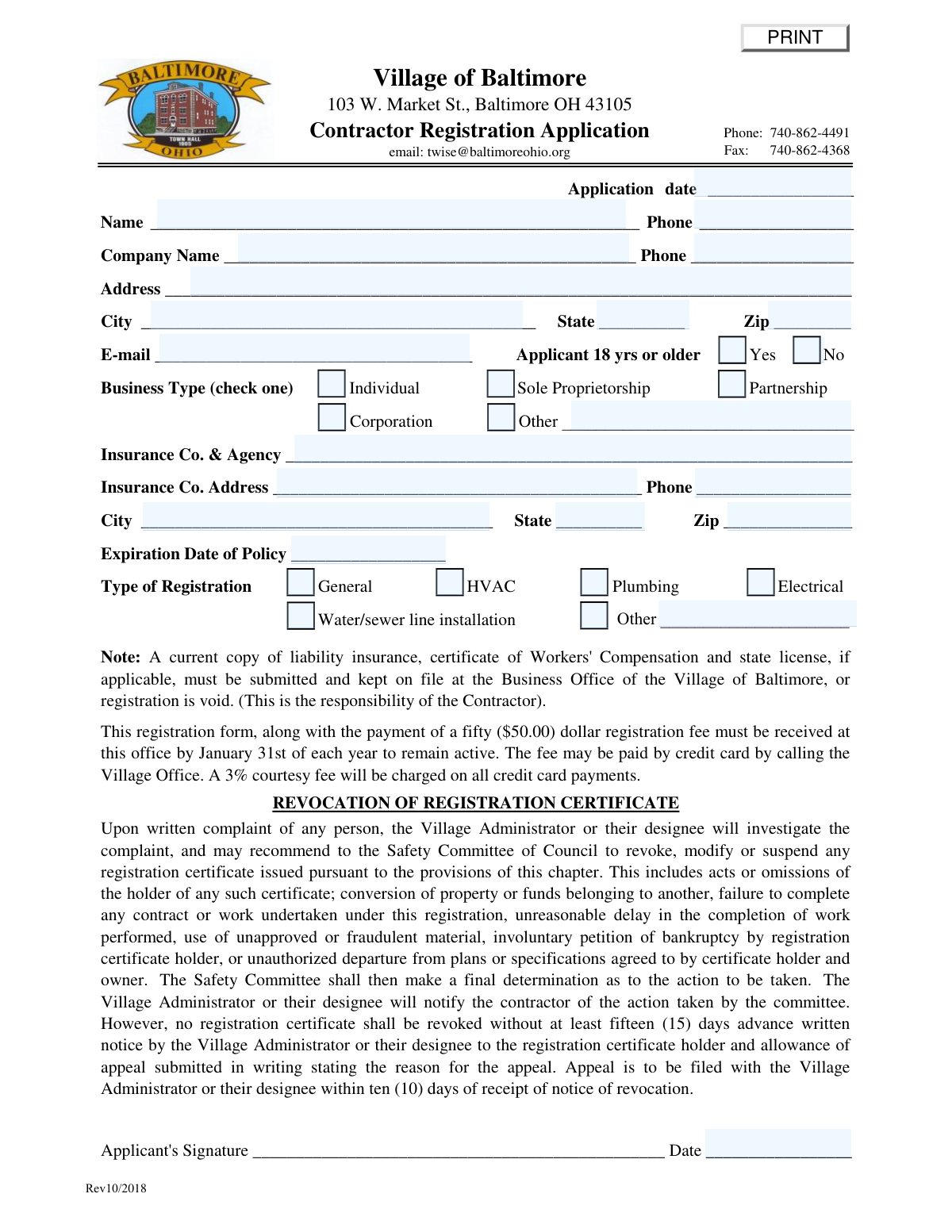
Village of Baltimore Contractor Registration Application and Taxpayer Registration, page 1
Moderate · 49/100Form Complexity Index

The AI does the filling. You just check it.

No typing into boxes, nothing to install.

Tell the AI about youAnswer a few questions in plain words, or upload your driver's license. That is all the typing there is.
AI fills every field in secondsIt puts each answer in the right box on every page, tables and checkboxes included.
Check it and downloadReview every field, change anything, then download, print or sign the PDF.

What this form asks for

The AI fills all of it, from your answers or your documents.

This is a mandatory application for any contractor wishing to perform work within the Village of Baltimore, Ohio. It serves as both a registration to operate and a taxpayer registration with the Regional Income Tax Authority, requiring details about the business, liability insurance, and workers' compensation. Today, this form can be filled out quickly and accurately using AI-powered services like Instafill.ai, which can also convert non-fillable PDF versions into interactive fillable forms.
Fillable fields61
Pages3
Sections17
Tables and lists1
Questions that depend on earlier answers3
Form Complexity IndexModerate, 49/100

The AI checks your answers before you download

14 checks built for this form, so a wrong date or a missing answer is caught before anyone else sees it.

Applicant Age Verification

This check verifies that the 'Yes' option is selected for 'Applicant 18 yrs or older'. The form explicitly states that the applicant must be at least eighteen years of age to register. If 'No' is selected or the field is left blank, the application cannot be processed and must be rejected as the applicant does not meet the minimum legal age requirement for registration.

Insurance Policy Expiration Date Validity

This validation ensures that the 'Expiration Date of Policy' is a date in the future. A current certificate of liability insurance is a mandatory requirement for registration to remain valid. If the policy is expired or will expire before the application can be processed, the registration is considered void, and the submission should be flagged for immediate follow-up or rejection.

Conditional 'Other Business Type' Requirement

This check ensures that if the 'Other' checkbox is selected under 'Business Type', the corresponding 'Other Business Type' text field is not empty. This is a logical consistency check to guarantee that the specific business structure is captured when it doesn't fit standard categories. Failure to provide this detail results in an incomplete application and prevents proper classification of the business.

Conditional Partnership Information Requirement

This validation triggers if 'Partnership' is selected as the 'Type of Organization' on the taxpayer registration section. It ensures that the fields for partner names, Social Security numbers, and addresses are filled out. This information is critical for tax purposes and for identifying all responsible parties in the partnership; an omission would render the tax registration incomplete.

Federal Tax ID or SSN Format Validation

This check validates that the 'Federal Tax ID or Social Security #' field contains a correctly formatted 9-digit number. It should accept either an EIN format (XX-XXXXXXX) or an SSN format (XXX-XX-XXXX). This number is essential for establishing the taxpayer account with the Regional Income Tax Authority, and an invalid format will cause processing errors and prevent account creation.

Standard Phone Number Format

This validation ensures that all phone number fields (Applicant, Company, Insurance, Preparer) adhere to a standard format, such as (XXX) XXX-XXXX or XXX-XXX-XXXX. Consistent formatting is crucial for data integrity and ensures the Village can successfully contact the contractor, their insurance agency, or the form preparer. An invalid format could lead to communication failures and delays.

And 8 more checks
  • Valid Email Address Format
  • ZIP Code Format Validation
  • Registration Type Completeness
  • Logical Date Sequence for Application and Signature
  • State Field Abbreviation Validation
  • Operation Start Date Logic
  • Completeness of Primary Address
  • Business Type Selection Completeness

Let AI fill out your Baltimore OH Contractor Registration

No typing. Every field filled in seconds, checked, ready to sign.

7 days free, then $19.99/month · Cancel anytime

How to Fill Out Baltimore OH Contractor Registration Online for Free in 2026

What the AI walks you through.

  1. Navigate to Instafill.ai and upload the Village of Baltimore Contractor Registration Application.
  2. Provide your personal and company information, including name, address, phone number, and email.
  3. Specify your business type (e.g., Sole Proprietorship, Corporation) and enter your liability insurance company details and policy expiration date.
  4. Select your type of registration, such as General, HVAC, Plumbing, or Electrical contractor.
  5. Complete the integrated Contractor Taxpayer Registration section with your Federal Tax ID or SSN and business details.
  6. Review all the information automatically populated by the AI for accuracy and completeness.
  7. Electronically sign and date the application, then download the completed form to submit it with the required fee and supporting documents to the Village of Baltimore.

Common Mistakes in Completing Baltimore OH Contractor Registration

The ones the AI is built to catch.

Failing to Submit Required Supporting Documents
Applicants often focus only on filling out the form and forget to include the mandatory attachments. The form clearly states that registration is void without a current copy of liability insurance, a certificate of Workers' Compensation, and a state license (if applicable). This oversight leads to an immediate rejection of the application, requiring the contractor to resubmit everything and causing significant delays.
Overlooking the Mandatory Taxpayer Registration Form
The application packet includes a second, distinct form titled "Contractor Taxpayer Registration" which is a mandatory requirement. Applicants frequently assume the first page is the complete application and fail to fill out and sign the second page. This results in an incomplete submission and prevents the establishment of the required taxpayer account, delaying the entire registration process.
Missing the Registration Fee or Deadline
The application is not complete without the payment of the $50 registration fee, which must be received by January 31st each year to remain active. Applicants may submit the form without payment or miss the deadline, rendering their registration inactive and potentially subjecting them to penalties for working without a valid registration. To avoid this, create a calendar reminder and confirm payment has been sent with the form well before the deadline.
Entering Incorrect or Outdated Insurance Details
This form requires specific liability insurance coverage ($100k/$300k bodily injury, $50k property damage) and a valid policy expiration date. A common error is entering an expired date or providing details for a policy that doesn't meet the village's minimum coverage requirements, which will lead to rejection. Before filling out this section, review your certificate of insurance to confirm the coverage amounts and expiration date are current and sufficient.
Providing Inconsistent Information Across Application Sections
The packet contains both a "Contractor Registration Application" and a "Contractor Taxpayer Registration" form. Applicants sometimes enter slightly different company names, addresses, or phone numbers on each section, causing data entry conflicts and processing delays. To prevent this, fill out both forms at the same time and carefully cross-reference the information to ensure it is identical.
Missing One or Both Required Signatures
This application packet consists of two separate forms, each requiring its own signature and date. It is a very common oversight for applicants to sign only the first page and miss the signature line at the bottom of the "Contractor Taxpayer Registration" form. An unsigned form is legally incomplete and cannot be processed, forcing the village office to return the application and causing delays.
Submitting an Illegible, Hand-Written Application
Since this form is a non-fillable PDF, it must be printed and completed by hand, and the instructions explicitly state to "PRINT". Applicants who use cursive or have illegible handwriting risk having their information misinterpreted or entered incorrectly into the village's system, leading to errors in their registration. AI-powered tools like Instafill.ai can convert such flat PDFs into fillable forms, eliminating handwriting issues entirely.
Confusing Personal and Company Information Fields
The top section of the application has separate fields for the individual applicant's name and the company's name, which can be ambiguous for sole proprietors. This often leads to applicants entering the same information in both fields or leaving one blank, causing confusion for record-keeping. The "Name" field should be for the individual person applying, while "Company Name" is for the official business name (e.g., the LLC or DBA name).
Neglecting to Complete Conditional Information Fields
The form contains fields that are only required if a specific option is checked, such as specifying an "Other" business type or listing partner details if "Partnership" is selected. Applicants often check the box but then forget to provide the required follow-up information on the corresponding line. This omission creates an incomplete record and requires the village to contact the applicant for clarification, halting the registration process.

Frequently Asked Questions About Baltimore OH Contractor Registration


Is it really free for 7 days?
Yes. You pay $0 today. Cancel before Nov 12 and you are never charged. Keep it, and it is $19.99 a month for 5 fills of your Baltimore OH Contractor Registration.
Can I fill other forms too?
This plan is for your Baltimore OH Contractor Registration: your own AI agent fills it as often as 5 times a month. To fill other forms and upload your own, choose a Professional plan from your account.
How do I cancel?
From your account, in two clicks, any time. No email, no call.
How does the AI fill out Baltimore OH Contractor Registration?
You answer a few questions in plain words, or upload your driver's license. The AI reads what you give it and puts each answer into the right field of Baltimore OH Contractor Registration, on every page, in seconds. It checks the answers against the form's own rules, and you review and change anything before you download, print or sign.
What happens to my information?
It is encrypted in transit and at rest, and it is never used to train AI.
How complex is Baltimore OH Contractor Registration to fill out?
Baltimore OH Contractor Registration has a Form Complexity Index of 49 out of 100, in the moderate tier: 61 fillable fields across 3 pages. Instafill.ai's AI fills it in under a minute, with every field there for you to review before you download.
What is the purpose of the Contractor Registration Application?
This form is used to register contractors to legally perform work in the Village of Baltimore. It also establishes your taxpayer account with the Regional Income Tax Authority (RITA) for local income tax purposes.
Who is required to register as a contractor in the Village of Baltimore?
Any person or company engaged in business as a General, Electrical, Mechanical (HVAC), Plumbing, or Water/Sewer Line Installer must complete this application to work within the village.
What documents must I submit with my application?
You must provide a current certificate of liability insurance, a certificate of Workers' Compensation if you have employees, and a copy of your state license if applicable for your trade.
What is the fee for registration and when is it due?
A fifty-dollar ($50.00) registration fee must be paid annually. To remain active, the fee and application must be received by January 31st of each year.
How can I pay the registration fee?
You can mail a payment to the Village Office or pay by credit card by calling the office. Note that a 3% courtesy fee is charged on all credit card payments.
What are the minimum insurance requirements?
You must have a current certificate of liability insurance with minimum coverage of $100,000/$300,000 for bodily injury and $50,000 for property damage.
I am a homeowner doing work on my own house. Do I need to register?
No, property owners or residents who perform the work themselves are exempt from this registration requirement.
Why do I also have to fill out the 'Contractor Taxpayer Registration' section?
This section is mandatory and is used to establish your taxpayer account with the Regional Income Tax Authority (RITA). All contractors doing business in the Village must file a Baltimore Income Tax Return annually.
Where do I send the completed application and documents?
Submit the completed form, payment, and all required documents to the Village of Baltimore Business Office at 103 W. Market St., Baltimore, OH 43105.
What happens if my registration is revoked?
If your registration is revoked due to a complaint, you will receive at least fifteen days' advance written notice. You have the right to file a written appeal with the Village Administrator within ten days of receiving the notice.
When does my registration expire?
All registration certificates expire on December 31st of the year they are issued, regardless of when you applied.
Can I use an AI tool to help me fill out this form?
Yes, services like Instafill.ai use AI to accurately auto-fill form fields from your saved information, which can save you time and help prevent errors.
How can I fill out this form online?
You can use a service like Instafill.ai to complete the form online. Simply upload the PDF to the platform, and you can type your information directly into the fields and save or print the completed document.
What can I do if the PDF form I have is not fillable?
If you have a non-fillable PDF, you can use a tool like Instafill.ai. It can convert flat PDFs into interactive, fillable forms, making them easy to complete on your computer.
Encrypted in transit and at restNever used to train AIDelete your forms any time

Get your Baltimore OH Contractor Registration filled out by AI

$0 today. Cancel before Nov 12 and you pay nothing.

7 days free, then $19.99/month · Cancel anytime