Yes! You can use AI to fill out Wellpoint Florida Retrospective Review Request Form
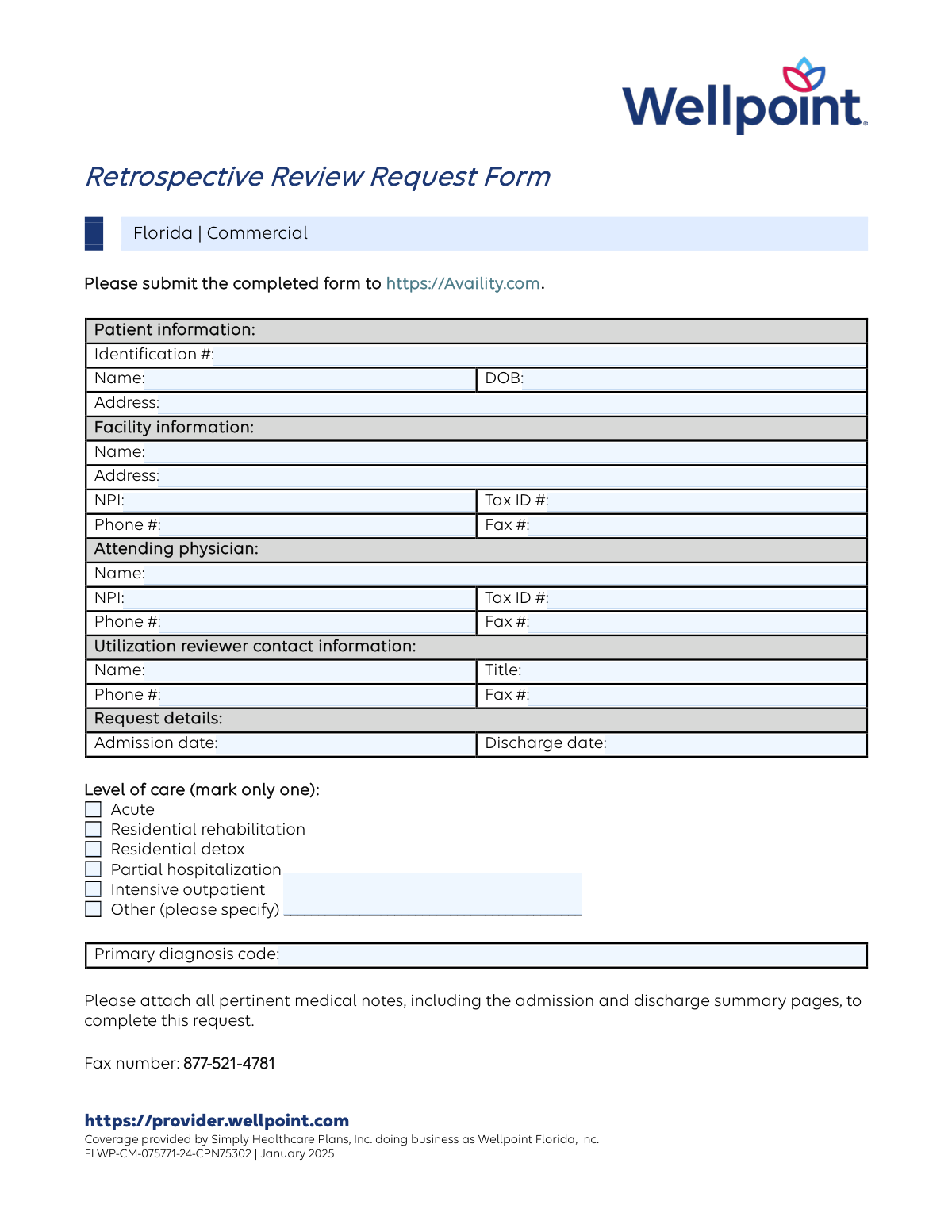
This form is used by healthcare providers in Florida to submit a request to Wellpoint for a retrospective review of medical services that have already been provided to a patient. It is a crucial step in the billing process to seek authorization and reimbursement for care that was delivered without prior approval. Today, this form can be filled out quickly and accurately using AI-powered services like Instafill.ai, which can also convert non-fillable PDF versions into interactive fillable forms.
Our AI automatically handles information lookup, data retrieval, formatting, and form filling.
It takes less than a minute to fill out FLWP-CM-075771-24-CPN75302 using our AI form filling.
Securely upload your data. Information is encrypted in transit and deleted immediately after the form is filled out.
Form specifications
| Form name: | Wellpoint Florida Retrospective Review Request Form |
| Number of pages: | 1 |
| Language: | English |
Instafill Demo: How to fill out PDF forms in seconds with AI
How to Fill Out FLWP-CM-075771-24-CPN75302 Online for Free in 2026
Are you looking to fill out a FLWP-CM-075771-24-CPN75302 form online quickly and accurately? Instafill.ai offers the #1 AI-powered PDF filling software of 2026, allowing you to complete your FLWP-CM-075771-24-CPN75302 form in just 37 seconds or less.
Follow these steps to fill out your FLWP-CM-075771-24-CPN75302 form online using Instafill.ai:
- 1 Navigate to Instafill.ai and upload or select the Retrospective Review Request Form.
- 2 Use the AI assistant to accurately input the patient's personal and identification information.
- 3 Provide the complete details for the facility and the attending physician, including names, addresses, NPIs, and Tax IDs.
- 4 Enter the specific request details, including the admission and discharge dates, and the primary diagnosis code.
- 5 Select the correct level of care provided from the options listed, or specify if 'Other'.
- 6 Review all the information auto-populated by the AI to ensure accuracy and completeness.
- 7 Submit the completed form along with all pertinent medical notes to Availity.com or the specified fax number.
Our AI-powered system ensures each field is filled out correctly, reducing errors and saving you time.
Why Choose Instafill.ai for Your Fillable FLWP-CM-075771-24-CPN75302 Form?
Speed
Complete your FLWP-CM-075771-24-CPN75302 in as little as 37 seconds.
Up-to-Date
Always use the latest 2026 FLWP-CM-075771-24-CPN75302 form version.
Cost-effective
No need to hire expensive lawyers.
Accuracy
Our AI performs 10 compliance checks to ensure your form is error-free.
Security
Your personal information is protected with bank-level encryption.
Frequently Asked Questions About Form FLWP-CM-075771-24-CPN75302
This form is used by healthcare providers to request a review and potential authorization for medical services that have already been provided to a patient covered by a Wellpoint Florida commercial plan.
Healthcare facilities or providers who have rendered services to a Wellpoint Florida commercial plan member without prior authorization should complete this form to seek retrospective approval for those services.
You can submit the completed form and all required attachments electronically through the Availity provider portal at https://Availity.com or by faxing it to 877-521-4781.
You must attach all pertinent medical notes to complete the request. This specifically includes the patient's admission and discharge summary pages.
The National Provider Identifier (NPI) is a unique 10-digit identification number for healthcare providers, while the Tax ID Number (TIN) is used for federal tax purposes. Both are required for the facility and the attending physician on this form.
The patient's Identification Number is located on their Wellpoint Florida member ID card. It is essential for correctly identifying the member and their associated health plan.
If the specific level of care is not one of the pre-listed options, you should check the box next to 'Other' and write in the correct level of care on the line provided.
No, this form is specifically for retrospective reviews, meaning the services have already occurred. For future services, you must use a prior authorization request process.
The utilization reviewer is the contact person at your facility or practice who is responsible for managing the review process and can answer questions from the health plan about the request.
Yes, you must provide complete information for both the facility where services were rendered and the attending physician responsible for the patient's care, including their respective NPI and Tax ID numbers.
Yes, services like Instafill.ai use AI to accurately auto-fill form fields from your saved profiles for patients, facilities, and physicians, which can save you significant time and reduce errors.
Simply upload the Retrospective Review Request Form to Instafill.ai, and its AI will identify all the fields. You can then quickly populate the patient, facility, and physician information from your saved profiles with a single click.
You can use a service like Instafill.ai, which can convert flat, non-fillable PDFs into interactive, fillable forms online. This allows you to easily type your information into the fields before printing or submitting.
Compliance FLWP-CM-075771-24-CPN75302
Validation Checks by Instafill.ai
1
Validates NPI Format and Checksum
This check ensures that the Facility NPI and Attending Physician NPI fields contain a valid 10-digit National Provider Identifier. The validation confirms the field is numeric and passes the Luhn algorithm checksum test for NPIs. This is critical for correctly identifying and verifying the provider's credentials in national databases, and failure would prevent claim processing.
2
Ensures Discharge Date is on or after Admission Date
This validation performs a logical check to confirm the 'Discharge date' is not earlier than the 'Admission date'. A patient's discharge cannot precede their admission, so this rule prevents logical impossibilities and data entry errors. If this check fails, the form cannot be submitted as the service dates are invalid.
3
Enforces Single Selection for Level of Care
The form requires that only one 'Level of care' option be selected. This validation checks that exactly one checkbox from the available options (Acute, Residential rehabilitation, etc.) is marked. This is important for accurate service classification and billing, and selecting multiple options would create ambiguity and lead to processing delays or rejection.
4
Conditional Requirement for 'Other' Level of Care Specification
This check ensures that if the 'Other' checkbox is selected under 'Level of care', the corresponding text field for specification is not empty. Conversely, it ensures the specification field is empty if 'Other' is not selected. This prevents incomplete submissions where the level of care is undefined and ensures data cleanliness.
5
Validates Primary Diagnosis Code Format
This check verifies that the 'Primary diagnosis code' field follows a valid ICD-10 format (e.g., a letter followed by numbers, potentially with a decimal). This ensures the code is structurally correct for medical billing and data systems. An invalid format would prevent the system from recognizing the diagnosis, halting the review process.
6
Validates Patient Date of Birth is in the Past
This validation confirms that the 'Patient Date of Birth' is a valid date and occurs before the current date. A future date of birth is logically impossible and indicates a data entry error. Correcting this is essential for accurate patient identification and eligibility verification.
7
Validates Tax ID Number Format
This check ensures the 'Facility Tax ID #' and 'Attending Physician Tax ID #' fields contain a 9-digit number, consistent with the format of a federal Employer Identification Number (EIN). This is crucial for financial and regulatory reporting. An incorrectly formatted Tax ID will cause failures in payment processing and provider verification.
8
Verifies Required Attachments are Present
The form explicitly states that pertinent medical notes must be attached to complete the request. This validation checks that at least one file has been uploaded with the form submission. Submitting without the required documentation would result in an incomplete request that cannot be reviewed, causing significant delays.
9
Ensures Completeness of Patient Information
This validation confirms that all fields within the 'Patient information' section (Identification #, Name, DOB, Address) are filled out. This information is the minimum required to uniquely identify the patient and their policy. A submission with missing patient data cannot be processed and will be rejected immediately.
10
Ensures Completeness of Facility Information
This check verifies that all required fields in the 'Facility information' section (Name, Address, NPI, Tax ID #, Phone #) are completed. This data is essential for identifying the service location and communicating with the facility. Missing facility information would prevent proper claim routing and payment.
11
Validates Phone Number Format
This check ensures that all phone number fields (Facility, Attending Physician, Utilization Reviewer) adhere to a standard 10-digit format, allowing for common characters like parentheses and hyphens. Proper formatting is necessary for the system to parse the number correctly and for successful communication with the provider. An invalid format could prevent crucial follow-up calls.
12
Ensures Completeness of Attending Physician Information
This validation confirms that the attending physician's Name, NPI, Tax ID, and Phone Number are all provided. This information is critical for verifying the credentials of the physician who ordered or oversaw the care. Failure to provide this complete information can lead to the rejection of the review request.
Common Mistakes in Completing FLWP-CM-075771-24-CPN75302
Staff often mistakenly enter the attending physician's NPI or Tax ID in the facility information section, or vice versa. This happens due to haste or misunderstanding which identifier belongs to the organization versus the individual provider, leading to claim processing delays or rejections. To avoid this, always double-check that the facility's group NPI is in the 'Facility Information' section and the physician's individual NPI is in the 'Attending Physician' section. AI-powered form-filling tools like Instafill.ai can help prevent this by storing and correctly mapping identifiers for frequently used providers.
The form explicitly requires attaching pertinent medical notes, including admission and discharge summaries. Submitters often forget to include these documents or attach incomplete records, assuming the form itself is sufficient. Without this supporting documentation, the review cannot be completed, leading to an automatic denial for lack of information and requiring a full resubmission. Always create a checklist to ensure all required documents are gathered and attached before submitting the form.
The primary diagnosis code must be a valid and specific ICD-10 code, but staff may inadvertently use an outdated ICD-9 code, a non-specific code, or make a typo. This can result in a denial for not meeting medical necessity criteria or require a request for more information, delaying reimbursement. Intelligent form fillers like Instafill.ai can integrate with coding databases to suggest valid, specific codes and flag outdated ones, reducing the chance of error.
Simple data entry errors can lead to transposed numbers, incorrect years, or a discharge date that occurs before the admission date. These logical inconsistencies will cause the system to flag the request for manual review or reject it outright, significantly delaying the process. AI form-filling tools like Instafill.ai can automatically check for logical errors, such as a discharge date preceding an admission date, and ensure the format is correct.
The form requires marking only one level of care, but submitters sometimes check multiple boxes or check 'Other' without providing the required specification. This ambiguity prevents the reviewer from understanding the context of the service provided, leading to processing delays or requests for clarification. Carefully review the patient's services and select the single most accurate level of care, ensuring the 'Other' field is filled out completely if that option is chosen.
The patient's identification number is often entered with typos or missing characters, or the submitter might use an internal medical record number instead of the insurance member ID. This is the primary key for matching the request to the patient's coverage, and an error will cause an immediate rejection or delay. Always verify the full member ID from the patient's insurance card before submission; tools like Instafill.ai can help by validating the format and auto-populating the number to minimize typos.
The person filling out the form may overlook the 'Utilization reviewer contact information' section, assuming it's optional. This information is crucial for the insurance plan if they have questions or need to communicate the review outcome. Missing contact details can delay the final decision, as the plan has no direct person to contact for clarification. Tools like Instafill.ai can automatically populate this information for registered users, ensuring it's never forgotten.
This form is marked 'January 2025,' indicating it is a specific version. Healthcare offices often save local copies of forms and may continue using an old version after a new one is released, leading to rejection because it may lack required fields. Always download the most current version of the form from the payer's portal. If the form is a non-fillable PDF, a tool like Instafill.ai can convert it into an interactive, fillable version to streamline completion.
Submitters frequently omit crucial details like apartment numbers, suite numbers, or full ZIP codes for both the patient and the facility. This can cause issues with identity verification and lead to returned mail if physical correspondence is required. AI-powered tools like Instafill.ai use address verification to auto-complete and standardize addresses, ensuring all details are included and accurate.
Saved over 80 hours a year
“I was never sure if my IRS forms like W-9 were filled correctly. Now, I can complete the forms accurately without any external help.”
Kevin Martin Green
Your data stays secure with advanced protection from Instafill and our subprocessors

Robust compliance program
Transparent business model
You’re not the product. You always know where your data is and what it is processed for.
ISO 27001, HIPAA, and GDPR
Our subprocesses adhere to multiple compliance standards, including but not limited to ISO 27001, HIPAA, and GDPR.
Security & privacy by design
We consider security and privacy from the initial design phase of any new service or functionality. It’s not an afterthought, it’s built-in, including support for two-factor authentication (2FA) to further protect your account.
Fill out FLWP-CM-075771-24-CPN75302 with Instafill.ai
Worried about filling PDFs wrong? Instafill securely fills wellpoint-florida-retrospective-review-request-form forms, ensuring each field is accurate.