Yes! You can use AI to fill out Wound Care Quick Start Form

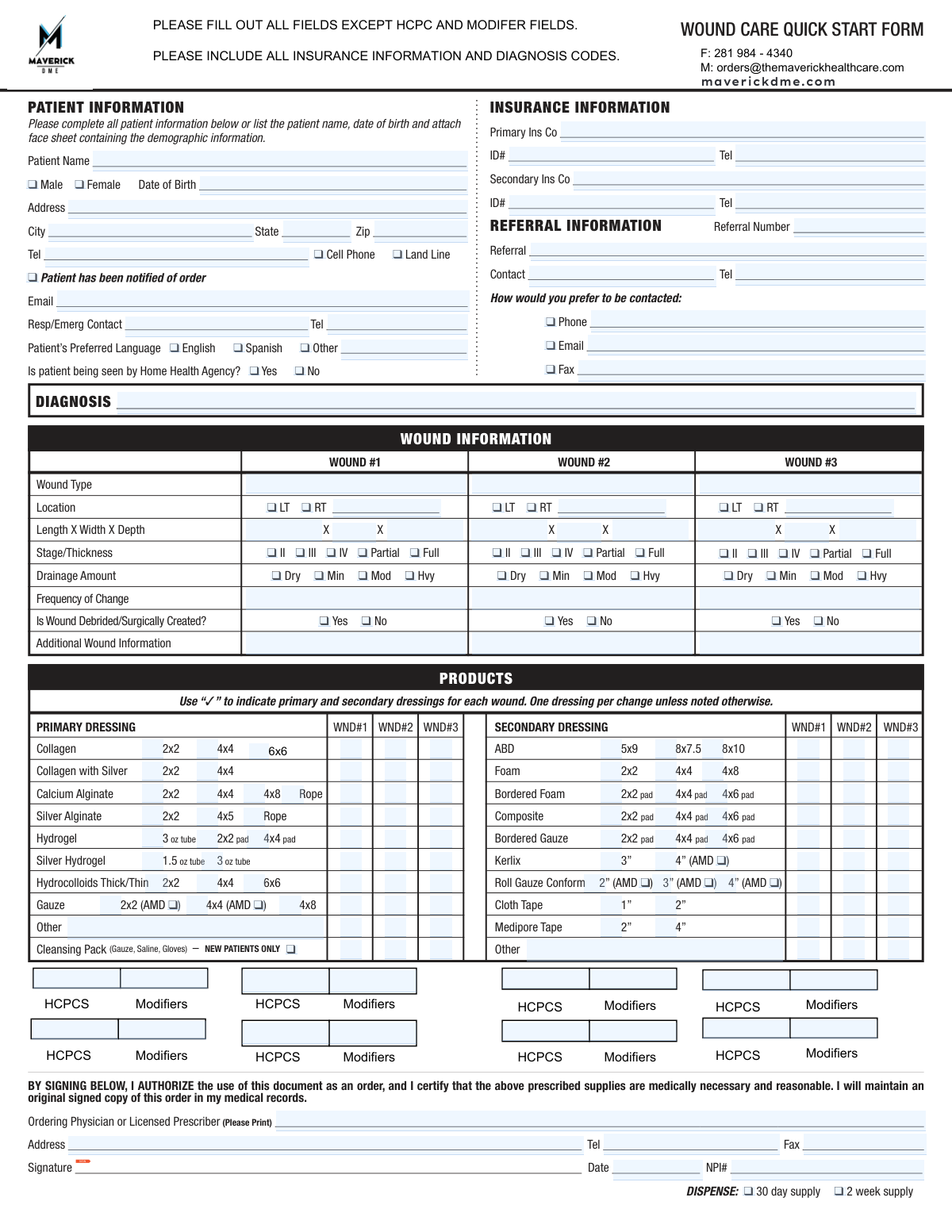
The Wound Care Quick Start Form is a detailed medical document that allows physicians and licensed prescribers to order specific wound care supplies for their patients. It captures essential information including patient demographics, insurance details, comprehensive wound assessments, and the prescribed dressings, ensuring medical necessity and facilitating proper treatment. Today, this form can be filled out quickly and accurately using AI-powered services like Instafill.ai, which can also convert non-fillable PDF versions into interactive fillable forms.
Our AI automatically handles information lookup, data retrieval, formatting, and form filling.
It takes less than a minute to fill out Wound Care Quick Start Form using our AI form filling.
Securely upload your data. Information is encrypted in transit and deleted immediately after the form is filled out.

Form specifications

Form name: Wound Care Quick Start Form
Number of fields: 233
Number of pages: 1
Language: English
main-image

Instafill Demo: How to fill out PDF forms in seconds with AI

How to Fill Out Wound Care Quick Start Form Online for Free in 2026

Are you looking to fill out a WOUND CARE QUICK START FORM form online quickly and accurately? Instafill.ai offers the #1 AI-powered PDF filling software of 2026, allowing you to complete your WOUND CARE QUICK START FORM form in just 37 seconds or less.
Follow these steps to fill out your WOUND CARE QUICK START FORM form online using Instafill.ai:
  1. 1 Navigate to Instafill.ai and upload or select the Wound Care Quick Start Form.
  2. 2 Use the AI assistant to accurately populate patient information, insurance details, and referral data.
  3. 3 Detail the specifics for up to three wounds, including type, location, dimensions, drainage, and frequency of dressing changes, letting the AI guide you through each required field.
  4. 4 Select the prescribed primary and secondary dressings for each wound from the comprehensive product list by checking the appropriate boxes.
  5. 5 Enter the ordering physician or licensed prescriber's information, including their name, address, and NPI number.
  6. 6 Review all entered information for accuracy, then have the prescriber electronically sign and date the form to authorize the order.
  7. 7 Securely download, print, or email the completed form directly to the durable medical equipment (DME) supplier.

Our AI-powered system ensures each field is filled out correctly, reducing errors and saving you time.

Why Choose Instafill.ai for Your Fillable Wound Care Quick Start Form Form?

Speed

Complete your Wound Care Quick Start Form in as little as 37 seconds.

Up-to-Date

Always use the latest 2026 Wound Care Quick Start Form form version.

Cost-effective

No need to hire expensive lawyers.

Accuracy

Our AI performs 10 compliance checks to ensure your form is error-free.

Security

Your personal information is protected with bank-level encryption.

Frequently Asked Questions About Form Wound Care Quick Start Form

This form is used by a licensed prescriber to order medically necessary wound care supplies for a patient. It documents the patient's information, wound details, and the specific dressings required for treatment.

A healthcare professional, such as the ordering physician or licensed prescriber, must complete the form with all patient and wound details. The prescriber's signature is required to certify medical necessity and authorize the order.

You must provide complete patient demographics, insurance information, a valid diagnosis code, and detailed descriptions of each wound. The prescriber's information, NPI number, and signature are also mandatory.

Yes, you can attach a patient face sheet with the demographic information. If you do, be sure to still write the patient's name and date of birth on the form itself.

In the 'PRODUCTS' section, use a checkmark in the column corresponding to the wound number (WND#1, WND#2, WND#3) to indicate the primary and secondary dressings needed. The form specifies which products are typically used as primary versus secondary dressings.

This form only accommodates up to three wounds. You will need to complete and submit a second form for any additional wounds.

Use the blank 'Other' fields at the bottom of the primary and secondary dressing lists. Write in the specific product name and size you require.

You can submit the signed form by faxing it to 281-984-4340 or by emailing it to [email protected]. This contact information is listed at the top of the form.

No, the instructions state to leave the HCPCS and Modifiers fields blank. These sections are for internal use by the supplier for billing purposes.

This selection determines the quantity of supplies that will be dispensed. Choose the option that aligns with the patient's treatment plan and the prescriber's orders.

Yes, services like Instafill.ai use AI to auto-fill form fields accurately and save time by pulling data from patient records. However, the prescriber must always review the final form for accuracy and provide a signature.

Upload the Wound Care Quick Start Form to the Instafill.ai web platform. The service will make the document interactive, allowing you to easily type in information, check boxes, and save the completed PDF.

If you have a non-fillable or 'flat' PDF, you can use a tool like Instafill.ai. Simply upload the file, and it will be automatically converted into an interactive, fillable form you can complete on your device.

Check this box to confirm that the patient has been informed that these specific wound care supplies are being ordered for them. This is an important part of patient consent and communication.

Compliance Wound Care Quick Start Form
Validation Checks by Instafill.ai

1
Validates NPI Number Format and Presence
Checks that the NPI# field contains a 10-digit number. This is crucial for billing and provider verification, as a valid National Provider Identifier is required to process the order and submit claims to insurance. If the NPI is missing or invalid, the form submission will be rejected until a correct NPI is provided.
2
Ensures Prescriber Signature and Date are Present
Verifies that the prescriber's signature and the order date are both provided. A signed and dated order is a legal requirement for establishing medical necessity and providing authorization to dispense supplies. Without a signature and date, the form is not a valid order, and processing will be halted until the form is properly completed and re-submitted.
3
Validates Patient's Date of Birth
Checks that the 'Date of Birth' is a valid date in MM/DD/YYYY format and is not a date in the future. This information is essential for unique patient identification, insurance verification, and determining clinical appropriateness. An invalid or future date would cause record-matching failures and prevent the order from being processed.
4
Requires at least one Diagnosis Code
Ensures that at least one diagnosis code (e.g., an ICD-10 code) is entered in the 'DIAGNOSIS' field. The medical necessity for the prescribed supplies is established by the patient's diagnosis. Without a valid diagnosis code, insurance claims will be denied, and the order cannot be justified or fulfilled.
5
Wound Information and Dressing Selection Consistency
Verifies that if any information is entered for a specific wound (e.g., Wound #1 Type, Location, Dimensions), at least one primary dressing is also selected for that same wound. This check ensures that every documented wound has a corresponding treatment plan specified. A failure would indicate an incomplete order, requiring clarification from the prescriber before supplies can be dispensed.
6
Ensures Sequential Entry of Wound Data
Checks that if data is entered for Wound #2, then Wound #1 must also have its information filled out. Similarly, if Wound #3 data is present, Wound #2 data must also be present. This maintains a logical order and prevents skipping wounds, which could lead to confusion and incorrect supply fulfillment. An error would prompt the user to complete the information for the preceding wound(s).
7
Validates Completeness of Secondary Insurance Information
If a 'Secondary Ins Co' name is provided, this check ensures that the corresponding 'ID#' and 'Tel' fields are also filled. Incomplete secondary insurance details prevent successful coordination of benefits and billing. The system should flag this as an error to ensure all necessary information is captured for claim submission.
8
Requires Specification for 'Other' Preferred Language
This validation confirms that if the 'Other' checkbox is selected for 'Patient’s Preferred Language', the adjacent text field must contain a value. This is important for patient communication and meeting language access requirements for patient care. If the field is left blank, the user will be prompted to specify the language or select one of the other options.
9
Verifies Single Selection for Exclusive Options
Ensures that for groups of mutually exclusive options, only one is selected. This applies to Patient Gender (Male/Female), Telephone Type (Cell Phone/Land Line), Home Health Agency status (Yes/No), and Dispense quantity (30 day/2 week). Selecting multiple options in these groups is a logical contradiction and would require user correction before submission.
10
Ensures Single Stage/Thickness Selection Per Wound
For each active wound column (WND#1, WND#2, WND#3), this check verifies that only one option is selected from the 'Stage/Thickness' row (e.g., II, III, IV, Partial, Full). The wound stage is a critical clinical detail that influences dressing choice and cannot be ambiguous. A submission with multiple stages selected for a single wound would be rejected for clarification.
11
Validates Standard 10-Digit Phone Number Format
Checks that all telephone number fields (Patient, Emergency Contact, Referral, Insurance, Prescriber) contain a valid 10-digit number. Correct phone numbers are essential for contacting the patient, prescriber, or insurance for order verification and issue resolution. Invalid formats would prevent communication and delay the order.
12
Ensures Core Patient Information is Complete
Verifies that 'Patient Name', 'Date of Birth', and the full 'Address' (Street, City, State, Zip) are all provided. This information is fundamental for patient identification, delivery of supplies, and insurance billing. Missing any of these core fields would render the order unfulfillable and result in an immediate validation failure.
13
Validates Presence of All Three Wound Dimensions
If any one dimension (Length, Width, or Depth) is entered for a wound, this check ensures all three measurements are provided. Wound volume is a key factor in determining the appropriate size and quantity of dressings. Incomplete dimensions can lead to incorrect supply orders, so the system should prompt the user to provide all three measurements.
14
Referral Contact Method Consistency
This check verifies that if a preferred contact method is checked for the referral contact (Phone, Email, or Fax), the corresponding contact detail field is filled. For example, if 'Phone' is checked, the 'Tel' number field must not be empty. This ensures the ability to follow up with the referral source effectively, and a mismatch would trigger an error requiring the user to provide the necessary contact information.

Common Mistakes in Completing Wound Care Quick Start Form

Illegible Handwriting on Printed Form

This form is often printed and filled out by hand, leading to illegible entries for critical data like the prescriber's name, NPI number, or diagnosis codes. Illegible handwriting causes data entry errors on the supplier's end, requires clarification calls, and can lead to incorrect supplies being ordered or claims being denied. Since the original form is a non-fillable PDF, using a tool like Instafill.ai can convert it into a fillable version, ensuring all entries are typed and perfectly legible.

Missing Prescriber Signature or Date

A missing prescriber signature or date is one of the most frequent and critical errors, rendering the entire order invalid. This oversight completely stops the fulfillment process until a properly signed and dated form is obtained, significantly delaying the patient's access to medically necessary supplies. To avoid this, establish a final checklist to ensure the signature, date, and NPI number are all present before faxing or sending the form.

Omitting the Diagnosis Code

The form explicitly states to include diagnosis codes, which are essential for establishing medical necessity for the ordered supplies. Forgetting to enter the specific ICD-10 code related to the patient's condition is a guaranteed reason for the form to be rejected and returned. This halts the entire process and requires the prescriber to amend and resubmit the order, delaying patient care.

Incomplete Wound Information Grid

The wound information grid requires multiple data points for each wound, such as location, dimensions, stage, and drainage. Clinicians, in a hurry, sometimes overlook filling out every required field for each documented wound, creating an incomplete clinical picture. This missing data can lead to questions from the supplier or insurer about medical necessity, delaying the order.

Confusing Dressing Selections in the Grid

The product grid is complex, with columns for up to three wounds. A common mistake is checking a box in the wrong column (e.g., selecting a dressing for Wound #2 when it was intended for Wound #1). This can result in an incorrect or incomplete dressing regimen being shipped. Carefully trace the row and column to ensure each checkmark is placed accurately for the intended wound.

Missing or Incorrect NPI Number

The ordering prescriber's National Provider Identifier (NPI) is a mandatory field for billing and provider verification. This number is sometimes forgotten or transcribed incorrectly, especially on handwritten forms. An absent or invalid NPI number will cause an immediate rejection of the order, as the provider cannot be authenticated for billing purposes.

Attaching an Incomplete or Outdated Patient Face Sheet

The form allows attaching a patient face sheet instead of filling out the demographic section. A common error is attaching a sheet that is missing key information like a current phone number or secondary insurance, or using a sheet that is outdated. This leads to communication failures, billing errors, and delays in shipping supplies. Always verify that the attached face sheet is complete and current before submission.

Ambiguous Wound Dimensions

The form requests wound dimensions as 'Length X Width X Depth,' but users often fail to include measurement units (e.g., cm) or enter just numbers without context. This ambiguity can lead to misinterpretation of the wound's actual size, potentially resulting in the wrong size dressings being ordered or questions about the wound's severity. Always specify units (cm) and follow the L x W x D format for clarity.

Clinical Mismatch Between Wound and Dressing

A frequent clinical error is a disconnect between the described wound and the selected dressing. For example, a wound documented with 'Hvy' (heavy) drainage might be paired with a dressing only suitable for minimal exudate. This inconsistency raises red flags for clinical reviewers and insurers, often requiring a follow-up with the prescriber to justify the choice, which delays supply shipment.

Ambiguous Supply Duration Request

The form provides checkboxes for a '30 day supply' or a '2 week supply.' Users may accidentally check both boxes or forget to check either one, creating ambiguity for the supplier. This forces the supplier to contact the prescriber's office for clarification, delaying the initial shipment of supplies. To avoid this, ensure only one of the supply duration boxes is clearly marked.
Saved over 80 hours a year

“I was never sure if my IRS forms like W-9 were filled correctly. Now, I can complete the forms accurately without any external help.”

Kevin Martin Green

Your data stays secure with advanced protection from Instafill and our subprocessors

Robust compliance program

Transparent business model

You’re not the product. You always know where your data is and what it is processed for.

ISO 27001, HIPAA, and GDPR

Our subprocesses adhere to multiple compliance standards, including but not limited to ISO 27001, HIPAA, and GDPR.

Security & privacy by design

We consider security and privacy from the initial design phase of any new service or functionality. It’s not an afterthought, it’s built-in, including support for two-factor authentication (2FA) to further protect your account.

Fill out Wound Care Quick Start Form with Instafill.ai

Worried about filling PDFs wrong? Instafill securely fills wound-care-quick-start-form forms, ensuring each field is accurate.