Yes! You can use AI to fill out Youth Transition Plan for Independent Living

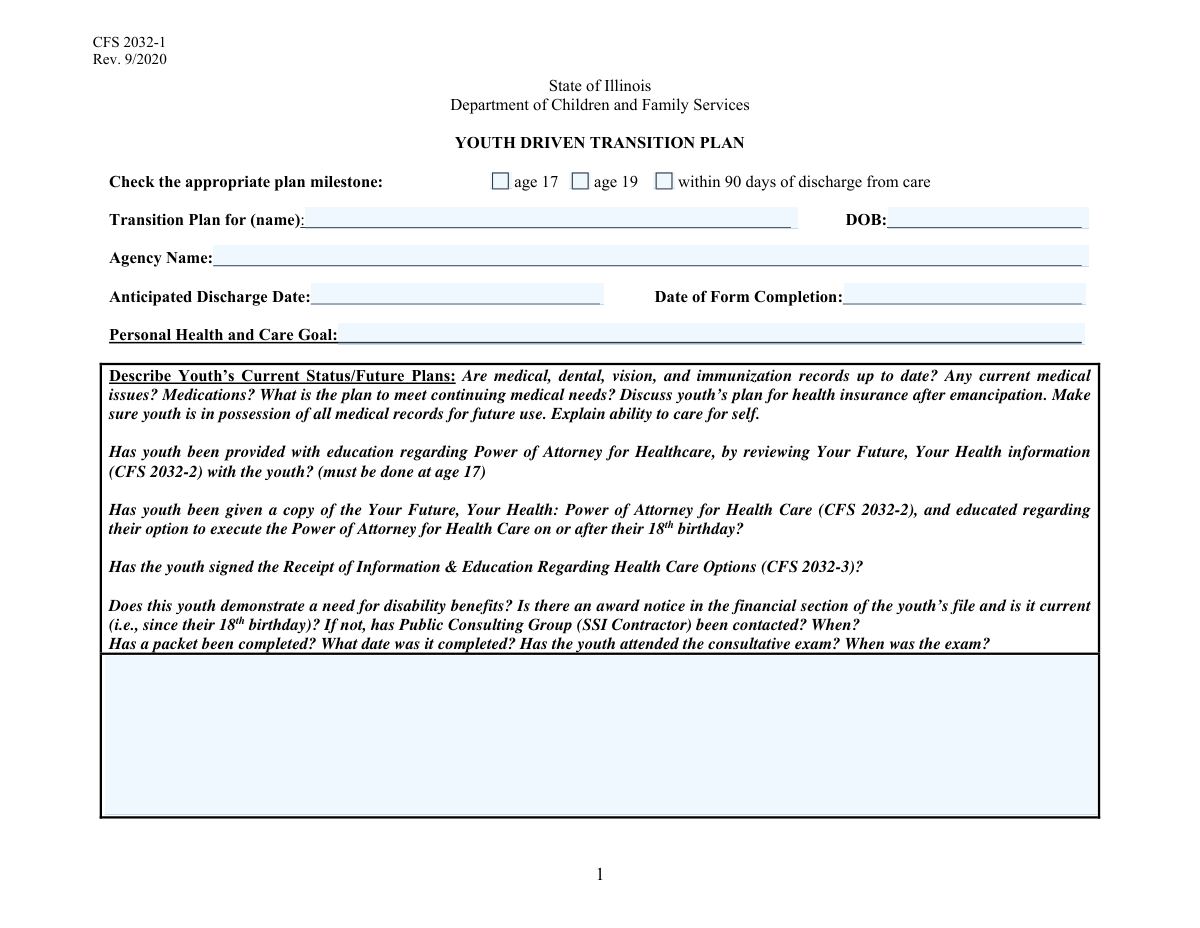
The Youth Transition Plan for Independent Living is a critical tool for social workers and agencies to help youth prepare for life after discharging from care. It provides a structured framework for setting and tracking goals in essential areas such as education, employment, housing, health, and financial management, ensuring a smoother transition to adulthood. This comprehensive planning is vital for empowering youth and establishing a support system for their success. Today, this form can be filled out quickly and accurately using AI-powered services like Instafill.ai, which can also convert non-fillable PDF versions into interactive fillable forms.
Our AI automatically handles information lookup, data retrieval, formatting, and form filling.
It takes less than a minute to fill out Youth Transition Plan using our AI form filling.
Securely upload your data. Information is encrypted in transit and deleted immediately after the form is filled out.

Form specifications

Form name: Youth Transition Plan for Independent Living
Number of fields: 224
Number of pages: 12
Filled form examples: Form Youth Transition Plan Examples
Language: English
main-image

Instafill Demo: How to fill out PDF forms in seconds with AI

How to Fill Out Youth Transition Plan Online for Free in 2026

Are you looking to fill out a YOUTH TRANSITION PLAN form online quickly and accurately? Instafill.ai offers the #1 AI-powered PDF filling software of 2026, allowing you to complete your YOUTH TRANSITION PLAN form in just 37 seconds or less.
Follow these steps to fill out your YOUTH TRANSITION PLAN form online using Instafill.ai:
  1. 1 Navigate to Instafill.ai and upload or select the Youth Transition Plan form.
  2. 2 Enter the youth's personal information, including their full name, date of birth, and the agency's name.
  3. 3 Indicate the plan milestone (e.g., Age 17, Age 19) and provide the anticipated discharge and form completion dates.
  4. 4 Complete the detailed sections for each life domain, such as Education, Employment, Housing, and Health, by describing the youth's current status and future goals.
  5. 5 For each goal, define specific action steps, assign a responsible person (youth or staff), and set a target completion date.
  6. 6 Document any specialty programming, legal goals, or safety concerns, outlining the corresponding action plans.
  7. 7 Review the entire completed plan with the youth and all involved parties to ensure accuracy and agreement before finalizing and distributing the document.

Our AI-powered system ensures each field is filled out correctly, reducing errors and saving you time.

Why Choose Instafill.ai for Your Fillable Youth Transition Plan Form?

Speed

Complete your Youth Transition Plan in as little as 37 seconds.

Up-to-Date

Always use the latest 2026 Youth Transition Plan form version.

Cost-effective

No need to hire expensive lawyers.

Accuracy

Our AI performs 10 compliance checks to ensure your form is error-free.

Security

Your personal information is protected with bank-level encryption.

Frequently Asked Questions About Form Youth Transition Plan

This form is designed to create a comprehensive transition plan for a youth preparing for discharge from care. It helps document goals, define action steps, and track progress in key life areas to support a successful transition to independence.

An agency caseworker or social worker typically completes this form in collaboration with the youth. The youth's active participation is essential for setting meaningful goals and planning for their future.

These checkboxes indicate the specific timing of the plan, which should be updated at critical milestones. You should check the appropriate box if the plan is being created or updated when the youth is 17, 19, or within 90 days of their discharge.

For each life area, first describe the main goal, then detail the youth's current status and future plans in the description box. Finally, list specific, measurable action steps, assigning a responsible person and a target completion date for each one.

This section needs a complete overview of the youth's health, including current conditions, medications, future care plans, and health insurance post-emancipation. It's also important to note if they have possession of their own medical, dental, and immunization records.

No, you only need to complete the sections that are relevant to the youth's specific circumstances. For instance, the 'Pregnant & Parenting Goal' section should only be filled out if the youth is pregnant or is a parent.

The 'Person Responsible' can be the youth, the agency staff member, a caregiver, or another supportive adult. This should be the person who will take the lead on ensuring the task is completed.

The 'Target Date' is the projected deadline for completing an action step, set during planning. The 'Achieved Date' is the actual date the action step was successfully completed, which should be filled in as progress is made.

Pay close attention to instructions like 'Fill only if...'. These conditional fields should only be completed if the specified criteria are met, which helps tailor the form to the youth's individual needs.

If you have a non-fillable PDF, you can use a service like Instafill.ai to convert it into an interactive, fillable form. This allows you to easily type in your answers, save, and share the document digitally.

Yes, AI-powered services like Instafill.ai can help you complete this form more efficiently. These tools can auto-fill repetitive information like names and dates, saving you time and helping to ensure accuracy across all sections.

Simply upload the form's PDF to the Instafill.ai platform. The AI will automatically identify all the fields, allowing you to type directly into them or use the auto-fill feature to populate information from your existing records.

In this section, you should describe any significant challenges or obstacles that might prevent the youth from successfully transitioning to independence. This could include financial issues, lack of stable housing, or unresolved legal matters.

Compliance Youth Transition Plan
Validation Checks by Instafill.ai

1
Valid and Past Date of Birth
This check ensures that the 'Date of Birth' field contains a validly formatted date that occurs before the current date. It is critical for accurately calculating the youth's age and determining eligibility for age-specific services. If the date is invalid or in the future, the form submission should be rejected with an error prompting the user to enter a correct date.
2
Form Completion Date Chronology
This validation verifies that the 'Date of Form Completion' is a valid date and is not set in the future. This ensures the form reflects a real-world event that has already occurred. A future date would be illogical and could compromise the integrity of timelines and reporting, so the system should prevent submission until the date is corrected to be today or in the past.
3
Logical Discharge Date
This check ensures the 'Anticipated Discharge Date' is chronologically after the 'Date of Form Completion'. A discharge date cannot occur before the plan is created. This validation prevents logical impossibilities in the data, which is crucial for planning and tracking. If this rule is violated, the user should be prompted to correct one or both dates.
4
Mandatory Plan Milestone Selection
This validation ensures that at least one of the 'Plan Milestone' checkboxes (Age 17, Age 19, or Within 90 Days of Discharge) is selected. This field is fundamental to defining the context and purpose of the transition plan. A submission without a selected milestone is incomplete and lacks critical context, so it should be blocked until a selection is made.
5
Youth Age and Milestone Consistency
This check performs a logical comparison between the youth's age, calculated from the 'Date of Birth' and 'Date of Form Completion', and the selected 'Plan Milestone'. For example, if 'Age 17 Milestone' is checked, the youth's calculated age should be 17. This prevents the creation of plans that are inconsistent with the youth's actual life stage, ensuring the correct services and goals are applied.
6
Required Youth Identification
This validation confirms that the 'Youth Name' and 'Agency Name' fields are not empty. These fields are the primary identifiers for the plan's subject and the responsible organization. Without this information, the form is not attributable and is functionally useless, so submission must be blocked until these fields are completed.
7
Action Step Group Completeness
This check verifies that if an 'Action Step' description field is filled out, its corresponding 'Person Responsible' and 'Target Date' fields are also completed. An action step is not actionable without an owner and a deadline. This rule enforces the creation of complete, accountable tasks, preventing vague or untrackable goals from entering the system.
8
Conditional Employment Action Step
This validation enforces the rule that the 'First Action Step' for the employment goal can only be filled if the main 'Youth Employment Status and Future Plans' description is not empty. This ensures that action steps are not created in a vacuum and are always tied to a defined goal. If the parent description is empty, the action step fields should be disabled or trigger a validation error upon submission.
9
90-Day Discharge Milestone Logic
If the 'Within 90 Days of Discharge Milestone' checkbox is selected, this validation confirms that the 'Anticipated Discharge Date' is no more than 90 days after the 'Date of Form Completion'. This ensures the plan type is correctly applied based on the timeline. A mismatch would indicate either the wrong milestone was chosen or the dates are incorrect, requiring user correction.
10
Target Date Chronology
This check ensures that any 'Target Date' for an action step is set to a date after the 'Date of Form Completion'. It is logically impossible to set a deadline for a task that is in the past. This validation maintains the integrity of the plan's timeline and ensures all goals are forward-looking. An invalid target date should block submission.
11
Achieved Date Logic
This validation verifies that any 'Action Step Achieved Date' is not before the 'Date of Form Completion'. A task cannot be completed before the plan documenting it is created. This check prevents data entry errors and ensures the sequence of events is logical. If an achieved date is entered, it should also verify that the corresponding action step description is not empty.
12
Mutually Exclusive Milestone Selection
This check ensures that only one of the 'Plan Milestone' checkboxes can be selected at a time. Selecting both 'Age 17 Milestone' and 'Age 19 Milestone' for the same plan would be contradictory. This rule prevents ambiguity and ensures the plan has a single, clear purpose. If a user selects one, any others should be automatically deselected.
13
Completeness of Goal Descriptions
This validation checks that key narrative sections, such as 'Youth's Health and Care Goal Description' and 'Youth's Education Status and Plans', contain a substantive amount of text and are not left empty. These descriptions are the core of the plan, providing essential context for the action steps. An empty or minimally filled description renders the plan incomplete and requires the user to provide more detail.
14
Conditional Visibility of Clinical Action Steps
This check enforces the rule that action steps under the 'Clinical Goal' section are only available if a specific condition is met, such as a 'Yes' answer to 'Does this youth demonstrate a need for disability benefits?'. This prevents irrelevant sections from being filled out, simplifying the form for the user and improving data quality. If the condition is not met, these fields should be hidden or disabled.

Common Mistakes in Completing Youth Transition Plan

Incomplete Narrative Descriptions

Users often provide brief, superficial answers in detailed description fields, such as 'Youth Employment Status and Future Plans'. Instead of including all requested details like work history, wages, schedule, and insurance, they might only write 'Works at McDonald's'. This happens due to haste or overlooking the specific prompts within the field description. The consequence is an incomplete plan that requires time-consuming follow-ups to gather the necessary information for effective support.

Ignoring Conditional Filling Instructions

The form contains many fields with instructions like 'Fill only if...' which are frequently missed. For example, a user might fill out 'First Employment Goal Action Step' even when the preceding description is empty, or fail to fill out the 'Barriers to Emancipation' section when 'Release prior to age 21' is applicable. This leads to cluttered, irrelevant data or, more critically, missing information essential for specific cases. This is a common issue on static PDF forms that lack automated logic.

Entering Vague or Unactionable Action Steps

In fields like 'Action Step', users may enter vague goals such as 'Improve money skills' instead of a specific, measurable task. A proper action step should detail what the youth and/or staff will do, like 'Youth will open a checking account with staff assistance at ABC Bank'. Vague entries make it impossible to measure progress or assign accountability, rendering the action plan ineffective and difficult to track.

Providing Conflicting Information in Redundant Fields

The form has several pairs of fields that appear to ask for the same information, such as the two different 'Youth Employment Status and Future Plans' fields. Users may fill them out at different times or copy/paste information incorrectly, leading to contradictions. This creates confusion and uncertainty about the youth's true status and plans, potentially leading to incorrect services or support.

Ambiguous 'Person Responsible' Entries

When filling out fields like 'Person Responsible', users often enter a generic role like 'Caseworker' or a first name like 'Sarah'. This creates ambiguity and a lack of clear accountability, especially in large agencies or during staff transitions. To avoid this, always use the person's full name and specific title to ensure everyone knows exactly who is accountable for completing the action step.

Inconsistent or Illogical Date Formatting

The form includes numerous date fields ('Target Date', 'Achieved Date', 'Date of Birth'). Common mistakes include using inconsistent formats (e.g., MM/DD/YY vs. Month Day, YYYY) or entering logically impossible dates, such as an 'Achieved Date' that is earlier than the 'Target Date'. These errors can cause significant processing delays and confusion when tracking milestones. Using a consistent, unambiguous format like MM/DD/YYYY is crucial for clarity.

Confusing Goals with Current Status Descriptions

Many sections have separate fields for a 'Goal' and a 'Status/Future Plans' description. A frequent mistake is to describe the current situation in the 'Goal' field or write the goal in the 'Status' field. The 'Goal' field should contain a concise, future-oriented objective, while the 'Status' field is for a detailed narrative of the present circumstances. Mixing these up reduces the plan's clarity and focus.

Data Misalignment in Repetitive Action Step Sections

The form's structure repeats 'Action Step', 'Person Responsible', and 'Target Date' for multiple steps within each goal area. Users can easily lose their place and enter information for 'Action Step 1' into the fields for 'Action Step 2'. This misalignment makes tracking progress on goals impossible and requires a full review to correct the data. Carefully double-checking row and column alignment before submitting is essential.

Incorrect Milestone Selection

At the beginning of the form, the user must select the correct plan milestone (e.g., 'Age 17', 'Age 19', 'Within 90 Days of Discharge'). A common error is checking the wrong box, multiple boxes, or forgetting to check one at all. This initial mistake miscategorizes the entire document, which can affect processing, reporting, and the applicability of certain services, requiring the form to be corrected and resubmitted.

Ignoring Unlabeled 'Text' Fields

The form contains numerous fields labeled generically as 'Text10', 'Text19', 'Text22', etc., which are likely artifacts of a poor form design. Users typically skip these fields because their purpose is unclear. However, these may be placeholders for important information, and leaving them blank could result in an incomplete submission. If the form is a non-fillable PDF, this problem is exacerbated; tools like Instafill.ai can convert it into a smart, fillable version where such fields could be properly labeled or removed.
Saved over 80 hours a year

“I was never sure if my IRS forms like W-9 were filled correctly. Now, I can complete the forms accurately without any external help.”

Kevin Martin Green

Your data stays secure with advanced protection from Instafill and our subprocessors

Robust compliance program

Transparent business model

You’re not the product. You always know where your data is and what it is processed for.

ISO 27001, HIPAA, and GDPR

Our subprocesses adhere to multiple compliance standards, including but not limited to ISO 27001, HIPAA, and GDPR.

Security & privacy by design

We consider security and privacy from the initial design phase of any new service or functionality. It’s not an afterthought, it’s built-in, including support for two-factor authentication (2FA) to further protect your account.

Fill out Youth Transition Plan with Instafill.ai

Worried about filling PDFs wrong? Instafill securely fills youth-transition-plan-for-independent-living forms, ensuring each field is accurate.