Yes! You can use AI to fill out Antrag auf Kinderzuschlag (KiZ 1) - Application for Child Supplement
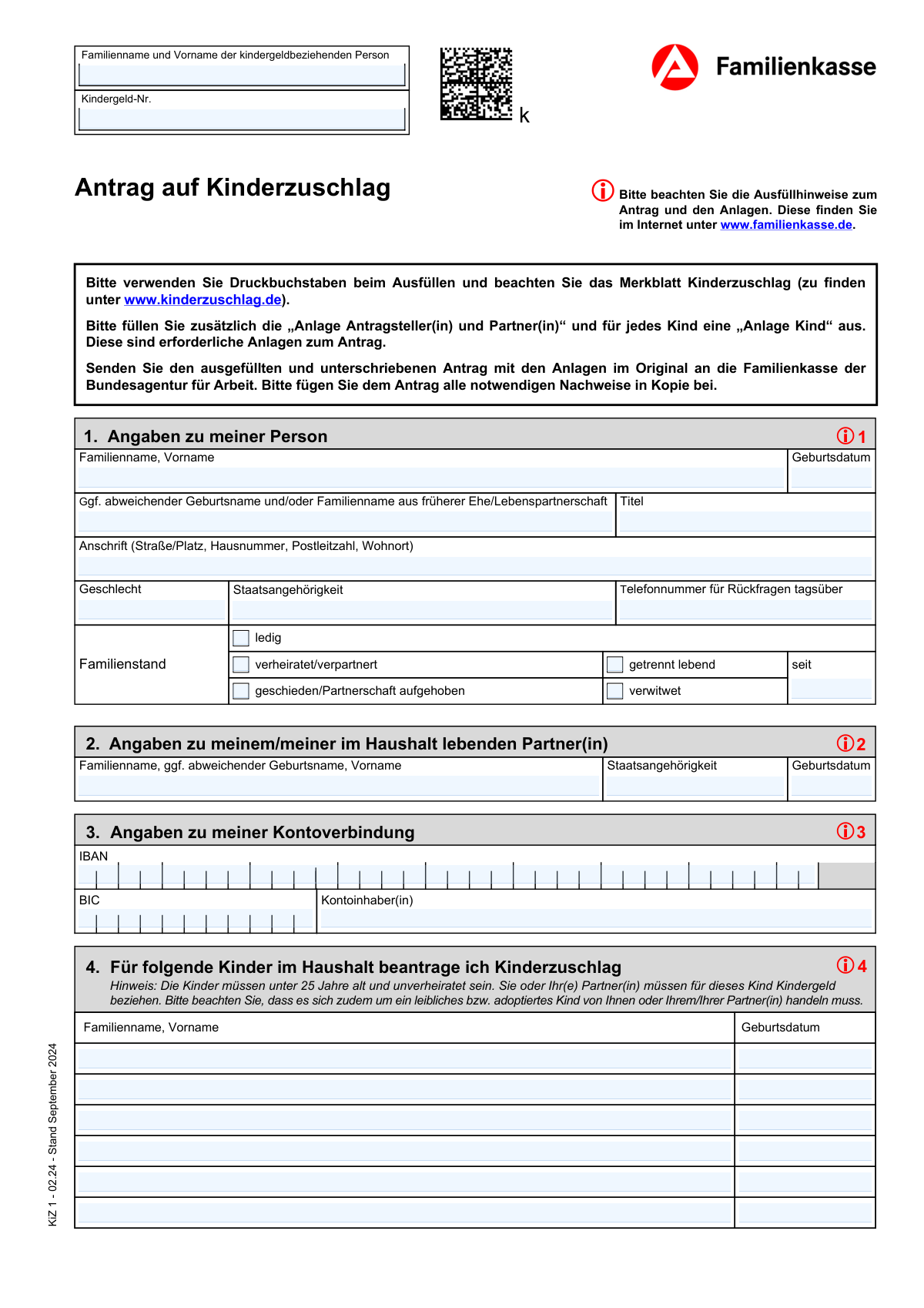
The 'Antrag auf Kinderzuschlag' (KiZ 1) is the official German application form for the child supplement, a financial benefit designed to support low-income parents who already receive child benefit (Kindergeld). This supplement helps cover the needs of the child and prevents families from having to rely on basic social security. Completing this form accurately is crucial for determining eligibility and the amount of the supplement. Today, this form can be filled out quickly and accurately using AI-powered services like Instafill.ai, which can also convert non-fillable PDF versions into interactive fillable forms.
Our AI automatically handles information lookup, data retrieval, formatting, and form filling.
It takes less than a minute to fill out KiZ 1 using our AI form filling.
Securely upload your data. Information is encrypted in transit and deleted immediately after the form is filled out.
Form specifications
| Form name: | Antrag auf Kinderzuschlag (KiZ 1) - Application for Child Supplement |
| Number of fields: | 74 |
| Number of pages: | 3 |
| Language: | English |
Instafill Demo: How to fill out PDF forms in seconds with AI
How to Fill Out KiZ 1 Online for Free in 2026
Are you looking to fill out a KIZ 1 form online quickly and accurately? Instafill.ai offers the #1 AI-powered PDF filling software of 2026, allowing you to complete your KIZ 1 form in just 37 seconds or less.
Follow these steps to fill out your KIZ 1 form online using Instafill.ai:
- 1 Navigate to Instafill.ai and upload or select the 'Antrag auf Kinderzuschlag (KiZ 1)' form.
- 2 Use the AI assistant to provide your personal details, including your name, address, Kindergeld number, and family status.
- 3 Enter information about your partner and other members living in your household as prompted by the system.
- 4 List all children for whom you are applying, providing their names and birthdates, and specify their living arrangements and any special circumstances.
- 5 Input your bank account details (IBAN and BIC) for the direct payment of the child supplement.
- 6 Carefully review all the information auto-filled by the AI for accuracy, make any necessary corrections, and then date and sign the declaration.
- 7 Download, save, or print the completed form for your records and for submission to the responsible Familienkasse (Family Benefits Office).
Our AI-powered system ensures each field is filled out correctly, reducing errors and saving you time.
Why Choose Instafill.ai for Your Fillable KiZ 1 Form?
Speed
Complete your KiZ 1 in as little as 37 seconds.
Up-to-Date
Always use the latest 2026 KiZ 1 form version.
Cost-effective
No need to hire expensive lawyers.
Accuracy
Our AI performs 10 compliance checks to ensure your form is error-free.
Security
Your personal information is protected with bank-level encryption.
Frequently Asked Questions About Form KiZ 1
This form is used to collect personal and household information for a person receiving German child benefits (Kindergeld), likely for an application or review of the child supplement (Kinderzuschlag).
This is the primary recipient of the child benefit (Kindergeld). You should enter your details here and provide your unique Kindergeld number.
Your Kindergeld number is your unique child benefit reference number. You can find it on any official letters from the Familienkasse (Family Benefits Office) or on bank statements showing the benefit payment.
Select 'getrennt lebend' if you are still legally married but live apart from your spouse, and provide the date of separation. Select 'geschieden' if your marriage has been legally dissolved by a court.
Yes, if you live with a spouse or partner in the same household, you must provide their full name, date of birth, and nationality in Section 2.
These details are required for the direct deposit of the child supplement (Kinderzuschlag) payments. Ensure the IBAN is entered correctly and that the account holder's name matches the one provided.
The form has space for six children. If you have more, list the first six on the form and attach a separate sheet with the full details for any additional children, making a note on the form itself.
A 'non-residing child' is one you receive benefits for but who doesn't live with you full-time. The other section is for children under 25 living with you for whom you do *not* receive child benefits.
List any other person who lives in your household besides yourself, your partner, and the children already listed. This can include other relatives (like parents or siblings) or non-relatives (like lodgers).
Yes, you must provide the date and your signature in the 'ERKLÄRUNG' (Declaration) section to certify that the information you have provided is true and complete.
Yes, services like Instafill.ai use AI to accurately recognize form fields and can help you auto-fill your information. This saves time and helps prevent common mistakes.
You can use a service like Instafill.ai to complete the form digitally. Simply upload the PDF, and the platform will make it interactive so you can type your answers directly into the fields.
If you have a non-fillable or 'flat' PDF, you can upload it to Instafill.ai. The service is designed to convert such documents into interactive, fillable forms that you can easily complete on your computer.
Compliance KiZ 1
Validation Checks by Instafill.ai
1
IBAN Format and Checksum Validation
This check verifies that the provided IBAN is in the correct format for Germany (DE followed by 20 digits) and that it passes the MOD-97 checksum algorithm. This is critical to ensure that payments can be processed successfully and are not sent to an invalid account. If the IBAN is invalid, the form submission should be blocked, and the user prompted to correct the entry, as it's a mandatory field for payment.
2
Mutually Exclusive Family Status Selection
This validation ensures that the user has selected only one checkbox from the available family statuses ('ledig', 'verheiratet/verpartnert', 'geschieden', 'getrennt lebend', 'verwitwet'). Since a person can only have one of these statuses at a time, selecting multiple options would represent a logical contradiction. If more than one is selected, an error message should appear, forcing the user to choose only the single most appropriate option.
3
Conditional Requirement for 'Family Status Since' Date
This check enforces the rule that the 'Familienstand - seit' (Family status since) date field is only required and enabled when the 'getrennt lebend' (separated) checkbox is selected. This is important for capturing legally relevant information about the start of a separation period. If 'getrennt lebend' is checked and the date is missing, the user must be prompted to provide it; otherwise, the field should be ignored.
4
Logical Date of Birth Consistency (Parent vs. Child)
This validation compares the applicant's date of birth with the date of birth of each listed child. It ensures that each child's date of birth is at least 14 years after the applicant's date of birth, preventing logically impossible scenarios. This check helps maintain data integrity and flags potential data entry errors. A failure would trigger a warning asking the user to verify the dates entered for both themselves and the child.
5
Kindergeld-Nummer Format Verification
This check validates that the 'Kindergeld-Nummer' follows the official format, which typically consists of 11 characters (e.g., '###FK######'). Correctly formatting this number is essential for the processing agency to locate the correct case file and link the application to the existing record. An invalid format would prevent automated processing and should trigger an error message with an example of the correct format.
6
Conditional Requirement for Partner Information
This validation ensures that the section for partner details ('2. Angaben zu meinem/meiner im Haushalt lebenden Partner(in)') is only required if the applicant's family status is 'verheiratet/verpartnert' or 'getrennt lebend'. For other statuses like 'ledig' or 'verwitwet', this information is irrelevant and should not be mandatory. This prevents user frustration and ensures only necessary data is collected, flagging the fields as required only when the relevant family status is chosen.
7
Signature Date Must Not Be in the Future
This check validates that the 'Datum (Unterschrift)' (signature date) is not a future date. A declaration cannot be signed for a future time, so this check ensures the legal validity and chronological sense of the document. If a user enters a future date, the system should display an error and require them to enter the current date or a date in the recent past.
8
Dependent Child Date of Birth Field
This validation enforces the dependency that a child's date of birth field can only be filled out, and is required, if the corresponding child's name field has been completed. This rule, explicitly mentioned in the form instructions, prevents orphaned data entries where a date of birth exists without a corresponding person. If a name is entered, the system should prompt for the date of birth to ensure a complete record for each child.
9
BIC (Bank Identifier Code) Format
This check verifies that the BIC conforms to the standard ISO 9362 format, which is either 8 or 11 alphanumeric characters. A valid BIC is necessary, along with the IBAN, for successful international or SEPA bank transfers. If the entry does not match the expected format, the system should reject it and inform the user about the correct structure (e.g., 'AAAA DE BB XXX').
10
Applicant Age Plausibility Check
This validation checks the applicant's 'Date of birth' to ensure they are of a plausible age to be applying for child benefits, typically over 18 years old. This serves as a basic sanity check to catch significant data entry errors, such as typing the current year as the birth year. If the calculated age is below the legal adult age, the system should display a warning and ask the user to confirm the entered date.
11
Address Field Content Check
This validation performs a basic check on the 'Street address, house number, postal code and city' field to ensure it contains both alphabetical and numerical characters. A valid address must include a street name (letters) and a house number/postal code (numbers). This check helps prevent incomplete or nonsensical address entries that would lead to mail delivery failure. If the check fails, a prompt should ask the user to provide their full, complete address.
12
Age Verification for 'Child under 25'
For any child listed in the 'Child under 25 not receiving child benefit' section, this validation calculates the child's age based on their provided date of birth. It then confirms that the calculated age is indeed less than 25 years. This is crucial for ensuring the applicant is correctly claiming for children who fall within the specified age bracket for this category. If a child is 25 or older, an error should be shown, indicating the child does not qualify for this section.
13
Consistency of Account Holder Name
This validation compares the 'Kontoinhaber/in' (account holder) name with the applicant's name ('Name der kindergeldbeziehenden Person'). While they don't have to be identical, a mismatch can sometimes cause payment issues. This check should trigger a soft warning if the names differ, asking the user to confirm that the account details are correct to prevent accidental payment failures.
14
Duplicate Household Member Check
This validation checks for duplicate entries across all sections where a person can be listed (e.g., children, partner, other household members). It compares the name and date of birth to identify if the same person has been entered more than once, which could indicate a user error. If a duplicate is found, a warning should be displayed, asking the user to review and correct the entries to ensure each person is only listed once in the appropriate section.
Common Mistakes in Completing KiZ 1
Applicants often enter their name in the 'Given Name, Surname' format out of habit, but this form explicitly requires 'Surname followed by Given Name'. This mistake happens due to cultural differences in name ordering or simply not reading the instructions carefully. An incorrect name order can cause mismatches with official records at the Familienkasse, leading to processing delays or rejection while they verify the applicant's identity.
The Kindergeld-Nummer is a unique identifier crucial for linking the application to an existing file. People frequently make typos, omit the 'FK' letters, or confuse it with a tax ID or social security number. Without the correct number, the agency cannot process the application, as they cannot locate the corresponding child benefit record, causing significant delays until the correct information is provided.
The form specifies that the 'seit' date for marital status should only be filled if the 'getrennt lebend' (separated) box is checked. A common error is to provide this date for other statuses like 'married' or 'divorced', or to forget it when 'separated' is selected. This leads to an incorrect assessment of the applicant's circumstances, requiring clarification from the agency and delaying the benefit calculation.
The instructions for the IBAN field state it should be entered completely and without any separators like spaces or hyphens. However, users often copy it from their bank card or statement with spaces included, or make typographical errors in the long string of characters. An invalid IBAN will result in a failed payment transaction, meaning the applicant will not receive their money until the error is corrected and resubmitted, causing financial hardship.
Applicants sometimes enter their own name in the 'Kontoinhaber/in' (account holder) field, even when using a joint account or a partner's account. The bank will reject any payment where the recipient name does not match the account holder's name on record. To avoid payment failure, the name entered must be exactly as it appears on the bank account, regardless of who is filling out the form.
The form has separate, distinct sections for children residing in the household, children not residing in the household, and children over 25. Applicants often get confused and list a child in the wrong section, for example, listing a child who lives with the other parent in the main 'household children' section. This misrepresentation of the household structure directly impacts the benefit calculation and can lead to requests for clarification, delays, or incorrect payment amounts.
In the sections for non-residing children, the fields 'Reason and duration of absence' require specific details. Many users enter vague phrases like 'visits often' or 'lives with mother'. The agency needs precise information (e.g., 'stays every second weekend and half of school holidays') to determine eligibility. Vague answers force the agency to send a follow-up request for more details, halting the application process for weeks.
Applicants may mistakenly believe they only need to list themselves, their partner, and their children. However, benefit calculations often depend on the entire household composition, including other relatives or lodgers. Omitting individuals who live at the same address can lead to an incorrect assessment of the household's needs and income, potentially resulting in benefit denial or accusations of providing false information.
The form asks for the full postal address, including street, house number, postal code, and city, to be entered on a single line. Many people are used to forms with separate fields for each address component and incorrectly break the information into multiple lines or use commas. This can lead to automated processing errors or returned mail, delaying communication and the entire application.
If the form is a non-fillable PDF, applicants often print it and fill it out by hand. Illegible handwriting, especially for critical data like names, dates, and bank details, is a major source of error. This can make it impossible for the agency to process the form, forcing them to return it and request a new, legible submission, which can delay the process by several weeks. Using a tool like Instafill.ai to convert the PDF into a fillable version ensures all entries are typed and perfectly clear.
Saved over 80 hours a year
“I was never sure if my IRS forms like W-9 were filled correctly. Now, I can complete the forms accurately without any external help.”
Kevin Martin Green
Your data stays secure with advanced protection from Instafill and our subprocessors

Robust compliance program
Transparent business model
You’re not the product. You always know where your data is and what it is processed for.
ISO 27001, HIPAA, and GDPR
Our subprocesses adhere to multiple compliance standards, including but not limited to ISO 27001, HIPAA, and GDPR.
Security & privacy by design
We consider security and privacy from the initial design phase of any new service or functionality. It’s not an afterthought, it’s built-in, including support for two-factor authentication (2FA) to further protect your account.
Fill out KiZ 1 with Instafill.ai
Worried about filling PDFs wrong? Instafill securely fills antrag-auf-kinderzuschlag-kiz-1-application-for-child-supplement forms, ensuring each field is accurate.