Yes! You can use AI to fill out Child Status and Service Needs Review

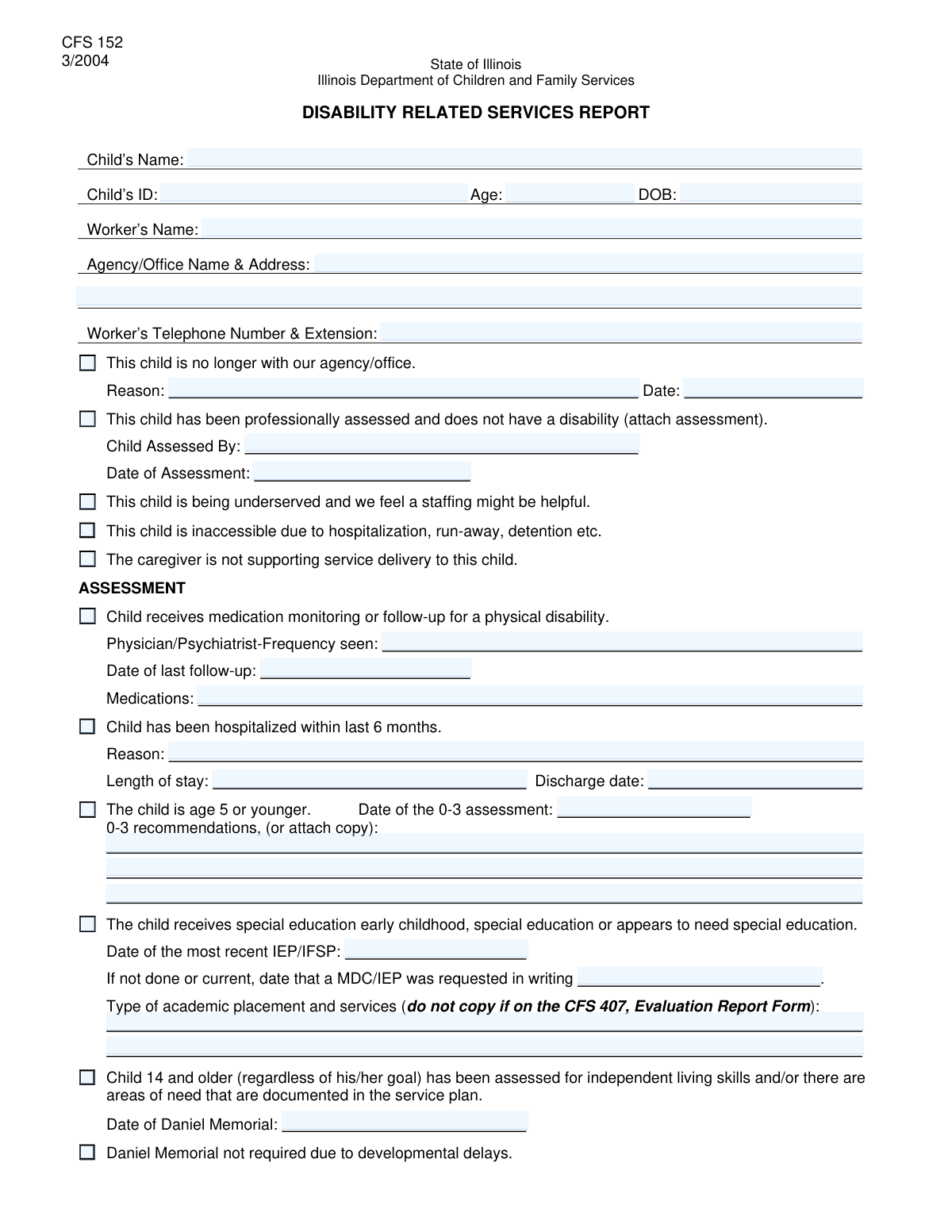
The Child Status and Service Needs Review is a comprehensive document used by child welfare agencies to report on a child's current situation, including their health, educational progress, and any special needs. It serves as a vital tool for case workers to track service delivery, identify gaps, and plan for the child's ongoing care and support. Today, this form can be filled out quickly and accurately using AI-powered services like Instafill.ai, which can also convert non-fillable PDF versions into interactive fillable forms.
Our AI automatically handles information lookup, data retrieval, formatting, and form filling.
It takes less than a minute to fill out CSSNR Form using our AI form filling.
Securely upload your data. Information is encrypted in transit and deleted immediately after the form is filled out.

Form specifications

Form name: Child Status and Service Needs Review
Number of fields: 64
Number of pages: 2
Filled form examples: Form CSSNR Form Examples
Language: English
main-image

Instafill Demo: How to fill out PDF forms in seconds with AI

How to Fill Out CSSNR Form Online for Free in 2026

Are you looking to fill out a CSSNR FORM form online quickly and accurately? Instafill.ai offers the #1 AI-powered PDF filling software of 2026, allowing you to complete your CSSNR FORM form in just 37 seconds or less.
Follow these steps to fill out your CSSNR FORM form online using Instafill.ai:
  1. 1 Navigate to Instafill.ai and upload or select the Child Status and Service Needs Review form.
  2. 2 Use the AI assistant to populate the 'Child Information,' 'Worker Information,' and 'Agency/Office Address' sections.
  3. 3 Complete the 'Child Status Update' and 'Service Delivery Issues' sections by checking the appropriate boxes and providing necessary explanations.
  4. 4 Fill out the detailed assessment sections covering disability, medication monitoring, hospitalization history, and special education (IEP/IFSP) status.
  5. 5 Document current services, placement information, and clearly outline any unmet needs, including who will address them and the expected timeframe.
  6. 6 Review the entire form for accuracy and completeness, ensuring all required fields and attachments are addressed.
  7. 7 Securely download, print, or share the completed review form directly from the Instafill.ai platform.

Our AI-powered system ensures each field is filled out correctly, reducing errors and saving you time.

Why Choose Instafill.ai for Your Fillable CSSNR Form Form?

Speed

Complete your CSSNR Form in as little as 37 seconds.

Up-to-Date

Always use the latest 2026 CSSNR Form form version.

Cost-effective

No need to hire expensive lawyers.

Accuracy

Our AI performs 10 compliance checks to ensure your form is error-free.

Security

Your personal information is protected with bank-level encryption.

Frequently Asked Questions About Form CSSNR Form

This form is used to provide a comprehensive status update on a child receiving services from an agency. It should be completed by the assigned worker, such as a case manager or social worker, who is familiar with the child's case.

Check this box only if the child has been discharged or is no longer receiving any services from your agency. You must also provide the reason and the date of this status change in the 'Child Status Update' section.

If you indicate the child has no disability, you must attach a copy of the professional assessment that confirms this finding. The form requires this documentation to be submitted along with it.

'Underserved' means the child is not receiving sufficient services and a staffing meeting is needed to address this. 'Inaccessible' means the worker cannot physically reach the child due to circumstances like hospitalization, running away, or detention.

No, you only need to complete this section if the child has a disability and receives medication monitoring or follow-up. If you check the 'Medication Monitoring/Follow-up' box, you must provide all the required details.

In the 'Special Education Information' section, enter the date the Multidisciplinary Conference (MDC) or Individualized Education Program (IEP) was requested in writing. This shows that the process has been initiated even if the plan is not yet current.

These sections are for documenting specific services or supports the child needs but is not currently receiving. For each unmet need, describe the need, identify who is responsible for addressing it, and provide an expected timeframe for resolution.

This refers to the date of a specific independent living skills assessment. You only need to enter this date if the child is 14 or older and has been assessed for independent living skills with documented needs.

Submission instructions and processing times are typically determined by the receiving agency or governing body. Please refer to your agency's specific guidelines or contact the intended recipient for this information.

Yes, you can use AI-powered services like Instafill.ai to help complete this form quickly and accurately. These tools can auto-fill information from your records, reducing manual data entry and saving you time.

Simply upload a scan or PDF of the form to the Instafill.ai platform. The AI will convert it into a fillable format, allowing you to type your answers directly into the fields and then download the completed document.

Services like Instafill.ai can make any non-fillable PDF interactive. Upload your form, and the AI will identify the fields, allowing you to type your information directly into them online.

Compliance CSSNR Form
Validation Checks by Instafill.ai

1
Child Age and DOB Consistency
This validation checks if the entered 'Child's Age' matches the age calculated from the 'Child's Date of Birth'. This is crucial for ensuring data integrity and preventing simple data entry errors that could impact service eligibility. If the values do not align, the system should flag an error, requiring the user to correct either the age or the date of birth before submission.
2
Date Chronology and Validity
Ensures all date fields (e.g., 'Date of Birth', 'Discharge Date', 'Date of Last Follow-up') are valid, formatted correctly, and are not in the future. It also checks that event dates, like a 'Discharge Date', occur after the 'Child's Date of Birth'. This prevents the submission of illogical or impossible timelines, which is critical for accurate record-keeping.
3
Conditional Requirement for Child Status Update
This check enforces that if the 'Child no longer with agency/office' checkbox is selected, the 'Reason for Child Status Update' and 'Date of Status Update' fields become mandatory. This logic is essential for capturing the complete context of a significant status change. A submission will fail if the box is checked but the corresponding reason and date fields are empty.
4
Mutually Exclusive Disability Status
This validation enforces that if the 'Child has no disability' checkbox is checked, then subsequent sections related to disability services (e.g., Medication Monitoring, Hospitalization, Special Education) must be empty. This prevents contradictory information from being submitted and ensures the form's logic is followed. The system should either disable these sections or flag an error if they contain data when the 'no disability' box is checked.
5
Conditional Requirement for Hospitalization Details
Verifies that if the 'Hospitalized within 6 Months' checkbox is selected, the 'Reason for Hospitalization', 'Length of Stay', and 'Discharge Date' fields are all filled out. This ensures that a claim of recent hospitalization is properly documented with essential details for care planning. A submission will be blocked if the box is checked without the corresponding details.
6
Logical Age Check for 'Child Age 5 or Younger'
Cross-references the 'Child Age 5 or Younger' checkbox with the child's age calculated from their Date of Birth. If the child's age is greater than 5, this checkbox cannot be selected. This prevents logical inconsistencies in the data and ensures age-specific sections, like the '0-3 Assessment Details', are applied correctly.
7
Logical Age Check for 'Child 14+ Assessed'
Validates that the 'Child 14+ Assessed for Independent Living Skills' checkbox is only checked if the child's age is 14 or older. This check maintains logical consistency across the form and ensures that age-appropriate assessments are correctly documented. An error is raised if the box is checked for a child younger than 14.
8
Conditional Requirement for Special Education Details
Ensures that if the 'Child Receives Special Education' box is checked, the 'Most Recent IEP/IFSP Date' and 'Academic Placement and Services' fields are completed. This rule guarantees that claims of special education services are substantiated with required documentation dates and descriptions. The form will be rejected if these details are missing when the box is checked.
9
Required Worker and Agency Information
Verifies that 'Worker's Name', 'Agency/Office Name', and 'Worker's Telephone Number' are not empty. This information is critical for identifying the source of the form and for any necessary follow-up communication. A submission fails if these core contact and identification fields are missing.
10
Telephone Number Format
Validates that the 'Worker's Telephone Number and Extension' field follows a standard phone number format (e.g., allowing for digits, parentheses, hyphens, and an extension). This ensures the phone number is usable and can be correctly parsed by automated systems for dialing or record-keeping. An invalid format will trigger an error message prompting the user to correct the entry.
11
Conditional Requirement for Medication Monitoring
This validation ensures that if the 'Medication Monitoring/Follow-up' checkbox is selected, the fields for 'Physician/Psychiatrist Frequency Seen', 'Date of Last Follow-up', and 'Medications' are all required. This is important for capturing complete and actionable information about the child's medication regimen. The submission will fail if the box is checked but the details are incomplete.
12
Conditional Requirement for Unmet Needs
Verifies that if 'Check Box50' (indicating there are unmet needs) is checked, then at least the entire 'First Unmet Need' section ('Service/Support', 'Who Will Address', 'Timeframe') is filled out. This ensures that flagging an issue is accompanied by the necessary details for action planning. The form should not be submittable with the box checked and the first need block empty.
13
Completeness of Core Child Information
Ensures that the 'Child's Name', 'Child's ID', and 'Child's Date of Birth' fields are always filled out. These fields are the primary identifiers for the child's record and are essential for linking the submitted information to the correct individual. The form submission will be blocked if any of these key fields are left blank.

Common Mistakes in Completing CSSNR Form

Ignoring Conditional Logic

The form has many sections that should only be filled out if a specific checkbox is selected. A common error is either filling out these dependent sections when they are not required or, more frequently, checking a box but failing to complete the corresponding required fields. This leads to incomplete submissions and requires follow-up to gather the missing information. To avoid this, carefully read the instructions for each section; AI-powered tools like Instafill.ai can also help by dynamically showing or hiding relevant fields based on your checkbox selections.

Mismatching Child's Age and Date of Birth

Users sometimes enter the child's age and date of birth without verifying that they align, often due to a simple miscalculation or a typo in the year of birth. Such discrepancies create data conflicts that can delay processing or require clarification, as official records rely on the accurate date of birth. Double-checking the date of birth and the calculated age before submission is crucial; some advanced form-filling tools can automatically calculate the age from the date of birth to prevent this error.

Forgetting to Include Required Attachments

The form explicitly states that if the 'Child has no disability' box is checked, a professional assessment must be attached. It is very common for filers to check the box but forget to include the actual document with their submission. This renders the claim unsubstantiated and will always result in a request for the missing documentation, delaying the entire process. Always create a checklist of required attachments before submitting the form to ensure everything is included.

Providing Vague Service or Reason Descriptions

Fields like 'Reason for Hospitalization', 'Current Services Description', or 'Unmet Need' require specific, detailed information. People often provide overly brief or vague answers like 'services' or 'check-up,' which are not sufficient for assessment. This lack of detail forces the agency to contact the filer for clarification, slowing down service allocation and planning. Be as specific as possible, including provider names, service frequency, and clear descriptions of needs or events.

Making Contradictory Checkbox Selections

A user might check 'Child has no disability' but then also check a box in a subsequent section, such as 'Medication Monitoring/Follow-up.' These contradictory answers create logical impossibilities in the data and halt the review process until the filer clarifies the child's actual status. Since this form is likely a non-fillable PDF, using a tool like Instafill.ai can convert it to a smart, fillable version that can flag such logical conflicts before submission.

Using Inconsistent or Ambiguous Date Formats

The form contains numerous date fields ('Date of Birth', 'Discharge Date', 'IEP/IFSP Date'). Users often enter dates in various formats (e.g., 01-05-2023, 5/1/23, Jan 5, 2023), which can lead to data entry errors and misinterpretation. This can cause significant issues in tracking timelines and eligibility. Always use a consistent MM/DD/YYYY format to ensure clarity, and AI form-filling tools like Instafill.ai can help by automatically standardizing date formats.

Partially Completing the 'Unmet Needs' Section

When reporting an unmet need, the form requires three distinct pieces of information: the service/support needed, who will address it, and the timeframe. A common mistake is to describe the need but leave the 'Who Will Address' or 'Timeframe' fields blank. An incomplete entry for an unmet need is not actionable and cannot be processed, delaying the arrangement of critical support for the child. Ensure all three fields are completed for every unmet need listed.

Omitting Worker's Phone Extension or Full Address

When providing the 'Worker's Telephone Number and Extension,' the extension is frequently forgotten, making it difficult to reach the correct person directly. Similarly, the 'Agency/Office Address' may be entered without a suite number or a complete ZIP code, leading to returned mail. These small omissions can cause significant communication delays. Always double-check contact fields to ensure they are complete and accurate for prompt communication.

Confusing Service Frequency with Last Service Date

In the 'Medication Monitoring Information' section, the form asks for both the 'Frequency Seen' and the 'Date of Last Follow-up.' Users may mistakenly enter a date (e.g., '10/15/2023') in the frequency field or write 'monthly' in the date field. This confusion makes it impossible to understand the child's care schedule. Pay close attention to the field label to provide the correct type of information—a rate of occurrence for frequency and a specific calendar date for the last follow-up.

Missing Key Dates for Special Education Services

When indicating a child receives special education, the form asks for both the 'Most Recent IEP/IFSP Date' and the 'MDC/IEP Request Date.' Filers often provide only the most recent plan date and leave the request date blank, even if a new one has been requested. This missing information is crucial for tracking compliance and ensuring the child's educational needs are being addressed in a timely manner. Be sure to fill in both dates if applicable to provide a complete picture of the child's special education status.
Saved over 80 hours a year

“I was never sure if my IRS forms like W-9 were filled correctly. Now, I can complete the forms accurately without any external help.”

Kevin Martin Green

Your data stays secure with advanced protection from Instafill and our subprocessors

Robust compliance program

Transparent business model

You’re not the product. You always know where your data is and what it is processed for.

ISO 27001, HIPAA, and GDPR

Our subprocesses adhere to multiple compliance standards, including but not limited to ISO 27001, HIPAA, and GDPR.

Security & privacy by design

We consider security and privacy from the initial design phase of any new service or functionality. It’s not an afterthought, it’s built-in, including support for two-factor authentication (2FA) to further protect your account.

Fill out CSSNR Form with Instafill.ai

Worried about filling PDFs wrong? Instafill securely fills child-status-and-service-needs-review forms, ensuring each field is accurate.