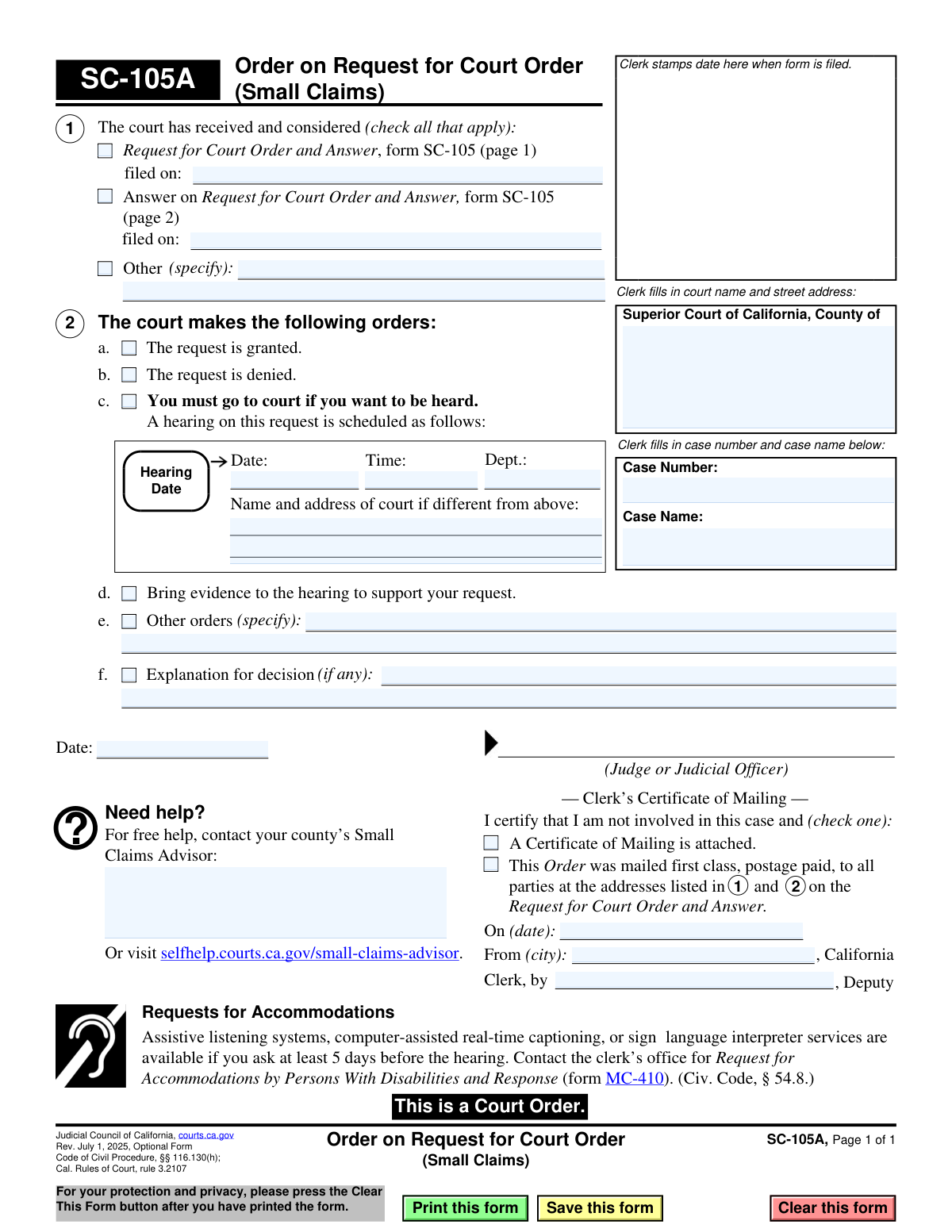
Yes! You can use AI to fill out Form SC-105A, Order on Request for Court Order (Small Claims)
Form SC-105A, Order on Request for Court Order (Small Claims), is a legal document issued by a California Superior Court judge. It communicates the court's ruling on a previously filed 'Request for Court Order' (Form SC-105), stating whether the request is granted, denied, or if a hearing is scheduled. This document is a binding court order that dictates the outcome or next steps in the matter. Today, this form can be filled out quickly and accurately by court personnel using AI-powered services like Instafill.ai, which can also convert non-fillable PDF versions into interactive fillable forms.
SC-105A is part of the
California court forms, court claim forms and small claims forms categories on Instafill.
Our AI automatically handles information lookup, data retrieval, formatting, and form filling.
It takes less than a minute to fill out SC-105A using our AI form filling.
Securely upload your data. Information is encrypted in transit and deleted immediately after the form is filled out.
Form specifications
| Form name: | Form SC-105A, Order on Request for Court Order (Small Claims) |
| Number of fields: | 35 |
| Number of pages: | 1 |
| Language: | English |
Instafill Demo: How to fill out PDF forms in seconds with AI
How to Fill Out SC-105A Online for Free in 2026
Are you looking to fill out a SC-105A form online quickly and accurately? Instafill.ai offers the #1 AI-powered PDF filling software of 2026, allowing you to complete your SC-105A form in just 37 seconds or less.
Follow these steps to fill out your SC-105A form online using Instafill.ai:
- 1 Navigate to Instafill.ai and upload or select the SC-105A form.
- 2 Use the AI tool to automatically populate the court information, case number, and case name.
- 3 Check the boxes to indicate which documents the court considered, such as Form SC-105, and enter the corresponding filing dates.
- 4 Select the court's decision by checking the box for 'granted,' 'denied,' or 'You must go to court.' If a hearing is set, fill in the date, time, and department details.
- 5 Enter any additional specific orders or explanations for the decision in the provided text fields.
- 6 Review the completed form for accuracy before it is signed by the judge or judicial officer.
- 7 Once signed, complete the 'Clerk's Certificate of Mailing' section to certify that the order has been mailed to all parties involved.
Our AI-powered system ensures each field is filled out correctly, reducing errors and saving you time.
Why Choose Instafill.ai for Your Fillable SC-105A Form?
Speed
Complete your SC-105A in as little as 37 seconds.
Up-to-Date
Always use the latest 2026 SC-105A form version.
Cost-effective
No need to hire expensive lawyers.
Accuracy
Our AI performs 10 compliance checks to ensure your form is error-free.
Security
Your personal information is protected with bank-level encryption.
Frequently Asked Questions About Form SC-105A
Form SC-105A is the official document a judge uses to issue a decision on a request made by a party in a small claims case. It is not a form you fill out; it is an order you receive from the court.
You received this form because either you or another party in your case filed a 'Request for Court Order' (Form SC-105), and this document is the judge's official ruling on that request.
No, you do not fill out this form. It is completed and signed by a judicial officer and processed by the court clerk to inform you of the court's decision.
This means the judge has approved the request that was submitted to the court. You must follow any instructions detailed in the 'Other orders' or 'Explanation for decision' sections.
If a hearing is scheduled, you must go to court at the specified date, time, and location. Be prepared to present your case and bring any evidence that supports your position as noted in section 2d.
Form SC-105 is the 'Request' form that a party files to ask the court for an order. Form SC-105A is the 'Order' form that the judge uses to communicate their decision on that request.
The judge might include specific instructions, such as ordering a party to provide documents, changing a court date, or setting a deadline for an action to be completed.
You must request accommodations for a disability at least 5 days before your hearing by contacting the clerk's office. You will need to submit a 'Request for Accommodations' (Form MC-410).
For free legal help, you can contact your county's Small Claims Advisor. You can also find resources and information by visiting the California Courts Self-Help Center website.
This section is completed by the court clerk to certify that a copy of the order was mailed to all parties involved in the case. It serves as official proof of notification.
While you don't fill out this specific order, AI tools like Instafill.ai can help you accurately complete the initial 'Request for Court Order' (Form SC-105) that leads to this decision, saving time and preventing errors.
You can upload any small claims form to Instafill.ai. The AI-powered service will identify all the form fields, allowing you to fill them out quickly and accurately online before printing for submission.
If you have a flat, non-fillable PDF, you can use a service like Instafill.ai to convert it into an interactive, fillable form. Simply upload the document, and the platform will make it easy to type your information directly into the correct fields.
Compliance SC-105A
Validation Checks by Instafill.ai
1
Case Number Presence and Format
This check verifies that the 'Case Number' field is not empty and conforms to the standard format for the specified court. The case number is the primary identifier for the legal proceeding, and its accuracy is critical for correct filing and record-keeping. If the case number is missing or malformed, the order cannot be associated with the correct case file, leading to significant legal and administrative delays.
2
At Least One Document Considered
Validates that in Section 1, at least one checkbox is marked to indicate which documents the court considered (e.g., 'Request for Court Order', 'Answer', or 'Other'). This is important for creating a clear judicial record of the basis for the court's decision. A failure to indicate the documents reviewed could make the order vulnerable to appeal or challenge.
3
Conditional Date for Considered Documents
Ensures that if a checkbox in Section 1 is checked (e.g., for form SC-105), the corresponding 'filed on' date field is filled with a valid, non-future date. This confirms when the foundational documents were filed, which is essential for establishing the timeline of events. An error here could invalidate the procedural correctness of the order.
4
Conditional 'Other' Document Specification
This check ensures that if the 'Other' checkbox in Section 1 is marked, the adjacent text field specifying the document is not empty. This provides necessary clarity on what additional materials the court reviewed. Without this specification, the record is incomplete and ambiguous, making it difficult to understand the full context of the court's decision.
5
Mutually Exclusive Grant/Deny Order
Verifies that only one of the checkboxes for 'The request is granted' (2a) or 'The request is denied' (2b) is selected. A request cannot be simultaneously granted and denied, as these are contradictory outcomes. If both are checked, the order is legally nonsensical and unenforceable, requiring correction by the court.
6
At Least One Order Selection
This validation confirms that at least one of the primary order checkboxes in Section 2 (e.g., granted, denied, hearing scheduled, other orders) is selected. The purpose of the form is to issue an order, so it must contain a decision from the court. A form without any order selected is incomplete and fails to perform its function.
7
Conditional Hearing Details
Ensures that if the 'A hearing on this request is scheduled' checkbox (2c) is selected, the 'Date', 'Time', and 'Dept.' fields are all populated. This information is critical for the parties involved to know when and where to appear. Failure to provide these details would make the notice of hearing ineffective and could violate due process rights.
8
Future Hearing Date
Validates that the 'Date' provided for a hearing in Section 2c is a valid date format and occurs in the future. A hearing cannot be scheduled for a past date, and an invalid date format would cause confusion for all parties. This check ensures that the notice is actionable and legally sound.
9
Conditional 'Other Orders' Specification
This check ensures that if the 'Other orders' checkbox (2e) is marked, the corresponding text field specifying the order is not empty. This is crucial for defining any unique or specific directives from the judge that are not covered by the standard options. An empty field here would render the 'Other orders' selection meaningless and the order incomplete.
10
Judge's Signature Date Presence
Verifies that the 'Date' field next to the Judge or Judicial Officer's signature line is filled. This date is the official date the order was made and is fundamental to its legal validity and enforceability. An unsigned or undated order is not a valid court order.
11
Logical Judge's Signature Date
This check confirms that the Judge's signature date is on or after any document filing dates listed in Section 1. A judge cannot logically sign an order based on a request before that request was officially filed with the court. This validation upholds the procedural integrity and chronological sense of the legal process.
12
Clerk's Certificate of Mailing Completeness
Ensures that if the Clerk's Certificate of Mailing is used (i.e., a checkbox is checked), then the 'On (date)', 'From (city)', and 'Clerk, by' fields are all completed. This certificate serves as official proof of service. Incomplete information would undermine its legal value as evidence that parties were properly notified of the order.
13
Logical Clerk's Mailing Date
Validates that the mailing date in the Clerk's Certificate of Mailing is on or after the Judge's signature date. An order cannot be mailed to the parties before it has been officially signed and rendered by the court. This check prevents chronologically impossible and legally invalid records of service.
Common Mistakes in Completing SC-105A
A litigant might mistakenly download and attempt to fill out this form (SC-105A, the Order) instead of the form they need to file (SC-105, the Request). This form is for court use only, to be completed by a clerk or judge. Submitting this form as a request will lead to its rejection, causing significant delays and frustration in the legal process.
Court staff may accidentally transcribe the wrong Case Number or Case Name from another document onto the order. This critical error can cause the order to be filed in the wrong case file, leading to legal chaos, incorrect notifications, and potential due process violations. To avoid this, staff must meticulously double-check case information against the official case file before finalizing the document.
In Section 1, the judicial officer must indicate all documents that were considered in making the order. Forgetting to check a box for the Request (SC-105) or Answer, or failing to specify documents under 'Other,' creates an incomplete record. This can make the order's basis unclear and potentially vulnerable to appeal or a motion for reconsideration.
A common mistake made in haste is checking conflicting boxes in Section 2, such as checking both 'The request is granted' (2a) and 'The request is denied' (2b). This renders the order ambiguous and legally unenforceable. The parties are left without a clear resolution, forcing the court to issue a corrected order and causing delays.
When a hearing is scheduled by checking box 2c, it is essential to completely fill in the Date, Time, and Department. Omitting any of these details means the parties will not have proper notice of when and where to appear. This inevitably leads to missed hearings, requests for rescheduling, and unnecessary delays in resolving the matter.
The 'Other orders' field (2e) is for specific, actionable instructions. A mistake is to write something vague like 'Parties to cooperate' without defining the terms of cooperation. Such orders are difficult to enforce and lead to further disputes about their meaning, requiring additional court intervention to clarify.
An order is not valid until it is signed and dated by the Judge or Judicial Officer. Overlooking this final step renders the document a mere draft with no legal authority. This mistake nullifies the entire proceeding documented on the form, requiring the document to be routed back for signature and re-issued, delaying justice for the parties.
The Clerk's Certificate of Mailing at the bottom is proof of service, a cornerstone of due process. Clerks may mistakenly enter the wrong mailing date, forget to sign, or fail to check the box confirming mailing. Such errors can be used to challenge whether a party received proper notice of the order, potentially invalidating subsequent actions.
While this is a fillable PDF, orders are sometimes annotated or completed by hand. Illegible handwriting for dates, department numbers, or explanations in section 2f can cause confusion for the parties reading the order. This can lead to missed deadlines or incorrect actions based on a misinterpretation of the court's directive.
Sometimes, related documents or even this form itself may exist only as a flat, non-fillable scan, making data entry difficult and error-prone for court staff. This slows down processing and increases the chance of transcription errors. AI-powered tools like Instafill.ai can convert such non-fillable PDFs into interactive, fillable forms, streamlining the workflow and improving accuracy for court personnel.
Saved over 80 hours a year
“I was never sure if my IRS forms like W-9 were filled correctly. Now, I can complete the forms accurately without any external help.”
Kevin Martin Green
Your data stays secure with advanced protection from Instafill and our subprocessors

Robust compliance program
Transparent business model
You’re not the product. You always know where your data is and what it is processed for.
ISO 27001, HIPAA, and GDPR
Our subprocesses adhere to multiple compliance standards, including but not limited to ISO 27001, HIPAA, and GDPR.
Security & privacy by design
We consider security and privacy from the initial design phase of any new service or functionality. It’s not an afterthought, it’s built-in, including support for two-factor authentication (2FA) to further protect your account.
Fill out SC-105A with Instafill.ai
Worried about filling PDFs wrong? Instafill securely fills form-sc-105a-order-on-request-for-court-order-small-claims forms, ensuring each field is accurate.