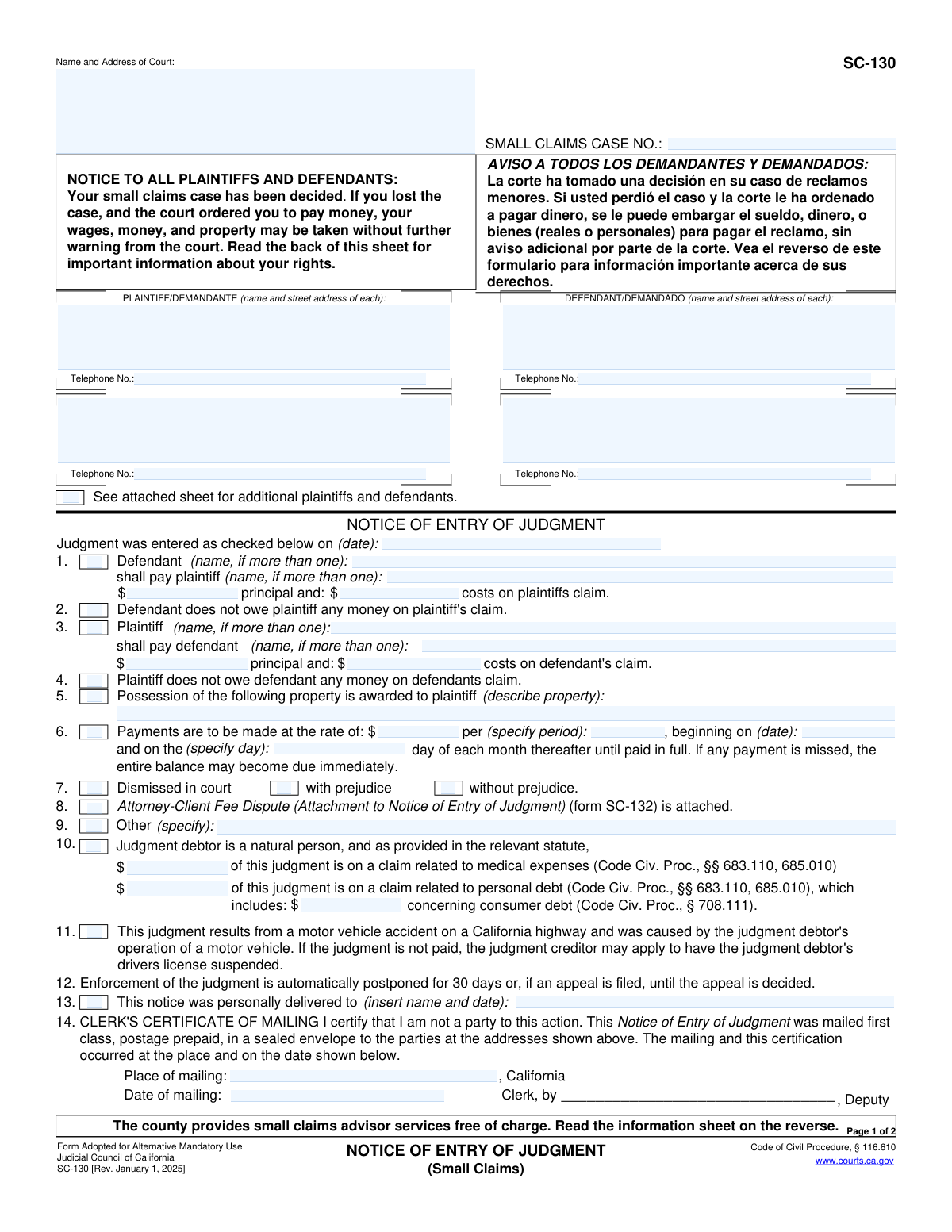
Yes! You can use AI to fill out Form SC-130, Notice of Entry of Judgment (Small Claims)
Form SC-130, Notice of Entry of Judgment (Small Claims), is a legal document used by California courts to inform all parties in a small claims case of the court's final decision. It specifies who won the case, if any money is owed, and the rights and obligations of both the judgment creditor (winner) and judgment debtor (loser). This notice is crucial as it starts the timeline for appeals and for enforcing the judgment. Today, this form can be filled out quickly and accurately using AI-powered services like Instafill.ai, which can also convert non-fillable PDF versions into interactive fillable forms.
SC-130 is part of the
California court forms, court claim forms and small claims forms categories on Instafill.
Our AI automatically handles information lookup, data retrieval, formatting, and form filling.
It takes less than a minute to fill out SC-130 using our AI form filling.
Securely upload your data. Information is encrypted in transit and deleted immediately after the form is filled out.
Form specifications
| Form name: | Form SC-130, Notice of Entry of Judgment (Small Claims) |
| Number of fields: | 55 |
| Number of pages: | 1 |
| Language: | English |
Instafill Demo: How to fill out PDF forms in seconds with AI
How to Fill Out SC-130 Online for Free in 2026
Are you looking to fill out a SC-130 form online quickly and accurately? Instafill.ai offers the #1 AI-powered PDF filling software of 2026, allowing you to complete your SC-130 form in just 37 seconds or less.
Follow these steps to fill out your SC-130 form online using Instafill.ai:
- 1 Navigate to Instafill.ai and upload or select the SC-130, Notice of Entry of Judgment form.
- 2 Use the AI assistant to input the court name, address, and the small claims case number in the designated fields.
- 3 Enter the full names, addresses, and telephone numbers for all plaintiffs and defendants involved in the case.
- 4 Detail the judgment by checking the appropriate boxes, indicating the date of entry, who is ordered to pay whom, and the specific dollar amounts for principal and costs.
- 5 If applicable, specify payment plan terms, property possession awards, or other specific orders from the court.
- 6 Review all the information for accuracy, then allow the court clerk to complete the certificate of mailing section before distributing the notice to all parties.
- 7 Once the judgment is paid, the judgment creditor must complete and file the 'Acknowledgment of Satisfaction of Judgment' section at the bottom of the form.
Our AI-powered system ensures each field is filled out correctly, reducing errors and saving you time.
Why Choose Instafill.ai for Your Fillable SC-130 Form?
Speed
Complete your SC-130 in as little as 37 seconds.
Up-to-Date
Always use the latest 2026 SC-130 form version.
Cost-effective
No need to hire expensive lawyers.
Accuracy
Our AI performs 10 compliance checks to ensure your form is error-free.
Security
Your personal information is protected with bank-level encryption.
Frequently Asked Questions About Form SC-130
This form officially notifies both the plaintiff and defendant of the court's final decision in their small claims case. It details who won, who lost, and any money or property that was awarded.
Generally, no, as the court clerk fills out and sends this form to inform you of the judgment. The only part you might fill out is the 'Acknowledgment of Satisfaction of Judgment' at the bottom of page 2, but only if you won the case and have been paid in full.
You can pay the judgment directly to the winner, file a Notice of Appeal (Form SC-140) within 30 days to request a new trial, or, if you didn't attend the trial, file a Motion to Vacate the Judgment (Form SC-135).
The court does not collect the money for you; you must ask the judgment debtor for payment. If they don't pay, you can use other court forms like a Writ of Execution (Form EJ-130) to garnish wages or levy bank accounts.
This means the winning party cannot legally start collecting the money or property for 30 days after the judgment is entered. This period gives the losing party time to pay or file an appeal.
This section must be completed and filed with the court by the judgment creditor (the winner) as soon as the judgment has been paid in full. Failing to do so can result in a fine.
If you disagree with the decision on the other party's claim, you must file a Notice of Appeal (Form SC-140) within 30 days from the date the Notice of Entry of Judgment was mailed or handed to you.
This is Form SC-133, which the law requires the debtor to complete to tell you about their property and income. If they fail to send it, you can ask the court to order them to comply.
Yes, services like Instafill.ai use AI to help you accurately auto-fill related forms, such as an appeal or collection documents. This can save you time and help reduce errors.
You can use a service like Instafill.ai to fill out your forms online. Simply upload the form, and the AI will help you complete the required fields before you print and file it with the court.
If you have a flat, non-fillable PDF, you can upload it to Instafill.ai. The platform can convert it into an interactive, fillable form that you can complete easily on your computer.
If you did not go to the trial, you may ask the court to cancel or 'vacate' the judgment. You must file a Motion to Vacate the Judgment (Form SC-135) within 30 days after this notice was mailed.
No, if you are the plaintiff, the court's decision on your claim is final and you cannot appeal it. You may only appeal the decision on a claim the defendant filed against you.
This indicates that if the judgment is not paid, the winning party can apply to have the Department of Motor Vehicles (DMV) suspend the judgment debtor's driver's license.
Compliance SC-130
Validation Checks by Instafill.ai
1
Case Number Presence and Format
Validates that the 'SMALL CLAIMS CASE NO.' field is not empty and conforms to the expected format for the jurisdiction. The case number is the primary identifier for the legal action and is essential for filing and retrieval. An empty or incorrectly formatted case number will cause the document to be rejected by the court clerk.
2
Mutually Exclusive Judgment Outcome
Validates that only one primary judgment outcome from items 1, 2, 3, 4, 5, or 7 is selected. Selecting conflicting outcomes, such as 'Defendant pays plaintiff' (item 1) and 'Defendant owes nothing' (item 2), is logically impossible and would make the judgment unenforceable. If validation fails, the user must be prompted to select a single, definitive outcome for the judgment.
3
Conditional Requirement for Judgment Amounts
Validates that if a judgment for payment is indicated (item 1 or 3), the corresponding 'principal' and 'costs' fields are filled with valid, non-negative currency values. A judgment for money is meaningless without the specific amounts owed. The system should prevent submission if these mandatory financial details are missing.
4
Conditional Property Description Requirement
Ensures that if 'Possession of the following property is awarded to plaintiff' (item 5) is checked, the corresponding description field is not empty. The judgment must clearly identify the specific property to be returned for the order to be enforceable. A missing description would make the judgment vague and ineffective.
5
Conditional Dismissal Type Selection
Verifies that if the 'Dismissed in court' option (item 7) is checked, one of the sub-options ('with prejudice' or 'without prejudice') is also selected. The distinction is legally critical as it determines whether the claim can be refiled. An incomplete selection makes the dismissal order ambiguous and requires correction before processing.
6
Payment Plan Completeness
Ensures that if the payment plan option (item 6) is checked, all related fields (payment amount, frequency, start date, and day of the month) are filled. An incomplete payment plan is ambiguous and cannot be enforced. Failure to provide all details will result in a validation error, requiring the user to complete the plan details or uncheck the option.
7
Logical Date Sequence for Judgment and Mailing
Verifies that the 'Date of mailing' (item 14) is on or after the 'Judgment was entered on' date. A notice cannot be mailed before the judgment officially exists. This check prevents chronological errors that could invalidate the notice period for appeals, and an invalid sequence will block submission until the dates are corrected.
8
Valid Judgment Date
Checks that the 'Judgment was entered on' date is a valid calendar date and is not in the future. A judgment cannot be entered on a future date, and this check prevents typographical errors that could affect legal timelines, such as the appeal period. The system should reject any future dates or non-date entries.
9
Debt Allocation Consistency
Checks that the sum of amounts allocated to medical or personal debt (item 10) does not exceed the total principal judgment amount awarded in item 1 or 3. This prevents clerical errors where the specified debt components total more than the actual judgment. If the sum is greater, an error should be flagged, requiring the user to correct the amounts.
10
Required Plaintiff and Defendant Information
Ensures that at least one plaintiff and one defendant are identified with their name and address. A judgment must clearly state the parties involved to be legally valid. Missing this core information would render the notice incomplete and legally void, so the form cannot be processed without it.
11
Conditional 'Other' Specification
Ensures that if the 'Other' checkbox (item 9) is selected, the accompanying text field is filled out to specify the details. This prevents an open-ended and undefined order from being entered. The system must require a description to ensure the judgment is clear and complete.
12
Acknowledgment Case Number Consistency
Validates that if the 'Acknowledgment of Satisfaction of Judgment' section is completed, its case number field is filled and matches the case number on page 1. This ensures the satisfaction is applied to the correct case, preventing serious legal and financial errors. A mismatch or missing number should trigger an alert and prevent submission of the satisfaction.
13
Acknowledgment Creditor Role Selection
Verifies that when the 'Acknowledgment of Satisfaction of Judgment' is signed, either the 'judgment creditor' or 'assignee of record' checkbox is selected. This clarifies who is attesting to the payment and has the legal standing to do so. The form should not be accepted without this role being specified.
14
Payment Plan Start Date Logic
Verifies the payment plan start date (item 6) is a valid date and occurs on or after the 'Judgment was entered on' date. A payment schedule cannot begin before the judgment is officially made. This check prevents logical inconsistencies and ensures the payment terms are valid from the outset.
Common Mistakes in Completing SC-130
Users often miscopy the Small Claims Case Number when filling out the 'Acknowledgment of Satisfaction of Judgment' at the bottom of the form. This can happen due to typographical errors or referencing an old document. An incorrect case number will cause the court to reject the filing or apply it to the wrong case, failing to clear the judgment debtor's record and potentially requiring refiling. To avoid this, meticulously copy the number from the top of the form; AI-powered tools like Instafill.ai can also help by auto-populating consistent information across a document to prevent such transcription errors.
After receiving full payment, the judgment creditor (the winner) is legally required to complete and file the acknowledgment section at the bottom of the form. Many creditors forget this step, not realizing it carries penalties. This failure leaves the judgment officially open, negatively impacting the debtor's credit and legal standing, and can result in the court fining the creditor. To prevent this, the creditor should file the form immediately after funds have cleared.
A critical mistake is using the acknowledgment section on this SC-130 form after an 'Abstract of Judgment' (a lien on real estate) has been recorded. The form explicitly states not to use it in this situation. Doing so will not properly release the lien on the debtor's property, creating significant legal and title-clearing issues down the line. The creditor must obtain and file a different form (typically EJ-100) from the court clerk to properly release the property lien.
The form's second page outlines strict deadlines, most notably the 30-day period to appeal or file a motion to vacate. A common error is starting the 30-day count from the trial date instead of the 'Date of mailing' printed on the front of the form. This miscalculation can cause a party to miss their deadline, resulting in the permanent loss of their right to challenge the court's decision. Always use the mailing date as the starting point for all timelines.
Judgment creditors, eager to collect, often overlook Item 12, which states that enforcement is automatically postponed for 30 days. Attempting to garnish wages or levy a bank account during this 'stay' period is illegal and can expose the creditor to court sanctions. The 30-day window is designed to allow the debtor time to appeal; collection efforts can only begin after this period expires and no appeal has been filed.
The instructions on page two differentiate between appealing a judgment and vacating it, but parties often confuse the two. A party who attended the trial and disagrees with the outcome must file an 'Appeal' (form SC-140). A party who did not attend the trial must file a 'Motion to Vacate the Judgment' (form SC-135). Filing the wrong motion wastes critical time and money, and can result in missing the strict deadline for the correct legal action.
The accuracy of the plaintiff and defendant addresses at the top of the form is crucial for the entire legal process. An incorrect or outdated address means a party may not receive the Notice of Entry of Judgment, causing them to miss appeal deadlines or be unaware of a judgment against them. This can lead to default actions like a driver's license suspension without their knowledge. Using a tool like Instafill.ai can help validate addresses against postal databases to ensure they are accurate and correctly formatted.
A judgment creditor might file the 'Acknowledgment of Satisfaction of Judgment' as soon as they receive a payment, such as a personal check, without waiting for the funds to clear. If the payment later bounces or is reversed, the creditor is in a difficult position because they have already legally declared the debt as paid. It is essential to wait until the payment is fully secured in your account before signing and mailing this form to the court.
As explained on page two, a judgment debtor who does not pay is required by law to complete and send a 'Judgment Debtor's Statement of Assets' (form SC-133) to the creditor. Many debtors ignore this requirement, viewing it as optional. This is a mistake, as the creditor can file a motion with the court to compel the debtor to comply, which can result in sanctions and the debtor being ordered to pay the creditor's attorney's fees.
When the judgment creditor fills out the satisfaction section, they must provide both a signature and a clearly printed name. An illegible signature or a scribbled printed name can cause the court clerk to reject the document. This delays the official closing of the case and requires the creditor to refile, creating unnecessary hassle. If the form is a non-fillable PDF, a tool like Instafill.ai can convert it to a fillable version, allowing you to type your name for perfect legibility.
Saved over 80 hours a year
“I was never sure if my IRS forms like W-9 were filled correctly. Now, I can complete the forms accurately without any external help.”
Kevin Martin Green
Your data stays secure with advanced protection from Instafill and our subprocessors

Robust compliance program
Transparent business model
You’re not the product. You always know where your data is and what it is processed for.
ISO 27001, HIPAA, and GDPR
Our subprocesses adhere to multiple compliance standards, including but not limited to ISO 27001, HIPAA, and GDPR.
Security & privacy by design
We consider security and privacy from the initial design phase of any new service or functionality. It’s not an afterthought, it’s built-in, including support for two-factor authentication (2FA) to further protect your account.
Fill out SC-130 with Instafill.ai
Worried about filling PDFs wrong? Instafill securely fills form-sc-130-notice-of-entry-of-judgment-small-claims forms, ensuring each field is accurate.