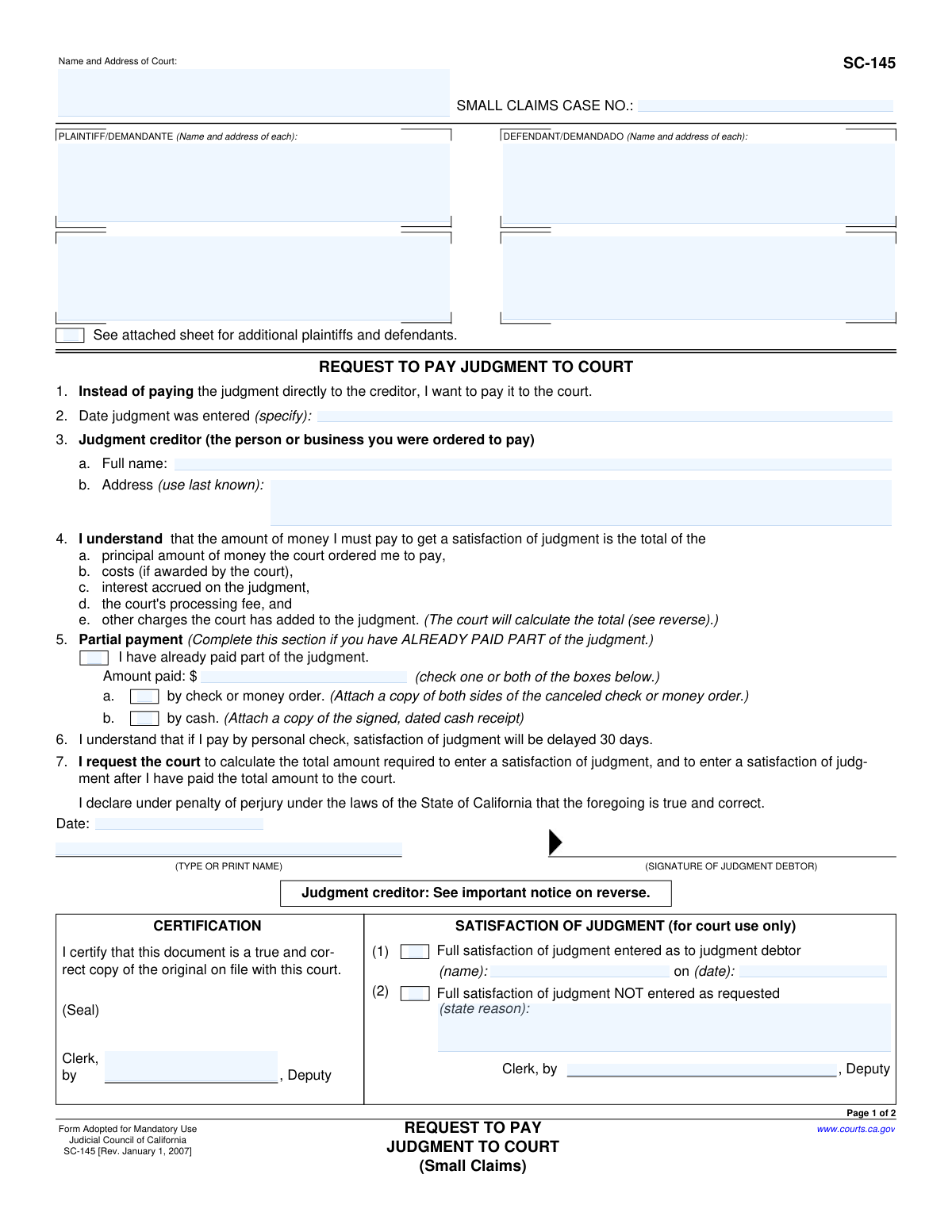
Yes! You can use AI to fill out Form SC-145, Request to Pay Judgment to Court (Small Claims)

Form SC-145, Request to Pay Judgment to Court, is a legal document used within the California court system for small claims cases. It allows the person who owes money (the judgment debtor) to pay the court directly, which then ensures the payment is officially recorded and forwarded to the person who is owed (the judgment creditor). This process helps in obtaining a formal 'satisfaction of judgment' once the debt is fully paid. Today, this form can be filled out quickly and accurately using AI-powered services like Instafill.ai, which can also convert non-fillable PDF versions into interactive fillable forms.
SC-145 is part of the California court forms, court claim forms and small claims forms categories on Instafill.
Our AI automatically handles information lookup, data retrieval, formatting, and form filling.
It takes less than a minute to fill out SC-145 using our AI form filling.
Securely upload your data. Information is encrypted in transit and deleted immediately after the form is filled out.

Form specifications

Form name: Form SC-145, Request to Pay Judgment to Court (Small Claims)
Number of fields: 51
Number of pages: 1
Language: English
main-image

Instafill Demo: How to fill out PDF forms in seconds with AI

How to Fill Out SC-145 Online for Free in 2026

Are you looking to fill out a SC-145 form online quickly and accurately? Instafill.ai offers the #1 AI-powered PDF filling software of 2026, allowing you to complete your SC-145 form in just 37 seconds or less.
Follow these steps to fill out your SC-145 form online using Instafill.ai:
  1. 1 Navigate to Instafill.ai and upload or select Form SC-145, Request to Pay Judgment to Court.
  2. 2 Provide the court name, small claims case number, and the names and addresses of the plaintiff(s) and defendant(s).
  3. 3 Enter the date the judgment was entered and the full name and last known address of the judgment creditor (the person you need to pay).
  4. 4 If you have already made partial payments, check the appropriate box, enter the amount paid, and be prepared to attach proof like a canceled check or receipt.
  5. 5 Review all the information populated by the AI for accuracy and completeness.
  6. 6 Date and sign the form in the designated signature field. The AI service will guide you through the e-signature process.
  7. 7 Download the completed form to file with the court. The court will then calculate the total amount due, including any fees and interest.

Our AI-powered system ensures each field is filled out correctly, reducing errors and saving you time.

Why Choose Instafill.ai for Your Fillable SC-145 Form?

Speed

Complete your SC-145 in as little as 37 seconds.

Up-to-Date

Always use the latest 2026 SC-145 form version.

Cost-effective

No need to hire expensive lawyers.

Accuracy

Our AI performs 10 compliance checks to ensure your form is error-free.

Security

Your personal information is protected with bank-level encryption.

Frequently Asked Questions About Form SC-145

The SC-145 form, 'Request to Pay Judgment to Court,' is used by a judgment debtor in a small claims case to pay the money they owe directly to the court instead of to the judgment creditor.

This form should be filled out by the judgment debtor, who is the person or business that was ordered by the court to pay money in a small claims case.

You might pay the court if you cannot locate the judgment creditor or if you want to ensure there is an official court record that the judgment has been paid in full, leading to a 'Satisfaction of Judgment'.

You will need your small claims case number, the names and addresses of all parties, the date the judgment was entered, and the full name and last known address of the judgment creditor.

After you submit the form, the court will calculate the total amount you owe, including interest and fees. You must then pay this full amount to the court to receive a 'Satisfaction of Judgment'.

The court calculates the total by adding the original judgment amount, any court costs, accrued interest, and a court processing fee, then subtracting any partial payments you have already made and can prove.

You must check the box in section 5, state the amount you paid, and attach proof of payment, such as a copy of a canceled check or a signed cash receipt.

The court delays the 'Satisfaction of Judgment' for 30 days when you pay by personal check to ensure the check clears and the funds are successfully transferred.

The court will notify you that payment has been made. You must then complete the 'Judgment Creditor's Request for Funds' section on the form and submit it to the court to receive your money.

Yes, the judgment creditor has three years to claim the money from the court. If the money is not claimed within that time, it becomes the property of the court.

A 'Satisfaction of Judgment' is an official court document that proves you have fully paid your debt. It is important for clearing the judgment from your record and can help repair your credit history.

Yes, services like Instafill.ai use AI to accurately auto-fill form fields, which can save you time and help prevent common errors.

You can use a service like Instafill.ai to fill out the form online. Simply upload the PDF, and the AI-powered tool will help you complete the required fields quickly and accurately.

If you have a non-fillable PDF, you can use a tool like Instafill.ai. It can convert flat, non-interactive PDFs into fillable forms that you can easily complete on your computer.

Compliance SC-145
Validation Checks by Instafill.ai

1
Validates Small Claims Case Number Format and Presence
This check ensures that the 'SMALL CLAIMS CASE NO.' field is not empty and conforms to the expected format for the jurisdiction (e.g., a specific combination of letters, numbers, and hyphens). This is critical for correctly identifying and filing the document within the court's system. A missing or malformed case number will result in filing rejection or misrouting of the request.
2
Ensures Case Number Consistency Across Pages
This validation compares the 'SMALL CLAIMS CASE NO.' entered on Page 1 with the 'CASE NUMBER' entered in the header of Page 2. Both fields must be identical to ensure the entire document pertains to a single case. A mismatch could lead to confusion, incorrect calculations, or the pages being separated and misfiled, compromising the integrity of the submission.
3
Validates Judgment Entry Date Format and Logic
This check verifies that the 'Date judgment was entered' (Item 2) is a valid calendar date (e.g., MM/DD/YYYY) and that the date is in the past, not the current or a future date. A judgment must have already been entered for a payment request to be valid. An invalid or future date would make the request logically impossible and would be rejected by the court clerk.
4
Requires Judgment Creditor's Full Name and Address
This validation ensures that the Judgment Creditor's full name (Item 3a) and last known address (Item 3b) are both completed. This information is essential for the court to provide proper notice to the creditor that a payment has been made to the court on their behalf. Failure to provide this information will halt the process, as the court cannot proceed without being able to contact the creditor.
5
Conditional Validation for Partial Payment Amount
This check is triggered if the 'Partial payment' box (Item 5) is checked. It verifies that the 'Amount paid' field contains a numeric value greater than zero. Claiming a partial payment without specifying the amount makes it impossible for the court to calculate the remaining balance. The form would be considered incomplete and returned to the filer.
6
Validates Partial Payment Amount Format
This check ensures that the 'Amount paid' value entered in Item 5 is a valid monetary figure. It should only contain numbers, a single decimal point, and optionally a currency symbol, with no more than two digits after the decimal. This prevents data entry errors and ensures the amount can be correctly processed by the court's financial system.
7
Conditional Requirement for Proof of Partial Payment
If the 'Partial payment' box (Item 5) is checked, this validation ensures that at least one of the sub-boxes (5a for check/money order or 5b for cash) is also checked. The form requires the filer to indicate the method of prior payment and attach proof. Failing to select a method indicates an incomplete submission and may cause the court to disregard the claimed partial payment.
8
Ensures Debtor's Signature Date is Present and Valid
This check verifies that the 'Date' field next to the judgment debtor's signature is filled with a valid calendar date. It also confirms the date is not in the future. The signature date establishes when the declaration was made under penalty of perjury and is a fundamental requirement for a legal document's validity.
9
Requires Debtor's Printed Name for Identification
This validation ensures that the 'TYPE OR PRINT NAME' field below the debtor's signature line is not empty. A signature can often be illegible, so the printed name is crucial for positively identifying the person signing the document. A missing printed name can lead to the document being rejected for improper identification.
10
Verifies Completeness of Plaintiff and Defendant Information
This check ensures that the name and address fields for at least one Plaintiff and one Defendant are filled out in the header section of Page 1. The form is meaningless without identifying the primary parties to the judgment. Submissions lacking this core information cannot be processed and will be immediately rejected.
11
Ensures Plaintiff/Defendant Name Consistency Across Pages
This validation compares the Plaintiff and Defendant names entered in the header of Page 1 with the corresponding names in the header of Page 2. The names must match exactly to ensure document consistency. Discrepancies could suggest that the pages are from different cases, leading to processing errors or rejection.
12
Validates Creditor's Address for Fund Disbursement
This check applies to the 'JUDGMENT CREDITOR'S REQUEST FOR FUNDS' section. It ensures that if a creditor signs and dates this section, they have also provided a current mailing address. This address is where the court will mail the payment, and its absence would prevent the creditor from receiving their funds, defeating the purpose of the form.

Common Mistakes in Completing SC-145

Incorrect or Missing Case Number

The Small Claims Case Number is the primary identifier for the legal action. People often forget this field or enter it incorrectly, especially on the second page. Without the correct case number, the court cannot locate the judgment file, leading to the rejection of the form and a delay in processing the payment.

Filling Out 'For Court Use Only' Sections

This form has several sections clearly marked 'For Court Use Only,' including the 'Satisfaction of Judgment' box on page 1 and the entire calculation table on page 2. Filers may mistakenly try to complete these sections themselves. This creates confusion for the court clerk and can result in the form being returned for correction, delaying the satisfaction of the judgment.

Missing or Invalid Proof of Partial Payment

In Section 5, if a debtor claims to have already made a partial payment, they must attach specific proof: a copy of both sides of the canceled check or a signed cash receipt. A common mistake is to check the box but forget the attachment, or to attach insufficient proof like a personal ledger. The court will disregard any claimed payments without proper documentation, forcing the debtor to pay that amount again to the court.

Debtor Signing the Creditor's Section

The 'Judgment Creditor's Request for Funds' at the bottom of page 2 is exclusively for the person owed money (the creditor) to complete after the court has received payment. A frequent error is for the debtor, who is filling out the initial request, to see the signature line and sign it themselves. This invalidates that portion of the form and can cause significant processing delays and confusion when the creditor actually tries to claim their funds.

Forgetting to Sign or Date the Debtor's Declaration

The declaration at the bottom of page 1, where the debtor signs under penalty of perjury, is the most critical part of the request. An unsigned or undated form is legally invalid and will be rejected immediately by the court clerk. This simple oversight stops the entire process before it can even begin, requiring the debtor to refile.

Using an Old or Incorrect Creditor Address

The form requires the debtor to provide the judgment creditor's last known address in Section 3b. The court uses this address to mail the 'Notice to Judgment Creditor' once payment is made. Using an outdated address means the creditor won't be notified, preventing them from claiming their money and potentially leading to future disputes where the creditor claims they were never paid.

Entering an Incorrect Judgment Date

Section 2 asks for the date the judgment was entered, which is crucial for the court to accurately calculate the post-judgment interest. Debtors may mistakenly use the trial date, the date they received the notice, or simply guess. An incorrect date will lead to an incorrect interest calculation, resulting in either an underpayment (which won't satisfy the judgment) or an overpayment.

Incomplete or Inaccurate Party Names

The form requires the full legal names and addresses for all plaintiffs and defendants exactly as they appear on the court judgment. People often use nicknames, abbreviations, or forget to list all parties if there are multiple. This discrepancy can cause the filing to be rejected, as the names on the form must perfectly match the official court record to ensure the judgment is satisfied against the correct individuals or entities.

Failing to Complete Page 2 Header Information

The top of page 2 requires the Case Number, Plaintiff, and Defendant names to be filled in again. It is common for filers to focus on page 1 and forget to carry this information over to the second page. If the pages get separated, the court clerk will have no way of linking the calculation sheet on page 2 to the request on page 1, causing the form to be deemed incomplete.

Misunderstanding the Personal Check Payment Delay

Section 6 clearly states that if payment is made by personal check, the satisfaction of judgment will be delayed for 30 days to ensure the check clears. Debtors often overlook this detail and become frustrated when their judgment is not immediately cleared from their record. This can cause problems if they need a clear record urgently for a loan application, background check, or credit report.
Saved over 80 hours a year

“I was never sure if my IRS forms like W-9 were filled correctly. Now, I can complete the forms accurately without any external help.”

Kevin Martin Green

Your data stays secure with advanced protection from Instafill and our subprocessors

Robust compliance program

Transparent business model

You’re not the product. You always know where your data is and what it is processed for.

ISO 27001, HIPAA, and GDPR

Our subprocesses adhere to multiple compliance standards, including but not limited to ISO 27001, HIPAA, and GDPR.

Security & privacy by design

We consider security and privacy from the initial design phase of any new service or functionality. It’s not an afterthought, it’s built-in, including support for two-factor authentication (2FA) to further protect your account.

Fill out SC-145 with Instafill.ai

Worried about filling PDFs wrong? Instafill securely fills form-sc-145-request-to-pay-judgment-to-court-small-claims forms, ensuring each field is accurate.

Related forms by category

California court forms Judicial Council of California Form SC-105, Request for Court Order and Answer (Small Claims), Judicial Council of California Form SC-120, Defendant’s Claim and ORDER to Go to Small Claims Court (Small Claims), Judicial Council of California Form SER-001, Request for Sheriff to Serve Court Papers, Judicial Council of California Form SER-001, Request for Sheriff to Serve Court Papers, Affidavit for Collection of Personal Property California Probate Code Section 13100, Form POS-040, Proof of Service—Civil, Declaration of Facts of Death (California Superior Court), declaration-of-marriage-for-court-proceeding-california-family-law, ADOPT-200, Adoption Request, ADOPT-200, Stepparent Adoption Request, ADOPT-210, Adoption Agreement, ADOPT-310, Contact After Adoption Agreement, Judicial Council of California Form ADOPT-200, Adoption Request, Form ADR-107, Mediation Attendance Sheet, Form ADR-110, Order Appointing Referee, Form ADR-109, Stipulation or Motion for Order Appointing Referee, Form ADR-102, Request for Trial De Novo After Judicial Arbitration, Form ADR-108, Referee's Report (Code Civ. Proc., §§ 638, 639), Form ADR-106, Petition to Confirm, Correct, or Vacate Contractual Arbitration Award, Form ADR-104, Rejection of Award and Request for Trial After Attorney-Client Fee Arbitration · + 557 more →
court claim forms Form SC-100, Plaintiff's Claim and ORDER to Go to Small Claims Court, Judicial Council of California Form SC-105, Request for Court Order and Answer (Small Claims), SC-120, Defendant’s Claim and ORDER to Go to Small Claims Court (Small Claims), SC-105, Request for Court Order and Answer (Small Claims), Judicial Council of California Form SC-120, Defendant’s Claim and ORDER to Go to Small Claims Court (Small Claims), Form SC-100, Plaintiff’s Claim and ORDER to Go to Small Claims Court, Certificate of Service (Civil Court Claim), Form N161, Appellant’s notice (All appeals except small claims track appeals and appeals to the Family Division of the High Court), Plaintiff's Claim and ORDER to Go to Small Claims Court (SC-100), Form N161, Appellant's Notice (All appeals except small claims track appeals and appeals to the Family Division of the High Court), Form SC-100A, Other Plaintiffs or Defendants (Attachment to Plaintiff's Claim and ORDER to Go to Small Claims Court), Form N461: Claim for judicial review, Statement of Small Claim and Notice, Trial Court of Massachusetts, State of Michigan, Form MC 25, Notice of Intent to Escheat Unclaimed Personal Property, Form MC 35, Complaint, Claim and Delivery, Form MC 36, Motion for Possession Pending Judgment, Claim and Delivery, Order of Possession Pending Judgment, Claim and Delivery, Form MC 38, Bond, Claim and Delivery, Form MC 39, Judgment, Claim and Delivery, Form MC 55, Claim of Appeal · + 53 more →
small claims forms Form SC-100, Plaintiff's Claim and ORDER to Go to Small Claims Court, Judicial Council of California Form SC-104, Proof of Service (Small Claims), SC-108, Request to Correct or Cancel Judgment and Answer (Small Claims), Judicial Council of California Form SC-105, Request for Court Order and Answer (Small Claims), SC-120, Defendant’s Claim and ORDER to Go to Small Claims Court (Small Claims), Judicial Council of California Form SC-104, Proof of Service (Small Claims), Judicial Council of California Form SC-108, Request to Correct or Cancel Judgment and Answer (Small Claims), SC-105, Request for Court Order and Answer (Small Claims), Judicial Council of California Form SC-120, Defendant’s Claim and ORDER to Go to Small Claims Court (Small Claims), Form SC-100, Plaintiff’s Claim and ORDER to Go to Small Claims Court, Form N161, Appellant’s notice (All appeals except small claims track appeals and appeals to the Family Division of the High Court), Plaintiff's Claim and ORDER to Go to Small Claims Court (SC-100), Form N161, Appellant's Notice (All appeals except small claims track appeals and appeals to the Family Division of the High Court), Form SC-100A, Other Plaintiffs or Defendants (Attachment to Plaintiff's Claim and ORDER to Go to Small Claims Court), Form A, Claim Form, European Small Claims Procedure, Form EJ-001, Abstract of Judgment—Civil and Small Claims, Form SC-109, Authorization to Appear (Small Claims), Form SC-112A, Proof of Service by Mail (Small Claims), Form SC-114, Request to Amend Party Name Before Hearing (Small Claims), Form SC-132, Attorney-Client Fee Dispute (Attachment to Notice of Entry of Judgment) · + 27 more →