Yes! You can use AI to fill out Form SC-150, Request to Postpone Trial (Small Claims)
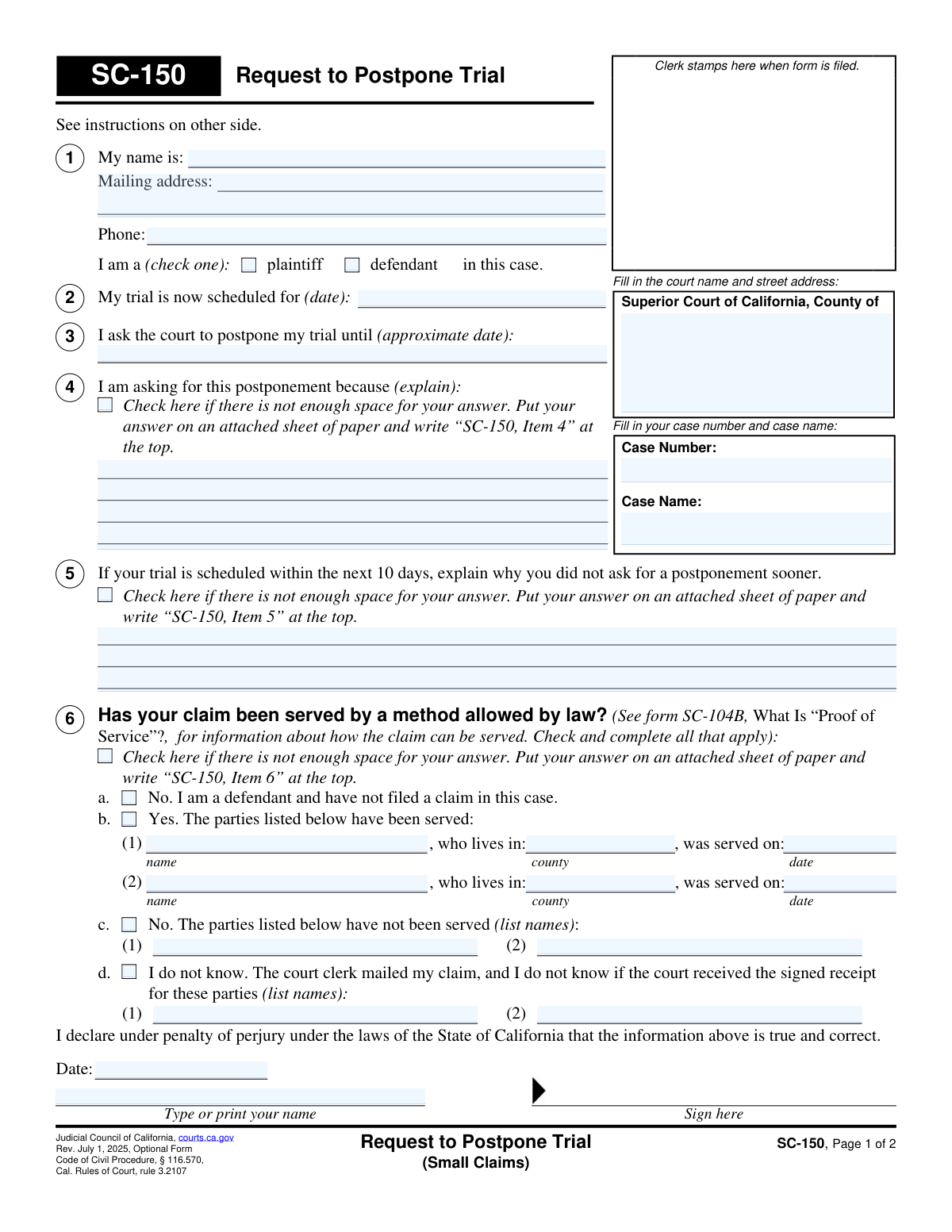
Form SC-150, Request to Postpone Trial (Small Claims), is a Judicial Council of California form used by either a plaintiff or defendant to ask the court to reschedule their trial date. The form requires the filer to provide a valid reason for the postponement and information about whether the other parties have been served. Today, this form can be filled out quickly and accurately using AI-powered services like Instafill.ai, which can also convert non-fillable PDF versions into interactive fillable forms.
SC-150 is part of the
California court forms, court claim forms and small claims forms categories on Instafill.
Our AI automatically handles information lookup, data retrieval, formatting, and form filling.
It takes less than a minute to fill out SC-150 using our AI form filling.
Securely upload your data. Information is encrypted in transit and deleted immediately after the form is filled out.
Form specifications
| Form name: | Form SC-150, Request to Postpone Trial (Small Claims) |
| Number of fields: | 36 |
| Number of pages: | 1 |
| Language: | English |
Instafill Demo: How to fill out PDF forms in seconds with AI
How to Fill Out SC-150 Online for Free in 2026
Are you looking to fill out a SC-150 form online quickly and accurately? Instafill.ai offers the #1 AI-powered PDF filling software of 2026, allowing you to complete your SC-150 form in just 37 seconds or less.
Follow these steps to fill out your SC-150 form online using Instafill.ai:
- 1 Navigate to Instafill.ai and upload or select Form SC-150, Request to Postpone Trial (Small Claims).
- 2 Provide the court name, county, case number, and case name in the designated fields.
- 3 Enter your personal information, including your name and mailing address, and indicate whether you are the plaintiff or defendant.
- 4 Specify the current trial date and the approximate new date you are requesting for the postponement.
- 5 Clearly explain the reason for your postponement request in Item 4, attaching additional pages if needed.
- 6 Complete Item 6 by providing details on whether the other parties in the case have been legally served.
- 7 Review all the information you've entered for accuracy, then date and sign the declaration under penalty of perjury before downloading the form for filing.
Our AI-powered system ensures each field is filled out correctly, reducing errors and saving you time.
Why Choose Instafill.ai for Your Fillable SC-150 Form?
Speed
Complete your SC-150 in as little as 37 seconds.
Up-to-Date
Always use the latest 2026 SC-150 form version.
Cost-effective
No need to hire expensive lawyers.
Accuracy
Our AI performs 10 compliance checks to ensure your form is error-free.
Security
Your personal information is protected with bank-level encryption.
Frequently Asked Questions About Form SC-150
Form SC-150, Request to Postpone Trial, is used to formally ask a California small claims court to reschedule your trial date for a good reason.
Both the person who filed the lawsuit (the plaintiff) and the person being sued (the defendant) can use this form to ask for a postponement.
No, using Form SC-150 is optional. You may write a letter instead, but it must include all the same information requested on the form, such as your case number, the reason for the request, and service information.
You must fill out the form, serve a copy to all other parties in the case, and then file the original form along with a completed Proof of Service with the court clerk.
You may have to pay a $10 fee, depending on whether the claim has been served. If you cannot afford the fee, you can ask the court for a fee waiver.
Yes, but in Item 5 of the form, you must provide a good reason explaining why you did not make the request sooner. Last-minute requests are harder to get approved.
In Item 4, you need to clearly and honestly explain your 'good reason' for needing to postpone the trial. This could be a medical emergency, inability to serve the other party, or another significant conflict.
The court needs to know if all parties have been legally notified of the lawsuit, as this is a critical step before a trial can proceed. Your answer helps the court understand the current status of the case.
If the court grants your request, it will mail a notice with the new trial date to all parties. If the request is denied, the court will notify you, and the trial will proceed on the original date.
If you do not hear from the court, you must assume the request was not granted and attend the trial on the currently scheduled date. Failure to appear could result in a judgment against you.
Yes — services like Instafill.ai use AI to auto-fill form fields accurately and save time, helping you complete your request more efficiently.
You can use a service like Instafill.ai to complete your form online. Simply upload the SC-150 PDF, and the tool will guide you through filling out the required fields.
Instafill.ai can convert flat non-fillable PDFs into interactive fillable forms. Just upload your non-fillable SC-150, and the platform will make it possible to type your information directly into the fields.
Compliance SC-150
Validation Checks by Instafill.ai
1
Ensures Case Number is Provided
This check verifies that the 'Case Number' field is not empty. The case number is a unique identifier essential for the court clerk to locate the correct case file and process the postponement request. Without it, the form cannot be filed, leading to rejection and potential failure to postpone the trial.
2
Validates Exclusive Requester Role Selection
This validation ensures that the user has selected exactly one option from 'plaintiff' or 'defendant' in Item 1. This information is critical for the court to understand who is making the request and to verify their standing in the case. Failure to select one and only one role will result in an incomplete form and processing delays.
3
Validates Current Trial Date Format and Plausibility
This check verifies that the date entered in Item 2, 'My trial is now scheduled for', is in a valid date format (e.g., MM/DD/YYYY) and is not a date in the past. This is crucial for establishing the context of the postponement request. An invalid or past date would make the request nonsensical and cause it to be rejected by the court clerk.
4
Ensures Requested Postponement Date is Logically After Current Trial Date
This validation compares the date in Item 3 ('postpone my trial until') with the date in Item 2 ('My trial is now scheduled for'). The requested new date must be after the current trial date. This logical check prevents nonsensical requests and ensures the form is filled out correctly, avoiding immediate rejection.
5
Verifies Completeness of Postponement Reason
This check ensures that either the explanation text box in Item 4 is filled or the 'attached sheet' checkbox is ticked. The reason for the postponement is the most critical part of the request, as the judge's decision depends on it. An empty request with no reason provided will be denied, and the trial will proceed as scheduled.
6
Conditional Validation for Urgent Postponement Request
This validation is triggered if the current trial date (Item 2) is within 10 days of the form submission date. It checks that the user has provided an explanation in Item 5 for the late request. Courts have strict rules for last-minute postponements, and failing to provide this justification will likely lead to an automatic denial of the request.
7
Ensures a Service Status Option is Selected in Item 6
This check verifies that at least one of the options (a, b, c, or d) in Item 6 regarding the service of the claim has been selected. The service status affects court procedures and potential fees, making it mandatory information. An incomplete selection in this section will halt the processing of the form until it is corrected.
8
Validates Completeness of 'Served Parties' Information
If the user checks option 6b, indicating that parties have been served, this validation ensures that the name of the party and the date of service are filled in. This information is required for the court to confirm that all relevant parties are aware of the proceedings. Missing details will render the 'Yes' answer incomplete and may require the user to refile.
9
Validates Service Date is Before Current Trial Date
This check ensures that any service date provided in Item 6b occurred before the current trial date listed in Item 2. It is logically impossible to serve a party for a trial after the trial has already been scheduled to occur. This check prevents data entry errors and ensures the timeline of events presented to the court is coherent.
10
Ensures Names are Provided for Unserved Parties in Item 6c
When a user selects option 6c, stating that some parties have not been served, this check verifies that at least one name is listed. This information is crucial because a primary reason for postponement is to allow time for proper service. Failing to list the unserved parties makes the claim in 6c unsubstantiated and the form incomplete.
11
Validates Presence and Format of Declaration Date
This check ensures the 'Date' field in the declaration section is filled with a valid, correctly formatted date. The date of signature is legally significant as it marks when the declarant attested to the truthfulness of the information under penalty of perjury. An unsigned or undated form is legally invalid and will be rejected.
12
Ensures Printed Name Matches Requester Name
This validation verifies that the 'Type or print your name' field in the declaration section is not empty and ideally matches the name provided in Item 1. The printed name clarifies the identity of the signatory, whose signature might be illegible. A mismatch could raise questions about who is actually making the declaration, potentially invalidating the form.
13
Validates Phone Number Format
This check verifies that the phone number provided in Item 1 follows a standard U.S. format (e.g., 10 digits, with optional parentheses, spaces, or hyphens). A valid phone number is essential for the court to contact the requester if there are questions or issues with the postponement request. An invalid format could lead to communication failures and delays.
14
Verifies Court and Case Name are Provided
This validation ensures that the 'Superior Court of California, County of' and 'Case Name' fields are both filled out. Along with the case number, this information is fundamental for routing the document to the correct courthouse and associating it with the right legal matter. Missing this information would make it impossible for the clerk to file the document correctly.
Common Mistakes in Completing SC-150
People often forget to fill in the full Superior Court name and address or mistype the case number. This happens due to haste or not having the original case documents handy. An incorrect identifier can lead to the form being rejected by the clerk or misfiled, causing the request to be ignored and the filer to miss their original court date. Always double-check these details against official court notices before submitting.
In Section 1, filers must check a box to indicate their role in the case. Overlooking this simple step is common but creates ambiguity for the court clerk and judge reviewing the request. This can delay the processing of the form or lead to its rejection, as the filer's standing is unclear. It's a crucial piece of context that must be provided for the request to be properly evaluated.
The explanation in Section 4 must be a 'good reason' in the eyes of the court. Vague reasons like 'I am not ready' or 'I have a conflict' without further detail are often deemed insufficient, leading to a denial of the postponement. The filer should provide specific, compelling facts, such as a pre-scheduled medical procedure or a family emergency, to justify the request and increase the likelihood of approval.
Section 5 is mandatory if the trial is scheduled within the next 10 days, but it is frequently missed by filers. The court requires a justification for the delay in requesting a postponement. Leaving this section blank when it applies will almost certainly lead to an automatic denial of the request, as it suggests a lack of diligence on the filer's part.
Section 6, which deals with the service of the claim, is the most complex part of the form and a major source of errors. Filers often misunderstand the legal definition of 'service,' are unsure if other parties have been served, or check contradictory boxes. An error here can cause the court to misjudge the case's procedural status, resulting in a denial of the postponement request.
An unsigned form is legally invalid because it lacks a declaration under penalty of perjury. Filers sometimes print their name on the signature line or forget to sign altogether, especially when rushing. An unsigned Request to Postpone Trial will be rejected by the court, meaning the original trial date remains in effect, and the filer may not realize this until it's too late.
A critical procedural error is filling out form SC-150 and filing it with the court without sending a copy to the opposing party (or parties). The instructions state that all other parties must be served with the request. Failure to do so violates the other party's due process rights to be notified, and the court will deny the postponement request on these grounds.
Even if a filer correctly serves the request on the other parties, they often forget to prove it to the court. The instructions specify using a separate form (SC-104 or SC-112A, 'Proof of Service') to inform the court that the other parties were notified. Without a filed Proof of Service, the court has no official record that the other side was informed and will not grant the postponement.
Many people mistakenly believe that simply filing the SC-150 form automatically postpones their trial. The instructions explicitly warn against this, stating you must attend the original trial date unless the court notifies you of a new one. This misunderstanding can lead to the person not showing up for trial and losing their case by default judgment.
When entering the current trial date (Section 2) or the requested new date (Section 3), people may use an incorrect format (e.g., DD-MM-YYYY instead of MM/DD/YYYY) or enter a date that is a weekend or holiday. This can cause processing delays or confusion. AI-powered form-filling tools like Instafill.ai can help prevent this by validating date formats and ensuring data is entered correctly. If the form is a non-fillable PDF, Instafill.ai can convert it into an interactive, fillable version.
Saved over 80 hours a year
“I was never sure if my IRS forms like W-9 were filled correctly. Now, I can complete the forms accurately without any external help.”
Kevin Martin Green
Your data stays secure with advanced protection from Instafill and our subprocessors

Robust compliance program
Transparent business model
You’re not the product. You always know where your data is and what it is processed for.
ISO 27001, HIPAA, and GDPR
Our subprocesses adhere to multiple compliance standards, including but not limited to ISO 27001, HIPAA, and GDPR.
Security & privacy by design
We consider security and privacy from the initial design phase of any new service or functionality. It’s not an afterthought, it’s built-in, including support for two-factor authentication (2FA) to further protect your account.
Fill out SC-150 with Instafill.ai
Worried about filling PDFs wrong? Instafill securely fills form-sc-150-request-to-postpone-trial-small-claims forms, ensuring each field is accurate.