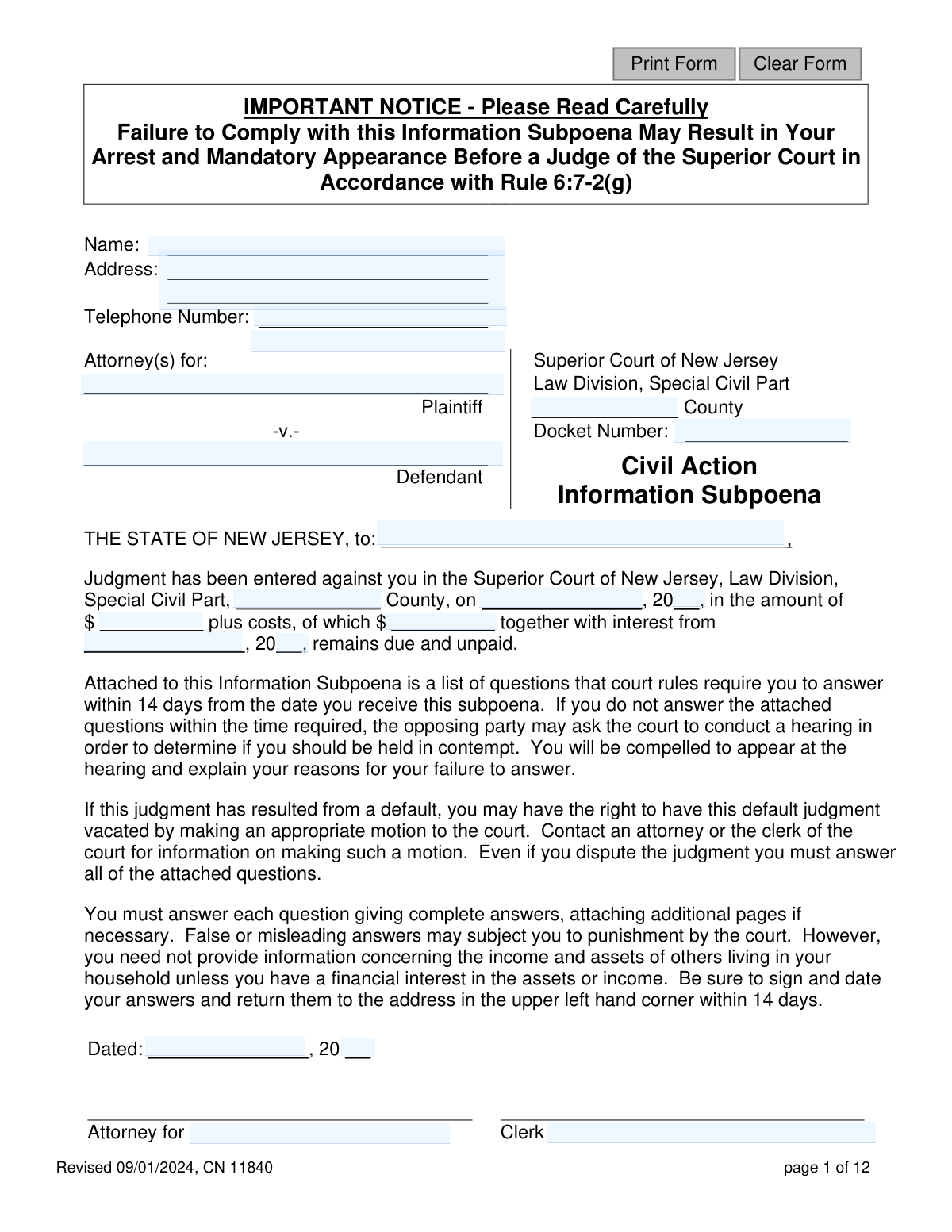
Yes! You can use AI to fill out Information Subpoena - Appendix XI-L

The Information Subpoena - Appendix XI-L is a legal form issued by the Superior Court of New Jersey, Law Division, Special Civil Part, after a judgment has been entered. It legally requires a judgment debtor (an individual or a business) to provide detailed answers about their assets, income, and property to the judgment creditor. This information is crucial for the creditor to enforce the judgment and collect the unpaid debt. Today, this form can be filled out quickly and accurately using AI-powered services like Instafill.ai, which can also convert non-fillable PDF versions into interactive fillable forms.
Appendix XI-L is part of the New Jersey forms category on Instafill.
Our AI automatically handles information lookup, data retrieval, formatting, and form filling.
It takes less than a minute to fill out Appendix XI-L using our AI form filling.
Securely upload your data. Information is encrypted in transit and deleted immediately after the form is filled out.

Form specifications

Form name: Information Subpoena - Appendix XI-L
Number of fields: 405
Number of pages: 1
Language: English
main-image

Instafill Demo: How to fill out PDF forms in seconds with AI

How to Fill Out Appendix XI-L Online for Free in 2026

Are you looking to fill out a APPENDIX XI-L form online quickly and accurately? Instafill.ai offers the #1 AI-powered PDF filling software of 2026, allowing you to complete your APPENDIX XI-L form in just 37 seconds or less.
Follow these steps to fill out your APPENDIX XI-L form online using Instafill.ai:
  1. 1 Navigate to Instafill.ai and upload or select the Information Subpoena - Appendix XI-L form.
  2. 2 Use the AI assistant to locate and fill in the case information, including the court, county, docket number, and judgment details.
  3. 3 Select whether you are filling out the form as an individual or a business entity and proceed to the corresponding section of questions.
  4. 4 Answer all required questions about your financial status, including employment, bank accounts, real estate, personal property, and other assets, letting the AI guide you through each field.
  5. 5 Carefully review all the information you have provided for accuracy and completeness, using the AI's validation checks to catch any errors.
  6. 6 Certify that your statements are true by electronically signing and dating the form in the designated signature block.
  7. 7 Download the completed subpoena and ensure it is returned to the specified attorney or court clerk within the required 14-day period.

Our AI-powered system ensures each field is filled out correctly, reducing errors and saving you time.

Why Choose Instafill.ai for Your Fillable Appendix XI-L Form?

Speed

Complete your Appendix XI-L in as little as 37 seconds.

Up-to-Date

Always use the latest 2026 Appendix XI-L form version.

Cost-effective

No need to hire expensive lawyers.

Accuracy

Our AI performs 10 compliance checks to ensure your form is error-free.

Security

Your personal information is protected with bank-level encryption.

Frequently Asked Questions About Form Appendix XI-L

This is a legal document from the Superior Court of New Jersey sent because a court judgment was entered against you. You are required to provide information about your finances and assets so the judgment creditor (the person you owe money to) can collect the debt.

Failure to respond within 14 days can lead to serious consequences, including being held in contempt of court. The court may even issue a warrant for your arrest to compel your appearance before a judge.

You must answer all questions completely and return the signed form within 14 days from the date you received it.

Yes, the form states that even if you dispute the judgment, you are legally required to answer all questions. You should contact an attorney or the court clerk for information on how to challenge the judgment itself.

If the judgment is against you personally, complete the 'Questions for Individuals' section. If the judgment is against your company, complete the 'Questions for Business Entity' section.

Yes, for Question 11, you must attach copies of the three most recent bank statements for any account that contains exempt funds like Social Security, SSI, or VA benefits.

No, you do not need to provide information about others living in your household unless you have a financial interest in their assets or income.

Exempt income includes sources like Social Security, VA benefits, and child support, which generally cannot be taken to pay a judgment. You must disclose this income, but it is protected from seizure.

You must sign, date, and return the completed subpoena to the attorney or party whose name and address are listed in the upper left-hand corner of the first page.

If the total present value of your personal property (like furniture, electronics, cars, and cash) exceeds $1,000, you must itemize the property as requested. You need to list the item, purchase date, price, any amount still owed, and its current value.

By signing the form, you are legally declaring under penalty of punishment that all the information you have provided is true and complete. Providing false or misleading answers can subject you to punishment by the court.

Yes, services like Instafill.ai use AI to accurately auto-fill form fields from your saved information, which can save you time and help ensure accuracy.

You can use a service like Instafill.ai to upload the PDF and fill it out electronically. Instafill.ai allows you to type your answers directly into the fields, add your signature, and then download the completed document for printing and mailing.

Services like Instafill.ai can convert non-fillable PDFs into interactive forms. Simply upload the document, and the tool will automatically detect the fields, allowing you to type your answers easily.

Compliance Appendix XI-L
Validation Checks by Instafill.ai

1
Social Security Number Format Validation
This check ensures that the Social Security Number entered in question 4 (field 'plaSsn') follows the standard 9-digit format, typically XXX-XX-XXXX. This is crucial for correct identification of the individual. If the format is incorrect, the system should reject the entry and prompt the user to enter a valid SSN, as this is a key personal identifier for legal and financial matters.
2
Conditional Employment Information Requirement
This validation checks the logic in question 7. If a value greater than zero is entered for 'Weekly Salary Gross' ('salaryWkGross'), the 'Full name and address of your employer' field ('employNameAddr') must be completed. Conversely, if no salary is entered, the 'name and address of last employer' field ('employLastNameAddr') may be required. This ensures that employment status is clearly and completely documented.
3
Net Salary vs. Gross Salary Consistency
This check verifies that the 'Net' weekly salary ('salaryWkNet') entered in question 7a is less than or equal to the 'Gross' weekly salary ('salaryWkGross'). It is logically impossible for take-home pay to be more than total earnings. A failure would indicate a data entry error, and the form should prompt the user to review and correct the salary figures before submission.
4
Conditional Income Source Details
For question 10, if any income source checkbox (e.g., 'alimony', 'pension') is checked, this validation ensures the corresponding 'Amount & Frequency', 'Name of Source', and 'Address' fields are all filled out. This prevents incomplete submissions where an income source is declared but not detailed. An error would require the user to either complete the details or uncheck the box.
5
Conditional Exempt Benefits Amount
In question 11, if the user answers 'Yes' to receiving any type of exempt benefit (e.g., Social Security, V.A. benefits), this check ensures that the corresponding 'Amount per month' field is filled with a valid numerical value. This is critical for determining which funds are legally protected from levy. Failure to provide an amount would make the 'Yes' answer incomplete and require correction.
6
Conditional Residence Ownership Details
This validation is tied to question 12. If the user selects 'Yes' to owning their residence, all sub-fields (12a through 12e), including owner name, purchase date, price, mortgage holder, and balance, must be completed. This ensures that a declared asset is fully described as required by the subpoena. A failed validation would prevent submission until all required property details are provided.
7
Conditional Other Real Estate Details
Similar to the residence check, if the user answers 'Yes' to question 13 ('Do you own any other real estate?'), the system must verify that details for at least one property (fields 13a through 13g) are entered. This prevents a user from affirming ownership without providing the necessary specifics for the court. The form should prompt the user to add property details or change the answer to 'No'.
8
Conditional Personal Property Itemization
For question 14, if the user answers 'Yes' (indicating personal property exceeds $1,000), this check ensures that either the 'Cash on Hand' field or at least one row in the itemized property table is filled out. This enforces the rule that a 'Yes' answer must be substantiated with details. An error would require the user to itemize their property or correct their answer.
9
Conditional Motor Vehicle Details
This validation applies to question 15. If the user answers 'Yes' to owning a motor vehicle, the system must confirm that the essential details, including 'Make, model and year' (15a), 'License plate Number' (15c), and 'Vehicle Identification Number' (15d), are all provided. This information is vital for identifying and placing liens on assets. Incomplete entries would trigger an error.
10
Judgment Amount Consistency
This check validates the monetary values on the first page. It ensures the 'unpaid' judgment amount ('jdgmntAmtUnpaid') is a valid currency format and is less than or equal to the total 'judgment amount' ('jdgmntAmt'). This prevents logical errors where the remaining debt is listed as more than the original judgment. An inconsistency would require review and correction by the filer.
11
Signature Date Chronology
This validation ensures the signature date ('sigDtInd' or 'sigDtBus') is a valid date and occurs on or after the 'subpoena date' ('subpoenaDtMnthDay', 'subpoenaDtYr'). A person cannot legally certify answers to a subpoena before it has been issued. This check maintains the legal integrity and timeline of the document submission process.
12
Bank Account Row Completeness
For question 9, this check ensures that for any bank account listed, the entire row of information is complete. If a 'Bank Name' ('bk1Name') is entered, the corresponding 'Address' ('bk1Addr') and 'Account Number' ('bk1AcctNum') must also be filled. This prevents partial, unusable information from being submitted and ensures each declared account is fully identifiable.
13
Date of Birth Is in the Past
This check validates that the 'Birth Date' in question 3 ('plaBirthDt') is a valid date and precedes the current date. This simple but essential check prevents impossible data, such as a future or invalid birth date, from being entered. A failed validation would require the user to input a correct and logical date of birth.
14
Docket Number Presence and Format
This validation ensures the 'Docket Number' field ('caseDocket') is not empty, as it is the primary identifier for the court case. An additional check could validate that the number follows the expected format for the specified court and county. Missing or malformed docket numbers would prevent the form from being correctly filed and associated with the proper legal action.

Common Mistakes in Completing Appendix XI-L

Failing to Respond Within the Deadline

The most critical mistake is ignoring the subpoena or failing to respond within the 14-day timeframe. Individuals may feel overwhelmed or believe they can't comply, but non-compliance has severe consequences, including potential arrest and a mandatory court appearance as stated on the first page. This is a legal order, not an optional request. To avoid this, mark the date you received the subpoena on a calendar and set a reminder to ensure you mail the completed, signed form well before the 14-day deadline expires.

Completing the Incorrect Form Section

The form has separate, detailed sections for 'Individuals' (pages 2-5) and 'Business Entities' (pages 6-12). An individual who owns a small business or LLC might only fill out the personal section and completely miss Question 16 or the entire business section, leading to an incomplete disclosure. This guarantees the submission will be rejected and treated as non-compliant. To avoid this, carefully determine which sections apply to you. If you are subpoenaed as an individual but have a business interest, you must answer Question 16 and may need to complete the business section as well.

Omitting Bank Accounts

Question 9 asks for 'all bank accounts on which your name appears,' but people often forget to list joint accounts with a spouse, dormant accounts with a small balance, or online-only savings accounts. Omitting accounts, even unintentionally, can be interpreted as hiding assets, which can lead to severe legal penalties. To avoid this, gather statements for every single account your name is on, including checking, savings, investment, and joint accounts, before you begin filling out the form.

Incorrectly Reporting Salary Information

Question 7(a) specifically asks for both 'Gross' (pre-tax) and 'Net' (take-home) weekly salary. Many people confuse the two, provide only one figure, or guess at the amounts. This inaccuracy can lead to a flawed assessment of your financial situation and potential wage garnishment calculations. To avoid this error, refer to your most recent pay stub to find the exact gross and net pay figures and enter them correctly in the designated fields.

Improperly Disclosing Exempt Funds

Question 11 lists funds that are exempt from levy, such as Social Security, VA, and unemployment benefits. A common mistake is failing to disclose this income, thinking it doesn't count, or neglecting the instruction to 'Attach copies of the three most recent bank statements' for accounts containing these funds. This is a critical error, as failing to properly identify and document exempt funds could result in them being frozen or seized by the creditor. Always check 'Yes' for any exempt funds you receive, list the monthly amount, and attach the required bank statements to protect them.

Under-reporting or Incorrectly Valuing Personal Property

Question 14 requires itemizing all personal property if the total value exceeds a very low $1,000 threshold. People often struggle to assess the 'Present Value' and may use the original purchase price, guess a low number, or fail to list items altogether. This can be considered a willfully false statement, which is punishable by the court. To avoid this, make a good-faith estimate of the current resale value (what a person would pay for it today) for major items like electronics, jewelry, and furniture, and list them accurately.

Failing to Disclose Liens on Assets

When listing real estate (Question 12) or vehicles (Question 15), debtors often state they own the asset but forget to include the critical information about the mortgage or auto loan. This includes the name and address of the lienholder and the remaining balance due. Omitting this debt presents a misleading picture of your net equity in the asset. To avoid this, gather your most recent mortgage and car loan statements to ensure you can accurately report who holds the lien and the exact amount you still owe.

Failing to List All Other Judgments

Question 17 requires disclosing all other judgments entered against you. Individuals may omit these out of embarrassment, forgetfulness, or a mistaken belief that they are not relevant. However, creditors can easily find this information through public record searches. An omission, especially a deliberate one, destroys your credibility and can be treated as a false statement subject to punishment. To avoid this, be thorough and honest, listing any other judgments you are aware of.

Submitting an Unsigned or Undated Form

A simple but devastating mistake is failing to sign and date the certification on page 5 (for individuals) or page 12 (for businesses). The signature legally certifies that your answers are true under penalty of punishment. An unsigned form is invalid and will be treated as a failure to respond, which can trigger the contempt proceedings outlined on the form's first page. Always do a final check to ensure you have physically signed and dated the document before returning it.

Providing Vague or Incomplete Answers

Throughout the form, fields require specific details like names, addresses, account numbers, and frequencies. People often provide vague answers like 'various sources' for income or 'household goods' for assets, and fail to use additional pages when necessary. These incomplete answers will be rejected and will require you to provide more information, delaying the process and potentially leading to a court hearing. To avoid this, be as specific as possible for every question. AI-powered tools like Instafill.ai can help by structuring data correctly and ensuring all required fields in a fillable form are completed, and can even convert flat PDFs like this one into an interactive, fillable version to prevent missed fields.
Saved over 80 hours a year

“I was never sure if my IRS forms like W-9 were filled correctly. Now, I can complete the forms accurately without any external help.”

Kevin Martin Green

Your data stays secure with advanced protection from Instafill and our subprocessors

Robust compliance program

Transparent business model

You’re not the product. You always know where your data is and what it is processed for.

ISO 27001, HIPAA, and GDPR

Our subprocesses adhere to multiple compliance standards, including but not limited to ISO 27001, HIPAA, and GDPR.

Security & privacy by design

We consider security and privacy from the initial design phase of any new service or functionality. It’s not an afterthought, it’s built-in, including support for two-factor authentication (2FA) to further protect your account.

Fill out Appendix XI-L with Instafill.ai

Worried about filling PDFs wrong? Instafill securely fills information-subpoena-appendix-xi-l forms, ensuring each field is accurate.