Yes! You can use AI to fill out Medicare Secondary Payer Employer Acknowledgement Form
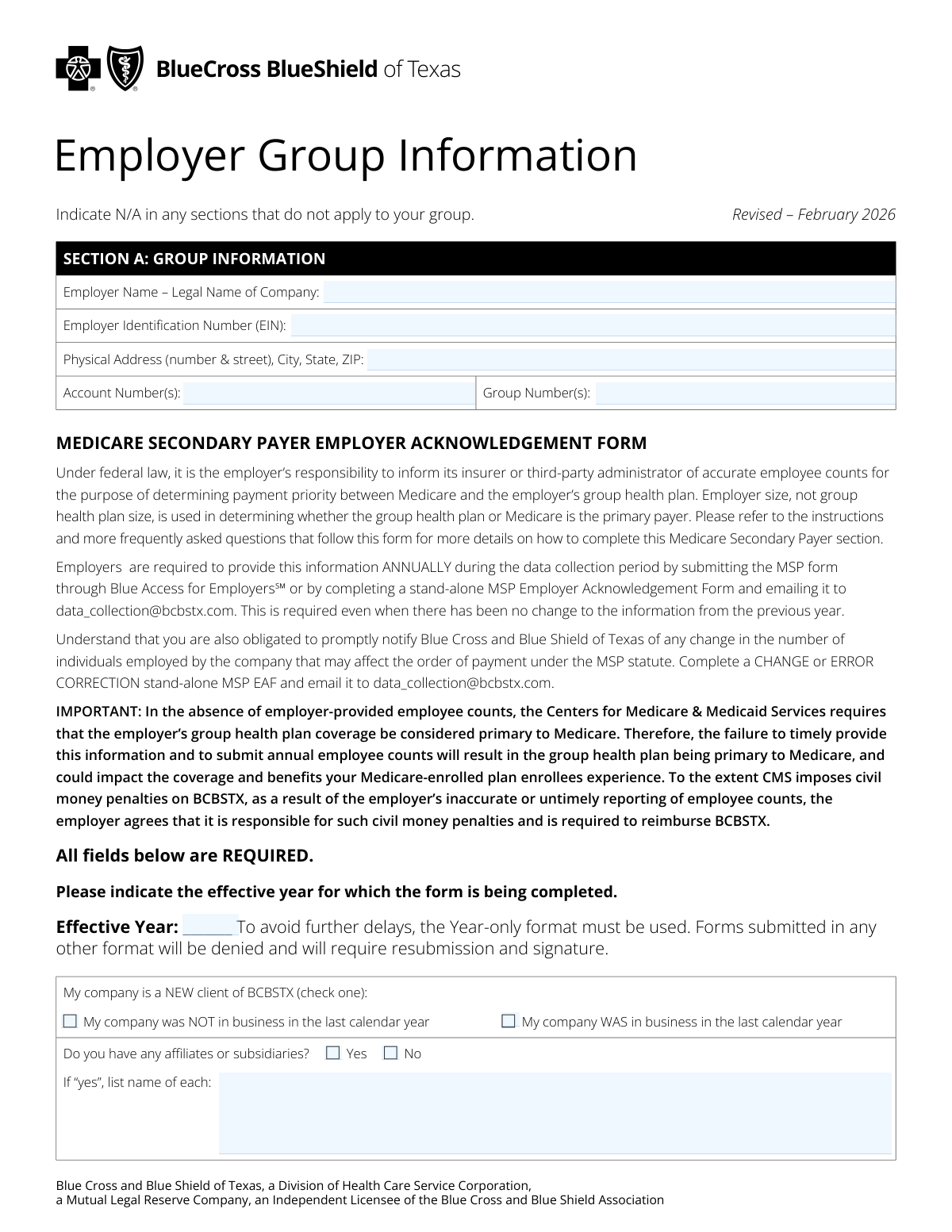
This form is a mandatory annual document for employers with Blue Cross and Blue Shield of Texas (BCBSTX) group health plans. Employers use it to provide detailed employee counts, which are legally required to determine whether their group health plan or Medicare is the primary payer for eligible employees. Accurate and timely submission is crucial to avoid penalties and ensure proper claims processing. Today, this form can be filled out quickly and accurately using AI-powered services like Instafill.ai, which can also convert non-fillable PDF versions into interactive fillable forms.
Our AI automatically handles information lookup, data retrieval, formatting, and form filling.
It takes less than a minute to fill out BCBSTX MSP Employer Acknowledgement Form using our AI form filling.
Securely upload your data. Information is encrypted in transit and deleted immediately after the form is filled out.
Form specifications
| Form name: | Medicare Secondary Payer Employer Acknowledgement Form |
| Number of pages: | 5 |
| Language: | English |
| Categories: | CAR forms, employer forms, L.A. Care forms, SEC forms, Medicare forms |
Instafill Demo: How to fill out PDF forms in seconds with AI
How to Fill Out BCBSTX MSP Employer Acknowledgement Form Online for Free in 2026
Are you looking to fill out a BCBSTX MSP EMPLOYER ACKNOWLEDGEMENT FORM form online quickly and accurately? Instafill.ai offers the #1 AI-powered PDF filling software of 2026, allowing you to complete your BCBSTX MSP EMPLOYER ACKNOWLEDGEMENT FORM form in just 37 seconds or less.
Follow these steps to fill out your BCBSTX MSP EMPLOYER ACKNOWLEDGEMENT FORM form online using Instafill.ai:
- 1 Navigate to Instafill.ai and upload or select the BCBSTX Medicare Secondary Payer Employer Acknowledgement Form.
- 2 Use the AI assistant to automatically fill in your group information in Section A, including the legal company name, EIN, and group numbers.
- 3 Carefully answer the questions in Section B regarding employee counts for the current and prior years to determine Medicare Secondary Payer (MSP) status.
- 4 Complete Section C by providing information on COBRA and continuation of coverage, including details of any employees currently receiving these benefits.
- 5 Fill out Section D to report the average employee count for Medical Loss Ratio (MLR) purposes and provide the Church Plan Written Assurance if applicable.
- 6 Review all entered information for accuracy, then proceed to Section E to provide your electronic signature, name, title, and the date to attest to the form's contents.
- 7 Download the completed, signed form and submit it to BCBSTX as instructed, typically by emailing it to [email protected].
Our AI-powered system ensures each field is filled out correctly, reducing errors and saving you time.
Why Choose Instafill.ai for Your Fillable BCBSTX MSP Employer Acknowledgement Form Form?
Speed
Complete your BCBSTX MSP Employer Acknowledgement Form in as little as 37 seconds.
Up-to-Date
Always use the latest 2026 BCBSTX MSP Employer Acknowledgement Form form version.
Cost-effective
No need to hire expensive lawyers.
Accuracy
Our AI performs 10 compliance checks to ensure your form is error-free.
Security
Your personal information is protected with bank-level encryption.
Frequently Asked Questions About Form BCBSTX MSP Employer Acknowledgement Form
This form is used by employers to report their employee counts to Blue Cross and Blue Shield of Texas (BCBSTX). This information helps determine whether Medicare or the employer's group health plan is the primary payer for claims. All employers with a BCBSTX group health plan are required to submit this form annually.
You are required to submit this form annually during the data collection period. You must submit it even if there have been no changes to your employee information from the previous year.
If you do not provide your employee counts, your group health plan will automatically be considered primary to Medicare. This could impact your employees' coverage, and your company may be responsible for civil money penalties imposed on BCBSTX due to untimely reporting.
You should count all full-time, part-time, and seasonal employees, as well as partners. Do not include retirees, self-employed individuals, or those on COBRA in your count for the MSP sections.
You must promptly notify BCBSTX of any change that affects your MSP status. Complete a new stand-alone MSP Employer Acknowledgement Form as a 'CHANGE' and email it to [email protected], indicating the date the threshold was met.
You can submit the form annually through the Blue Access for Employers℠ portal. Alternatively, you can complete the stand-alone form and email the signed copy to [email protected].
This section helps BCBSTX classify your group for ACA reporting and determine market segment, products, and rates. The average employee count you provide is used to calculate the MLR and determine if any premium rebates are due.
The '20 or more employees' rule (Working Aged Rule) applies to employees aged 65 or older to determine if the group plan is primary over Medicare. The '100 or more employees' rule (Disability Rule) applies to employees entitled to Medicare due to a disability.
If your company is a new client and there have not yet been 20 weeks in the current calendar year, base your MSP answers on your current employee count. For the MLR section, provide the average number of employees you reasonably expect to employ during the current year.
Yes, for MSP purposes, you must use IRS aggregation rules and count all employees of all corporations in a controlled group or under common control. This includes parent companies, subsidiaries, and affiliated entities worldwide.
Yes, services like Instafill.ai use AI to accurately auto-fill form fields, which can save you time and help reduce errors. This is especially useful for repetitive information like your company name, address, and EIN.
You can use a service like Instafill.ai to upload the form and fill it out interactively online. The platform allows you to type directly into the fields, add your signature, and then download the completed document for submission.
If you have a non-fillable or 'flat' PDF, you can use a tool like Instafill.ai to convert it into an interactive, fillable form. This allows you to easily type your information into the correct fields before printing or saving.
Compliance BCBSTX MSP Employer Acknowledgement Form
Validation Checks by Instafill.ai
Common Mistakes in Completing BCBSTX MSP Employer Acknowledgement Form
The form explicitly requires the 'Effective Year' to be entered in a 'Year-only' (YYYY) format. People often mistakenly enter a date range (e.g., '2024-2025') or a full date (MM/DD/YYYY). Submitting the form with an incorrect format will lead to an automatic denial and require the user to resubmit the entire form, causing significant processing delays.
For the Medicare Secondary Payer (MSP) section, employers often miscalculate their employee count by only including full-time staff, similar to an FTE calculation. The form requires counting all full-time, part-time, seasonal employees, and partners, but excluding retirees and COBRA beneficiaries. This error leads to incorrect answers for the 20+ and 100+ employee thresholds, which can result in incorrect primary payer determination and potential financial penalties from CMS.
The form asks for employee counts based on both the 'current' and 'prior' calendar years in different questions, which is a frequent source of confusion. An employer might accidentally provide prior year data for a current year question, or vice-versa. This mistake directly impacts the MSP determination, as payer status can depend on employee counts in either year, leading to claim processing errors and compliance issues.
Users often check a 'Yes' box but neglect to fill in the required follow-up information. For example, in Question 4, if an employer checks 'Yes' for meeting the 20+ employee threshold in the current year, they must also provide the specific date the threshold was met. Omitting this conditional data renders the submission incomplete and can delay the determination of Medicare's payer status.
A subtle but common error is using the same employee count for both the Medicare Secondary Payer (MSP) section and the Medical Loss Ratio (MLR) section. The definitions are different; for instance, the MLR calculation (Section D) explicitly excludes partners in a partnership, whereas the MSP calculation includes them. Using the wrong count for the MLR section can lead to incorrect market segment classification and affect potential premium rebates.
The thresholds for MSP status involve complex calculations that are easy to get wrong, such as having '20 or more total employees for each working day in each of 20 or more calendar weeks'. Employers may simply check if they ever had 20 employees, rather than performing the detailed week-by-week analysis. An incorrect calculation leads to a flawed attestation of the company's size, which could result in the group health plan being incorrectly assigned as primary over Medicare, impacting enrollee benefits.
In Section A, employers sometimes enter their common trade name or 'Doing Business As' (DBA) name instead of the full legal company name. The form requires the legal name as registered with tax authorities to ensure proper identification. This discrepancy can cause mismatches with EIN records and other official documentation, delaying verification and processing of the form.
When an employer checks 'Yes' to having affiliates or subsidiaries, they often forget to list the names of each entity in the space provided. For MSP purposes, all employees of affiliated companies under common control must be aggregated to determine the total employer size. Failing to list these entities results in an inaccurate employee count and can lead to incorrect payer determination and potential CMS penalties.
A simple but critical mistake is failing to complete the Signature/Attestation section. An unsigned or undated form is legally invalid and will be rejected immediately. This requires the employer to complete and resubmit the entire form, delaying the annual data collection process and potentially causing the plan to default to primary payer status until a valid form is received.
In Section C, if an employer indicates that individuals are currently receiving COBRA benefits, they must fill out a detailed table for each person. It is common for this table to be left blank or filled out with missing information, such as the qualifying event date or coverage type. This incomplete data prevents the insurer from properly managing continuation coverage, which can lead to compliance issues and coverage problems for the beneficiaries.
Saved over 80 hours a year
“I was never sure if my IRS forms like W-9 were filled correctly. Now, I can complete the forms accurately without any external help.”
Kevin Martin Green
Your data stays secure with advanced protection from Instafill and our subprocessors

Robust compliance program
Transparent business model
You’re not the product. You always know where your data is and what it is processed for.
ISO 27001, HIPAA, and GDPR
Our subprocesses adhere to multiple compliance standards, including but not limited to ISO 27001, HIPAA, and GDPR.
Security & privacy by design
We consider security and privacy from the initial design phase of any new service or functionality. It’s not an afterthought, it’s built-in, including support for two-factor authentication (2FA) to further protect your account.
Fill out BCBSTX MSP Employer Acknowledgement Form with Instafill.ai
Worried about filling PDFs wrong? Instafill securely fills medicare-secondary-payer-employer-acknowledgement-form forms, ensuring each field is accurate.