Yes! You can use AI to fill out Mortgage Renewal Agreement

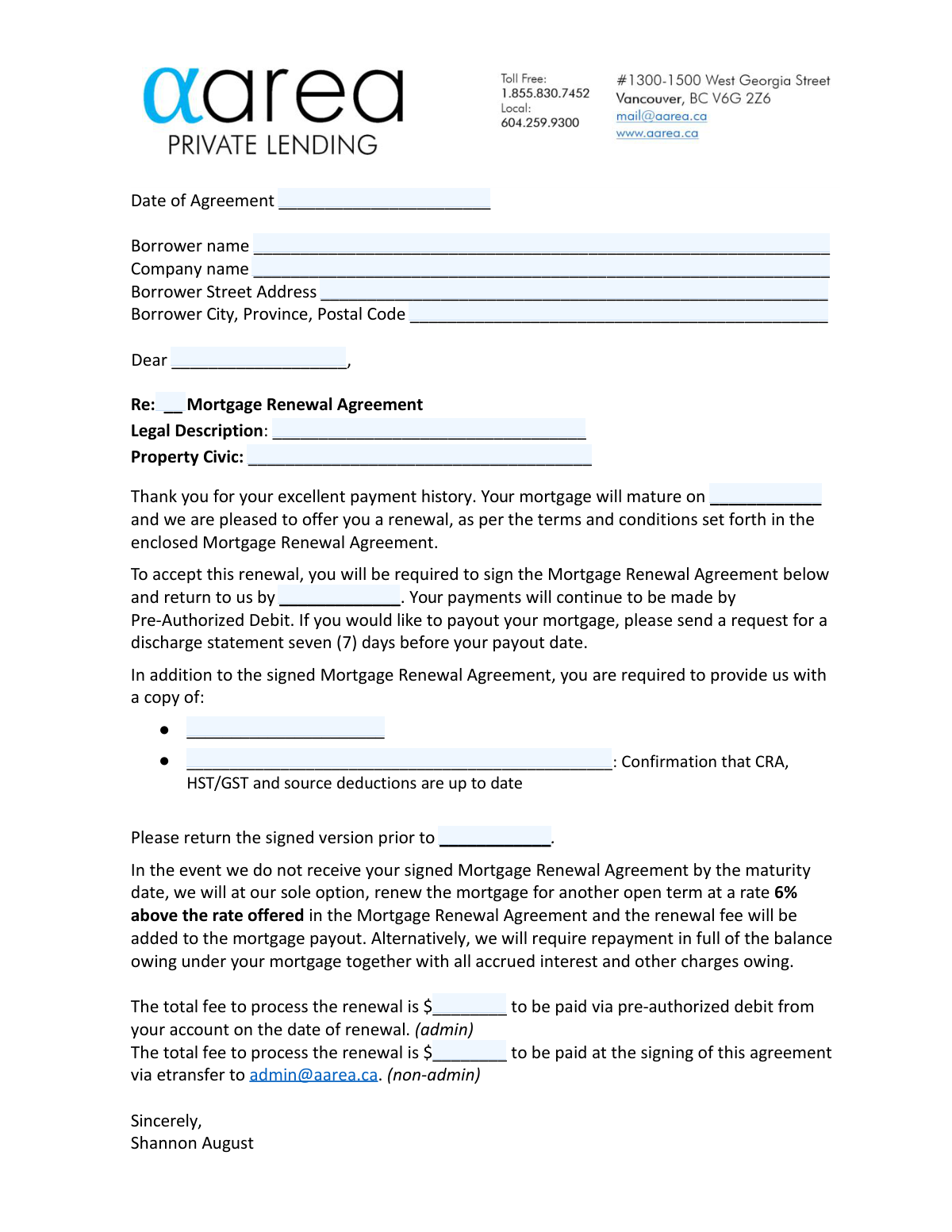
A Mortgage Renewal Agreement is a contract between a borrower and a lender, such as AAREA Private Lending Inc., that outlines the terms for extending a mortgage loan beyond its original maturity date. It specifies the new principal amount, interest rate, payment schedule, and length of the new term, ensuring the loan remains in good standing. Today, this form can be filled out quickly and accurately using AI-powered services like Instafill.ai, which can also convert non-fillable PDF versions into interactive fillable forms.
Mortgage Renewal Agreement is part of the mortgage forms category on Instafill.
Our AI automatically handles information lookup, data retrieval, formatting, and form filling.
It takes less than a minute to fill out Mortgage Renewal Agreement using our AI form filling.
Securely upload your data. Information is encrypted in transit and deleted immediately after the form is filled out.

Form specifications

Form name: Mortgage Renewal Agreement
Number of fields: 34
Number of pages: 2
Language: English
main-image

Instafill Demo: How to fill out PDF forms in seconds with AI

How to Fill Out Mortgage Renewal Agreement Online for Free in 2026

Are you looking to fill out a MORTGAGE RENEWAL AGREEMENT form online quickly and accurately? Instafill.ai offers the #1 AI-powered PDF filling software of 2026, allowing you to complete your MORTGAGE RENEWAL AGREEMENT form in just 37 seconds or less.
Follow these steps to fill out your MORTGAGE RENEWAL AGREEMENT form online using Instafill.ai:
  1. 1 Navigate to Instafill.ai and upload your Mortgage Renewal Agreement PDF or select it from the template library.
  2. 2 Use the AI assistant to automatically populate your personal details, such as borrower name, company name, and address, into the correct fields.
  3. 3 Verify the pre-filled property information, including the legal description and civic address, ensuring it matches your official documents.
  4. 4 Enter the specific terms of the renewal, such as the new principal amount, interest rate, payment dates, and maturity date as provided by the lender.
  5. 5 Input details for any required supporting documents, like the CRA confirmation, and specify the renewal fee amount.
  6. 6 Carefully review the entire agreement for accuracy, then apply your digital signature and the date in the designated borrower acceptance section.
  7. 7 Download the completed and signed Mortgage Renewal Agreement to return to the lender before the specified deadline.

Our AI-powered system ensures each field is filled out correctly, reducing errors and saving you time.

Why Choose Instafill.ai for Your Fillable Mortgage Renewal Agreement Form?

Speed

Complete your Mortgage Renewal Agreement in as little as 37 seconds.

Up-to-Date

Always use the latest 2026 Mortgage Renewal Agreement form version.

Cost-effective

No need to hire expensive lawyers.

Accuracy

Our AI performs 10 compliance checks to ensure your form is error-free.

Security

Your personal information is protected with bank-level encryption.

Frequently Asked Questions About Form Mortgage Renewal Agreement

This form is an offer from your lender, AAREA Private Lending Inc., to renew your mortgage for a new term. By signing, you agree to the new terms, including the principal amount, interest rate, and payment schedule, as your current mortgage term is expiring.

All borrowers, covenantors, and guarantors listed on the original mortgage must sign this agreement to accept the renewal offer. The signed document must be returned to the lender by the specified deadline to avoid penalties.

You must provide the signed agreement, a document confirming your CRA, HST/GST, and source deductions are up to date, and any other document specified in the checklist section of your letter.

If you don't return the signed agreement by the maturity date, the lender may renew your mortgage for an open term at a rate 6% higher than offered, or they may demand full repayment of the entire outstanding balance.

If you wish to pay out your mortgage in full, you must send a request for a discharge statement to the lender. This request needs to be sent at least seven days before your intended payout date.

The form indicates two possible methods: the fee may be taken via pre-authorized debit from your account on the renewal date, or you may be required to pay it via e-transfer at the time of signing. Check your specific agreement to see which method applies to you.

The legal description of your property can be found on your original mortgage documents or the property's title deed. You must copy this information exactly as it appears on those official documents.

This is an official document from the Canada Revenue Agency (CRA), like a Clearance Certificate or Statement of Account, that proves your business tax accounts are in good standing. This is typically required for mortgages held by a company.

While not mandatory, it is strongly recommended to ensure you fully understand the terms you are agreeing to. By signing, you acknowledge that you were given the opportunity to consult a lawyer and that the lender does not represent your interests.

The form provides signature lines for multiple borrowers. Each person listed as a borrower on the mortgage must print their name, sign, and enter the date in the designated spaces.

Yes, services like Instafill.ai use AI to accurately auto-fill form fields, which can save time and help prevent errors. It can populate fields like your name, address, and property details based on your existing information.

You can upload the PDF of your Mortgage Renewal Agreement to the Instafill.ai platform. The service will make the document interactive, allowing you to easily type in your information and use AI-powered suggestions to complete fields quickly.

You can use a service like Instafill.ai to make the document fillable. Simply upload the flat, non-fillable PDF, and the platform will convert it into an interactive form that you can type into directly.

The 'Maturity Date' is the day your current mortgage term officially ends. The 'Date of Renewal' is the day your new mortgage term, with its new rate and conditions, officially begins.

Compliance Mortgage Renewal Agreement
Validation Checks by Instafill.ai

1
New Maturity Date Chronology
This check ensures the 'New Maturity Date' occurs after the 'Date of Renewal'. A mortgage term cannot end before it has begun. This validation prevents logical impossibilities in the agreement's core terms, which could render the contract invalid. If this check fails, the user must correct one or both dates to reflect a valid term period.
2
Renewal Term Length Consistency
This validation cross-references the 'Date of Renewal', the 'Length of Renewal Term', and the 'New Maturity Date'. It calculates the expected maturity date based on the renewal date and term length (e.g., '2025-06-15' + '5 years' = '2030-06-15') and flags any significant discrepancy. This is crucial for ensuring the specified term length matches the dates on the contract. A failure would require the user to align the term length and the dates.
3
Borrower Name Consistency
This check verifies that the names entered in 'Borrower Name', 'Cover Letter Salutation', and 'Borrower Greeting Name' are consistent. Using the same name(s) across the entire document is critical for legal clarity and professionalism, ensuring the correct party is identified throughout. If the names do not match, the system will prompt the user to correct the fields to ensure uniformity.
4
Mutually Exclusive Renewal Fee Fields
This validation ensures that only one of the two renewal fee fields, 'Renewal Fee (Pre-Authorized Debit)' or 'Non-admin Renewal Processing Fee Amount', is populated. These fields represent different payment methods and are mutually exclusive. Having both filled would create ambiguity in billing. If both fields contain a value, the user will be required to clear one to proceed.
5
Canadian Postal Code Format
This check validates that the postal code within the 'Borrower City, Province & Postal Code' field follows the standard Canadian 'A1A 1A1' format. Correct postal code formatting is essential for mail delivery and data integrity for location-based services or reporting. A validation failure would require the user to re-enter the postal code in the correct format.
6
Conditional Second Borrower Fields
This validation ensures that the 'Second Borrower Signature Date' field is only filled if the 'Second Borrower’s Printed Name' field is also populated. A signature date is only valid if it is associated with a named signatory. This prevents orphaned data and incomplete signature blocks. If the date is present without a name, the user must either add the name or clear the date.
7
Return Deadline Before Maturity Date
This check verifies that the 'Mortgage Renewal Agreement Return Deadline' is on or before the 'Mortgage Maturity Date'. The borrower must accept the renewal offer before the existing mortgage term expires to avoid default conditions. If the deadline is set after the maturity date, it creates a contractual gap and the user will be prompted to set a valid deadline.
8
Signature Date After Agreement Date
This validation ensures that the 'First Borrower Signature Date' and 'Second Borrower Signature Date' are on or after the 'Date of Agreement'. A borrower cannot legally sign and agree to the terms of a contract before the contract itself is dated and officially exists. A failure would require the user to correct the signature date to be on or after the agreement date.
9
Interest Rate Format
This check validates that the 'Interest Rate' and 'Renewal Interest Rate' fields are entered as a numeric value followed by a percentage sign (e.g., '5.75%'). This specific format is required for correct parsing and calculation within the system and for clear, unambiguous presentation on the final document. If the format is incorrect, the user will be prompted to fix it before proceeding.
10
Lien Priority Ordinal Format
This validation ensures the 'Mortgage Lien Priority' field is entered as an ordinal number (e.g., 1st, 2nd, 3rd). The priority of a mortgage is a critical legal detail that determines the order of payout in case of foreclosure. An incorrect format could lead to legal disputes. The system will reject non-ordinal entries like '1' or 'one' and require correction.
11
Property Address Consistency
This check verifies that the 'Mortgaged Property Civic Address' (street address only) is correctly contained within the full 'Property Address (Mortgage Renewal Terms)' field. This ensures that the specific property being renewed is consistently and accurately identified in both the property details and mortgage terms sections. A mismatch could indicate a data entry error and will require user review and correction.
12
Renewal Date vs. Maturity Date Logic
This check validates that the 'Date of Renewal' is on or immediately after the 'Mortgage Maturity Date'. The new term should begin seamlessly as the old one ends to prevent any lapse in the mortgage agreement. Setting a renewal date before the old term matures is illogical. If the check fails, the user must adjust the renewal date to align correctly with the maturity date.
13
Principal Amount Format
This validation ensures the 'Principal Mortgage Amount' field contains only a numeric value with two decimal places, without any currency symbols or commas. This strict format is essential for accurate financial calculations and to prevent data processing errors. If the entry contains '$', ',', or an incorrect number of decimal places, the submission will be rejected until the format is corrected.
14
Corporate vs. Individual Borrower Logic
This check enforces the rule that the 'Borrower Legal Company Name' field must be left blank if the borrower is an individual. This prevents incorrect data entry and ensures a clear distinction between individual and corporate borrowers. If text is entered in the company name field for a borrower type identified as an individual, the system will flag it as an error and require the field to be cleared.

Common Mistakes in Completing Mortgage Renewal Agreement

Inconsistent or Incorrect Date Formatting

The form requires multiple dates with different formats, such as YYYY-MM-DD for the agreement date and Month Day, Year for the return deadline. Borrowers often use a single format for all fields or enter dates that are logically inconsistent (e.g., a signature date before the agreement date). These errors can lead to document rejection and significant processing delays. To avoid this, carefully check the specific format required for each date field and ensure the timeline is logical.

Using an Incorrect or Incomplete Borrower Name

Borrowers frequently enter a common name, nickname, or an incomplete version of their legal name instead of the full legal name that appears on the original mortgage documents. This creates a legal discrepancy and can fail identity verification, halting the renewal process until a corrected form is submitted. Always use your full legal name, including any middle names or initials, exactly as it appears on your title and previous mortgage agreements.

Improperly Formatting Monetary Values

Fields like 'Principal Mortgage Amount' and 'Total Monthly Payment' explicitly state not to include dollar signs or commas, requiring a format like '350000.00'. Many people add these symbols out of habit, which can cause data entry system errors on the lender's side. This may require manual correction, delaying the renewal. Always enter monetary values as plain numbers with a decimal for cents as instructed.

Confusing Legal Description with Civic Address

The form asks for both the 'Legal Description of Property' and the 'Property Civic Address'. Borrowers often don't know the legal description (e.g., Lot, Block, Plan) and incorrectly enter the street address in both fields. An incorrect legal description invalidates the agreement, as it fails to properly identify the secured property. You must copy the legal description verbatim from your property title or original mortgage documents to avoid rejection.

Missing or Incorrect Signature Dates

Forgetting to enter the date next to a signature is a very common oversight, especially when multiple borrowers are signing. An undated signature can render the agreement legally unenforceable or lead the lender to reject the form, requiring you to sign and submit it again. Always double-check that each borrower has both signed and dated the agreement in the specified YYYY-MM-DD format on the day of signing.

Incorrectly Filling Company vs. Individual Name Fields

The form has separate fields for an individual 'Borrower Name' and a 'Borrower Legal Company Name'. Individuals sometimes mistakenly fill in the company field, or corporate borrowers may use a shortened trade name instead of the full registered legal name. This ambiguity can cause legal and compliance issues. Ensure you are filling out the correct field based on whether the borrower is a person or a registered company.

Mismatched Salutation and Borrower Name

The form requires the borrower's name in the 'Cover Letter Salutation' field to match the official 'Borrower Name' field. Borrowers may use a more casual name in the salutation, creating an inconsistency within a formal legal document. This can appear unprofessional and may trigger a request for correction. To prevent this, ensure the name in the salutation is identical to the full legal borrower name used elsewhere on the form.

Incorrect Canadian Address and Postal Code Formatting

The 'Borrower City, Province, Postal Code' field has a specific required format (e.g., 'Vancouver, BC V6G 2Z6'). Common mistakes include omitting the comma, using lowercase letters for the province or postal code, or not including a space in the postal code. These formatting errors can cause issues with mail delivery and automated data processing systems. Following the example format precisely ensures your information is recorded correctly.

Forgetting to Detail Required CRA/GST Documents

The form requires specifying the document provided as confirmation that CRA, HST/GST, and source deductions are up to date. Borrowers may leave this field blank or write a vague entry like 'Tax document'. This forces the lender to follow up for clarification, delaying the renewal approval. You must enter the official title of the document, such as 'GST/HST Clearance Certificate', and include any relevant account or reference numbers.

Ambiguous or Incomplete Prepayment Rights Entry

The 'Prepayment Rights' field is a free-text area that requires a clear, specific description of prepayment privileges. A vague entry like 'As per original agreement' or '10% annually' is insufficient and can lead to future disputes over prepayment penalties and terms. This field must be filled with a precise statement detailing the exact percentage, timing, and conditions of prepayment to ensure the terms are legally binding and clearly understood by both parties.
Saved over 80 hours a year

“I was never sure if my IRS forms like W-9 were filled correctly. Now, I can complete the forms accurately without any external help.”

Kevin Martin Green

Your data stays secure with advanced protection from Instafill and our subprocessors

Robust compliance program

Transparent business model

You’re not the product. You always know where your data is and what it is processed for.

ISO 27001, HIPAA, and GDPR

Our subprocesses adhere to multiple compliance standards, including but not limited to ISO 27001, HIPAA, and GDPR.

Security & privacy by design

We consider security and privacy from the initial design phase of any new service or functionality. It’s not an afterthought, it’s built-in, including support for two-factor authentication (2FA) to further protect your account.

Fill out Mortgage Renewal Agreement with Instafill.ai

Worried about filling PDFs wrong? Instafill securely fills mortgage-renewal-agreement forms, ensuring each field is accurate.