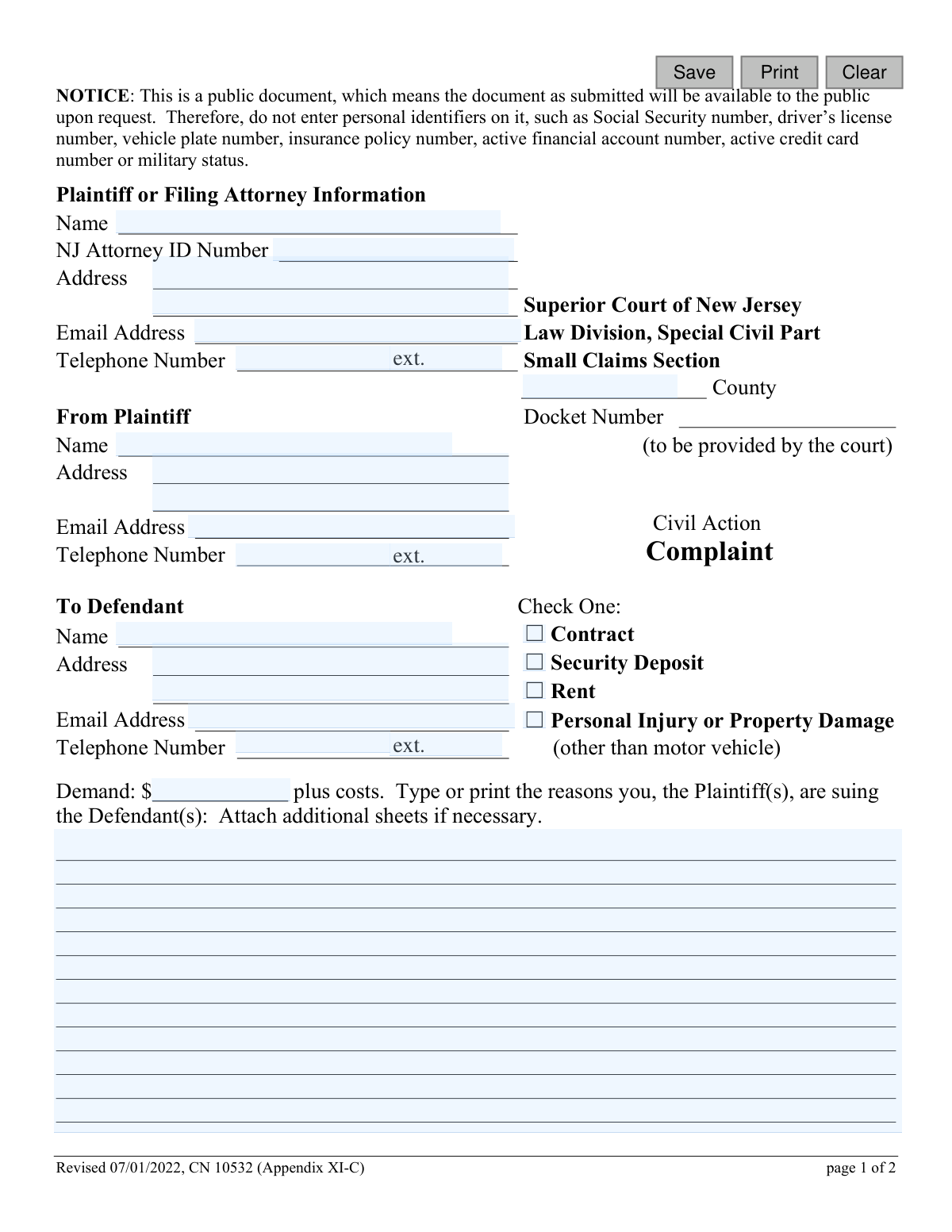
Yes! You can use AI to fill out Small Claims Complaint (Contract, Security Deposit, Rent or Tort) - Appendix XI-C

The Small Claims Complaint (Appendix XI-C) is the official form used in New Jersey to start a lawsuit in the Small Claims Section of the Special Civil Part. A plaintiff uses this document to state their case against a defendant for issues such as breach of contract, unreturned security deposits, unpaid rent, or personal injury, seeking a monetary demand. Filing this complaint correctly is the crucial first step in the legal process for resolving small disputes. Today, this form can be filled out quickly and accurately using AI-powered services like Instafill.ai, which can also convert non-fillable PDF versions into interactive fillable forms.
Appendix XI-C is part of the court claim forms, New Jersey forms, small claims forms and tort claim forms categories on Instafill.
Our AI automatically handles information lookup, data retrieval, formatting, and form filling.
It takes less than a minute to fill out Appendix XI-C using our AI form filling.
Securely upload your data. Information is encrypted in transit and deleted immediately after the form is filled out.

Form specifications

Form name: Small Claims Complaint (Contract, Security Deposit, Rent or Tort) - Appendix XI-C
Number of fields: 29
Number of pages: 1
Language: English
main-image

Instafill Demo: How to fill out PDF forms in seconds with AI

How to Fill Out Appendix XI-C Online for Free in 2026

Are you looking to fill out a APPENDIX XI-C form online quickly and accurately? Instafill.ai offers the #1 AI-powered PDF filling software of 2026, allowing you to complete your APPENDIX XI-C form in just 37 seconds or less.
Follow these steps to fill out your APPENDIX XI-C form online using Instafill.ai:
  1. 1 Navigate to Instafill.ai and upload or select the Small Claims Complaint (Appendix XI-C) form.
  2. 2 Use the AI assistant to input your information as the plaintiff, including your name, address, and contact details.
  3. 3 Provide the full name and address of the defendant(s) you are suing.
  4. 4 Specify the type of complaint (e.g., Contract, Security Deposit), enter the monetary amount you are demanding, and write a detailed description of your claim.
  5. 5 Carefully review the certifications, confirming the matter is not in another court and that all personal identifiers have been redacted.
  6. 6 Date and electronically sign the complaint in the designated plaintiff signature section.
  7. 7 Review the completed form for accuracy and completeness before downloading it for filing with the appropriate Superior Court of New Jersey.

Our AI-powered system ensures each field is filled out correctly, reducing errors and saving you time.

Why Choose Instafill.ai for Your Fillable Appendix XI-C Form?

Speed

Complete your Appendix XI-C in as little as 37 seconds.

Up-to-Date

Always use the latest 2026 Appendix XI-C form version.

Cost-effective

No need to hire expensive lawyers.

Accuracy

Our AI performs 10 compliance checks to ensure your form is error-free.

Security

Your personal information is protected with bank-level encryption.

Frequently Asked Questions About Form Appendix XI-C

This form is used to initiate a lawsuit in the Small Claims Section of the New Jersey Superior Court for disputes involving contracts, security deposits, rent, or certain types of personal injury or property damage.

The Plaintiff is the person or entity filing the lawsuit to claim money they believe they are owed. The Defendant is the person or entity being sued.

You can file complaints related to contracts, security deposits, unpaid rent, and personal injury or property damage cases that do not involve a motor vehicle. You must check the appropriate box on the form to indicate the type of your complaint.

Do not enter personal identifiers such as Social Security numbers, driver's license numbers, or active financial account numbers. The form is a public document, and omitting this information helps protect your privacy.

In this section, you should clearly and briefly explain the facts of your case. Describe why you believe the defendant owes you money, including relevant dates and details of the dispute.

The 'Demand' is the specific dollar amount you are suing the defendant for, plus court costs. Ensure your demand amount falls within the monetary limit for New Jersey's Small Claims court.

By signing, you are certifying two things: that the dispute is not already part of another court case or arbitration, and that you have removed all confidential personal identifiers from the documents you are submitting.

After filing, a hearing will be scheduled where you must present your case. You must bring all your evidence, such as witnesses, photos, receipts, and any other relevant documents, to the hearing.

The New Jersey Judiciary provides court interpreters and reasonable accommodations for individuals with disabilities. You must contact the court as soon as possible to request these services.

Yes, services like Instafill.ai use AI to help you accurately auto-fill form fields with your saved information, which saves time and reduces the chance of errors.

You can use a service like Instafill.ai to upload the form and fill it out on your computer. The platform allows you to type directly into the fields, add a digital signature, and download the completed PDF for printing or submission.

If you have a non-fillable or 'flat' PDF, you can upload it to a platform like Instafill.ai. It can convert the document into an interactive, fillable form that you can complete easily online.

Compliance Appendix XI-C
Validation Checks by Instafill.ai

1
Ensures Plaintiff's Name is Provided
Validates that the plaintiff's name field ('plaNameA') is not empty. This is a fundamental requirement as the court needs to know who is initiating the lawsuit. If this field is left blank, the form submission will be rejected as it's impossible to process a complaint without a plaintiff.
2
Ensures Defendant's Name and Address are Provided
Verifies that both the defendant's name ('defNameA') and address ('defAddrA') are filled out. This information is critical for the court to properly notify the defendant of the lawsuit, a process known as service of process. Failure to provide a complete name and address will prevent the case from moving forward.
3
Validates Single Complaint Type Selection
Checks that exactly one box is selected from the complaint type options ('ComplaintType'). The court needs to categorize the case correctly as a Contract, Security Deposit, Rent, or Tort claim. Submitting the form with no selection or multiple selections would cause ambiguity and processing delays.
4
Validates Demand Amount is a Positive Number
Ensures the 'demandAmt' field contains only a positive numerical value, allowing for decimals. This validation prevents the entry of text, negative numbers, or zero, which are invalid for a monetary demand. The amount claimed is the basis of the financial dispute, so it must be a clear and valid number.
5
Ensures Complaint Description is Provided
Verifies that the 'demandDesc' field, which explains the reasons for the lawsuit, is not empty. This narrative is essential for the court and the defendant to understand the basis of the claim. A blank description would render the complaint meaningless and lead to its rejection.
6
Validates Email Address Format
Checks that any entered email address (in fields 'attyEmail', 'plaEmailA', 'defEmailA') follows the standard '[email protected]' format. This ensures that if the court or parties use email for communication, the messages will be deliverable. An invalid format would lead to communication failures and potential missed notices.
7
Validates Telephone Number Format
Ensures that all telephone number fields ('attyPh', 'plaPhA', 'defPhA') conform to a standard 10-digit format, with or without common separators. This validation helps maintain a consistent data standard and ensures the contact numbers are usable. Incorrectly formatted numbers can hinder communication between the court and the parties.
8
Requires Attorney ID if Attorney Name is Present
This is a logical check that verifies if the 'attyName' field is filled, the 'attyId' field must also be filled. The NJ Attorney ID is a unique identifier required for tracking and verifying the credentials of a filing attorney. Submitting a form with an attorney's name but no ID would be considered an incomplete filing for an attorney.
9
Scans for Prohibited Personal Identifiers
Performs a check on text fields, primarily 'demandDesc', to detect patterns resembling forbidden personal identifiers like Social Security or driver's license numbers, as explicitly warned on the form. This is crucial for protecting privacy and complying with court rules (Rule 1:38-7(b)). If such information is detected, the user should be prompted to redact it before submission.
10
Validates Signature Date is Not in the Future
Checks that the 'sigDtA' field contains a valid date that is on or before the current date. A future date is logically impossible for a signature that has already been made. This validation prevents simple data entry errors and ensures the integrity of the certification date.
11
Ensures Court County is Specified
Validates that the 'typeCtyA' field, specifying the county of the Superior Court, is not empty. The county determines the proper venue and jurisdiction for the case. Filing without specifying the county would make it impossible for the court system to route the complaint to the correct location.
12
Ensures Consistency Between Plaintiff Name Fields
Compares the plaintiff's name at the top of the form ('plaNameA') with the typed name on the signature line ('plaA'). These names should match to confirm the identity of the person filing and certifying the complaint. A mismatch could indicate an error or that a different person filled out the form, which may require clarification.
13
Verifies Demand Amount is Within Small Claims Limit
Checks if the 'demandAmt' is within the maximum monetary jurisdiction for the Small Claims Section of the Special Civil Part in New Jersey. Claims exceeding this limit must be filed in a different court division. This validation prevents users from filing a case that will be immediately rejected for being outside the court's jurisdictional authority.
14
Requires Plaintiff's Typed Name for Certification
Validates that the 'plaA' field (Plaintiff's Name Typed, or Printed) is filled out. This field serves as a clear, legible record of the signatory's name, complementing the handwritten signature. It is a required part of the certification process, and its absence would make the certification incomplete.

Common Mistakes in Completing Appendix XI-C

Including Confidential Personal Identifiers

The form explicitly warns filers not to include personal identifiers like Social Security or driver's license numbers, as the document becomes public record. People often overlook this notice in haste, exposing their sensitive data and increasing the risk of identity theft. To prevent this, meticulously review the form and all attachments to ensure every piece of confidential information has been redacted.

Entering an Incorrect Defendant Name or Address

Proper legal service on the defendant is impossible without their exact legal name and current, valid address. Using a nickname, an old address, or making a typo can cause the service of process to fail, leading to major delays or even the dismissal of your case. Always verify the defendant's full legal name and last known address before filing to ensure the case can proceed.

Filing in the Incorrect County

A lawsuit must be filed in the correct legal venue, which is usually the county where the defendant lives or where the incident occurred. Filing in the wrong county is a common jurisdictional error that will cause the court to reject the complaint, forcing you to start the entire process over again. Research New Jersey's rules on venue to confirm the correct county before you file.

Providing a Vague or Incomplete Complaint Description

The section explaining the reason for the lawsuit requires a clear, factual, and concise summary of what happened, not an emotional narrative. Filers often provide insufficient detail or include legally irrelevant information, which can fail to establish a valid claim and weaken their position. Clearly state the key events, dates, and the specific damages you suffered to ensure the court understands the basis of your lawsuit.

Incorrectly Calculating the Demand Amount

The demand amount must be a specific monetary value and must not exceed the jurisdictional limit for Small Claims Court. People frequently make calculation errors, forget to include certain costs, or enter an amount over the limit, which can lead to the claim being rejected or reduced by the court. Double-check your calculations and verify the current Small Claims limit before entering the final demand amount.

Forgetting to Sign or Date the Form

A signature and date are legally required to certify that the information provided is true and that you have read the form's declarations. An unsigned or undated form is incomplete and will be immediately rejected by the court clerk, halting your case before it even begins. Always perform a final review to ensure you have signed and dated the form in the designated areas.

Selecting the Incorrect Complaint Type

The form requires you to check one box to categorize your claim (e.g., Contract, Security Deposit, Rent). This choice defines the legal elements you will need to prove, and selecting the wrong one can cause confusion or require you to file an amendment later. Carefully consider the fundamental nature of your dispute to ensure you select the most accurate complaint type.

Entering Incomplete or Inaccurate Plaintiff Contact Information

The court uses the email, phone number, and address you provide to send critical notices, such as your hearing date. Simple typos or omissions in your contact information can lead to you missing important communications and potentially having your case dismissed. AI-powered form-filling tools like Instafill.ai can help prevent these errors by auto-filling from a secure profile and validating data formats for accuracy.

Failing to Redact Attached Documents

The certification on page two requires you to redact confidential identifiers from all submitted documents, not just the complaint form itself. Filers often forget to review and redact sensitive information from their evidence, such as bank statements or contracts attached to the filing. Before submitting, meticulously review all attachments and black out any personal account numbers or other identifiers as required by court rules.

Attempting to Fill Court-Use-Only Fields

Certain fields, such as 'Docket Number', are explicitly marked to be provided by the court. Filers sometimes try to guess or enter their own information in these fields, which can cause processing errors and delays. It is crucial to leave any field designated for court or clerk use completely blank. If the form is a flat PDF, a tool like Instafill.ai can convert it to a smart, fillable version that can help guide you away from restricted fields.
Saved over 80 hours a year

“I was never sure if my IRS forms like W-9 were filled correctly. Now, I can complete the forms accurately without any external help.”

Kevin Martin Green

Your data stays secure with advanced protection from Instafill and our subprocessors

Robust compliance program

Transparent business model

You’re not the product. You always know where your data is and what it is processed for.

ISO 27001, HIPAA, and GDPR

Our subprocesses adhere to multiple compliance standards, including but not limited to ISO 27001, HIPAA, and GDPR.

Security & privacy by design

We consider security and privacy from the initial design phase of any new service or functionality. It’s not an afterthought, it’s built-in, including support for two-factor authentication (2FA) to further protect your account.

Fill out Appendix XI-C with Instafill.ai

Worried about filling PDFs wrong? Instafill securely fills small-claims-complaint-contract-security-deposit-rent-or-tort-appendix-xi-c forms, ensuring each field is accurate.

Related forms by category

court claim forms Form SC-100, Plaintiff's Claim and ORDER to Go to Small Claims Court, Judicial Council of California Form SC-105, Request for Court Order and Answer (Small Claims), SC-120, Defendant’s Claim and ORDER to Go to Small Claims Court (Small Claims), SC-105, Request for Court Order and Answer (Small Claims), Judicial Council of California Form SC-120, Defendant’s Claim and ORDER to Go to Small Claims Court (Small Claims), Form SC-100, Plaintiff’s Claim and ORDER to Go to Small Claims Court, Certificate of Service (Civil Court Claim), Form N161, Appellant’s notice (All appeals except small claims track appeals and appeals to the Family Division of the High Court), Plaintiff's Claim and ORDER to Go to Small Claims Court (SC-100), Form N161, Appellant's Notice (All appeals except small claims track appeals and appeals to the Family Division of the High Court), Form SC-100A, Other Plaintiffs or Defendants (Attachment to Plaintiff's Claim and ORDER to Go to Small Claims Court), Form N461: Claim for judicial review, Statement of Small Claim and Notice, Trial Court of Massachusetts, State of Michigan, Form MC 25, Notice of Intent to Escheat Unclaimed Personal Property, Form MC 35, Complaint, Claim and Delivery, Form MC 36, Motion for Possession Pending Judgment, Claim and Delivery, Order of Possession Pending Judgment, Claim and Delivery, Form MC 38, Bond, Claim and Delivery, Form MC 39, Judgment, Claim and Delivery, Form MC 55, Claim of Appeal · + 58 more →
New Jersey forms State of New Jersey Alternate Benefit Program Withdrawal Request Acknowledgement Receipt, Horizon Blue Cross Blue Shield of New Jersey Applied Behavior Analysis Supplemental Information Form, State of New Jersey Application for Employment (Form DPF-663), New Jersey Judiciary Plea Form (Plea 01), Supplemental Plea Form for Certain Sexual Offenses: Megan’s Law/Parole Supervision for Life/Community Supervision for Life (Plea 05), Financial Questionnaire to Establish Indigency, New Jersey Judiciary Resource Family Information Form, Foreclosure Case Information Statement (FCIS) - Appendix XII-B2, New Jersey Judiciary Records Request Form, Superior Court of New Jersey, Application for Appeal and Order, FL Certification of Requested Background Checks for Kinship Legal Guardianship, Certification of Caregiver as to Knowledge of Identity and/or Location of Parents, FL Order Judgment for Kinship Legal Guardianship, New Jersey Judiciary Certification of Repair and Plea of Guilty, Uniform Summary Support Order (USSO), New Jersey Judiciary Volunteer Application (CN 10293), Application to Take the New Jersey Court Interpreter Oral Examination, New Jersey Judiciary Attorney Fee Arbitration Request, Order to Show Cause with Temporary Restraints Pursuant to Rule 4:52, Tax Court of New Jersey, State Tax Complaint · + 158 more →
small claims forms Form SC-100, Plaintiff's Claim and ORDER to Go to Small Claims Court, Judicial Council of California Form SC-104, Proof of Service (Small Claims), SC-108, Request to Correct or Cancel Judgment and Answer (Small Claims), Judicial Council of California Form SC-105, Request for Court Order and Answer (Small Claims), SC-120, Defendant’s Claim and ORDER to Go to Small Claims Court (Small Claims), Judicial Council of California Form SC-104, Proof of Service (Small Claims), Judicial Council of California Form SC-108, Request to Correct or Cancel Judgment and Answer (Small Claims), SC-105, Request for Court Order and Answer (Small Claims), Judicial Council of California Form SC-120, Defendant’s Claim and ORDER to Go to Small Claims Court (Small Claims), Form SC-100, Plaintiff’s Claim and ORDER to Go to Small Claims Court, Form N161, Appellant’s notice (All appeals except small claims track appeals and appeals to the Family Division of the High Court), Plaintiff's Claim and ORDER to Go to Small Claims Court (SC-100), Form N161, Appellant's Notice (All appeals except small claims track appeals and appeals to the Family Division of the High Court), Form SC-100A, Other Plaintiffs or Defendants (Attachment to Plaintiff's Claim and ORDER to Go to Small Claims Court), Form A, Claim Form, European Small Claims Procedure, Form EJ-001, Abstract of Judgment—Civil and Small Claims, Form SC-109, Authorization to Appear (Small Claims), Form SC-112A, Proof of Service by Mail (Small Claims), Form SC-114, Request to Amend Party Name Before Hearing (Small Claims), Form SC-132, Attorney-Client Fee Dispute (Attachment to Notice of Entry of Judgment) · + 30 more →