
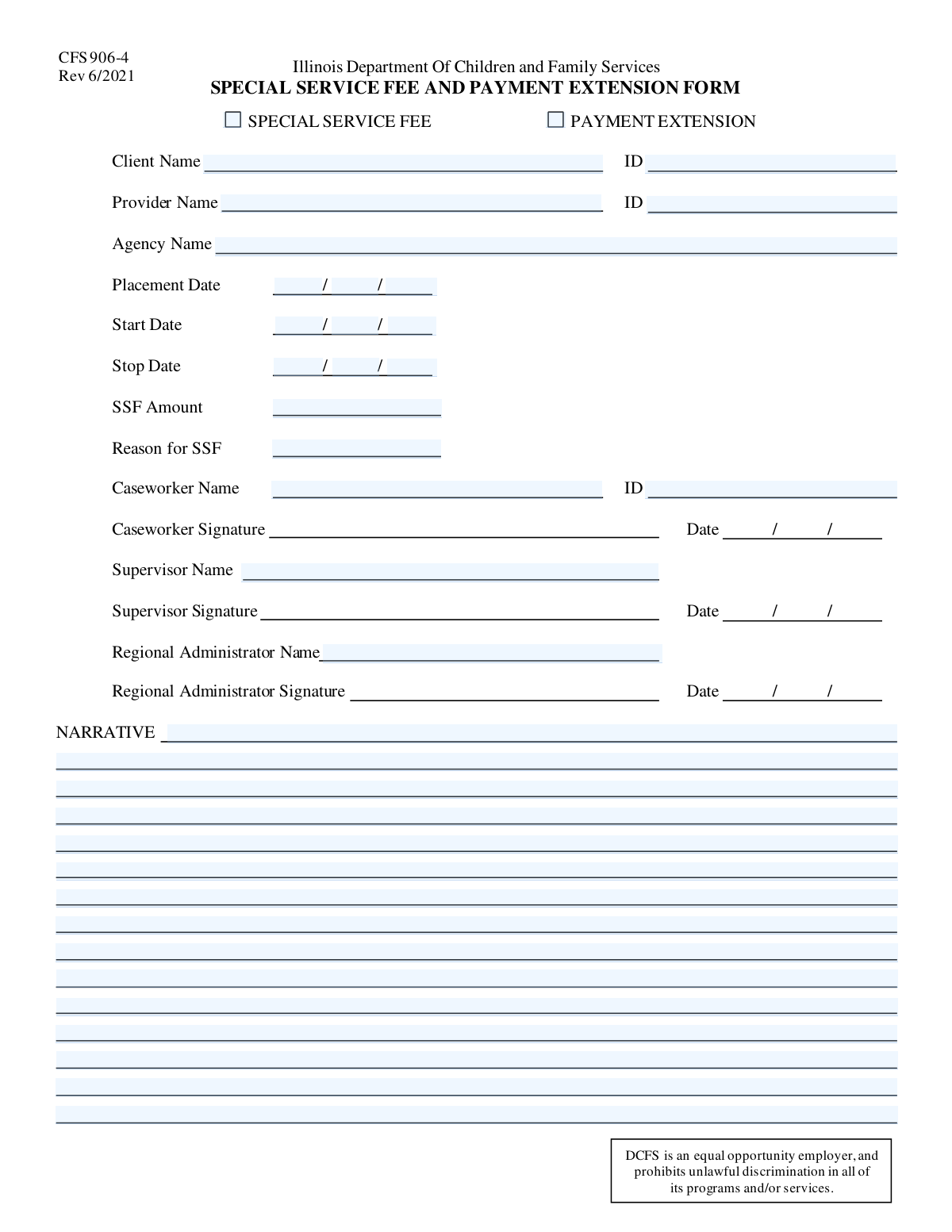
Yes! You can use AI to fill out Special Service Fee and Payment Extension Request
Don't type 38 fields by hand. Tell our AI about yourself, or upload a document you already have, and it fills every field in seconds. You check it, then download, print or sign.
The AI does the filling. You just check it.
No typing into boxes, nothing to install.
What this form asks for
The AI fills all of it, from your answers or your documents.
The AI checks your answers before you download
12 checks built for this form, so a wrong date or a missing answer is caught before anyone else sees it.
This validation ensures that exactly one of the form type checkboxes ('Special Service Fee' or 'Payment Extension') is selected. It prevents ambiguity by forcing a clear purpose for the submission, which is critical for routing the form to the correct processing workflow. If both or neither are selected, the submission should be blocked with an error message prompting the user to choose one option.
This check verifies that if the 'Special Service Fee' checkbox is selected, the 'SSF Amount' and 'Reason for SSF' fields are mandatory and populated. These details are essential for evaluating and approving financial requests. A failure would prevent submission and highlight the required SSF fields to the user, ensuring complete information is captured.
Ensures that the 'SSF Amount' and 'Reason for SSF' fields are empty if the form is not for a 'Special Service Fee' request. This prevents irrelevant or confusing financial data from being submitted with a payment extension request. If data is present in these fields without the corresponding checkbox selected, the system should alert the user to either clear the fields or correct the form type selection.
Validates that the 'Start Date Month', 'Day', and 'Year' fields combine to form a valid calendar date (e.g., not April 31). This check is fundamental to preventing data corruption and ensuring the integrity of service period records. An invalid date combination would trigger an error and require the user to correct the input before proceeding.
Verifies that the 'Stop Date Month', 'Day', and 'Year' fields form a legitimate calendar date. Accurate stop dates are crucial for correct billing, service duration tracking, and reporting. If the date is invalid, the form submission should be blocked until the user provides a correct and real calendar date.
Confirms that the dates are in a logical order: Placement Date must be on or before the Start Date, and the Start Date must be before the Stop Date. This validation is critical for maintaining data integrity and preventing nonsensical service periods. A failure would result in an error explaining the required date order (e.g., 'Stop Date must be after Start Date').
And 6 more checks
- Required Narrative Field
- Client ID Format and Existence
- Provider ID Format and Existence
- SSF Amount Numeric Format
- Core Information Completeness
- Valid Placement Date Composition
Let AI fill out your SSF/PE Request
No typing. Every field filled in seconds, checked, ready to sign.
How to Fill Out SSF/PE Request Online for Free in 2026
What the AI walks you through.
- Navigate to Instafill.ai and upload your Special Service Fee and Payment Extension Request form, or select it from their template library.
- Indicate the form type by checking the box for either 'Special Service Fee' or 'Payment Extension' at the top of the form.
- Use the AI assistant to automatically fill in the Client, Provider, and Agency information, including full names and identification numbers.
- Enter the relevant dates for placement, start, and stop of service. If requesting a Special Service Fee, provide the specific amount and a detailed reason.
- Complete the narrative section to provide a comprehensive justification for your request, and fill in the names and IDs for the Caseworker, Supervisor, and Regional Administrator.
- Review all the auto-filled information for accuracy, make any necessary corrections, and then e-sign the document directly on the platform before submitting.
Common Mistakes in Completing SSF/PE Request
The ones the AI is built to catch.
Forgetting to Specify Form Type
Entering Incorrect or Transposed ID Numbers
Using Incomplete or Informal Names
Ignoring Conditional Field Logic for SSF
Entering Illogical Date Ranges
Transposing Month and Day Fields
Providing a Vague Narrative Justification
Incorrectly Formatting the SSF Amount
Listing an Incorrect Approval Hierarchy
Confusion Over Unlabeled Form Fields
Frequently Asked Questions About SSF/PE Request
Is it really free for 7 days?
Can I fill other forms too?
How do I cancel?
How does the AI fill out SSF/PE Request?
What happens to my information?
How complex is SSF/PE Request to fill out?
What is the purpose of this form?
Who should fill out this form?
What's the difference between a 'Special Service Fee' and a 'Payment Extension' request?
What information do I need before I start?
When do I fill out the 'SSF Amount' and 'Reason for SSF' fields?
What should I write in the 'Narrative' section?
Where do I find the Client, Provider, and Caseworker ID numbers?
What is the difference between the 'Placement Date', 'Start Date', and 'Stop Date'?
Who needs to approve this request?
What are the fields labeled 'Text32', 'Text33', etc. for?
Can I use an AI tool to help fill out this form?
How can I use Instafill.ai to complete this form online?
What should I do if my PDF copy of this form is not fillable?
Get your SSF/PE Request filled out by AI
$0 today. Cancel before Nov 10 and you pay nothing.
Other forms like this one
payment forms: Form 5405, Repayment of First-Time Homebuyer Credit, Form 1127, Application for Extension of Time for Payment of Tax Due to Undue Hardship, Form 1099-G, Certain Government Payments, Form 1099-K, Payment Card and Third Party Network Transactions, Form 1099-Q, Payments From Qualified Education Programs, Form SSA-8, Application for Lump-Sum Death Payment, Form 1845-0163, Borrower Defense to Repayment Application, application-and-contract-for-electric-facilities-w, Carer Payment and Carer Allowance – Medical Report (SA431) for a child under 16 years, Income-Driven Repayment (IDR) Plan Request (PAYE, IBR, and ICR) — William D. Ford Federal Direct Loan (Direct Loan) Program and Federal Family Education Loan (FFEL) Programs (OMB No. 1845-0102), Fidelity NetBenefits Distribution - Recurring Payments, Electronic Dividend and Interest Payment Authorization Form, Vanguard Super Apply for a financial hardship payment, Special Tax Notice Regarding Plan Payments, Empower Loan Payment Change Request Form, Empower Retirement Payment Request Form, Empower 401(k) Loan Prepayment Request Form, Special Tax Notice Regarding Plan Payments, Transamerica Automatic Payment Authorization, Excess Withdrawal Request and Form W-4R, Withholding Certificate for Nonperiodic Payments and Eligible Rollover Distributions
Let AI fill out your SSF/PE Request
Your trial starts once a card is added. You pay nothing before Nov 10.
Our AI already knows this form, all 38 fields of it. Skip the typing: tell it about yourself, or upload what you have, and it fills the whole form in seconds.
- AI fills every field on the form, checkboxes included
- No typing into boxes: answer a few questions, or upload a document you already have, an old copy of this form, a photo of a document
- The AI checks the answers; you review and change anything before you download
- Download the finished PDF, print it, or sign it online
- Encrypted, and never used to train AI
Cancel before Nov 10 and you pay nothing.
A card is needed to start the trial. Cancel in two clicks from your account.
Terms · Privacy