Yes! You can use AI to fill out Staff Information and Cost Center Allocation Form
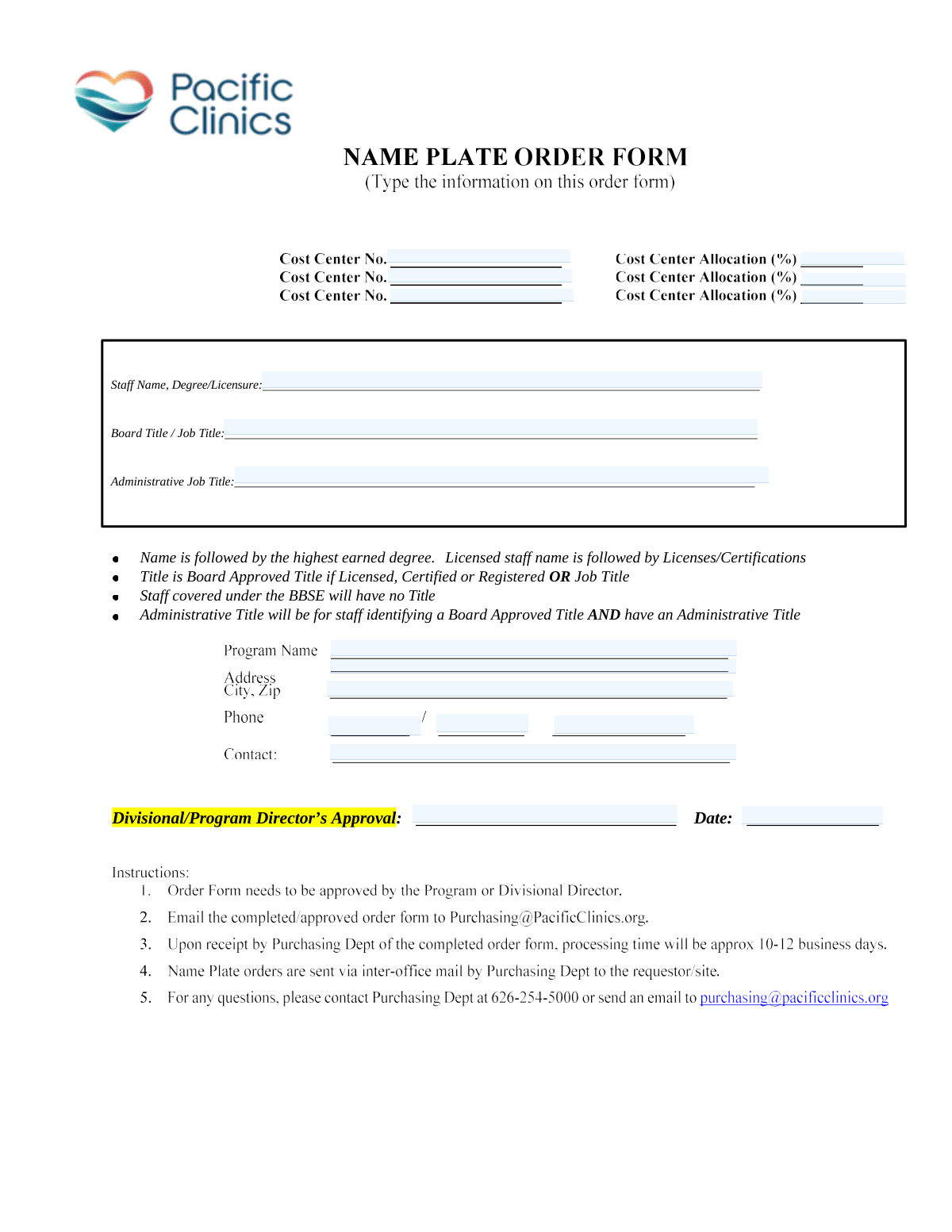
This form is an internal document used by organizations to collect and update information about staff members, including their titles, program affiliations, and cost center allocations. It is crucial for maintaining accurate records for human resources, payroll, and financial budgeting, ensuring that personnel costs are correctly assigned to the appropriate departments or programs. Today, this form can be filled out quickly and accurately using AI-powered services like Instafill.ai, which can also convert non-fillable PDF versions into interactive fillable forms.
Our AI automatically handles information lookup, data retrieval, formatting, and form filling.
It takes less than a minute to fill out Staff Info & Cost Allocation using our AI form filling.
Securely upload your data. Information is encrypted in transit and deleted immediately after the form is filled out.
Form specifications
| Form name: | Staff Information and Cost Center Allocation Form |
| Number of fields: | 19 |
| Number of pages: | 1 |
| Filled form examples: | Form Staff Info & Cost Allocation Examples |
| Language: | English |
Instafill Demo: How to fill out PDF forms in seconds with AI
How to Fill Out Staff Info & Cost Allocation Online for Free in 2026
Are you looking to fill out a STAFF INFO & COST ALLOCATION form online quickly and accurately? Instafill.ai offers the #1 AI-powered PDF filling software of 2026, allowing you to complete your STAFF INFO & COST ALLOCATION form in just 37 seconds or less.
Follow these steps to fill out your STAFF INFO & COST ALLOCATION form online using Instafill.ai:
- 1 Navigate to Instafill.ai and upload or select the Staff Information and Cost Center Allocation form.
- 2 Use the AI assistant to automatically fill in the Staff Details section, including name, degree/licensure, and job titles.
- 3 Enter the relevant Program Information, such as the program name, address, and contact phone number.
- 4 Input the specific Cost Center numbers and their corresponding allocation percentages.
- 5 Provide the name of the approving Divisional/Program Director and the date of approval.
- 6 Carefully review all entered information for accuracy and completeness before finalizing.
- 7 Securely download, print, or share the completed form directly from the platform.
Our AI-powered system ensures each field is filled out correctly, reducing errors and saving you time.
Why Choose Instafill.ai for Your Fillable Staff Info & Cost Allocation Form?
Speed
Complete your Staff Info & Cost Allocation in as little as 37 seconds.
Up-to-Date
Always use the latest 2026 Staff Info & Cost Allocation form version.
Cost-effective
No need to hire expensive lawyers.
Accuracy
Our AI performs 10 compliance checks to ensure your form is error-free.
Security
Your personal information is protected with bank-level encryption.
Frequently Asked Questions About Form Staff Info & Cost Allocation
This form is used to document staff details, program information, and allocate costs across different departments or programs for administrative and financial tracking.
This form should be completed for a staff member whose time and costs are allocated across one or more cost centers, and it requires approval from a Divisional or Program Director.
Enter your full name, followed by your highest earned degree, and then any applicable licenses or certifications. For example: 'Jane Doe, PhD, LCSW'.
The 'Board/Job Title' is your official title if you are licensed or your general job title otherwise. The 'Administrative Job Title' is a separate title you hold only if you have a Board Approved Title and also perform distinct administrative duties.
If your position is regulated by the Board of Behavioral Sciences Examiners (BBSE), you should leave the 'Board/Job Title' field blank as per the form's instructions.
Cost centers are departments or units used for accounting. You should obtain the correct cost center numbers and their corresponding allocation percentages from your supervisor or the finance department.
Yes, the total of all cost center allocation percentages you enter must equal 100% to ensure costs are fully accounted for.
This appears to be a redundancy in the form. To be safe, please enter the same, full official program name in each field where it is requested.
This section must be signed by the Divisional or Program Director who has oversight of your program or department. Staff members cannot approve their own forms.
Please provide the full street address for the program, including the street, city, state, and zip code.
Yes, services like Instafill.ai use AI to auto-fill form fields accurately from your saved information, which can save you time and help prevent errors.
You can use a service like Instafill.ai to complete this form online. Simply upload the document, and the tool will allow you to type directly into the fields before saving or printing.
If you have a non-fillable PDF, you can use a tool like Instafill.ai. It can convert flat PDFs into interactive, fillable forms that you can easily complete on your computer.
After the form is completely filled out and has the director's approval signature, you should submit it to your administrative or HR department. Always confirm the specific submission procedure with your supervisor.
Compliance Staff Info & Cost Allocation
Validation Checks by Instafill.ai
1
Ensures Staff Name Field is Populated
This check verifies that the 'Staff Name, Degree/Licensure' field is not empty. This field is fundamental for identifying the staff member in question, and a blank submission would make the entire form's data unusable. If this validation fails, the form submission should be rejected with an error message prompting the user to enter the staff member's details.
2
Conditional Requirement for Board/Job Title
This validation ensures that the 'Board/Job Title' field is filled if the 'Staff Name, Degree/Licensure' field contains information indicating the staff is licensed or certified. This is important for correctly classifying staff as per the form's instructions. Failure to provide a title for a licensed individual will result in a validation error, requiring the user to specify the appropriate title.
3
Conditional Logic for Administrative Job Title
This check verifies that the 'Administrative Job Title' field is only populated if the 'Board/Job Title' field is also filled with a Board Approved Title. This rule prevents administrative titles from being assigned in isolation, ensuring a clear hierarchical job description. If an administrative title is entered without a primary board/job title, the submission should be flagged as an error.
4
Validates Total Cost Center Allocation Sum
This validation calculates the sum of all entered 'Allocation Percentage' fields and ensures the total equals exactly 100%. This is critical for maintaining accurate financial records and ensuring that staff time is fully accounted for across different cost centers. If the sum is not 100%, the form will be rejected, and the user must adjust the percentages.
5
Ensures Paired Entry for Cost Centers and Allocations
This check ensures that if a number is entered for the 'Second Cost Center' or 'Third Cost Center', its corresponding 'Allocation Percentage' field must also be filled, and vice versa. This prevents incomplete or orphaned data pairs, which can cause errors in financial processing. A mismatch will trigger an error, forcing the user to complete the data pair or remove it entirely.
6
Validates Numeric Format of Cost Center Numbers
This check confirms that all cost center number fields contain only numeric characters. Cost center codes are specific identifiers used in financial systems, and non-numeric data would cause processing failures. Any entry containing letters or symbols will be rejected, prompting the user for a valid number.
7
Validates Format and Range of Allocation Percentages
This validation verifies that all allocation percentage fields contain only numeric values and that these values are greater than 0 and less than or equal to 100. This ensures that the percentages are valid and meaningful for financial allocation. Submissions with non-numeric text, zero, or negative values will be blocked.
8
Ensures Consistency Across Program Name Fields
This check compares the values entered into the three separate 'Program Name' fields to ensure they are identical. Due to a redundant form design, this validation is crucial to prevent data discrepancies and ensure the correct program is identified in all contexts. If the names do not match, the user will be prompted to correct the entries to be consistent.
9
Validates Completeness of Program Address
This validation checks that the 'Program Address' field contains sufficient detail, such as a street, city, and zip code. A partial address is often unusable for mailings or location services, making this check important for data quality. The system should look for common address patterns and flag entries that appear incomplete.
10
Validates Structure of Phone Number Components
This check ensures the three-part phone number is entered correctly: the first part must be 3 digits, the second part 3 digits, and the third part 4 digits. All parts must be numeric. This maintains a standard format for contact information, which is essential for reliable communication and data parsing. Incorrectly formatted numbers will be rejected.
11
Ensures Director's Approval Name is Provided
This validation confirms that the 'Director's Approval' field is not left blank. The director's name serves as a required authorization for the form's request, and its absence would invalidate the submission. The form cannot be processed without this explicit approval.
12
Validates Approval Date Format and Recency
This check verifies that the 'Approval Date' is in a valid date format (e.g., MM/DD/YYYY) and is not a date in the future. This ensures the integrity of the approval record, confirming it happened on or before the submission day. An invalid format or a future date would cause the submission to fail validation.
13
Ensures First Cost Center is Populated
This check validates that the 'First Cost Center' field is not empty, as it is the primary financial code for the staff member. At least one cost center is required for any financial allocation to be meaningful. A missing primary cost center would make the form's financial data incomplete and should block submission.
14
Ensures Program Contact Name is Provided
This validation confirms that the 'Program Contact' field is filled out. This contact person is the primary point of communication for any questions regarding the program or the form itself. A missing contact name hinders communication and follow-up, so the form should be rejected until this information is provided.
Common Mistakes in Completing Staff Info & Cost Allocation
The form requires a specific format: full name, followed by the highest earned degree, and then any licenses. Users often get the order wrong, omit information, or use inconsistent abbreviations. This mistake happens due to not reading the fine print, leading to inconsistent data in HR systems and potential compliance issues for licensed positions. To avoid this, carefully review the instructions and enter the information in the exact sequence requested.
The form has a complex, conditional hierarchy for titles (Board Title vs. Job Title vs. Administrative Title) that users frequently misunderstand. People may fill in a general job title where a specific Board Approved Title is required, or fill in all title fields incorrectly. This leads to inaccurate personnel records and potential payroll or compliance errors. Carefully read the definitions and conditional logic for each title field before entering information.
The form confusingly includes multiple fields for the same information, such as 'Program Name' appearing three times and 'First Cost Center' appearing twice. Users often enter slightly different information in each field or leave duplicates blank, causing data conflicts and processing delays. To prevent this, be consistent with your entries; if the purpose of a duplicate field is unclear, seek clarification. AI-powered tools can help by ensuring data is consistently propagated across identical fields.
The form asks for allocation percentages for the second and third cost centers but not the first, implying the first cost center receives the remaining balance. Users frequently make calculation errors, resulting in a total allocation that is not exactly 100%. This can cause significant issues in accounting and budget management. Before submitting, always double-check that the sum of all cost center allocations equals 100%.
Splitting a phone number across three separate fields is a common source of data entry errors. Users may accidentally transpose the area code and prefix, or mis-enter digits due to the fragmented input method. This simple mistake can make it impossible to contact the program, leading to communication breakdowns. To avoid this, carefully enter the 3-digit area code, 3-digit prefix, and 4-digit line number into their respective boxes. AI form-filling tools like Instafill.ai can automatically parse and correctly format phone numbers to prevent this error.
The form contains specific exceptions that are easy to miss, such as the instruction that 'Staff covered under the BBSE will have no Title'. Users often fill out forms based on habit and may enter a title even when the rule explicitly forbids it. This creates non-compliant data that requires manual correction and delays processing. To avoid this, read all instructional text carefully, including notes that are not directly adjacent to an input field.
The form includes fields that should only be filled out if another field contains specific information (e.g., 'Fill Administrative Job Title only if Board/Job Title is filled with a Board Approved Title'). Users often ignore these 'if-then' instructions, either filling in fields when they shouldn't or leaving them blank when required. This results in an improperly completed form that may be rejected or require clarification. Always read the instructions for each field to see if it is dependent on another entry.
The 'Approval Date' field does not specify a required format (e.g., MM/DD/YYYY). This leads users to enter dates in various formats, such as '2/1/24' or 'Feb 1, 2024', creating ambiguity (especially in international contexts) and making data processing difficult. This can lead to incorrect record-keeping or delays if the date needs to be manually verified. To avoid this, use the full, unambiguous YYYY-MM-DD format or the standard MM/DD/YYYY format for your region.
When asked for a 'full street address including city and zip code', users often provide partial or abbreviated information out of haste. Forgetting the ZIP code, state, or using non-standard abbreviations can lead to failed mail deliveries and difficulty locating the program. Always provide the complete address as you would for mailing. AI-powered tools like Instafill.ai can help by autocompleting and validating addresses to ensure they are complete and properly formatted.
The form features a line for 'Divisional/Program Director’s Approval' which implies a signature is needed, but the digital field may only allow for a typed name. Simply typing a name where a legal signature is expected can render the form invalid, causing it to be rejected until a proper wet or digital signature is obtained. Before submitting, clarify whether a typed name is sufficient or if a signature is required. If the form is a non-fillable PDF, tools like Instafill.ai can convert it and allow for the easy addition of a digital signature.
Saved over 80 hours a year
“I was never sure if my IRS forms like W-9 were filled correctly. Now, I can complete the forms accurately without any external help.”
Kevin Martin Green
Your data stays secure with advanced protection from Instafill and our subprocessors

Robust compliance program
Transparent business model
You’re not the product. You always know where your data is and what it is processed for.
ISO 27001, HIPAA, and GDPR
Our subprocesses adhere to multiple compliance standards, including but not limited to ISO 27001, HIPAA, and GDPR.
Security & privacy by design
We consider security and privacy from the initial design phase of any new service or functionality. It’s not an afterthought, it’s built-in, including support for two-factor authentication (2FA) to further protect your account.
Fill out Staff Info & Cost Allocation with Instafill.ai
Worried about filling PDFs wrong? Instafill securely fills staff-information-and-cost-center-allocation-form forms, ensuring each field is accurate.



