Yes! You can use AI to fill out Straight Bill of Lading
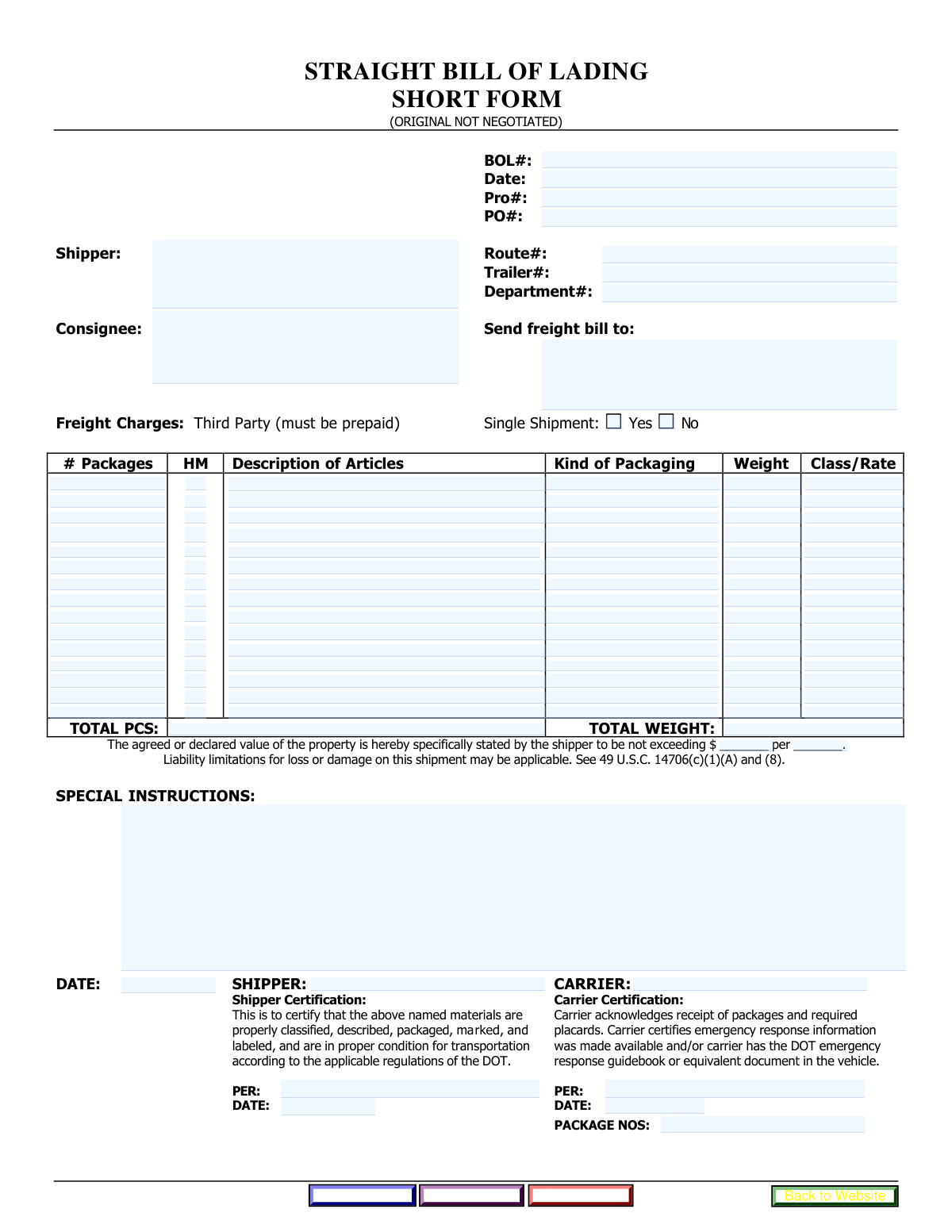
A Straight Bill of Lading (BOL) is a non-negotiable legal document that serves as a contract between a shipper and a carrier, a receipt for the goods shipped, and evidence of the title to the goods. It provides drivers and carriers with all the necessary details to process the freight shipment and invoice it correctly. Today, this form can be filled out quickly and accurately using AI-powered services like Instafill.ai, which can also convert non-fillable PDF versions into interactive fillable forms.
Our AI automatically handles information lookup, data retrieval, formatting, and form filling.
It takes less than a minute to fill out BOL using our AI form filling.
Securely upload your data. Information is encrypted in transit and deleted immediately after the form is filled out.
Form specifications
| Form name: | Straight Bill of Lading |
| Number of fields: | 119 |
| Number of pages: | 1 |
| Filled form examples: | Form BOL Examples |
| Language: | English |
Instafill Demo: How to fill out PDF forms in seconds with AI
How to Fill Out BOL Online for Free in 2026
Are you looking to fill out a BOL form online quickly and accurately? Instafill.ai offers the #1 AI-powered PDF filling software of 2026, allowing you to complete your BOL form in just 37 seconds or less.
Follow these steps to fill out your BOL form online using Instafill.ai:
- 1 Navigate to Instafill.ai and upload or select the Straight Bill of Lading form.
- 2 Allow the AI to scan and identify all the fields on the form, including shipper, consignee, and shipment details.
- 3 Provide the necessary information for key sections, such as the Bill of Lading number, shipper and consignee addresses, and routing details, by answering simple questions.
- 4 Enter the specifics for each article being shipped, including the number of packages, description, weight, and freight class.
- 5 Add any special instructions and complete the shipper and carrier certification sections with names and dates.
- 6 Review all the entered information for accuracy. The AI will highlight any missing or incomplete fields.
- 7 Securely download, print, or submit the completed Bill of Lading form directly.
Our AI-powered system ensures each field is filled out correctly, reducing errors and saving you time.
Why Choose Instafill.ai for Your Fillable BOL Form?
Speed
Complete your BOL in as little as 37 seconds.
Up-to-Date
Always use the latest 2026 BOL form version.
Cost-effective
No need to hire expensive lawyers.
Accuracy
Our AI performs 10 compliance checks to ensure your form is error-free.
Security
Your personal information is protected with bank-level encryption.
Frequently Asked Questions About Form BOL
This is a Bill of Lading (BOL), a legal document required for shipping goods. The shipper is typically responsible for filling out the details of the shipment, including the contents, shipper address, and consignee address.
The BOL Number is created by the shipper to identify the shipment. The Pro Number is a tracking number assigned by the carrier. The PO Number is the Purchase Order number from the customer, used to reference the original sale.
The 'HM' checkbox stands for Hazardous Materials. You must check this box if the article on that line is classified as a hazardous material, as this requires special handling and documentation.
This field is for the National Motor Freight Classification (NMFC) freight class, which helps determine shipping costs. If you are unsure of the correct class for your items, you should consult your carrier or a logistics professional.
The form provides space for up to fifteen different articles. Use a new line for each type of item, detailing its specific number of packages, description, weight, and freight class.
The 'Consignee Address' is the final delivery destination where the goods are being shipped. The 'Freight Billing Address' is the location where the invoice for the shipping charges should be sent.
The shipper or an authorized agent signs the 'Shipper Certification' to verify the shipment's contents are accurately described. The carrier's representative (usually the driver) signs the 'Carrier Certification' upon accepting the goods for transport.
This form accommodates up to fifteen unique articles. If your shipment contains more, you will likely need to complete a second Bill of Lading form and clearly mark it as a continuation of the first.
The form includes a button to 'submit this bill of lading to Drake International' for electronic submission. You should also use the 'print a copy' button to keep a physical record for yourself and the carrier.
Yes, services like Instafill.ai use AI to auto-fill form fields accurately and save time. This is especially helpful for repetitive information like addresses and frequently shipped item descriptions.
Simply upload the Bill of Lading PDF to the Instafill.ai platform. The AI will make the document interactive, allowing you to quickly fill in all the required fields, save your progress, and download the completed form.
If you have a non-fillable PDF, you can use a tool like Instafill.ai to help. Instafill.ai can convert flat, non-fillable PDFs into interactive forms that you can easily complete and sign on your computer.
The Declared Value establishes the carrier's maximum liability for the shipment in case of loss or damage. Declaring a value that is higher than the carrier's standard liability limit may result in additional charges.
Compliance BOL
Validation Checks by Instafill.ai
1
Required Bill of Lading Details
Ensures the 'BOL Number' and 'Date' fields in the Bill of Lading Details section are not empty. These fields are the primary identifiers for the entire shipment document, and their absence would make the record untraceable and invalid for logistical or legal purposes. If this validation fails, the user must be prompted to enter the missing information before submission.
2
Shipper and Consignee Address Completeness
Validates that both the 'Shipper Address' and 'Consignee Address' fields are filled out. These addresses are legally required to define the origin and destination of the shipment. An incomplete address will lead to delivery failures, delays, and potential contractual issues, so the form cannot be submitted without them.
3
At Least One Article Line Required
Checks that at least one complete article line item has been entered, including 'Number of Packages', 'Article Description', 'Weight', and 'Class or Rate'. A Bill of Lading must describe goods being shipped; a form with no articles is invalid. This validation prevents the creation of empty or erroneous shipping documents.
4
Total Packages Calculation Consistency
Cross-references the sum of all 'Number of Packages' fields from each article line against the 'Total Pieces (Shipment Totals)' field. This is a critical check to ensure the manifest is accurate and that all declared packages are accounted for. A mismatch indicates a data entry error and must be corrected before submission.
5
Total Weight Calculation Consistency
Verifies that the sum of all 'Weight' fields from the individual article lines equals the value entered in the 'Total Weight (Shipment Totals)' field. This ensures the declared total weight is accurate, which is vital for carrier load balancing, safety compliance, and correct freight billing. Discrepancies will trigger a validation failure.
6
Positive Numeric Values for Packages and Weight
Validates that all 'Number of Packages' and 'Weight' fields across all articles contain only positive numerical values. Negative numbers, zero, or non-numeric characters are invalid as they would cause calculation errors for totals and are physically impossible. This check is crucial for accurate freight charges and load planning.
7
Article Line Item Integrity
Checks that for any article line where a 'Number of Packages' is entered, the corresponding 'Article Description', 'Weight', and 'Class or Rate' fields are also completed. This ensures that each listed item is fully described for accurate handling, billing, and inventory. An incomplete line item would be flagged for completion.
8
Exclusive Single Shipment Selection
Verifies that only one of the 'Single Shipment' options ('Yes' or 'No') is selected. This is a binary choice that affects how the shipment is processed and billed. If both or neither are selected, the system cannot determine the shipment type, leading to a validation error that must be resolved by the user.
9
Valid Date Formatting and Logic
Ensures that all date fields ('Date (Bill of Lading Details)', 'Certification Date') are entered in a valid format (e.g., MM/DD/YYYY) and are not set to a future date. This prevents data entry errors and ensures the dates are machine-readable and logical. An invalid date format or a future date would be rejected.
10
Logical Date Sequence
Verifies that the 'Certification Date' for both the shipper and carrier is on or after the 'Date (Bill of Lading Details)'. It is logically impossible to certify a shipment before the Bill of Lading itself is dated. This check prevents anachronistic data entry that could invalidate the document's legal timeline.
11
Shipper and Carrier Certification Completeness
Checks that if the form is being finalized, the required certification fields ('Shipper Signature', 'Certifier Name', 'Carrier Name', 'Certified By Name') are all filled out. These fields legally attest to the accuracy of the BOL. An uncertified BOL is not a valid legal document for transfer of custody.
12
Declared Value Completeness
Ensures that if a value is entered into the 'Declared Value Amount' field, the corresponding 'Declared Value Unit' field (e.g., per pound, per package) is also filled. The amount is meaningless without its unit, and this information is crucial for determining carrier liability and insurance coverage. An incomplete declaration would be rejected.
13
Hazardous Material Declaration Consistency
Ensures that if any 'HM' checkbox is checked for an article, the corresponding 'Article Description' contains appropriate hazardous material information as required by regulations. This is a critical safety and compliance check. Failure to properly describe a hazardous material can lead to severe penalties and dangerous handling situations.
14
Address Structure Validation
Performs a basic structural check on the 'Shipper Address', 'Consignee Address', and 'Freight Billing Address' fields to ensure they contain multiple words and likely include a postal code (e.g., a 5-digit number). While not a full verification, this helps catch major data entry errors like single-word entries. An improperly formatted address could result in failed deliveries or misdirected invoices.
Common Mistakes in Completing BOL
This error occurs when the sum of packages or weights from the individual article lines does not match the values entered in the 'Shipment Totals' section. This often happens due to manual calculation mistakes or last-minute changes to a line item without updating the totals. Inconsistent totals can lead to billing disputes, carrier re-weigh fees, and significant shipping delays while the discrepancy is investigated. To avoid this, meticulously double-check all calculations before submission; AI-powered tools like Instafill.ai can prevent this by automatically calculating and populating the total fields based on line item entries.
Users often enter overly broad descriptions like 'Freight All Kinds,' 'Parts,' or 'General Merchandise' in the 'Article Description' fields. Carriers require specific descriptions to determine the correct freight class, ensure proper handling, and comply with regulations. Vague descriptions can result in shipment re-classification at a higher cost, inspections that cause delays, or even rejection of the freight by the carrier. Always provide a clear, detailed description of the items, including the material they are made of, as it appears on the commercial invoice.
Failing to check the 'HM' box for regulated hazardous materials is a serious compliance failure with significant legal and safety consequences. Conversely, incorrectly marking non-hazardous goods as 'HM' can lead to unnecessary surcharges and handling requirements. This mistake happens due to lack of knowledge or simple oversight. Always verify an item's hazardous status using its Safety Data Sheet (SDS) and ensure the corresponding 'HM' box is accurately checked for each line item to avoid fines, liability, and dangerous situations.
A frequent error is confusing the 'Shipper Address' (where the shipment originates), 'Consignee Address' (the destination), and 'Freight Billing Address' (where the invoice is sent). People may accidentally copy the shipper or consignee address into the billing field, especially if a third party is paying. This mistake sends invoices to the wrong party, leading to payment delays, strained business relationships, and potential collection issues. Carefully verify that each address field contains the correct and complete information for its intended purpose.
Entering an incorrect 'Class or Rate' is a common and costly mistake, as this value is a primary factor in determining the shipping cost. Shippers may guess the freight class or use an old, outdated one to save time. An incorrect class will almost certainly be caught by the carrier during inspection, leading to a re-classification, a significantly higher bill (with penalty fees), and payment disputes. To prevent this, use the correct National Motor Freight Classification (NMFC) number for your commodity or consult with your logistics provider to ensure accuracy.
Simple typos or transposing digits when entering the 'BOL Number', 'Pro Number', or 'PO Number' are extremely common. These numbers are the primary identifiers for tracking, billing, and referencing the shipment across all parties. An incorrect number can make the shipment untraceable in carrier systems, cause failed delivery appointments, and create major accounting problems when trying to match invoices to purchase orders. Always double-check these critical numbers for accuracy before submitting the form.
Submitting addresses without essential details like a suite/unit number, a valid postal code, or a contact person is a frequent oversight. This happens when rushing or assuming the carrier 'knows' the location. An incomplete address is a primary cause of delivery failures, returned shipments, and costly re-delivery fees. To avoid this, always enter the full, validated mailing address for both the shipper and consignee. AI form-filling tools like Instafill.ai can help by validating addresses against a database to ensure they are complete and accurate.
The 'Shipper Certification' and 'Carrier Certification' sections are legally binding and are often left blank, unsigned, or undated. A Bill of Lading is a contract, and without proper certification, it may be considered invalid, creating liability issues if goods are damaged or lost. Users may forget to fill this out or be unsure who should sign. Ensure the authorized person's name and the correct date are entered in the appropriate shipper/carrier fields to create a legally enforceable document.
Users often leave the 'Declared Value' fields blank or enter a nominal amount, not understanding the consequences. The declared value sets the carrier's maximum liability in the event of loss or damage to the cargo. Leaving it blank means the shipment will default to a minimum liability based on weight, which may be far less than the actual value of the goods. Always state the correct value of the property and the correct unit (e.g., per pound, per package) to ensure you are adequately covered.
The form structure for the 'Fifteenth Article' includes fields like 'Total Number of Packages' and 'Total Weight', which can be confused with the final 'Shipment Totals' section. A user might incorrectly enter the grand total in this line item instead of summarizing it at the very end. This creates ambiguity and can lead to data entry errors and confusion for the carrier's billing department. It's crucial to use the line items for individual articles and the dedicated 'Shipment Totals' section for the final, overall counts. If the form is a non-fillable PDF, a tool like Instafill.ai can convert it to a smart, fillable version that helps guide the user through these sections correctly.
Saved over 80 hours a year
“I was never sure if my IRS forms like W-9 were filled correctly. Now, I can complete the forms accurately without any external help.”
Kevin Martin Green
Your data stays secure with advanced protection from Instafill and our subprocessors

Robust compliance program
Transparent business model
You’re not the product. You always know where your data is and what it is processed for.
ISO 27001, HIPAA, and GDPR
Our subprocesses adhere to multiple compliance standards, including but not limited to ISO 27001, HIPAA, and GDPR.
Security & privacy by design
We consider security and privacy from the initial design phase of any new service or functionality. It’s not an afterthought, it’s built-in, including support for two-factor authentication (2FA) to further protect your account.
Fill out BOL with Instafill.ai
Worried about filling PDFs wrong? Instafill securely fills straight-bill-of-lading forms, ensuring each field is accurate.



