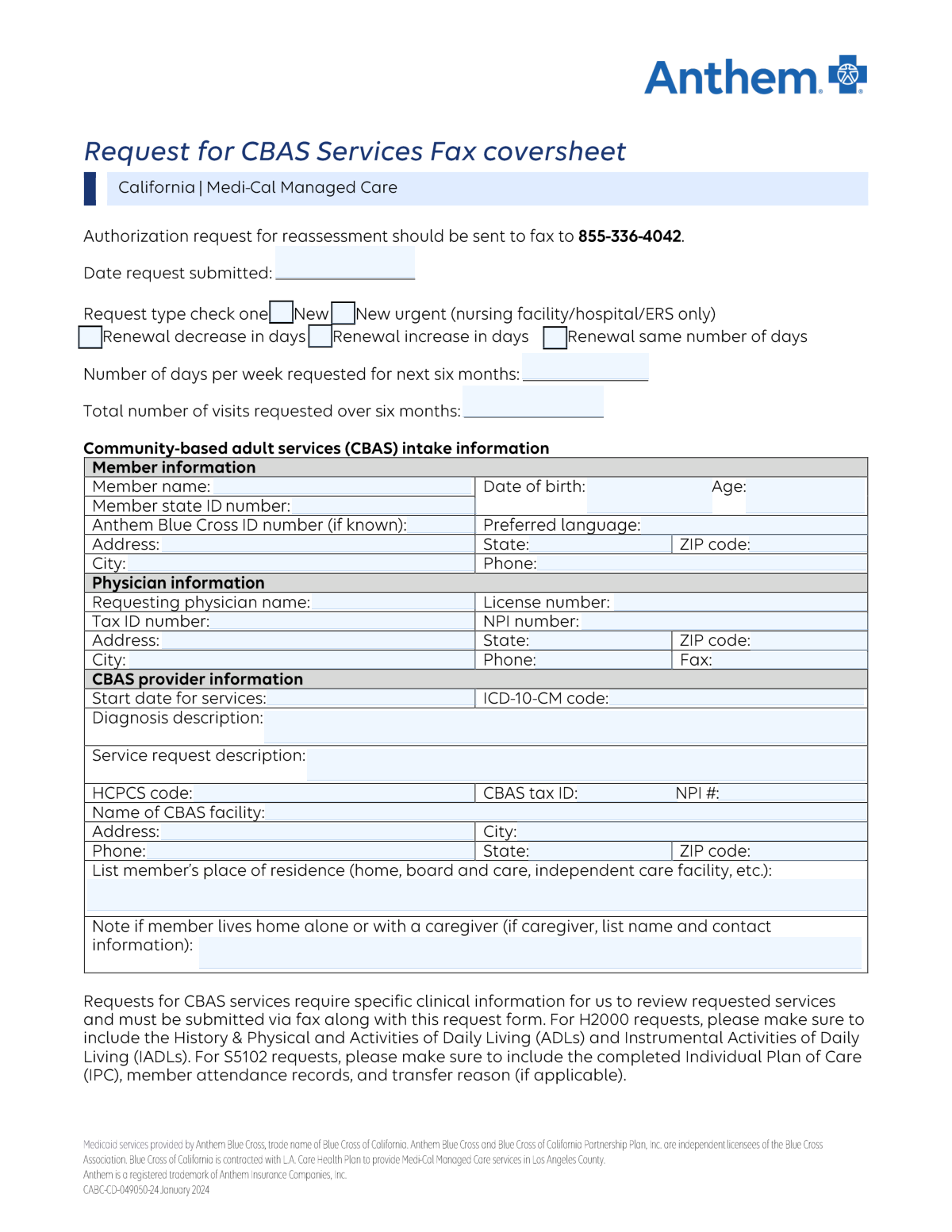
Yes! You can use AI to fill out Anthem Blue Cross Community-Based Adult Services (CBAS) Authorization Request Form
This form is a formal request submitted by physicians to Anthem Blue Cross to obtain pre-approval for Community-Based Adult Services (CBAS) for a patient. It requires detailed information about the member, the requesting physician, the CBAS provider, and a thorough medical justification including diagnosis codes and service descriptions to establish medical necessity. Today, this form can be filled out quickly and accurately using AI-powered services like Instafill.ai, which can also convert non-fillable PDF versions into interactive fillable forms.
Our AI automatically handles information lookup, data retrieval, formatting, and form filling.
It takes less than a minute to fill out Anthem CBAS Authorization Request using our AI form filling.
Securely upload your data. Information is encrypted in transit and deleted immediately after the form is filled out.
Form specifications
| Form name: | Anthem Blue Cross Community-Based Adult Services (CBAS) Authorization Request Form |
| Number of pages: | 1 |
| Language: | English |
| Categories: | authorization forms, service authorization forms |
Instafill Demo: How to fill out PDF forms in seconds with AI
How to Fill Out Anthem CBAS Authorization Request Online for Free in 2026
Are you looking to fill out a ANTHEM CBAS AUTHORIZATION REQUEST form online quickly and accurately? Instafill.ai offers the #1 AI-powered PDF filling software of 2026, allowing you to complete your ANTHEM CBAS AUTHORIZATION REQUEST form in just 37 seconds or less.
Follow these steps to fill out your ANTHEM CBAS AUTHORIZATION REQUEST form online using Instafill.ai:
- 1 Navigate to Instafill.ai and upload or select the Anthem CBAS Authorization Request form.
- 2 Provide the Member's Information, including their name, state and Anthem ID numbers, date of birth, and address.
- 3 Enter the Requesting Physician's details, such as name, NPI and Tax ID numbers, and practice contact information.
- 4 Fill in the service justification section with the service start date, ICD-10-CM diagnosis code, and a detailed description of the diagnosis and requested services.
- 5 Input the CBAS Provider's details, including the facility name, address, Tax ID, NPI, and the relevant HCPCS code.
- 6 Review all the information auto-populated by the AI to ensure accuracy and completeness across all sections.
- 7 Submit the completed and verified form to Anthem Blue Cross as per their submission guidelines.
Our AI-powered system ensures each field is filled out correctly, reducing errors and saving you time.
Why Choose Instafill.ai for Your Fillable Anthem CBAS Authorization Request Form?
Speed
Complete your Anthem CBAS Authorization Request in as little as 37 seconds.
Up-to-Date
Always use the latest 2026 Anthem CBAS Authorization Request form version.
Cost-effective
No need to hire expensive lawyers.
Accuracy
Our AI performs 10 compliance checks to ensure your form is error-free.
Security
Your personal information is protected with bank-level encryption.
Frequently Asked Questions About Form Anthem CBAS Authorization Request
This form is used to request authorization for Community-Based Adult Services (CBAS) for a member. It gathers necessary information about the member, the requesting physician, and the CBAS provider to justify the need for services.
Typically, the requesting physician's office or the Community-Based Adult Services (CBAS) provider completes this form on behalf of the member. It requires detailed medical and provider information that they would have on file.
The NPI is a unique national ID for healthcare providers, the Tax ID is for federal tax purposes, and the License Number is the state-issued credential to practice. All three are required for proper provider identification and billing.
You should still complete the form with all other available information, especially the Member's State ID Number. The health plan can often locate the member using other details like their name and date of birth.
The ICD-10-CM code specifies the member's diagnosis (the 'why' for the service). The HCPCS code identifies the specific services or procedures being requested (the 'what').
To calculate the total visits, multiply the 'Days Per Week Requested' by the number of weeks in the six-month period, which is approximately 26 weeks. For example, 3 days per week would be about 78 total visits.
This section requires a detailed written description of the member's diagnosis and a clear explanation of the specific services being requested. Be as specific as possible to justify the medical necessity of the services.
You only need to provide caregiver details if the member's place of residence is listed as 'home' and they have a caregiver. If the member lives alone or in a facility, this section can be left blank.
The form should be submitted to the member's health plan, Anthem Blue Cross. Refer to your provider manual or contact the health plan directly for the correct fax number or mailing address for prior authorization requests.
The 'Requesting Physician' is the doctor who is diagnosing the patient and recommending the services. The 'CBAS Provider' is the facility or agency that will actually be delivering the Community-Based Adult Services.
Yes, services like Instafill.ai use AI to accurately auto-fill form fields, which can save significant time and reduce errors. This is especially helpful for offices that handle many similar forms.
Simply upload the form to the Instafill.ai platform. The AI will identify the fields, allowing you to enter the information once and have it automatically populate the correct fields across the document.
You can use a service like Instafill.ai to solve this problem. Instafill.ai can convert flat, non-fillable PDFs into interactive, fillable forms that you can easily complete and save online.
Compliance Anthem CBAS Authorization Request
Validation Checks by Instafill.ai
1
Member Age and Date of Birth Consistency
This check validates that the entered 'Member Age' is consistent with the age calculated from the 'Member Date of Birth'. This cross-field validation is crucial for verifying member identity and confirming eligibility for age-specific programs or benefits. If the age and date of birth do not align, the submission should be flagged for manual review to correct the data entry error, as it could lead to incorrect processing or denial of services.
2
Service Start Date Logical Chronology
This validation ensures the 'Service Start Date' is on or after the 'Date Request Submitted'. Requesting services for a date prior to the submission date is logically impossible and indicates a data entry error. This check prevents the processing of invalid requests and ensures accurate tracking of service authorization timelines. A failed validation would require the user to correct one or both dates before submission.
3
NPI Number Format and Structure
This check verifies that the 'NPI Number' for both the physician and the CBAS provider is a valid 10-digit number. The National Provider Identifier is a standard, unique identifier for health care providers, and its accuracy is critical for billing, claims processing, and regulatory compliance. An invalid NPI format would prevent the system from correctly identifying the provider, leading to claim rejection and payment delays.
4
ICD-10-CM Code Validity
This validation confirms that the provided 'ICD-10-CM Code' is a valid and billable code within the official ICD-10-CM code set. Using an invalid, outdated, or non-specific code can lead to claim denials and delays in service authorization. The check ensures that the diagnosis is coded correctly for medical necessity justification and proper data analysis. If the code is invalid, the form should prompt the user to find and enter a valid diagnosis code.
5
HCPCS Code Format and Validity
This check ensures the 'HCPCS Code' follows the correct format (typically a letter followed by four digits) and represents a valid service code. The Healthcare Common Procedure Coding System is used to identify specific medical services, procedures, and products. An incorrect code would result in a mismatch between the service requested and the service billed, leading to automatic claim rejection and requiring resubmission.
6
Tax ID Number Format
This validation ensures that the 'Tax ID Number' for the physician and the 'CBAS Tax ID' are in the correct 9-digit format for an Employer Identification Number (EIN). This number is essential for financial transactions, tax reporting, and verifying the legitimacy of the provider entity. An incorrectly formatted Tax ID will cause failures in payment processing and provider verification systems.
7
Visit Request Consistency
This check verifies that the 'Total Visits Requested' is logically consistent with the 'Days Per Week Requested' over the specified six-month period (approximately 26 weeks). For example, if 3 days per week are requested, the total visits should be around 78. This validation helps catch significant data entry errors and ensures the service request volume is coherent and intentional. A discrepancy would trigger a warning asking the user to confirm the requested amounts.
8
Conditional Caregiver Information Requirement
This validation enforces a conditional rule where the 'Caregiver Information' field must be filled out if the 'Member's Place of Residence' is selected as 'home' and the presence of a caregiver is indicated. This ensures that for members receiving care at home, essential contact information for the caregiver is captured, which is vital for care coordination and emergency situations. If the condition is met but the information is missing, the form cannot be submitted.
9
Completeness of Member Identifying Information
This check ensures that all critical member identification fields, such as 'Member Name', 'Member State ID Number', 'Member Date of Birth', and 'Member Address', are not empty. This information is fundamental to uniquely identify the correct individual in the health plan's system and prevent duplicate records or misidentification. A failure to provide this complete information would block the submission until all required fields are populated.
10
Diagnosis Code and Description Correlation
This validation ensures that if an 'ICD-10-CM Code' is entered, the corresponding 'Diagnosis Description' field is not left empty, and vice-versa. A code without a description is ambiguous for human reviewers, while a description without a code cannot be processed by automated systems. This check guarantees that both machine-readable and human-readable diagnosis information are present, which is essential for a comprehensive review of medical necessity.
11
State and ZIP Code Coherence
This check validates that the entered 'ZIP Code' corresponds to the selected 'State' for the member, physician, and facility addresses. This improves data accuracy and ensures mail can be successfully delivered to the correct address. It also helps in assigning the request to the correct regional processing office. If a mismatch is found, the user should be prompted to correct either the state or the ZIP code.
12
Phone Number Format Validation
This check verifies that all phone number fields ('Member Phone', 'Physician Phone Number', 'Facility Phone') contain a valid 10-digit phone number, ignoring common formatting characters like parentheses or hyphens. Accurate contact information is critical for communication regarding the service request, care coordination, and resolving any issues that may arise. An invalid phone number format would prevent submission until a valid number is entered.
Common Mistakes in Completing Anthem CBAS Authorization Request
This occurs when the written 'Diagnosis Description' or 'Service Request Description' does not clinically align with the provided ICD-10-CM or HCPCS codes. This often happens due to clerical error or using a familiar but incorrect code. Such a mismatch is a major red flag during utilization review and will almost certainly lead to a request for more information or an outright denial, delaying patient care. To avoid this, meticulously cross-reference the descriptions with the latest official coding manuals before submission.
The form requests separate identifiers (NPI, Tax ID) for the 'Requesting Physician' and the 'CBAS Provider'. A frequent error is entering the physician's NPI or Tax ID into the CBAS provider's fields, or vice-versa. This mistake can cause billing rejections and claim processing failures, as the service provider will not match the submitted credentials. Always verify you are entering the correct NPI and Tax ID for each distinct entity listed on the form.
Users often enter numbers in the 'Days Per Week Requested' and 'Total Visits Requested' fields that do not logically align for a six-month period. For example, requesting 3 days per week but only 50 total visits. This inconsistency forces the reviewer to guess the true intent, leading to processing delays or an incorrect authorization. To prevent this, calculate the total visits by multiplying the days per week by 26 (the approximate number of weeks in six months) and ensure the numbers are consistent.
The 'Diagnosis Description' and 'Service Request Description' fields are often filled with generic or brief phrases that lack sufficient clinical detail to establish medical necessity. This is a primary reason for service denials, as reviewers cannot approve what is not justified. To avoid this, provide a thorough, specific narrative that clearly explains the patient's condition, functional limitations, and why the requested services are essential for their treatment plan.
Submitting an invalid, incomplete, or outdated ICD-10-CM code is a common error that results in immediate processing holds or denials. For instance, using a code that lacks the required level of specificity (e.g., not using all required characters) or a code that has been retired. This halts the authorization process until a valid code is provided. Using up-to-date coding software or resources is crucial, and AI-powered form fillers like Instafill.ai can help validate codes against current databases to prevent these errors.
A simple but frequent mistake is entering a 'Member Age' that does not accurately correspond to the provided 'Member Date of Birth'. This can happen due to a manual calculation error or failing to update the age from a previous form. While it seems minor, this data discrepancy can trigger fraud alerts or cause the submission to be flagged for manual review, delaying the request. Always double-check that the age is correctly calculated based on the date of birth and the submission date.
Fields like 'Member State ID Number', 'NPI Number', and 'Tax ID Number' are highly susceptible to data entry errors such as transposed digits or missing characters. A single incorrect digit will cause the system to fail when verifying the member's eligibility or the provider's credentials, leading to rejection. To prevent this, carefully proofread all numbers after entry. AI-powered tools like Instafill.ai can reduce these errors by auto-populating information from a secure profile, ensuring accuracy.
The form specifies that 'Caregiver Information' should only be filled out if the member lives at home and has a caregiver. Mistakes include either failing to provide this information when it's required or filling it out when the member lives in a facility. This can impact the assessment of the member's support system and care plan, potentially delaying approval. Pay close attention to conditional logic on forms to ensure all required information is provided correctly.
Omitting the 'Member State ID Number' or the 'Anthem Blue Cross ID Number' is a critical error that prevents the processing entity from identifying the member and verifying their eligibility. While the Anthem ID is marked as 'if known', the State ID is typically mandatory for verification. Leaving these fields blank will cause the form to be returned as incomplete, stopping the entire request process. If the form is a non-fillable PDF, a tool like Instafill.ai can convert it into a smart, fillable version that can highlight required fields to prevent omissions.
Date fields such as 'Date Request Submitted' and 'Service Start Date' are often filled out with inconsistent or ambiguous formats (e.g., MM-DD-YY, DD/MM/YYYY). This can lead to data entry errors in the backend system, potentially scheduling services for the wrong year or month. To avoid this, always use the standard MM/DD/YYYY format to ensure clarity and prevent processing delays. Advanced form-filling tools can automatically enforce correct date formatting.
Saved over 80 hours a year
“I was never sure if my IRS forms like W-9 were filled correctly. Now, I can complete the forms accurately without any external help.”
Kevin Martin Green
Your data stays secure with advanced protection from Instafill and our subprocessors

Robust compliance program
Transparent business model
You’re not the product. You always know where your data is and what it is processed for.
ISO 27001, HIPAA, and GDPR
Our subprocesses adhere to multiple compliance standards, including but not limited to ISO 27001, HIPAA, and GDPR.
Security & privacy by design
We consider security and privacy from the initial design phase of any new service or functionality. It’s not an afterthought, it’s built-in, including support for two-factor authentication (2FA) to further protect your account.
Fill out Anthem CBAS Authorization Request with Instafill.ai
Worried about filling PDFs wrong? Instafill securely fills anthem-blue-cross-community-based-adult-services-cbas-authorization-request-form forms, ensuring each field is accurate.