Yes! You can use AI to fill out Disability Benefits Questionnaire (DBQ) - Muscle Injuries
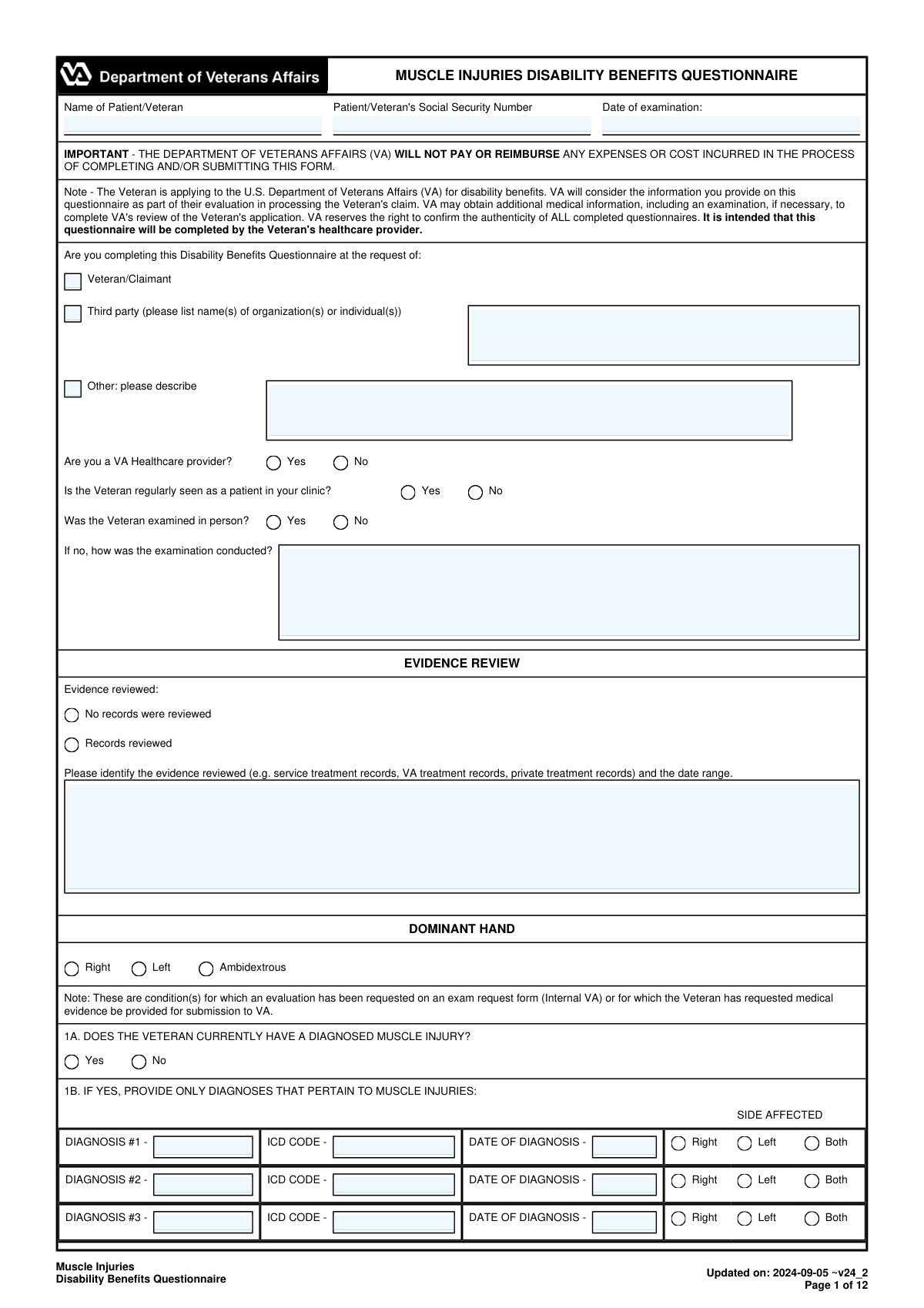
The Muscle Injuries Disability Benefits Questionnaire (DBQ) is a standardized form from the U.S. Department of Veterans Affairs (VA) used by healthcare providers to document the severity and impact of a veteran's muscle injuries. This detailed questionnaire provides crucial medical evidence for the VA to accurately rate a disability claim related to conditions affecting muscles throughout the body. Today, this form can be filled out quickly and accurately using AI-powered services like Instafill.ai, which can also convert non-fillable PDF versions into interactive fillable forms.
Muscle Injuries DBQ is part of the
benefit forms, DBQ forms, disability benefits forms and disability forms categories on Instafill.
Our AI automatically handles information lookup, data retrieval, formatting, and form filling.
It takes less than a minute to fill out Muscle Injuries DBQ using our AI form filling.
Securely upload your data. Information is encrypted in transit and deleted immediately after the form is filled out.
Form specifications
| Form name: | Disability Benefits Questionnaire (DBQ) - Muscle Injuries |
| Number of fields: | 491 |
| Number of pages: | 12 |
| Filled form examples: | Form Muscle Injuries DBQ Examples |
| Language: | English |
More forms in Benefit forms
Instafill Demo: How to fill out PDF forms in seconds with AI
How to Fill Out Muscle Injuries DBQ Online for Free in 2026
Are you looking to fill out a MUSCLE INJURIES DBQ form online quickly and accurately? Instafill.ai offers the #1 AI-powered PDF filling software of 2026, allowing you to complete your MUSCLE INJURIES DBQ form in just 37 seconds or less.
Follow these steps to fill out your MUSCLE INJURIES DBQ form online using Instafill.ai:
- 1 Navigate to Instafill.ai and upload or select the Muscle Injuries DBQ form.
- 2 The AI will scan the form, identifying all fields for patient information, medical history, and specific muscle assessments.
- 3 Enter the veteran's identification details, including their full name, Social Security Number, and the date of examination.
- 4 Systematically complete the questionnaire by providing diagnoses, ICD codes, and checking boxes for all relevant muscle groups (I-XXIII) affected by injury.
- 5 Document the physical examination findings, including strength ratings (0/5 to 5/5) for movements like shoulder abduction, elbow flexion, and knee extension.
- 6 Detail the functional impact of the injuries, use of assistive devices, and any other pertinent findings or diagnostic test results.
- 7 Review all entered information for accuracy, then have the examiner electronically sign, date, and provide their professional credentials to finalize the document.
Our AI-powered system ensures each field is filled out correctly, reducing errors and saving you time.
Why Choose Instafill.ai for Your Fillable Muscle Injuries DBQ Form?
Speed
Complete your Muscle Injuries DBQ in as little as 37 seconds.
Up-to-Date
Always use the latest 2026 Muscle Injuries DBQ form version.
Cost-effective
No need to hire expensive lawyers.
Accuracy
Our AI performs 10 compliance checks to ensure your form is error-free.
Security
Your personal information is protected with bank-level encryption.
Frequently Asked Questions About Form Muscle Injuries DBQ
This is a Disability Benefits Questionnaire (DBQ) for muscle injuries. It is used by the VA to evaluate a veteran's disability claim and should be completed by a qualified healthcare provider based on a medical examination.
You should list all medical records you reviewed to complete the questionnaire, such as service treatment records, VA treatment records, or private medical records. Be sure to include the date range for the documents you reviewed.
The form provides examples of muscles within each group to guide you (e.g., Group V includes biceps and brachialis). Select the group that best corresponds to the veteran's diagnosed injury based on your clinical assessment.
This is a standard medical scale for muscle strength, where 5/5 is normal strength and 0/5 is no muscle movement. You should rate the veteran's strength for specific movements based on your physical examination findings.
The form provides space for three initial diagnoses. If there are more, you can list them in the 'Additional Muscle Injury Diagnoses' free-text field and use the 'Multiple Muscle Injury Clarification' section to detail the symptoms for each.
If the exam was not face-to-face, you must check the 'No' box for an in-person examination. Then, you need to describe the method used, such as telehealth, records review, or a phone interview, in the provided field.
In Section 7, indicate 'Yes' for assistive devices, check the box for 'Cane(s)', and specify the frequency of use. You should also describe which medical condition requires the use of the cane in the narrative field.
The completed form is typically given to the veteran or their representative, who submits it to the VA as part of their disability claim. The VA will then use this medical evidence to help make a decision on the claim.
Yes, services like Instafill.ai use AI to auto-fill form fields accurately, which can save time on repetitive information like patient demographics. This allows you to focus more on entering the detailed clinical findings from your examination.
If you have a non-fillable or 'flat' PDF, you can use a service like Instafill.ai. It can convert the static PDF into an interactive, fillable form online, making it much easier to complete electronically.
Simply upload the Muscle Injuries DBQ form to the Instafill.ai platform. The AI will identify the fields, allowing you to fill them out interactively and use auto-fill features before downloading or printing the completed document.
If the veteran's muscle injury affects their ability to work, you should describe how. Provide specific examples, such as difficulty lifting, inability to stand for long periods, or other limitations that impact their job performance.
Compliance Muscle Injuries DBQ
Validation Checks by Instafill.ai
1
Validate Social Security Number Format
This check ensures the 'Patient/Veteran Social Security Number' is entered in a valid format, such as XXX-XX-XXXX or a 9-digit number without dashes. It is crucial for correctly identifying the patient and linking records across systems. If the format is invalid, the system should reject the submission and prompt the user to correct the entry.
2
Chronological Date Validation
Verifies that the 'Date of Diagnosis' is not after the 'Date of Examination', and that the 'Date of Examination' is not in the future. This maintains the logical timeline of events, as a diagnosis cannot be recorded on this form before the examination has occurred. A failure would indicate a data entry error that could invalidate the medical record, requiring user correction.
3
Conditional Diagnosis Section Requirement
Ensures that if 'Currently Diagnosed Muscle Injury (Yes/No)' is marked as 'Yes', at least 'Diagnosis #1' and its corresponding 'ICD Code' and 'Date of Diagnosis' are provided. Conversely, if 'No' is selected, all diagnosis fields (Diagnosis #1, #2, #3) must be empty. This prevents incomplete or contradictory information about the veteran's medical conditions.
4
Requester Type Logic and Completeness
This validation checks that only one requester type ('Veteran/Claimant', 'Third party', 'Other') is selected. It also enforces that if 'Third party' is checked, the 'Third-Party Requester Name(s)' field is not empty, and if 'Other' is checked, the 'Other Requester Description' is not empty. This ensures clarity and completeness regarding who initiated the questionnaire.
5
Exclusive Choice for Dominant Hand
Validates that for the 'Dominant Hand' section, only one option ('Right', 'Left', or 'Ambidextrous') is selected. This prevents ambiguous or impossible data, such as a user selecting both 'Right' and 'Left'. This rule is critical for ensuring data integrity for any set of mutually exclusive options on the form.
6
Conditional Evidence Description
This check verifies that if the 'Records reviewed' box is checked in the 'EVIDENCE REVIEW' section, the 'Evidence Reviewed and Date Range' text area must contain information. If 'No records were reviewed' is checked, this text area should be empty. This rule ensures that claims of evidence review are properly substantiated with details.
7
Muscle Group Injury Dependency
Ensures that if a user indicates 'No' to a primary injury history question (e.g., 'Shoulder Girdle/Arm Injury History (3A Yes/No)'), all subsequent detailed muscle group selections within that section (e.g., Group I, Group II) are disabled or cleared. This enforces the form's hierarchical structure and prevents users from providing details for a condition they claim the veteran does not have.
8
Side Affected Exclusivity
For any diagnosis or muscle group, this validation ensures that only one of 'Right', 'Left', or 'Both' can be selected for the 'Side affected'. Selecting 'Right' and 'Left' simultaneously when a 'Both' option exists is redundant and confusing. This check enforces clear and unambiguous data entry for laterality.
9
Muscle Atrophy Measurement Logic
If 'Muscle Atrophy Present (Yes/No)' is 'Yes', this check validates two things: first, that the measurement fields are filled, and second, that the 'Atrophied Side Circumference (cm)' value is numerically less than the 'Normal Side Circumference (cm)' value. This is a logical check based on the medical definition of atrophy and prevents erroneous measurements from being recorded.
10
Assistive Device Specification
Verifies that if 'Assistive Devices Used (Yes/No)' is answered 'Yes', at least one specific device (e.g., 'Wheelchair', 'Cane(s)') is checked. Furthermore, it ensures that if a device is checked, its corresponding 'frequency of use' is also selected. This prevents a vague 'Yes' answer without the necessary details for a complete assessment.
11
Conditional Examination Method Description
This validation ensures that if 'Examined in person - No' is selected, the 'Examination Method if Not In Person' text field must be filled out. This is critical for understanding the context and potential limitations of the evaluation, as a records review or telehealth exam is different from a face-to-face assessment. Failure to provide this detail would leave a critical gap in the examination record.
12
ICD Code Format Validation
Checks that the 'ICD Code' fields for each diagnosis follow a standard International Classification of Diseases format (e.g., M62.81). This is essential for accurate data processing, system interoperability, and proper claims adjudication. An invalid format could lead to processing delays or rejections, so the user should be prompted to enter a valid code.
13
Functional Impact Explanation Requirement
Ensures that if the user checks 'Yes' in 'SECTION X - FUNCTIONAL IMPACT', the corresponding 'Work Impact Description' text area must be completed. A simple 'Yes' is insufficient for evaluation purposes; a description of how the condition impacts work is required for a complete picture. This validation forces the user to provide the necessary context.
14
Strength Rating Exclusivity
For each muscle strength test (e.g., 'Shoulder Abduction Strength'), this check ensures that only one rating (from 0/5 to 5/5) is selected for the right side and only one for the left side. It is impossible for a muscle to have multiple strength ratings at the same time. This validation prevents contradictory and nonsensical clinical data from being submitted.
Common Mistakes in Completing Muscle Injuries DBQ
Examiners often list a muscle injury diagnosis but neglect to include the corresponding ICD code or the date of diagnosis. This happens due to oversight or not having the information readily available during the examination. An incomplete diagnosis section can lead to claim processing delays or requests for clarification, as the VA requires this specific data to properly categorize and evaluate the condition.
This form contains numerous conditional fields, where answering 'Yes' requires filling out subsequent sections. A frequent error is checking 'Yes' to a condition (e.g., 'Currently Diagnosed Muscle Injury') but leaving the required detailed fields blank, or conversely, checking 'No' but still filling in the details. This creates contradictions that can invalidate the section and require the form to be returned for correction, delaying the veteran's claim.
In the 'EVIDENCE REVIEW' section, simply writing 'medical records' is a common but critical mistake. This field requires a specific list of the documents reviewed (e.g., 'Service Treatment Records,' 'Private MRI report from Dr. Smith') and their corresponding date ranges. Vague entries weaken the evidentiary value of the examination, as VA raters cannot verify the basis of the examiner's opinions, potentially leading to a lower disability rating or denial.
When documenting cardinal symptoms like 'Loss of power' or 'Weakness,' the form requires identifying the specific muscle group affected (I-XXIII). Examiners frequently check a symptom but fail to specify the associated muscle group, especially when multiple injuries exist. This omission makes it impossible for the VA to accurately assess the functional impact of each distinct injury, which can result in an under-evaluated claim.
After indicating a history of injury to a specific body part (e.g., 'Shoulder Girdle/Arm Injury History'), the examiner must complete the corresponding muscle strength rating tables. A common oversight is to affirm the injury history but then leave the 0/5 to 5/5 strength rating checkboxes blank for the affected joints. Without this objective data, the VA lacks crucial information to determine the level of functional impairment, which directly affects the disability rating.
For veterans with multiple injuries, the 'Multiple Muscle Injury Clarification' text box is one of the most important fields on the form, yet it is often left blank. Failing to describe which findings and symptoms are attributable to each specific injury can lead to the VA improperly combining ratings or misinterpreting the overall disability picture. To avoid this, examiners must clearly delineate the functional impact of each muscle group injury separately.
When muscle atrophy is present, the form requires specific circumference measurements in centimeters for both the atrophied side and the normal side for comparison. Examiners often check 'Yes' for atrophy but fail to record these objective measurements. Without this quantitative data, the VA rater cannot accurately grade the severity of the atrophy according to rating schedules, likely resulting in a lower-than-warranted evaluation.
The section on assistive devices requires not only identifying the device used (e.g., cane, brace) but also describing the medical condition that necessitates its use. A frequent mistake is to list a device without explaining which muscle injury requires it. This disconnect can prevent the VA from assigning a higher disability rating that is often warranted by the need for a prescribed assistive device for locomotion.
A form is invalid without complete and legible examiner information, yet this section is often rushed and left incomplete. Common errors include a missing signature, date, medical license number, or NPI number. Such omissions will cause the form to be immediately rejected by the VA, forcing the veteran to start the process over and causing significant, avoidable delays in their benefits claim.
Due to the form's complexity with over 20 muscle groups and numerous yes/no questions, it is easy to make contradictory selections. For example, an examiner might check 'No' for any history of foot/leg injury in section 3C, but then provide strength ratings for ankle dorsiflexion later in the form. These inconsistencies undermine the report's credibility and will almost certainly trigger a request for clarification from the VA. Using a tool like Instafill.ai can help prevent these errors by enforcing conditional logic and ensuring consistency. If the form is a non-fillable PDF, Instafill.ai can also convert it to an interactive, fillable version to streamline the process.
Saved over 80 hours a year
“I was never sure if my IRS forms like W-9 were filled correctly. Now, I can complete the forms accurately without any external help.”
Kevin Martin Green
Your data stays secure with advanced protection from Instafill and our subprocessors

Robust compliance program
Transparent business model
You’re not the product. You always know where your data is and what it is processed for.
ISO 27001, HIPAA, and GDPR
Our subprocesses adhere to multiple compliance standards, including but not limited to ISO 27001, HIPAA, and GDPR.
Security & privacy by design
We consider security and privacy from the initial design phase of any new service or functionality. It’s not an afterthought, it’s built-in, including support for two-factor authentication (2FA) to further protect your account.
Fill out Muscle Injuries DBQ with Instafill.ai
Worried about filling PDFs wrong? Instafill securely fills disability-benefits-questionnaire-dbq-muscle-injuries forms, ensuring each field is accurate.



