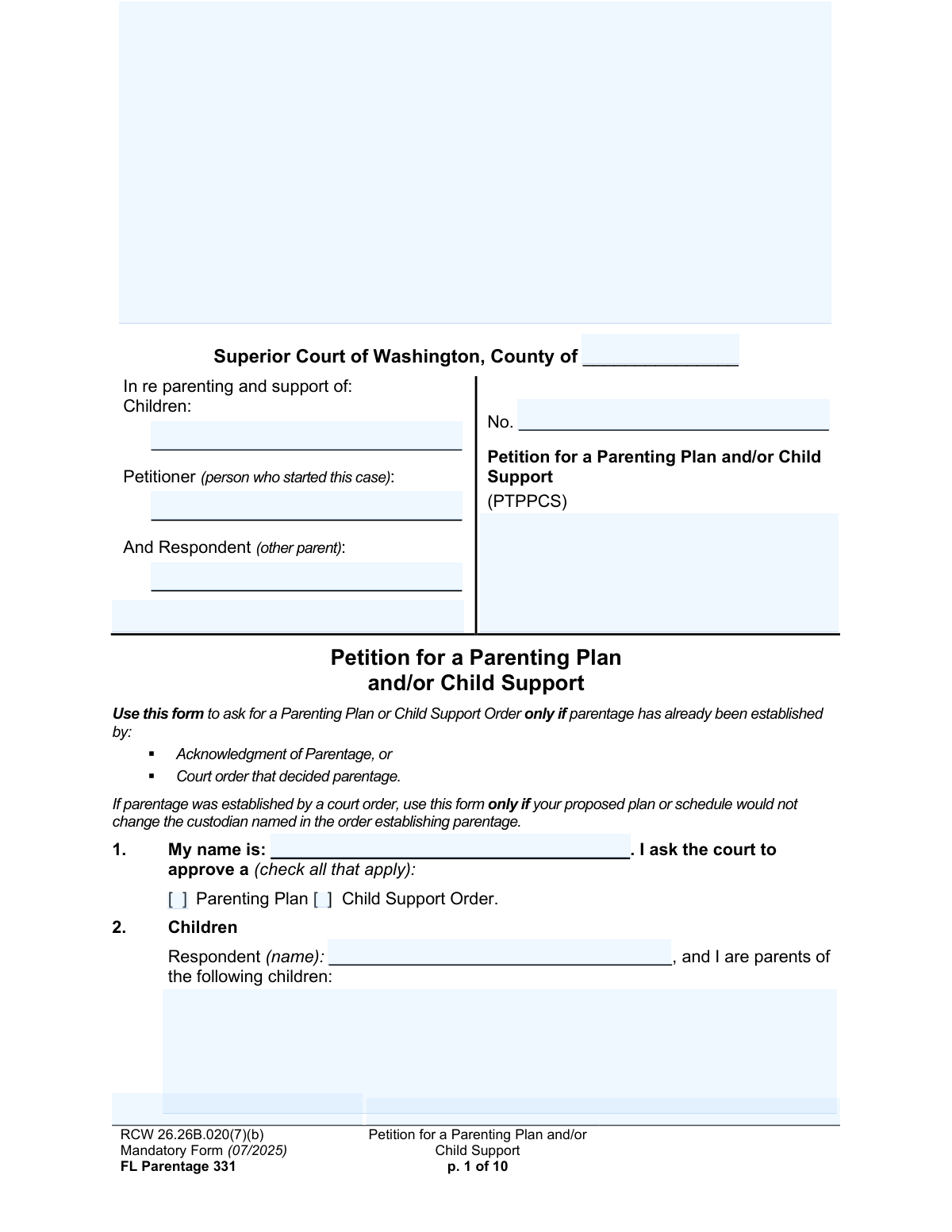
Yes! You can use AI to fill out FL Parentage 331, Petition for a Parenting Plan and/or Child Support

Form FL Parentage 331, Petition for a Parenting Plan and/or Child Support, is a legal document used in Washington State to ask the Superior Court for a formal parenting plan or child support order. It is specifically for cases where the parents were not married and parentage has already been legally established through a court order or an Acknowledgment of Parentage. This petition is crucial for creating legally enforceable guidelines for custody, visitation, and financial responsibilities for the children. Today, this form can be filled out quickly and accurately using AI-powered services like Instafill.ai, which can also convert non-fillable PDF versions into interactive fillable forms.
Our AI automatically handles information lookup, data retrieval, formatting, and form filling.
It takes less than a minute to fill out FL Parentage 331 using our AI form filling.
Securely upload your data. Information is encrypted in transit and deleted immediately after the form is filled out.

Form specifications

Form name: FL Parentage 331, Petition for a Parenting Plan and/or Child Support
Number of pages: 10
Language: English
main-image

Instafill Demo: How to fill out PDF forms in seconds with AI

How to Fill Out FL Parentage 331 Online for Free in 2026

Are you looking to fill out a FL PARENTAGE 331 form online quickly and accurately? Instafill.ai offers the #1 AI-powered PDF filling software of 2026, allowing you to complete your FL PARENTAGE 331 form in just 37 seconds or less.
Follow these steps to fill out your FL PARENTAGE 331 form online using Instafill.ai:
  1. 1 Navigate to Instafill.ai and upload or select the FL Parentage 331 form.
  2. 2 Provide the case caption information, including the county, court, and the full names of the Petitioner, Respondent, and children involved.
  3. 3 Enter detailed information about each child, their age, and current living situation, and answer questions regarding how parentage was legally established.
  4. 4 Complete the sections on jurisdiction, confirming the court's authority over the parents and children, and disclose any other relevant court cases or individuals with legal rights to the children.
  5. 5 Clearly state your requests by checking the appropriate boxes for a Parenting Plan, Child Support Order, protection orders, or restraining orders, and attach any required supporting documents.
  6. 6 Use the AI assistant to review all entered information for accuracy and consistency before finalizing the document.
  7. 7 Securely download, print, sign the declaration under penalty of perjury, and file the completed petition with the correct Washington Superior Court.

Our AI-powered system ensures each field is filled out correctly, reducing errors and saving you time.

Why Choose Instafill.ai for Your Fillable FL Parentage 331 Form?

Speed

Complete your FL Parentage 331 in as little as 37 seconds.

Up-to-Date

Always use the latest 2026 FL Parentage 331 form version.

Cost-effective

No need to hire expensive lawyers.

Accuracy

Our AI performs 10 compliance checks to ensure your form is error-free.

Security

Your personal information is protected with bank-level encryption.

Frequently Asked Questions About Form FL Parentage 331

This form is used to ask a Washington State court to create a new Parenting Plan or Child Support Order. It is only for cases where the child's parentage has already been legally established.

You should use this form if you are a parent and parentage has been confirmed by either a court order or a signed Acknowledgment of Parentage. If you have a prior court order, you cannot use this form to change the child's legal custodian.

This is not the correct form for modifications. You must file a 'Petition to Change a Parenting Plan, Residential Schedule or Custody Order' (form FL Modify 601) to ask the court to change an existing order.

You cannot use this form until parentage is established. You must first complete the legal process to establish parentage, either through a separate court case or by filing an Acknowledgment of Parentage.

You must attach your proposed Parenting Plan (form FL All Family 140). Depending on your case, you may also need to file a copy of the parentage court order, Acknowledgment of Parentage, or the child's birth certificate.

Jurisdiction is the court's legal authority to make decisions. You must explain why the Washington court has power over the other parent (personal jurisdiction) and the children (subject matter jurisdiction) for the case to proceed.

Yes, you can request these in sections 13 and 14. However, for a Protection Order, you must also file a separate 'Petition for Protection Order' (form PO 001), and for immediate orders, you must file a motion for a temporary order.

If the other parent agrees, they can sign the 'joinder' section at the end of the form. This informs the court of their agreement and can help the case move forward more smoothly.

After filing the petition with the court clerk, you must legally serve a copy of the documents on the other parent (the Respondent). The case will then proceed according to court rules, which may include hearings before a judge.

You can still use this petition to ask the court for orders on issues that a DCS administrative order does not cover, such as post-secondary (college) support or allocating tax dependency exemptions.

Yes, services like Instafill.ai use AI to auto-fill form fields accurately and save time. This can be particularly helpful for complex legal forms with repetitive information.

You can use a service like Instafill.ai to easily complete this form online. Simply upload the PDF, and the platform will make it an interactive, fillable form you can type directly into.

If you have a non-fillable or 'flat' PDF, you can use a tool like Instafill.ai. It can convert the document into an interactive, fillable form that you can complete and save on your computer.

Compliance FL Parentage 331
Validation Checks by Instafill.ai

1
Ensures at least one primary request is selected
This check verifies that the petitioner has selected at least one of the primary action checkboxes in Section 1: 'Parenting Plan' or 'Child Support Order'. The entire purpose of the petition is to request one or both of these orders. If neither is selected, the petition has no legal request for the court to act upon, and the submission should be rejected as incomplete.
2
Validates completeness of child information
For each child listed in Section 2, this validation ensures that the child's name, age, who the child lives with, and the county/state of residence are all provided. This information is fundamental for the court to establish jurisdiction and make appropriate decisions regarding the child's welfare. Missing information for any child will result in a validation failure, requiring the user to complete all fields before proceeding.
3
Verifies correct form usage based on existing custody order
This check validates the response in Section 3 regarding a prior court order. If a parentage order exists that named a custodian, this form cannot be used to change that custodian. The validation ensures the petitioner affirms their proposal does not change the custodian, preventing the incorrect use of this form. If a change is desired, the system should block submission and direct the user to file a 'Petition to Change a Parenting Plan' (FL Modify 601).
4
Conditional requirement for parentage establishment details
This validation ensures that if the user indicates parentage was established by court order (Section 3) or by Acknowledgment (Section 4), all corresponding mandatory fields are filled. This includes the child's name, date, location/state, and case number where applicable. This documentation is critical evidence for the court to confirm that parentage is not in dispute, which is a prerequisite for this petition.
5
Ensures a basis for personal jurisdiction is claimed
This check requires that at least one checkbox is selected in Section 6 to establish the court's personal jurisdiction over the Respondent. If 'None of the above' is selected, the system should warn the user that the court cannot order child support or restraining orders. This prevents the court from issuing orders it cannot enforce and manages the petitioner's expectations.
6
Validates date logic in child's residential history
In Section 7, if the user indicates a child has lived outside the state or with non-parties, this check verifies that the 'From' and 'To' dates for each residence period are valid and logical. The 'From' date must be earlier than the 'To' date for each entry. This ensures the timeline of the child's residency for the past five years is accurate and coherent, which is crucial for determining jurisdiction under the UCCJEA.
7
Prevents logical conflict with existing Parenting Plans
This validation checks the response in Section 11. If the user selects 'Yes' to indicate a court has already approved a Parenting Plan, a warning is triggered explaining that this form cannot be used to change an existing plan. This is a critical check to prevent the filing of an incorrect petition and directs the user to the proper modification form (FL Modify 601), saving time and court resources.
8
Differentiates between court and agency child support orders
This check analyzes the user's input in Section 12 regarding existing child support orders. If the user indicates a prior order was issued by a 'court', the system will flag this as a potential error and inform the user that a modification petition is required. However, if the order was from an 'agency' (like DCS), the validation passes, as this petition can be used to obtain a superseding court order.
9
Ensures specificity for Restraining Order requests
If the petitioner requests a Restraining Order in Section 14 by checking 'Yes', this validation ensures they also select at least one specific type of protection (e.g., 'Do not disturb', 'Stay away'). A general request for a restraining order is insufficient for the court to act upon. Failure to specify the desired protections will result in a validation error prompting the user for more detail.
10
Validates completeness of weapons surrender directive
In Section 14, if the 'Prohibit weapons and order surrender' box is checked, this validation confirms that one of the three subsequent options for who receives the weapons is also selected. Furthermore, if 'other person' is chosen, the validation ensures a name is provided in the text field. This is a critical safety measure to ensure any court order regarding weapons is clear, specific, and enforceable.
11
Cross-references Summary of Requests with form body
This validation ensures that the items checked in the 'Summary of Requests' (Section 17) are consistent with the detailed requests made throughout the form. For example, if the user did not request a Protection Order in Section 13, they cannot check 'Protection Order' in Section 17. This check maintains logical consistency and prevents a final summary that misrepresents the petitioner's actual requests.
12
Verifies petitioner's declaration and signature
This check confirms that all fields in the petitioner's signature block on the final page are completed, including the city and state, date, printed name, and signature. The declaration under penalty of perjury is legally required for the document to be valid. An incomplete declaration section would render the petition invalid and lead to its rejection by the court clerk.
13
Validates conditional address requirement for joining Respondent
This validation applies if the Respondent agrees to join the petition in the final section. If the Respondent checks the box asking to be notified of hearings, the system must verify that a complete mailing address (address, city, state, zip) has been provided. Without this address, service of future legal documents would be impossible, so the form is considered incomplete.
14
Validates child's age format
This check ensures that the 'Age' entered for each child in Section 2 is a valid, non-negative integer. It prevents the entry of text, decimals, or negative numbers, which are invalid for a person's age. Maintaining data integrity for this field is important for court records and for determining eligibility for child support and other age-related matters.

Common Mistakes in Completing FL Parentage 331

Using the Wrong Form to Establish Parentage

This petition is only for cases where parentage has already been legally established by a court order or a signed Acknowledgment of Parentage. People mistakenly use this form to try and establish who the legal parents are, which will lead to the court rejecting the petition. To avoid this, carefully read the instructions on page one and use the correct form for establishing parentage if needed; this petition is for seeking a parenting plan or child support *after* parentage is settled.

Confusing a Court Order with an Acknowledgment of Parentage

Sections 3 and 4 ask how parentage was established, and filers often confuse a court order with a voluntary Acknowledgment of Parentage form. This mistake leads to filling out the wrong sections and failing to attach the correct supporting documents, causing delays and potential dismissal. To prevent this, identify whether parentage was decided by a judge in court or by signing a state form, and only complete the section that applies to your situation.

Failing to Attach Required Supporting Documents

The form requires attaching specific documents, such as a certified copy of a prior parentage order (Section 3) or a copy of the Acknowledgment of Parentage (Section 4). Petitioners frequently overlook these instructions, leading to an incomplete filing that the court cannot act on until the missing documents are provided. Always double-check each section for instructions marked with a '➢' symbol to ensure all necessary paperwork is included with your petition.

Incorrectly Requesting a Change to an Existing Court Order

This petition cannot be used to modify an existing final Parenting Plan or Child Support Order issued by a court. The form contains multiple warnings that a different petition (e.g., FL Modify 601 or FL Modify 501) must be used for modifications. Filing this form to change an order will result in its rejection, wasting time and filing fees.

Incomplete or Inaccurate 5-Year Child Residence History

In Section 7, petitioners must list everywhere the children have lived for the past five years, which is critical for establishing jurisdiction under the UCCJEA. People often provide incomplete date ranges, forget periods when a child lived with a non-parent, or omit out-of-state residences. These inaccuracies can lead to jurisdictional challenges from the other party and significant delays in the case.

Selecting the Incorrect Basis for Jurisdiction Over the Children

Section 10 contains complex legal terms like 'Exclusive, continuing jurisdiction' and 'Home state jurisdiction,' which are easily misunderstood by non-lawyers. Selecting the wrong basis or failing to provide the required details can lead a judge to conclude the court lacks authority to hear the case, resulting in dismissal. It is crucial to carefully read each option and select the one that accurately reflects your family's situation and history with the state of Washington.

Failing to Disclose Other Court Cases

Section 9 requires the disclosure of any other court cases involving the children, such as protection orders, dependency cases, or even criminal matters. Petitioners sometimes forget or intentionally omit these cases, which can damage their credibility with the court and complicate legal proceedings if discovered later. To avoid this, conduct a thorough review of your legal history and disclose every case, even if you think it is not relevant.

Forgetting to Attach the Proposed Parenting Plan

In Section 11, a petitioner may indicate they are requesting a Parenting Plan and that their proposal is attached, but then forget to actually include the separate 'Parenting Plan (form FL All Family 140)'. This leaves the court and the other party with no details about the residential schedule or decision-making authority being requested. Always ensure that any documents you state are attached are physically included in your filing packet.

Respondent Misunderstanding the 'Joinder' Section

A Respondent might sign the joinder section on page 10 believing they are simply acknowledging receipt of the petition. In reality, signing this section means they agree with all requests made by the petitioner and may waive their right to be notified of future hearings. This is a significant legal step that should only be taken after careful review and with full understanding that it constitutes an agreement to the petition's terms.

Forgetting to Sign and Date the Petition

The petitioner must sign and date the declaration under penalty of perjury on page 9 or 10 for the document to be legally valid. An unsigned petition is a common and simple mistake that will cause the court clerk to reject the entire filing, stopping the case before it even begins. AI-powered tools like Instafill.ai can help prevent this by flagging missing signature fields before submission and can also convert flat, non-fillable PDFs into interactive forms to make the process smoother.
Saved over 80 hours a year

“I was never sure if my IRS forms like W-9 were filled correctly. Now, I can complete the forms accurately without any external help.”

Kevin Martin Green

Your data stays secure with advanced protection from Instafill and our subprocessors

Robust compliance program

Transparent business model

You’re not the product. You always know where your data is and what it is processed for.

ISO 27001, HIPAA, and GDPR

Our subprocesses adhere to multiple compliance standards, including but not limited to ISO 27001, HIPAA, and GDPR.

Security & privacy by design

We consider security and privacy from the initial design phase of any new service or functionality. It’s not an afterthought, it’s built-in, including support for two-factor authentication (2FA) to further protect your account.

Fill out FL Parentage 331 with Instafill.ai

Worried about filling PDFs wrong? Instafill securely fills fl-parentage-331-petition-for-a-parenting-plan-andor-child-support forms, ensuring each field is accurate.