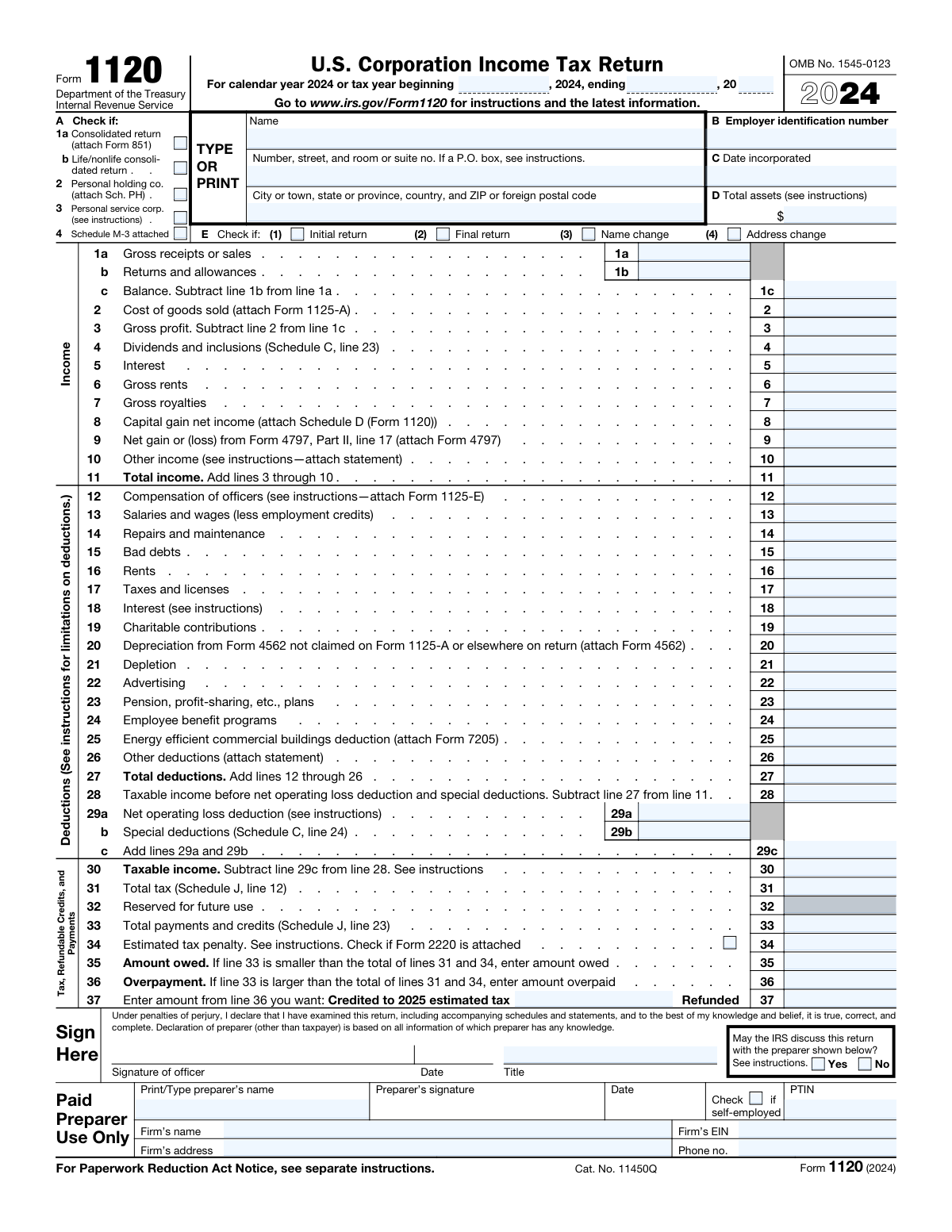
Yes! You can use AI to fill out Form 1120, U.S. Corporation Income Tax Return
Form 1120 is the standard U.S. Corporation Income Tax Return that domestic C corporations must file annually with the IRS to report their financial performance. It is a comprehensive document used to detail a corporation's income, deductions, and credits, ultimately calculating its income tax liability for the year. Today, this form can be filled out quickly and accurately using AI-powered services like Instafill.ai, which can also convert non-fillable PDF versions into interactive fillable forms.
Our AI automatically handles information lookup, data retrieval, formatting, and form filling.
It takes less than a minute to fill out Form 1120 using our AI form filling.
Securely upload your data. Information is encrypted in transit and deleted immediately after the form is filled out.
Form specifications
| Form name: | Form 1120, U.S. Corporation Income Tax Return |
| Number of fields: | 472 |
| Number of pages: | 6 |
| Language: | English |
| Categories: | income forms, income tax forms, tax forms |
Instafill Demo: How to fill out PDF forms in seconds with AI
How to Fill Out Form 1120 Online for Free in 2026
Are you looking to fill out a FORM 1120 form online quickly and accurately? Instafill.ai offers the #1 AI-powered PDF filling software of 2026, allowing you to complete your FORM 1120 form in just 37 seconds or less.
Follow these steps to fill out your FORM 1120 form online using Instafill.ai:
- 1 Navigate to Instafill.ai and upload your Form 1120 or select it from the form library.
- 2 Provide the corporation's basic information, such as its name, address, Employer Identification Number (EIN), and date of incorporation.
- 3 Enter the corporation's income figures, including gross receipts, cost of goods sold, dividends, and other income sources, into the smart fields.
- 4 List all applicable business deductions, such as officer compensation, salaries and wages, rent, taxes, and depreciation, following the AI-guided prompts.
- 5 Complete the necessary schedules, like Schedule J (Tax Computation), Schedule K (Other Information), and Schedule L (Balance Sheets), by inputting the required financial data.
- 6 Review the entire return, including all auto-calculated totals and schedules, for accuracy. The AI system will help flag potential errors or inconsistencies.
- 7 Sign the form electronically and download the completed, file-ready Form 1120 for submission to the IRS.
Our AI-powered system ensures each field is filled out correctly, reducing errors and saving you time.
Why Choose Instafill.ai for Your Fillable Form 1120 Form?
Speed
Complete your Form 1120 in as little as 37 seconds.
Up-to-Date
Always use the latest 2026 Form 1120 form version.
Cost-effective
No need to hire expensive lawyers.
Accuracy
Our AI performs 10 compliance checks to ensure your form is error-free.
Security
Your personal information is protected with bank-level encryption.
Frequently Asked Questions About Form Form 1120
Form 1120, the U.S. Corporation Income Tax Return, is used by domestic C corporations to report their income, gains, losses, deductions, and credits. All domestic corporations must file this form annually, regardless of whether they have taxable income.
You will need your corporation's Employer Identification Number (EIN), date of incorporation, and total assets. You should also have complete financial records, including gross receipts, cost of goods sold, compensation of officers, and details for all other income and deductions.
For a corporation that uses the calendar year, Form 1120 is generally due by the 15th day of the fourth month after the tax year ends, which is typically April 15th. If your corporation uses a different fiscal year, the due date is the 15th day of the fourth month following the close of its fiscal year.
To calculate your total income, you first determine your gross profit by subtracting the cost of goods sold (line 2) from your net sales (line 1c). Then, you add other income sources such as dividends (line 4), interest (line 5), rents, royalties, and capital gains to the gross profit.
Not always. If your corporation's total receipts for the tax year and its total assets at the end of the year are both less than $250,000, you are not required to complete Schedules L, M-1, and M-2. This is addressed in Schedule K, question 13.
Schedule J is used to calculate your corporation's total tax liability. This involves computing the income tax, adding other taxes like the alternative minimum tax, applying any tax credits, and tallying payments to determine if you owe more tax or are due a refund.
You must indicate this on the form by checking the appropriate box in section E at the top of page 1. Check 'Initial return' if it's your first time filing, or 'Final return' if the corporation has dissolved or liquidated during the tax year.
The return must be signed and dated by a corporate officer, such as the president, vice president, treasurer, chief accounting officer, or any other officer authorized to sign. If you use a paid preparer, they must also sign the return in the designated section.
Yes, AI-powered services like Instafill.ai can help you complete Form 1120 accurately and efficiently. These tools can auto-fill form fields based on your data, which saves time and helps reduce the chance of manual errors.
Simply upload your Form 1120 PDF to the Instafill.ai platform. The AI will analyze the document and create an interactive, fillable version where you can easily input your information, sign electronically, and then download the completed form.
If you have a non-fillable or 'flat' PDF, you can use a service like Instafill.ai to convert it into an interactive, fillable form. Just upload the document, and the platform's AI will automatically make all the fields editable for you.
'Gross receipts or sales' (line 1a) is the total amount your corporation received from all sales before any costs. 'Gross profit' (line 3) is what remains after you subtract returns, allowances, and the cost of goods sold from your gross receipts.
Compensation paid to corporate officers is reported on line 12 of the Deductions section. You must also attach Form 1125-E, Compensation of Officers, to provide detailed information for each officer.
Schedule M-1 is used to reconcile the net income (or loss) reported on the corporation's books with the taxable income reported on the tax return. It accounts for differences between financial accounting and tax accounting rules, such as non-deductible expenses or tax-exempt income.
Compliance Form 1120
Validation Checks by Instafill.ai
1
Validates Employer Identification Number (EIN) Format
This check ensures the Employer Identification Number (EIN) in field B is entered in the correct XX-XXXXXXX format. The EIN is a unique nine-digit number assigned by the IRS to business entities, and its correct format is crucial for accurate identification and processing. A failure in this validation would prevent the return from being matched to the correct corporate entity, leading to processing delays or rejection.
2
Ensures Date Incorporated is Before Tax Year End
This validation confirms that the 'Date Incorporated' (Field C) is on or before the 'Tax Year Ending Date'. A corporation cannot file a tax return for a period during which it did not legally exist. This check prevents logical impossibilities and ensures the tax period reported is valid for the entity, and failure would indicate a significant data entry error requiring correction.
3
Verifies Total Income Calculation on Line 11
This check verifies the arithmetic accuracy of Line 11 (Total income). It confirms that the value entered is the sum of lines 3 (Gross profit), 4 (Dividends), 5 (Interest), 6 (Gross rents), 7 (Gross royalties), 8 (Capital gain), 9 (Net gain/loss), and 10 (Other income). Incorrectly calculating total income would lead to errors in all subsequent tax calculations, making this a critical check for the return's integrity.
4
Verifies Total Deductions Calculation on Line 27
This check ensures the value on Line 27 (Total deductions) is the correct sum of all individual deduction lines from 12 through 26. Accurate calculation of total deductions is essential for determining the correct taxable income. An error here would result in an incorrect tax base and, consequently, an incorrect tax liability or refund.
5
Confirms Taxable Income Calculation on Line 28
This validation confirms that Line 28 (Taxable income before net operating loss deduction and special deductions) is correctly calculated by subtracting Line 27 (Total deductions) from Line 11 (Total income). This is a pivotal calculation on the form, as this figure is the starting point for applying special deductions and NOLs to arrive at the final taxable income. A miscalculation would invalidate the entire tax computation.
6
Cross-references Schedule C Dividends to Page 1, Line 4
This check ensures that the amount reported on Page 1, Line 4 (Dividends and inclusions) is identical to the total calculated on Schedule C, Line 23 (Total dividends and inclusions). This maintains consistency between the main form and its supporting schedules. A mismatch indicates a data transfer error or an incomplete schedule, which would cause the IRS to question the reported income figures.
7
Cross-references Schedule C Special Deductions to Page 1, Line 29b
This validation verifies that the amount for 'Special deductions' on Page 1, Line 29b, exactly matches the 'Total special deductions' from Schedule C, Line 24. This ensures that the detailed calculations from the schedule are correctly transferred to the main form's tax computation section. Failure to match these values would lead to an incorrect taxable income and an inaccurate tax assessment.
8
Cross-references Schedule J Total Tax to Page 1, Line 31
This check confirms that the 'Total tax' amount on Page 1, Line 31, is the same as the 'Total tax' calculated on Schedule J, Line 12. Schedule J contains the detailed tax computation, and this validation ensures the final result is accurately reflected on the first page of the return. A discrepancy would mean the final tax liability is reported incorrectly, leading to processing errors and potential notices from the IRS.
9
Validates Schedule L Balance Sheet Equation
This validation ensures the fundamental accounting equation (Assets = Liabilities + Shareholders' Equity) holds true for the balance sheet. It checks that the value on Schedule L, Line 15 (Total assets) equals the value on Line 28 (Total liabilities and shareholders' equity) for both the beginning-of-year and end-of-year columns. An unbalanced balance sheet is a critical error indicating incorrect financial data, and the return would be rejected or flagged for immediate review.
10
Validates Schedule M-1 Reconciliation with Page 1
This check verifies that the reconciled income figure on Schedule M-1, Line 10, matches the taxable income figure on Page 1, Line 28. Schedule M-1 is designed to explain the differences between book income and taxable income. If these two key figures do not match, the reconciliation is invalid and fails its primary purpose, which will trigger an IRS review.
11
Validates Schedule M-2 Retained Earnings Continuity
This check ensures the unappropriated retained earnings are consistent between schedules. It verifies that the beginning balance on Schedule M-2 (Line 1) matches the beginning balance on Schedule L (Line 25), and that the ending balance on Schedule M-2 (Line 8) matches the ending balance on Schedule L (Line 25). This confirms the roll-forward of retained earnings is arithmetically correct and consistent with the balance sheet.
12
Enforces Conditional Entry for Parent Corporation Information
This validation checks that if the 'Yes' box for Question 3 on Schedule K is checked (indicating the corporation is a subsidiary), then the parent corporation's name and EIN must be provided. This is a completeness check that ensures required information is captured based on the filer's answers. Failure to provide the parent company details when required results in an incomplete return and may affect processing, especially for consolidated groups.
13
Ensures Mutually Exclusive Amount Owed and Overpayment
This check verifies that a value greater than zero is not entered in both Line 35 (Amount Owed) and Line 36 (Overpayment). A corporation can either owe taxes or have overpaid them, but not both simultaneously. Having values in both fields is a logical contradiction that indicates a calculation error in the 'Tax, Refundable Credits, and Payments' section.
14
Validates Allocation of Overpayment on Line 37
This check ensures that the sum of the amounts on Line 37 ('Credited to 2025 estimated tax' and 'Refunded') does not exceed the total 'Overpayment' amount on Line 36. A filer cannot request a refund or credit for more than the amount they have overpaid. This validation prevents invalid refund or credit requests and ensures the disbursement of funds is arithmetically sound.
Common Mistakes in Completing Form 1120
This common mistake occurs when a filer enters an incorrect Employer Identification Number (EIN) or a corporate name that does not exactly match IRS records. This often happens due to typographical errors or using a 'doing business as' (DBA) name instead of the legal entity name. An information mismatch will cause the IRS to reject the filing, leading to significant processing delays, postponed refunds, and potential late-filing notices.
Form 1120 is a summary form that relies on numerous other schedules and forms for substantiation, such as Form 1125-A (Cost of Goods Sold) or Form 4562 (Depreciation). A frequent error is forgetting to attach these mandatory supporting documents, which renders the return incomplete. This triggers correspondence from the IRS and can halt the processing of the return until the missing information is provided. AI-powered tools like Instafill.ai can help prevent this by flagging dependencies and reminding users of required attachments.
A critical and easily detectable error is submitting a Schedule L where Total Assets (Line 15) do not equal Total Liabilities and Shareholders’ Equity (Line 28). This 'unbalanced' balance sheet signals a fundamental accounting error and guarantees IRS scrutiny. It immediately flags the return as inaccurate, leading to processing rejections and a high likelihood of a more in-depth review or audit of the corporation's books.
Schedule M-1, which reconciles book income to taxable income, is a major source of errors. Filers often fail to properly add back non-deductible expenses, such as the non-deductible portion of meals, entertainment expenses, or penalties. This mistake directly impacts the calculation of taxable income on the front page of the return, often resulting in an understatement of tax, which can lead to accuracy-related penalties and interest charges.
The analysis of retained earnings on Schedule M-2 must be consistent both internally and with other parts of the return. Common mistakes include the beginning balance (Line 1) not matching the prior year's ending balance, or the ending balance (Line 8) not tying to the corresponding line on the Schedule L balance sheet (Line 25). These reconciliation errors indicate poor record-keeping and can trigger IRS inquiries into the corporation's equity accounts.
The 'Other Information' section on Schedule K contains critical compliance questions that are often answered hastily or incorrectly. For instance, incorrectly answering 'No' to ownership questions (e.g., Question 7 regarding foreign ownership) can lead to a failure to file other required forms like Form 5472, which carries substantial penalties. Each question must be read carefully to ensure all compliance obligations are met.
Corporations with total receipts and total assets of $250,000 or more are required to complete the balance sheet (Schedule L) and reconciliation schedules (M-1 and M-2). A common mistake is for small but growing corporations to miscalculate their totals or be unaware they have crossed this threshold, leading them to file an incomplete return. The IRS will not consider the return filed until these schedules are submitted, which can result in late-filing penalties.
Despite the use of software, simple math and data entry errors remain prevalent. These include incorrect additions when totaling income or deductions, or incorrectly transcribing a final number from a supporting schedule (like Schedule J or C) to the main Form 1120. AI-powered form-filling tools like Instafill.ai can prevent these mistakes by performing calculations automatically and ensuring data is transferred accurately between related fields. If the form is a non-fillable PDF, Instafill.ai can also convert it into a smart, fillable version to reduce manual errors.
Schedule C is complex, and filers often make mistakes calculating the special deduction for dividends received. The correct deduction percentage (e.g., 50%, 65%, or 100%) depends on the level of ownership in the paying corporation. Applying the wrong percentage or misclassifying the source of the dividend leads to an incorrect special deduction, which directly impacts taxable income and can cause a significant tax misstatement.
On Schedule K, the corporation must enter a six-digit Principal Business Activity code that best describes its main source of revenue. Many filers pick a generic or outdated code without consulting the latest IRS instructions. The IRS uses these codes to benchmark companies against industry peers, and an incorrect code could cause a company's financial ratios to appear as outliers, potentially increasing the chance of an audit.
Saved over 80 hours a year
“I was never sure if my IRS forms like W-9 were filled correctly. Now, I can complete the forms accurately without any external help.”
Kevin Martin Green
Your data stays secure with advanced protection from Instafill and our subprocessors

Robust compliance program
Transparent business model
You’re not the product. You always know where your data is and what it is processed for.
ISO 27001, HIPAA, and GDPR
Our subprocesses adhere to multiple compliance standards, including but not limited to ISO 27001, HIPAA, and GDPR.
Security & privacy by design
We consider security and privacy from the initial design phase of any new service or functionality. It’s not an afterthought, it’s built-in, including support for two-factor authentication (2FA) to further protect your account.
Fill out Form 1120 with Instafill.ai
Worried about filling PDFs wrong? Instafill securely fills form-1120-us-corporation-income-tax-return forms, ensuring each field is accurate.