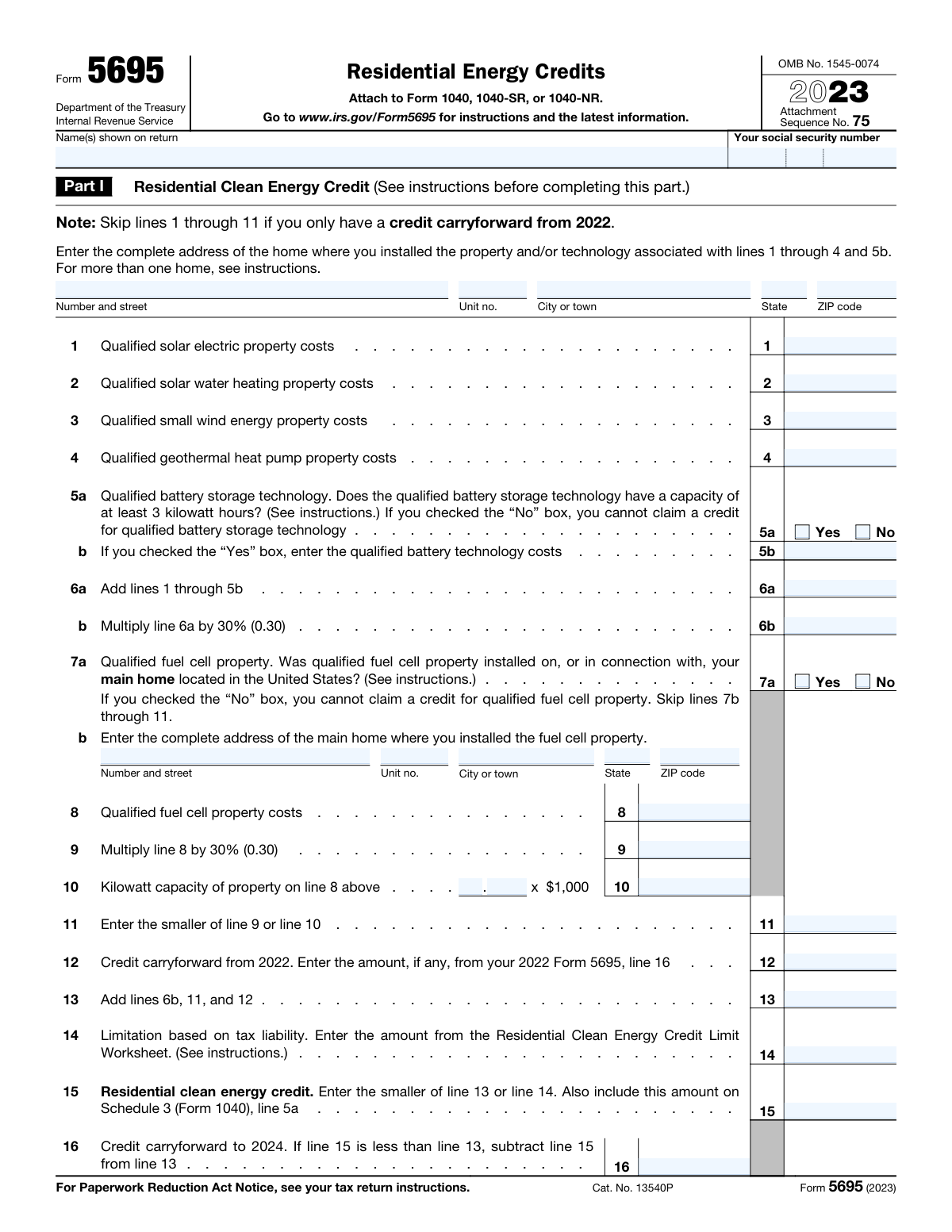
Yes! You can use AI to fill out Form 5695, Residential Energy Credits

IRS Form 5695, Residential Energy Credits, is a tax form filed by homeowners to claim two separate credits: the Residential Clean Energy Credit and the Energy Efficient Home Improvement Credit. It is essential for taxpayers who have invested in qualifying improvements like solar panels, new windows, or heat pumps to reduce their overall tax liability. Today, this form can be filled out quickly and accurately using AI-powered services like Instafill.ai, which can also convert non-fillable PDF versions into interactive fillable forms.
Form 5695 is part of the credit forms category on Instafill.
Our AI automatically handles information lookup, data retrieval, formatting, and form filling.
It takes less than a minute to fill out Form 5695 using our AI form filling.
Securely upload your data. Information is encrypted in transit and deleted immediately after the form is filled out.

Form specifications

Form name: Form 5695, Residential Energy Credits
Number of fields: 102
Number of pages: 3
Language: English
main-image

Instafill Demo: How to fill out PDF forms in seconds with AI

How to Fill Out Form 5695 Online for Free in 2026

Are you looking to fill out a FORM 5695 form online quickly and accurately? Instafill.ai offers the #1 AI-powered PDF filling software of 2026, allowing you to complete your FORM 5695 form in just 37 seconds or less.
Follow these steps to fill out your FORM 5695 form online using Instafill.ai:
  1. 1 Navigate to Instafill.ai and upload your Form 5695, or select it from the platform's library of tax forms.
  2. 2 Provide your personal taxpayer identification details, including your name and Social Security Number as they appear on your tax return.
  3. 3 Complete Part I by entering the costs and addresses for any qualified Residential Clean Energy property, such as solar, wind, geothermal, or battery storage systems.
  4. 4 Fill out Part III with the costs and details for any Energy Efficient Home Improvements, such as insulation, doors, windows, or high-efficiency HVAC systems.
  5. 5 Input any credit carryforward amounts from the previous year and provide your tax liability information to allow the AI to accurately calculate your credit limitations.
  6. 6 Review the completed form, verifying that all costs, calculations, and addresses are correct before downloading or printing the form to file with your annual tax return.

Our AI-powered system ensures each field is filled out correctly, reducing errors and saving you time.

Why Choose Instafill.ai for Your Fillable Form 5695 Form?

Speed

Complete your Form 5695 in as little as 37 seconds.

Up-to-Date

Always use the latest 2026 Form 5695 form version.

Cost-effective

No need to hire expensive lawyers.

Accuracy

Our AI performs 10 compliance checks to ensure your form is error-free.

Security

Your personal information is protected with bank-level encryption.

Frequently Asked Questions About Form Form 5695

This form, likely IRS Form 5695, is used to calculate and claim two tax credits for homeowners: the Residential Clean Energy Credit and the Energy Efficient Home Improvement Credit. You file it with your annual income tax return to reduce your tax liability.

You should file this form if you are a homeowner who paid for qualified clean energy property or energy-efficient improvements for your home during the tax year. This applies to your main home and, in some cases, a second home.

The Residential Clean Energy Credit is for new solar, wind, geothermal, and battery storage systems and generally has no dollar limit. The Energy Efficient Home Improvement Credit is for upgrades like windows, insulation, and heat pumps, and has specific annual credit limits.

You should have receipts and invoices detailing the costs of your qualified improvements, as well as any manufacturer certifications stating the products meet the required energy standards. Keep these documents with your tax records.

Yes, you can claim the Residential Clean Energy Credit for a qualified battery storage technology installation. However, it must have a capacity of at least 3 kilowatt-hours to be eligible.

Yes, this credit has several limits. There is a general annual limit of $1,200 for most items, a $2,000 limit for qualified heat pumps, and specific lower caps for things like doors ($500) and home energy audits ($150).

The Residential Clean Energy Credit (for solar, etc.) can be claimed for a vacation home, as long as you live in it for part of the year. The Energy Efficient Home Improvement Credit (for windows, insulation, etc.) can only be claimed for improvements made to your main home.

Credit carryforward allows you to apply any unused portion of your Residential Clean Energy Credit to a future tax year. This happens if your available credit is more than your total tax liability for the current year.

This form is not submitted by itself. You must complete it and attach it to your main federal income tax return, such as Form 1040, when you file your taxes.

To be the 'original user' means you are the very first person to use the new property or equipment. You cannot claim a credit for buying a home that already had these improvements or for installing used equipment.

Yes, you can claim a credit for 30% of the cost of a qualifying home energy audit, up to a maximum credit of $150. The audit must be performed by a certified auditor and include a written report.

Yes, services like Instafill.ai use AI to help you fill out forms accurately and save time. These tools can auto-fill form fields, making the process faster and reducing the chance of errors.

To use Instafill.ai, you upload the PDF form to their website. The AI technology makes the form interactive, allowing you to type your information directly into the fields before downloading the completed document.

If you have a flat or non-fillable PDF, you can use a tool like Instafill.ai. It can convert the non-fillable PDF into an interactive form that you can easily complete on your computer.

Compliance Form 5695
Validation Checks by Instafill.ai

1
SSN Format and Completeness
This check ensures that the Social Security Number field is not empty and follows the standard 9-digit format (XXX-XX-XXXX or XXXXXXXXX). It is critical for correctly identifying the taxpayer and matching records with the IRS database. If the format is incorrect or the field is empty, the form submission will be rejected to prevent processing errors and potential identity mismatches.
2
ZIP Code Format Validation
Verifies that all ZIP Code fields contain a valid 5-digit or 9-digit (ZIP+4) numeric format. This is essential for address validation, mail delivery, and ensuring the property location is within an eligible area. An invalid ZIP code will trigger an error, prompting the user to correct the entry before the form can be submitted.
3
Battery Storage Cost Eligibility
This validation enforces the rule that 'Qualified battery storage technology costs' can only be entered if the 'Yes (battery storage capacity at least 3 kWh)' box is checked. If the 'No' box is checked, the cost field must be zero or empty. This prevents taxpayers from incorrectly claiming a credit for which they are ineligible, ensuring compliance with tax law and preventing automatic rejection or future audits.
4
Clean Energy Credit Calculation (Line 6b)
This check validates that the amount on 'Line 6b' is exactly 30% of the total on 'Line 6a'. This automated calculation check prevents mathematical errors by the user, which could lead to an incorrect credit claim. If the calculated value does not match the user's entry, the system will flag the field for correction, ensuring the credit amount is calculated accurately according to the form's instructions.
5
Fuel Cell Section Dependency
This rule ensures that fields related to the Fuel Cell Property (lines 7b through 11) are only filled out if the taxpayer has checked 'Yes' on 'Line 7a (Fuel Cell Property Eligibility)'. If 'No' is checked, any data in these subsequent fields will be flagged as an error or the fields will be disabled. This prevents contradictory information and ensures that credit details are only provided when the basic eligibility criteria are met.
6
Fuel Cell Credit Limit Logic (Line 11)
This validation confirms that the value entered on 'Line 11 (Smaller of 30% cost or capacity limit)' is correctly identified as the lesser of the values from 'Line 9 (Fuel cell costs multiplied by 30%)' and 'Line 10 (Fuel cell capacity limit amount)'. This is a critical check to enforce the statutory limits on the fuel cell credit. An incorrect value would lead to a miscalculation of the total credit, so the system must enforce this comparison.
7
Total Credit Summation (Line 13)
This check verifies that the amount on 'Line 13 (Total credit before limitation)' is the correct sum of 'Line 6b (Clean Energy Credit)', 'Line 11 (Fuel Cell Credit)', and 'Line 12 (Credit carryforward from 2022)'. Accurate summation is fundamental to the integrity of the form's calculations. If the total is incorrect, the system will require the user to fix the discrepancy before proceeding, ensuring the final credit calculation is based on a correct subtotal.
8
Final Clean Energy Credit Logic (Line 15)
This validation ensures the 'Residential clean energy credit allowed' on Line 15 is the smaller of the 'Total credit before limitation' (Line 13) and the 'Credit limitation based on tax liability' (Line 14). This check is crucial for applying the tax liability limit, which determines the maximum credit a taxpayer can receive in a given year. Failure to apply this rule correctly would result in an inaccurate tax filing.
9
Energy Efficiency Improvement Eligibility (Lines 17a-c)
This rule validates that the user has checked 'Yes' for all three prerequisite questions (17a, 17b, and 17c) before allowing data entry in the subsequent energy efficiency improvement sections (lines 17d onward). If any of the three questions are answered 'No', the taxpayer is ineligible for the credit, and the related cost and address fields should be disabled or flagged. This prevents users from filling out sections of the form for which they do not qualify.
10
Insulation Credit Cap (Line 18b)
This check verifies that the 'Insulation/Air Sealing 30% Credit Amount' is calculated as 30% of the cost from line 18a and does not exceed the $1,200 maximum limit. This enforces a specific cap placed on this category of improvement. The system must calculate the 30% value and then compare it to $1,200, using whichever is smaller, to prevent an overstatement of the credit.
11
Exterior Doors Total Credit Cap (Line 19e)
This validation ensures the 'Total exterior doors credit' on line 19e is the sum of lines 19b and 19d, and that this total does not exceed the maximum allowed credit of $500. This check combines a summation with a hard cap, which is a common pattern in tax forms. The system must perform the addition and then apply the limit to ensure the final credit for doors is compliant.
12
Heat Pump and Biomass Credit Cap (Line 29e)
This check validates that the 'Credit for heat pumps and biomass' on line 29e is 30% of the total costs from line 29d, but is capped at a maximum of $2,000. This is a critical check to enforce the specific, higher limit for these high-efficiency items. An error here could lead to a significant miscalculation of the overall credit, so the system must enforce both the percentage calculation and the hard cap.
13
Credit Subtotal Summation (Line 27)
Verifies that the 'Line 27 Credit Subtotal' is the correct sum of eight individual credit fields (18b, 19e, 20b, 22b, 23b, 24b, 25b, and 26c). This is a complex summation that is highly prone to manual error. The system must automatically calculate this sum to ensure the subtotal, which is used to apply a general credit cap, is accurate.
14
Final Energy Efficiency Credit Logic (Line 32)
This validation ensures the 'Energy efficient home improvement credit' on Line 32 is the smaller of the 'Total credit before limitation' (Line 30) and the 'Tax liability limitation amount' (Line 31). This is the final step in determining the allowable credit for this part of the form. The check is essential for ensuring the taxpayer's final claimed credit does not exceed what they are allowed based on their overall tax situation.

Common Mistakes in Completing Form 5695

Name and SSN Mismatch with Tax Return

This error occurs when the taxpayer's name and Social Security Number on this form do not exactly match the information on their primary tax return (e.g., Form 1040). Even minor variations, like a missing middle initial or a typo, can cause processing delays or rejection by the IRS. To avoid this, double-check that the information is identical across all submitted tax documents. AI-powered tools like Instafill.ai can help by storing your verified identity information and populating it consistently across all forms.

Incorrectly Calculating Credit Percentages and Limits

Many lines require calculating 30% of a cost, but are also subject to a specific dollar limit (e.g., exterior doors, windows, home energy audits). A common mistake is to only calculate the 30% and enter that amount, even if it exceeds the cap, leading to an overstatement of the credit and potential IRS adjustments. Always check for a maximum credit amount for each line and apply the 'lesser of' rule. Using tax software or an AI form-filler can automate these complex calculations and prevent such errors.

Including Non-Qualified Costs

Taxpayers often mistakenly include costs that are not eligible for the credit, such as labor costs for installation when only the material cost is allowed, or the full price of an appliance instead of just the qualifying energy-efficient component. This inflates the basis for the credit and can lead to it being disallowed upon review. Carefully read the IRS instructions for each category to understand what constitutes a 'qualified cost' before entering any figures.

Errors in the Fuel Cell Credit Calculation

The fuel cell credit calculation is uniquely complex, involving a 30% calculation and a separate limit based on the kilowatt capacity of the unit. People often struggle with correctly determining the capacity limit or forget to apply the 'smaller of' rule between the two calculated amounts. This can result in claiming an incorrect credit amount. Ensure you follow the multi-step calculation precisely as instructed on the form.

Forgetting Credit Carryforward from Previous Years

The form allows for a credit carryforward from the prior tax year, but many people forget to check their previous return for this amount and leave the line blank. This mistake means you lose out on a credit you were previously entitled to but couldn't use due to tax liability limitations. Always review your prior year's Form 5695 to see if you have a carryforward amount to claim on line 12.

Skipping Mandatory Eligibility Questions

The form contains several sets of 'Yes/No' eligibility questions (e.g., Lines 17a-c) that determine if you can claim certain credits. Skipping these questions or answering them incorrectly can lead to the entire section being disallowed or the form being considered incomplete. You must answer these questions before proceeding, as they act as gateways to subsequent fields. AI form-fillers can help by highlighting required fields and enforcing this logic.

Confusing 'Main Home' with Other Properties

Many credits on this form are strictly limited to improvements made on the taxpayer's 'main home.' A frequent error is claiming credits for work done on a rental property, vacation home, or a home that is not the primary residence. This can lead to the credit being denied and potential penalties. Be sure to only claim expenses for properties that meet the specific 'main home' definition for that part of the form.

Misapplying the Various Annual Credit Caps

This form has multiple layers of credit limitations, including a $1,200 annual cap for a group of improvements (Line 28) and a separate $2,000 cap for heat pumps and biomass stoves (Line 29e). Taxpayers often get confused and either apply the wrong cap or ignore it altogether, leading to an incorrect total credit. It is crucial to calculate the subtotals and apply the specified limits correctly before calculating the final credit amount.

Entering Costs on the Wrong Line Item

With dozens of specific lines for different types of property (e.g., solar electric vs. solar water, central A/C vs. heat pump), it is easy to enter a cost in the wrong field. Since different items have different rules and limits, this simple data entry error can cause a cascade of miscalculations and result in an incorrect credit claim. To prevent this, carefully match your expense receipts to the exact description on each line. Using a tool like Instafill.ai can help guide you to the correct field based on the type of improvement.

Ignoring Conditional Field Logic

Many fields are conditional and should only be filled out if a preceding checkbox is marked 'Yes' (e.g., the Fuel Cell address fields). A common mistake is either filling in these fields when they should be blank or, conversely, missing them when they are required. This creates an inconsistent and confusing form that may be flagged for review. If the form is a non-fillable PDF, tools like Instafill.ai can convert it to a smart, fillable version that can help enforce this conditional logic.
Saved over 80 hours a year

“I was never sure if my IRS forms like W-9 were filled correctly. Now, I can complete the forms accurately without any external help.”

Kevin Martin Green

Your data stays secure with advanced protection from Instafill and our subprocessors

Robust compliance program

Transparent business model

You’re not the product. You always know where your data is and what it is processed for.

ISO 27001, HIPAA, and GDPR

Our subprocesses adhere to multiple compliance standards, including but not limited to ISO 27001, HIPAA, and GDPR.

Security & privacy by design

We consider security and privacy from the initial design phase of any new service or functionality. It’s not an afterthought, it’s built-in, including support for two-factor authentication (2FA) to further protect your account.

Fill out Form 5695 with Instafill.ai

Worried about filling PDFs wrong? Instafill securely fills form-5695-residential-energy-credits forms, ensuring each field is accurate.