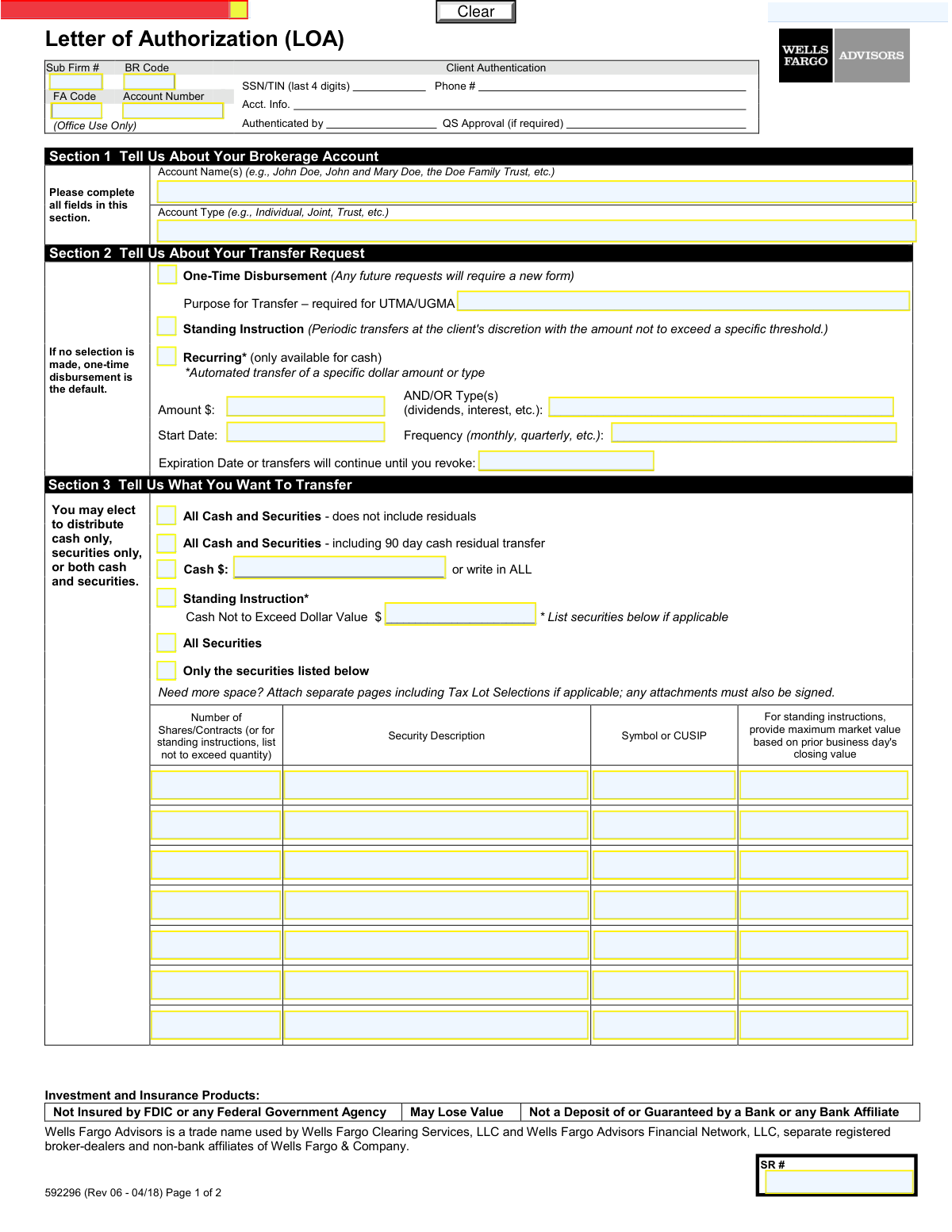
Yes! You can use AI to fill out Form 592296, Letter of Authorization (LOA)

The Letter of Authorization (LOA) form 592296 is a document used by Wells Fargo Advisors clients to provide instructions for transferring assets out of their brokerage account. This form allows account holders to specify one-time, recurring, or standing instructions for moving cash, securities, or both to another account or financial institution. Today, this form can be filled out quickly and accurately using AI-powered services like Instafill.ai, which can also convert non-fillable PDF versions into interactive fillable forms.
Our AI automatically handles information lookup, data retrieval, formatting, and form filling.
It takes less than a minute to fill out 592296 using our AI form filling.
Securely upload your data. Information is encrypted in transit and deleted immediately after the form is filled out.

Form specifications

Form name: Form 592296, Letter of Authorization (LOA)
Number of fields: 88
Number of pages: 2
Language: English
Categories: authorization forms
main-image

Instafill Demo: How to fill out PDF forms in seconds with AI

How to Fill Out 592296 Online for Free in 2026

Are you looking to fill out a 592296 form online quickly and accurately? Instafill.ai offers the #1 AI-powered PDF filling software of 2026, allowing you to complete your 592296 form in just 37 seconds or less.
Follow these steps to fill out your 592296 form online using Instafill.ai:
  1. 1 Navigate to Instafill.ai and upload or select the Letter of Authorization form.
  2. 2 Provide your brokerage account details in Section 1, including the account name and type.
  3. 3 In Section 2, select the type of transfer: one-time, standing instruction, or recurring, and provide any required details like frequency or purpose.
  4. 4 Specify what you want to transfer in Section 3, whether it's cash, specific securities, or all assets in the account.
  5. 5 Complete Section 4 to indicate how the assets should be moved, such as via journal to another Wells Fargo account, to another firm, or by check.
  6. 6 Review all the information automatically populated by the AI to ensure accuracy and completeness.
  7. 7 Electronically sign and date the form in Section 5 to finalize your authorization for the asset transfer.

Our AI-powered system ensures each field is filled out correctly, reducing errors and saving you time.

Why Choose Instafill.ai for Your Fillable 592296 Form?

Speed

Complete your 592296 in as little as 37 seconds.

Up-to-Date

Always use the latest 2026 592296 form version.

Cost-effective

No need to hire expensive lawyers.

Accuracy

Our AI performs 10 compliance checks to ensure your form is error-free.

Security

Your personal information is protected with bank-level encryption.

Frequently Asked Questions About Form 592296

This form is used to authorize Wells Fargo Advisors to transfer cash or securities from your brokerage account. You can use it for one-time transfers, to set up recurring distributions, or to move assets to another account or financial institution.

Any Wells Fargo Advisors account holder who wants to move assets out of their brokerage account must complete this form. All account owners or trustees listed on the account are required to sign the form in Section 5.

A 'Standing Instruction' allows for periodic transfers at your discretion up to a specified maximum value. A 'Recurring' transfer is an automated, scheduled transfer of a specific cash amount at a set frequency (e.g., monthly).

Transfers from a UTMA/UGMA custodial account must legally be for the benefit of the minor. Providing a purpose, such as 'education expenses,' documents that the funds are being used appropriately as required by law.

Selecting this option ensures that any cash from dividends or interest that posts to your account within 90 days of the main transfer is also automatically sent. This helps to completely clear all remaining funds from the account.

You will need your Wells Fargo Advisors account number, details of the assets to be transferred (e.g., security names, CUSIPs, or cash amounts), and the destination account information. For external transfers, this includes the receiving firm's name, account number, and DTC number.

If you run out of space, you can list the additional securities on a separate page. Ensure you include all required details for each security and sign any attached pages.

In Section 4, check the box for 'Send shares to another Financial Firm' and provide all the requested details. This includes the receiving firm's name, your account number there, and the firm's DTC number for proper routing.

No, the form states that checks cannot be mailed directly to the IRS or other taxing authorities. The check must be made payable to an account owner or third party, who can then use the funds to make the payment.

The processing time varies based on the type of assets and the transfer method. Journaling assets to another Wells Fargo Advisors account is typically faster than sending securities to an external financial firm.

Yes, services like Instafill.ai use AI to accurately auto-fill form fields, which can save you time and help reduce errors. This is especially helpful for forms requiring many specific details like account and security numbers.

You can upload the PDF of the Letter of Authorization to the Instafill.ai platform. The AI will identify all the form fields, allowing you to easily enter your information and generate a completed form ready for printing and signing.

If you have a non-fillable or 'flat' PDF, you can use a service like Instafill.ai. It can convert the static document into an interactive, fillable form that you can easily complete on your computer.

Compliance 592296
Validation Checks by Instafill.ai

1
Section 1 Account Details Completeness
This check ensures that both the 'Account Name(s)' and 'Account Type' fields in Section 1 are filled out. These fields are critical for identifying the correct source account for the transfer. If this information is missing, the form cannot be processed as the system cannot locate the account, leading to rejection of the request.
2
Mutually Exclusive Transfer Request Type
Validates that only one transfer request type is selected in Section 2 from 'One-Time Disbursement', 'Standing Instruction', or 'Recurring'. Selecting multiple options creates ambiguity and makes the request impossible to execute as intended. A failed validation should prompt the user to choose only one option.
3
Conditional UTMA/UGMA Purpose
This check verifies that the 'Purpose for Transfer' field is completed if the 'Account Type' in Section 1 is 'UTMA/UGMA'. Due to the custodial nature of these accounts, regulations require a documented reason for any disbursement. Failure to provide a purpose will result in a compliance failure and rejection of the transfer.
4
Recurring Transfer Details Requirement
If the 'Recurring' transfer option is selected in Section 2, this validation ensures that the 'Amount', 'Type(s)', 'Start Date', and 'Frequency' fields are all populated. These details are essential for setting up the automated transfer correctly. Missing any of this information would make the instruction incomplete and unenforceable.
5
Recurring Transfer Date Logic
This check validates the date logic for recurring transfers. It ensures the 'Start Date' is a valid, non-past date and that the 'Expiration Date', if provided, is chronologically after the 'Start Date'. This prevents logical errors in scheduling, such as a transfer ending before it begins, which would cause immediate processing failure.
6
Mutually Exclusive Asset Selection
Verifies that only one of the primary asset transfer checkboxes in Section 3 is selected (e.g., 'All Cash and Securities', 'Cash $', 'All Securities'). These options are mutually exclusive and define the entire scope of the transfer. Selecting more than one would create a conflicting instruction, requiring the form to be rejected and resubmitted with a clear choice.
7
Specific Cash Amount Validation
When the 'Cash $' checkbox is selected in Section 3, this check ensures the corresponding text field contains either a valid numeric dollar amount or the case-insensitive string 'ALL'. This prevents ambiguity in the transfer amount. An invalid entry, such as text other than 'ALL', would halt processing until a valid amount is specified.
8
Securities Table Completeness for Specific Transfer
If the 'Only the securities listed below' option is checked in Section 3, this validation confirms that at least one row in the securities table is fully completed with 'Number of Shares/Contracts', 'Security Description', and 'Symbol or CUSIP'. Without this information, the instruction to transfer specific securities is incomplete and cannot be acted upon.
9
Mutually Exclusive Distribution Method
This check ensures that only one distribution method is selected in Section 4 from 'Move via Journal', 'Send shares to another Financial Firm', or 'Check'. Each option represents a distinct and separate destination for the assets. Selecting multiple methods would create a conflicting and impossible-to-process instruction.
10
Journal Transfer Destination Account Format
If 'Move via Journal' is selected in Section 4, this validation confirms that the '8-Digit Account Number' field contains exactly eight numeric digits. This is crucial for ensuring the assets are transferred to the correct internal account. An incorrect format would lead to a failed transfer and could risk assets being misrouted.
11
Check Mailing Address Completeness
When the 'Check' distribution method is chosen in Section 4, this check verifies that 'Payee Name', 'Street Address', 'City', 'State', and 'Zip Code' are all filled out. A complete and accurate address is mandatory for the successful creation and delivery of a physical check. Missing any of these fields will prevent the check from being issued.
12
ZIP Code Format Validation
This validation examines the 'Zip Code' field in Section 4 to ensure it conforms to a standard US format (5 digits, e.g., '12345', or 9 digits, e.g., '12345-6789'). Correct formatting is essential for mail delivery systems to route the check accurately and without delay. An invalid format could result in returned mail and significant delays in payment.
13
Signature and Date Requirement
Verifies that for each signing party in Section 5, the 'Print Name' and 'Date' fields are completed alongside the signature. The printed name confirms the identity of the signer, and the date legally establishes when the authorization was granted. Missing either of these elements can render the authorization invalid from a legal and compliance standpoint.
14
Joint Account Signature Logic
This check cross-references the 'Account Type' in Section 1 with the signatures in Section 5. If the account is a 'Joint' account or has multiple owners listed, it validates that all required parties have signed. A missing signature from one of the owners would invalidate the authorization, as all owners must typically consent to the transfer of assets.

Common Mistakes in Completing 592296

Entering an Incorrect or Incomplete Account Name

People often enter a shortened version of their name or trust name in Section 1, rather than the full legal name as it appears on their brokerage statement. This mismatch causes the form to be rejected for security and verification purposes, leading to significant processing delays. To avoid this, carefully copy the exact 'Account Name(s)' from a recent account statement before filling out the form.

Confusing Transfer Frequency Options

Users frequently confuse 'One-Time,' 'Standing Instruction,' and 'Recurring' transfers in Section 2, leading to unintended transactions. For example, selecting 'Recurring' for a one-off transfer can cause unwanted future debits, while leaving the section blank defaults to a 'One-Time' transfer which may not be the user's intent. Carefully read the descriptions for each option to ensure your selection matches your goal for a single, discretionary periodic, or automated transfer.

Omitting the Required Purpose for UTMA/UGMA Transfers

When transferring funds from a custodial (UTMA/UGMA) account, the 'Purpose for Transfer' field in Section 2 is mandatory but often overlooked. This information is required for legal and compliance reasons to ensure the funds are used for the minor's benefit. Failure to provide a valid purpose, such as 'education expenses' or 'gift to minor,' will result in the form being returned for completion.

Making Contradictory Selections for Asset Transfers

In Section 3, applicants may check multiple, contradictory boxes, such as selecting both 'All Securities' and 'Only the securities listed below.' This ambiguity makes it impossible for the firm to know the client's true intent, forcing them to reject the form and request clarification. To prevent this, select only one option that precisely describes the assets you wish to move.

Providing Incomplete Security Identifiers

When choosing to transfer specific securities in Section 3, filers sometimes list the security description but omit the crucial 'Symbol or CUSIP' number. This identifier is essential for accurately locating and transferring the correct asset, and its absence can lead to the wrong security being moved or the request being delayed. AI-powered form filling tools like Instafill.ai can help validate that a proper Symbol or CUSIP format is used, reducing such errors.

Ambiguous Instructions for Cash Transfers

In Section 3, users may write 'ALL' in the cash amount field but also enter a specific dollar value, or write a dollar amount without checking the corresponding 'Cash $' box. This creates confusion and requires follow-up, delaying the transfer. Ensure you either check the box and write a specific dollar amount, or check the box and clearly write 'ALL,' but not both.

Missing Destination Firm Information for External Transfers

When sending shares to another financial firm (Section 4), people often leave out the receiving firm's name, the full account number, or the 'Firm or DTC Number.' The DTC number is critical for routing the assets electronically and its omission will cause the transfer to fail. Always verify all destination account and firm details with the receiving institution before submitting the form.

Requesting Prohibited Check Deliveries

The form explicitly states that checks cannot be overnighted to a P.O. Box or mailed directly to the IRS or other tax authorities, yet users still make these requests. Such instructions will be rejected, requiring the form to be corrected and resubmitted. Always provide a valid physical street address for the payee and arrange to forward payments to tax agencies yourself.

Missing Signatures on Joint or Trust Accounts

For joint or trust accounts, all listed owners or trustees are typically required to sign the form in Section 5, but often only one signature is provided. This is a common reason for immediate rejection, as authorization from all parties is legally necessary to process the request. Ensure every individual listed as an account owner or trustee signs and dates the form.

Forgetting to Sign Attached Pages

The instructions in Section 3 note that if more space is needed for listing securities, separate pages can be attached, but specifies that 'any attachments must also be signed.' This requirement is very easy to miss, and an unsigned attachment will invalidate the entire request for the securities listed on it. Remember to sign and date every single page you submit, including all attachments.

Illegible Handwriting and Incomplete Fields

Handwritten forms often suffer from illegible writing, especially for critical data like account numbers and CUSIPs, leading to data entry errors and processing delays. Since this form is a non-fillable PDF, using a tool like Instafill.ai can convert it into a fillable version, ensuring all entries are legible and that required fields are not accidentally skipped.
Saved over 80 hours a year

“I was never sure if my IRS forms like W-9 were filled correctly. Now, I can complete the forms accurately without any external help.”

Kevin Martin Green

Your data stays secure with advanced protection from Instafill and our subprocessors

Robust compliance program

Transparent business model

You’re not the product. You always know where your data is and what it is processed for.

ISO 27001, HIPAA, and GDPR

Our subprocesses adhere to multiple compliance standards, including but not limited to ISO 27001, HIPAA, and GDPR.

Security & privacy by design

We consider security and privacy from the initial design phase of any new service or functionality. It’s not an afterthought, it’s built-in, including support for two-factor authentication (2FA) to further protect your account.

Fill out 592296 with Instafill.ai

Worried about filling PDFs wrong? Instafill securely fills form-592296-letter-of-authorization-loa forms, ensuring each field is accurate.