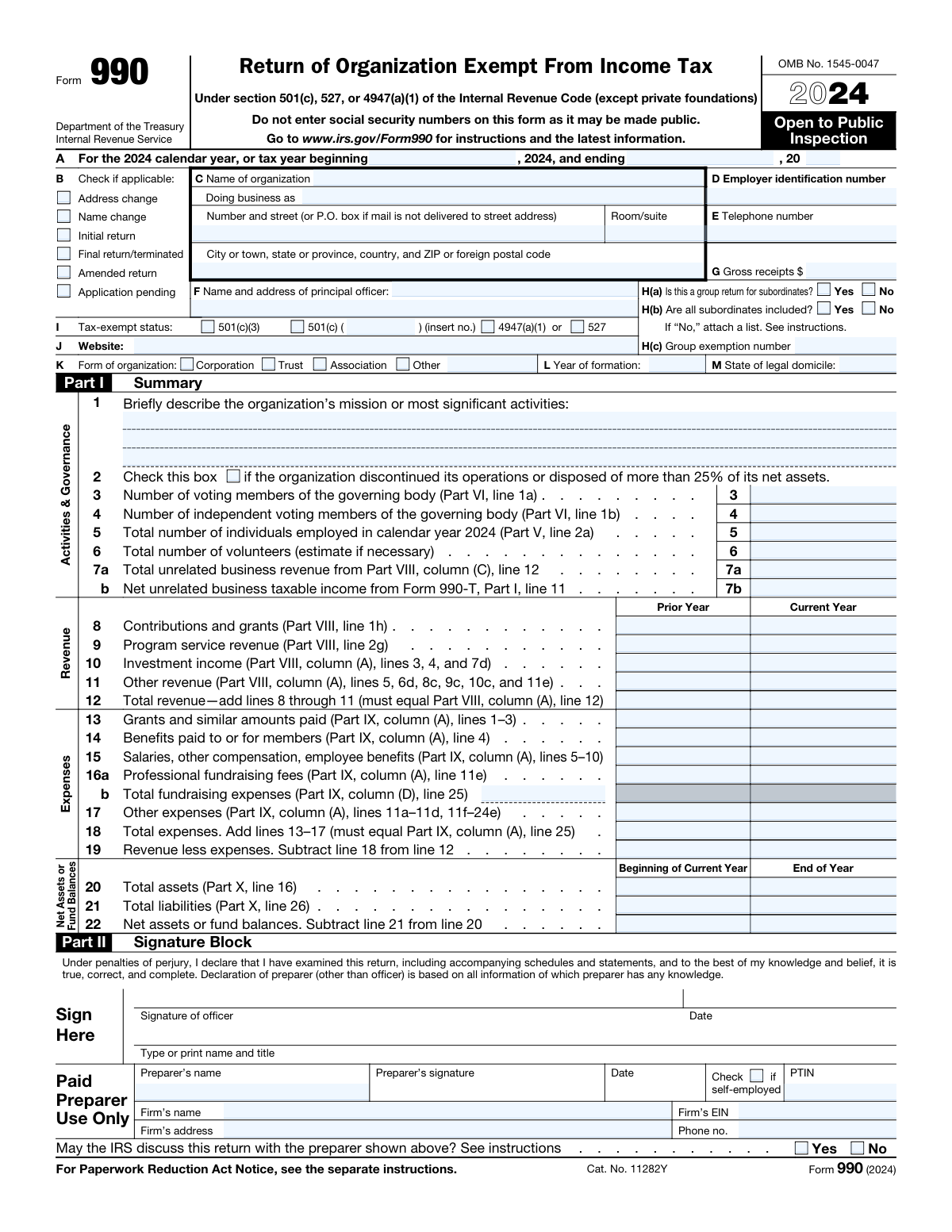
Yes! You can use AI to fill out Form 990, Return of Organization Exempt From Income Tax
IRS Form 990, Return of Organization Exempt From Income Tax, is an annual information return that most federally tax-exempt organizations must file with the IRS. It provides the public and the IRS with financial information about the nonprofit, allowing for evaluation of its operations and ensuring compliance with tax-exempt status regulations. Today, this comprehensive form can be filled out quickly and accurately using AI-powered services like Instafill.ai, which can also convert non-fillable PDF versions into interactive fillable forms.
Our AI automatically handles information lookup, data retrieval, formatting, and form filling.
It takes less than a minute to fill out Form 990 using our AI form filling.
Securely upload your data. Information is encrypted in transit and deleted immediately after the form is filled out.
Form specifications
| Form name: | Form 990, Return of Organization Exempt From Income Tax |
| Number of fields: | 1075 |
| Number of pages: | 12 |
| Language: | English |
| Categories: | income forms, income tax forms, tax forms |
Instafill Demo: How to fill out PDF forms in seconds with AI
How to Fill Out Form 990 Online for Free in 2026
Are you looking to fill out a FORM 990 form online quickly and accurately? Instafill.ai offers the #1 AI-powered PDF filling software of 2026, allowing you to complete your FORM 990 form in just 37 seconds or less.
Follow these steps to fill out your FORM 990 form online using Instafill.ai:
- 1 Navigate to Instafill.ai and upload your PDF of Form 990 or select it from the template library.
- 2 Use the AI assistant to automatically populate basic organizational information, such as name, address, EIN, and principal officer details from your saved profile.
- 3 Enter your financial data into the interactive fields for the Summary (Part I), Statement of Revenue (Part VIII), and Statement of Functional Expenses (Part IX), letting the AI perform calculations.
- 4 Complete the governance, management, and disclosure sections (Part VI) by answering the series of yes/no questions with AI-powered guidance.
- 5 Input details about your program service accomplishments (Part III) and compensation for officers, directors, and key employees (Part VII).
- 6 Review the entire form for accuracy, utilizing Instafill.ai's validation checks to identify potential errors or missing information before finalizing.
- 7 Securely e-sign the document, then download the completed, compliant Form 990, ready for filing with the IRS.
Our AI-powered system ensures each field is filled out correctly, reducing errors and saving you time.
Why Choose Instafill.ai for Your Fillable Form 990 Form?
Speed
Complete your Form 990 in as little as 37 seconds.
Up-to-Date
Always use the latest 2026 Form 990 form version.
Cost-effective
No need to hire expensive lawyers.
Accuracy
Our AI performs 10 compliance checks to ensure your form is error-free.
Security
Your personal information is protected with bank-level encryption.
Frequently Asked Questions About Form Form 990
Form 990 is an annual information return that most organizations exempt from income tax must file with the IRS. It provides the IRS and the public with financial information about the organization and ensures it is meeting its tax-exempt obligations.
Yes, Form 990 is open to public inspection, as noted on the first page of the form. For this reason, you should not include sensitive personal information like Social Security numbers.
Part IV is a series of yes/no questions that helps you determine which additional schedules (e.g., Schedule A, B, G, O) your organization must complete and attach. Your answers are based on your organization's specific activities, governance, and financial situation during the tax year.
You should provide a brief, clear, and concise description of your organization's primary purpose and most significant activities. This statement helps the IRS and the public understand what your organization does and why it is tax-exempt.
Part VII requires you to list all current officers, directors, and trustees, regardless of their compensation amount. You must also list key employees and the five highest-compensated employees who earned more than $100,000, as well as certain former employees meeting specific thresholds.
Part VI asks about your organization's governing body, management structure, and internal policies. This includes questions about your conflict of interest policy, whistleblower policy, and the process for reviewing the Form 990 before filing.
No, smaller organizations may be eligible to file a simpler version, such as Form 990-EZ or Form 990-N (e-Postcard). The specific form required depends on the organization's annual gross receipts and total assets.
Schedule O is used to provide narrative explanations and supplemental information for answers on the main form. As noted in Part IV, line 38, all organizations that file Form 990 are required to complete and attach Schedule O.
The return must be signed by a current officer of the organization, such as the president, vice president, treasurer, assistant treasurer, or chief accounting officer. The signature declares, under penalties of perjury, that the information is true, correct, and complete.
The IRS provides comprehensive instructions for Form 990 on its website. You can find the latest version by visiting www.irs.gov/Form990.
Yes, services like Instafill.ai use AI to accurately auto-fill form fields, which can save significant time and help reduce errors. These tools can extract information from your financial records to populate the form's complex financial sections.
You can upload the Form 990 PDF to a platform like Instafill.ai, which will make it an interactive, fillable document. You can then type your information directly into the fields, add an electronic signature, and download the completed form for filing.
If you have a non-fillable or 'flat' PDF, you can use a tool like Instafill.ai to convert it into an interactive form. This allows you to easily complete all the necessary parts on your computer without needing to print and fill by hand.
Contributions and grants (Part VIII, line 1) are funds given to your organization without the donor receiving a direct service in return. Program service revenue (Part VIII, line 2) is income earned from activities that are part of your organization's exempt mission, such as ticket sales for a performance or fees for educational classes.
Compliance Form 990
Validation Checks by Instafill.ai
1
Validates Employer Identification Number (EIN) Format
This check ensures the Employer Identification Number (EIN) entered in Part D is a valid nine-digit number, formatted as XX-XXXXXXX. The EIN is a unique identifier for the business entity with the IRS, and it is critical for correctly processing the return. An invalid or incorrectly formatted EIN will cause the submission to be rejected or misrouted, delaying processing and potentially leading to penalties.
2
Ensures Tax Period Chronology
This validation verifies that the tax year ending date in Part A is chronologically after the tax year beginning date. This is a fundamental check for logical consistency, as a tax period cannot end before it begins. A failure indicates a data entry error that would make the entire return's financial data nonsensical and lead to rejection by the IRS.
3
Verifies Group Return Logic
This check validates the conditional logic in Part H. If 'Yes' is checked for H(a) 'Is this a group return for subordinates?', then H(b) must be answered ('Yes' or 'No') and the Group Exemption Number in H(c) must be provided. This ensures that returns for multiple entities are filed correctly and contain the necessary identifying information. Failure to provide this information can result in an incomplete filing for the subordinate organizations.
4
Cross-references Part I Summary Counts with Detailed Sections
This validation ensures that the summary numbers in Part I are consistent with the detailed data in other parts of the form. Specifically, it checks that the number of voting members in Part I, line 3 equals the number in Part VI, line 1a, and that the number of employees in Part I, line 5 equals the number in Part V, line 2a. This consistency is crucial for data integrity and confirms that the summary accurately reflects the detailed governance and employment information.
5
Validates Part I Summary Revenue Calculation
This check confirms that the 'Total revenue' amount in Part I, line 12 (Current Year) is the correct sum of lines 8 through 11 in the 'Current Year' column. This is a basic arithmetic check to ensure the summary section is mathematically sound before comparing it to other parts of the form. An incorrect sum indicates a calculation error that undermines the accuracy of the financial summary presented on the first page.
6
Confirms Consistency Between Part I and Part VIII Revenue Totals
This validation ensures that the 'Total revenue' reported in the Part I summary (line 12, Current Year) exactly matches the 'Total revenue' calculated in the detailed Statement of Revenue (Part VIII, column A, line 12). This is a critical cross-check for financial consistency across the entire return. A mismatch indicates a significant error in reporting revenue, which could trigger an IRS inquiry or audit.
7
Confirms Consistency Between Part I and Part IX Expense Totals
This validation ensures that the 'Total expenses' reported in the Part I summary (line 18, Current Year) exactly matches the 'Total functional expenses' from the detailed Statement of Functional Expenses (Part IX, column A, line 25). This cross-check is vital for ensuring the organization's financial reporting is consistent and accurate. Discrepancies suggest calculation errors or misallocated expenses that must be corrected before filing.
8
Verifies Part IV Schedule Triggers
This check validates that for every 'Yes' answer to a question in Part IV, the corresponding required schedule (e.g., Schedule A, B, C, etc.) is attached to the submission. Part IV is a checklist designed to ensure all necessary supplementary forms are included based on the organization's activities. Missing a required schedule results in an incomplete return, which will be rejected by the IRS and may lead to penalties for late filing.
9
Validates Fundamental Balance Sheet Equation in Part X
This check verifies that the fundamental accounting equation is satisfied in the Balance Sheet (Part X). It ensures that for both the 'Beginning of year' and 'End of year' columns, Total Assets (line 16) equals the sum of Total Liabilities (line 26) and Total Net Assets (line 32). A failure of this check indicates a fundamental error in the organization's financial statements that makes the entire balance sheet invalid.
10
Cross-references Part XI Reconciliation with Part X Balance Sheet
This validation confirms that the 'Net assets or fund balances at end of year' on the Reconciliation of Net Assets (Part XI, line 10) equals the 'Total net assets or fund balances' at the 'End of year' on the Balance Sheet (Part X, line 32, column B). This check ensures that the change in net assets during the year, as calculated from revenue and expenses, correctly reconciles with the year-end balance sheet position. A mismatch points to errors in the reconciliation or balance sheet figures.
11
Prohibits Social Security Numbers
This check scans all free-text fields for data matching the format of a Social Security Number (SSN), such as XXX-XX-XXXX or a 9-digit string. The form explicitly warns filers not to enter SSNs because the document may be made public, and including them poses a significant privacy and identity theft risk. If an SSN pattern is detected, the system should flag it and require the user to remove it before submission.
12
Validates Independent Governing Member Count
This check ensures the number of independent voting members reported in Part VI, line 1b, is less than or equal to the total number of voting members reported in Part VI, line 1a. It is logically impossible to have more independent members than total members. This validation prevents a common data entry error and ensures the governance information reported is logical and accurate.
Common Mistakes in Completing Form 990
This error occurs when financial totals in the Part I Summary do not match the detailed calculations in other parts, such as Part VIII (Revenue) and Part IX (Expenses). For example, the 'Total revenue' on Part I, line 12 must equal the total on Part VIII, line 12. This often happens due to manual data entry mistakes or last-minute changes in one section without updating the summary. Such inconsistencies can trigger IRS reviews and signal poor financial oversight to funders and the public. To avoid this, double-check all cross-referenced figures before filing. AI-powered tools like Instafill.ai can prevent this by automatically linking and calculating these fields, ensuring consistency across the entire return.
Part IV is a checklist that determines which supplementary schedules (A through R) must be filed with the Form 990 based on the organization's activities and financial thresholds. A common mistake is incorrectly answering 'No' to a question, thereby failing to attach a required schedule, such as Schedule J for high compensation or Schedule G for fundraising. This results in an incomplete return, which can lead to penalties and correspondence with the IRS. Carefully review each question in Part IV against your organization's records to ensure accuracy. Using a guided filing process can help identify which schedules are necessary based on your data.
In Part VII, organizations often fail to list all required individuals. All current officers, directors, and trustees must be listed, regardless of whether they received compensation. Another frequent error is omitting former officers or key employees who received over $100,000 in compensation during the year. These omissions can lead to an incomplete return and scrutiny regarding transparency. To prevent this, maintain a clear list of all governing individuals and high-paid staff, both current and former, and verify it against the Part VII requirements before filing.
The descriptions in Part I ('Briefly describe the organization’s mission') and Part III ('Statement of Program Service Accomplishments') are public-facing and crucial for communicating impact. A common mistake is using vague, jargon-filled language instead of clear, concise descriptions of activities and accomplishments. This is a missed opportunity to showcase the organization's value to the public, donors, and grantors. To avoid this, write descriptions that are specific, outcome-oriented, and easily understood by someone unfamiliar with your work. Focus on what you did, for whom, and what the results were.
In Part IX, expenses must be allocated among three functions: Program Services, Management and General, and Fundraising. Organizations sometimes incorrectly allocate costs, often by attributing too much to program services to appear more efficient to donors. For example, a portion of the CEO's salary should be allocated to management and fundraising if they spend time on those activities, not 100% to programs. Misallocation can misrepresent the organization's operations and may be questioned by the IRS or watchdog groups. Use a reasonable, documented methodology to allocate expenses based on time, usage, or another logical basis.
Throughout Form 990, especially in Part VI (Governance), many questions require a narrative explanation on Schedule O if answered 'Yes' or 'No'. A frequent oversight is answering the question on the main form but forgetting to provide the corresponding detailed explanation on Schedule O. This makes the filing incomplete and can trigger follow-up questions from the IRS. To avoid this, flag every question that references Schedule O during preparation and ensure a complete, clear explanation is written for each one before finalizing the return.
Part IV, line 2, asks if the organization is required to complete Schedule B (Schedule of Contributors). The rules for this are complex and depend on the organization's type and the amount received from individual donors. Many filers misunderstand these thresholds and either fail to file a required Schedule B or file one unnecessarily. This can lead to compliance issues or privacy concerns. It is critical to read the specific instructions for Schedule B to determine if your organization meets the filing requirements for the year.
A Form 990 is not considered filed unless it is signed by a current officer of the organization, such as the President, Treasurer, or Chief Executive Officer. Common mistakes include the return being left unsigned, signed by an unauthorized person (like a junior staff member), or only signed by the paid preparer. An unsigned or improperly signed return is invalid and can result in late-filing penalties. Always ensure a current, authorized officer signs and dates the return in the Part II Signature Block before it is submitted.
The number of voting members and independent voting members of the governing body must be consistent where they appear on the form. Specifically, the numbers entered in Part I, lines 3 and 4, must exactly match the numbers entered in Part VI, Section A, lines 1a and 1b. This mistake often occurs when one part is updated but the other is not, indicating a lack of careful review. This simple error can undermine the credibility of the return. AI-powered form-filling tools like Instafill.ai can help prevent this by validating data across related fields to ensure consistency.
Entering the wrong Employer Identification Number (EIN) in Part D is a critical error that can cause the entire return to be rejected or misprocessed by the IRS. This can happen due to a simple typo or by using a state ID number instead of the federal EIN. The consequences include processing delays, failure-to-file notices, and potential penalties. Always double-check the nine-digit EIN against official IRS documentation for the organization. Ensure the number is entered without hyphens or spaces, as required by electronic filing systems.
Some organizations may only have access to a non-fillable, 'flat' PDF of Form 990, especially when referencing prior year returns or drafts. Trying to fill this out manually or with basic text-box tools often leads to misaligned data, calculation errors, and an unprofessional appearance. This can make the form difficult for the IRS to process and for the public to read. To solve this, specialized software like Instafill.ai can convert any flat PDF into a fully interactive, fillable form, ensuring data is placed correctly and calculations are automated, which saves time and reduces errors.
Saved over 80 hours a year
“I was never sure if my IRS forms like W-9 were filled correctly. Now, I can complete the forms accurately without any external help.”
Kevin Martin Green
Your data stays secure with advanced protection from Instafill and our subprocessors

Robust compliance program
Transparent business model
You’re not the product. You always know where your data is and what it is processed for.
ISO 27001, HIPAA, and GDPR
Our subprocesses adhere to multiple compliance standards, including but not limited to ISO 27001, HIPAA, and GDPR.
Security & privacy by design
We consider security and privacy from the initial design phase of any new service or functionality. It’s not an afterthought, it’s built-in, including support for two-factor authentication (2FA) to further protect your account.
Fill out Form 990 with Instafill.ai
Worried about filling PDFs wrong? Instafill securely fills form-990-return-of-organization-exempt-from-income-tax forms, ensuring each field is accurate.