Yes! You can use AI to fill out Form CC 381, Notice of Hearing on Petition for Personal Protection Order

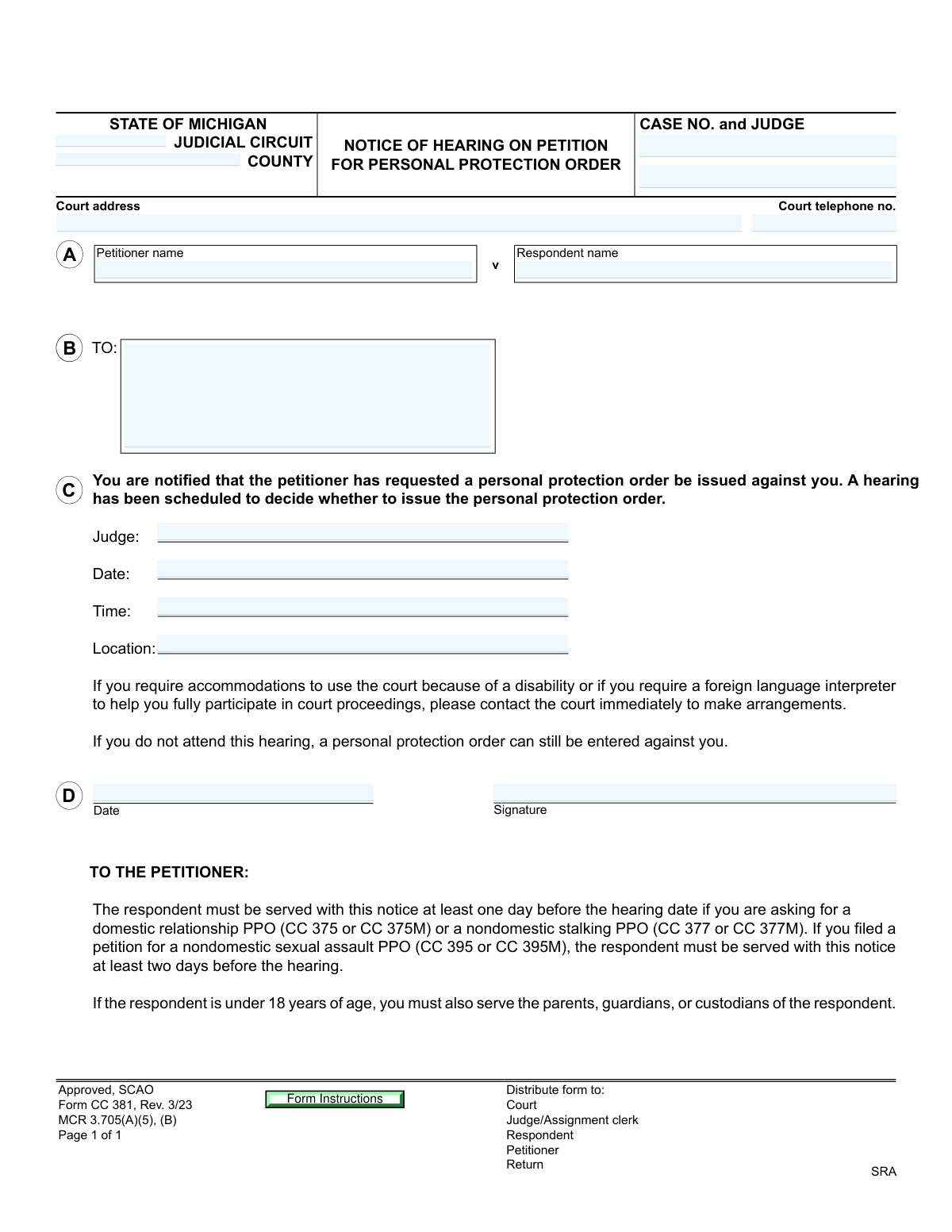
Form CC 381, Notice of Hearing on Petition for Personal Protection Order, is an official Michigan judicial form (approved by SCAO) used to formally notify a respondent that a petitioner has requested a Personal Protection Order and that a court hearing has been scheduled to determine whether the order will be issued. The form also includes proof of service sections to document how and when the notice was delivered to the respondent and, if applicable, to the respondent's parent, guardian, or custodian. It is governed by MCR 3.705(A)(5), (B) and MCR 2.105, and proper completion and timely service are critical to ensuring due process in PPO proceedings. Today, this form can be filled out quickly and accurately using AI-powered services like Instafill.ai, which can also convert non-fillable PDF versions into interactive fillable forms.
Our AI automatically handles information lookup, data retrieval, formatting, and form filling.
It takes less than a minute to fill out CC 381 using our AI form filling.
Securely upload your data. Information is encrypted in transit and deleted immediately after the form is filled out.

Form specifications

Form name: Form CC 381, Notice of Hearing on Petition for Personal Protection Order
Number of pages: 3
Language: English
Categories: court forms, family law forms
main-image

Instafill Demo: filling out a legal form in seconds

How to Fill Out CC 381 Online for Free in 2026

Are you looking to fill out a CC 381 form online quickly and accurately? Instafill.ai offers the #1 AI-powered PDF filling software of 2026, allowing you to complete your CC 381 form in just 37 seconds or less.
Follow these steps to fill out your CC 381 form online using Instafill.ai:
  1. 1 Navigate to Instafill.ai and upload or select Form CC 381 (Notice of Hearing on Petition for Personal Protection Order) to begin filling it out online.
  2. 2 Enter the court information, including the judicial circuit, county, case number, assigned judge, court address, and court telephone number in the appropriate fields.
  3. 3 Provide the full legal names of the petitioner and respondent, and fill in the hearing details including the judge's name, hearing date, time, and location.
  4. 4 Complete the 'TO:' section with the full name and mailing address of the person to whom the notice is directed, and have the appropriate court official sign and date the form.
  5. 5 As the process server, complete the Proof of Service section by selecting the method of service (personal or certified mail), entering the respondent's name, date and time of service, place of service, and any attachments served.
  6. 6 Fill in the service fee breakdown, including service fees, miles traveled, mileage fees, incorrect address fees if applicable, and the total fee, then sign and print your name as the server.
  7. 7 If the respondent is under 18, complete the second Proof of Service page for the respondent's parent, guardian, or custodian, and ensure all acknowledgment of service fields are completed and signed before filing the form with the court clerk.

Our AI-powered system ensures each field is filled out correctly, reducing errors and saving you time.

Why Choose Instafill.ai for Your Fillable CC 381 Form?

Speed

Complete your CC 381 in as little as 37 seconds.

Up-to-Date

Always use the latest 2026 CC 381 form version.

Cost-effective

No need to hire expensive lawyers.

Accuracy

Our AI performs 10 compliance checks to ensure your form is error-free.

Security

Your personal information is protected with bank-level encryption.

Frequently Asked Questions About Form CC 381

Form CC 381 is the 'Notice of Hearing on Petition for Personal Protection Order' used in Michigan courts. It officially notifies the respondent (the person the petition is filed against) that a hearing has been scheduled to decide whether a Personal Protection Order (PPO) will be issued against them.

This form is primarily completed by the court and the petitioner (the person requesting the PPO). The process server fills out the Proof of Service section after delivering the notice, and the respondent may sign the Acknowledgment of Service section upon receiving it.

For a domestic relationship PPO (CC 375 or CC 375M) or a nondomestic stalking PPO (CC 377 or CC 377M), the respondent must be served at least one day before the hearing. For a nondomestic sexual assault PPO (CC 395 or CC 395M), the respondent must be served at least two days before the hearing.

The form clearly states that if the respondent does not attend the hearing, a personal protection order can still be entered against them. It is strongly advised that the respondent attend the scheduled hearing to present their side.

If the respondent is a minor (under 18 years old), the petitioner must also serve the notice on the respondent's parents, guardians, or custodians. The form includes a separate Proof of Service section specifically for serving the respondent's parent, guardian, or custodian.

The notice can be served either personally (hand-delivered) or by registered or certified mail with return receipt requested, with delivery restricted to the respondent. The process server must check the appropriate box on the Certificate of Service section and provide details of the service.

The Proof of Service section is completed by the process server (the person who delivers the notice). It documents whether service was successfully completed or attempted, including the respondent's name, date and time of service, place of service, and any fees charged for mileage or service.

If the process server is unable to complete service, they must check the 'I have attempted to serve and been unable to complete service' box, document the attempt details, and return the original form and all copies to the court clerk. They should also record any fees for incorrect address attempts.

The form states that if you require accommodations due to a disability or need a foreign language interpreter to fully participate in court proceedings, you should contact the court immediately to make arrangements before the hearing date.

The hearing details section requires the assigned judge's name, the scheduled hearing date, the hearing start time, and the specific location (courtroom or address) where the hearing will take place. This information is typically filled in by the court clerk.

Yes, services like Instafill.ai use AI to accurately auto-fill form fields, saving you time and reducing errors. You can upload the form to Instafill.ai, and the AI will help you complete all required fields, including party names, hearing details, and service information.

To fill out Form CC 381 online, visit Instafill.ai and upload the PDF form. The AI will guide you through each field, auto-filling information such as case number, party names, hearing details, and service information. Once complete, you can download and print the filled form for submission to the court.

If you have a flat, non-fillable PDF version of Form CC 381, Instafill.ai can convert it into an interactive fillable form. Simply upload the non-fillable PDF to Instafill.ai, and the platform will make all fields editable so you can complete and save the form digitally.

The process server can charge a service fee, mileage fees for miles traveled to complete service, and an incorrect address fee if they traveled to a wrong address. All fees must be itemized on the form, and a total fee must be calculated and entered in the designated field.

According to the form, copies should be distributed to four parties: the Court, the Judge/Assignment Clerk, the Respondent, and the Petitioner. The process server must also file the completed Proof of Service with the court clerk after serving the notice.

Compliance CC 381
Validation Checks by Instafill.ai

1
Hearing Date Must Be a Valid Future Date
The hearing date field must contain a properly formatted calendar date (MM/DD/YYYY) that falls on or after the date the form is completed. A past or invalid date would render the notice legally defective and could result in the hearing being rescheduled or the PPO petition being dismissed. The system should reject any non-date values, dates in the past, or dates that do not correspond to a real calendar day.
2
Minimum Service Lead Time Based on PPO Type
For domestic relationship PPOs (CC 375/CC 375M) and nondomestic stalking PPOs (CC 377/CC 377M), the respondent must be served at least one day before the hearing date. For nondomestic sexual assault PPOs (CC 395/CC 395M), service must occur at least two days before the hearing. The date and time of service recorded in the Certificate of Service must be validated against the hearing date to confirm the required minimum notice period has been met; failure to meet this requirement could invalidate service and jeopardize the hearing.
3
Petitioner and Respondent Names Are Not Identical
The petitioner name and respondent name fields must contain distinct, non-matching values, as a person cannot file a personal protection order against themselves. If both fields contain the same name or substantially similar text, the form should flag an error requiring correction before submission. This check prevents clerical errors that could cause significant legal confusion or delay in court processing.
4
Case Number Format Consistency Across All Pages
The case number entered on the main notice page must exactly match the case number entered on both the Page 1 and Page 2 proof-of-service sections. Inconsistent case numbers across pages could cause the proof of service to be filed under the wrong case, potentially leaving the respondent legally unserved of record. The validation should perform a string comparison across all three case number fields and flag any discrepancy.
5
Exactly One Service Method Selected Per Certificate of Service
Each Certificate of Service section (for respondent and for respondent's parent/guardian/custodian) requires that exactly one service option be selected: 'I served' (personally or by certified mail) or 'I have attempted to serve and been unable to complete service.' Selecting no option leaves the certificate legally incomplete, while selecting both creates a contradictory record. The validation must confirm that one and only one primary service outcome is indicated per certificate.
6
Return Receipt Attachment Required When Certified Mail Service Is Selected
When the 'by registered or certified mail, return receipt requested' option is checked for either the respondent or the respondent's parent/guardian/custodian, the form instructions require that a copy of the return receipt be attached. The validation should confirm that an attachment is noted or referenced in the attachments field when this mail service method is selected. Failure to attach the return receipt undermines proof that restricted delivery was completed and may invalidate service.
7
Service Detail Fields Required When Service Is Indicated
When either 'I served' or 'I have attempted to serve and been unable to complete service' is selected, the fields for respondent's name, date and time of service, and place or address of service must all be populated. These details are legally required to establish a valid record of service or attempted service under MCR 2.105. Leaving any of these fields blank when a service option is checked should trigger a validation error preventing form submission.
8
Date and Time of Service Must Include Both Date and Time Components
The 'Date and time of service' field must contain both a valid calendar date and a specific time of day (e.g., 03/15/2024 at 2:30 PM). Providing only a date without a time, or a time without a date, is insufficient for a legally valid proof of service record. The validation should parse the field to confirm both components are present and that the date is a valid calendar date not later than the hearing date.
9
Total Fee Must Equal Sum of All Component Fees
The Total Fee field must equal the arithmetic sum of the Service Fee, Mileage Fee (service), Incorrect Address Fee, and Mileage Fee (incorrect address) fields. Any discrepancy between the sum of itemized fees and the stated total indicates a calculation error that could result in improper reimbursement to the process server. The validation should automatically compute the expected total and flag any mismatch for correction before the form is finalized.
10
Fee Fields Must Contain Non-Negative Numeric Values
All monetary fee fields (Service Fee, Mileage Fee for service, Incorrect Address Fee, Mileage Fee for incorrect address, and Total Fee) must contain numeric values greater than or equal to zero, formatted as valid currency amounts. Negative values, alphabetic characters, or blank entries in these fields when service has been indicated would produce an invalid fee record. The validation should reject any non-numeric or negative input in these fields.
11
Miles Traveled Fields Must Contain Non-Negative Numeric Values
Both miles-traveled fields (for service and for incorrect address) must contain non-negative numeric values when the 'I served' option is selected. Entering negative numbers, text, or leaving these fields blank when fees are claimed creates an inconsistent and potentially fraudulent service record. The validation should enforce numeric-only input and flag any value below zero as invalid.
12
Parent/Guardian/Custodian Service Required When Respondent Is a Minor
Per the form instructions, if the respondent is under 18 years of age, the petitioner must also serve the respondent's parents, guardians, or custodians. When the respondent is identified as a minor, the Page 2 proof-of-service section for the respondent's parent/guardian/custodian must be completed, including the parent/guardian/custodian's name, date and time of service, and place of service. Failure to complete this section when the respondent is a minor constitutes incomplete service and could invalidate the notice.
13
Court Telephone Number Must Be in Valid Format
The court telephone number field must contain a properly formatted U.S. phone number, typically in the format (XXX) XXX-XXXX or XXX-XXX-XXXX, with exactly 10 digits excluding formatting characters. An improperly formatted or incomplete phone number would prevent parties with disabilities or those needing language interpretation from contacting the court as directed in the notice. The validation should strip non-numeric characters and confirm exactly 10 digits are present.
14
Server Signature and Printed Name Must Both Be Present
Each Certificate of Service section requires both the process server's signature and their printed or typed name to be completed. A signature without a printed name makes it impossible to identify the server of record, while a printed name without a signature lacks the sworn certification required under penalty of perjury. Both fields must be populated for the certificate to be legally valid, and the validation should flag any certificate where one or both fields are missing.
15
Acknowledgment of Service Requires Respondent Signature and Printed Name Together
In the Acknowledgment of Service section, if the respondent's signature field is completed, the respondent's printed name field must also be populated, and vice versa. An acknowledgment with only a signature and no printed name, or a printed name with no signature, is incomplete and may not satisfy the evidentiary requirements for proof of personal service. The validation should enforce that both fields are either both filled or both left blank.
16
Hearing Time Must Be in a Valid Time Format
The hearing time field must contain a recognizable time value in a standard format such as HH:MM AM/PM or 24-hour HH:MM notation. An invalid or ambiguous time entry (e.g., '25:00', 'noon-ish', or a blank field) would leave the respondent without adequate notice of when to appear, potentially violating their due process rights. The validation should parse the time entry and reject any value that does not correspond to a valid time of day.

Common Mistakes in Completing CC 381

Missing or incorrect judicial circuit and county information

Many filers confuse the judicial circuit number with the county name, or leave one of these fields blank entirely. Since Michigan has multiple circuits that may span more than one county, entering the wrong circuit can cause the form to be rejected or filed in the wrong jurisdiction. Always verify the correct judicial circuit number and county name by checking the court's website or calling the clerk's office before submitting. Tools like Instafill.ai can help auto-populate jurisdiction fields based on your location to prevent this error.

Incomplete or incorrectly formatted case number

Filers often enter a partial case number, use an incorrect format, or leave this field blank when the case number has not yet been assigned. Michigan court case numbers follow a specific format that includes year, court code, and sequence number, and any deviation can cause filing delays or mismatches in the court's records. If the case number has not yet been assigned, contact the clerk's office before completing the form. Double-check the number against prior court documents to ensure it matches exactly.

Using nicknames or informal names instead of full legal names for petitioner and respondent

A very common mistake is entering a nickname, maiden name, or abbreviated name for either the petitioner or respondent rather than their full legal name as it appears on official identification. This can create discrepancies in court records, complicate service of process, and potentially invalidate the order. Always use the complete legal name — first, middle (if applicable), and last — for both parties. Instafill.ai can flag name fields that appear incomplete or inconsistent with legal name formatting standards.

Failing to include complete hearing details (date, time, location, and judge)

Filers sometimes leave one or more of the hearing detail fields blank — particularly the courtroom location or the judge's name — assuming the respondent will find out through other means. Incomplete hearing details mean the respondent may not know where or when to appear, which can lead to procedural complications or claims of improper notice. All four fields (judge, date, time, and location) must be filled in completely and accurately before the form is served. Confirm these details directly with the court clerk after the hearing is scheduled.

Not serving the respondent within the required timeframe before the hearing

The form clearly states that for domestic relationship PPOs and nondomestic stalking PPOs, the respondent must be served at least one day before the hearing, while nondomestic sexual assault PPOs require at least two days' notice. Filers frequently overlook these different deadlines or miscalculate the service window, which can result in the hearing being postponed or the PPO being challenged. Carefully read the service deadline requirements for the specific type of PPO being filed and plan service accordingly. Mark the deadline on a calendar as soon as the hearing date is set.

Failing to serve the respondent's parents, guardians, or custodians when the respondent is a minor

When the respondent is under 18 years of age, the form explicitly requires that parents, guardians, or custodians also be served — yet this step is frequently overlooked, especially by self-represented petitioners who are unaware of this requirement. Skipping this step can render service legally defective and jeopardize the PPO proceeding. Always check the respondent's age before completing service, and if they are a minor, identify and serve all parents, guardians, or custodians using the second proof of service section on page 2. Instafill.ai can prompt users to complete the minor-respondent service section when applicable.

Leaving the 'TO:' recipient field incomplete or entering only a name without a full address

The 'TO:' field requires both the full name and complete mailing address of the person being notified, but filers often enter only a name or provide an incomplete address (missing apartment number, ZIP code, or city). An incomplete address makes it impossible to properly serve the notice by mail and may cause the form to be returned by the court. Always include the full street address, city, state, and ZIP code in this field. Verify the respondent's current address through available records before completing this section.

Checking the wrong service method box or checking multiple conflicting boxes

The Certificate of Service section requires the process server to select either personal service or certified mail service — but not both — and to separately indicate if service was unsuccessful. Filers and process servers sometimes check multiple boxes (e.g., both 'I served' and 'I have attempted to serve and been unable to complete service'), which creates a contradictory and legally defective proof of service. Only one service method should be checked, and it must accurately reflect how service was actually completed or attempted. Review the completed form carefully before signing to ensure only the correct box is selected.

Omitting the date and exact time of service in the proof of service section

Process servers frequently record only the date of service and forget to include the exact time, or they enter an approximate time rather than the actual time service was completed. Courts require both date and time to verify that service occurred within the legally required window before the hearing. The time of service is especially critical when service is completed close to the deadline. Always record the exact time of service immediately after completing it, and ensure both date and time are entered in the designated field.

Failing to attach the return receipt when service is made by certified mail

When the process server selects the certified mail service option, the form requires that a copy of the return receipt be attached to prove delivery was restricted to the respondent. Filers often forget to attach this receipt or submit the form before the receipt has been returned, leaving the proof of service incomplete. Without the return receipt, the court cannot confirm that service was properly restricted and completed. Wait until the return receipt is received before filing the proof of service, and staple it securely to the form.

Incorrectly calculating or leaving blank the total service fee

The fee breakdown section requires separate entries for the service fee, mileage fees for the service trip, incorrect address fees, and mileage for incorrect address attempts — all of which must be totaled correctly in the 'Total Fee' field. Process servers often add these figures incorrectly, omit one or more line items, or leave the total blank. An incorrect or missing total can delay reimbursement and create discrepancies in court records. Double-check all arithmetic before entering the total, and ensure every applicable fee line is completed. Instafill.ai can automatically calculate and validate fee totals to prevent arithmetic errors.

Process server failing to sign and print their name on the Certificate of Service

The Certificate of Service requires both a signature and a printed or typed name from the process server, who is declaring under penalty of perjury that the contents are true. It is common for process servers to sign but forget to print their name, or to print their name but omit the signature, making the certificate legally defective. Both fields are required for the declaration to be valid and for the court to identify the server if questions arise. Always complete both the signature and printed name fields before submitting the form to the court clerk.
Saved over 80 hours a year

“I was never sure if my IRS forms like W-9 were filled correctly. Now, I can complete the forms accurately without any external help.”

Kevin Martin Green

Your data stays secure with advanced protection from Instafill and our subprocessors

Robust compliance program

Transparent business model

You’re not the product. You always know where your data is and what it is processed for.

ISO 27001, HIPAA, and GDPR

Our subprocesses adhere to multiple compliance standards, including but not limited to ISO 27001, HIPAA, and GDPR.

Security & privacy by design

We consider security and privacy from the initial design phase of any new service or functionality. It’s not an afterthought, it’s built-in, including support for two-factor authentication (2FA) to further protect your account.

Fill out CC 381 with Instafill.ai

Worried about filling PDFs wrong? Instafill securely fills form-cc-381-notice-of-hearing-on-petition-for-personal-protection-order forms, ensuring each field is accurate.