Yes! You can use AI to fill out Form Mod P - Partner Details

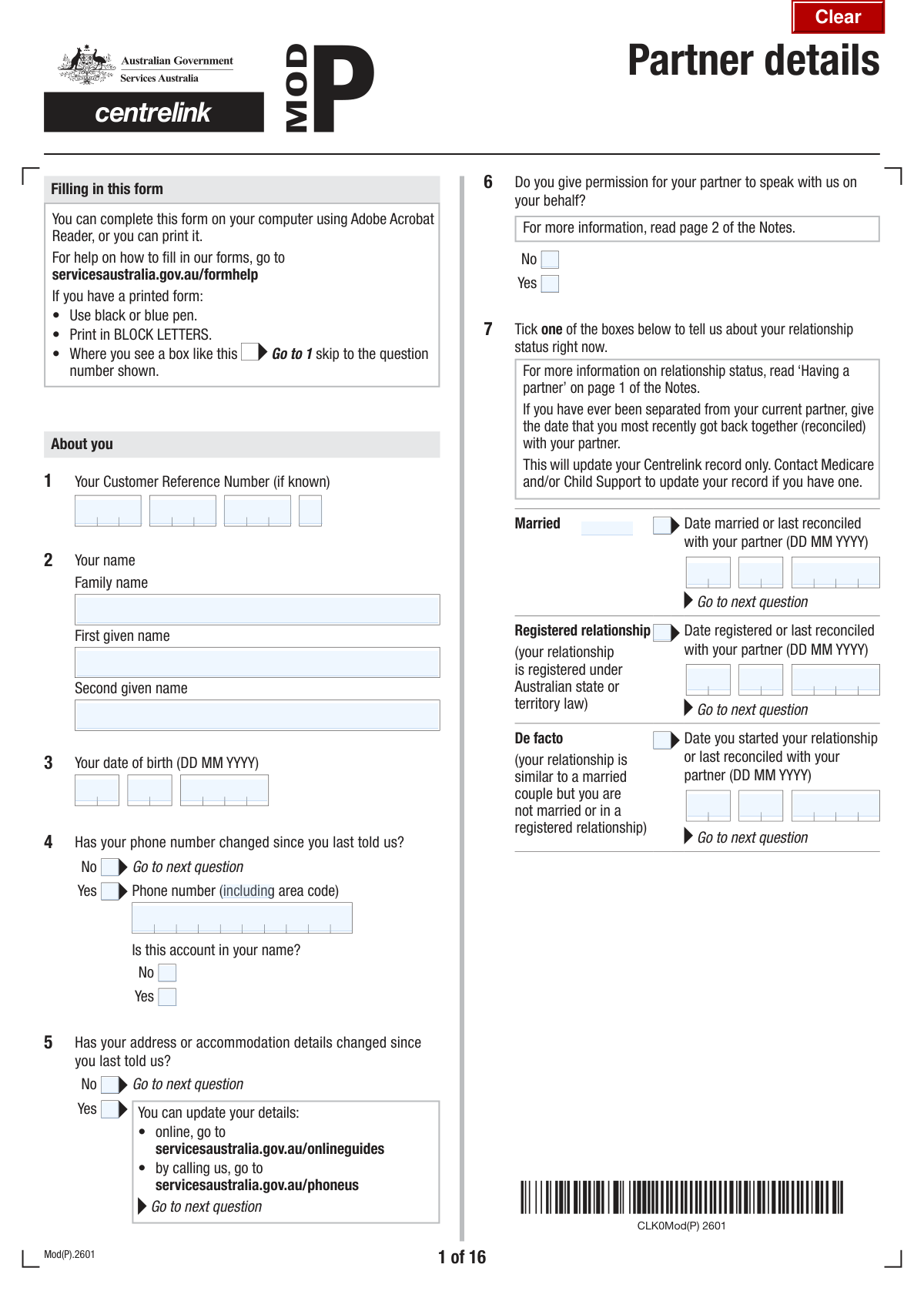
Form Mod P, the Partner Details form, is an official Australian Government document used to inform Centrelink of a change in your relationship status, such as getting married, starting a de facto relationship, or reconciling with a partner. It is essential for correctly assessing your eligibility and payment rates for government benefits, as it collects comprehensive information about your partner's identity, residency, income, and assets. Today, this form can be filled out quickly and accurately using AI-powered services like Instafill.ai, which can also convert non-fillable PDF versions into interactive fillable forms.
Mod P is part of the ETA forms category on Instafill.
Our AI automatically handles information lookup, data retrieval, formatting, and form filling.
It takes less than a minute to fill out Mod P using our AI form filling.
Securely upload your data. Information is encrypted in transit and deleted immediately after the form is filled out.

Form specifications

Form name: Form Mod P - Partner Details
Number of fields: 649
Number of pages: 18
Language: English
main-image

Instafill Demo: How to fill out PDF forms in seconds with AI

How to Fill Out Mod P Online for Free in 2026

Are you looking to fill out a MOD P form online quickly and accurately? Instafill.ai offers the #1 AI-powered PDF filling software of 2026, allowing you to complete your MOD P form in just 37 seconds or less.
Follow these steps to fill out your MOD P form online using Instafill.ai:
  1. 1 Navigate to Instafill.ai and upload your Form Mod P, or select it from their library of templates.
  2. 2 Provide your personal details, Customer Reference Number, and information about your new relationship status, such as the date you were married or became partnered.
  3. 3 Enter your partner's personal information, including their full name, date of birth, contact details, and residency status.
  4. 4 Use the AI assistant to accurately fill in the detailed financial sections for both you and your partner, covering employment income, investments, superannuation, and other assets.
  5. 5 Answer the specific questions related to the types of payments or services you and your partner receive, such as Family Tax Benefit or Child Care Subsidy.
  6. 6 Review all the auto-filled information for correctness, then electronically sign and date the form to complete the process before submitting it to Services Australia.

Our AI-powered system ensures each field is filled out correctly, reducing errors and saving you time.

Why Choose Instafill.ai for Your Fillable Mod P Form?

Speed

Complete your Mod P in as little as 37 seconds.

Up-to-Date

Always use the latest 2026 Mod P form version.

Cost-effective

No need to hire expensive lawyers.

Accuracy

Our AI performs 10 compliance checks to ensure your form is error-free.

Security

Your personal information is protected with bank-level encryption.

Frequently Asked Questions About Form Mod P

This form is used to update your personal and financial details with the agency, particularly when there has been a change in your relationship status, such as getting married or starting a de facto relationship. It gathers information about you and your partner to assess your eligibility for payments and services like Income Support, Family Assistance, and Health Care Cards.

You need to fill out this form if you are receiving or claiming a government payment or service and have recently partnered, married, or reconciled with a partner. It ensures your circumstances are correctly recorded and your entitlements are accurately calculated.

If your partner has one, they can find their CRN on letters from the agency or by logging into their online account. If they don't have one or can't find it, you can leave this section blank, but be sure to provide all their other personal details accurately.

Yes, even if you and your partner are not living together, you must still provide their details. The form includes specific sections (Questions 14-17) to explain the reason for living separately and provide their address.

Gross income is the total amount of money you or your partner earn before any taxes or other deductions are taken out. You should report this pre-tax amount as indicated on your payslips.

Recognised participation refers to activities like paid work, study, training, volunteering, or looking for work that you and your partner undertake. The number of hours you participate per fortnight helps determine the number of subsidised child care hours you are entitled to.

The required documents depend on your answers; a checklist is provided near the end of the form (Question 58). Common documents include payslips, income tax returns, Centrelink/DVA schedules, and potentially a Details of child's care arrangement (FA012) form.

While providing a TFN is voluntary, not doing so may affect your payment rate. If your partner does not have a TFN or you are unsure, you should select the appropriate option in Question 18 and proceed as directed.

No, giving permission is optional. Question 6 allows you to choose whether you authorize your partner to speak with the agency on your behalf regarding this form and your shared circumstances.

Processing times can vary depending on the complexity of your case and the volume of forms being processed. To avoid delays, ensure all questions are answered completely and all required documents are attached upon submission.

Yes, you can use AI-powered services like Instafill.ai to simplify filling out this form. These tools can accurately auto-fill your personal information, saving you time and reducing the chance of errors.

Simply upload the form's PDF to the Instafill.ai platform. The AI will analyze the fields and help you fill them in interactively, pulling from your saved profile to complete sections instantly.

If you have a non-fillable or 'flat' PDF, you can use a service like Instafill.ai to help. Instafill.ai can convert non-fillable PDFs into interactive, fillable forms that you can easily complete on your computer.

Compliance Mod P
Validation Checks by Instafill.ai

1
Date of Birth Validity and Chronology
This check ensures that the combination of Day, Month, and Year of Birth for both the applicant and their partner forms a valid calendar date that is in the past. It prevents impossible dates like 'February 30' or future birth dates. If the date is invalid or in the future, the form submission will be rejected, and the user will be prompted to correct the date to ensure accurate identity and eligibility verification.
2
Relationship Date Logical Consistency
This validation verifies that the 'Date Married or Reconciled' (or other relationship start dates) is a logical date. The date must be after both the applicant's and their partner's date of birth, and it cannot be a future date. This is crucial for establishing the correct timeline of the relationship for eligibility purposes. An invalid submission would trigger an error message asking the user to provide a valid date that fits the established timeline.
3
Mutually Exclusive Phone Change Confirmation
This check ensures that the user selects only one of the two options: 'Phone Number Not Changed' or 'Phone Number Changed'. These options are mutually exclusive, and selecting both creates a logical conflict. This validation prevents ambiguity in the data and ensures the system knows whether to look for new phone number details. If both are checked, an error will be displayed, forcing the user to choose only one option.
4
Conditional Requirement for New Phone Number
This validation is triggered if the 'Phone Number Changed' box is checked. It ensures that the 'Area Code' and 'Phone Number' fields are subsequently filled out. This is important for maintaining up-to-date contact information. If the box is checked but the number is not provided, the form will be considered incomplete and will prompt the user to enter the new phone number.
5
Conditional Requirement for Partner's Address
This check validates that if the user selects 'No' for 'Partner Living in Same Home', then the partner's address fields ('Permanent Street Address', 'Permanent Suburb or City and State', 'Permanent Postcode') become mandatory. This is critical for verifying the partner's living situation, which can affect benefits and eligibility. A failure to provide the address after indicating the partner lives elsewhere will block form submission.
6
Separation Period Date Sequence
This validation checks the 'Period Not Living Together' dates. It ensures that the 'From Date' is not after the 'To Date'. This maintains logical chronological order for the period of separation. If 'indefinite' is checked, the 'To Date' fields should be disabled and not required. An illogical date sequence would result in an error, requiring the user to correct the dates before proceeding.
7
Partner's TFN Format Validation
This check verifies that the partner's Tax File Number (TFN), if provided, adheres to the standard Australian format, typically nine digits grouped as three sets of three (e.g., 123-456-789). Correct formatting is essential for successful integration and verification with tax office systems. An incorrectly formatted TFN would fail validation and require the user to re-enter the number in the correct structure.
8
Exclusive Selection for Payment/Service Combination
This validation ensures that from the large group of checkboxes under 'Payments/Services Combination' (Question 20), only one option is selected. Since each option represents a unique combination of circumstances for the applicant and their partner, selecting more than one would be a contradiction. The system should enforce a radio-button-like behavior, and if a user manages to select more than one, an error should be flagged to resolve the ambiguity.
9
Total Income Calculation Verification
This check validates that the value entered in 'Your Total Income' or 'Partner's Total Income' is the correct sum of the individual income components listed (e.g., Taxable Income, Foreign Income, Investment Losses). This acts as a cross-check to ensure the user has calculated their total income correctly, which is fundamental for assessing eligibility. If the sum is incorrect, a warning will be displayed, suggesting the user review and correct the amounts or the total.
10
Financial Year Span Validation
This validation ensures that the 'Financial Year End' year is exactly one year greater than the 'Financial Year Start' year. This enforces the standard definition of a financial year and prevents errors in reporting periods. An incorrect year span would be rejected, and the user would be prompted to enter a valid start and end year for the financial period.
11
Activity Date Chronology
This rule applies to all sections detailing activities with a start and end date (e.g., Paid Work, Study, Training, Imprisonment). It validates that the provided 'End Date' is not earlier than the 'Start Date' for any given activity. This ensures the data is logical and represents a valid time period. If an end date precedes a start date, the system will flag an error and require the user to correct the timeline.
12
Conditional Requirement for 'Other' Text Fields
This validation ensures that whenever a user selects an 'Other' checkbox (e.g., 'Other reason partner is not living with you'), the corresponding text field for providing details is not left empty. This is crucial for capturing necessary information that doesn't fit into predefined categories. If 'Other' is checked and the details are missing, the form will prompt the user to provide the required explanation.
13
Signature Date Validity
This check ensures the 'Signature Date' is a valid calendar date that is not in the future. It should also be on or after the applicant's date of birth. This is a critical step for verifying the legal declaration and its timing. An invalid or future date would invalidate the signature, so the form would reject the submission and require a valid date.
14
Child Care Responsibility Conditional Logic
This validation checks the response to 'Child Care Responsibility' (Question 45). If the user answers 'Yes', the form should require them to answer the subsequent questions about Family Tax Benefit (starting at Q46). If the user answers 'No', the form should ensure they are correctly skipped to question 58. This prevents users from filling out irrelevant sections or skipping required ones, improving data quality and user experience.

Common Mistakes in Completing Mod P

Misinterpreting Conditional Logic and Form Navigation

This form uses complex conditional logic, such as 'Fill only if...' and 'Go to question X'. Applicants often miss these cues, leading them to fill out sections that are irrelevant to their situation or, more critically, skip sections that are required. This results in an incomplete or logically inconsistent application, causing significant processing delays or outright rejection. To avoid this, carefully read every instruction before entering data; AI-powered tools like Instafill.ai can automate this by only showing relevant fields based on your previous answers.

Incorrectly Entering Segmented Reference Numbers

Fields like 'Customer Reference Number' and 'Partner's TFN' are broken into multiple parts. It is very common for users to transpose digits between boxes, miscopy the number, or leave one of the segments blank. An incorrect reference number can prevent the agency from identifying the applicant or their partner in their system, halting the entire process. Always double-check these numbers digit by digit against your source document.

Confusing Gross vs. Net Income

The form asks for 'gross' weekly or fortnightly income (before tax and deductions) in multiple sections (e.g., Q25). Many people mistakenly enter their net (take-home) pay, as this is the figure they are most familiar with. This error leads to under-reporting income, which can result in incorrect benefit calculations and may require repayment or cause legal issues later. Always refer to the gross amount on your payslip before filling out these fields.

Inaccurate Reporting of 'Recognised Participation' Hours

Questions 51 through 55 ask for a detailed breakdown of activity hours per fortnight (e.g., paid work, study, volunteering). People often estimate these hours, leading to inaccuracies, or they may misinterpret what qualifies as a 'recognised activity'. These errors can directly impact eligibility for certain benefits, like the Child Care Subsidy. It is crucial to calculate these hours carefully or use records like timesheets and course schedules to ensure accuracy.

Failing to Provide Complete and Accurate Partner Information

This form requires extensive and sensitive information about a partner, including their TFN, income, residency status, and activity hours. Applicants may not have this information readily available, guess the answers, or enter it incorrectly. Incomplete or inaccurate partner data is a major reason for application delays, as the agency must verify both individuals' circumstances. Before starting, gather all necessary documents and information for both yourself and your partner.

Omitting Required Supporting Documents

Throughout the form, various questions reference required documentation (e.g., payslips at Q25, tax assessments at Q31, care arrangement forms at Q57), which are summarized in the checklist (Q58). A very frequent mistake is submitting the form without all the necessary attachments. This guarantees the application will be marked as incomplete and returned, delaying access to payments or services. Use the checklist at the end to ensure every required document is attached before submission.

Contradictory or Incomplete Checkbox Selections

With hundreds of checkboxes, it's easy to make a mistake, such as checking both 'Yes' and 'No' for the same question (e.g., 'Phone Number Changed' and 'Phone Number Not Changed') or failing to select an option at all. The 'Payments/Services Combination' section (Q20) is particularly prone to error due to its complexity. These contradictions create ambiguity and require the processing officer to follow up, causing delays. AI form-fillers like Instafill.ai can help prevent this by enforcing rules, such as allowing only one selection from a mutually exclusive group.

Incorrectly Reporting Dates and Date Formats

The form requires numerous dates (birth, marriage, activity start/end dates) to be entered into separate Day, Month, and Year fields. Users often transpose numbers (e.g., entering the month in the day field), use an incorrect format, or provide an incomplete date. Such errors can cause data validation failures or miscalculations of eligibility periods. Carefully enter each component of the date into its corresponding field to ensure accuracy.

Mismatching Names with Official Identification

The form asks for 'Family Name', 'First Given Name', and 'Second Given Name' to match official documents. Applicants sometimes use nicknames, shortened names, or enter their full name into a single field, creating a mismatch with official records. This can cause identity verification to fail, leading to application rejection. Always use the full legal names as they appear on documents like your passport or driver's license.

Failing to Fill Out a Non-Fillable PDF Correctly

Often, complex government forms are only available as flat, non-fillable PDFs, forcing users to print them and fill them out by hand. This leads to illegible handwriting, smudges, and mistakes that are difficult to correct, all of which can cause processing errors or rejections. To avoid this, you can use a tool like Instafill.ai, which can convert any non-fillable PDF into an interactive, fillable form, ensuring your entries are clear, legible, and easy to review for accuracy before printing.
Saved over 80 hours a year

“I was never sure if my IRS forms like W-9 were filled correctly. Now, I can complete the forms accurately without any external help.”

Kevin Martin Green

Your data stays secure with advanced protection from Instafill and our subprocessors

Robust compliance program

Transparent business model

You’re not the product. You always know where your data is and what it is processed for.

ISO 27001, HIPAA, and GDPR

Our subprocesses adhere to multiple compliance standards, including but not limited to ISO 27001, HIPAA, and GDPR.

Security & privacy by design

We consider security and privacy from the initial design phase of any new service or functionality. It’s not an afterthought, it’s built-in, including support for two-factor authentication (2FA) to further protect your account.

Fill out Mod P with Instafill.ai

Worried about filling PDFs wrong? Instafill securely fills form-mod-p-partner-details forms, ensuring each field is accurate.