Yes! You can use AI to fill out Form ST-105, General Sales Tax Exemption Certificate
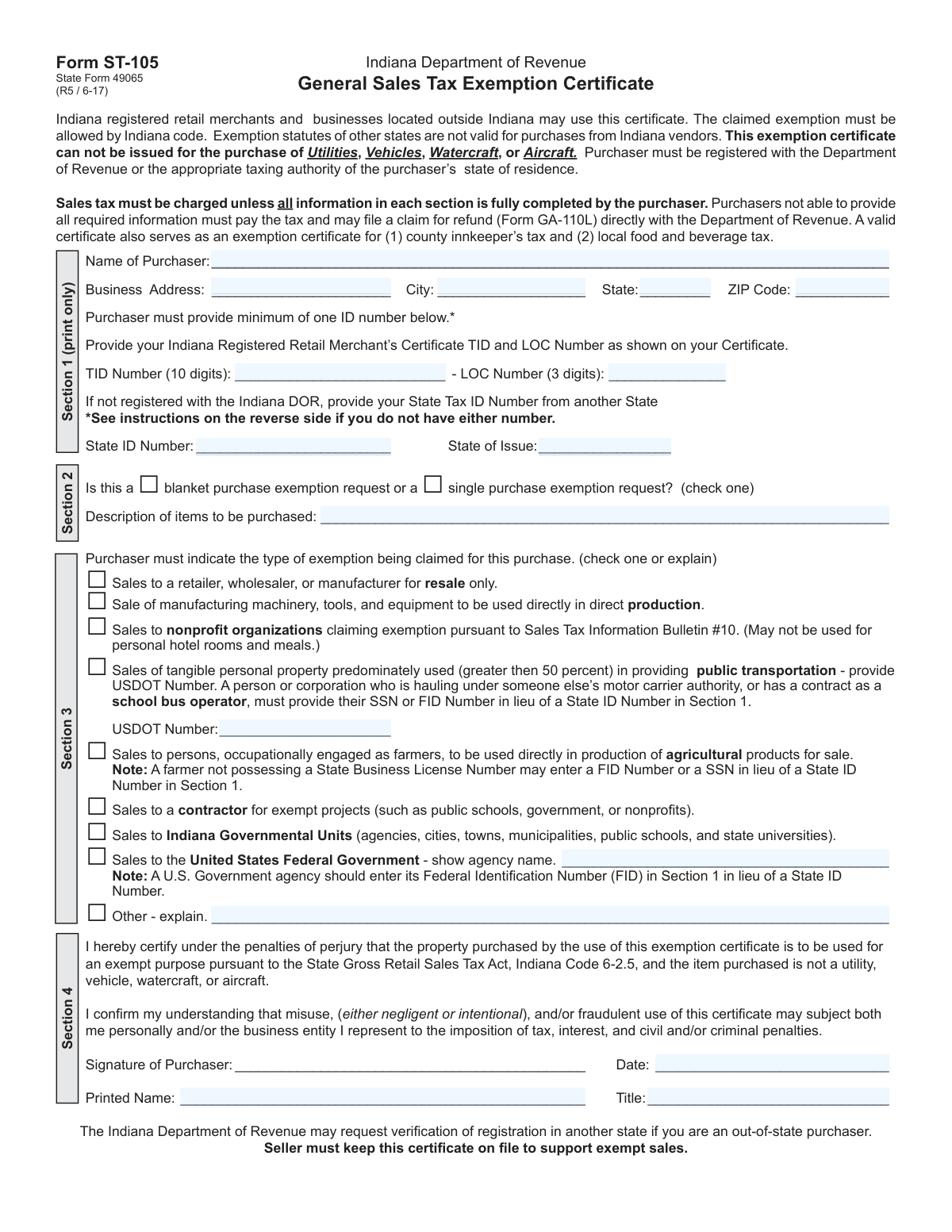
Form ST-105, the General Sales Tax Exemption Certificate, is an Indiana Department of Revenue document that allows qualifying businesses to purchase goods and services without paying sales tax. To be valid, the purchaser must provide their business and identification details and specify the legal basis for the exemption, ensuring compliance with Indiana tax law. Today, this form can be filled out quickly and accurately using AI-powered services like Instafill.ai, which can also convert non-fillable PDF versions into interactive fillable forms.
Our AI automatically handles information lookup, data retrieval, formatting, and form filling.
It takes less than a minute to fill out ST-105 using our AI form filling.
Securely upload your data. Information is encrypted in transit and deleted immediately after the form is filled out.
Form specifications
| Form name: | Form ST-105, General Sales Tax Exemption Certificate |
| Number of fields: | 27 |
| Number of pages: | 1 |
| Filled form examples: | Form ST-105 Examples |
| Language: | English |
More forms in Sales tax forms
Instafill Demo: How to fill out PDF forms in seconds with AI
How to Fill Out ST-105 Online for Free in 2026
Are you looking to fill out a ST-105 form online quickly and accurately? Instafill.ai offers the #1 AI-powered PDF filling software of 2026, allowing you to complete your ST-105 form in just 37 seconds or less.
Follow these steps to fill out your ST-105 form online using Instafill.ai:
- 1 Navigate to Instafill.ai and upload or select Form ST-105.
- 2 Enter the purchaser's name and business address details in Section 1.
- 3 Provide the required identification number in Section 1, such as an Indiana TID and LOC number or a State Tax ID from another state.
- 4 In Section 2, specify if it is a blanket or single purchase and describe the items to be purchased.
- 5 Select the appropriate reason for the exemption in Section 3, such as for resale, manufacturing, or sales to a government entity.
- 6 Review all the information you have entered to ensure it is complete and accurate.
- 7 Sign, date, and provide your printed name and title in Section 4 to certify the information under penalties of perjury.
Our AI-powered system ensures each field is filled out correctly, reducing errors and saving you time.
Why Choose Instafill.ai for Your Fillable ST-105 Form?
Speed
Complete your ST-105 in as little as 37 seconds.
Up-to-Date
Always use the latest 2026 ST-105 form version.
Cost-effective
No need to hire expensive lawyers.
Accuracy
Our AI performs 10 compliance checks to ensure your form is error-free.
Security
Your personal information is protected with bank-level encryption.
Frequently Asked Questions About Form ST-105
Form ST-105, the General Sales Tax Exemption Certificate, is used by qualifying businesses and organizations to make purchases in Indiana without paying state and local sales tax. The seller keeps this form on file as proof that the sale was legally exempt from tax.
Indiana registered retail merchants, businesses located outside Indiana, government agencies, and certain nonprofit organizations can use this form. The purchaser must be registered with the Indiana Department of Revenue or the appropriate taxing authority in their state of residence.
A 'single purchase' exemption applies to one specific transaction only. A 'blanket' exemption can be used for multiple future purchases of the same type of items from the same seller, so you don't have to fill out a new form for every purchase.
If you are an out-of-state business, provide your home state's tax ID number. Specific entities like farmers, federal agencies, or nonprofits may be instructed to use their SSN or Federal Identification Number (FID) instead.
This exemption certificate specifically cannot be used for the purchase of utilities, vehicles, watercraft, or aircraft.
The seller is required to charge sales tax if the form is not fully and correctly completed. If you pay the tax, you can file a claim for a refund directly with the Indiana Department of Revenue using Form GA-110L.
You must keep the completed certificate on file to support the tax-exempt sale. The Indiana Department of Revenue may request to see this form during an audit to verify the exempt transaction.
If you are a farmer and do not have a State Business License Number, you can enter your Federal Identification Number (FID) or Social Security Number (SSN) in the State ID Number field in Section 1.
No, the exemption for nonprofit organizations specifically states it may not be used for personal hotel rooms and meals.
No, exemption statutes of other states are not valid for purchases from Indiana vendors. You must complete Indiana's Form ST-105 to claim a valid exemption on your purchase.
Yes, services like Instafill.ai use AI to help you accurately auto-fill form fields with your saved information, which can save time and reduce errors.
You can use Instafill.ai to easily fill out your form online. Simply upload the form, and the platform will make it interactive, allowing you to type your information directly into the fields before printing or saving.
If you have a non-fillable PDF, you can upload it to a service like Instafill.ai. The platform can convert flat, non-fillable PDFs into interactive forms that you can easily complete on your computer.
Compliance ST-105
Validation Checks by Instafill.ai
1
Ensures a Primary Identification Number is Provided
This check verifies that the purchaser has provided at least one valid identification number as required in Section 1. The form is invalid unless either the Indiana 'TID Number' and 'LOC Number' are completed, or an alternative 'State ID Number' is provided. Failure to provide a valid ID number means the exemption cannot be processed, and the seller must charge sales tax.
2
Validates Indiana TID Number Format
This validation ensures the 'TID Number' field, if filled, contains exactly 10 digits. This format is specified by the Indiana Department of Revenue and is crucial for correctly identifying the registered retail merchant. An incorrect format will lead to a failed lookup in the state's database and invalidate the exemption certificate.
3
Validates LOC Number Format and Dependency
This check confirms that the 'LOC Number' contains exactly 3 digits and is only provided when the 'TID Number' is also filled. The LOC number is a required component of the Indiana Registered Retail Merchant’s Certificate and is meaningless on its own. Submitting a TID without a LOC, or a LOC without a TID, results in an incomplete and invalid identifier.
4
Requires Exclusive Purchase Type Selection
This validation ensures that the purchaser has selected exactly one option for the purchase type: either 'blanket purchase' or 'single purchase'. Selecting neither or both options creates ambiguity about the scope of the exemption. The form must be rejected if this choice is not made clearly, as it affects how the seller applies the exemption to future sales.
5
Requires Exclusive Exemption Reason Selection
This check verifies that the purchaser has checked one and only one box in Section 3 to indicate the reason for the exemption. The legal basis for the tax exemption is dependent on this selection, and choosing multiple reasons or none at all makes the claim invalid. If the reason is unclear, the seller is obligated to collect sales tax on the purchase.
6
Conditional Requirement for USDOT Number
This validation ensures that the 'USDOT Number' field is completed if the purchaser claims the 'Sales for public transportation' exemption. The USDOT number is the specific piece of evidence required to substantiate this type of claim. Failure to provide the USDOT number when claiming this exemption results in an incomplete and invalid certificate.
7
Conditional Requirement for 'Other' Exemption Explanation
This check verifies that if the 'Other - explain' box is checked in Section 3, the corresponding explanation text field is not empty. The state requires a specific, written justification for any exemption claim that does not fall into the predefined categories. An empty explanation for an 'Other' claim makes the exemption reason completely unsubstantiated and invalid.
8
Conditional Requirement for Federal Agency Name
This validation ensures that if the 'Sales to the United States Federal Government' exemption is claimed, the agency name field is filled out. Identifying the specific federal agency is necessary for verification and record-keeping. A claim for a federal exemption without naming the agency is considered incomplete and cannot be accepted.
9
Ensures All Certification Fields are Complete
This check verifies that the 'Signature of Purchaser', 'Date', 'Printed Name', and 'Title' fields in Section 4 are all completed. These elements constitute a legal attestation under penalties of perjury, confirming the validity of the information provided. An incomplete certification section renders the entire document legally non-binding and invalid for tax exemption purposes.
10
Validates Certification Date is Not in the Future
This validation ensures the 'Date' in the certification section is a valid date and is not set to a future date. A certificate must be signed on or before the date of purchase to be valid, as one cannot attest to the conditions of a purchase that has not yet happened. A future-dated certificate would be rejected as logically and legally invalid.
11
Scans for Prohibited Purchase Items
This check scans the 'Description of items to be purchased' field for keywords of explicitly prohibited items, such as 'Utilities', 'Vehicles', 'Watercraft', or 'Aircraft'. The form clearly states it cannot be used for these purchases, so their mention would immediately invalidate the exemption claim. This prevents the misuse of the certificate for non-qualifying high-value assets.
12
Ensures Completeness of Purchaser's Full Address
This validation verifies that the 'Business Address', 'City', 'State', and 'ZIP Code' fields are all filled out. A complete and valid address is essential for identifying the purchaser and for any potential audits or verification requests by the Department of Revenue. An incomplete address makes the purchaser difficult to trace and can invalidate the form.
13
Requires 'State of Issue' for Out-of-State IDs
This check ensures that the 'State of Issue' field is completed whenever the 'State ID Number' field is used. The ID number from another state is meaningless without knowing which state issued it. This validation prevents incomplete data for out-of-state purchasers and ensures their registration can be verified with the correct authority.
14
Validates ZIP Code Format
This check ensures the provided 'ZIP Code' conforms to a valid 5-digit or 9-digit (ZIP+4) format. Correct formatting is crucial for data integrity, address verification systems, and potential mailings from the Department of Revenue. An invalid ZIP code can cause processing errors and indicates poor data quality on the form.
Common Mistakes in Completing ST-105
Users often provide the wrong type of ID number or enter it incorrectly. For example, an out-of-state purchaser might leave the ID section blank, or a farmer might provide a State ID instead of the requested SSN or FID. An invalid or missing ID number will cause the seller to reject the certificate and charge sales tax, as it is a mandatory field for validating the exemption. To avoid this, carefully read the instructions for Section 1 to determine the correct ID type for your business category; AI-powered tools like Instafill.ai can help by validating number formats and guiding users to the correct field based on their entity type.
In Section 2, purchasers frequently forget to check either the 'blanket purchase' or 'single purchase' box, making it unclear if the certificate applies to one transaction or all future qualifying purchases. An incomplete form may be rejected by the vendor, forcing them to charge sales tax until a corrected certificate is provided. Always check one of the two boxes to clearly define the scope of the exemption request.
Purchasers often write a generic description like 'parts' or 'supplies' in Section 2, which is insufficient for a seller to verify that the items qualify for the claimed exemption. This creates audit risks for the seller, who may then reject the form and charge tax to protect themselves. Be specific by listing the types of items, such as 'steel components for manufacturing' or 'cardboard packaging for resale,' to create a clear record.
In Section 3, a user might select an exemption category that doesn't accurately reflect their business or the item's use, such as claiming a 'resale' exemption for equipment that will be used in production. This constitutes misuse of the certificate and can lead to penalties, interest, and back taxes for the purchaser if discovered during an audit. Carefully review each exemption category and select the one that precisely matches your legal eligibility.
Certain exemptions in Section 3 require additional information that is often missed, such as providing a USDOT number for a public transportation exemption or an agency name for a federal government exemption. Failure to provide this linked information invalidates the specific exemption claim, forcing the seller to collect sales tax. Double-check if your selected exemption requires an additional ID or name and ensure it is filled in the correct space.
It is extremely common for purchasers to leave the signature, date, printed name, or title fields in Section 4 blank. An unsigned or undated certificate is legally invalid and cannot be accepted by the seller, leading to immediate rejection and the collection of sales tax. Always complete all fields in the certification section to attest to the accuracy of the information under penalty of perjury.
Indiana-based purchasers often enter their Taxpayer Identification Number (TID) and Location Code (LOC) incorrectly, as the form requires a specific 10-digit TID and 3-digit LOC. Users may transpose digits, omit numbers, or enter them in the wrong fields, which prevents the seller from verifying the purchaser's registration. To prevent this, copy the numbers exactly as they appear on your certificate; using a tool like Instafill.ai can help auto-populate and format these numbers correctly.
The form explicitly states it cannot be used for the purchase of Utilities, Vehicles, Watercraft, or Aircraft, but purchasers sometimes overlook this restriction. Attempting to use the certificate for these non-qualifying items is a direct violation of the form's terms and will be rejected by the seller. Misuse can also lead to penalties, so always confirm that the items you are purchasing are eligible for exemption with this specific form.
Purchasers sometimes enter their 'Doing Business As' (DBA) name instead of the full legal entity name registered with the state. This can create a mismatch when the seller attempts to verify the business's tax-exempt status against official records, leading to the rejection of the form. Always use the official legal name of the business as it appears on your state registration documents to ensure a smooth validation process.
When filling out a paper copy, purchasers often have illegible handwriting, especially in the name, address, and ID number sections. If the seller cannot accurately read the information, they cannot verify its validity, rendering the certificate useless. To avoid this, print clearly in block letters or use a fillable version of the form. Since this form is often a non-fillable PDF, a service like Instafill.ai can convert it into an interactive, fillable format to ensure all entries are typed and perfectly legible.
Saved over 80 hours a year
“I was never sure if my IRS forms like W-9 were filled correctly. Now, I can complete the forms accurately without any external help.”
Kevin Martin Green
Your data stays secure with advanced protection from Instafill and our subprocessors

Robust compliance program
Transparent business model
You’re not the product. You always know where your data is and what it is processed for.
ISO 27001, HIPAA, and GDPR
Our subprocesses adhere to multiple compliance standards, including but not limited to ISO 27001, HIPAA, and GDPR.
Security & privacy by design
We consider security and privacy from the initial design phase of any new service or functionality. It’s not an afterthought, it’s built-in, including support for two-factor authentication (2FA) to further protect your account.
Fill out ST-105 with Instafill.ai
Worried about filling PDFs wrong? Instafill securely fills form-st-105-general-sales-tax-exemption-certificate forms, ensuring each field is accurate.



