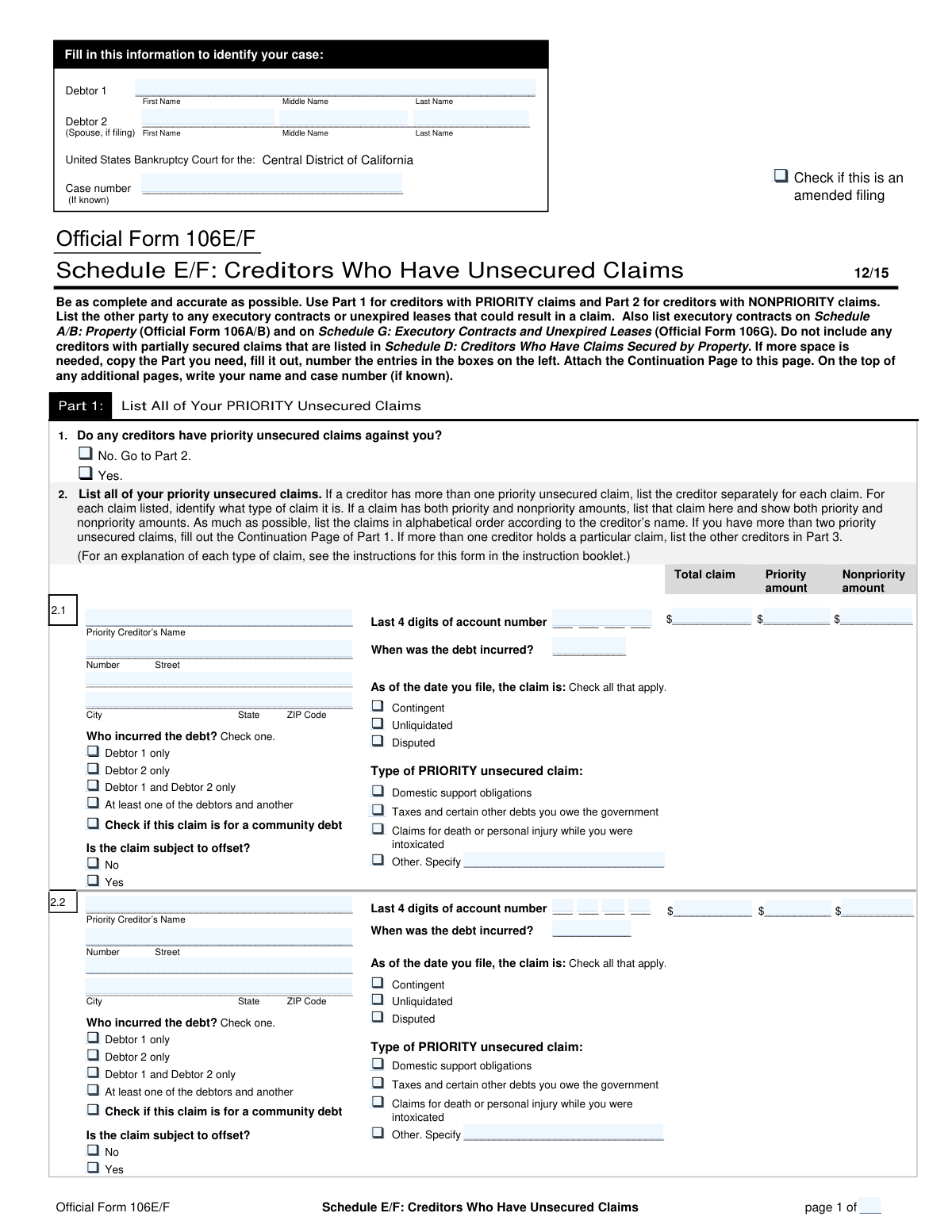
Yes! You can use AI to fill out Official Form 106E/F, Schedule E/F: Creditors Who Have Unsecured Claims

This form is a mandatory schedule in a United States bankruptcy filing, requiring the debtor to list all creditors who have unsecured claims. It is divided into two main parts: Part 1 for priority claims (such as taxes and domestic support obligations) and Part 2 for nonpriority claims (like student loans or credit card debt). Accurately completing this schedule is crucial for the bankruptcy process to ensure all debts are properly accounted for and discharged. Today, this form can be filled out quickly and accurately using AI-powered services like Instafill.ai, which can also convert non-fillable PDF versions into interactive fillable forms.
Our AI automatically handles information lookup, data retrieval, formatting, and form filling.
It takes less than a minute to fill out Official Form 106E/F using our AI form filling.
Securely upload your data. Information is encrypted in transit and deleted immediately after the form is filled out.

Form specifications

Form name: Official Form 106E/F, Schedule E/F: Creditors Who Have Unsecured Claims
Number of pages: 3
Language: English
Categories: VA claim forms, credit forms, SEC forms
main-image

Instafill Demo: How to fill out PDF forms in seconds with AI

How to Fill Out Official Form 106E/F Online for Free in 2026

Are you looking to fill out a OFFICIAL FORM 106E/F form online quickly and accurately? Instafill.ai offers the #1 AI-powered PDF filling software of 2026, allowing you to complete your OFFICIAL FORM 106E/F form in just 37 seconds or less.
Follow these steps to fill out your OFFICIAL FORM 106E/F form online using Instafill.ai:
  1. 1 Navigate to Instafill.ai and upload or select Official Form 106E/F.
  2. 2 Use the AI assistant to input your personal and case information, such as debtor names and the bankruptcy court district.
  3. 3 Proceed to Part 1 to list all priority unsecured claims, providing details for each creditor including their name, address, amount of the claim, and the type of priority.
  4. 4 Complete Part 2 by listing all nonpriority unsecured claims, entering the creditor's information and the total claim amount for each.
  5. 5 If other parties are liable for any of the listed debts, provide their information in the relevant section of the form.
  6. 6 Review all the information entered across the schedule with the AI's help to ensure accuracy and completeness before finalizing.
  7. 7 Download, print, or e-file the completed Schedule E/F as part of your bankruptcy petition.

Our AI-powered system ensures each field is filled out correctly, reducing errors and saving you time.

Why Choose Instafill.ai for Your Fillable Official Form 106E/F Form?

Speed

Complete your Official Form 106E/F in as little as 37 seconds.

Up-to-Date

Always use the latest 2026 Official Form 106E/F form version.

Cost-effective

No need to hire expensive lawyers.

Accuracy

Our AI performs 10 compliance checks to ensure your form is error-free.

Security

Your personal information is protected with bank-level encryption.

Frequently Asked Questions About Form Official Form 106E/F

This form is used when filing for bankruptcy to list all your creditors who have unsecured claims. Unsecured claims are debts not backed by any collateral, such as credit card debt, medical bills, or personal loans.

Priority claims, listed in Part 1, are debts that bankruptcy law requires to be paid first, like child support or recent taxes. Nonpriority claims, listed in Part 2, are general debts like credit cards or medical bills that are paid after priority claims.

No, you should not list secured debts like car loans or mortgages here. Those debts are secured by property and must be listed on Schedule D: Creditors Who Have Claims Secured by Property.

A 'contingent' claim depends on a future event, an 'unliquidated' claim is one where the exact amount owed is not yet certain, and a 'disputed' claim is a debt you believe you do not owe. You must check any of these boxes that apply to a specific debt.

You should list the entire claim in Part 1. Enter the total amount of the debt, and then break it down into the specific 'Priority amount' and 'Nonpriority amount' in the designated fields for that creditor.

The form provides continuation pages for both Part 1 and Part 2. You can make copies of the necessary continuation page, fill in the additional creditors, and attach it to the main form.

This asks if the creditor also owes you money, which could potentially be used to reduce the debt you owe them. This is common with banks where you might have both a loan and a savings account.

Provide your best estimate for the amount and check the 'Unliquidated' box. For the date, provide an estimate if you cannot find the exact date on a statement or by contacting the creditor.

These are typically nonpriority unsecured claims and should be listed in Part 2 of the form. Be sure to list each creditor alphabetically.

Yes, services like Instafill.ai use AI to auto-fill form fields accurately and save time. This can be especially helpful for a long and detailed form like Schedule E/F, reducing the chance of errors.

Simply upload the PDF to the Instafill.ai platform. The AI makes the form instantly fillable, allowing you to type in your information or automatically extract data from your creditor statements to complete the schedule.

You can use a tool like Instafill.ai to make it interactive. Instafill.ai can convert flat, non-fillable PDFs into fillable forms online, so you can easily type your information instead of printing and writing by hand.

Compliance Official Form 106E/F
Validation Checks by Instafill.ai

1
Ensures Priority Claims are Listed if Indicated
This check verifies that if the user answers 'Yes' to question 1 ('Do any creditors have priority unsecured claims against you?'), at least one priority creditor is detailed in section 2.1 or a continuation page. This is crucial for form completeness, as a 'Yes' answer without corresponding details leaves the section incomplete and ambiguous. If validation fails, the user should be prompted to either add a creditor or change the answer to 'No'.
2
Verifies Priority Claim Amount Calculation
This validation ensures that for each priority claim listed in Part 1, the sum of the 'Priority amount' and 'Nonpriority amount' fields equals the 'Total claim' field. This is a critical logical check to maintain financial accuracy and prevent mathematical errors in the bankruptcy schedules. A mismatch would lead to incorrect totals and potential rejection of the filing.
3
Confirms Existence of Priority Amount in Part 1
This rule validates that for any claim listed in Part 1, the 'Priority amount' field contains a value greater than zero. Listing a claim in the priority section without a corresponding priority amount is contradictory and makes the entry invalid. This check ensures that only legitimate priority claims are included in this part of the schedule.
4
Requires Specification for 'Other' Claim Type
This check ensures that if the 'Other. Specify' checkbox is selected for either a priority or nonpriority claim type, the adjacent text field is not left blank. This is important for providing complete and explicit information to the court about the nature of the debt. Failure to specify makes the entry incomplete and requires clarification.
5
Ensures Nonpriority Claims are Listed if Indicated
This validation checks that if the user answers 'Yes' to question 3 ('Do any creditors have nonpriority unsecured claims against you?'), at least one nonpriority creditor is detailed in section 4.1 or a continuation page. Similar to the priority claims section, this ensures the form is logically consistent and complete. If 'Yes' is selected without any creditor details, the filing is incomplete.
6
Validates Account Number Format
This check verifies that the 'Last 4 digits of account number' field contains exactly four numeric digits. This specific format is required for identification purposes while protecting the debtor's full account information. Submitting incorrect formats can cause issues with creditor identification and data processing.
7
Validates 'Debt Incurred' Date
This validation ensures the 'When was the debt incurred?' field contains a properly formatted date that is not in the future. An invalid or future date is logically impossible and would be considered a data entry error. This check maintains the integrity and accuracy of the timeline of debts presented to the court.
8
Validates Creditor's ZIP Code Format
This rule checks that the ZIP Code provided for a creditor's address is in a valid 5-digit (NNNNN) or 9-digit (NNNNN-NNNN) format. Correct postal codes are essential for ensuring legal notices and other communications are successfully delivered to the creditor. An invalid ZIP code could lead to failed mail delivery and procedural delays.
9
Ensures Complete Creditor Entry
This validation ensures that if any part of a creditor entry (e.g., 2.1, 4.1) is started, all required fields within that entry are completed, including the creditor's full name, address, and the total claim amount. Partial entries are ambiguous and prevent proper processing of the claim. This check enforces the 'Be as complete and accurate as possible' instruction on the form.
10
Requires Selection of Debtor Liability
This check verifies that for every listed claim, one of the checkboxes under 'Who incurred the debt?' is selected. This information is legally significant as it assigns responsibility for the debt among the filers (Debtor 1, Debtor 2, both, etc.). Failing to make a selection creates ambiguity regarding who is liable for the claim.
11
Requires Selection of Claim Offset Status
This validation ensures that for each creditor listed, either 'Yes' or 'No' is selected for the question 'Is the claim subject to offset?'. The potential for an offset, where a creditor might owe money to the debtor, is a critical piece of financial information. Answering this question is mandatory for a complete and accurate schedule.
12
Ensures Debtor 1 Name is Provided
This check validates that the 'Debtor 1' First Name and Last Name fields at the top of the form are filled out. This is the primary identifier for the individual filing for bankruptcy and is mandatory for the form to be legally valid. Missing this information would make it impossible to associate the schedule with the correct case.
13
Validates Numeric Format for Claim Amounts
This rule ensures that all monetary fields ('Total claim', 'Priority amount', 'Nonpriority amount') contain only valid numeric characters and represent a non-negative currency value. Non-numeric or negative values are invalid and would cause calculation errors and processing failures. This maintains the financial integrity of the entire document.
14
Conditional Logic for Debtor 2 Fields
This check validates that fields specific to 'Debtor 2' (e.g., the 'Debtor 2 only' checkbox) are only used if a 'Debtor 2' name is provided in the form header. If no spouse is filing, these options should be disabled or flagged as an error if selected. This prevents logically inconsistent data entries related to a non-existent second debtor.

Common Mistakes in Completing Official Form 106E/F

Misclassifying Priority and Nonpriority Claims

Debtors often confuse priority debts (like recent taxes or domestic support) with nonpriority debts (like credit cards), listing them in the wrong section of the form. This is a critical error as it affects which debts get paid first and which may be discharged, potentially leading to objections from the trustee. To avoid this, carefully review the legal definitions of each claim type or consult with a legal professional before categorizing your debts.

Incorrectly Allocating Priority and Nonpriority Amounts

In Part 1, for claims that have both priority and nonpriority portions, filers often list the entire amount as priority or fail to ensure the two amounts sum to the total claim. This miscalculation can lead to an incorrect bankruptcy plan and affect the dischargeability of the debt. Always verify the exact breakdown of the debt and double-check your math. AI-powered tools like Instafill.ai can help prevent this by automatically validating that the amounts add up correctly.

Not Listing Creditors in Alphabetical Order

The instructions for Part 2 explicitly require nonpriority creditors to be listed alphabetically, a rule that is frequently overlooked. Filers tend to list debts in the order they remember them, which makes the schedule difficult for the court and trustee to process, potentially causing delays or requiring an amendment. To avoid this, sort your creditors before filling out the form. Using a tool like Instafill.ai can automate this process by sorting the entries for you.

Misunderstanding 'Contingent,' 'Unliquidated,' or 'Disputed'

Filers often misinterpret the legal meanings of 'Contingent,' 'Unliquidated,' and 'Disputed,' checking these boxes incorrectly or not at all. For instance, a claim is 'contingent' if it depends on a future event, not just because you're unsure about it. These errors misrepresent the nature of your liabilities and can lead to legal challenges, so it is vital to understand these terms or seek legal advice before making a selection.

Providing Incomplete or Inaccurate Creditor Addresses

Entering a wrong, incomplete, or outdated address for a creditor is a severe mistake, as it can prevent them from receiving legal notice of the bankruptcy. If a creditor is not properly notified, their debt may be excluded from the discharge, meaning you will still owe the money after your case is over. Always use the most recent statement to verify the creditor's mailing address for notices. AI form-fillers can help by validating address formats to catch typos.

Omitting Creditors from the Schedule

It is common for filers to accidentally omit debts, such as those to family members, old medical bills, or debts they personally dispute. You are required to list every single debt you owe. Failing to list a creditor will almost certainly result in that debt not being discharged, leaving you liable for payment post-bankruptcy. Thoroughly review your credit reports and financial records to ensure a complete list.

Failing to Specify Who Incurred the Debt

In joint filings, people often forget to check the box indicating whether the debt belongs to 'Debtor 1 only,' 'Debtor 2 only,' or is a joint or community debt. This information is critical for determining individual liability and how assets are treated, especially in community property states. An omission or error here can complicate the proceedings and requires careful review of original credit agreements to ensure accuracy.

Incorrectly Using or Numbering Continuation Pages

When filers have more creditors than fit on the main form, they often use continuation pages incorrectly. Common errors include failing to number the entries sequentially (e.g., starting again at 2.1 instead of continuing with 2.3) or neglecting to add their name and case number to the top of the extra page. This disorganization can cause claims to be overlooked by the court. If the form is a non-fillable PDF, tools like Instafill.ai can convert it to a fillable version and automatically manage continuation pages.

Forgetting Debtor and Case Information on Each Page

Filers frequently fill in their name and case number on the first page but forget to repeat this information in the header of all subsequent and continuation pages. If the pages of the filing become separated, any unidentified pages may be disregarded by the court, rendering the information on them invalid. This can lead to an incomplete filing and require time-consuming amendments. Using an automated tool can ensure this data is consistently populated across all pages.

Erroneously Listing Secured Claims on Schedule E/F

This schedule is exclusively for unsecured creditors. A frequent mistake is listing secured debts, such as a mortgage or car loan, on this form, particularly if there is a potential deficiency balance. Secured claims must be listed on Schedule D. This error creates confusion, shows a misunderstanding of the bankruptcy process, and will require filing amended schedules, which delays the case.
Saved over 80 hours a year

“I was never sure if my IRS forms like W-9 were filled correctly. Now, I can complete the forms accurately without any external help.”

Kevin Martin Green

Your data stays secure with advanced protection from Instafill and our subprocessors

Robust compliance program

Transparent business model

You’re not the product. You always know where your data is and what it is processed for.

ISO 27001, HIPAA, and GDPR

Our subprocesses adhere to multiple compliance standards, including but not limited to ISO 27001, HIPAA, and GDPR.

Security & privacy by design

We consider security and privacy from the initial design phase of any new service or functionality. It’s not an afterthought, it’s built-in, including support for two-factor authentication (2FA) to further protect your account.

Fill out Official Form 106E/F with Instafill.ai

Worried about filling PDFs wrong? Instafill securely fills official-form-106ef-schedule-ef-creditors-who-have-unsecured-claims-1 forms, ensuring each field is accurate.