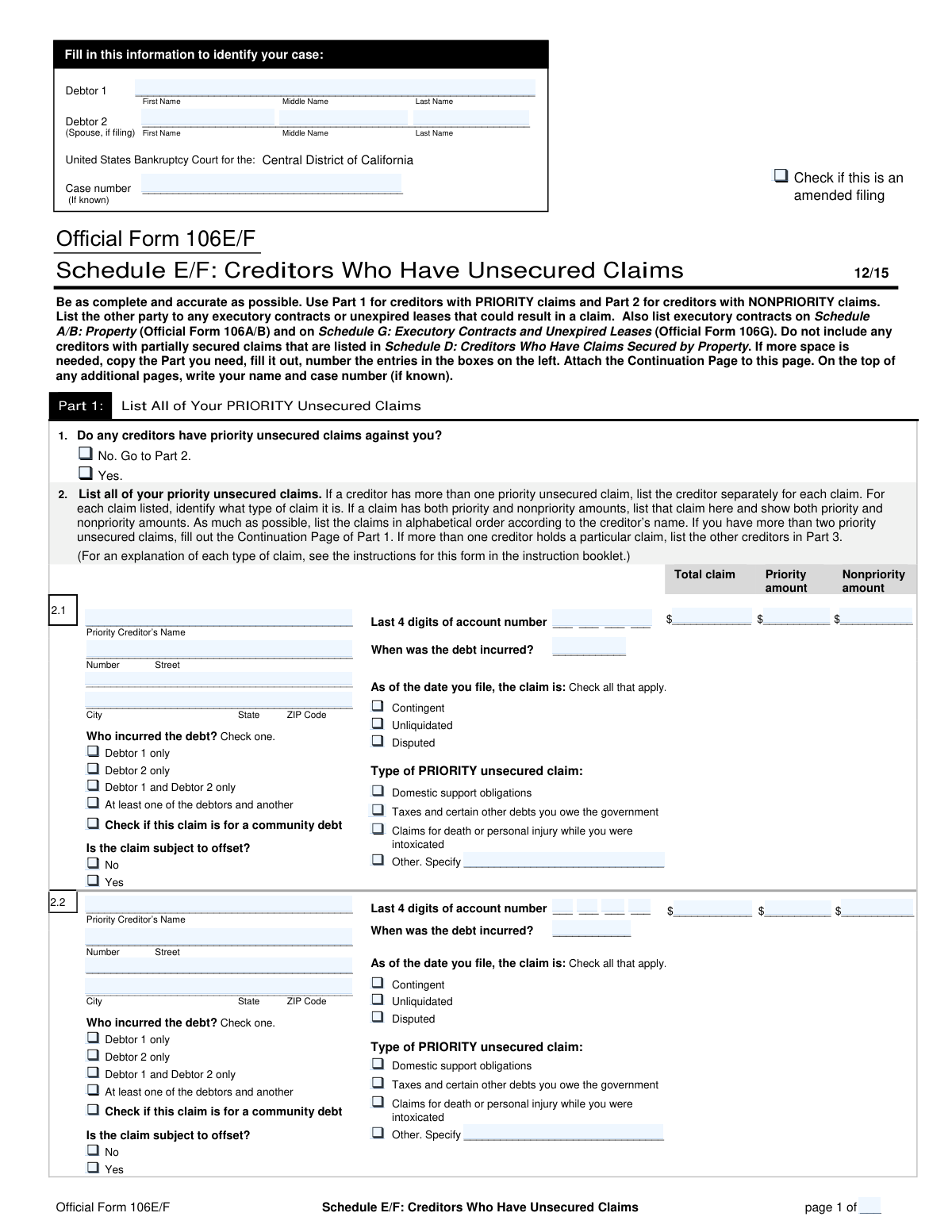
Yes! You can use AI to fill out Official Form 106E/F, Schedule E/F: Creditors Who Have Unsecured Claims

Official Form 106E/F is a crucial schedule in a bankruptcy filing where the debtor must list all creditors who hold unsecured claims. The form is divided into two main parts: one for priority claims (like certain taxes or domestic support obligations) and another for nonpriority claims (like credit card debt or medical bills). Accurately completing this schedule is vital for ensuring all debts are properly accounted for and addressed in the bankruptcy proceeding. Today, this form can be filled out quickly and accurately using AI-powered services like Instafill.ai, which can also convert non-fillable PDF versions into interactive fillable forms.
Our AI automatically handles information lookup, data retrieval, formatting, and form filling.
It takes less than a minute to fill out Official Form 106E/F using our AI form filling.
Securely upload your data. Information is encrypted in transit and deleted immediately after the form is filled out.

Form specifications

Form name: Official Form 106E/F, Schedule E/F: Creditors Who Have Unsecured Claims
Number of pages: 4
Language: English
Categories: VA claim forms, credit forms, SEC forms
main-image

Instafill Demo: How to fill out PDF forms in seconds with AI

How to Fill Out Official Form 106E/F Online for Free in 2026

Are you looking to fill out a OFFICIAL FORM 106E/F form online quickly and accurately? Instafill.ai offers the #1 AI-powered PDF filling software of 2026, allowing you to complete your OFFICIAL FORM 106E/F form in just 37 seconds or less.
Follow these steps to fill out your OFFICIAL FORM 106E/F form online using Instafill.ai:
  1. 1 Navigate to Instafill.ai and upload or select Official Form 106E/F.
  2. 2 Provide your personal details and bankruptcy case number for the AI to populate the form's header sections.
  3. 3 In Part 1, input the information for each priority unsecured creditor, including their name, address, the amount of the claim, and the type of priority.
  4. 4 In Part 2, list all nonpriority unsecured creditors, providing their details and the total claim amount for each.
  5. 5 For each listed creditor, specify details such as when the debt was incurred, who incurred it, and whether the claim is contingent, unliquidated, or disputed.
  6. 6 Carefully review the entire form generated by the AI, verifying that all creditors are listed correctly and all financial details are accurate.
  7. 7 Securely download, print, or e-file the completed Schedule E/F as required by the bankruptcy court.

Our AI-powered system ensures each field is filled out correctly, reducing errors and saving you time.

Why Choose Instafill.ai for Your Fillable Official Form 106E/F Form?

Speed

Complete your Official Form 106E/F in as little as 37 seconds.

Up-to-Date

Always use the latest 2026 Official Form 106E/F form version.

Cost-effective

No need to hire expensive lawyers.

Accuracy

Our AI performs 10 compliance checks to ensure your form is error-free.

Security

Your personal information is protected with bank-level encryption.

Frequently Asked Questions About Form Official Form 106E/F

This form is used in a bankruptcy case to list all of your unsecured debts. Unsecured debts are those not backed by any collateral, such as most credit card balances, medical bills, and personal loans.

Part 1 is for listing 'priority' unsecured claims, which are debts that are given special treatment and paid first under bankruptcy law, like child support or recent taxes. Part 2 is for 'nonpriority' unsecured claims, which includes most general debts like credit cards and medical bills.

Any individual filing for bankruptcy (the debtor) who has unsecured debts must complete and file this form. It is a required part of the bankruptcy petition to ensure all creditors are properly notified.

You do not list secured debts like car loans or mortgages on Schedule E/F. Those debts should be listed on Schedule D: Creditors Who Have Claims Secured by Property.

For each creditor, you must provide their name and full mailing address, the last four digits of the account number, the total amount you owe, and when the debt was incurred. Having recent billing statements handy will help you gather this information.

A claim is 'Contingent' if your obligation to pay depends on a future event, 'Unliquidated' if the exact amount is not yet determined, and 'Disputed' if you disagree that you owe the debt or contest the amount.

The form includes continuation pages for both Part 1 and Part 2. You can make copies of these pages, fill them out with your additional creditors, and attach them to the main Schedule E/F form.

In the section 'Who incurred the debt?', you should check the box for 'Debtor 1 and Debtor 2 only' if you are filing a joint bankruptcy petition. This correctly identifies the debt as a joint obligation.

This applies if the creditor also owes you money. An offset means the creditor could potentially use the money they owe you to reduce the amount of your debt to them.

You should list the creditor separately for each individual claim or account. This ensures that each debt is clearly and accurately reported in your bankruptcy filing.

Yes, services like Instafill.ai use AI to accurately auto-fill form fields, which can save you time and help prevent errors. These tools can extract information from your records and place it in the correct sections of the form.

To fill out Schedule E/F online, you can upload the PDF to a platform like Instafill.ai. The service will make the document interactive, allowing you to type your information directly into the fields and then save or print your completed form.

If your PDF is a 'flat' or non-fillable image, you can use a service like Instafill.ai. It can convert the static document into an interactive, fillable form that you can easily complete on your computer.

Compliance Official Form 106E/F
Validation Checks by Instafill.ai

1
Conditional Requirement for Priority Claims
This check ensures that if the user answers 'Yes' to question 1 ('Do any creditors have priority unsecured claims against you?'), then at least one priority creditor must be detailed in Part 1, section 2. This prevents the submission of an internally inconsistent form where the user indicates they have priority claims but fails to list them. If validation fails, the user will be prompted to either list a creditor or change their answer to 'No'.
2
Priority Claim Amount Summation
For each priority claim listed in Part 1, this validation verifies that the 'Priority amount' plus the 'Nonpriority amount' equals the 'Total claim'. This is crucial for accurate financial reporting and calculating the total debt owed in each category. A mismatch could lead to incorrect calculations in the bankruptcy estate, so a failure would require the user to correct the amounts before proceeding.
3
Specification for 'Other' Priority Claim Type
This check validates that if the 'Other' checkbox is selected under 'Type of PRIORITY unsecured claim' for any creditor in Part 1, the adjacent text field for specifying the claim type is not left blank. This ensures that all claims are properly categorized as required by the court. Failure to specify will result in an error message requiring the user to provide a description.
4
Conditional Requirement for Nonpriority Claims
This check ensures that if the user answers 'Yes' to question 3 ('Do any creditors have nonpriority unsecured claims against you?'), then at least one nonpriority creditor must be detailed in Part 2, section 4. This maintains logical consistency within the form. If validation fails, the user will be prompted to either list a nonpriority creditor or change their answer to 'No'.
5
Specification for 'Other' Nonpriority Claim Type
This check validates that if the 'Other' checkbox is selected under 'Type of NONPRIORITY unsecured claim' for any creditor in Part 2, the adjacent specification text field is filled in. This is necessary for the court and trustee to understand the nature of all listed debts. A failed validation will prevent submission until a description is provided.
6
Debtor 2 Existence for Debt Attribution
This validation confirms that if 'Debtor 2 only' or 'Debtor 1 and Debtor 2 only' is selected for 'Who incurred the debt?', the 'Debtor 2' name fields at the top of the form are filled out. This prevents attributing debt to a non-existent party in the filing. If Debtor 2's name is missing, the user will be alerted to either add the Debtor 2 information or correct the debt attribution.
7
Completeness of Creditor Entry
This check ensures that for any partially filled creditor entry in Part 1 or Part 2, all essential fields are completed, including the Creditor's Name, full address (Number, Street, City, State, ZIP Code), and the total claim amount. This is vital for ensuring proper notification to all creditors. An incomplete entry will trigger an error, highlighting the missing fields.
8
Account Number Format Validation
This rule verifies that the 'Last 4 digits of account number' field, if filled, contains exactly four numeric digits. This standardized format aids in correctly identifying specific accounts without disclosing the full account number. An entry with non-numeric characters or an incorrect number of digits will be flagged as invalid.
9
Date of Debt Incurred Validity
This check ensures that the 'When was the debt incurred?' field contains a valid date that is not in the future. A future date is logically impossible for an existing debt and would be a data entry error. The validation prevents such errors, ensuring the timeline of debt is accurate for legal purposes.
10
ZIP Code Format Validation
This validation checks that all ZIP Code fields contain a valid 5-digit or 9-digit (ZIP+4) numeric format. Correctly formatted ZIP codes are essential for the mailability of legal notices to creditors. An invalid format will prompt the user for correction to ensure deliverability.
11
Exclusive Selection for 'Who Incurred the Debt'
For each listed claim, this check ensures that exactly one option is selected from the 'Who incurred the debt?' checklist. Selecting zero or multiple options would create ambiguity regarding legal responsibility for the debt. The form will be considered incomplete until a single, valid selection is made for each creditor.
12
Debtor 1 Name Presence on All Pages
This validation ensures that the 'Debtor 1' name field is filled out on the header of every page of the schedule. This is a critical requirement for document identification, especially if pages become separated. A missing name on any page would trigger a validation failure, requiring the user to complete the field before submission.
13
Logical Pagination
This check verifies that the 'page __ of ___' fields are filled and that the current page number is not greater than the total number of pages. It also ensures the total number of pages is consistent across all pages of the schedule. This is important for confirming that the submitted document is complete and in the correct order.

Common Mistakes in Completing Official Form 106E/F

Misclassifying Priority and Nonpriority Claims

Debtors often confuse which debts are 'priority' (like recent taxes or domestic support) and which are 'nonpriority' (like credit cards or medical bills). This happens due to the complexity of bankruptcy law. Misclassification can lead to the improper treatment of debts, potentially leaving the debtor liable for priority debts they thought would be handled differently. To avoid this, carefully review the definitions for each claim type and list them in the correct section (Part 1 for Priority, Part 2 for Nonpriority).

Incorrectly Allocating Claim Amounts in Part 1

In Part 1, for priority claims, filers must break down the 'Total claim' into its 'Priority amount' and 'Nonpriority amount'. A common error is to list the same value for all three fields or to have amounts that do not add up correctly. This mistake can misrepresent the total priority debt, affecting the bankruptcy plan and payment calculations. Always ensure that the Priority amount plus the Nonpriority amount equals the Total claim for that specific debt.

Failing to List All Unsecured Creditors

People frequently omit creditors, especially for informal personal loans, old medical bills, or debts in collections, assuming they are not important. However, any debt not listed on the bankruptcy schedules may not be discharged, meaning the filer will still be legally obligated to pay it after the case is over. To prevent this, thoroughly review your credit reports from all three major bureaus, as well as old bank statements and bills, to create a comprehensive list of everyone you owe.

Incorrectly Listing Secured Debts

This schedule is exclusively for unsecured claims, but filers sometimes mistakenly list secured debts like mortgages or car loans here. This error creates significant inconsistencies across the bankruptcy petition, as secured debts belong on a separate form (Schedule D). Such mistakes can cause delays and require filing amendments. Always differentiate between debts backed by collateral (secured) and those that are not (unsecured) before filling out the forms.

Providing Incomplete or Inaccurate Creditor Information

Entering a wrong address, an old P.O. Box, or forgetting the account number is a frequent mistake that has serious consequences. The court system relies on this information to formally notify creditors of the bankruptcy filing. If a creditor is not properly notified because of bad information, the debt owed to them may be excluded from the discharge. To avoid this, use the most recent statement from each creditor to copy the exact name and mailing address. AI-powered tools like Instafill.ai can help by auto-completing and validating addresses to ensure accuracy.

Misunderstanding Claim Status Checkboxes

The terms 'Contingent,' 'Unliquidated,' and 'Disputed' have specific legal meanings that are often misinterpreted by filers. A claim might be checked as 'Disputed' when it's simply a bill the person doesn't want to pay, which is incorrect. This mischaracterization can affect how the claim is treated by the trustee and may require clarification, delaying the case. You should only check these boxes if the debt truly depends on a future event (contingent), the exact amount is unknown (unliquidated), or you have a legitimate legal basis to challenge the debt (disputed).

Forgetting to Fill Out Headers on Continuation Pages

When a debtor has more creditors than fit on the main page, they must use continuation pages. A very common oversight is failing to write the debtor's name and case number at the top of every single additional page. This can lead to pages being misfiled or lost by the court clerk, resulting in an incomplete petition and unlisted creditors. Always fill out the header information on all pages before you begin listing the creditor details.

Incorrectly Assigning Debt in a Joint Filing

In a joint case with two debtors, it is crucial to correctly check who incurred the debt: 'Debtor 1 only,' 'Debtor 2 only,' or 'Debtor 1 and Debtor 2 only.' Filers may guess or incorrectly assume all debts are joint. This information is vital for determining individual liability and how community property laws apply. Incorrectly assigning a debt can lead to legal complications regarding who is responsible for what after the bankruptcy.

Failing to List Creditors Alphabetically

The form instructions explicitly require that creditors in both Part 1 and Part 2 be listed in alphabetical order. Filers, often focused on the financial details, frequently overlook this organizational requirement. While it may seem minor, failing to alphabetize can slow down the review process for the court and trustee, and in some districts, it may trigger a deficiency notice requiring you to amend and refile the schedule. Using a tool like Instafill.ai can help automatically sort creditors correctly before generating the final form.

Omitting the 'Date Debt Was Incurred'

Filers often leave the 'When was the debt incurred?' field blank, either because they don't know the exact date or they underestimate its importance. This date is critical, especially for priority tax debts, as it helps determine whether the debt qualifies for priority status. Leaving this field blank creates ambiguity and may lead to the trustee or court requiring more information. If the exact date is unknown, provide an approximate date or the year the account was opened.
Saved over 80 hours a year

“I was never sure if my IRS forms like W-9 were filled correctly. Now, I can complete the forms accurately without any external help.”

Kevin Martin Green

Your data stays secure with advanced protection from Instafill and our subprocessors

Robust compliance program

Transparent business model

You’re not the product. You always know where your data is and what it is processed for.

ISO 27001, HIPAA, and GDPR

Our subprocesses adhere to multiple compliance standards, including but not limited to ISO 27001, HIPAA, and GDPR.

Security & privacy by design

We consider security and privacy from the initial design phase of any new service or functionality. It’s not an afterthought, it’s built-in, including support for two-factor authentication (2FA) to further protect your account.

Fill out Official Form 106E/F with Instafill.ai

Worried about filling PDFs wrong? Instafill securely fills official-form-106ef-schedule-ef-creditors-who-have-unsecured-claims-2 forms, ensuring each field is accurate.