
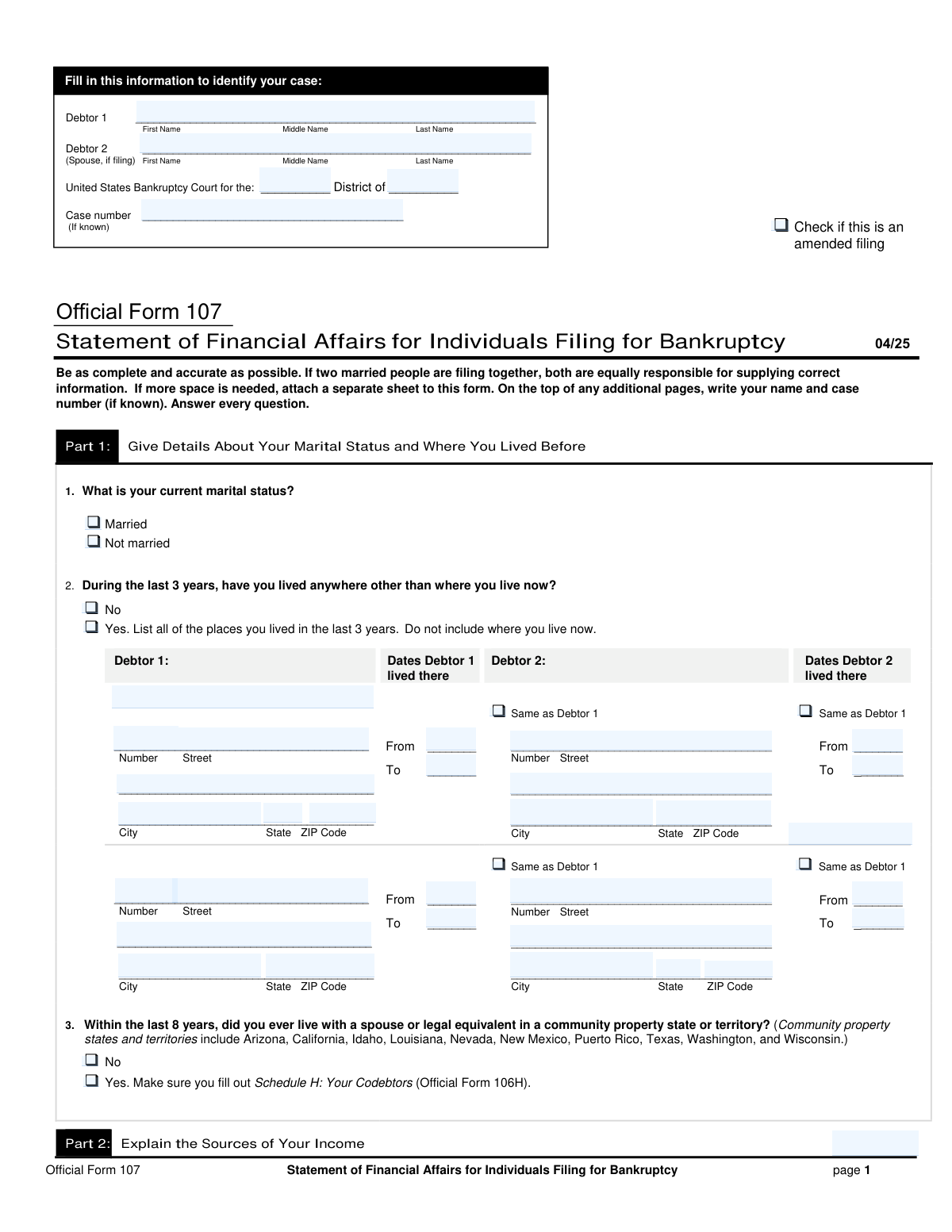
Yes! You can use AI to fill out Official Form 107, Statement of Financial Affairs for Individuals Filing for Bankruptcy (04/25)
Don't type 111 fields by hand. Tell our AI about yourself, or upload your W-2 or last year's return, and it fills every field in seconds. You check it, then download, print or sign.
The AI does the filling. You just check it.
No typing into boxes, nothing to install.
What this form asks for
The AI fills all of it, from your answers or your documents.
The AI checks your answers before you download
14 checks built for this form, so a wrong date or a missing answer is caught before anyone else sees it.
This validation ensures that a user cannot select both 'Married' and 'Not married' checkboxes simultaneously. These options are mutually exclusive, and selecting both would create a logical contradiction in the filer's status. If a user tries to check the second box, the first one should be unchecked, or an error should be displayed to force a single choice.
This check verifies that if the 'Married' checkbox is selected, the 'Debtor 2 Full Name' field is populated. It is crucial for legal and financial accuracy in a joint filing that the spouse's information is included. If 'Married' is checked but Debtor 2's name is missing, the form submission should be blocked with a message prompting the user to either provide the spouse's name or change the marital status.
This validation ensures that if the user checks 'Yes' for 'Lived Elsewhere in Last 3 Years', they must provide details for at least the first prior address (e.g., 'Debtor 1 Prior Address Line 1'). This is a conditional requirement to ensure the form is complete and provides the necessary residency history for legal review. A failure would trigger an error message indicating that prior address details are missing.
This check validates that for any given prior address, the 'Lived There From' date is chronologically before the 'Lived There To' date. This prevents logical errors in the timeline of residency, which is critical for establishing jurisdiction and other legal facts. If the 'From' date is after the 'To' date, an error should be flagged, forcing the user to correct the date range.
This validation confirms that all dates entered in the 'Lived There From' and 'Lived There To' fields fall within the last three years from the date of filing. The form specifically asks for addresses within this period, so any dates outside this range are invalid and could lead to incorrect legal declarations. The system should calculate the three-year window and reject any dates that do not comply.
This check ensures that if the 'Debtor 2 address same as Debtor 1' checkbox is checked for a prior address row, the separate address fields for Debtor 2 (e.g., 'Debtor 2 Prior Street Address') are left empty or disabled. This prevents redundant and potentially conflicting data entry. If the box is checked and an address is also entered, the system should flag an error and ask the user to either clear the fields or uncheck the box.
And 8 more checks
- ZIP Code Format Validation
- Conditional Income Details Requirement
- Income Source and Amount Correlation
- Calendar Year Sequence Logic
- Case Number Format
- Debtor Name Consistency Check
- Conditional Other Income Requirement
- Mutually Exclusive Yes/No Selection
Let AI fill out your Form 107
No typing. Every field filled in seconds, checked, ready to sign.
How to Fill Out Form 107 Online for Free in 2026
What the AI walks you through.
- Navigate to Instafill.ai and upload or select Form 107, the Statement of Financial Affairs.
- Provide personal and case identification details for Debtor 1 and Debtor 2 (if applicable), including names, court information, and case number.
- Answer questions about your marital status, residence history for the last 3 years, and any time spent in community property states over the last 8 years.
- Detail all income from employment and business operations for the current year and the two previous calendar years, specifying sources and gross amounts for each debtor.
- Disclose any other income received during the same periods from sources other than employment or business, such as support payments, government benefits, or rental income.
- Complete the remaining sections of the form, which cover payments to creditors, property transfers, gifts, losses, and involvement in lawsuits.
- Carefully review all entered information for accuracy and completeness before signing and dating the declaration under penalty of perjury.
Common Mistakes in Completing Form 107
The ones the AI is built to catch.
Incomplete or Inaccurate Prior Address History
Incorrectly Handling Debtor 2's Address Information
Misinterpreting Income Reporting Periods
Reporting Net Income Instead of Gross Income
Failing to Complete Conditional Sections
Omitting or Using Informal Names
Misclassifying Income Sources
Inaccurate Community Property State Declaration
Inconsistent Information Across the Form
Forgetting to Check Income Type Boxes
Frequently Asked Questions About Form 107
Is it really free for 7 days?
Can I fill other forms too?
How do I cancel?
How does the AI fill out Form 107?
What happens to my information?
How complex is Form 107 to fill out?
What is the purpose of this form?
Who are 'Debtor 1' and 'Debtor 2'?
What does 'gross income' mean in the income sections?
What should I list under 'Operating a business'?
What is considered 'other income' in Question 5?
What if my spouse (Debtor 2) and I lived at different addresses during the last 3 years?
What should I do if I had no income to report for the specified years?
I've lived at more than two other addresses in the last 3 years. How do I list them all?
What is a community property state, and why does the form ask about it?
I don't remember the exact dates I lived at a previous address. What should I do?
What if I need to correct information after I've already filed this form?
Can an AI tool help me fill out this complicated form?
How can I fill out this bankruptcy form online?
The PDF version of this form I have isn't fillable. What can I do?
Get your Form 107 filled out by AI
$0 today. Cancel before Nov 19 and you pay nothing.
Other forms like this one
financial forms: Form 8938, Statement of Specified Foreign Financial Assets, Form 12.902(b), Family Law Financial Affidavit (Short Form), Form I-361, Affidavit of Financial Support, Form CJA-23, Financial Affidavit, Form 107, Statement of Financial Affairs, SBA Form 413, Personal Financial Statement, Personal Financial Statement (REV 06/2018) – Northwest Federal Credit Union, NSFAS Consent Form (National Student Financial Aid Scheme) – APP2026, International Student Application for Financial Aid 2026-2027 (International Student Application for Financial Assistance 2026-2027), State of Hawaii Department of Commerce and Consumer Affairs (DCCA) Contractors License Board – Application for Contractor's License (Sole Proprietor) (CT-36) with supporting forms (Experience Certificate CT-03, Contractors Financial Statement CT-02, and Chronological History of Projects/Project List), Colorado Judicial Department Form JDF 1111SC (Form 35.2), Sworn Financial Statement, Northwestern University Office of Undergraduate Financial Aid International Applicant Document Upload Cover Sheet, Vanguard Super Apply for a financial hardship payment, Selbstauskunft/ Vermögensaufstellung (Financial Self-Disclosure/Statement of Assets), Selbstauskunft - vertraulich - (Financial Self-Disclosure), Empower Financial Services, Inc. (EFSI) and Empower Advisory Group, LLC (EAG) Form CRS Customer Relationship Summary, Rollover Form (Principal Financial Group), Principal Financial 401(k) Withdrawal Form, Principal Financial Group Pre-Approved Basic Savings Plan - Plus, DoD 7000.14-R, Department of Defense Financial Management Regulation, Volume 12: Special Accounts, Funds and Programs
IRS forms: Form 5405, Repayment of First-Time Homebuyer Credit, Form 8879, IRS e-file Signature Authorization, Form 107, Statement of Financial Affairs, State of Hawaii Department of Commerce and Consumer Affairs (DCCA) Contractors License Board – Application for Contractor's License (Sole Proprietor) (CT-36) with supporting forms (Experience Certificate CT-03, Contractors Financial Statement CT-02, and Chronological History of Projects/Project List), Department of Home Affairs — Appointment or cessation of a registered migration agent, legal practitioner or exempt person providing immigration assistance (Appointment notification form), Australian Department of Home Affairs — Application for a Protection visa (subclass 866) (Form 866), Form 1399 – Declaration of Service (Department of Home Affairs, Australia), Ohio Department of Commerce Table of Heirship (Division of Unclaimed Funds), Ohio Department of Commerce – Table of Heirship (Unclaimed Funds Claim, Claims Less Than $3,000), DWC001S, Employer’s first report of injury or illness, DWC Form-001, Employer’s first report of injury or illness, First Republic Securities Company, LLC Entity Account Application (FRSC 778 E 7/19), Congressional Record - Proceedings and Debates of the Sixty-sixth Congress, First Session, Form 1040-X, Amended U.S. Individual Income Tax Return, Form 3115, Application for Change in Accounting Method, Form 8606, Nondeductible IRAs, Form 8850, Pre-Screening Notice and Certification Request for the Work Opportunity Credit, Form 911, Request for Taxpayer Advocate Service Assistance (And Application for Taxpayer Assistance Order), Form W-2, Wage and Tax Statement, Form W-4P (2026), Withholding Certificate for Periodic Pension or Annuity Payments
PA state forms: Form 1095-A, Health Insurance Marketplace Statement, Form W-2, Wage and Tax Statement, Form 593, Real Estate Withholding, Form 8938, Statement of Specified Foreign Financial Assets, Form CMS-2567, Statement of Deficiencies, Form 1098, Mortgage Interest Statement, Form 1098-T, Tuition Statement, Form 1099-S, Proceeds From Real Estate Transactions, Form 1098-E, Student Loan Interest Statement, Form DS-3053, Statement of Consent, Form DS-86, Statement of Non-Receipt of a U.S. Passport, Form DS-86, Statement of Non-Receipt of a U.S. Passport, Form 108, Statement of Intention, Form 107, Statement of Financial Affairs, Form 121, Statement About Your SSNs, Form 122A-1, Chapter 7 Statement of Current Monthly Income, Center for Infertility & Reproductive Surgery – New Patient Questionnaire and Patient/Guarantor Statement (Brigham and Women’s Hospital, Department of Obstetrics and Gynecology), Adult Travel Document Application for Stateless and Protected Persons in Canada (16 years of age or over) (PPTC 190), Form W-8IMY (Rev. October 2021), Certificate of Foreign Intermediary, Foreign Flow-Through Entity, or Certain U.S. Branches for United States Tax Withholding and Reporting, Form W-2, Wage and Tax Statement (2025)
bankruptcy forms: Form 101, Voluntary Petition for Bankruptcy, Form 119, Bankruptcy Petition Preparer’s Notice, Official Form 101, Voluntary Petition for Individuals Filing for Bankruptcy, Debtor’s(s’) Chapter 13 Plan (Containing a Motion for Valuation), Official Form 101, Voluntary Petition for Individuals Filing for Bankruptcy, Official Form 107, Statement of Financial Affairs for Individuals Filing for Bankruptcy (04/19)
NJ state forms: Form 1095-A, Health Insurance Marketplace Statement, Form W-2, Wage and Tax Statement, Form 593, Real Estate Withholding, Form 8938, Statement of Specified Foreign Financial Assets, Form CMS-2567, Statement of Deficiencies, Form 1098, Mortgage Interest Statement, Form 1098-T, Tuition Statement, Form 1099-S, Proceeds From Real Estate Transactions, Form 1098-E, Student Loan Interest Statement, Form DS-3053, Statement of Consent, Form DS-86, Statement of Non-Receipt of a U.S. Passport, Form DS-86, Statement of Non-Receipt of a U.S. Passport, Form 108, Statement of Intention, Form 107, Statement of Financial Affairs, Form 121, Statement About Your SSNs, Form 122A-1, Chapter 7 Statement of Current Monthly Income, Center for Infertility & Reproductive Surgery – New Patient Questionnaire and Patient/Guarantor Statement (Brigham and Women’s Hospital, Department of Obstetrics and Gynecology), Adult Travel Document Application for Stateless and Protected Persons in Canada (16 years of age or over) (PPTC 190), Form W-8IMY (Rev. October 2021), Certificate of Foreign Intermediary, Foreign Flow-Through Entity, or Certain U.S. Branches for United States Tax Withholding and Reporting, Form W-2, Wage and Tax Statement (2025)
state ID forms: Application for Renewal or Duplicate of Alabama Driver License or ID card, Form 1095-A, Health Insurance Marketplace Statement, Form W-2, Wage and Tax Statement, Form 593, Real Estate Withholding, Form 8938, Statement of Specified Foreign Financial Assets, Form CMS-2567, Statement of Deficiencies, Form 1098, Mortgage Interest Statement, Form 1098-T, Tuition Statement, Form 1099-S, Proceeds From Real Estate Transactions, Form 1098-E, Student Loan Interest Statement, Form DS-3053, Statement of Consent, Form DS-86, Statement of Non-Receipt of a U.S. Passport, Form 108, Statement of Intention, Form 107, Statement of Financial Affairs, Form 121, Statement About Your SSNs, Form 122A-1, Chapter 7 Statement of Current Monthly Income, Center for Infertility & Reproductive Surgery – New Patient Questionnaire and Patient/Guarantor Statement (Brigham and Women’s Hospital, Department of Obstetrics and Gynecology), Adult Travel Document Application for Stateless and Protected Persons in Canada (16 years of age or over) (PPTC 190), Form W-8IMY (Rev. October 2021), Certificate of Foreign Intermediary, Foreign Flow-Through Entity, or Certain U.S. Branches for United States Tax Withholding and Reporting, Form W-2, Wage and Tax Statement (2025)
Let AI fill out your Form 107
Your trial starts once a card is added. You pay nothing before Nov 19.
Your bank declined that card, so the trial did not start and nothing was charged. Please try another card.
Our AI already knows this form, all 111 fields of it. Skip the typing: tell it about yourself, or upload what you have, and it fills the whole form in seconds.
- AI fills every field on both pages, tables and checkboxes included
- No typing into boxes: answer a few questions, or upload your W-2 or last year's return, an old copy of this form, a photo of a document
- The AI checks the answers; you review and change anything before you download
- Download the finished PDF, print it, or sign it online
- Encrypted, and never used to train AI
Cancel before Nov 19 and you pay nothing.
A card is needed to start the trial. We check it with a $19.99 hold that is released right away. Cancel in two clicks from your account.
Terms · Privacy