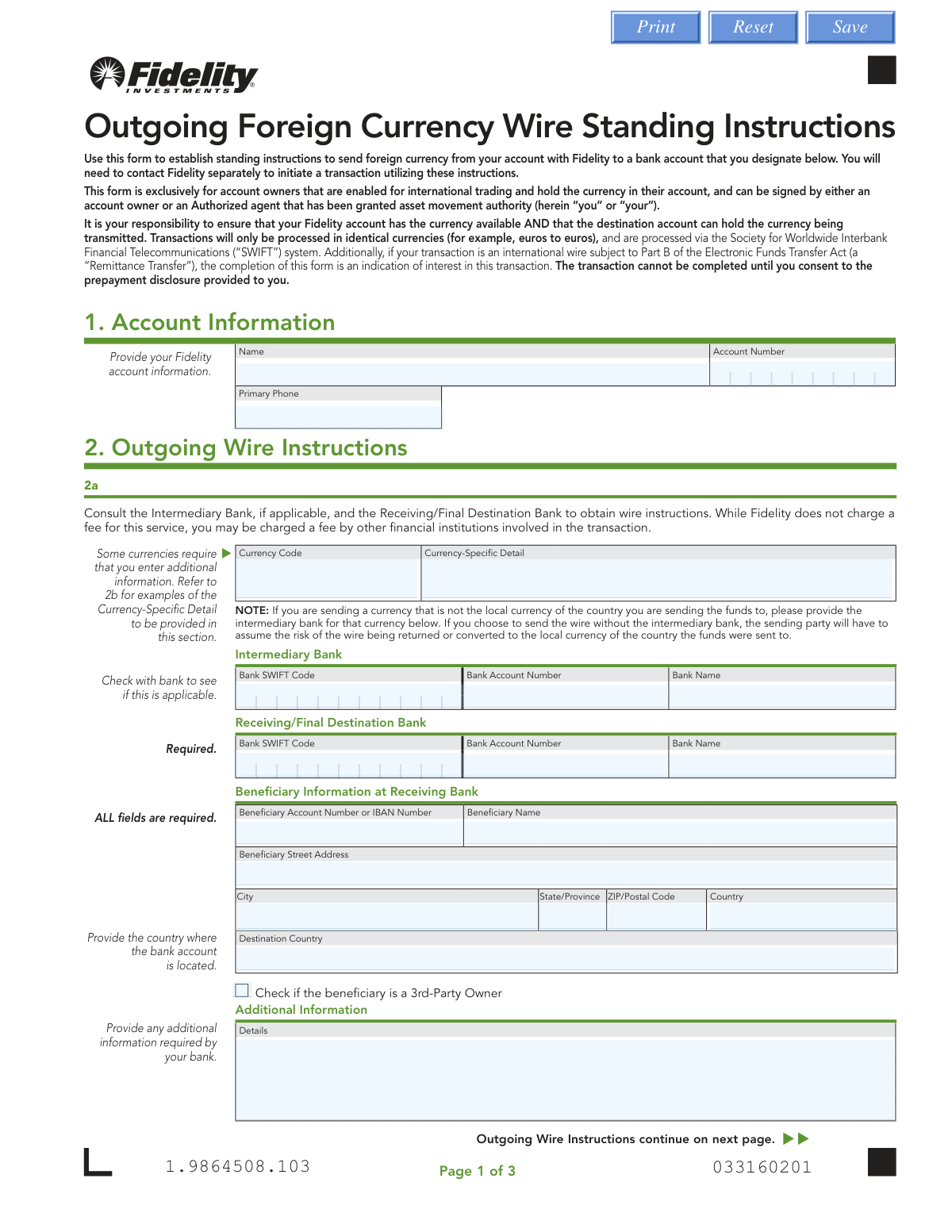
Yes! You can use AI to fill out Outgoing Foreign Currency Wire Standing Instructions
This form allows Fidelity account owners who are enabled for international trading to set up standing instructions for future foreign currency wire transfers. By completing this form, you pre-authorize the details of a recipient bank account, streamlining the process for subsequent transactions without needing to provide the information each time. Today, this form can be filled out quickly and accurately using AI-powered services like Instafill.ai, which can also convert non-fillable PDF versions into interactive fillable forms.
Our AI automatically handles information lookup, data retrieval, formatting, and form filling.
It takes less than a minute to fill out Fidelity Form 719858.4.0 using our AI form filling.
Securely upload your data. Information is encrypted in transit and deleted immediately after the form is filled out.
Form specifications
| Form name: | Outgoing Foreign Currency Wire Standing Instructions |
| Number of pages: | 1 |
| Language: | English |
Instafill Demo: How to fill out PDF forms in seconds with AI
How to Fill Out Fidelity Form 719858.4.0 Online for Free in 2026
Are you looking to fill out a FIDELITY FORM 719858.4.0 form online quickly and accurately? Instafill.ai offers the #1 AI-powered PDF filling software of 2026, allowing you to complete your FIDELITY FORM 719858.4.0 form in just 37 seconds or less.
Follow these steps to fill out your FIDELITY FORM 719858.4.0 form online using Instafill.ai:
- 1 Navigate to Instafill.ai and upload or select the Fidelity Outgoing Foreign Currency Wire Standing Instructions form.
- 2 Use the AI assistant to automatically fill in your Fidelity account information in Section 1, including your name, account number, and phone number.
- 3 Complete Section 2 by providing the outgoing wire instructions, such as the currency code, destination bank's SWIFT code, bank name, and beneficiary account details.
- 4 If applicable, enter details for an intermediary bank and any required currency-specific information (e.g., IBAN for EUR, Sort Code for GBP).
- 5 If you are a W-8 certified customer sending funds to a country different from your tax residence, provide the required explanation in Section 3.
- 6 Carefully review all the information populated by the AI for accuracy. Proceed to sign and date the form in Section 4, obtaining a Medallion signature guarantee if required.
- 7 Download the completed, signed form and submit it to Fidelity following the mailing instructions provided on the document.
Our AI-powered system ensures each field is filled out correctly, reducing errors and saving you time.
Why Choose Instafill.ai for Your Fillable Fidelity Form 719858.4.0 Form?
Speed
Complete your Fidelity Form 719858.4.0 in as little as 37 seconds.
Up-to-Date
Always use the latest 2026 Fidelity Form 719858.4.0 form version.
Cost-effective
No need to hire expensive lawyers.
Accuracy
Our AI performs 10 compliance checks to ensure your form is error-free.
Security
Your personal information is protected with bank-level encryption.
Frequently Asked Questions About Form Fidelity Form 719858.4.0
This form is used to establish recurring instructions for sending foreign currency from your Fidelity account to a specific international bank account. This saves you from re-entering the recipient's details for every future transfer.
This form is exclusively for Fidelity account owners who are enabled for international trading and hold the specific foreign currency in their account. It can be signed by an account owner or an authorized agent.
No, this form only sets up the recipient's information for future use. You must still contact Fidelity separately to initiate each individual wire transaction.
An Intermediary Bank is a middle bank that helps process the transfer. You should provide one if you are sending a currency that is not the local currency of the destination country to avoid potential delays or conversion issues.
Certain currencies require additional routing numbers, such as an IBAN for Euros or a Sort Code for British Pounds. You must obtain this specific information from the receiving bank and enter it in Section 2a.
Fidelity does not charge a fee for this service. However, the intermediary or final destination bank may impose their own fees on the transaction.
A Medallion signature guarantee is a special stamp that verifies your identity and signature, which is required to process this form. You can get one at most banks, but it is not needed if you sign the form at a Fidelity Investor Center.
You must complete this section if you are a non-U.S. person (W-8 certified) and are requesting to send money to a country different from your country of tax residence. You need to provide a brief reason for this.
After printing, signing, and obtaining a Medallion signature guarantee (if required), you must mail the physical form to Fidelity. The regular and overnight mail addresses are provided in Section 4.
Yes, services like Instafill.ai use AI to accurately auto-fill form fields with your saved information, which can save time and help reduce errors.
You can upload the PDF form to the Instafill.ai platform. The AI will make the fields interactive, allowing you to fill them out on your computer or use saved data to populate them automatically before you print the form for signing.
If you have a non-fillable or 'flat' PDF, you can upload it to a service like Instafill.ai. The platform can convert the document into an interactive, fillable form that you can easily complete online.
The 'Receiving/Final Destination Bank' is the financial institution where the account is held. The 'Beneficiary' is the specific person or company who owns that account and will ultimately receive the funds.
No, this form is exclusively for sending foreign currency that you already hold in your Fidelity account. Transactions are processed in identical currencies, for example, sending Euros to a Euro-denominated account.
Compliance Fidelity Form 719858.4.0
Validation Checks by Instafill.ai
1
Currency-Specific Detail Format Validation
This check verifies that the 'Currency-Specific Detail' field in Section 2a is provided and correctly formatted based on the selected 'Currency Code'. For example, it ensures a 6-digit BSB code for AUD, an 18-digit CLABE number for MXN, or a valid IBAN for EUR. This is critical because these local clearing codes are required by the destination country's banking system, and failure to provide the correct format will result in the wire transfer being rejected.
2
Beneficiary Information Completeness
Ensures all fields within the 'Beneficiary Information at Receiving Bank' section are filled out, including name, account number, and full address (street, city, state, zip, country). This information is essential for identifying the final recipient of the funds and for compliance with anti-money laundering (AML) regulations. Incomplete beneficiary details will prevent the wire from being processed and may require the user to resubmit the form.
3
Receiving Bank SWIFT Code Format
Validates that the 'Bank SWIFT Code' for the 'Receiving/Final Destination Bank' is a valid 8 or 11-character alphanumeric code. The SWIFT code is the global standard for identifying banks in a financial transaction, and an incorrect or malformed code will cause the wire to be misrouted or fail entirely. This check prevents transaction failures due to incorrect bank identification.
4
Owner Name Consistency Check
This validation compares the 'PRINT OWNER NAME' in the signature block (Section 4) against the account holder 'Name' provided in Section 1. This serves as a basic verification that the individual signing the form is the actual account owner. A mismatch would flag the form for manual review to prevent unauthorized instructions on the account.
5
Conditional W-8 Explanation Requirement
Checks if the 'Reason' field in Section 3 is completed when a W-8 certified customer requests instructions to a country different from their country of tax residence. This explanation is required for tax and regulatory compliance purposes to understand the nature of the cross-border transaction. If the condition is met and the field is empty, the form submission will be rejected pending completion.
6
Signature Date Validity
Verifies that the 'DATE' field in Section 4 is filled out, is in the correct MM/DD/YYYY format, and is not a future date. The signature date is a legal requirement that establishes when the authorization was granted. An invalid or future date would render the authorization void and block the form from being processed.
7
Fidelity Account Number Existence and Format
This check ensures the 'Account Number' in Section 1 is not empty and matches the expected format for a valid Fidelity account. This is the most fundamental check, as it links the instruction to the correct source account from which funds will be drawn. An invalid or missing account number makes it impossible to process the form.
8
Beneficiary IBAN or Account Number Validation
Validates the 'Beneficiary Account Number or IBAN Number' field for a proper format. If the value appears to be an International Bank Account Number (IBAN), it checks for the correct country code, check digits, and length. An incorrect account number is the most common reason for failed payments, so this check is crucial to ensure funds are credited to the correct recipient.
9
Destination Country Consistency
Compares the 'Destination Country' field with the 'Country' field provided in the beneficiary's address to ensure they match. Conflicting country information can cause confusion and errors in processing, especially regarding currency and regulatory requirements. A mismatch would require user correction to ensure clarity and accuracy.
10
Required Receiving Bank Details
Confirms that all fields for the 'Receiving/Final Destination Bank' (Bank SWIFT Code, Bank Account Number, Bank Name) are completed, as this section is marked 'Required'. These details are non-negotiable for identifying the institution that will receive the funds. Missing any of this information will result in an immediate rejection of the form as the wire path is incomplete.
11
Primary Phone Number Format
Validates that the 'Primary Phone' number in Section 1 is in a recognizable E.164 or national format. A valid phone number is essential for the financial institution to contact the account owner if there are any questions or issues with the wire instruction. An invalid number could lead to significant delays if manual verification is needed.
12
W-8 Reason Character Limit
Ensures the text entered into the 'Reason' field in Section 3 does not exceed the 250-character maximum. This is a technical constraint to ensure the data fits into the processing system's database fields without truncation. If the text is too long, the user will be prompted to shorten it before the form can be submitted.
Common Mistakes in Completing Fidelity Form 719858.4.0
This error occurs because people often confuse a notary public's stamp with a Medallion Signature Guarantee. The form explicitly states a notary is not acceptable. Submitting the form with a notary stamp will lead to immediate rejection, causing significant delays as you will need to get the correct guarantee and resubmit the entire form. To avoid this, visit a qualified financial institution like a bank or credit union that is part of a Medallion signature program.
Users often fail to provide the required currency-specific code in Section 2a, such as the BSB code for Australian Dollars (AUD) or the CLABE number for Mexican Pesos (MXN). This happens when they overlook the reference table in Section 2b. The absence or incorrect formatting of this critical detail will cause the wire transfer to be rejected by the processing system, halting the transaction. Always consult Section 2b and verify the required code with the receiving bank.
People often skip the Intermediary Bank section, especially when sending a currency that is not the local currency of the destination country (e.g., sending USD to a German bank). This can cause the wire to be returned, delayed, or converted to the local currency at an unfavorable exchange rate, resulting in financial loss. To prevent this, always confirm with the beneficiary's bank whether an intermediary bank is required for the specific currency and country combination.
Entering a beneficiary name that does not exactly match the legal name on the destination bank account is a frequent and critical error. Using nicknames, abbreviations, or omitting a middle name can trigger a mismatch during compliance checks by the receiving bank, leading to the rejection and return of funds. Always verify the beneficiary's full, official account name and enter it precisely as it appears on their bank statements.
A common data entry error is placing the International Bank Account Number (IBAN) in the 'Bank SWIFT Code' field or vice versa. A SWIFT code identifies the financial institution, while an IBAN identifies the specific individual account. This mistake will cause the wire to be misrouted or rejected, delaying payment and potentially incurring bank fees. Carefully copy these numbers into their designated fields as provided by the beneficiary.
Filers frequently provide an incomplete beneficiary address, often omitting the postal code, state/province, or even the country. International banking regulations require a full physical address for verification and compliance purposes. An incomplete address can cause the transaction to be flagged and delayed by the receiving bank. Ensure you obtain and enter the complete and accurate street address, city, state/province, postal code, and country.
It is a surprisingly common oversight to submit the form without a signature or date in Section 4. The form is a legal authorization, and without a valid signature and date, it is considered incomplete and cannot be processed. This simple mistake requires Fidelity to return the form, forcing you to restart the submission process. Always perform a final review of the signature and date fields before mailing the document.
W-8 certified customers (typically non-resident aliens) who are sending funds to a country different from their country of tax residence often neglect to complete Section 3. This section requires a reason for the transaction and is mandatory for compliance. Leaving it blank will halt the setup of the standing instructions until the information is provided. If this applies to you, provide a concise and clear reason to avoid processing delays.
The sender incorrectly assumes the beneficiary's account can accept the foreign currency being sent (e.g., sending Canadian Dollars to a standard US Dollar account). The form warns that it is the sender's responsibility to ensure the destination account can hold the currency. This mistake leads to the wire being rejected or forcibly converted by the receiving bank at a poor exchange rate. Before initiating, explicitly confirm with the beneficiary that their account is a multi-currency account enabled for the specific currency of the wire.
Since this form is a non-fillable PDF, users must print it and fill it out by hand, which often leads to illegible handwriting or simple typos in critical fields like account numbers and SWIFT codes. These manual errors are a primary cause of transaction failures and delays. To avoid this, use a tool like Instafill.ai, which can convert a flat PDF into a digitally fillable form, allowing you to type information clearly and helping to validate data formats to prevent mistakes before they happen.
Saved over 80 hours a year
“I was never sure if my IRS forms like W-9 were filled correctly. Now, I can complete the forms accurately without any external help.”
Kevin Martin Green
Your data stays secure with advanced protection from Instafill and our subprocessors
Robust compliance program
Transparent business model
You’re not the product. You always know where your data is and what it is processed for.
ISO 27001, HIPAA, and GDPR
Our subprocesses adhere to multiple compliance standards, including but not limited to ISO 27001, HIPAA, and GDPR.
Security & privacy by design
We consider security and privacy from the initial design phase of any new service or functionality. It’s not an afterthought, it’s built-in, including support for two-factor authentication (2FA) to further protect your account.
Fill out Fidelity Form 719858.4.0 with Instafill.ai
Worried about filling PDFs wrong? Instafill securely fills outgoing-foreign-currency-wire-standing-instructions forms, ensuring each field is accurate.