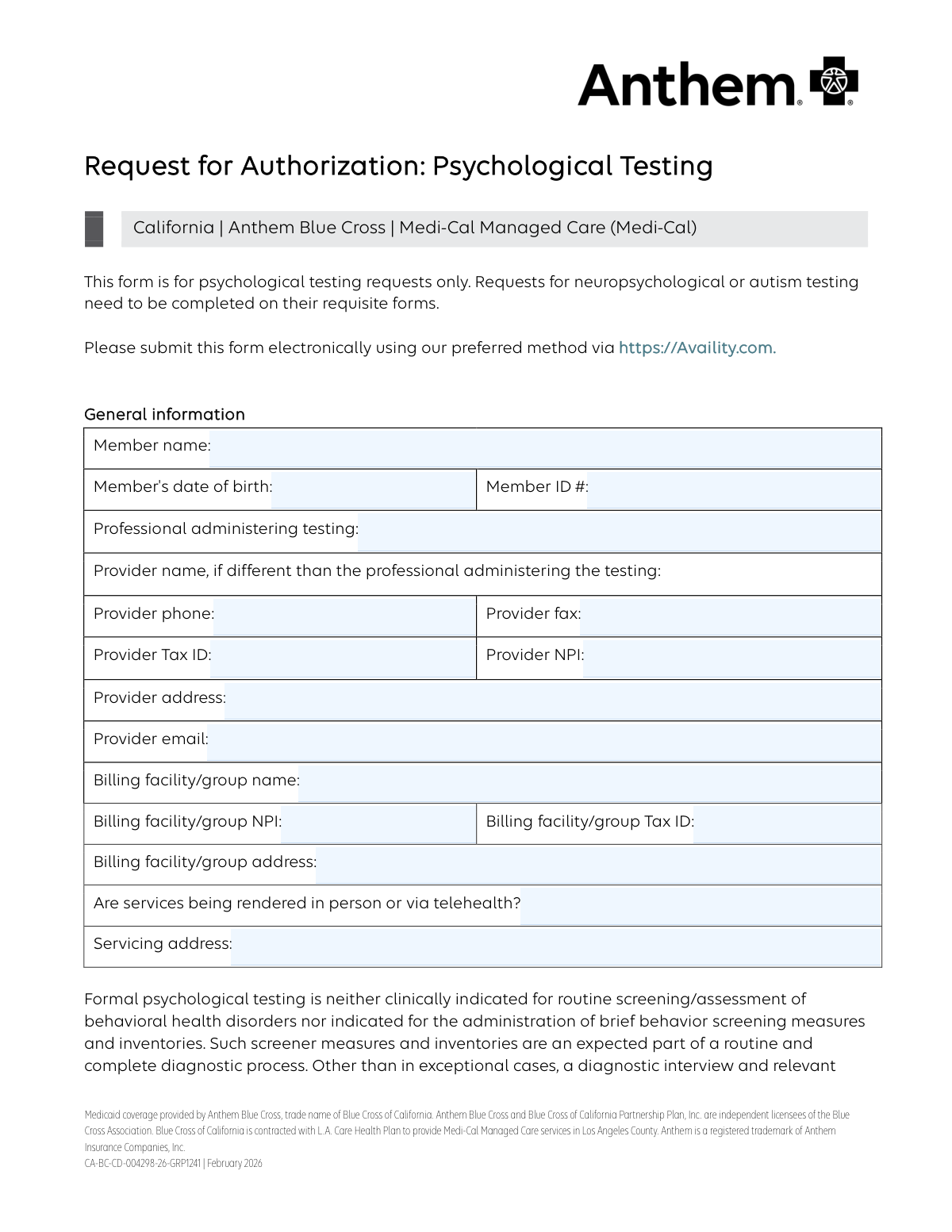
Yes! You can use AI to fill out Request for Authorization: Psychological Testing

This is a formal request submitted by healthcare providers to Anthem Blue Cross to obtain prior authorization for psychological testing for Medi-Cal Managed Care members in California. Completing this form is essential to demonstrate the medical necessity of the testing and to ensure the services are covered benefits before they are rendered. Today, this form can be filled out quickly and accurately using AI-powered services like Instafill.ai, which can also convert non-fillable PDF versions into interactive fillable forms.
Our AI automatically handles information lookup, data retrieval, formatting, and form filling.
It takes less than a minute to fill out CA-BC-CD-004298-26-GRP1241 using our AI form filling.
Securely upload your data. Information is encrypted in transit and deleted immediately after the form is filled out.

Form specifications

Form name: Request for Authorization: Psychological Testing
Number of pages: 4
Language: English
Categories: authorization forms
main-image

Instafill Demo: How to fill out PDF forms in seconds with AI

How to Fill Out CA-BC-CD-004298-26-GRP1241 Online for Free in 2026

Are you looking to fill out a CA-BC-CD-004298-26-GRP1241 form online quickly and accurately? Instafill.ai offers the #1 AI-powered PDF filling software of 2026, allowing you to complete your CA-BC-CD-004298-26-GRP1241 form in just 37 seconds or less.
Follow these steps to fill out your CA-BC-CD-004298-26-GRP1241 form online using Instafill.ai:
  1. 1 Navigate to Instafill.ai and upload or select the 'Request for Authorization: Psychological Testing' form.
  2. 2 Use the AI assistant to automatically populate general information fields, including member details, provider information, and billing facility data.
  3. 3 Complete the clinical sections by checking off relevant assessments, presenting symptoms, treatment history, and screening measures administered.
  4. 4 Clearly state the rationale for testing, explaining why it's necessary and how it will impact treatment, then list the specific CPT codes and units for the requested psychological tests.
  5. 5 Securely attach all required supporting documents, such as clinical records and diagnostic assessments, directly to the form.
  6. 6 Review the entire form for accuracy and completeness, then apply a legally binding electronic signature in the designated provider signature field.
  7. 7 Submit the completed authorization request electronically via the recommended portal or by fax as per the form's instructions.

Our AI-powered system ensures each field is filled out correctly, reducing errors and saving you time.

Why Choose Instafill.ai for Your Fillable CA-BC-CD-004298-26-GRP1241 Form?

Speed

Complete your CA-BC-CD-004298-26-GRP1241 in as little as 37 seconds.

Up-to-Date

Always use the latest 2026 CA-BC-CD-004298-26-GRP1241 form version.

Cost-effective

No need to hire expensive lawyers.

Accuracy

Our AI performs 10 compliance checks to ensure your form is error-free.

Security

Your personal information is protected with bank-level encryption.

Frequently Asked Questions About Form CA-BC-CD-004298-26-GRP1241

This form is used by healthcare providers to request prior authorization from Anthem Blue Cross for psychological testing for a Medi-Cal Managed Care member. It is not for neuropsychological or autism testing, which require different forms.

The psychologist or professional administering the testing is responsible for completing this form. It requires detailed clinical information, provider details, and a rationale for the testing.

The preferred method is to submit the form electronically via the Availity provider portal at Availity.com. Alternatively, you can fax the completed form to 855-473-7902.

No, this form cannot be used for those purposes. The form states that requests for educational testing should be referred to the public school system, and disability or forensic evaluations are not covered benefits.

Before submitting, the provider should have already completed a diagnostic interview and administered relevant brief screening measures. This form is for comprehensive testing that goes beyond routine assessments.

You must attach any relevant clinical or medical records to support the request. This includes results from initial screening measures and clinical diagnostic assessments.

In this section, you must explain what clinical questions cannot be answered by the initial interview and screenings. You also need to describe how the results of the requested psychological testing will specifically impact the member's course of treatment.

Yes, the form allows for services to be rendered via telehealth. You must indicate on the form whether the service will be in-person or telehealth and provide the appropriate servicing address.

The 'Provider' section is for the professional who is actually administering the test. The 'Billing Facility/Group' section is for the entity that will be submitting the claim and receiving payment, which may be different from the individual provider.

Yes, services like Instafill.ai use AI to accurately auto-fill form fields with your provider and patient information, which can save significant time and reduce errors.

You can use a service like Instafill.ai to convert flat, non-fillable PDFs into interactive, fillable forms. Simply upload the document, and the tool will make the fields editable online.

Upload the 'Request for Authorization: Psychological Testing' form to the Instafill.ai platform. The AI will identify the fields and you can then quickly fill them out online, use stored information to auto-populate sections, and then download the completed form for submission.

The form lists specific CPT codes for psychological testing services: 96130, 96131, 96136, 96137, 96138, and 96139. You must indicate the units requested for each and specify the tests to be administered.

Compliance CA-BC-CD-004298-26-GRP1241
Validation Checks by Instafill.ai

1
Member Date of Birth Validity
This check verifies that the 'Member's date of birth' is a valid date in a recognized format (e.g., MM/DD/YYYY) and is not in the future or an unreasonably distant past date. This is crucial for accurate patient identification and age-related clinical considerations. If the date is invalid, the form cannot be processed as the member's identity and eligibility cannot be confirmed.
2
Provider NPI and Tax ID Format
This validation ensures that the 'Provider NPI' is a 10-digit number and the 'Provider Tax ID' is a 9-digit number. These identifiers are essential for regulatory compliance, accurate provider identification, and correct claims processing. A failure in this check would halt the authorization process as the provider cannot be properly verified or reimbursed.
3
Billing Facility NPI and Tax ID Format
This check validates that the 'Billing facility/group NPI' is a 10-digit number and the 'Billing facility/group Tax ID' is a 9-digit number. Correct billing information is critical for financial processing and reimbursement for the services rendered. If these numbers are incorrectly formatted, it will lead to claim rejections and payment delays.
4
Conditional 'Other' Field Completion
This validation ensures that if an 'Other' checkbox is selected in sections like 'Clinical information' or 'Screening measures', the corresponding free-text field must contain an explanation. This is important because selecting 'Other' without clarification provides incomplete information, hindering the reviewer's ability to assess the request. A failure would prompt the user to provide the necessary details before submission.
5
Conditional Diagnostic Interview Date
This check verifies that the 'Date of diagnostic interview' field is filled if the 'Clinical interview with patient' checkbox is selected in the 'Clinical assessment' section. This creates a logical link between a claimed assessment and its date of occurrence, which is vital for establishing a clinical timeline. Without this date, the claim of a prior interview is unsubstantiated.
6
Logical Date Sequence
This validation confirms that the 'Date of diagnostic interview' occurs on or before the 'Provider signature' date. It is logically impossible for an interview to take place after the provider has already signed and dated the request form. This check prevents chronological errors and ensures the integrity of the submitted timeline.
7
CPT Code Unit Limitation
This check enforces the rule that for CPT codes 96130, 96136, and 96138, the requested units cannot exceed 1. The form explicitly states this limitation for these specific codes. This validation prevents requests that are non-compliant with billing rules, avoiding automatic rejection and the need for resubmission.
8
Total Units Calculation Accuracy
This validation ensures that the number entered in 'Total units requested' is the correct sum of all units requested in the individual CPT code rows. This cross-field check guarantees that the summary total accurately reflects the detailed service request. Discrepancies can cause confusion and errors in the authorization and billing process.
9
Diagnosis Code Status Requirement
For each row where an 'ICD-10-CM diagnosis' code is entered, this check ensures that either the 'Current' or 'Provisional' checkbox is selected, but not both. This is critical for understanding the clinical certainty of the diagnosis being evaluated. A missing or ambiguous status makes it difficult for reviewers to assess the medical necessity of the testing.
10
Rationale for Testing Completeness
This validation verifies that the text fields under 'Rationale for testing' are not empty. This narrative justification is the core of the authorization request, explaining why testing is medically necessary. An empty rationale section would result in an automatic denial, as there is no basis provided for the request.
11
Mandatory Member Information
This check ensures that the 'Member name', 'Member's date of birth', and 'Member ID #' fields are all completed. This information is the absolute minimum required to identify the patient and verify their eligibility for coverage. A submission lacking any of this core data is unprocessable.
12
Symptom Selection Requirement
This validation ensures that at least one checkbox is selected in the 'Clinical information' section, indicating a presenting problem or symptom. A request for psychological testing must be justified by a clinical need, which begins with identifying the symptoms to be investigated. Without this, the request lacks a fundamental component of medical necessity.
13
Conditional Servicing Address for In-Person Services
This check verifies that if 'in person' is selected as the service rendering method, the 'Servicing address' field must be completed. Knowing the physical location of the service is essential for network compliance, credentialing verification, and ensuring the service is delivered at an approved site. Failure to provide this address for in-person services would render the request incomplete.
14
ICD-10-CM Code Format Validation
This check validates that all entered diagnosis codes adhere to the standard ICD-10-CM format (e.g., F41.1, G43.909). Using correctly formatted codes is essential for electronic processing, data analysis, and interoperability between systems. Invalid codes will cause processing errors and claim rejections.
15
Treatment History Completeness
This validation ensures that if a treatment type (e.g., 'Mental health therapy') is indicated, the associated fields for frequency, duration, current status, and symptom improvement are also completed. This information provides crucial context about what has already been tried and whether it was effective, which is a key factor in determining the necessity of further testing. Incomplete history can lead to requests for more information, delaying the authorization.

Common Mistakes in Completing CA-BC-CD-004298-26-GRP1241

Using the Wrong Form for the Requested Testing Type

The form explicitly states it is for psychological testing only, and that neuropsychological or autism testing require different, specific forms. Providers in a hurry may grab the wrong form, leading to an automatic rejection and significant delays in authorization. To avoid this, always confirm the testing type required and select the corresponding form before starting. This initial check is crucial for a smooth authorization process.

Insufficient Rationale for Testing

Providers often provide generic justifications like 'to clarify diagnosis' without detailing why existing clinical data is insufficient. The form specifically asks what questions cannot be answered by interviews and how testing will alter the treatment plan. A weak rationale is a primary cause for denial. To prevent this, clearly articulate the diagnostic puzzle and link the potential test results directly to specific changes in the treatment strategy.

Forgetting to Attach Supporting Documents

The form repeatedly prompts the user to attach relevant medical records, academic records/IEPs, and prior clinical assessments. Forgetting to include these documents is a frequent and critical error, as it leaves the reviewer without the necessary context to approve the request. This almost always results in a denial or a request for more information, delaying patient care. Always create a checklist of required documents and verify they are all attached before submission.

Incorrect CPT Unit Requests

The form clearly indicates that certain CPT codes (96130, 96136, 96138) are limited to a single unit. A common mistake is to request more than one unit for these codes, which can cause the entire request to be delayed or partially denied. Carefully review the unit limitations for each CPT code before entering a value. AI-powered form filling tools like Instafill.ai can help prevent this by flagging entries that violate form-specific rules.

Confusing Provider and Billing Facility Information

The form requires separate details for the professional administering the test and the billing facility/group, which may or may not be the same entity. People often duplicate information incorrectly or leave one section blank, leading to claim processing errors and payment delays. It is essential to accurately enter the correct Name, NPI, Tax ID, and Address for both the individual provider and the billing group. Using a tool like Instafill.ai can help manage and correctly populate distinct provider and facility profiles to avoid this confusion.

Vague or Missing Test Names in CPT Section

When requesting CPT codes for testing, providers sometimes fail to specify the exact names and versions of the tests to be administered (e.g., writing 'Cognitive Testing' instead of 'WISC-V'). This lack of specificity prevents the reviewer from assessing the appropriateness of the request and can lead to a denial. Always list the full name of each test and, if applicable, the specific subtests you plan to use for each CPT code.

Submitting Requests for Non-Covered Services

The form explicitly states that testing for placement, disability evaluations, forensic purposes, or purely educational reasons (like learning disabilities) are not covered benefits. Submitting a request for these purposes wastes administrative time and will be denied. Providers must ensure the reason for testing aligns with covered benefits, focusing on diagnostic clarification for a covered behavioral health disorder. Reviewing the payer's coverage policies before submission is critical.

Incomplete Treatment History Table

The treatment history table has multiple rows and columns for frequency, duration, and outcomes, which are often left partially blank. An incomplete history makes it difficult for the reviewer to determine if less intensive interventions have been attempted and failed, a key component of medical necessity. Ensure every cell in the grid is filled out for all relevant past and current treatments to provide a complete clinical picture.

Failing to Summarize Screening Measure Results

Providers may check the boxes for screening measures they've administered (e.g., BDI, BASC) but then fail to fill in the 'pertinent results' field. Simply indicating a test was done is not enough; the reviewer needs the scores or qualitative findings to understand the clinical starting point. This omission can lead to a request for more information, delaying the authorization. Always summarize the key findings from any pre-assessment screeners.

Incorrect or Transposed NPI and Tax ID Numbers

The form requires both National Provider Identifier (NPI) and Tax ID numbers for the provider and the billing facility. It is very common for these long numeric strings to be entered with typos, transposed digits, or for the NPI to be entered in the Tax ID field and vice-versa. Such errors lead to claim rejections and payment delays. To avoid this, double-check each number for accuracy before submitting. AI tools like Instafill.ai can store and correctly populate these numbers, reducing the risk of manual data entry errors.
Saved over 80 hours a year

“I was never sure if my IRS forms like W-9 were filled correctly. Now, I can complete the forms accurately without any external help.”

Kevin Martin Green

Your data stays secure with advanced protection from Instafill and our subprocessors

Robust compliance program

Transparent business model

You’re not the product. You always know where your data is and what it is processed for.

ISO 27001, HIPAA, and GDPR

Our subprocesses adhere to multiple compliance standards, including but not limited to ISO 27001, HIPAA, and GDPR.

Security & privacy by design

We consider security and privacy from the initial design phase of any new service or functionality. It’s not an afterthought, it’s built-in, including support for two-factor authentication (2FA) to further protect your account.

Fill out CA-BC-CD-004298-26-GRP1241 with Instafill.ai

Worried about filling PDFs wrong? Instafill securely fills request-for-authorization-psychological-testing forms, ensuring each field is accurate.