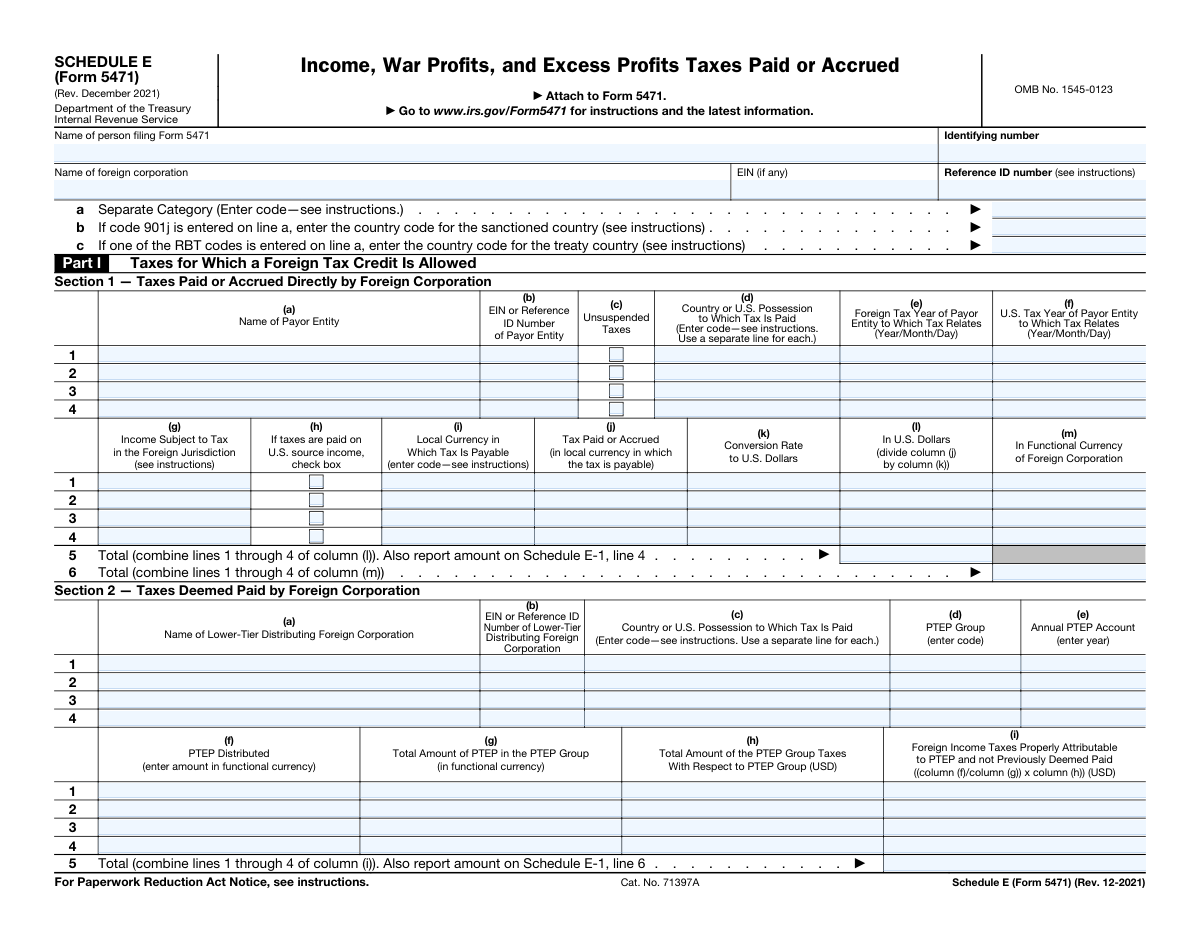
Yes! You can use AI to fill out Schedule E (Form 5471), Income, War Profits, and Excess Profits Taxes Paid or Accrued
Schedule E (Form 5471) is a supplemental form attached to Form 5471, Information Return of U.S. Persons With Respect to Certain Foreign Corporations. It is used to provide a detailed account of foreign taxes paid, accrued, or deemed paid by the foreign corporation, which is essential for claiming foreign tax credits on a U.S. tax return. The form breaks down taxes by category, including those paid directly, deemed paid from lower-tier corporations, and those disallowed. Today, this form can be filled out quickly and accurately using AI-powered services like Instafill.ai, which can also convert non-fillable PDF versions into interactive fillable forms.
Our AI automatically handles information lookup, data retrieval, formatting, and form filling.
It takes less than a minute to fill out Schedule E (Form 5471) using our AI form filling.
Securely upload your data. Information is encrypted in transit and deleted immediately after the form is filled out.
Form specifications
| Form name: | Schedule E (Form 5471), Income, War Profits, and Excess Profits Taxes Paid or Accrued |
| Number of pages: | 3 |
| Language: | English |
| Categories: | tax forms, income forms, income tax forms |
Instafill Demo: How to fill out PDF forms in seconds with AI
How to Fill Out Schedule E (Form 5471) Online for Free in 2026
Are you looking to fill out a SCHEDULE E (FORM 5471) form online quickly and accurately? Instafill.ai offers the #1 AI-powered PDF filling software of 2026, allowing you to complete your SCHEDULE E (FORM 5471) form in just 37 seconds or less.
Follow these steps to fill out your SCHEDULE E (FORM 5471) form online using Instafill.ai:
- 1 Navigate to Instafill.ai and upload your Schedule E (Form 5471) or select it from the template library.
- 2 Provide the identifying information for the person filing Form 5471 and the specific foreign corporation at the top of the form.
- 3 Complete Part I by entering details about taxes paid or accrued directly by the foreign corporation (Section 1) and taxes deemed paid (Section 2).
- 4 Make the necessary election in Part II and list any disallowed taxes in Part III, providing details for each payor entity.
- 5 Fill out the detailed Schedule E-1, tracking taxes paid, accrued, or deemed paid on the earnings and profits (E&P) of the foreign corporation across various income categories.
- 6 Review all the information auto-filled by the AI for accuracy, making any necessary corrections to ensure compliance.
- 7 Securely download, print, or e-file your completed Schedule E (Form 5471) as part of your Form 5471 submission.
Our AI-powered system ensures each field is filled out correctly, reducing errors and saving you time.
Why Choose Instafill.ai for Your Fillable Schedule E (Form 5471) Form?
Speed
Complete your Schedule E (Form 5471) in as little as 37 seconds.
Up-to-Date
Always use the latest 2026 Schedule E (Form 5471) form version.
Cost-effective
No need to hire expensive lawyers.
Accuracy
Our AI performs 10 compliance checks to ensure your form is error-free.
Security
Your personal information is protected with bank-level encryption.
Frequently Asked Questions About Form Schedule E (Form 5471)
Schedule E is used to report the income, war profits, and excess profits taxes paid or accrued by a foreign corporation. This information is crucial for calculating the foreign tax credits available to the U.S. shareholder.
This schedule must be completed and attached to Form 5471, which is filed by U.S. persons (including citizens, residents, corporations, and partnerships) who have a certain level of ownership or control in a foreign corporation.
Part I, Section 1 reports taxes paid or accrued directly by the foreign corporation. Part I, Section 2 reports taxes deemed paid by the foreign corporation, which are taxes paid by a lower-tier foreign entity on distributions of Previously Taxed Earnings and Profits (PTEP).
Schedule E-1 provides a detailed reconciliation of the foreign corporation's foreign income taxes. It tracks and allocates taxes to specific categories of earnings and profits (E&P), such as Subpart F income, Tested Income, and various PTEP groups.
You must report the tax amount in the original local currency, provide the conversion rate used, and then calculate the equivalent amounts in both U.S. dollars and the functional currency of the foreign corporation.
The correct codes for classifying the foreign income are provided in the official IRS instructions for Form 5471. It is essential to use the correct code for proper foreign tax credit limitation calculations.
This part is for reporting foreign taxes that are not eligible for a U.S. tax credit. This can include taxes paid to sanctioned countries (under Sec. 901(j)) or taxes subject to other specific disallowance rules.
The election under section 986(a)(1)(D) allows a taxpayer to translate foreign taxes into U.S. dollars using the exchange rate on the date of payment. If this election is not made, the average exchange rate for the year is typically used.
If you need to report more entities than the space allows, you should attach a separate statement that follows the same format as the schedule. Ensure the totals from your attachment are included on the summary lines of the main form.
PTEP stands for Previously Taxed Earnings and Profits. This is income of the foreign corporation that has already been included in a U.S. shareholder's income in a prior year but has not yet been distributed.
Yes, services like Instafill.ai use AI to auto-fill form fields accurately and save time. This can be particularly helpful for a detailed and complex form like Schedule E (Form 5471).
You can upload the Schedule E (Form 5471) PDF to the Instafill.ai platform. Their service will make the form interactive and help you populate the fields by extracting information from your financial records, simplifying the process.
If you have a non-fillable or 'flat' PDF, you can use a service like Instafill.ai to convert it into an interactive, fillable form. This allows you to easily type your information directly into the required fields online.
Compliance Schedule E (Form 5471)
Validation Checks by Instafill.ai
1
Filer Identifying Number Format
This check verifies that the 'Filer Identifying Number' is provided in a valid format, such as a Social Security Number (XXX-XX-XXXX), Individual Taxpayer Identification Number (9XX-XX-XXXX), or Employer Identification Number (XX-XXXXXXX). Correct formatting is essential for the IRS to accurately identify the filer and process the form. If the format is incorrect, the submission may be rejected or delayed for manual correction.
2
Conditional Sanctioned Country Code Requirement
This validation ensures that the 'Sanctioned country code' on line b is filled out if, and only if, the 'Separate Category code' on line a is '901j'. This rule enforces the specific instructions on the form, preventing incomplete or extraneous information. A failure in this check would indicate either missing required information for a sanctioned country or incorrect data entry, leading to processing errors.
3
Conditional Treaty Country Code Requirement
This check validates that the 'Treaty country code' on line c is provided when one of the 'RBT' (Reduced Rate by Treaty) codes is entered on line a. This ensures that all necessary information for claiming treaty benefits is present. If an RBT code is entered without a corresponding country code, the form is incomplete and the claim may be disallowed.
4
Part I, Section 1 Currency Conversion Calculation
This validation verifies the mathematical accuracy of the currency conversion in Part I, Section 1. It checks that the value in column (l) 'In U.S. Dollars' is the result of dividing column (j) 'Tax Paid or Accrued (in local currency)' by column (k) 'Conversion Rate'. This is critical for ensuring the tax amounts are correctly translated into U.S. dollars for credit calculation. An error here would lead to an incorrect tax credit amount being reported.
5
Part I, Section 1, Line 5 Total Calculation
This check ensures that the value entered on line 5, 'Total', is the correct sum of the amounts from lines 1 through 4 in column (l) 'In U.S. Dollars'. This total is a key figure that is carried forward to other parts of the tax return, such as Schedule E-1. A miscalculation would cause cascading errors throughout the return, potentially leading to an incorrect tax assessment.
6
Part I, Section 2, Column (i) Calculation
This validation confirms that the amount in column (i), 'Foreign Income Taxes Properly Attributable to PTEP', is correctly calculated using the formula specified: ((column (f) / column (g)) x column (h)). This calculation determines the amount of deemed paid taxes, which is a complex but crucial part of the foreign tax credit computation. An incorrect calculation will result in an inaccurate amount of deemed paid taxes being reported.
7
Conditional Section 986 Election Date
This check enforces the rule that if the 'Yes' box is checked in Part II regarding the section 986(a)(1)(D) election, the 'state date of election' field must contain a valid date. Conversely, if 'No' is checked, the date field should be empty. This ensures the form is internally consistent and provides necessary documentation for the election. Failure to provide the date when 'Yes' is checked makes the election attestation incomplete.
8
Part III, Line 1 Total Disallowed Taxes Calculation
This validation verifies that for each payor entity in Part III, the 'Total' in column (i) is the correct sum of the disallowed tax amounts in columns (c) through (h). This ensures the row-level totals are accurate before they are aggregated. An incorrect total could lead to an inaccurate calculation of total disallowed taxes on the form.
9
Part III, Line 3 Total Calculation
This check ensures that the total on line 3, 'In functional currency', is the sum of the total disallowed taxes from lines 1 and 2 in column (i). This aggregates the disallowed tax amounts for all payor entities listed. A failure in this summation would result in an incorrect total disallowed tax amount being reported in the functional currency.
10
Schedule E-1, Line 1c Adjusted Beginning Balance Calculation
This validation confirms that for each column in Schedule E-1, the 'Adjusted beginning balance' on line 1c is the sum of the 'Balance at beginning of year' (line 1a) and 'Beginning balance adjustments' (line 1b). This is a fundamental step in establishing the correct starting point for the year's tax pool reconciliation. An error here would invalidate all subsequent calculations on the schedule.
11
Schedule E-1, Line 4 Cross-Form Consistency
This check verifies that the total amount reported across the columns of Schedule E-1, Line 4 matches the amount from 'Schedule E, Part I, Section 1, line 5, column (l)'. This is a critical cross-reference check ensuring that data is transferred correctly between schedules. A mismatch indicates a data entry or calculation error that breaks the logical flow of the form.
12
Schedule E-1, Line 6 Cross-Form Consistency
This validation ensures that the total amount reported across the columns of Schedule E-1, Line 6 matches the amount from 'Schedule E, Part I, Section 2, line 5, column (i)'. This check confirms that deemed paid taxes are correctly carried from Part I to the reconciliation schedule. If these values do not match, the tax pool reconciliation will be incorrect.
13
Schedule E-1, Line 8 Total Calculation
This check validates that the amount on line 8, 'Taxes paid or accrued on current income/E&P or accumulated E&P', is the correct sum of lines 1c through 7 for each respective column. This line represents the total tax pool available before reductions. An incorrect sum would lead to an erroneous final tax balance.
14
Schedule E-1, Line 16 Zero Balance Requirement
This validation enforces the explicit instruction that the balances in columns (a), (b), and (c) of line 16 must equal zero. The form requires filers to make necessary adjustments on line 15 to achieve this zero balance. If these fields are not zero, it indicates the filer has not completed the schedule correctly, and the form submission is invalid.
Common Mistakes in Completing Schedule E (Form 5471)
In Part I, Section 1, filers often make mathematical errors when converting local currency taxes (column j) to U.S. dollars (column l) using the specified conversion rate (column k). This can also happen by using an incorrect exchange rate, such as an annual average rate when a specific daily rate is required. These errors lead to misstated foreign tax credits, potentially resulting in an underpayment or overpayment of tax and subsequent IRS notices. To avoid this, double-check all calculations and ensure the exchange rate used complies with IRS guidelines. AI-powered tools like Instafill.ai can prevent these errors by performing calculations automatically and validating that the correct type of exchange rate is applied.
Many fields on this form, such as 'Separate Category' (line a), 'Country Code' (Part I, column d), and 'Local Currency' (Part I, column i), require specific codes found in the IRS instructions. A common mistake is to write out the full name (e.g., 'Germany' instead of 'GM', or 'Euro' instead of 'EUR'). This happens when filers rush and don't consult the instructions for each field. Such entries can cause processing delays or rejection of the form by the IRS e-filing system. Always refer to the latest Form 5471 instructions for the correct codes to ensure compliance.
In Part I, Section 1, columns (e) and (f) require the foreign and U.S. tax years to be entered in a specific 'Year/Month/Day' format. Filers, particularly those accustomed to different international standards, often mistakenly use formats like MM/DD/YYYY or DD/MM/YYYY. This formatting error can lead to data entry mismatches in the IRS system and trigger inquiries about the tax period being reported. To prevent this, carefully follow the format specified on the form. AI-powered form fillers like Instafill.ai can automatically format dates correctly based on the form's specific requirements.
Part I, Section 2, column (i) requires a complex calculation to determine the foreign income taxes attributable to PTEP, based on amounts in columns (f), (g), and (h). Manually performing this pro-rata calculation `((f)/(g)) x (h)` is highly prone to error, especially when dealing with multiple tiers of foreign corporations. A simple slip can lead to a significant misstatement of the deemed paid credit, causing an incorrect tax liability and potential penalties. Using tax preparation software or an AI tool like Instafill.ai, which can handle these linked calculations automatically, is the most reliable way to ensure accuracy.
Schedule E-1 requires filers to allocate foreign taxes paid or accrued among different income categories: Subpart F Income, Tested Income, and Residual Income (columns a, b, c). The allocation rules are complex and depend on the character of the underlying income that generated the tax. Filers often misallocate these amounts, which directly impacts the calculation of the U.S. shareholder's foreign tax credit limitation. This can lead to an incorrect tax return and significant adjustments upon audit. Careful review of the regulations under section 904 and 960 is essential to perform this allocation correctly.
Line 1a of Schedule E-1 requires the filer to enter the balance from the prior year's ending Schedule E-1. A common mistake is to enter an incorrect amount, leave it blank, or enter zero without confirming the prior year's figures. This breaks the year-over-year continuity of the tax pools, making the entire schedule incorrect and almost guaranteeing an IRS inquiry. To avoid this, always have the prior year's completed Form 5471 on hand and carefully transcribe the ending balances from line 16 of the prior year's Schedule E-1 to line 1a of the current year's form.
The continuation of Schedule E-1 on page 3 presents a complex grid with ten distinct columns for different types of PTEP. Filers frequently get confused and place tax amounts in the wrong PTEP column, for example, mixing up 'Reclassified section 965(a) PTEP' with 'Section 965(a) PTEP'. Each column represents a specific legal category with different tax attributes, and misclassification can lead to incorrect tracking of tax basis and future distributions. This complex task requires meticulous record-keeping and a thorough understanding of the various PTEP categories created by tax reform.
Several lines on Schedule E-1, including line 1b (Beginning balance adjustments), line 7 (Other adjustments), and line 12 (Other), explicitly state 'attach statement'. Filers often enter a value on these lines but forget to prepare and attach the required explanatory statement. An incomplete filing can be rejected or flagged for review, leading to correspondence with the IRS and delays in processing. Always review the form for any 'attach statement' requirements and ensure all necessary documentation is included with the return.
This form requires entering the names and identifying numbers (EIN or Reference ID) for the filer, the foreign corporation, and various payor entities multiple times across different pages and schedules. Filers often introduce minor inconsistencies, such as using 'Corp.' instead of 'Corporation' or transposing digits in an EIN. These seemingly small discrepancies can cause the IRS's automated systems to flag the return for mismatches, leading to processing delays and unnecessary notices. Using an AI-powered tool like Instafill.ai can help by storing entity information and auto-filling it consistently throughout the form.
The form requires data in various currencies: local currency, U.S. dollars, and the functional currency of the foreign corporation. For example, Part I, Section 1 requires reporting in all three, while Part III requires amounts in functional currency. A frequent error is to enter a U.S. dollar amount in a field designated for functional currency, or vice versa. This mistake fundamentally distorts the tax calculation and can lead to significant errors in the reported foreign tax credit. Pay close attention to the column headings and instructions for each part to ensure amounts are reported in the correct currency.
Saved over 80 hours a year
“I was never sure if my IRS forms like W-9 were filled correctly. Now, I can complete the forms accurately without any external help.”
Kevin Martin Green
Your data stays secure with advanced protection from Instafill and our subprocessors

Robust compliance program
Transparent business model
You’re not the product. You always know where your data is and what it is processed for.
ISO 27001, HIPAA, and GDPR
Our subprocesses adhere to multiple compliance standards, including but not limited to ISO 27001, HIPAA, and GDPR.
Security & privacy by design
We consider security and privacy from the initial design phase of any new service or functionality. It’s not an afterthought, it’s built-in, including support for two-factor authentication (2FA) to further protect your account.
Fill out Schedule E (Form 5471) with Instafill.ai
Worried about filling PDFs wrong? Instafill securely fills schedule-e-form-5471-income-war-profits-and-excess-profits-taxes-paid-or-accrued forms, ensuring each field is accurate.